Automated Lead Enrichment in 2026: The Complete Guide
Manual data entry is killing your pipeline. Here's how automated lead enrichment turns thin contact records into sales-ready leads on autopilot.
TL;DR
- Automated lead enrichment is the process of automatically filling missing or stale fields on a contact or company record — email, phone, job title, firmographics — using external data sources instead of manual research.
- B2B data decays fast (roughly 2–3% per month), so a one-time data clean-up loses value within a year. Automation keeps records fresh as part of your normal workflow.
- The biggest wins are speed-to-lead, higher deliverability, and reps spending time selling instead of Googling prospects.
- A good stack pairs a real-time enrichment API with batch/bulk enrichment and a verification step so you don't pump bad data into your CRM.
- You can start small: trigger enrichment on form submit, on CRM record creation, or on a scheduled bulk run. Pick the pattern that matches where your leads come from.
What is automated lead enrichment?#
Automated lead enrichment is the practice of programmatically appending accurate, up-to-date information to a lead record the moment you capture it — or on a schedule — without a human doing the lookups.
Think of it like a self-restocking pantry. You don't walk the aisles every week checking what's low; sensors notice the gaps and the order goes out automatically. Enrichment does the same for your CRM: a record comes in half-empty (just an email, or just a company name), the system detects the missing fields, queries trusted data sources, and writes back a complete, verified profile.
Technically, enrichment takes one or two known attributes — a work email, a domain, a full name plus company — and resolves the rest: verified email, direct phone, job title, seniority, department, company size, industry, location, and social profiles. "Automated" is the operative word. Manual enrichment (a rep copy-pasting from LinkedIn into Salesforce) doesn't scale past a few dozen leads a day and introduces typos. Automated enrichment runs through an API or a no-code integration and handles thousands of records with the same logic every time.

Why does lead data go stale so fast?#
Because the people behind your records keep changing jobs, titles, and phone numbers — and your database has no way of knowing.
Industry estimates put B2B data decay at around 2–3% per month, which compounds to roughly 25–30% of your database going stale in a single year. HubSpot and other CRM vendors have published similar decay figures for years. The drivers are simple:
- Job changes — someone you mapped as a "Director of Marketing" is now a VP at a different company, and your email bounces.
- Company changes — mergers, rebrands, and domain switches break the email pattern you relied on.
- Form abandonment and bad input — prospects type
gmailaddresses, abbreviate company names, or skip fields entirely. - List rot — purchased lists are often months old before they reach you.
Manual clean-up can't keep pace with a moving target. That's the core argument for automation: enrichment that runs continuously treats data freshness as a process, not a one-time project. If you want a deeper primer on the underlying data quality concepts, Tomba's B2B glossary breaks down the terms.
How does automated lead enrichment actually work?#
At a high level, every enrichment flow follows the same four steps, whether it fires in real time or as a nightly batch.
- Trigger — something kicks off the enrichment: a form submission, a new CRM record, a CSV upload, or a scheduled job.
- Match — the system takes your known input (email or domain + name) and matches it against a data provider's index to find the right person or company.
- Append — missing fields are written back: verified email, phone, title, firmographics, social handles.
- Verify — each appended email is checked for validity (valid, invalid, catch-all, disposable) so you don't enrich a record with an address that bounces.
That last step matters more than people expect. Enrichment without verification just moves bad data faster. Pairing an email verifier with your enrichment step keeps your bounce rate low and protects sender reputation.
Real-time vs. batch enrichment#
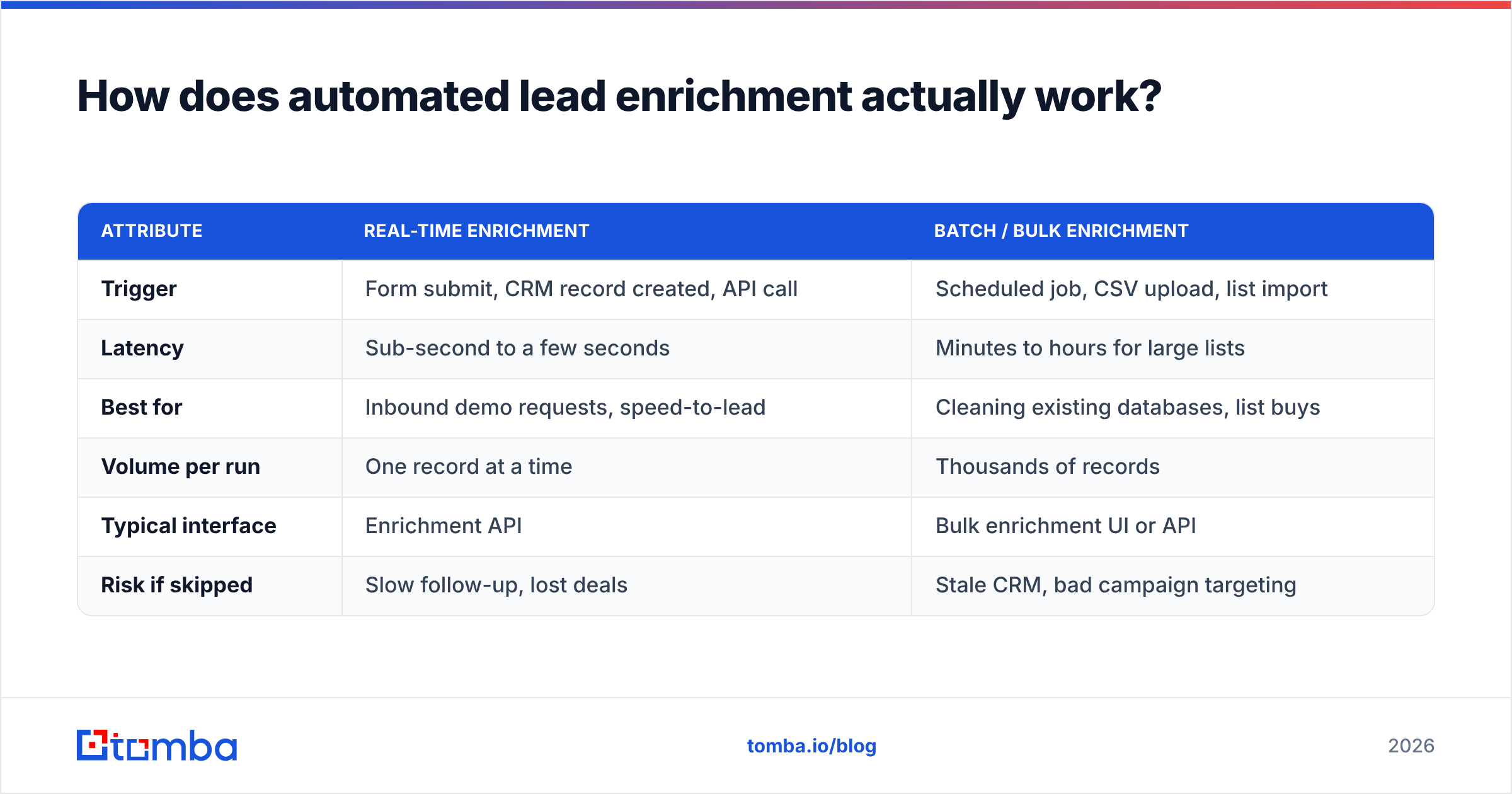
There are two dominant patterns, and most mature teams run both:
| Attribute | Real-time enrichment | Batch / bulk enrichment |
|---|---|---|
| Trigger | Form submit, CRM record created, API call | Scheduled job, CSV upload, list import |
| Latency | Sub-second to a few seconds | Minutes to hours for large lists |
| Best for | Inbound demo requests, speed-to-lead | Cleaning existing databases, list buys |
| Volume per run | One record at a time | Thousands of records |
| Typical interface | Enrichment API | Bulk enrichment UI or API |
| Risk if skipped | Slow follow-up, lost deals | Stale CRM, bad campaign targeting |
Real-time enrichment wins deals because speed-to-lead is brutal — responding within five minutes versus thirty can change conversion dramatically. Batch enrichment wins on hygiene: it's how you re-enrich your whole database quarterly so existing records don't rot.
What data should you actually enrich?#
Enrich the fields your reps and your routing rules use to make decisions — not every field a provider can return.
A common mistake is treating enrichment as a vanity exercise where you append 40 attributes and use four. Start with the data that drives action:
- Contact-level: verified work email, direct/mobile phone, job title, seniority, department.
- Company-level (firmographics): employee count, revenue band, industry, headquarters location, tech stack.
- Intent and routing signals: lead source, territory, account ownership — usually derived, not appended.
For outbound teams, a verified email plus a phone number is the minimum viable record. For account-based plays, firmographics decide whether a lead even fits your ICP. Match the enriched fields to your scoring model so enrichment feeds lead scoring instead of just bloating the record.

Where should enrichment fire in your stack?#
Pick the trigger that matches where leads enter your funnel. Here are the four most common, ranked by how quickly they pay off.
- On inbound form submit. A prospect fills out a short form (just work email), and enrichment instantly appends title, company size, and phone. You keep forms short — which lifts conversion — while routing gets the full picture. This is the highest-ROI pattern for most SaaS teams.
- On CRM record creation. Any new contact in HubSpot, Salesforce, or Pipedrive triggers enrichment via a native integration or [
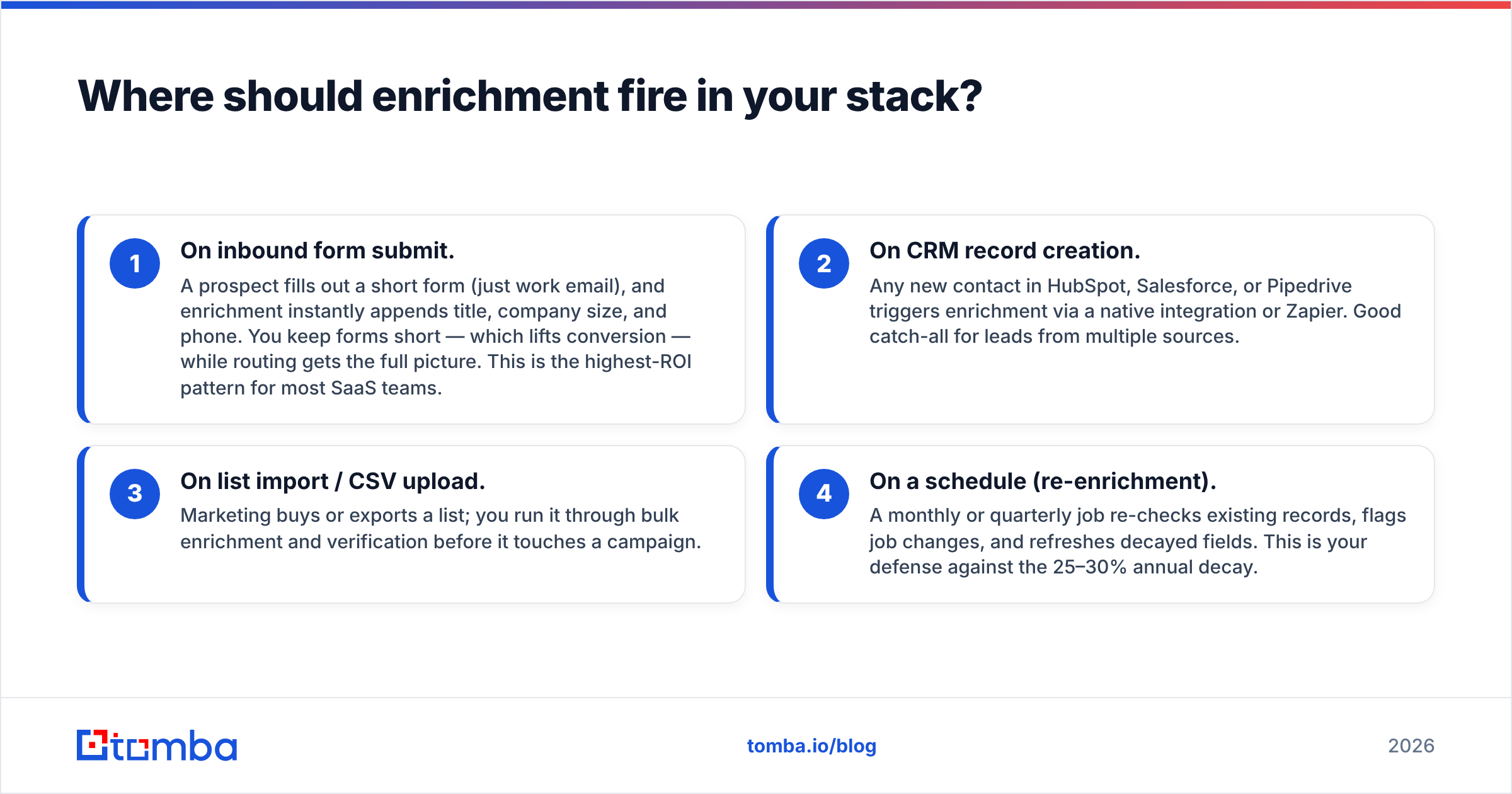
Zapier](https://tomba.io/integrations/zapier). Good catch-all for leads from multiple sources. 3. On list import / CSV upload. Marketing buys or exports a list; you run it through bulk enrichment and verification before it touches a campaign. 4. On a schedule (re-enrichment). A monthly or quarterly job re-checks existing records, flags job changes, and refreshes decayed fields. This is your defense against the 25–30% annual decay.
If you're technical, the cleanest implementation is a webhook → enrichment API → CRM write-back loop. If you're not, the same flow works through no-code tools like Make or a Google Sheets add-on.
How do enrichment tools compare?#
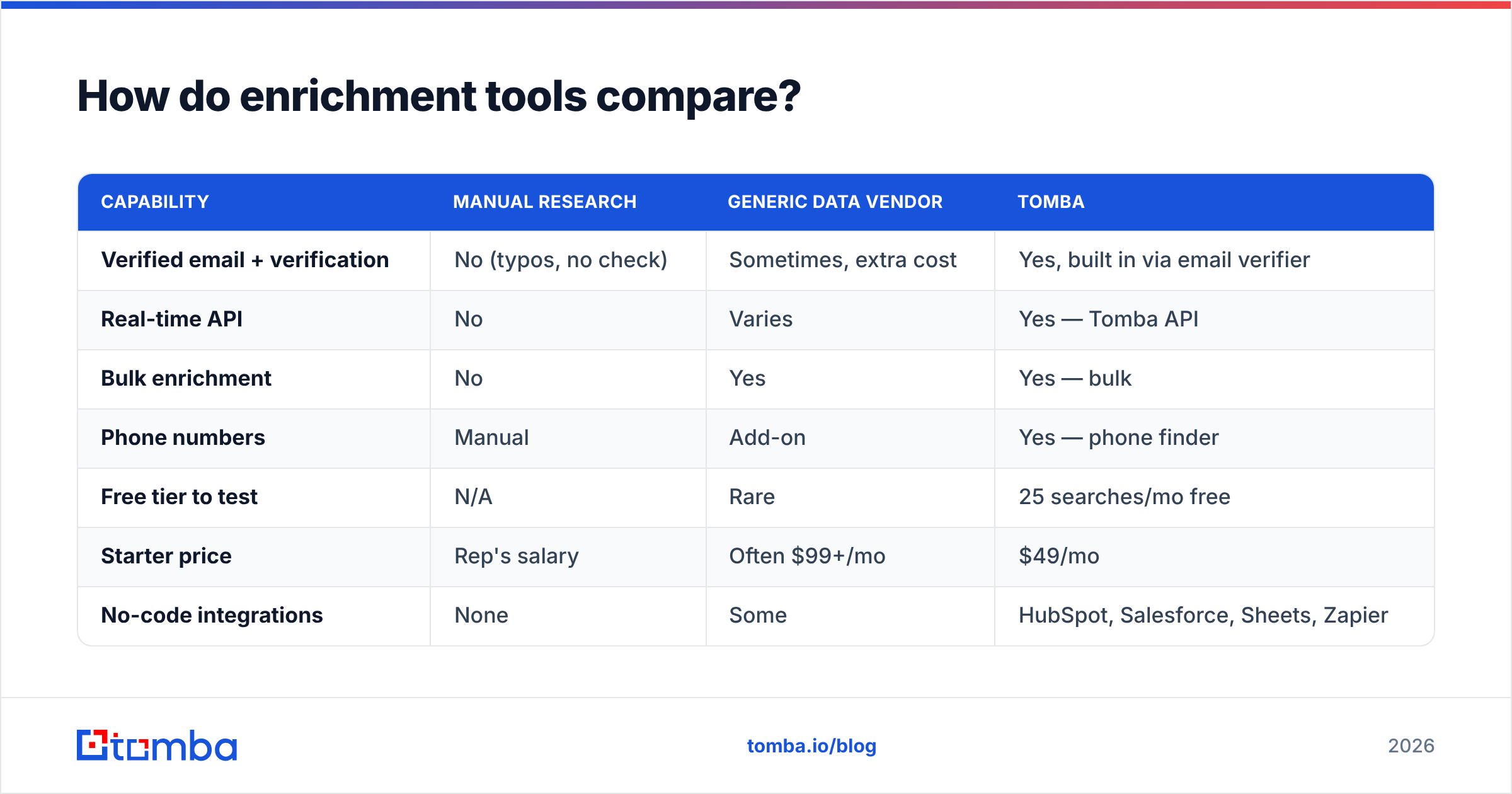
Tools differ on accuracy, coverage, verification, and how you access them. Here's a practical comparison of the categories you'll evaluate, with Tomba as a concrete reference point on pricing.
| Capability | Manual research | Generic data vendor | Tomba |
|---|---|---|---|
| Verified email + verification | No (typos, no check) | Sometimes, extra cost | Yes, built in via email verifier |
| Real-time API | No | Varies | Yes — Tomba API |
| Bulk enrichment | No | Yes | Yes — bulk |
| Phone numbers | Manual | Add-on | Yes — phone finder |
| Free tier to test | N/A | Rare | 25 searches/mo free |
| Starter price | Rep's salary | Often $99+/mo | $49/mo |
| No-code integrations | None | Some | HubSpot, Salesforce, Sheets, |
Zapier |
A few buying notes that the table can't capture:
- Accuracy beats volume. A provider that returns 90% of records at 70% accuracy is worse than one returning 70% at 95% accuracy, because every wrong record costs a rep a wasted touch and risks a bounce. When you evaluate vendors on G2 or Gartner, weight verified-email accuracy heavily.
- Coverage by region matters. Some tools are strong in North America and thin in EMEA or APAC. Test against your actual territory, not the vendor's demo list.
- Pricing model. Per-credit pricing punishes high-volume teams; flat plans punish low-volume ones. Compare the Tomba pricing tiers against your real monthly volume before committing.
For a transparent look at where the data behind enrichment comes from, Tomba documents its data sources — worth reviewing for any vendor you consider, since "where does this data originate" is the question that separates compliant providers from scrapers.
What does a good enrichment workflow look like end to end?#
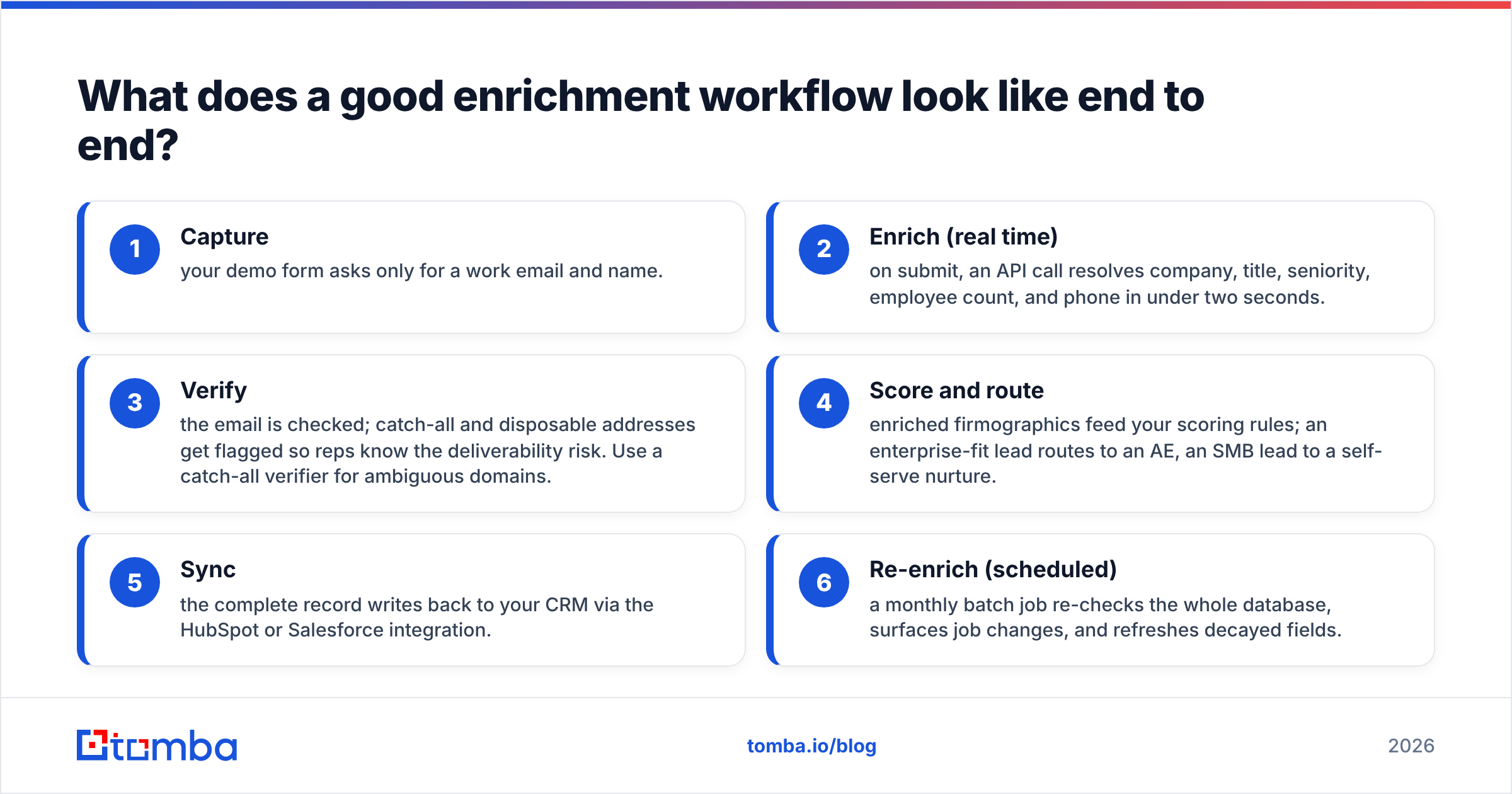
A reliable workflow looks like this: capture minimal input, enrich in real time, verify, score, route, and re-enrich on a schedule.
Here's a concrete example for an inbound SaaS funnel:
- Capture — your demo form asks only for a work email and name.
- Enrich (real time) — on submit, an API call resolves company, title, seniority, employee count, and phone in under two seconds.
- Verify — the email is checked; catch-all and disposable addresses get flagged so reps know the deliverability risk. Use a catch-all verifier for ambiguous domains.
- Score and route — enriched firmographics feed your scoring rules; an enterprise-fit lead routes to an AE, an SMB lead to a self-serve nurture.
- Sync — the complete record writes back to your CRM via the HubSpot or Salesforce integration.
- Re-enrich (scheduled) — a monthly batch job re-checks the whole database, surfaces job changes, and refreshes decayed fields.
The payoff compounds. Reps stop researching and start calling. Routing gets accurate. Campaigns target real fit instead of guesses. And because verification is baked in, your bounce rate stays low enough to protect email deliverability — which is the difference between landing in the inbox and the spam folder.
What mistakes should you avoid?#
The failure modes are predictable, and all of them are avoidable.
- Enriching without verifying. The fastest way to wreck a sender reputation. Always pair enrichment with a verification step.
- Over-enriching. Appending 40 fields you never use slows runs, costs credits, and clutters the record. Enrich what you act on.
- Ignoring decay. A one-time clean-up feels great for three months, then quietly rots. Schedule re-enrichment.
- No deduplication. Enriching duplicate records doubles cost and confuses routing. Dedupe before you enrich — a simple remove-duplicates pass first saves credits.
- Skipping the free test. Never trust a vendor's marketing accuracy number. Run your own sample against a free tier before you pay.
Is automated lead enrichment worth it for small teams?#
Yes — arguably more so than for large ones, because small teams can't afford to waste rep hours on data entry.
A two-person SDR team spending even 30 minutes a day each on manual research loses roughly five hours a week to a task software does in seconds. At a $49/mo starter plan, the math favors automation almost immediately. The barrier was never cost; it was the assumption that enrichment requires engineering. With no-code integrations and a free tier to prove value first, that barrier is gone. Start with one trigger — usually inbound form submit — measure the lift in speed-to-lead and connect rate, then expand to batch re-enrichment once you trust the data.
Get started with automated lead enrichment#
If you're ready to stop hand-filling CRM fields, start where the leads enter: capture a work email, then let enrichment resolve the rest. Tomba's data enrichment appends verified emails, phones, and firmographics, while the built-in email finder and verifier keep every record accurate and deliverable — backed by a real-time API, bulk tools, and native CRM integrations. Spin up the free tier (25 searches/mo), run a sample of your own leads through it, and see the accuracy for yourself before you scale. Your reps will spend their day selling instead of Googling — and your pipeline data will finally stay current.
// get started
Find, verify and enrich your first contacts today
Start on the free plan with 25 searches a month, then scale when your team is ready.
Free plan · No credit card required · GDPR & CCPA
Get the Tomba newsletter
Product and data updates
// about the author