Automatic Email Sender: Best Tools & Setup Guide 2026
An automatic email sender schedules, personalizes, and sends mail at scale without manual effort. Here's how the tools compare and how to set one up right in 2026.
An automatic email sender does one job well: it takes a list, a message, and a schedule, then sends personalized emails without you sitting at the keyboard. The catch is that "set it and forget it" is exactly how people torch their sender reputation. This guide shows what these tools actually do, how the leading options compare, and how to set one up in 2026 without landing in spam.
TL;DR#
- An automatic email sender sends scheduled, personalized emails at scale using triggers, mail merge, and sequences — no manual sending required.
- The category splits into three types: transactional senders (APIs like Postmark), marketing platforms (Mailchimp), and cold outreach tools (Instantly, Saleshandy).
- Deliverability is the real bottleneck, not send volume. Warmup, domain authentication, and clean lists matter more than features.
- Garbage-in, garbage-out: automation amplifies bad data. Verify addresses before you send or you will burn your domain fast.
- Use a dedicated email verifier and clean source data so your automatic sender works with valid contacts from day one.
What is an automatic email sender?#
An automatic email sender is software that sends emails on your behalf based on rules, schedules, or triggers instead of manual clicks. Think of it like a sprinkler system for your garden: you set the zones and timing once, and water reaches every plant on schedule whether or not you're home. Technically, it combines a contact list, message templates with personalization tokens, a sending engine (SMTP or API), and logic that decides who gets what and when.
The term covers a wide range of products that look similar but solve different problems:
- Transactional senders — Trigger-based, one-to-one system emails: password resets, receipts, shipping alerts. Tools like Postmark and Amazon SES live here.
- Marketing/newsletter platforms — Bulk campaigns to opted-in subscribers, with segmentation and templates. Mailchimp and Brevo dominate.
- Cold outreach / sales sequences — Multi-step automated follow-ups sent from your own inbox to prospects. Instantly, Saleshandy, and Reply.io fit here.
- Mail merge tools — Lightweight senders bolted onto Gmail or Outlook for small, personalized batches.
- Workflow automation — Zapier or Make.com pipelines that send email as one step in a larger sequence.
Picking the wrong category is the most common mistake. A newsletter platform will get your cold outreach flagged; a cold-email tool is overkill for transactional receipts.
How does an automatic email sender work?#
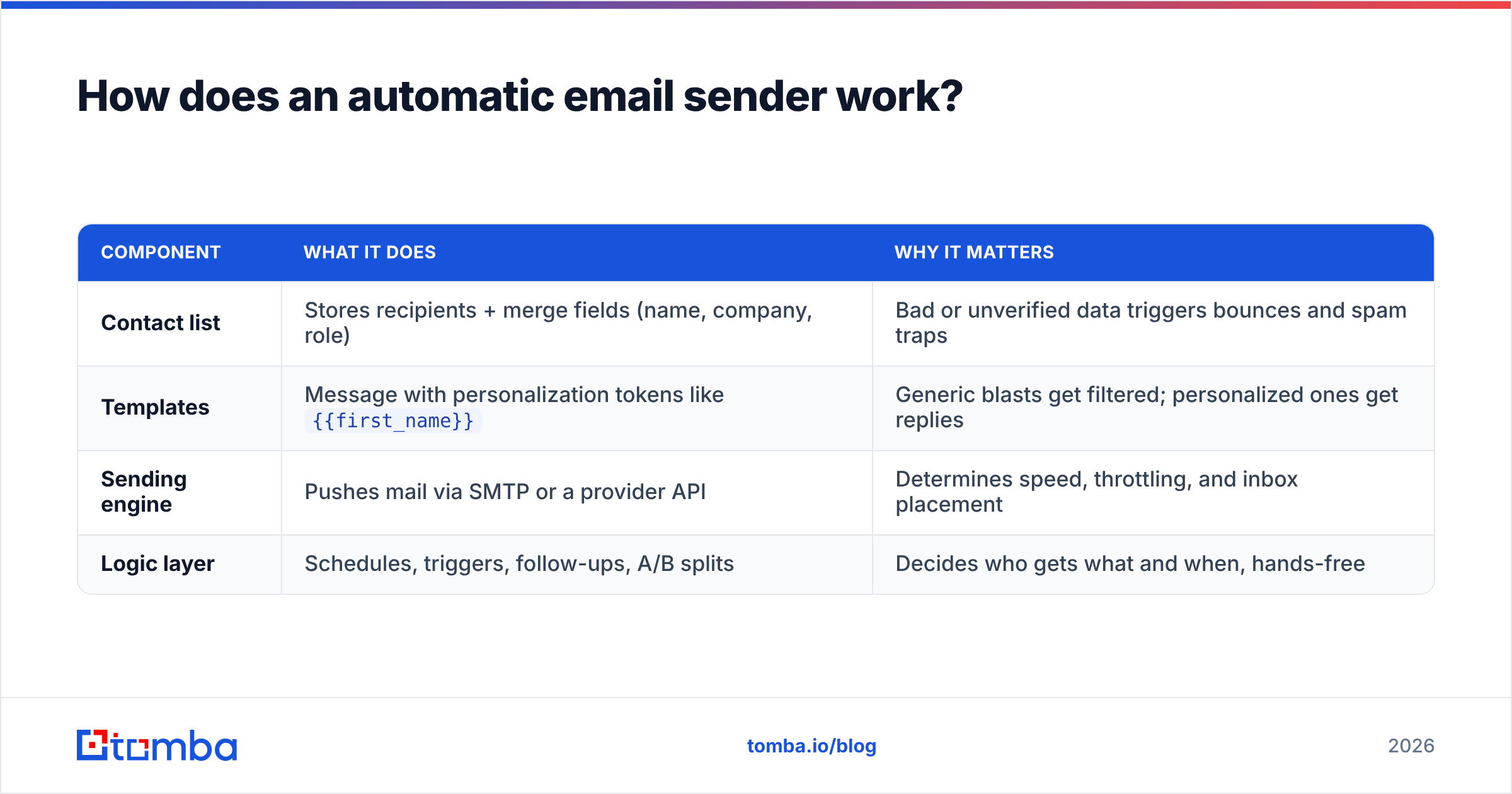
Four moving parts turn a static list into a running campaign. Understanding them helps you debug when sends stall or land in spam.
| Component | What it does | Why it matters |
|---|---|---|
| Contact list | Stores recipients + merge fields (name, company, role) | Bad or unverified data triggers bounces and spam traps |
| Templates | Message with personalization tokens like {{first_name}} |
Generic blasts get filtered; personalized ones get replies |
| Sending engine | Pushes mail via SMTP or a provider API | Determines speed, throttling, and inbox placement |
| Logic layer | Schedules, triggers, follow-ups, A/B splits | Decides who gets what and when, hands-free |
In practice, you connect a sending account (your domain's mailbox or an API key), import contacts, write a sequence with conditional steps ("if no reply in 3 days, send follow-up 2"), and the tool drips messages out within sending limits. The best platforms randomize send times and volume to mimic human behavior, which protects sender reputation.
The part nobody advertises: your automatic sender is only as good as your list. If 20% of your addresses are invalid, automation will cheerfully send to all of them, rack up bounces, and tank your email deliverability before you notice. That's why verification belongs before the send button, not after.
Which automatic email sender is best in 2026?#
There's no single winner — the best tool depends on whether you're sending receipts, newsletters, or cold outreach. Below is a side-by-side of representative tools across the three main categories, with current starting prices.
| Tool | Best for | Free tier | Starting price | Key strength |
|---|---|---|---|---|
| Mailchimp | Newsletters & marketing | 500 contacts | ~$13/mo | Templates + audience segmentation |
| Brevo (Sendinblue) | Marketing + transactional | 300 emails/day | ~$9/mo | Combined marketing & SMTP |
| Postmark | Transactional only | 100 emails/mo | ~$15/mo | Fast, reliable system emails |
| Instantly | Cold outreach at scale | Trial only | ~$37/mo | Inbox rotation + warmup |
| Saleshandy | Cold email sequences | Trial only | ~$36/mo | Multi-step follow-ups |
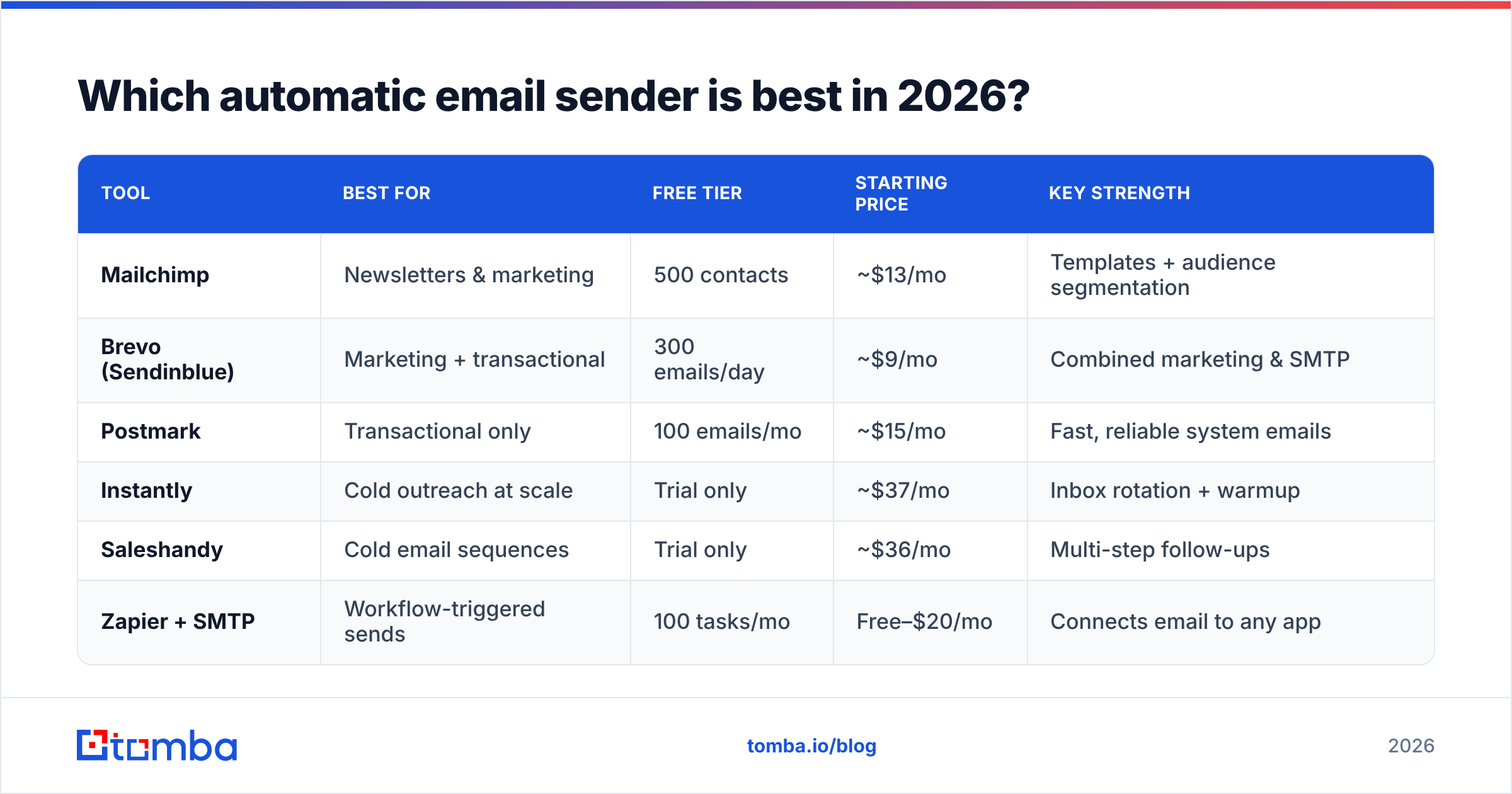
Zapier + SMTP | Workflow-triggered sends | 100 tasks/mo | Free–$20/mo | Connects email to any app |
A few honest takeaways:
- For marketing emails to subscribers, Mailchimp or Brevo are the safe defaults. Don't use them for cold outreach — their terms forbid it and your account can get suspended.
- For transactional email, use a dedicated API like Postmark; it keeps system emails off the same domain reputation as your campaigns.
- For cold sales sequences, tools like Instantly or Saleshandy handle inbox rotation and warmup. But they assume you already have valid, targeted addresses — which is where a finder and verifier come in.
If you'd rather not pay for a heavyweight platform to send a few hundred personalized emails, a Google Sheets mail merge or Zapier integration plus an SMTP step covers a lot of ground for almost nothing.
How do you set up an automatic email sender without hitting spam?#
Conclusion first: authenticate your domain, warm up the inbox, verify every address, and send slowly. Skip any of those and even the best tool lands you in the junk folder. Here's the order that works.
1. Authenticate your sending domain. Set up SPF, DKIM, and DMARC records before you send a single email. These prove you're allowed to send from your domain. Use a free SPF checker to confirm your record is valid — mailbox providers reject or junk unauthenticated mail by default in 2026.
2. Warm up the inbox. A brand-new domain that suddenly sends 500 emails screams "spammer." Ramp from ~20 sends/day and increase gradually over 2–4 weeks. Many cold-email tools include automated warmup; for marketing platforms you control volume manually.
3. Verify your list — every time. This is the step most people skip and the one that does the most damage. Run your contacts through an email verifier to remove invalid addresses, spam traps, and risky catch-alls. A bounce rate above 2–3% signals trouble to providers and depresses placement for your whole domain.
4. Personalize beyond the first name. Tokens for company, role, and a relevant detail lift reply rates and reduce spam complaints. Generic blasts get reported; specific messages get answered.
5. Throttle and monitor. Stay within provider limits, watch your bounce and complaint rates, and check your response rate per step. Pause and fix the moment bounces climb.

What happens if you automate sending with bad data?#
Automation multiplies whatever you feed it — including mistakes. Send to a list that's 25% invalid and your automatic sender will generate hundreds of bounces in minutes, which is the single fastest way to get throttled or blacklisted. Run your domain or IP through a blacklist checker if placement suddenly drops; you may already be flagged.
The fix is upstream. Instead of buying or scraping a stale list, build a clean one:
- Find verified addresses with a domain or name-based email finder so contacts are real before they ever enter your sequence.
- Search by company using domain search to pull all known addresses and patterns for a target account.
- Bulk-process at scale with a bulk email finder when you're loading hundreds of contacts into a sequence.
- Verify catch-all domains with a catch-all verifier, since those addresses look valid but often aren't.
According to email industry research from vendors like HubSpot, list hygiene is consistently the largest controllable factor in deliverability — bigger than subject lines or send time. Clean data isn't a nice-to-have; it's the foundation your automatic sender stands on. Third-party review sites such as G2 show the same pattern across hundreds of tool reviews: deliverability complaints almost always trace back to data quality, not the sending software.
Automatic email sender vs. manual sending: which wins?#
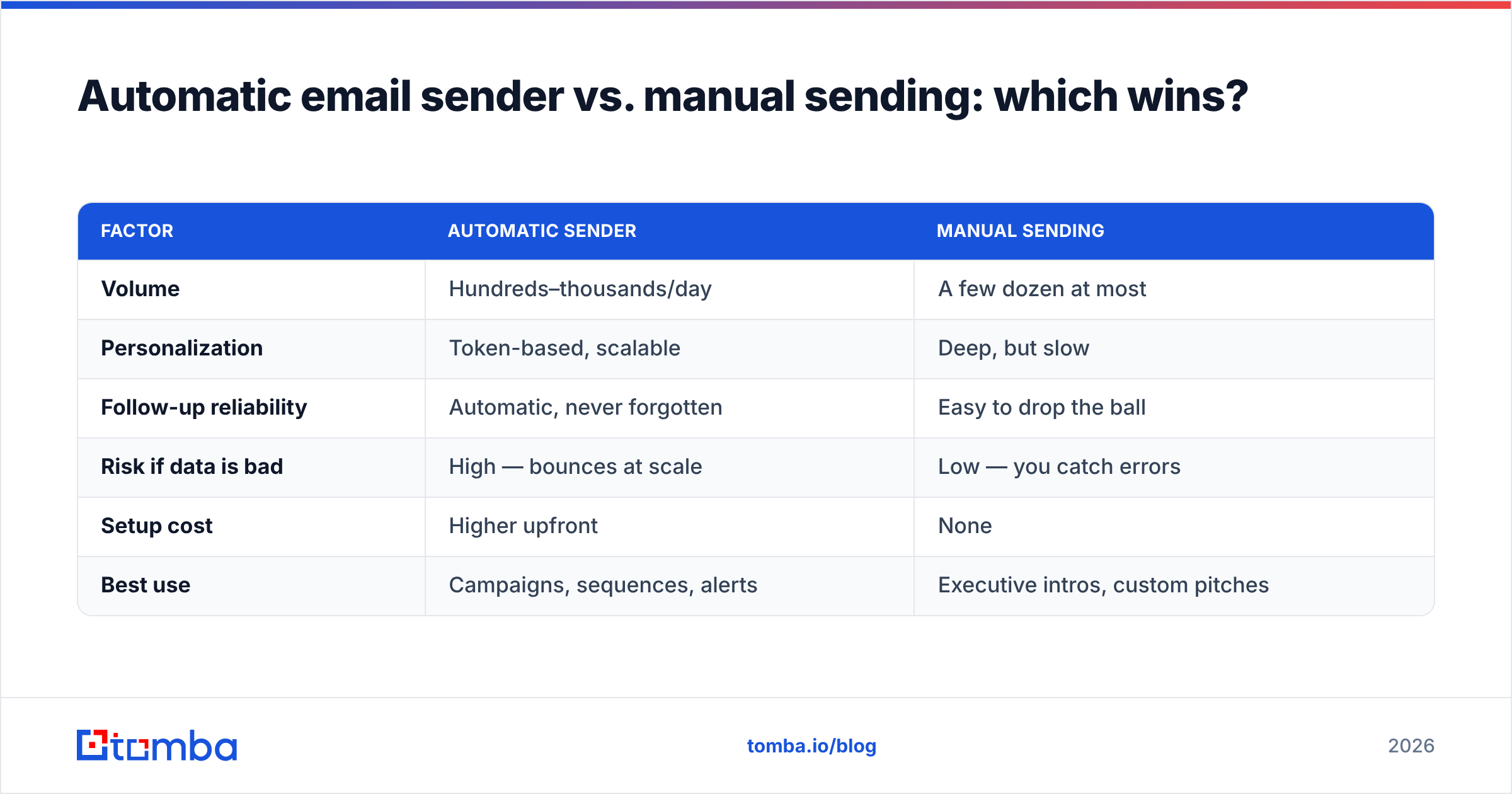
For anything beyond a handful of emails, automation wins on time and consistency — but manual sending still beats it for high-stakes, one-off messages where a typo or wrong name costs a deal.
| Factor | Automatic sender | Manual sending |
|---|---|---|
| Volume | Hundreds–thousands/day | A few dozen at most |
| Personalization | Token-based, scalable | Deep, but slow |
| Follow-up reliability | Automatic, never forgotten | Easy to drop the ball |
| Risk if data is bad | High — bounces at scale | Low — you catch errors |
| Setup cost | Higher upfront | None |
| Best use | Campaigns, sequences, alerts | Executive intros, custom pitches |
The smart play is hybrid: automate the volume (follow-ups, drips, transactional) and reserve manual sends for the 5% of contacts where a human touch changes the outcome. Either way, the input — verified, well-targeted contacts — is what separates campaigns that book meetings from campaigns that get blocked.
How does Tomba fit into an automatic email sending workflow?#
Tomba isn't an automatic email sender — and that's the point. It's the data layer that sits in front of whatever sender you choose. You find and verify contacts in Tomba, then push clean, valid addresses into Mailchimp, Instantly, your CRM, or a
Zapier flow.
A typical workflow:
- Use domain search or the email finder to source target contacts.
- Run them through the email verifier to strip invalid and risky addresses.
- Enrich with data enrichment so your merge fields (role, company, location) are populated for real personalization.
- Export or sync via the Tomba API or a native integration into your sending tool.
Because Tomba focuses only on accurate contact data, it stays neutral about which sender you use — the same clean list works in any platform. You can compare Tomba pricing tiers (Free: 25 searches/mo; Starter $49/mo; Growth $99/mo; Pro $249/mo) against your monthly contact volume to find the right fit.
Frequently asked questions#
Is it legal to use an automatic email sender for cold outreach? Yes, with conditions. Laws like CAN-SPAM (US) and GDPR (EU) require honest headers, a real physical address, an easy opt-out, and — under GDPR — a lawful basis for contacting B2B prospects. Automation doesn't change the rules; it just makes compliance more important because you're sending at scale.
Will an automatic email sender hurt my deliverability? Only if you misuse it. Authenticated domains, warmed-up inboxes, verified lists, and reasonable volume keep you in the inbox. Unverified lists and sudden volume spikes are what cause damage.
Do I need a separate tool to verify emails? You need verification, but not necessarily a separate subscription — many finders include it. The key is to verify before sending, every time, since lists decay roughly 2% per month as people change jobs.
What's the cheapest way to send automated emails? A Gmail or Outlook mail merge plus a free SMTP tier handles small, personalized batches at near-zero cost. Scale up to a dedicated platform only when volume or follow-up complexity demands it.
Start with clean data, not just a sending tool#
The best automatic email sender in the world can't fix a bad list — it just sends the mistakes faster. Before you automate anything, make sure every address is real, current, and verified. Use the Tomba Email Finder to source accurate B2B contacts by domain, name, or company, then verify and enrich them so your sequences hit real inboxes from the first send. Start free with 25 searches a month, plug the clean data into whatever sender you already use, and watch your bounce rate — and your reputation — stay healthy.
// get started
Find, verify and enrich your first contacts today
Start on the free plan with 25 searches a month, then scale when your team is ready.
Free plan · No credit card required · GDPR & CCPA
// about the author