B2B CRM in 2026: How to Choose, Compare, and Fill It
A B2B CRM only earns its keep when the data inside it is clean and current. Here's how to pick one in 2026 — and how to keep it from rotting.
TL;DR
- A B2B CRM is the system of record for every account, contact, deal, and touchpoint your revenue team owns — but it's only as useful as the data inside it.
- The big three for most teams are HubSpot, Salesforce, and Pipedrive; the right pick depends on team size, process complexity, and budget, not brand prestige.
- CRMs decay fast: B2B contact data goes stale at roughly 22–30% per year as people change jobs, so a buying decision is really two decisions — the platform and the data pipeline that feeds it.
- Budget for the platform license plus enrichment and verification; a $99/seat CRM full of dead emails costs more than a cheaper one that's clean.
- Pair any CRM with an email finder and email verifier so new and existing records stay reachable.
What is a B2B CRM?#
A B2B CRM is the shared filing cabinet your whole revenue team writes to and reads from. Marketing drops a lead in, an SDR logs the first call, an AE moves the deal through stages, and customer success picks it up after close — all against one record instead of five disconnected spreadsheets.
Technically, a B2B customer relationship management platform stores three linked object types: companies (accounts), people (contacts), and deals (opportunities), plus the activities (emails, calls, meetings, notes) attached to each. B2B differs from B2C CRM in one structural way: you sell to organizations with multiple stakeholders, so the account-to-contact relationship and the buying committee matter far more than any single individual.
Here's the part most buyer's guides skip: the CRM is a container, not a data source. It does not know that your champion left for a competitor last month or that the email you have on file now bounces. That gap — between what the CRM says and what's actually true — is where most B2B pipelines quietly leak. We'll come back to it, because it changes how you should budget.
)
What does a B2B CRM actually do?#
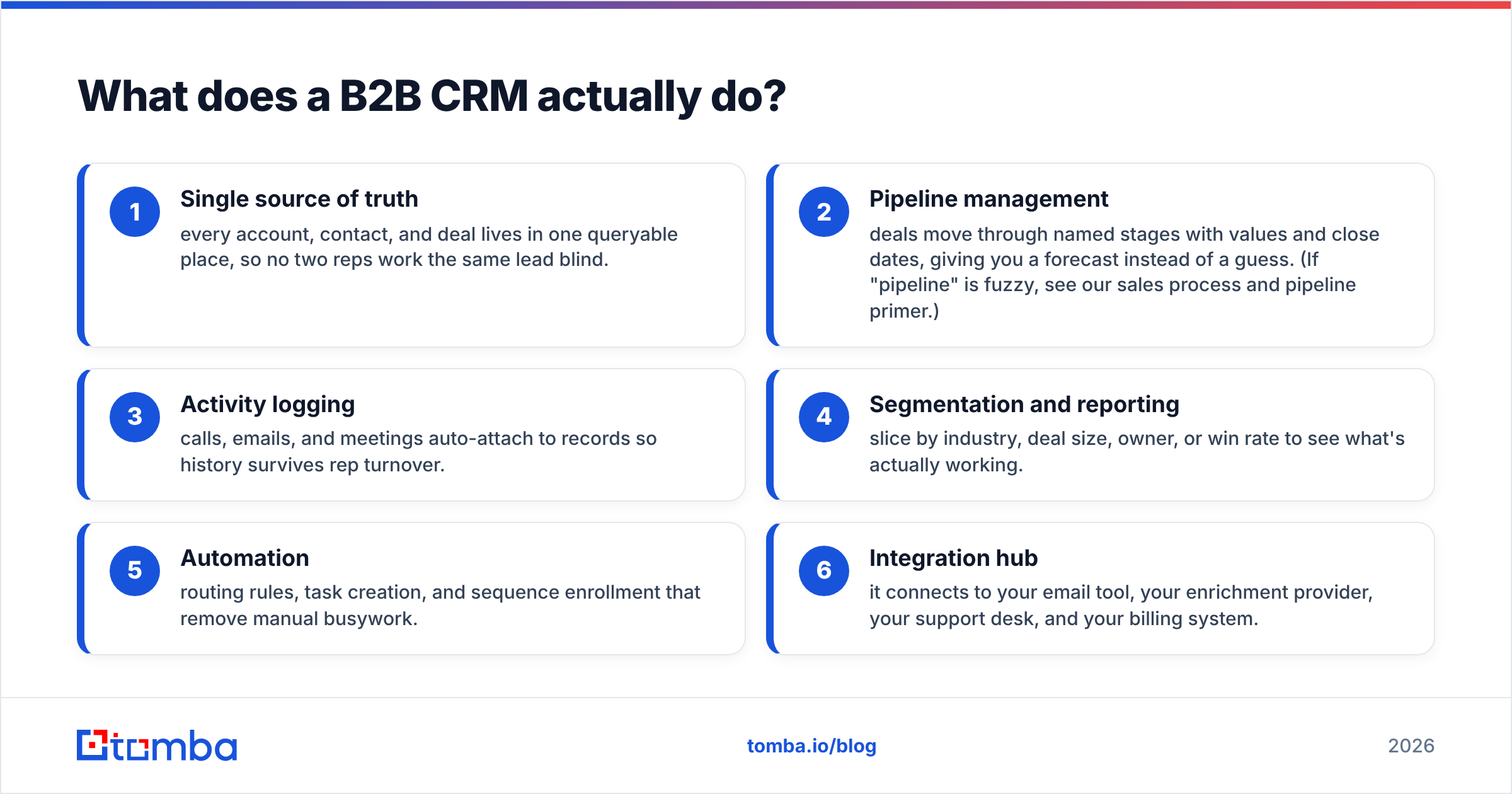
Strip away the marketing and a modern B2B CRM earns its license on six jobs:
- Single source of truth — every account, contact, and deal lives in one queryable place, so no two reps work the same lead blind.
- Pipeline management — deals move through named stages with values and close dates, giving you a forecast instead of a guess. (If "pipeline" is fuzzy, see our sales process and pipeline primer.)
- Activity logging — calls, emails, and meetings auto-attach to records so history survives rep turnover.
- Segmentation and reporting — slice by industry, deal size, owner, or win rate to see what's actually working.
- Automation — routing rules, task creation, and sequence enrollment that remove manual busywork.
- Integration hub — it connects to your email tool, your enrichment provider, your support desk, and your billing system.
The trap is treating the CRM as a passive ledger. A CRM only compounds in value when records enter clean, stay current, and link to live contact data. Garbage in, garbage forecast.
Which B2B CRM is right for your team?#
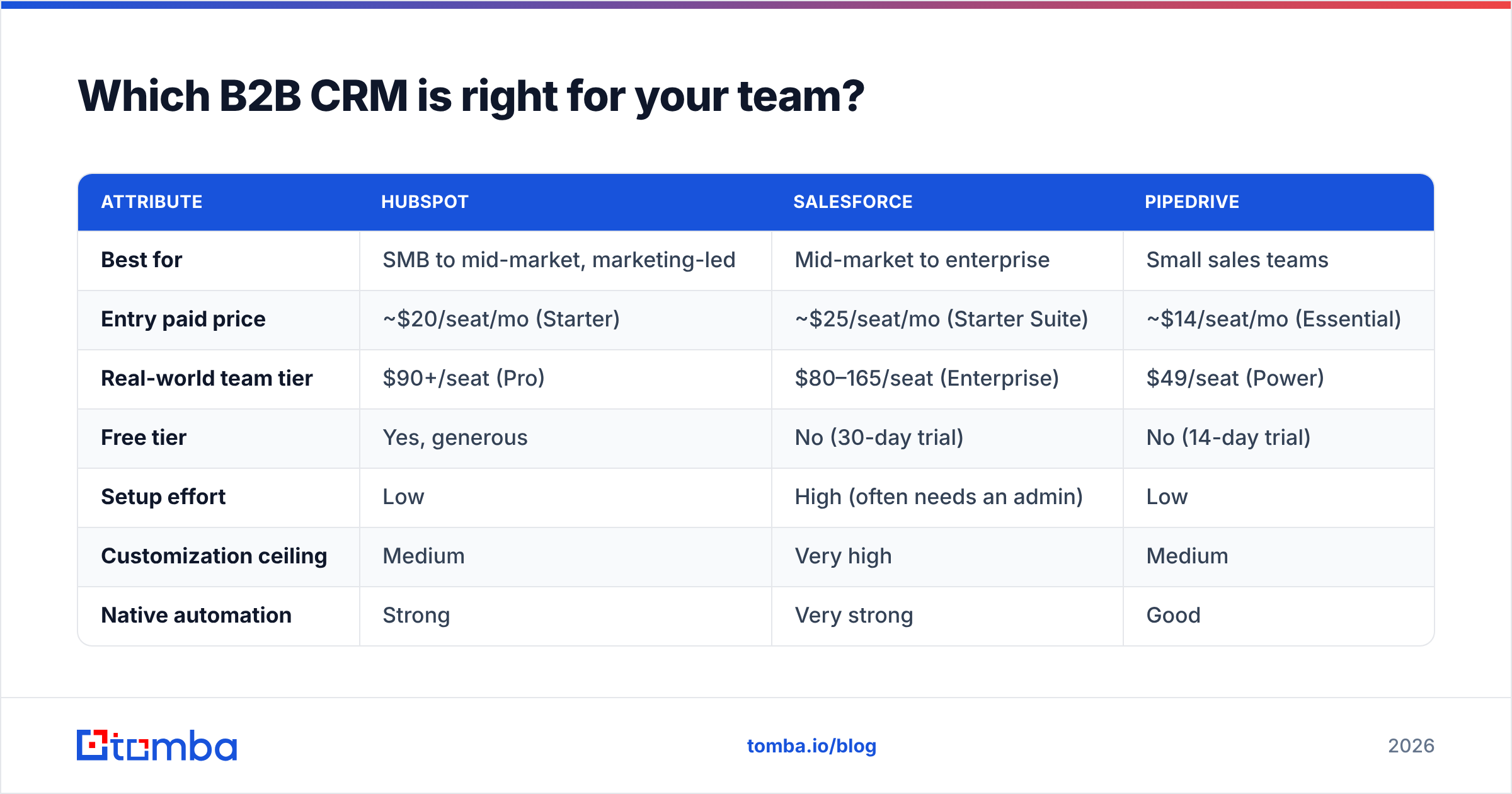
Short answer: HubSpot for marketing-led teams that want fast setup, Salesforce for large orgs with complex process, Pipedrive for lean sales teams that just want to move deals. Here's the detail.
| Attribute | HubSpot | Salesforce | Pipedrive |
|---|---|---|---|
| Best for | SMB to mid-market, marketing-led | Mid-market to enterprise | Small sales teams |
| Entry paid price | ~$20/seat/mo (Starter) | ~$25/seat/mo (Starter Suite) | ~$14/seat/mo (Essential) |
| Real-world team tier | $90+/seat (Pro) | $80–165/seat (Enterprise) | $49/seat (Power) |
| Free tier | Yes, generous | No (30-day trial) | No (14-day trial) |
| Setup effort | Low | High (often needs an admin) | Low |
| Customization ceiling | Medium | Very high | Medium |
| Native automation | Strong | Very strong | Good |
| Reporting depth | Strong | Deepest | Basic to moderate |
A few honest caveats. HubSpot's free tier is the best on-ramp in the category, but costs climb steeply once you need Professional features and contact-tier upgrades. Salesforce is the most powerful and the most likely to require a paid admin or consultant — that's a real line item, not a footnote. Pipedrive is the easiest to love for a 3–10 person sales team and the easiest to outgrow once marketing and CS need to live in the same system.
Don't choose on feature checklists alone. Choose on process fit and who will administer it. The most expensive CRM is the one nobody configures correctly. Cross-check current pricing and tiers on each vendor's own page — HubSpot, Salesforce, and review aggregators like G2 — because list prices shift more often than guides like this one update.
How much does a B2B CRM really cost?#
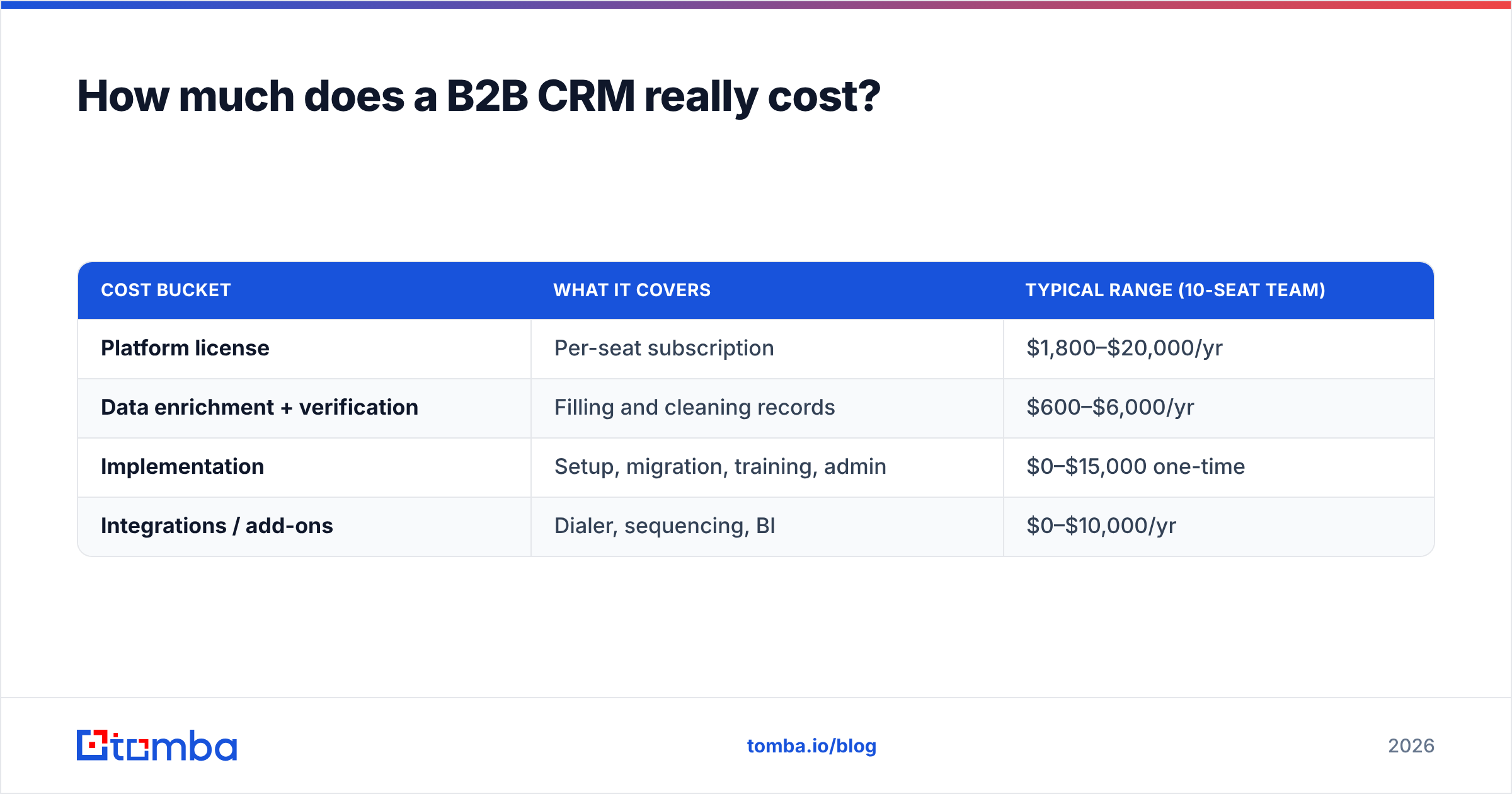
Plan for three buckets, not one: license, data, and implementation.
| Cost bucket | What it covers | Typical range (10-seat team) |
|---|---|---|
| Platform license | Per-seat subscription | $1,800–$20,000/yr |
| Data enrichment + verification | Filling and cleaning records | $600–$6,000/yr |
| Implementation | Setup, migration, training, admin | $0–$15,000 one-time |
| Integrations / add-ons | Dialer, sequencing, BI | $0–$10,000/yr |
The line teams routinely forget is the second one. A CRM does not generate contact data — it stores whatever you put in. If your reps are hand-typing emails from LinkedIn or buying a stale list once a year, you're paying premium license fees to warehouse decaying records. Budgeting $99/seat for the platform and $0 for data hygiene is the most common — and most expensive — CRM mistake in B2B.
For reference on the data side, Tomba's own pricing runs a Free tier (25 searches/mo), Starter at $49/mo, Growth at $99/mo, and Pro at $249/mo — a fraction of most CRM licenses, and the piece that keeps the expensive platform actually usable.
Why do B2B CRMs decay — and what does it cost you?#
Your CRM is rotting right now, and the rot is structural. People change jobs. Companies rebrand, merge, and relocate. Email formats change after acquisitions. Industry research consistently puts B2B data decay in the 22–30% per year range — meaning up to a third of your contacts become wrong within twelve months of entry, even if nobody touches them.
That decay translates directly into wasted spend:
- Bounced emails drag down your sender reputation, which hurts deliverability for the good addresses too.
- Reps work dead records — every call to a disconnected number or email to a departed champion is paid time spent on nothing.
- Forecasts lie — pipeline built on contacts who've left is phantom pipeline.
)
The fix is not "clean the CRM once." It's a continuous loop: enrich on entry, verify before send, re-verify on a schedule. Treat contact accuracy like security patching, not spring cleaning.
How do you keep a B2B CRM clean and full?#
Five habits separate a CRM that compounds from one that quietly bleeds budget. Each maps to a job you can automate rather than nag reps about.
- Enrich on creation. The moment a record enters — form fill, import, or manual add — auto-append the firmographic and contact fields you actually use. Data enrichment turns a bare name-and-company into a routable, scoreable record.
- Verify before you send. Run every email through an email verifier before it hits a sequence. This is the single highest-leverage habit for protecting deliverability.
- Find what's missing, don't guess it. When a record has a name and a company but no email, an email finder resolves it against the right domain instead of letting a rep permutate guesses by hand.
- Backfill in bulk. For existing lists, a bulk email finder re-resolves and re-verifies thousands of stale records in one pass instead of one-by-one.
- Sync, don't swivel-chair. Push clean data straight into your CRM. Tomba's HubSpot and Salesforce integrations (plus Pipedrive and Zapier) mean reps never copy-paste between tabs.
Notice none of these is a one-time project. They're standing processes — ideally automated through your CRM's workflow engine or an API so hygiene happens without anyone remembering to do it.
Does the CRM or the data matter more?#
Both, but the data is the part that's usually under-resourced. A blunt way to see it: a $20/seat CRM with verified, enriched, continuously refreshed contacts will out-produce a $165/seat CRM full of three-year-old bounced emails. The platform sets your ceiling; the data determines how close you get to it.
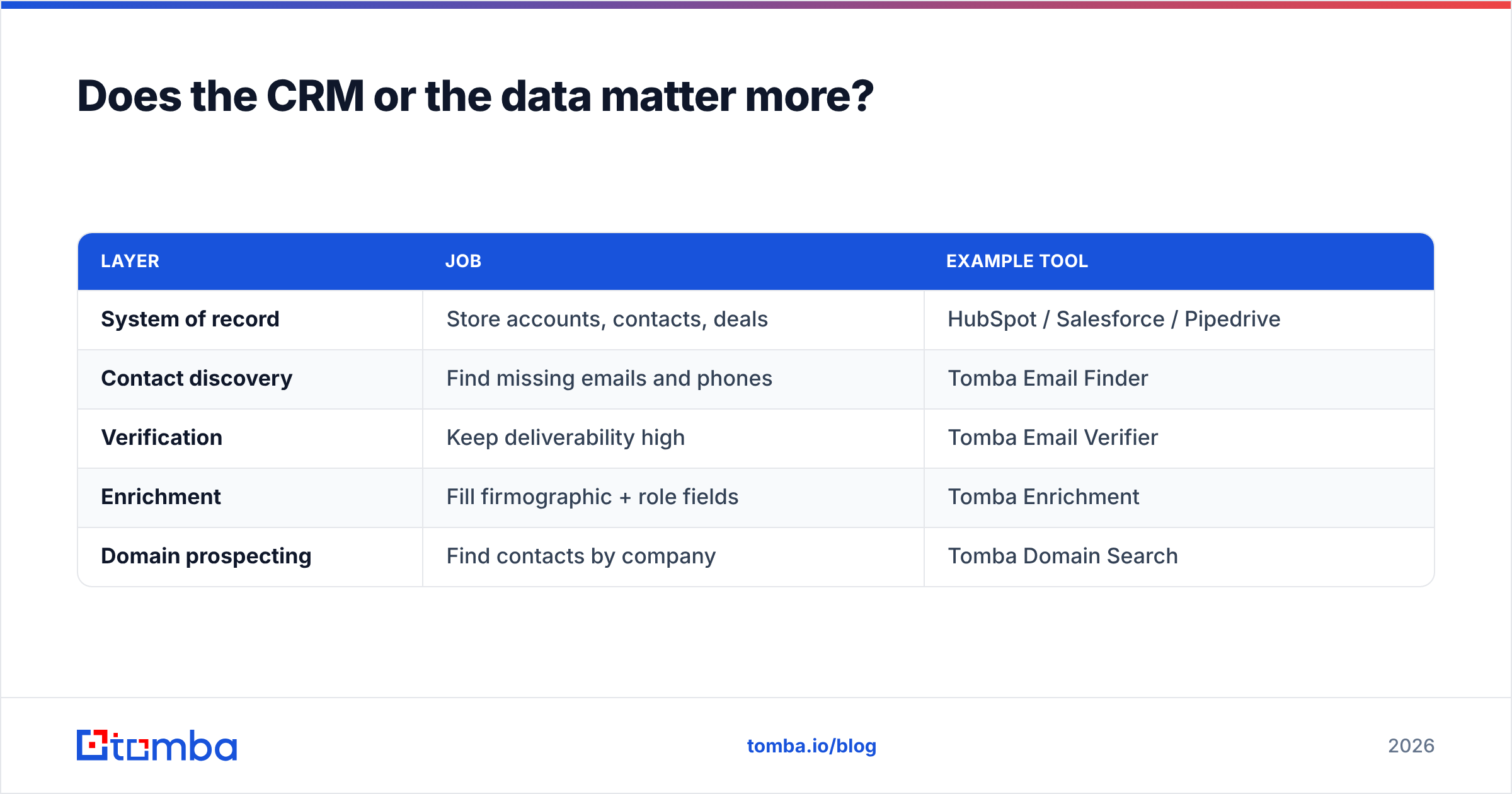
This is why the smart B2B stack pairs any of the CRMs above with a dedicated data layer underneath:
| Layer | Job | Example tool |
|---|---|---|
| System of record | Store accounts, contacts, deals | HubSpot / Salesforce / Pipedrive |
| Contact discovery | Find missing emails and phones | Tomba Email Finder |
| Verification | Keep deliverability high | Tomba Email Verifier |
| Enrichment | Fill firmographic + role fields | Tomba Enrichment |
| Domain prospecting | Find contacts by company | Tomba Domain Search |
The CRM vendors are excellent at the top row and deliberately thin on the rest — that's not their core business. Treating discovery, verification, and enrichment as a separate, best-of-breed layer is how high-performing revenue teams keep the expensive system of record honest.
How do you migrate to a new B2B CRM without losing data?#
If you're switching platforms, the migration itself is a cleaning opportunity — use it. A rough sequence that avoids importing your old problems:
- Export and audit. Pull your current data and measure it: what % of emails are verifiable, what fields are empty, how many duplicate accounts exist?
- Dedupe first. Merge duplicate companies and contacts before import, not after. A remove-duplicates pass here saves hours of cleanup later.
- Verify and enrich the survivors. Run the deduped list through verification and enrichment so you import clean records, not a fresh copy of the old mess.
- Map fields deliberately. Don't auto-map everything; only bring fields your new process actually uses.
- Import in batches and spot-check. Validate a sample after each batch rather than trusting a 50,000-row import blind.
Migrating clean data into a new CRM is the difference between a fresh start and paying setup fees to relocate the same decay.
What should you do next?#
Pick the platform that fits your process and your admin capacity — HubSpot to start fast, Salesforce to scale complex process, Pipedrive to keep a sales team lean. Then, before you sign anything, decide how you'll keep it full and accurate, because that's the half of the decision that actually determines ROI.
That second half is where Tomba fits. Use the Tomba Email Finder to resolve missing contact emails by name, company, or domain, verify them so your sender reputation stays intact, and sync clean records straight into HubSpot, Salesforce, or Pipedrive. Start on the free tier (25 searches/month), and only scale spend once you've watched your bounce rate drop and your reps stop working dead leads. The best B2B CRM is the one with live data inside it — give yours a pipeline that keeps it that way.
// get started
Find, verify and enrich your first contacts today
Start on the free plan with 25 searches a month, then scale when your team is ready.
Free plan · No credit card required · GDPR & CCPA
// about the author