B2B Data Enrichment in 2026: How It Works and Best Tools
B2B data enrichment turns thin lead records into sales-ready profiles. Here is how it works, what to measure, and which tools win in 2026.
Your CRM is lying to you. Every quarter, a chunk of it goes stale — people change jobs, companies rebrand, phone numbers get reassigned — and your reps burn hours chasing dead records. B2B data enrichment is the fix: it takes a thin lead (maybe just an email or a company name) and fills in the missing context your sales and marketing teams actually need to act.
This guide breaks down how enrichment works, what to measure, and which tools earn their price in 2026.
TL;DR#
- B2B data enrichment appends missing or fresh attributes (job title, company size, tech stack, phone, verified email) onto records you already have.
- The two modes that matter: real-time API enrichment (at form submit or CRM write) and batch enrichment (cleaning a list of thousands at once).
- Accuracy and freshness beat raw database size. A 500M-record provider with 40% stale data loses to a smaller, frequently re-verified source.
- Budget by match rate × accuracy, not by sticker price. A cheap tool that matches 30% of your list costs more per usable record.
- Tomba covers the email, phone, and company side of enrichment from one API starting at $49/mo, with a free tier to test match rates first.
What is B2B data enrichment?#
B2B data enrichment is the process of automatically adding verified, third-party attributes to a contact or company record you already own. Think of it like a passport stamp at customs: you arrive with a name, and the system fills in everything else it can confirm about you from trusted sources.
A raw lead might be nothing more than jane@acme.com. After enrichment, that same record carries Jane's full name, job title, seniority, LinkedIn URL, direct phone, plus Acme's headcount, industry, revenue band, location, and tech stack. That extra context is what lets you route the lead to the right rep, score it, personalize outreach, and decide whether it's worth a call at all.
Enrichment is not the same as lead generation. Generation finds new contacts; enrichment improves the ones you have. Most teams need both, but they solve different problems and you should budget for them separately.
The core attributes enrichment adds#
Here's what a typical B2B enrichment payload covers, grouped by how you'll use it:
- Person identity — full name, job title, seniority, department, LinkedIn profile, and a verified work email. This is the backbone of routing and personalization.
- Direct contact — mobile or direct-dial phone numbers and validated email status, so reps reach humans instead of switchboards.
- Firmographics — company headcount, revenue band, industry, HQ location, and founding year. These drive lead scoring and territory assignment.
- Technographics — the tools a company runs (CRM, analytics, cloud host). Gold for competitive displacement and qualifying technical fit.
- Intent and engagement signals — funding rounds, hiring spikes, or web-visit data that flag a buying window.
- Social and web — company domain, social handles, and logo, useful for verification and design assets.
You rarely need all six. Pick the two or three that move your conversion math and ignore the rest — every extra attribute you enrich is a credit spent.
How does B2B data enrichment work?#
Enrichment runs in three steps: match, append, verify. First, the provider takes your input key — usually an email, domain, or name+company pair — and matches it against its database. Second, it appends the attributes tied to that matched record. Third (the step cheap tools skip), it verifies the most volatile fields like email and phone before handing them back.
The input key you supply changes everything. Enriching from a verified email gives the highest match confidence because email is a near-unique identifier. Enriching from name + company is fuzzier and depends on how clean your input is. This is why running an email verifier before enrichment often lifts your downstream match rate.
Real-time vs batch enrichment#
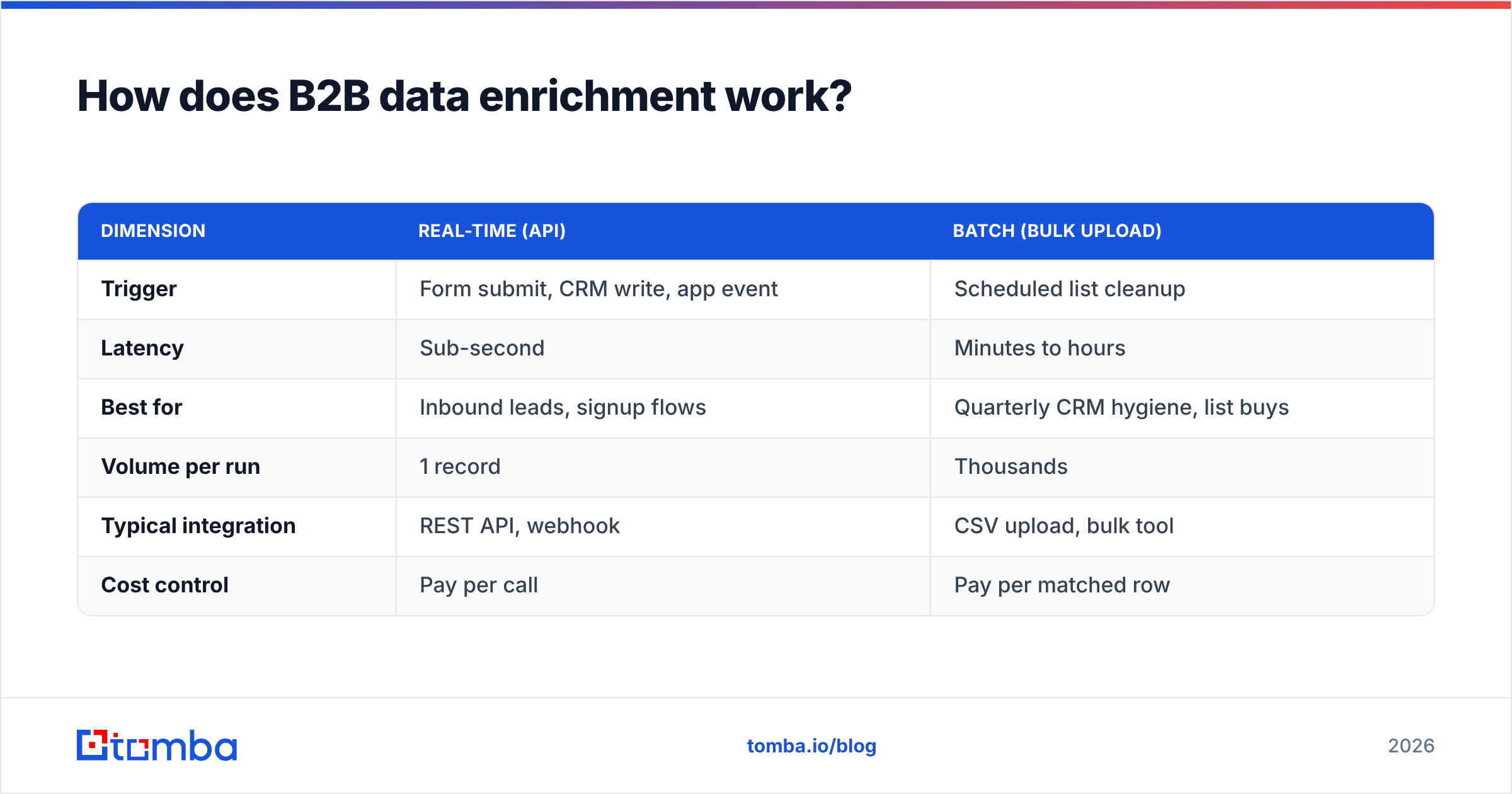
| Dimension | Real-time (API) | Batch (bulk upload) |
|---|---|---|
| Trigger | Form submit, CRM write, app event | Scheduled list cleanup |
| Latency | Sub-second | Minutes to hours |
| Best for | Inbound leads, signup flows | Quarterly CRM hygiene, list buys |
| Volume per run | 1 record | Thousands |
| Typical integration | REST API, webhook | CSV upload, bulk tool |
| Cost control | Pay per call | Pay per matched row |
Most teams need both. Real-time enrichment keeps new inbound leads complete the moment they arrive, so routing and scoring fire instantly. Batch enrichment is your maintenance cycle — run it monthly or quarterly against your whole database to reverse the natural decay. Pairing the two through the Tomba API means one provider and one accuracy standard across both flows.
Why does data decay make enrichment non-optional?#
B2B data decays roughly 25–30% per year, and that's an industry-wide reality, not a vendor scare tactic. People change jobs, companies merge, area codes get reassigned. A record that was perfect in January is partly wrong by summer.
The cost shows up everywhere downstream:
- Wasted rep time — every bounced email and disconnected number is minutes a rep won't get back.
- Deliverability damage — emailing dead addresses spikes your bounce rate and erodes sender reputation, which then hurts the mail your good prospects should be receiving.
- Broken routing and scoring — if firmographics are stale, leads land with the wrong rep or get the wrong score.
- Bad forecasting — RevOps can't trust pipeline math built on records nobody has confirmed in a year.
Enrichment is the counter-pressure against that decay. You're not enriching once; you're re-enriching on a cadence to keep the whole database above a usable accuracy floor.
What makes a good B2B data enrichment tool?#
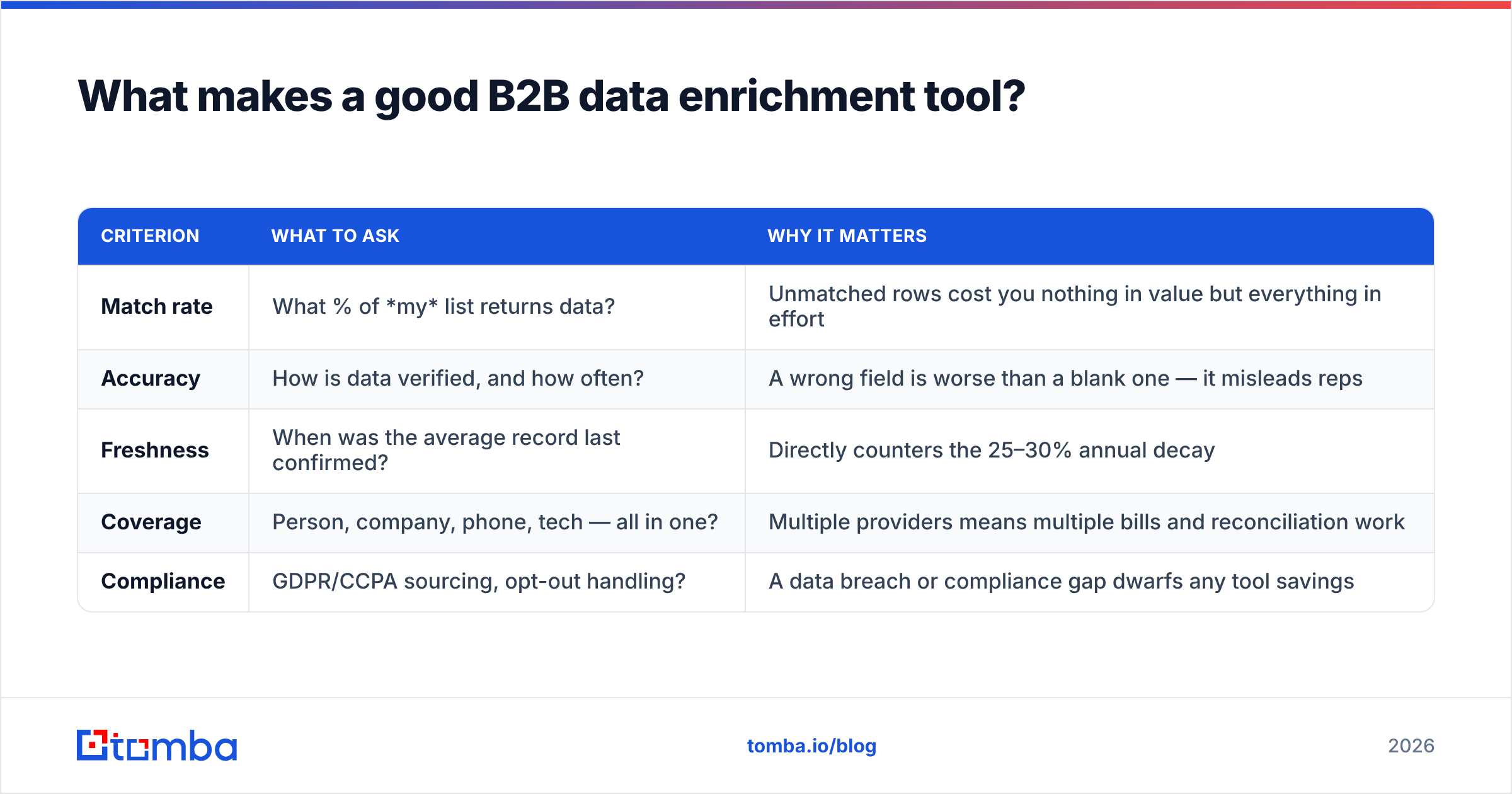
Accuracy and freshness, in that order — everything else is secondary. A provider's marketing will lead with database size ("700 million contacts!"), but raw count tells you nothing about how many records match your list or how recently they were verified. Judge tools on five things instead.
| Criterion | What to ask | Why it matters |
|---|---|---|
| Match rate | What % of my list returns data? | Unmatched rows cost you nothing in value but everything in effort |
| Accuracy | How is data verified, and how often? | A wrong field is worse than a blank one — it misleads reps |
| Freshness | When was the average record last confirmed? | Directly counters the 25–30% annual decay |
| Coverage | Person, company, phone, tech — all in one? | Multiple providers means multiple bills and reconciliation work |
| Compliance | GDPR/CCPA sourcing, opt-out handling? | A data breach or compliance gap dwarfs any tool savings |
Run a real test before you commit. Take 200 records you already know the truth about, enrich them with each candidate tool, and score the match rate and field accuracy yourself. Vendor-reported numbers are best-case; your list is the only benchmark that counts. You can read how a provider sources its data on pages like Tomba's data sources — transparency there is a green flag.
How do the main B2B data enrichment tools compare in 2026?#
The market splits into three camps: all-in-one sales platforms, pure data providers, and focused contact-data APIs. Here's how a few common choices line up on the attributes buyers actually weigh.
| Tool | Starting price | Free tier | Strength | Best for |
|---|---|---|---|---|
| Tomba | $49/mo | 25 searches/mo | Email + phone + company API, high verification | Teams wanting accurate contact data without platform lock-in |
| Apollo | ~$49/seat/mo | Limited | Database + sequencing in one | SMB teams wanting an all-in-one |
| Clearbit (Breeze) | Bundled with HubSpot | No standalone | Firmographic + intent inside HubSpot | HubSpot-native orgs |
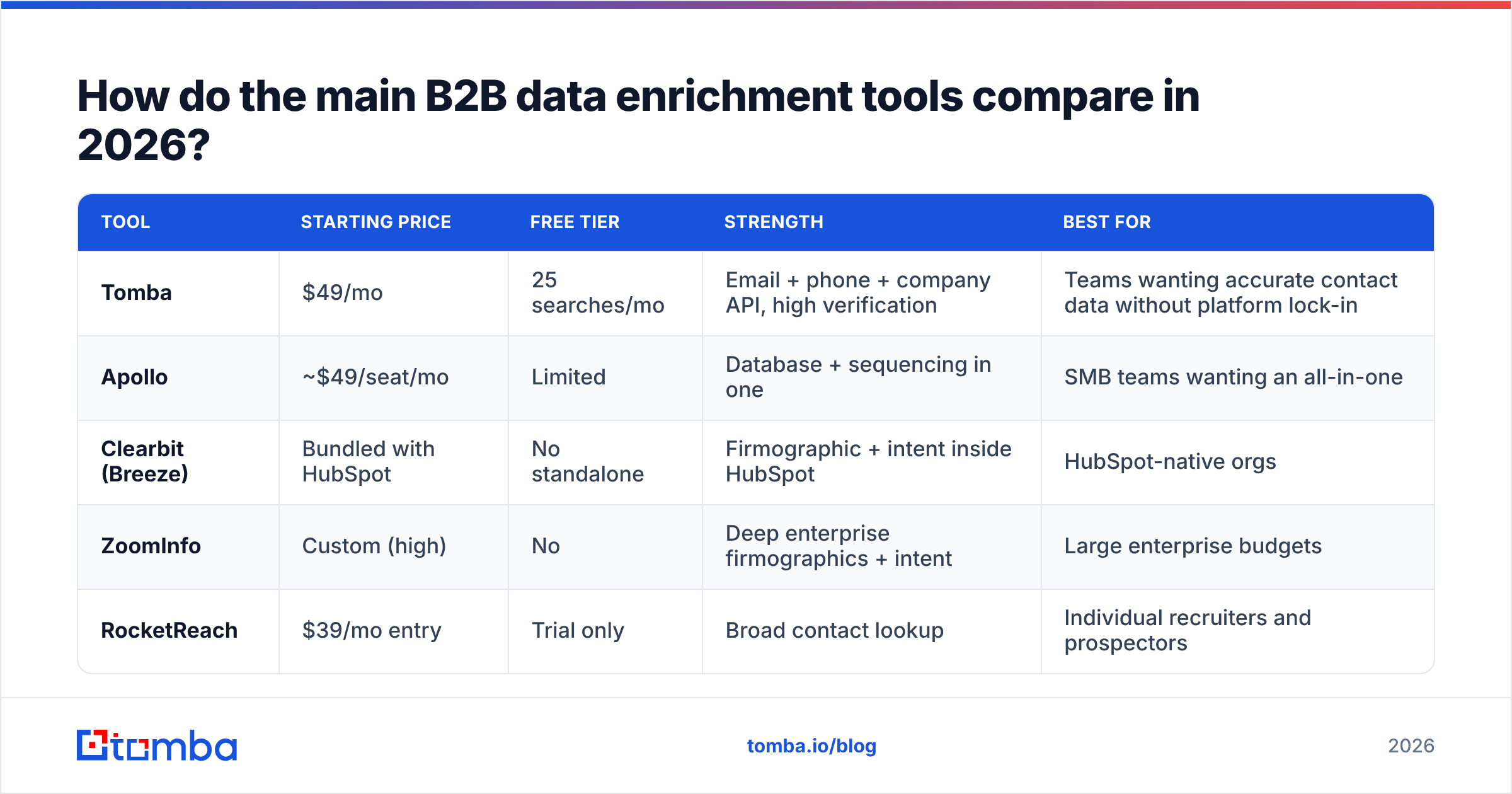
ZoomInfo | Custom (high) | No | Deep enterprise firmographics + intent | Large enterprise budgets | | RocketReach | $39/mo entry | Trial only | Broad contact lookup | Individual recruiters and prospectors |
A few honest takeaways. All-in-one platforms like Apollo bundle enrichment with outreach, which is convenient until you want to swap one piece — you can't. Enterprise providers like ZoomInfo have the deepest firmographic and intent data but price it for enterprise wallets and lock you into annual contracts. Focused APIs like Tomba win when you want excellent contact data (verified email, direct phone, company detail) you can pipe into whatever stack you already run, at a price that scales from a free trial up.
If you're specifically replacing one of the bigger platforms, the Apollo alternative and Clearbit alternative breakdowns go deeper than this table can. For the full price ladder, see the Tomba pricing page.
How do you measure enrichment ROI?#
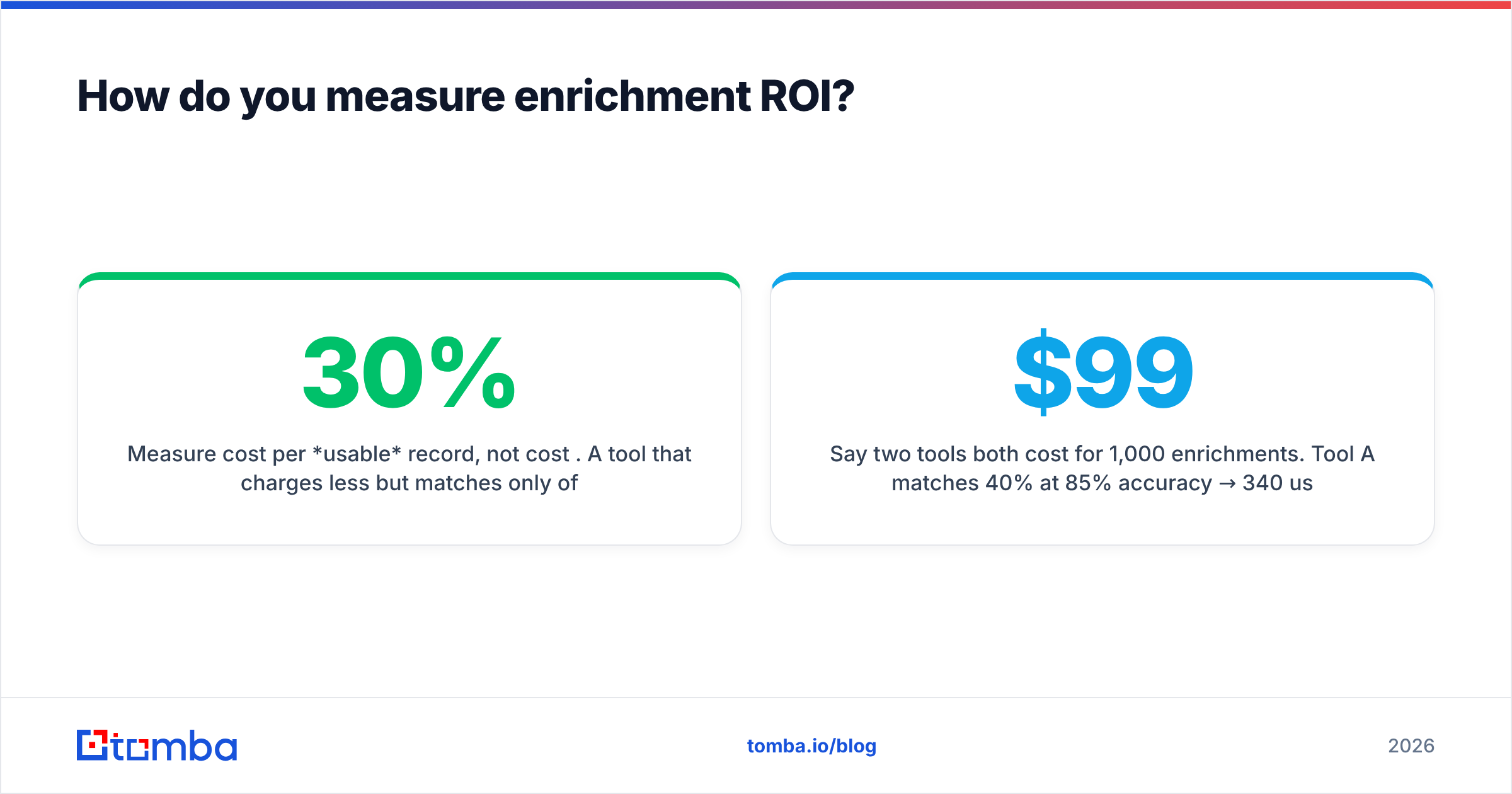
Measure cost per usable record, not cost per credit. A tool that charges less but matches only 30% of your list is more expensive in practice than a pricier tool that matches 80%. The math is simple:
Cost per usable record = (monthly price ÷ records enriched) ÷ (match rate × accuracy rate)
Say two tools both cost $99/mo for 1,000 enrichments. Tool A matches 40% at 85% accuracy → 340 usable records → $0.29 each. Tool B matches 75% at 90% accuracy → 675 usable records → $0.15 each. Tool B is nearly half the real cost despite the identical sticker. This is exactly why a free tier matters: it lets you run the match-rate test before you've spent a dollar.
The second metric worth tracking is downstream lift — did enriched records convert, route, or get worked faster than un-enriched ones? Tag a cohort, leave a control group thin, and compare reply rates and pipeline contribution after 60 days. If enrichment isn't moving those numbers, you're enriching fields nobody uses.
To wire enrichment into your existing workflow without engineering lift, the native HubSpot integration and Salesforce integration push verified data straight into the records reps already live in. For broader context on where enrichment sits in your go-to-market motion, the revenue operations primer is a useful read.
What are common enrichment mistakes to avoid?#
- Enriching everything. Spending credits on fields nobody uses is pure waste. Enrich only the attributes that drive a decision — routing, scoring, or personalization.
- Skipping verification. Enrichment that appends an unverified email just moves a guess into your CRM. Always verify the volatile fields. Authoritative reviews on G2 consistently flag accuracy, not volume, as the top complaint with enrichment vendors.
- Treating it as one-and-done. Data decays continuously, so enrichment has to be a recurring cadence, not a single project.
- Ignoring compliance. Verify your provider sources data in line with GDPR and CCPA, and that opt-outs are honored. Cheap data with murky provenance is a liability, not an asset.
- Buying on database size. A bigger database that doesn't overlap with your target market enriches nothing. Match rate against your list is the only number that counts.
Frequently asked questions#
Is B2B data enrichment legal? Yes, when the provider sources data lawfully and honors opt-outs under GDPR and CCPA. Ask any vendor how they collect and refresh data, and confirm they support deletion requests before you buy.
How often should I re-enrich my database? Quarterly is a sensible baseline given 25–30% annual decay, with real-time enrichment on new inbound leads. High-velocity teams re-run monthly on their active segments.
Can I enrich data from just an email address? Yes — email is the strongest input key because it's near-unique. Tools like the Tomba Email Finder and enrichment API can expand a single verified email into a full person and company profile.
Do I need a separate tool for phone numbers? Not if your enrichment provider covers it. Tomba includes phone finder and validation alongside email and company data, so one API handles the full contact record.
The bottom line#
B2B data enrichment isn't a luxury layer — it's the maintenance that keeps your CRM honest against constant decay. Win on accuracy and freshness, measure cost per usable record, and re-enrich on a cadence instead of treating it as a one-time cleanup.
If you want verified emails, direct phone numbers, and company data from a single API you can test before you pay, start with Tomba's data enrichment and run a free batch against 25 of your own records. Score the match rate yourself — that's the only benchmark that decides whether a tool belongs in your stack. The free tier gives you enough to prove it before committing a budget.
Ready to find emails that actually work?
Join 150,000+ professionals who stopped guessing and started sending. Free credits on signup — no credit card required.
Get the Tomba newsletter
Practical outbound tactics and product updates — once every two weeks.
About the author