B2B Directory Guide 2026: How to Turn Listings Into Pipeline
A B2B directory can be a goldmine or a graveyard of stale data. Here's how to pick one, mine it for leads, and turn listings into verified pipeline in 2026.
B2B Directory Guide 2026: How to Turn Listings Into Pipeline
A B2B directory is only as good as what you do with it. Most reps treat a directory like a phone book, copy a few company names, and wonder why their outreach flops. The directory is the map — it is not the destination.
TL;DR#
- A B2B directory is a structured database of companies (and sometimes contacts) you can filter by industry, size, location, and technology to build target lists.
- General directories (Crunchbase, G2, Clutch) are great for discovery but weak on direct, verified contact data.
- The fastest workflow in 2026: use a directory to find accounts, then use an email-finder layer to attach verified decision-maker contacts.
- Free directory data decays fast — expect 20–30% of listings to be stale within a year.
- Pair any directory with verification before you send, or your deliverability and reputation pay for it.
What is a B2B directory?#
A B2B directory is a searchable list of businesses organized by attributes you actually sell against: industry, headcount, revenue band, region, funding stage, and tech stack. Think of it as a library catalog. The catalog tells you a book exists and where it lives, but you still have to walk to the shelf and open it. The directory tells you a company exists and roughly what it looks like — you still have to find the right human and confirm their contact details.
Directories come in a few flavors:
- Discovery directories — Crunchbase, Owler, and similar tools that index companies for research, funding signals, and firmographics.
- Review directories — G2, Capterra, and Clutch, where buyers self-select by the software or services they already use.
- Local and vertical directories — chambers of commerce, association member lists, and niche industry registries.
- Contact databases — platforms that bundle company records with contact data and intent signals.
Each answers a different question. Discovery directories answer "who exists?" Review directories answer "who uses what?" Contact databases answer "how do I reach them?" Most teams need at least two of the three.
Why do B2B directories matter for lead generation?#
Because targeting beats volume. A directory lets you build a list that matches your ideal customer profile before you spend a single outreach credit. According to Gartner research on B2B buying, purchase groups now involve six to ten stakeholders — which means you cannot just find "a company," you need to find the right several people inside it. A good directory narrows the universe; a good contact layer finds those people.
The trap is treating the directory as the finish line. Directory listings are firmographic snapshots. They tell you Acme Corp has 200 employees and uses HubSpot. They rarely tell you that Jane Doe is the VP of Revenue Operations and that jane.doe@acme.com is a deliverable inbox. That last mile — turning a company row into a verified, reachable contact — is where most pipelines are won or lost.
This is also where data hygiene matters. People change jobs constantly, companies rebrand, and catch-all domains hide whether an address is real. If you scrape a directory and blast the raw list, you will hit bounces, trip spam filters, and torch your sender reputation. Verification is not optional in 2026 — it is the entry fee.
What types of B2B directories exist in 2026?#
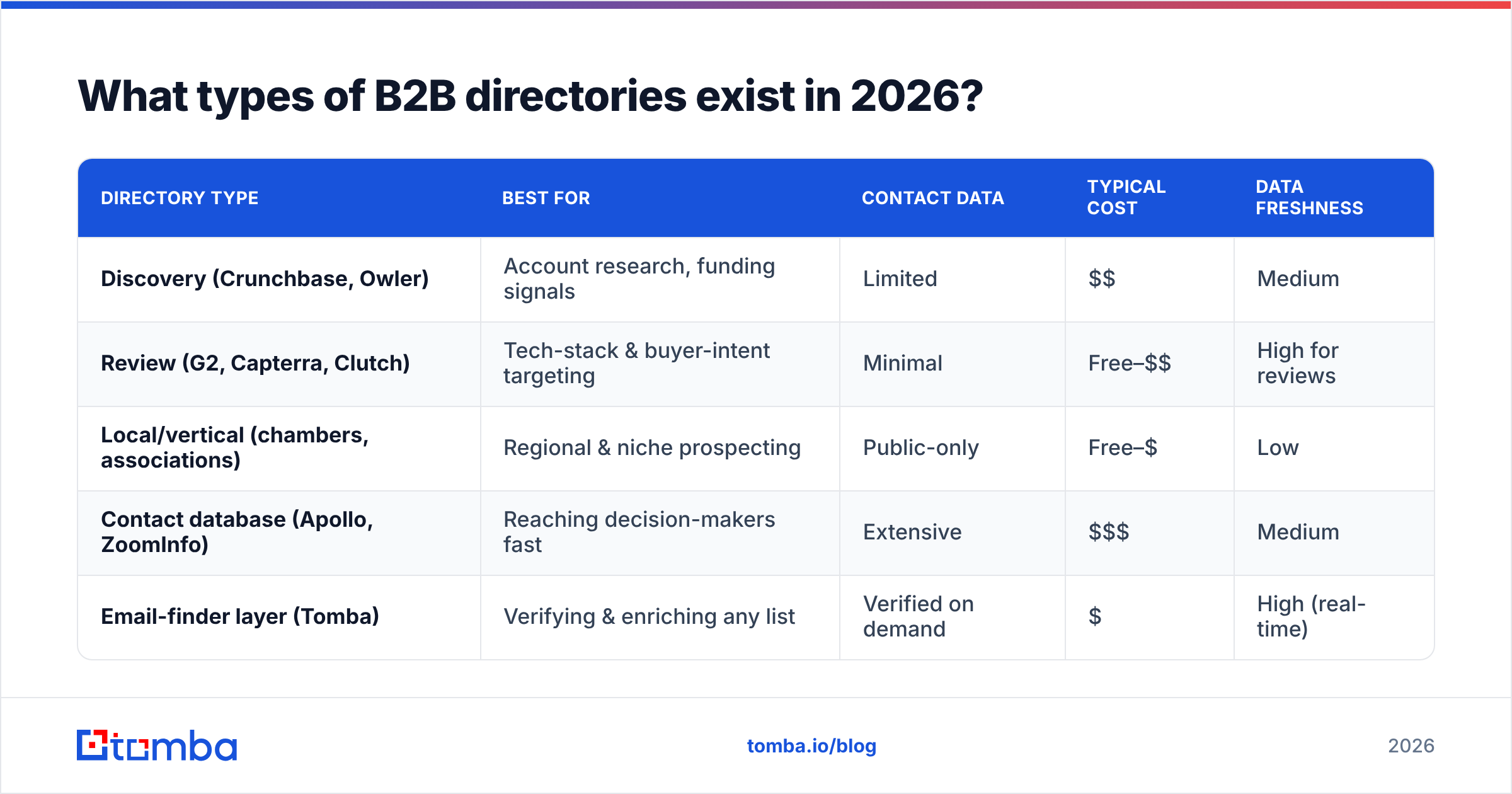
Here is how the main categories stack up on the things that decide whether a directory earns its place in your stack.
| Directory type | Best for | Contact data | Typical cost | Data freshness |
|---|---|---|---|---|
| Discovery (Crunchbase, Owler) | Account research, funding signals | Limited | $$ | Medium |
| Review (G2, Capterra, Clutch) | Tech-stack & buyer-intent targeting | Minimal | Free–$$ | High for reviews |
| Local/vertical (chambers, associations) | Regional & niche prospecting | Public-only | Free–$ | Low |
| Contact database (Apollo, ZoomInfo) | Reaching decision-makers fast | Extensive | $$$ | Medium |
| Email-finder layer (Tomba) | Verifying & enriching any list | Verified on demand | $ | High (real-time) |
The pattern most efficient teams settle on: pick one discovery or review directory to source accounts, then bolt on an email-finder layer to attach and verify contacts on demand. That keeps your list-building cheap and your contact data fresh, instead of paying enterprise prices for a bloated all-in-one whose records went stale six months ago.
How do you turn a B2B directory into a verified lead list?#
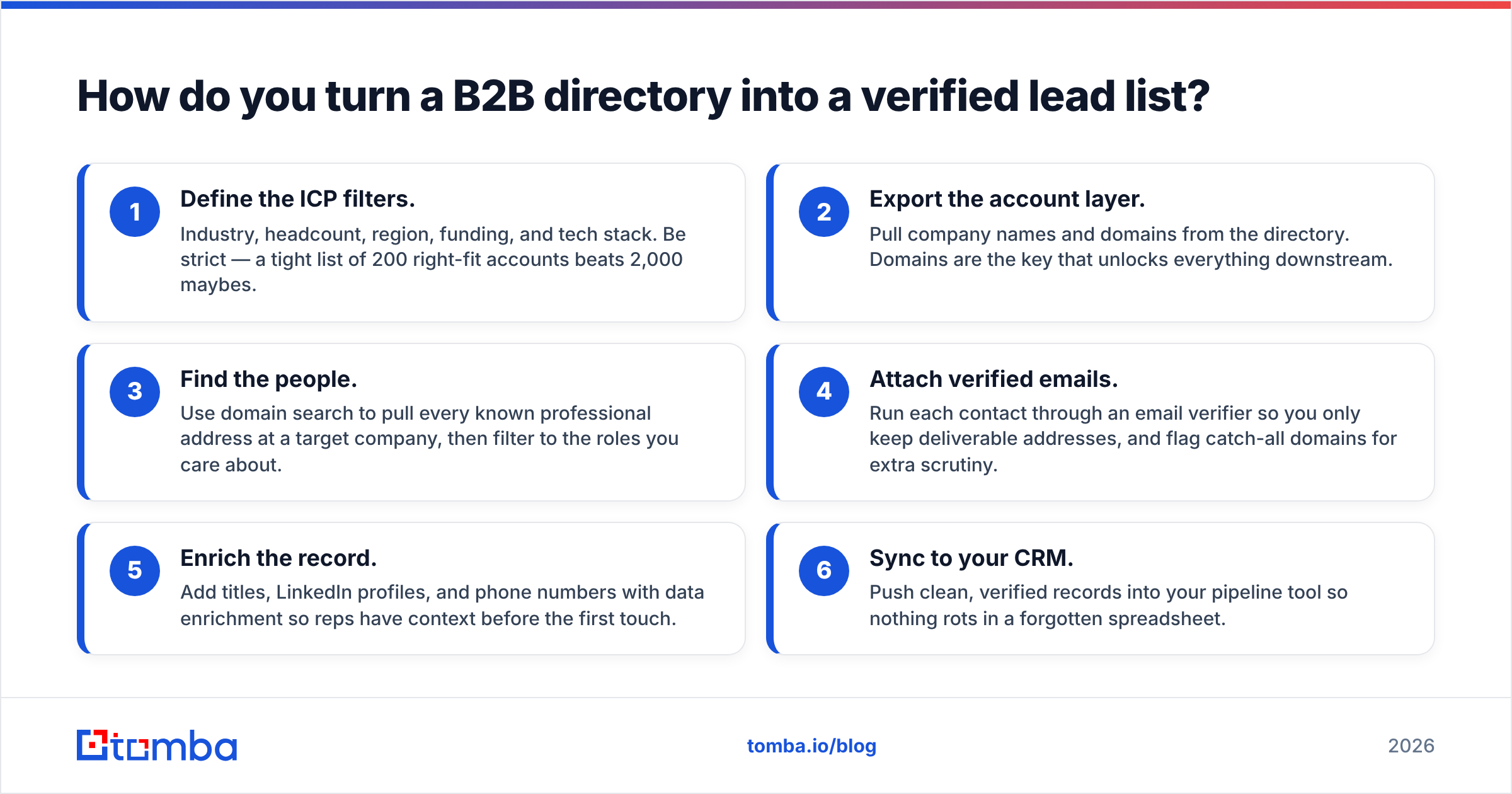
Conclusion first: build the account list in the directory, then enrich and verify contacts before any email leaves your outbox. Here is the workflow that scales.
- Define the ICP filters. Industry, headcount, region, funding, and tech stack. Be strict — a tight list of 200 right-fit accounts beats 2,000 maybes.
- Export the account layer. Pull company names and domains from the directory. Domains are the key that unlocks everything downstream.
- Find the people. Use domain search to pull every known professional address at a target company, then filter to the roles you care about.
- Attach verified emails. Run each contact through an email verifier so you only keep deliverable addresses, and flag catch-all domains for extra scrutiny.
- Enrich the record. Add titles, LinkedIn profiles, and phone numbers with data enrichment so reps have context before the first touch.
- Sync to your CRM. Push clean, verified records into your pipeline tool so nothing rots in a forgotten spreadsheet.
That sequence converts a flat directory listing into a sales-ready contact. Skip steps 4 and 5 and you are gambling with your domain reputation.

Which B2B directory should you choose?#
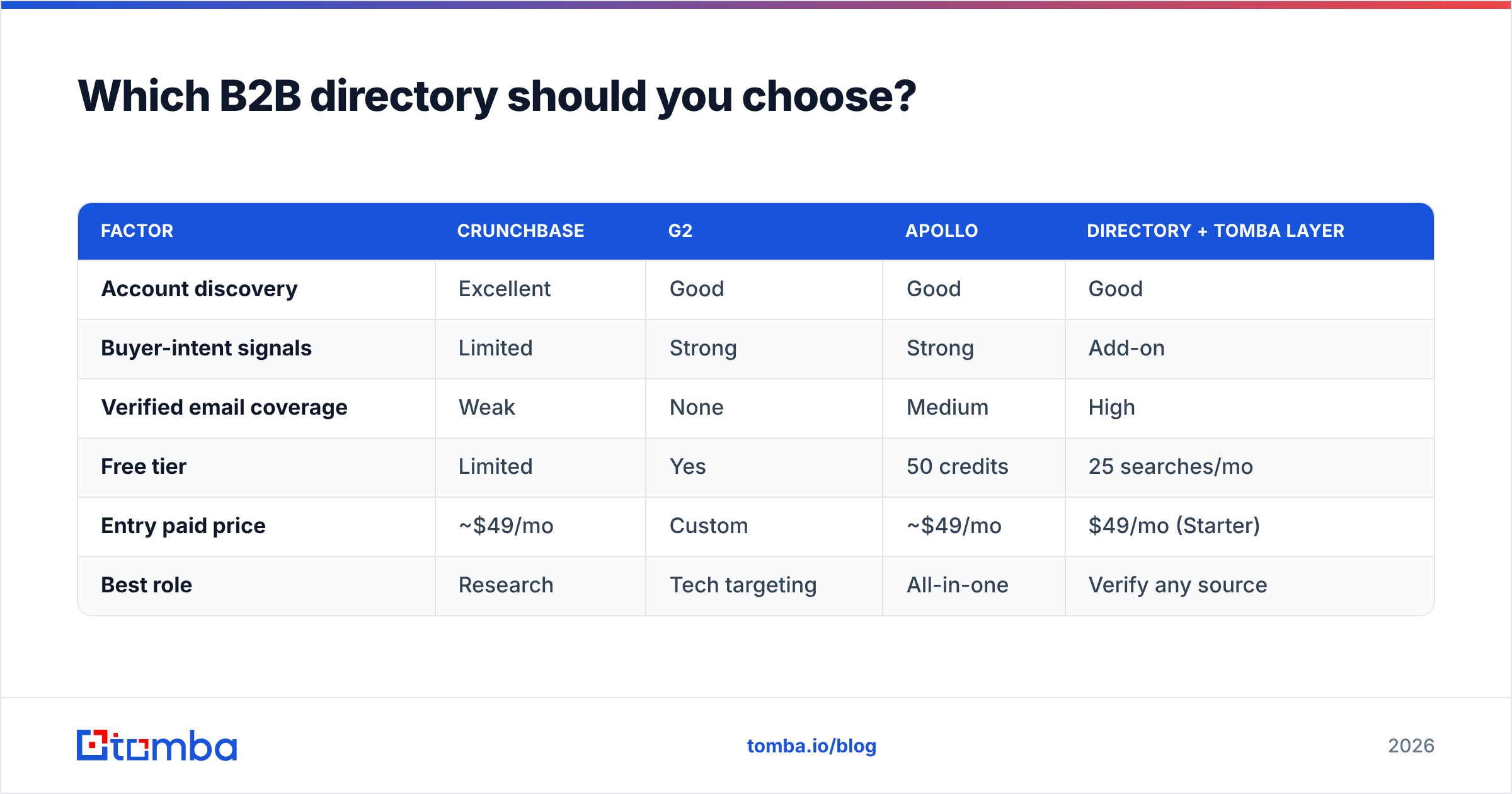
It depends on whether you are optimizing for discovery or reach. Here is a head-to-head on the most common starting points, scored on what matters to an outbound team.
| Factor | Crunchbase | G2 | Apollo | Directory + Tomba layer |
|---|---|---|---|---|
| Account discovery | Excellent | Good | Good | Good |
| Buyer-intent signals | Limited | Strong | Strong | Add-on |
| Verified email coverage | Weak | None | Medium | High |
| Free tier | Limited | Yes | 50 credits | 25 searches/mo |
| Entry paid price | ~$49/mo | Custom | ~$49/mo | $49/mo (Starter) |
| Best role | Research | Tech targeting | All-in-one | Verify any source |
A few honest takeaways:
- Crunchbase is unbeatable for funding-triggered prospecting but thin on direct contacts. Pair it with a finder.
- G2 and Capterra are the move when you sell into a specific tech stack — you can target companies that just reviewed a competitor. Cross-check vendor claims against G2's own category pages before you commit.
- Apollo bundles directory plus contacts, but coverage and accuracy vary by region, and you are locked into one vendor's data. If that is your concern, an Apollo alternative that lets you verify against multiple sources is worth a look.
- A directory-plus-Tomba layer keeps you vendor-flexible: source accounts wherever they are best, then verify and enrich through one consistent pipeline.
What about free B2B directories — are they worth it?#
Yes, with eyes open. Free directories — local chambers, association member lists, public review sites — are legitimate sources for top-of-funnel discovery. The catch is data decay. Public listings are rarely maintained in real time, so expect a meaningful slice to be wrong by the time you act on them. Industry studies on B2B data consistently peg annual contact decay in the 20–30% range as people change roles and companies restructure.
The free-directory playbook that actually works:
- Use them for account names and domains, not contact details. The public email on a listing is often a generic info@ inbox that no decision-maker reads.
- Re-verify everything. Treat any public address as a hypothesis until a verifier confirms it. A quick pass through a free email checker catches the obvious dead addresses before they cost you.
- Layer a finder on top. Once you have the domain, an email finder gets you the named decision-maker instead of the reception desk.
Free is fine as a starting layer. It is dangerous as your only layer.
How do you keep directory data from going stale?#
Treat your list like produce, not canned goods. Conclusion first: re-verify on a schedule and enrich continuously, or your hard-won list quietly rots.
- Verify before every send, not just at import. A contact verified in January may have moved by June.
- Run bulk hygiene quarterly. Push your whole database through a bulk verify pass and prune the bounces.
- Watch deliverability signals. Rising bounce rates are the canary — they mean your source data has decayed. Strong email deliverability starts with clean lists, not clever copy.
- Automate enrichment. Wire your directory and CRM together so new accounts get contact data attached automatically through the Tomba API or a no-code HubSpot integration.
The goal is a living list. A directory export is a photograph; your job is to keep the picture current.
Common mistakes when using a B2B directory#
- Blasting the raw export. Unverified directory data is the fastest way to a spam-folder reputation. Verify first.
- Targeting companies, not people. A company cannot reply to your email. Find the human and the role.
- Ignoring catch-all domains. Many corporate domains accept every address, so a "valid" result can still bounce. Use a dedicated catch-all verifier to score those separately.
- Paying enterprise prices for stale data. Bloated all-in-one platforms often charge the most for records that decay just as fast as free ones.
- Never refreshing. A list you built last year is a liability this year.
Avoid those five and you are already ahead of most outbound teams.
How does Tomba fit into a B2B directory workflow?#
Tomba is the verification and contact layer that sits on top of whatever directory you choose. You bring the account list — from Crunchbase, G2, a chamber of commerce, or a scraped vertical registry — and Tomba turns those domains into verified, enriched, sales-ready contacts.
- Find the people behind any domain with domain search and the core email finder.
- Verify deliverability with the email verifier and catch-all verifier before you send.
- Enrich records with titles, LinkedIn profiles, and phone numbers.
- Scale it through the API, Chrome extension, Google Sheets add-on, or bulk tools.
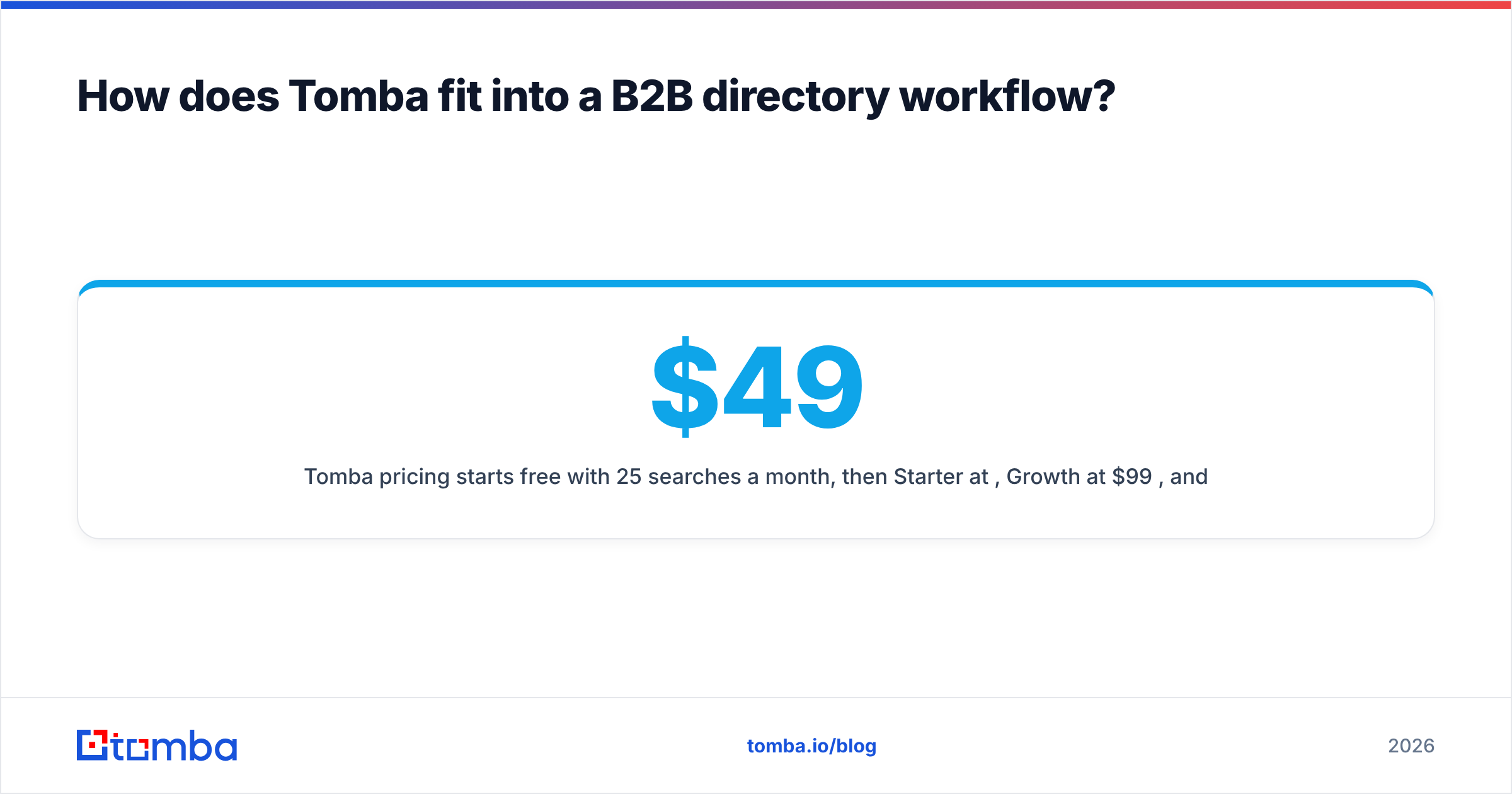
Tomba pricing starts free with 25 searches a month, then Starter at $49/mo, Growth at $99/mo, and Pro at $249/mo — so you can validate the workflow before committing budget. See full Tomba pricing for credit allowances per tier.
The bottom line#
A B2B directory gives you the map; a verification layer gets you to the door with the right name on the envelope. Pick a directory that matches your motion — discovery, review, or contact-rich — then attach verified contacts before you ever hit send. That combination is what separates a clean, high-converting list from a bounce-riddled one.
Ready to turn directory listings into pipeline? Start with the Tomba Email Finder — point it at any domain from your directory, pull verified decision-maker emails in seconds, and keep your outreach landing in inboxes instead of spam folders. The free tier gives you 25 searches to prove it out before you spend a dollar.
// get started
Find, verify and enrich your first contacts today
Start on the free plan with 25 searches a month, then scale when your team is ready.
Free plan · No credit card required · GDPR & CCPA
// about the author