B2B Email Appending Services: The 2026 Buyer's Guide
Email appending fills the gaps in your CRM by matching known contacts to verified business emails. Here's how the services work, what they cost, and how to keep match accuracy high in 2026.
You have 40,000 contact records and maybe 12,000 of them have a usable business email. The rest are names, companies, phone numbers, and LinkedIn URLs with an empty email column. Email appending is the service that fills that column — and doing it badly is one of the fastest ways to torch your sender reputation.
This guide explains how B2B email appending services actually work, what match rates and pricing to expect in 2026, where the compliance landmines are, and how to verify appended data before it ever touches a send.
TL;DR#
- Email appending matches your existing contact records (name + company, or name + domain) against a reference database to fill in missing business emails.
- Realistic match rates are 40–65% for B2B data — anyone promising 90%+ is either counting catch-all guesses or selling you junk.
- Always verify appended emails before sending. Appending without verification is how you land on a blacklist.
- Pricing splits into batch (per-record) and API/real-time models. Batch is cheaper per record; API is better for ongoing enrichment.
- Compliance matters: appended emails have no prior relationship, so GDPR/CAN-SPAM rules apply harder than to opt-in lists.
What is a B2B email appending service?#
Email appending is the process of taking the data you already have about a contact — usually a full name plus a company or domain — and matching it against a large reference database to retrieve their professional email address. Think of it like a reverse phone book: you walk in knowing the person's name and employer, and you walk out with the email that connects them.
There are two flavors you'll run into:
- Email appending (B2B): matches a person to their work email using name + company/domain. This is the focus of this guide.
- Reverse appending: you have an email and want the name, title, company, and other attributes — closer to data enrichment than appending.
The mechanics are straightforward but the quality varies wildly. A good service combines multiple signals — SMTP verification, pattern detection (e.g. first.last@company.com), web crawling, and historical data — to confirm a match. A weak one simply guesses the most common email pattern for a domain and ships it without checking whether the inbox exists.

How does email appending work under the hood?#
Most B2B email appending services run your input through a pipeline. Understanding the steps tells you why match rates are what they are — and where errors creep in.
- Normalization — your messy input (
Bob Smith, Acme Inc.) gets cleaned into a standard shape and the company is resolved to a domain (acme.com). - Pattern detection — the service identifies the company's dominant email format from known addresses at that domain.
- Candidate generation — it builds likely addresses (
bob.smith@,bsmith@,bob@). - Verification — each candidate is SMTP-checked and cross-referenced against existing records to confirm deliverability.
- Scoring — the best surviving candidate is returned with a confidence score; low-confidence matches are dropped rather than guessed.
The make-or-break step is verification. A pattern-only append (steps 1–3) is just an email permutator with a database attached. The services worth paying for treat step 4 as mandatory and refuse to return a "match" they couldn't validate. That's also why honest providers report lower match rates than the marketing-driven ones.
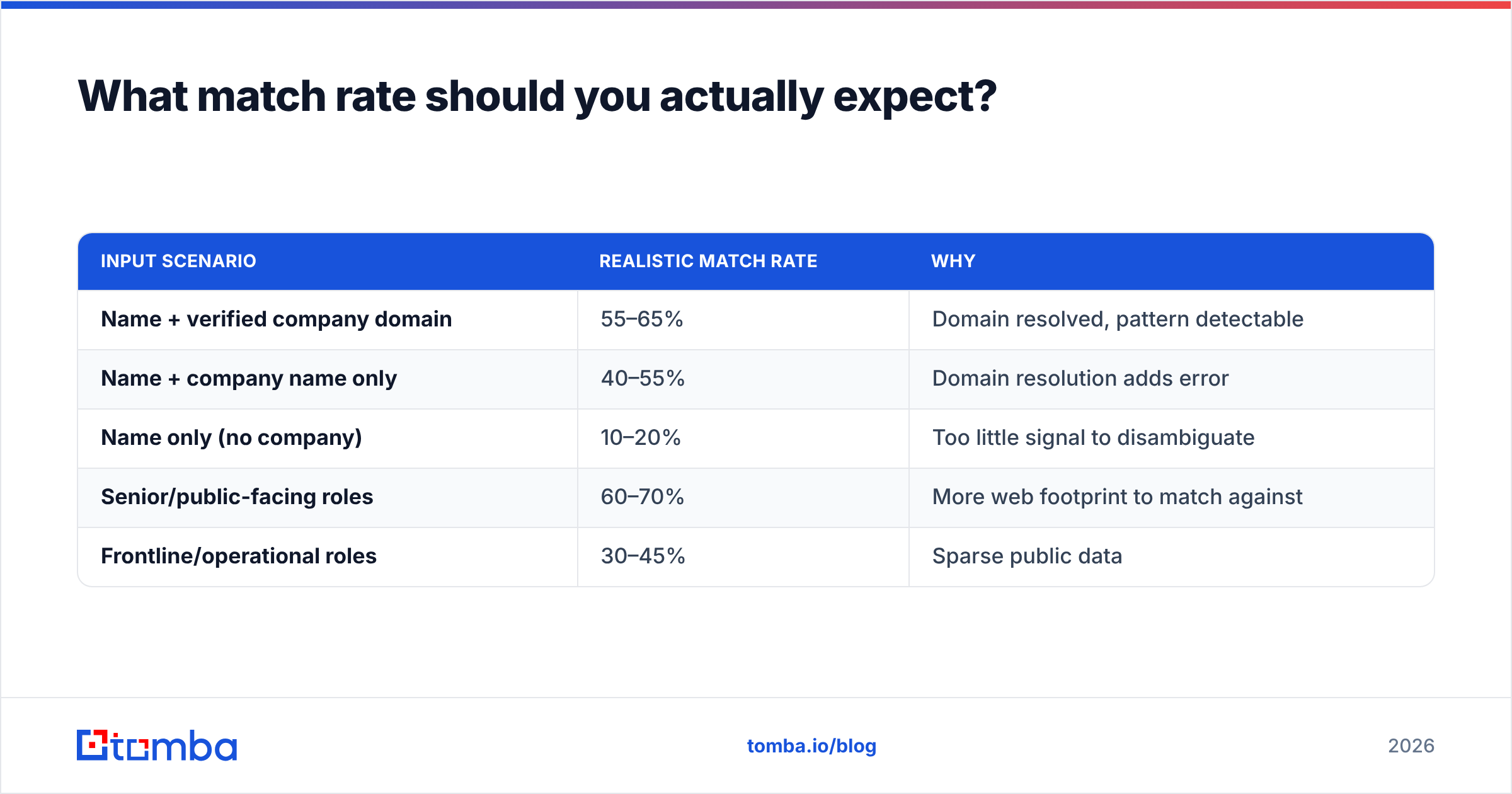
What match rate should you actually expect?#
Between 40% and 65% for typical B2B lists. That number depends almost entirely on input quality and the seniority/visibility of your contacts.
| Input scenario | Realistic match rate | Why |
|---|---|---|
| Name + verified company domain | 55–65% | Domain resolved, pattern detectable |
| Name + company name only | 40–55% | Domain resolution adds error |
| Name only (no company) | 10–20% | Too little signal to disambiguate |
| Senior/public-facing roles | 60–70% | More web footprint to match against |
| Frontline/operational roles | 30–45% | Sparse public data |
If a vendor quotes you "up to 95% match," ask two questions: are they counting catch-all domains as matches, and what's their verification step? Catch-all domains accept any address at the SMTP layer, so a naive system marks every guess as "valid." That inflates the headline number and hands you a list that bounces in production. Run anything from a catch-all domain through a dedicated catch-all verifier before trusting it.
Batch appending vs. API appending: which model fits?#
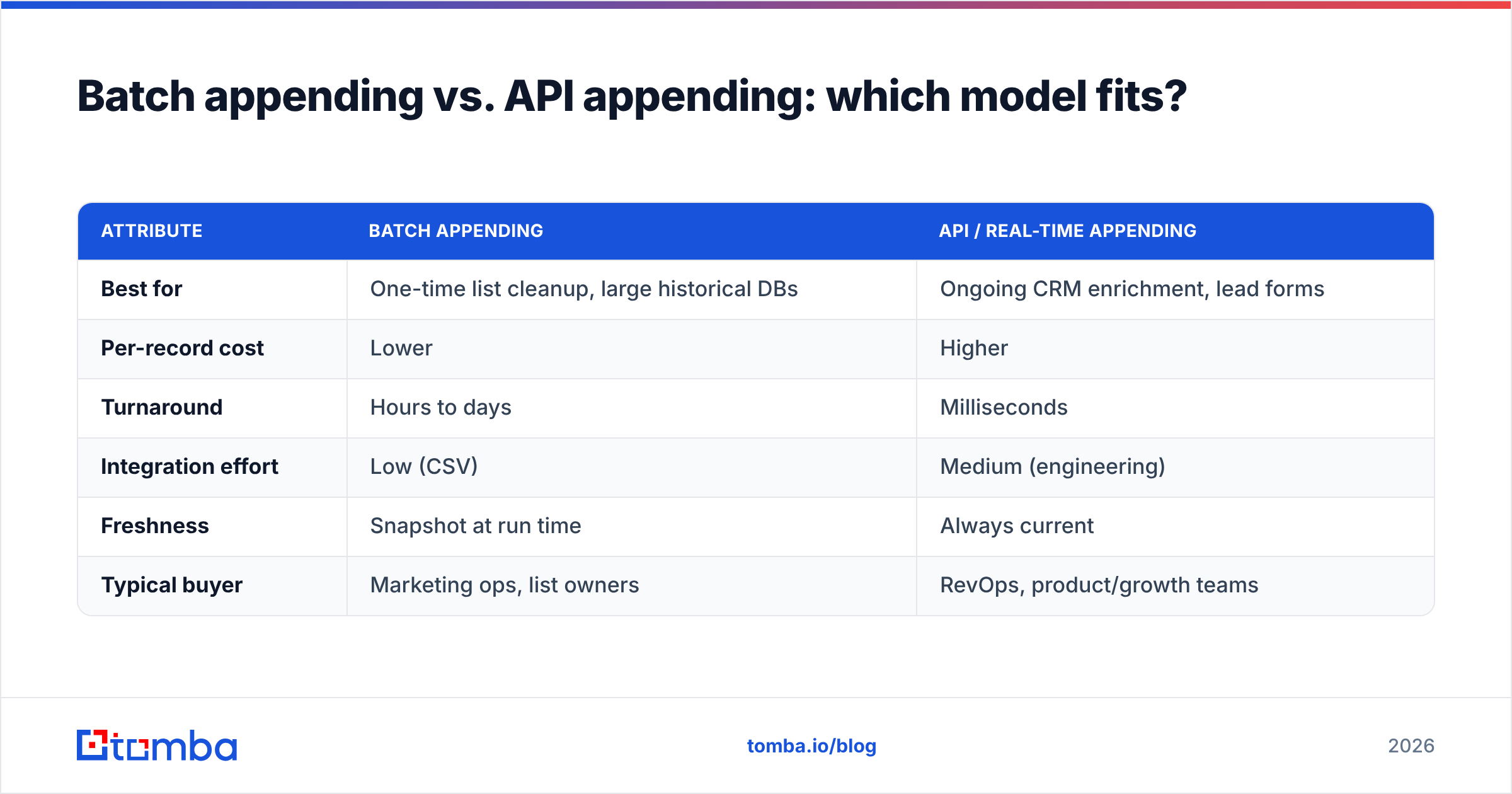
The delivery model shapes both cost and workflow. Batch appending is the classic upload-a-CSV-get-a-CSV service. API appending enriches records in real time as they enter your system — a new lead hits your CRM, your backend calls an endpoint, the email comes back enriched before a rep ever sees the record.
| Attribute | Batch appending | API / real-time appending |
|---|---|---|
| Best for | One-time list cleanup, large historical DBs | Ongoing CRM enrichment, lead forms |
| Per-record cost | Lower | Higher |
| Turnaround | Hours to days | Milliseconds |
| Integration effort | Low (CSV) | Medium (engineering) |
| Freshness | Snapshot at run time | Always current |
| Typical buyer | Marketing ops, list owners | RevOps, product/growth teams |
Most teams end up using both: a one-time batch pass to fix the existing database, then an API hook to keep new records clean. Tools like the Tomba bulk email finder cover the batch side, while the Tomba API handles real-time enrichment without you maintaining a scraping stack.
How much do B2B email appending services cost in 2026?#
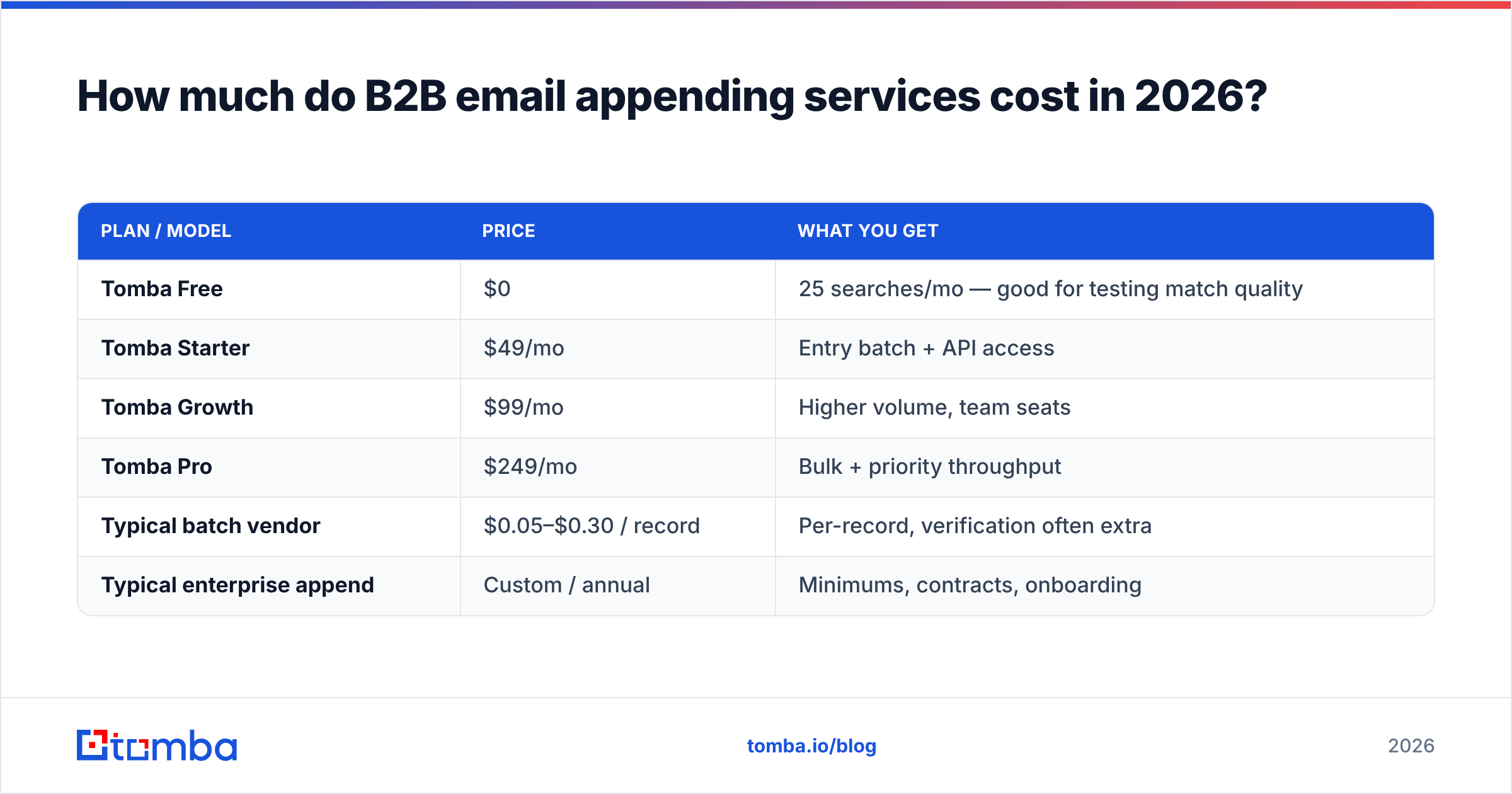
Pricing is usually per-record (batch) or per-credit (API), and the gap between vendors is large. Here's how Tomba's model compares to the general market shape — note these are representative ranges, not a head-to-head endorsement of any single competitor.
| Plan / model | Price | What you get |
|---|---|---|
| Tomba Free | $0 | 25 searches/mo — good for testing match quality |
| Tomba Starter | $49/mo | Entry batch + API access |
| Tomba Growth | $99/mo | Higher volume, team seats |
| Tomba Pro | $249/mo | Bulk + priority throughput |
| Typical batch vendor | $0.05–$0.30 / record | Per-record, verification often extra |
| Typical enterprise append | Custom / annual | Minimums, contracts, onboarding |
Full Tomba pricing is published per plan rather than hidden behind a sales call, which matters when you're trying to model cost per matched record. The hidden-cost trap with per-record vendors is paying for attempts rather than matches — always confirm whether you're billed on records submitted or emails successfully appended and verified.

Is email appending legal and compliant?#
It can be, but appended contacts are higher-risk than opt-in subscribers, and you have to treat them that way.
The core issue: an appended email represents someone who never gave you permission to contact them. Under GDPR, processing personal data (which a business email of a named individual is) needs a lawful basis — usually legitimate interest for B2B, which requires a documented balancing test and an easy opt-out. The U.S. CAN-SPAM rules are more permissive but still require accurate headers, a real physical address, and a working unsubscribe. The Wikipedia overview of email appending notes that major email marketing trade groups have historically discouraged appending to consumer lists for exactly these consent reasons — B2B is treated more leniently but not exempt.
Practical guardrails:
- Keep your match provenance. Record where and when each email was appended; you'll need it if a regulator or recipient asks.
- Warm up gradually. A freshly appended list sent at full volume looks like a purchased list to inbox providers. Ramp slowly and watch your sender reputation.
- Make opt-out frictionless. One click, honored immediately.
- Don't append consumer/personal emails for cold outreach — that's where the legal exposure spikes.
Vendor reputation reporting platforms like G2 are a useful sanity check on whether a provider's compliance claims hold up in practice.
How do you verify appended emails before sending?#
Verification is non-negotiable, and it's a separate step from appending. Even a well-matched email goes stale — people change jobs, companies fold, inboxes get deactivated. Sending to an unverified appended list is the single most common cause of self-inflicted deliverability damage.
A solid post-append verification workflow:
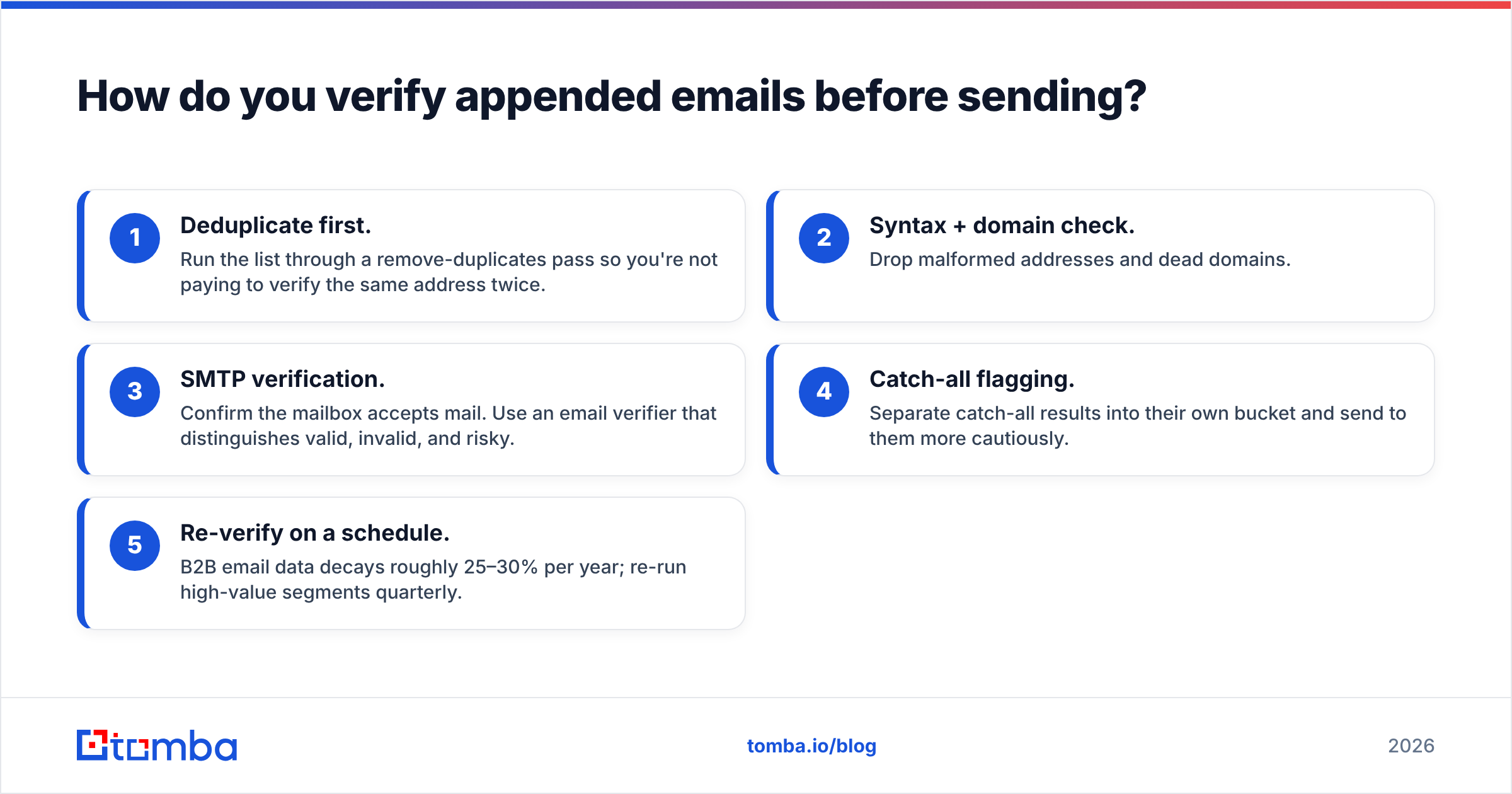
- Deduplicate first. Run the list through a remove-duplicates pass so you're not paying to verify the same address twice.
- Syntax + domain check. Drop malformed addresses and dead domains.
- SMTP verification. Confirm the mailbox accepts mail. Use an email verifier that distinguishes valid, invalid, and risky.
- Catch-all flagging. Separate catch-all results into their own bucket and send to them more cautiously.
- Re-verify on a schedule. B2B email data decays roughly 25–30% per year; re-run high-value segments quarterly.
This is also where appending and verification ideally come from the same provider — when the find emails step and the verify step share a data backbone, you get consistent confidence scoring instead of two systems that disagree about whether an address is good.
How to choose a B2B email appending service#
Weigh providers on these factors rather than headline match rates:
- Verification included, not upsold — appending without verification is half a product.
- Transparent match definition — confirm catch-alls aren't padding the number.
- Data sourcing transparency — providers like Tomba publish where the data comes from; be wary of vendors who won't say.
- Delivery flexibility — both batch and API, so you're not boxed in.
- Compliance posture — documented GDPR/CAN-SPAM handling and opt-out support.
- Honest pricing — billed on verified matches, with a free tier to test quality on your own data first.
The fastest way to evaluate any vendor is to run a sample of your records — ideally a few hundred you can manually spot-check — and measure verified match rate and bounce rate. Marketing benchmarks mean nothing; your data is the only test that counts. HubSpot's own guidance on email list health and Salesforce's data management resources both reinforce the same point: clean, consented, verified data outperforms volume every time.
The bottom line#
B2B email appending services are genuinely useful for reviving a database full of half-complete records — but only when paired with real verification and handled with compliance discipline. Chase match rate alone and you'll buy a list that bounces; prioritize verified, well-sourced matches and you'll actually fill your pipeline.
If you want to test appending on your own contacts without a sales call, start with the Tomba Email Finder and its free tier — 25 searches a month is enough to measure real match quality against your records, then scale into bulk or API enrichment once the numbers hold up. Match what you can verify, verify what you append, and your sender reputation will thank you.
// get started
Find, verify and enrich your first contacts today
Start on the free plan with 25 searches a month, then scale when your team is ready.
Free plan · No credit card required · GDPR & CCPA
// about the author