B2B List Providers in 2026: How to Buy Data That Converts
Buying a B2B contact list is easy. Buying one that actually converts is not. Here's how to vet B2B list providers, what to pay, and how to avoid burning your domain on stale data.
B2B List Providers in 2026: How to Buy Data That Converts
Buying a list is the fastest way to fill a pipeline — and the fastest way to wreck a sending domain if you pick the wrong vendor. The market is crowded with providers promising "100 million verified contacts," but coverage and accuracy are very different things, and most lists go stale faster than buyers expect.
This guide breaks down what B2B list providers actually sell, how to compare them, what fair pricing looks like in 2026, and how to protect your deliverability when you put purchased data into a sequence.
TL;DR#
- A B2B list provider sells contact and company data — names, job titles, emails, phone numbers, and firmographics — either as a one-time export or an ongoing subscription.
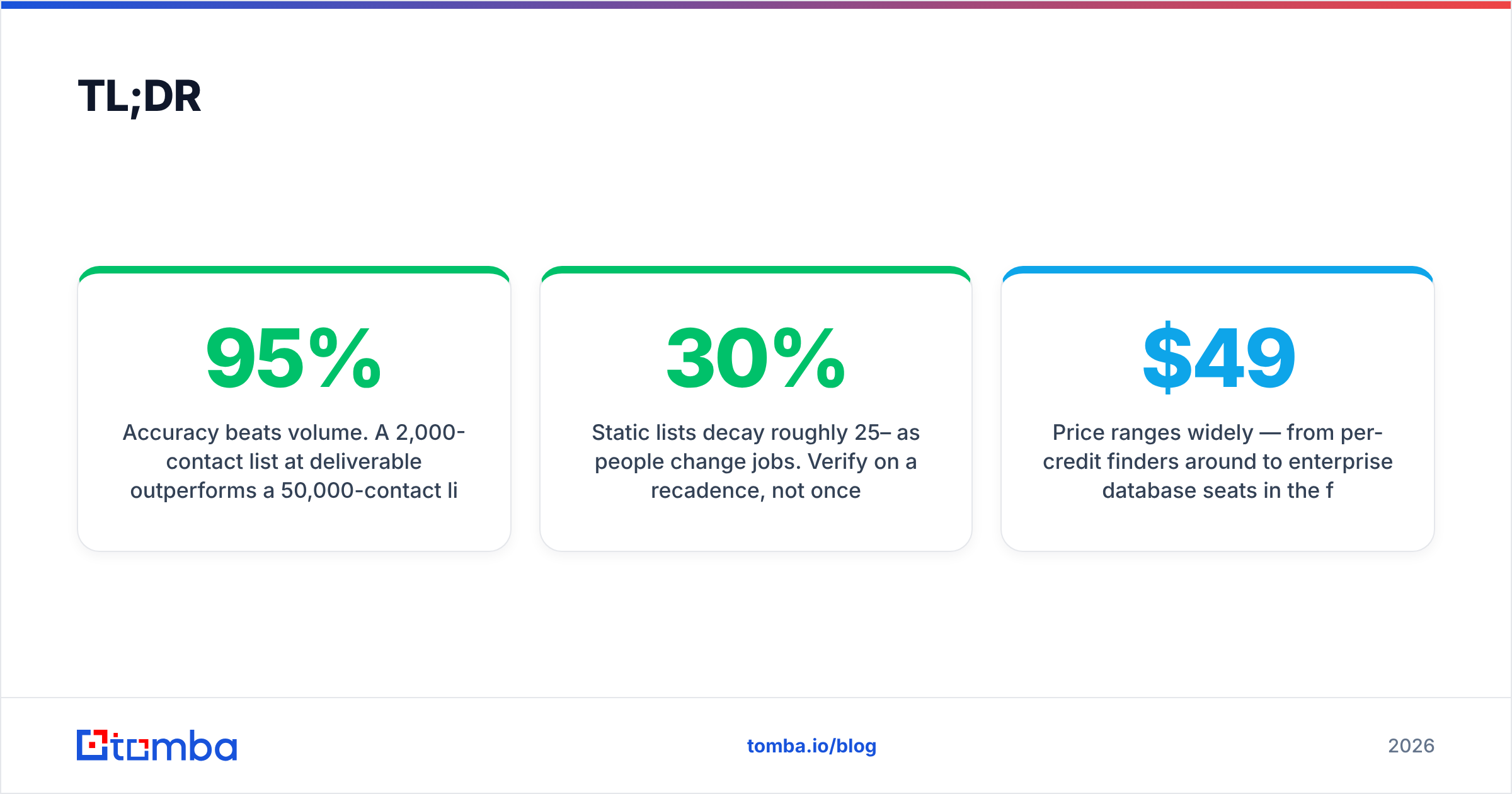
- Accuracy beats volume. A 2,000-contact list at 95% deliverable outperforms a 50,000-contact list at 70%, both in replies and in domain health.
- Static lists decay roughly 25–30% per year as people change jobs. Verify on a recadence, not once.
- Price ranges widely — from per-credit finders around $49/mo to enterprise database seats in the five figures per year.
- The safest play is build-and-verify: pull targeted contacts on demand with an email finder, then verify before every send rather than buying a giant static file.
What is a B2B list provider?#
A B2B list provider is a company that aggregates business contact and firmographic data and sells access to it. Think of it like a wholesale grocer for sales teams: instead of foraging for each contact yourself, you buy in bulk from a supplier who has already gathered, cleaned, and packaged the goods.
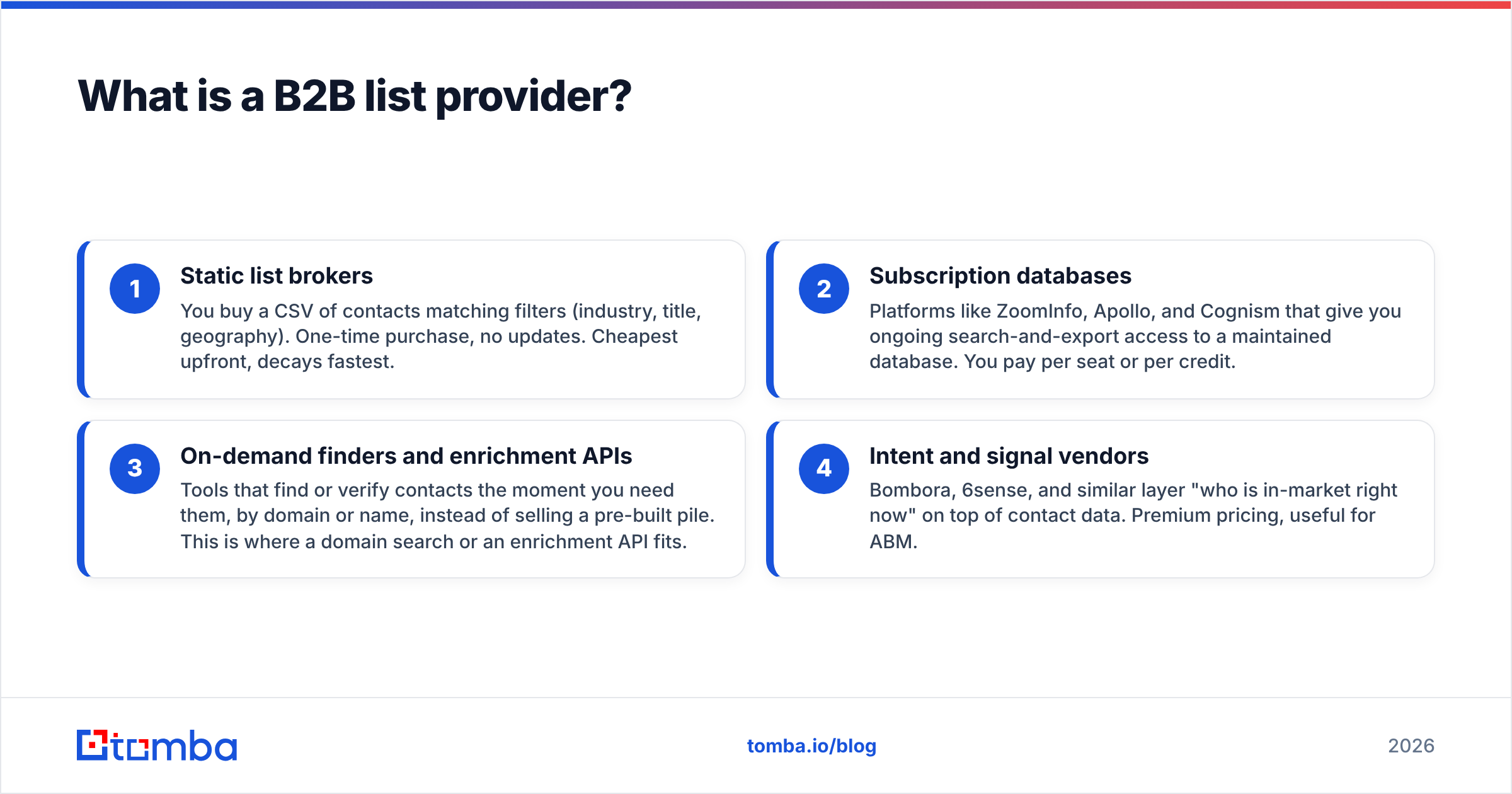
Providers fall into a few buckets, and the label "list provider" gets stretched across all of them:
- Static list brokers — You buy a CSV of contacts matching filters (industry, title, geography). One-time purchase, no updates. Cheapest upfront, decays fastest.
- Subscription databases — Platforms like ZoomInfo, Apollo, and Cognism that give you ongoing search-and-export access to a maintained database. You pay per seat or per credit.
- On-demand finders and enrichment APIs — Tools that find or verify contacts the moment you need them, by domain or name, instead of selling a pre-built pile. This is where a domain search or an enrichment API fits.
- Intent and signal vendors — Bombora, 6sense, and similar layer "who is in-market right now" on top of contact data. Premium pricing, useful for ABM.
Most teams end up using two of these together: a database or finder for contacts, plus a verification layer so they aren't emailing dead addresses.
)
How do B2B list providers compare in 2026?#
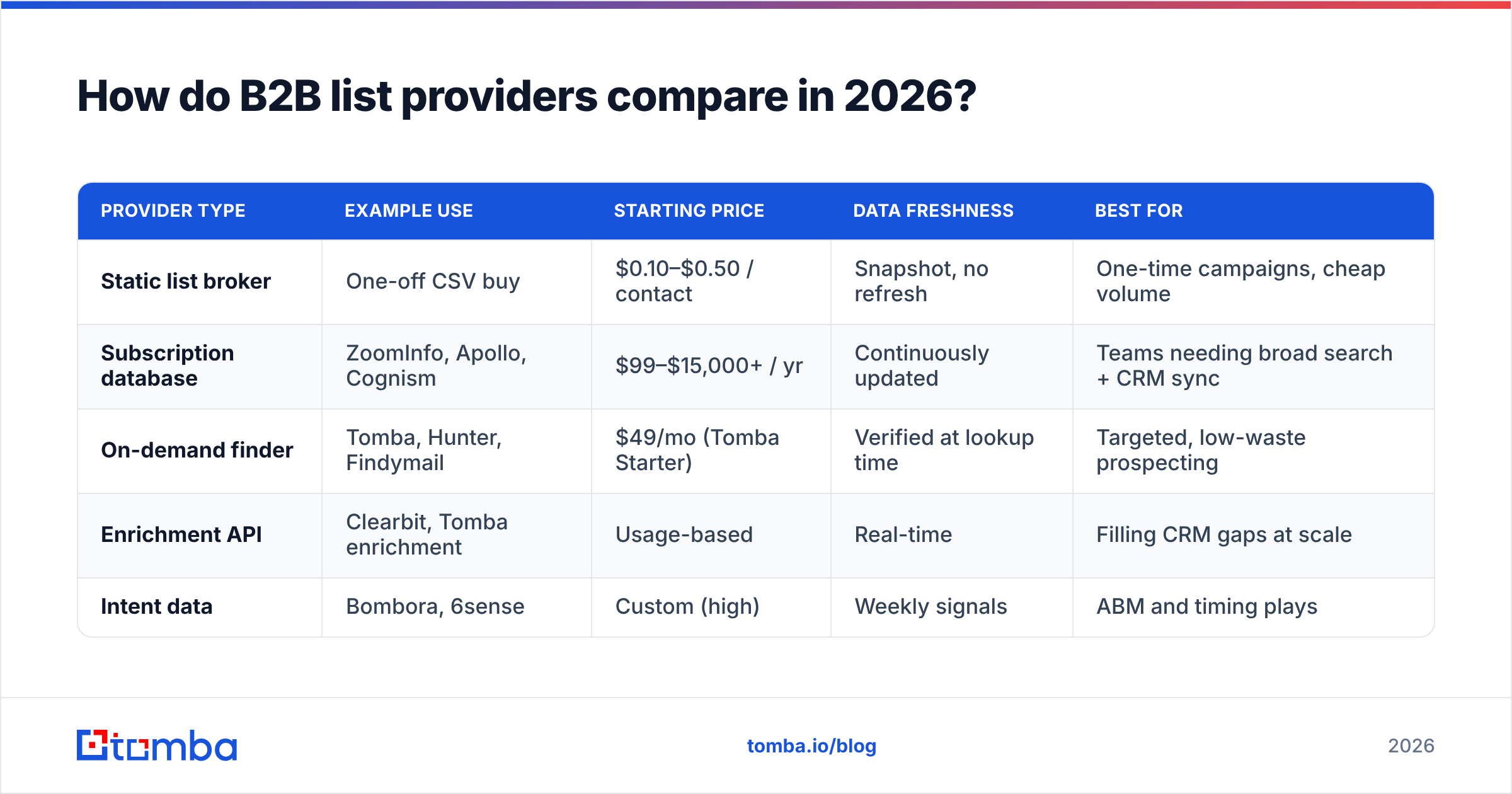
Here is a practical comparison across the categories you'll actually evaluate. Prices are representative starting points for 2026; every vendor gates real numbers behind a sales call, so treat these as directional.
| Provider type | Example use | Starting price | Data freshness | Best for |
|---|---|---|---|---|
| Static list broker | One-off CSV buy | $0.10–$0.50 / contact | Snapshot, no refresh | One-time campaigns, cheap volume |
| Subscription database | ZoomInfo, Apollo, Cognism | $99–$15,000+ / yr | Continuously updated | Teams needing broad search + CRM sync |
| On-demand finder | Tomba, Hunter, Findymail | $49/mo (Tomba Starter) | Verified at lookup time | Targeted, low-waste prospecting |
| Enrichment API | Clearbit, Tomba enrichment | Usage-based | Real-time | Filling CRM gaps at scale |
| Intent data | Bombora, 6sense | Custom (high) | Weekly signals | ABM and timing plays |
The pattern: the more "pre-built and bulk" the offering, the cheaper per record and the faster it rots. The more "on-demand and verified," the higher the unit cost but the lower your bounce rate and wasted spend.
If you're weighing a big-database subscription against a leaner finder, it's worth reading how the leaders stack up before committing — our breakdown of Apollo alternatives and Clearbit alternatives covers the tradeoffs in depth. You can also sanity-check any vendor's reputation on a neutral review site like G2 before signing.
How do you judge data accuracy and coverage?#
Conclusion first: never trust the headline contact count. Judge a provider on deliverable accuracy within your specific segment, not total database size.
A vendor can truthfully claim 200 million contacts and still be useless to you if only 4% are in your niche, or if half the emails in your niche bounce. Ask for these numbers, segment by segment:
- Match rate — Of the companies you target, for how many does the provider have any contact at the right title?
- Email validity rate — Of those emails, how many pass verification right now (not when they were first collected)?
- Catch-all handling — How does the provider treat catch-all domains, which accept every address and hide invalids? A real catch-all verifier distinguishes likely-valid from guesswork.
- Refresh cadence — How often is the record re-checked? "Verified" with no date is marketing, not data.
The honest move is to run a paid sample before you buy the full file. Take 200 contacts, push them through an independent email verifier, and measure the real bounce risk yourself. If a provider won't let you sample, that's an answer in itself.
Transparency about sourcing matters too. Vendors that publish where their data comes from — public web, opt-in networks, partner contributions — are easier to trust than black boxes. Tomba documents its data sources for exactly this reason, and the major analysts at Gartner track the category if you want a third-party lens.
Why do purchased B2B lists decay so fast?#
Because people move. The average B2B contact list loses roughly 25–30% of its accuracy per year as people change jobs, companies rebrand, and domains shift. Six months after purchase, a meaningful slice of a static list is already pointing at empty inboxes.
Picture a list like fresh produce. The day you buy it, it's at peak quality. Leave it in the CRM for a year and you're sending to spoiled records — and your mailbox provider notices. High bounce rates and spam-trap hits drag down your sender reputation, which quietly tanks deliverability for your good emails too.
This is the core argument against buying one enormous static file and working it for months. The data is decaying the entire time, and you're the last to know — usually when your reply rate craters.
)
Should you buy a list or build one on demand?#
For most teams in 2026, build-and-verify beats buy-and-blast. Here's the decision framework.
Buy a static list when:
- You need a large volume fast for a one-time event or a low-stakes channel.
- Your segment is broad and forgiving of some waste.
- You have a verification step in place before anything sends.
Build on demand when:
- You target specific accounts and titles (most outbound).
- Deliverability and domain health are priorities.
- You'd rather pay for 2,000 accurate contacts than 50,000 mostly-dead ones.
The build-on-demand workflow is straightforward:
- Define the account list — companies and titles you actually want.
- Find contacts by domain using a bulk email finder so you only pull people who match.
- Verify before the send, including catch-all checks, not at purchase time.
- Enrich the gaps with data enrichment to add phone numbers or firmographics where the CRM is thin.
- Re-verify on a cadence — monthly for active sequences.
This costs more per record than a bulk CSV, but you waste far less, your bounce rate stays low, and you keep control of your domain reputation. Speaking of which — checking email deliverability fundamentals before you scale outbound saves a lot of pain later.
What does fair pricing look like?#
Pricing depends entirely on the model. Roughly:
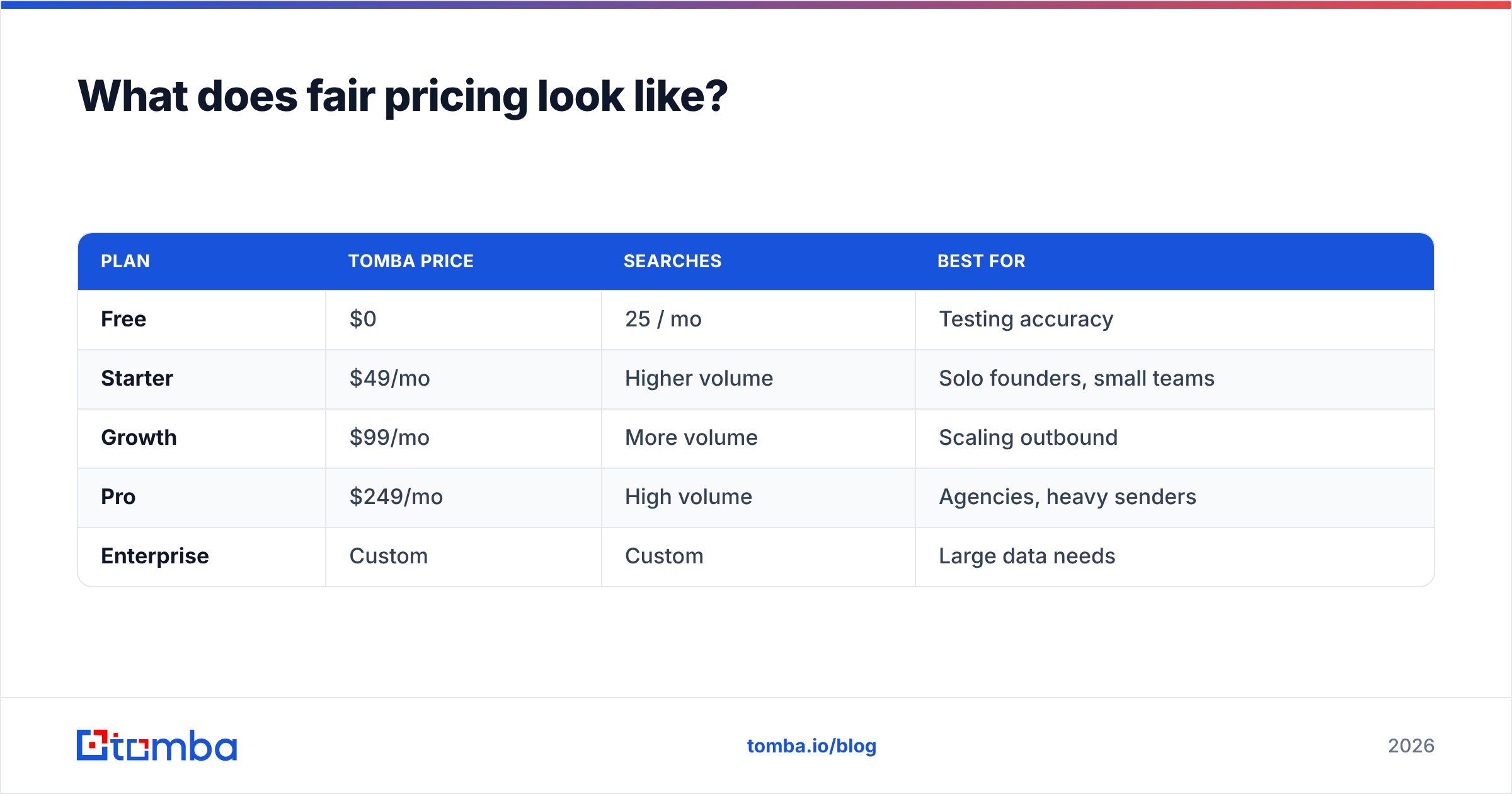
- Per-credit finders start affordably — Tomba's pricing runs a free tier at 25 searches/month, then Starter at $49/mo, Growth at $99/mo, and Pro at $249/mo, with custom enterprise plans above that.
- Subscription databases like ZoomInfo and Cognism typically land in the low-to-mid five figures per year for a real seat, often with annual commitments and add-on modules for intent or technographics.
- Static broker lists look cheap per record ($0.10–$0.50) but the effective cost is much higher once you account for bounces and wasted sending capacity.
A useful way to compare: don't price per contact purchased, price per contact that actually replies. A $49/mo finder that delivers 95% of its emails frequently beats a five-figure database seat you barely use, especially for a small team running focused campaigns.
| Plan | Tomba price | Searches | Best for |
|---|---|---|---|
| Free | $0 | 25 / mo | Testing accuracy |
| Starter | $49/mo | Higher volume | Solo founders, small teams |
| Growth | $99/mo | More volume | Scaling outbound |
| Pro | $249/mo | High volume | Agencies, heavy senders |
| Enterprise | Custom | Custom | Large data needs |
How do you protect deliverability with bought data?#
Treat every purchased or found contact as unverified until you've checked it yourself. The rules that keep your domain healthy:
- Verify in full before the first send, then re-verify active records monthly.
- Quarantine catch-all domains and validate them separately instead of blasting them.
- Warm up gradually — don't drop 10,000 cold purchased contacts onto a fresh domain in week one.
- Remove duplicates and role addresses (info@, sales@) before importing.
- Authenticate your domain with SPF, DKIM, and DMARC so mailbox providers trust you.
Skip these and even good data behaves like bad data, because the volume and bounce spikes look like spam to filters. Do them and a modest, verified list will outperform a giant unverified one every time.
The bottom line#
The best B2B list provider is the one whose data is accurate for your segment, right now — not the one with the biggest number on the homepage. Bulk static lists are cheap upfront and expensive in bounces and reputation. On-demand finding plus verification costs a little more per record and saves you from the slow deliverability death that kills most cold programs.
If you want to stop renting stale spreadsheets and start pulling fresh, verified contacts only when you need them, try the Tomba Email Finder. Find professional emails by domain, name, or company, verify them before they ever hit a sequence, and keep your sending domain — and your reply rate — healthy. Start on the free tier, test the accuracy on your own segment, and scale only what works.
// get started
Find, verify and enrich your first contacts today
Start on the free plan with 25 searches a month, then scale when your team is ready.
Free plan · No credit card required · GDPR & CCPA
// about the author