The 9 Best B2B Prospecting Tools in 2026 (Ranked & Compared)
A no-fluff breakdown of the best B2B prospecting tools in 2026 — what each does well, where they fall short, and how to build a stack that books meetings.
placeholder
TL;DR
- B2B prospecting tools fall into three buckets: contact-data providers, engagement/sequencing platforms, and intent/signal layers. Most teams need one from each — not nine overlapping subscriptions.
- Data accuracy is the single biggest driver of ROI. A tool with a flashy sequencer and stale emails still tanks your deliverability and your reputation.
- All-in-one suites (Apollo, Seamless.AI) trade depth for convenience; specialists (Tomba, ZoomInfo, Clay) win on the dimension they focus on.
- For most SMB and mid-market teams, a focused email-finder plus a lightweight sequencer beats a $15k/year enterprise platform you'll use 20% of.
- Budget reality: you can assemble a credible prospecting stack for under $200/month if you pick specialists instead of paying for bundled seats you won't touch.
What are B2B prospecting tools?#
B2B prospecting tools are the software that turns "we should sell to companies like X" into a list of named humans with verified contact details and a way to reach them. Think of it like fishing: data tools tell you where the fish are and hand you the right bait, engagement tools are the rod and line, and intent tools tell you which pond is biting today.
Technically, the category spans four jobs:
- Finding contacts — surfacing names, titles, and verified emails or phone numbers for the accounts you target.
- Verifying data — confirming an address actually accepts mail before you send, so bounces don't wreck your sender reputation.
- Engaging at scale — sequencing emails, calls, and LinkedIn touches without manual copy-paste.
- Prioritizing — using intent and firmographic signals to decide who to contact first.
The mistake most teams make is buying one tool that claims to do all four and discovering it does none of them well. The best prospecting stacks are assembled, not bought off a single shelf.
What types of B2B prospecting tools are there?#
Before comparing brands, sort the market by the job each tool is built for. This is the structure that should drive your buying decision:
- Contact-data providers — Tools like Tomba, ZoomInfo, and Apollo whose core asset is the database. You judge them on coverage, accuracy, and how fresh the records are. This is the foundation; everything else fails if this layer is wrong.
- Engagement platforms — Outreach, Salesloft, and Instantly live here. They sequence multi-channel touches, track replies, and manage cadences. They assume you already have good data.
- Intent and signal layers — 6sense, Bombora, and Clearbit surface which accounts are researching your category right now, so reps prioritize warm accounts over cold ones.
- Enrichment and orchestration — Clay and Tomba's data enrichment fill gaps in existing records and chain data sources together for waterfall lookups.
- Visitor identification — Tools such as Tomba's website visitor reveal tell you which companies already visited your site but never filled out a form.
A healthy stack picks one strong tool from buckets 1 and 2, then adds buckets 3–5 only when volume justifies the spend. Don't pay for intent data when you can't even keep up with your current list.
What are the best B2B prospecting tools in 2026?#
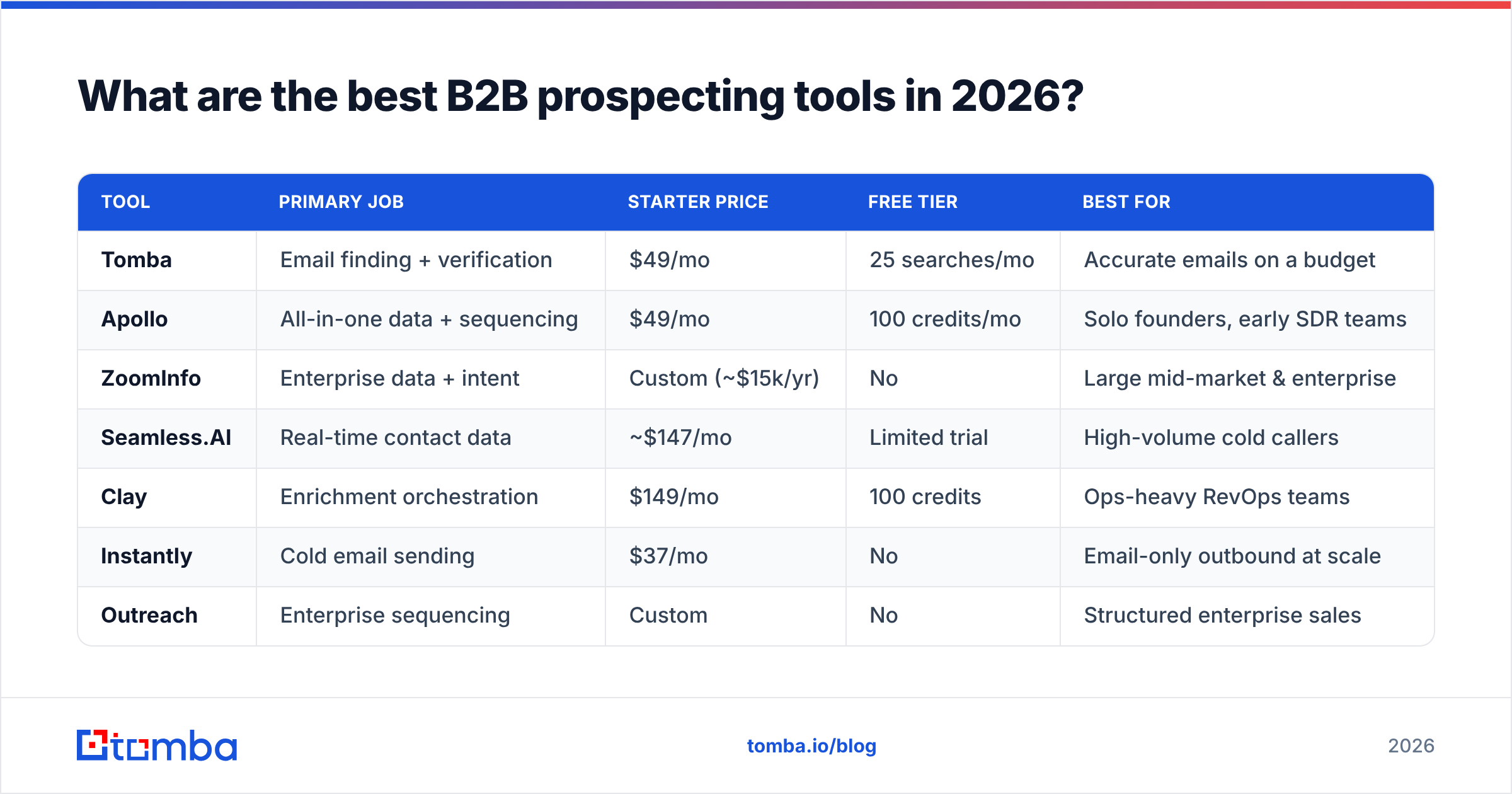
Here is the head-to-head. Prices reflect entry paid tiers as of 2026; check each vendor's page for current numbers since pricing shifts.
| Tool | Primary job | Starter price | Free tier | Best for |
|---|---|---|---|---|
| Tomba | Email finding + verification | $49/mo | 25 searches/mo | Accurate emails on a budget |
| Apollo | All-in-one data + sequencing | $49/mo | 100 credits/mo | Solo founders, early SDR teams |
| ZoomInfo | Enterprise data + intent | Custom (~$15k/yr) | No | Large mid-market & enterprise |
| Seamless.AI | Real-time contact data | ~$147/mo | Limited trial | High-volume cold callers |
| Clay | Enrichment orchestration | $149/mo | 100 credits | Ops-heavy RevOps teams |
| Instantly | Cold email sending | $37/mo | No | Email-only outbound at scale |
| Outreach | Enterprise sequencing | Custom | No | Structured enterprise sales |
| 6sense | Buyer intent | Custom | Limited | ABM and demand gen |
| Lusha | Quick contact lookup | $36/mo | 5 credits/mo | Lightweight, ad-hoc prospecting |
A few honest takeaways from that grid. The all-in-ones (Apollo, Seamless.AI) are convenient but their data accuracy is uneven — fine for top-of-funnel volume, risky for high-value accounts. The enterprise platforms (ZoomInfo, Outreach, 6sense) are powerful but priced and contracted for teams with a dedicated ops function. And the specialists — a focused email finder like Tomba, a pure sender like Instantly — let smaller teams punch above their budget by paying only for the job that actually moves pipeline.
How do you choose the right B2B prospecting tools?#
Start with the conclusion: pick your data tool first, then everything else. A perfect sequence sent to a wrong address is worse than no send at all — it costs you deliverability.
Score candidates against these criteria in order of impact:
- Data accuracy. Ask for the verification rate, not the database size. A 500M-record database with 30% stale emails is worse than a smaller, freshly verified one. This is where bounce rate — and your domain reputation — is won or lost.
- Verification built in. If your finder doesn't verify before handing you an address, you're paying twice: once to find, again to clean. Tools that pair finding with an email verifier in one step save real money.
- Coverage for your ICP. A tool strong in North American SaaS may be thin in EU manufacturing. Test it on 50 of your actual target accounts before signing.
- Workflow fit. Does it push to your CRM, work inside a Google Sheets add-on, or expose an email finder API so you can automate? A tool you have to babysit is a tool reps abandon.
- Pricing model. Credit-based pricing rewards precision; per-seat pricing rewards volume. Match the model to how your team actually prospects.
According to G2's sales-intelligence category, buyer reviews consistently rank data accuracy and CRM integration above feature count — which tells you the "does everything" pitch is rarely what wins on the ground.

Are all-in-one platforms better than specialist prospecting tools?#
Not for most teams. All-in-one suites win on procurement simplicity — one invoice, one login — but they almost always compromise on the layer you care about most.
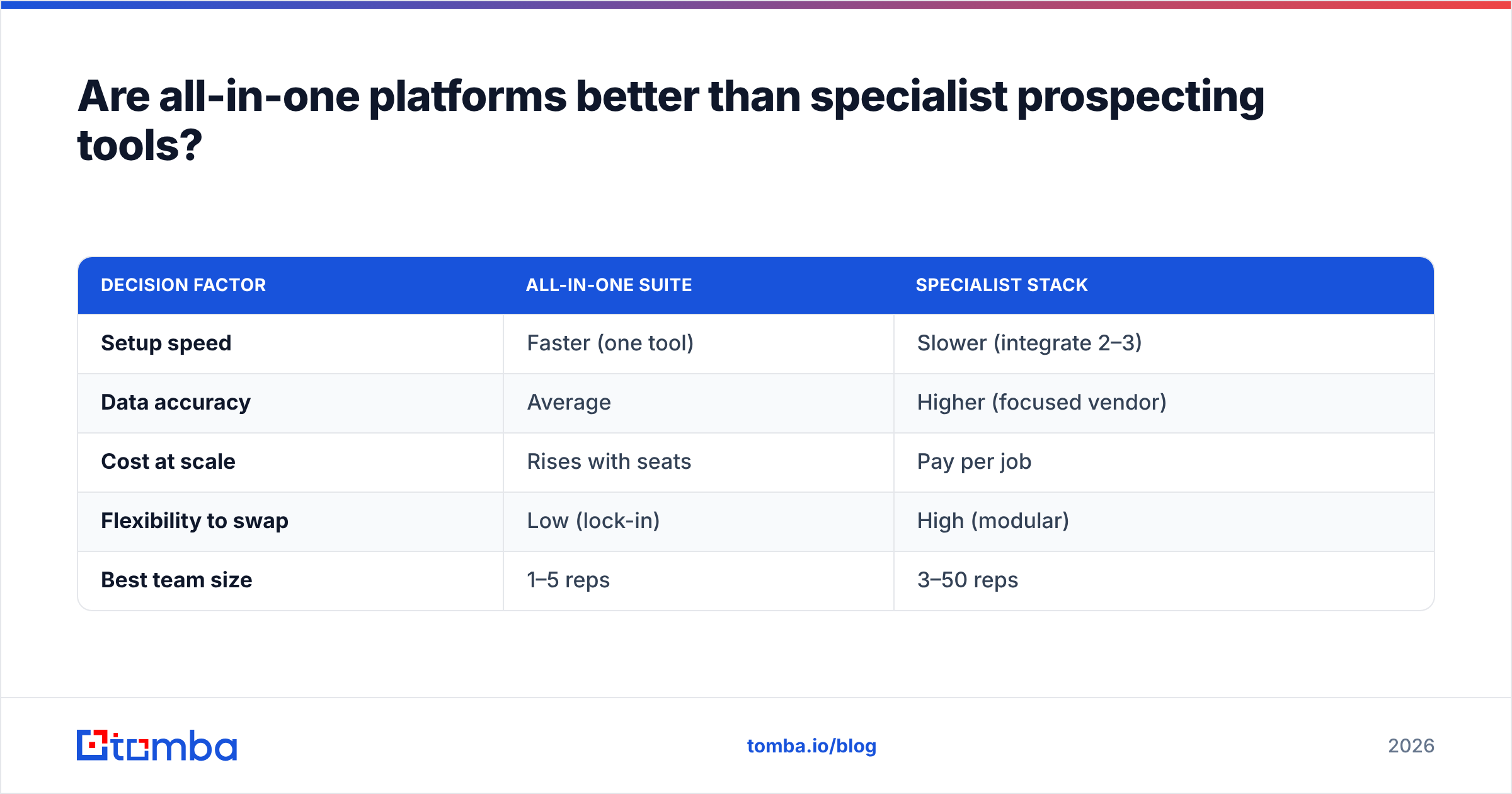
Here's the trade-off in plain terms. An all-in-one like Apollo bundles a database, a sequencer, and basic dialer. If you're a two-person startup, that bundle is genuinely efficient. But as soon as data quality becomes the bottleneck — and it always does — you discover the bundled database can't match a specialist's verification rate, and you can't swap just that piece.
Specialists let you upgrade one layer without ripping out the rest. You might run a dedicated finder for data, Instantly for sending, and your CRM for tracking. When a better finder appears, you switch it alone.
| Decision factor | All-in-one suite | Specialist stack |
|---|---|---|
| Setup speed | Faster (one tool) | Slower (integrate 2–3) |
| Data accuracy | Average | Higher (focused vendor) |
| Cost at scale | Rises with seats | Pay per job |
| Flexibility to swap | Low (lock-in) | High (modular) |
| Best team size | 1–5 reps | 3–50 reps |
The rule of thumb: if data accuracy is your constraint, go specialist. If onboarding speed and a single bill matter more than the last 15% of data quality, the all-in-one is a defensible choice — just know what you're trading.
For teams replacing a bloated suite, comparing focused options against an Apollo alternative or a ZoomInfo-class tool usually surfaces a cheaper, more accurate combination.
How do B2B prospecting tools fit into your outbound workflow?#
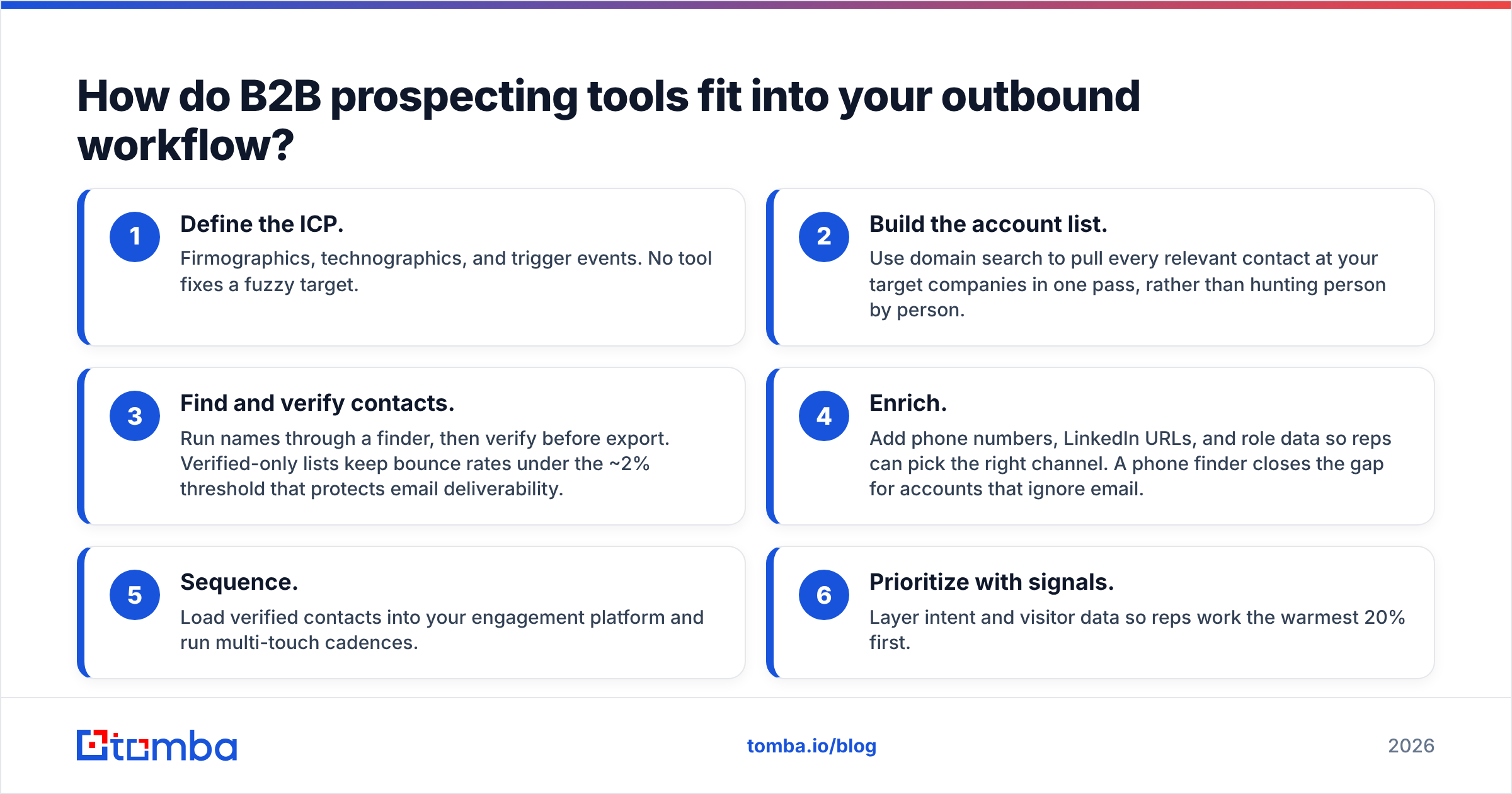
A prospecting tool is only as good as the workflow it plugs into. Here's the sequence that actually books meetings, and where each tool type earns its keep:
- Define the ICP. Firmographics, technographics, and trigger events. No tool fixes a fuzzy target.
- Build the account list. Use domain search to pull every relevant contact at your target companies in one pass, rather than hunting person by person.
- Find and verify contacts. Run names through a finder, then verify before export. Verified-only lists keep bounce rates under the ~2% threshold that protects email deliverability.
- Enrich. Add phone numbers, LinkedIn URLs, and role data so reps can pick the right channel. A phone finder closes the gap for accounts that ignore email.
- Sequence. Load verified contacts into your engagement platform and run multi-touch cadences.
- Prioritize with signals. Layer intent and visitor data so reps work the warmest 20% first.
The order matters. Most failed outbound programs aren't a copywriting problem — they're a step-3 problem. Garbage data in means garbage results out, no matter how clever the sequence.
For high-volume teams, automating steps 2–4 with a bulk email finder turns a day of manual list-building into a 20-minute job, which is where the real time ROI of prospecting tools shows up.
How much should you spend on B2B prospecting tools?#
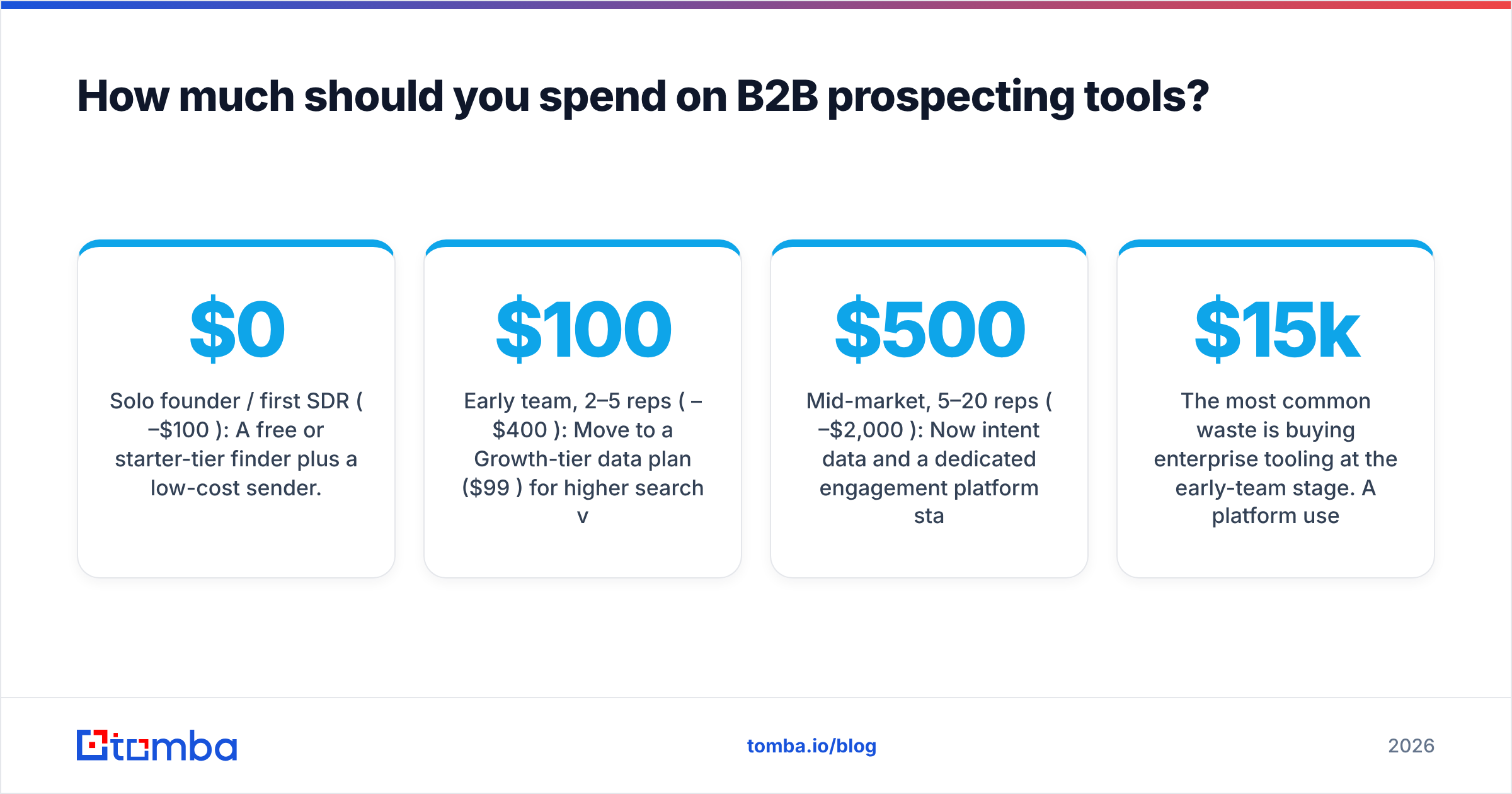
Spend in proportion to your pipeline math, not your FOMO. Here's a sane budgeting framework by team stage:
- Solo founder / first SDR ($0–$100/mo): A free or starter-tier finder plus a low-cost sender. Tomba's free tier (25 searches/mo) or Starter plan at $49/mo covers early list-building; pair with Instantly at $37/mo. Total under $90.
- Early team, 2–5 reps ($100–$400/mo): Move to a Growth-tier data plan ($99/mo) for higher search volume, add CRM sync via a HubSpot integration, and keep the sequencer. You're still well under $400.
- Mid-market, 5–20 reps ($500–$2,000/mo): Now intent data and a dedicated engagement platform start paying back. Add enrichment orchestration if you have a RevOps owner.
- Enterprise (custom): ZoomInfo, Outreach, and 6sense contracts make sense when a dedicated ops team can extract their full value — and only then.
The most common waste is buying enterprise tooling at the early-team stage. A $15k/year platform used at 20% capacity is more expensive per booked meeting than three specialists used at 90%. Match the spend to the maturity.
Salesforce and HubSpot research on sales productivity both point the same direction: reps lose the majority of selling time to admin and bad data, not to a missing feature. Fix data and time-to-contact first, and most of the "we need a bigger platform" pressure disappears.
What's the biggest mistake teams make with prospecting tools?#
Buying for features instead of for accuracy. A demo dazzles with dashboards and AI scoring, but six weeks in, the metric that matters is simple: what percentage of the emails you found actually landed and got read?
Three failure patterns to avoid:
- Skipping verification. Unverified lists drive bounces, bounces hurt sender reputation, and a damaged domain takes weeks to recover. Always verify before you send.
- Over-buying seats. Per-seat platforms tempt you to license the whole team "just in case." Start with the reps who prospect daily; expand when usage proves it out.
- Ignoring the API. If your tool can't automate via API or a Zapier integration, your reps will do manually what software should do — and they'll resent it.
Get those three right and a modest stack outperforms an expensive one.
Which B2B prospecting tool should you start with?#
If your bottleneck is finding accurate, verified contact data without paying enterprise prices — which it is for most teams — start with the data layer and build out from there.
The Tomba Email Finder is built for exactly that job: find professional emails by name, company, or domain, with verification baked in so you export clean lists, not guesses. The free tier (25 searches/mo) lets you test it against your real target accounts before you spend a cent, and paid plans start at $49/mo — a fraction of what bundled suites charge for data you'll constantly need to clean. Pair it with a sequencer of your choice, plug it into your CRM, and you have a prospecting stack that books meetings instead of burning your domain. Start free, test on your own ICP, and let the bounce rate make the case.
// get started
Find, verify and enrich your first contacts today
Start on the free plan with 25 searches a month, then scale when your team is ready.
Free plan · No credit card required · GDPR & CCPA
// about the author