BDR Productivity in 2026: Metrics, Tools, and Tactics
Most BDRs spend under 30% of their week actually selling. Here is how to measure, diagnose, and fix BDR productivity in 2026 without burning out your team.
BDR Productivity in 2026: Metrics, Tools, and Tactics
Your business development reps are not lazy. They are buried. The average BDR touches a dozen tools before lunch, copies data between tabs, hunts for an email that may or may not bounce, and only then starts the conversation that actually generates pipeline. BDR productivity is rarely a motivation problem. It is a friction problem, and friction is measurable, diagnosable, and fixable.
This guide breaks down what BDR productivity actually means in 2026, the metrics worth tracking, where the hours leak, and the specific tactics and tools that recover them.
TL;DR#
- BDR productivity = output per selling hour, not activity volume. Dials and emails sent are inputs; meetings booked and qualified pipeline are outputs. Track the ratio.
- The biggest drain is non-selling work — data entry, list building, email guessing, and tool-switching eat 60–70% of a rep's week.
- Clean, accurate contact data is the highest-leverage fix. Bad emails kill deliverability, waste sends, and inflate bounce rates that hurt every rep on the team.
- Standardize the sequence, then automate the busywork. Templates, enrichment, and CRM sync remove decisions reps shouldn't be making manually.
- Measure leading indicators weekly (connect rate, reply rate, meeting-set rate) so you fix process before quarter-end, not after.
What does BDR productivity actually mean?#
BDR productivity is the amount of qualified pipeline a rep generates per hour of actual selling time. That last phrase matters. A BDR who sends 200 emails a day is busy, but if 40 of them bounce and 30 land in spam, the activity number lies about the result.
Think of it like a delivery driver. You don't judge them by how many miles they drove — you judge them by how many packages arrived at the right door. A rep "driving" all day through bad addresses looks productive on the dashboard and produces nothing on the pipeline report.
So before you push reps to do more, separate two things:
- Inputs — dials, emails sent, LinkedIn touches, sequences started.
- Outputs — connects, replies, meetings booked, opportunities accepted by AEs.
Productivity lives in the conversion between them. Improving inputs without improving the conversion rate just adds noise — and burns out the team.
Which BDR productivity metrics matter in 2026?#
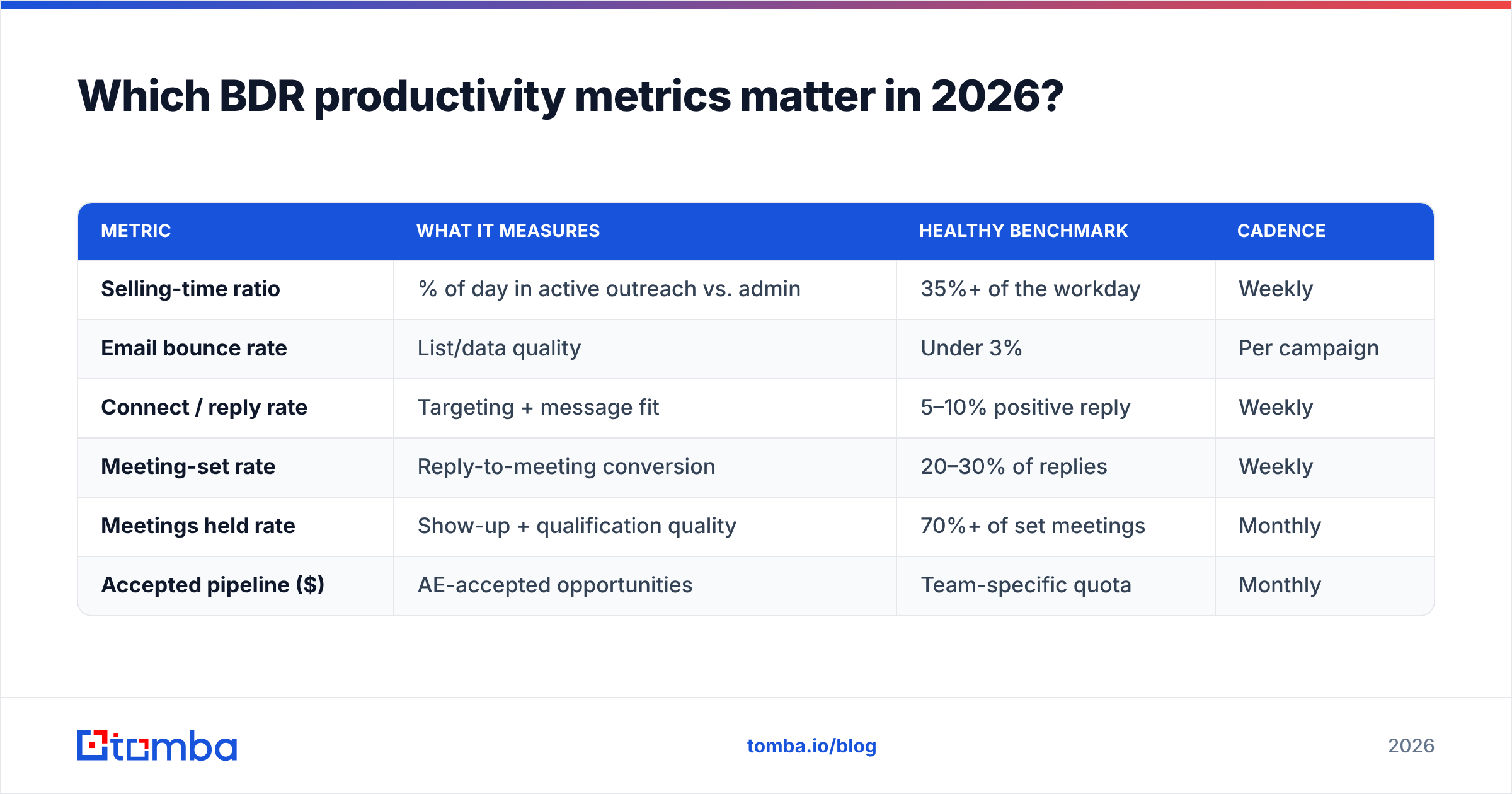
Track a small set of leading indicators weekly and a smaller set of lagging ones monthly. Vanity metrics (raw send volume, "activities logged") feel reassuring and tell you nothing about whether the motion works.
Here is a practical metric stack, what each tells you, and a realistic 2026 benchmark for outbound B2B teams:
| Metric | What it measures | Healthy benchmark | Cadence |
|---|---|---|---|
| Selling-time ratio | % of day in active outreach vs. admin | 35%+ of the workday | Weekly |
| Email bounce rate | List/data quality | Under 3% | Per campaign |
| Connect / reply rate | Targeting + message fit | 5–10% positive reply | Weekly |
| Meeting-set rate | Reply-to-meeting conversion | 20–30% of replies | Weekly |
| Meetings held rate | Show-up + qualification quality | 70%+ of set meetings | Monthly |
| Accepted pipeline ($) | AE-accepted opportunities | Team-specific quota | Monthly |
A few notes on reading this table. If your bounce rate climbs above 3%, stop optimizing copy — your data is the problem, and every additional send is damaging your sender reputation. If meeting-set rate is high but meetings-held is low, your reps are booking the wrong people. If selling-time ratio is under 30%, the fix isn't coaching — it's removing manual work.
Where do BDRs actually lose their hours?#
The uncomfortable answer: most of the day is not spent selling. Multiple time-study breakdowns across B2B sales orgs land in the same range — reps spend the majority of their week on tasks that are necessary but automatable.
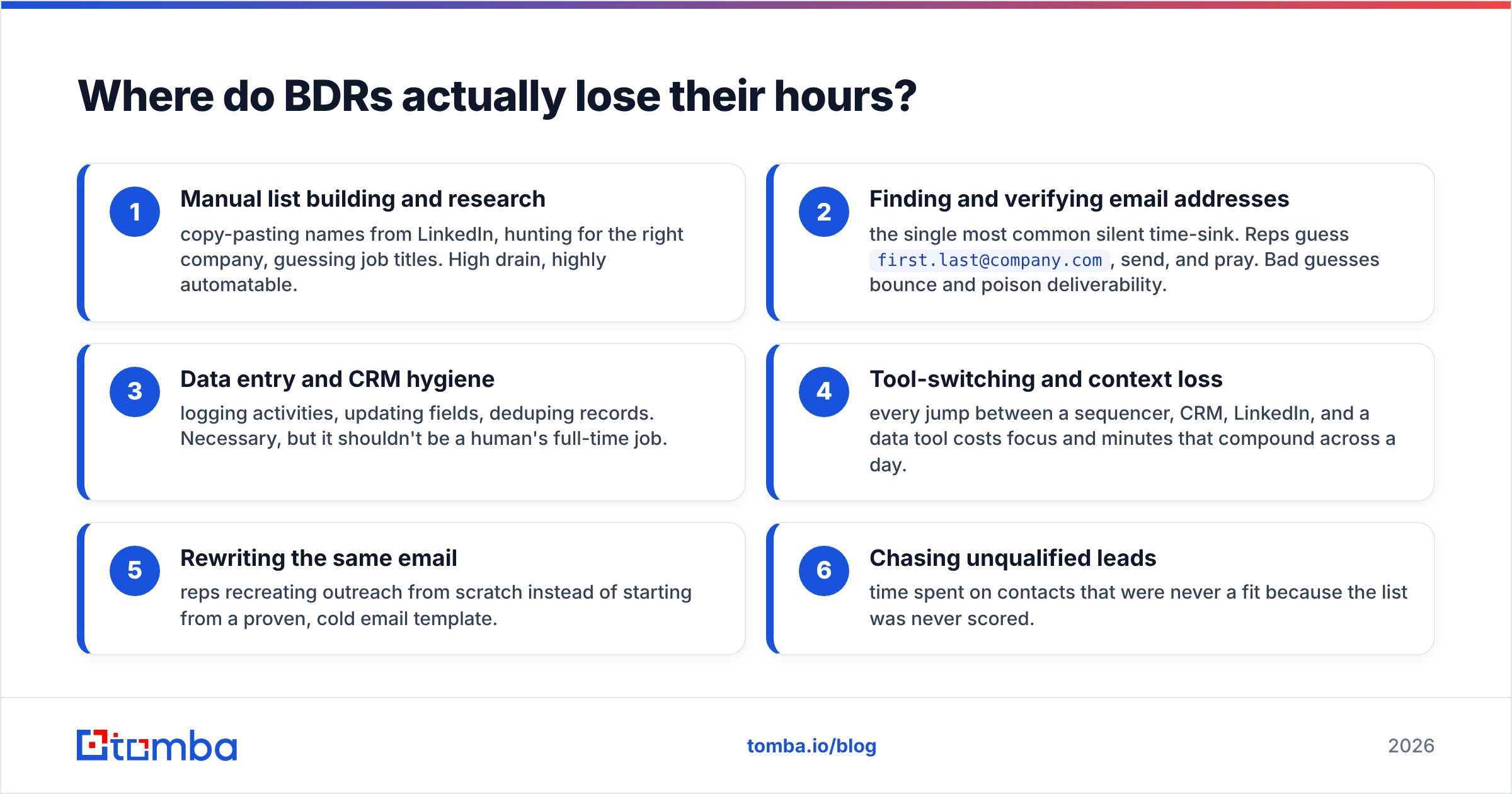
Here is where the time goes, ranked by how much it typically drains and how easily you can recover it:
- Manual list building and research — copy-pasting names from LinkedIn, hunting for the right company, guessing job titles. High drain, highly automatable.
- Finding and verifying email addresses — the single most common silent time-sink. Reps guess
first.last@company.com, send, and pray. Bad guesses bounce and poison deliverability. - Data entry and CRM hygiene — logging activities, updating fields, deduping records. Necessary, but it shouldn't be a human's full-time job.
- Tool-switching and context loss — every jump between a sequencer, CRM, LinkedIn, and a data tool costs focus and minutes that compound across a day.
- Rewriting the same email — reps recreating outreach from scratch instead of starting from a proven, cold email template.
- Chasing unqualified leads — time spent on contacts that were never a fit because the list was never scored.
Items 1, 2, and 3 are where the largest, fastest gains live. They are pure overhead — work that produces zero pipeline on its own and exists only to enable the work that does.
How does data quality drive BDR productivity?#
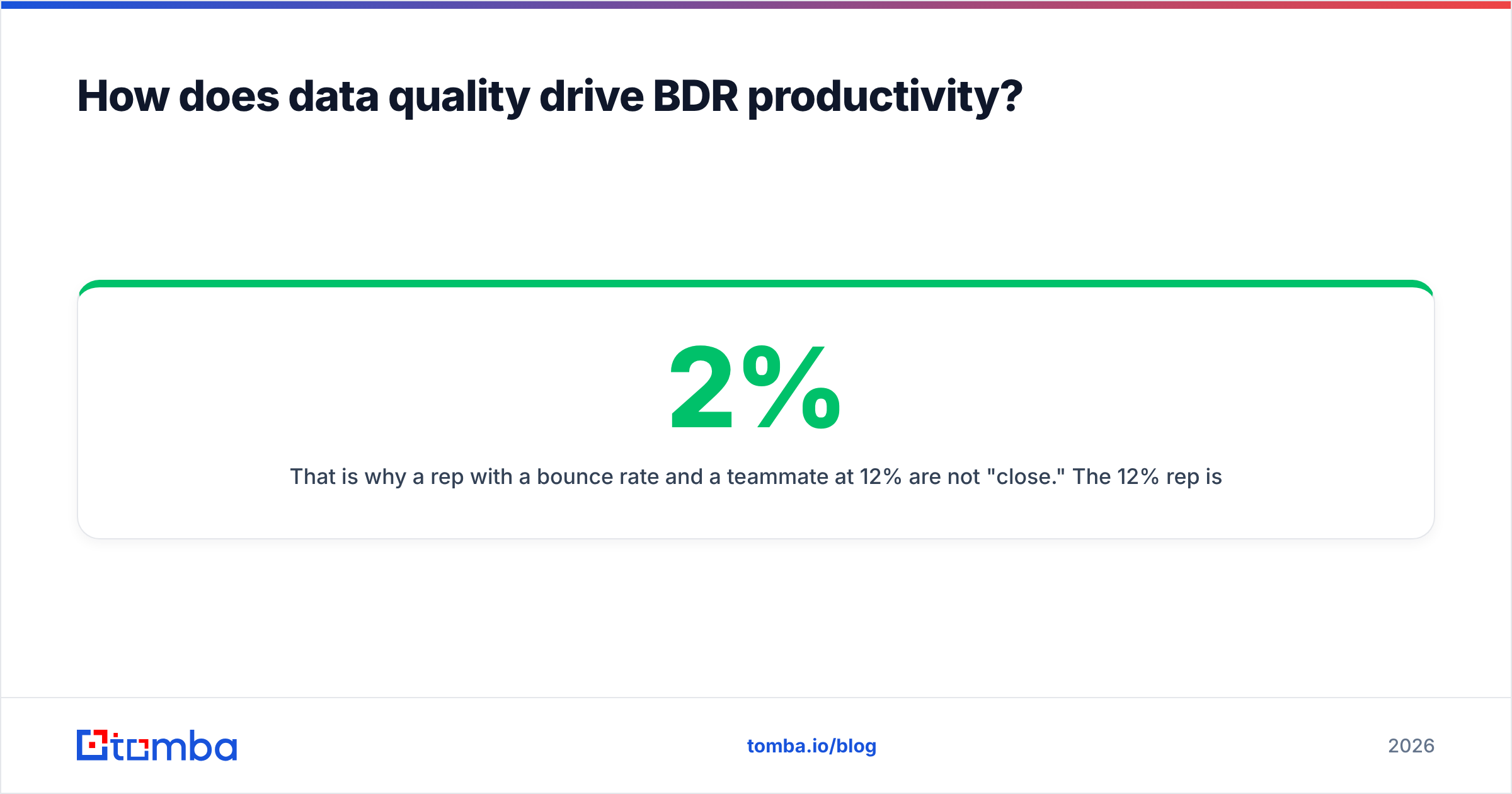
Clean contact data is the highest-leverage lever you have, because bad data doesn't just waste one send — it taxes the entire team. Here's the chain reaction: a guessed email bounces, the bounce signals mailbox providers that you send to invalid addresses, your domain reputation drops, and now the good emails from every rep on your domain start landing in spam.
That is why a rep with a 2% bounce rate and a teammate at 12% are not "close." The 12% rep is actively degrading everyone's email deliverability.
The fix is a two-step discipline before any send:
- Find the verified address, don't guess it. An email finder returns the real address tied to a name and domain, with a confidence score, instead of leaving reps to permute formats by hand.
- Verify before sending, especially for older lists. An email verifier checks that the mailbox exists and is reachable, so bounces never leave the building.
For teams working large lists, doing this in bulk — find, verify, dedupe, enrich — turns a multi-hour manual chore into a single pass. That is the difference between a rep who starts outreach at 9:15 and one who starts at 11:30.

What tactics lift BDR output without burning people out?#
More hours is not the answer — most BDR teams are already stretched. Higher yield per hour is. These tactics compound.
Standardize the sequence, personalize the opener. Reps shouldn't redesign the cadence for every prospect. Lock the structure (timing, channels, number of touches) and let reps spend their creative energy only on the first two lines that actually need to be human. A subject line generator and reusable template library remove decisions that don't deserve daily reinvention.
Time-block in two modes. Group similar work. One block for list building and enrichment, one uninterrupted block for live outreach and calls. Context-switching between research and conversation is where focus — and minutes — quietly die.
Score leads before reps touch them. A rep working a ranked list converts far better than one working alphabetically. Push qualification upstream with lead scoring so the highest-fit accounts get human attention first.
Automate the CRM round-trip. Connect your data tool, sequencer, and CRM so found contacts, verification results, and activity logs flow automatically. Manual logging is the tax reps resent most, and it's the easiest to eliminate.
Coach on conversion, not volume. When the metric is "more activity," reps cut corners on quality. When it's "improve reply-to-meeting rate," they get sharper. Review calls and replies together, weekly.
Which tools should a productive BDR stack include?#
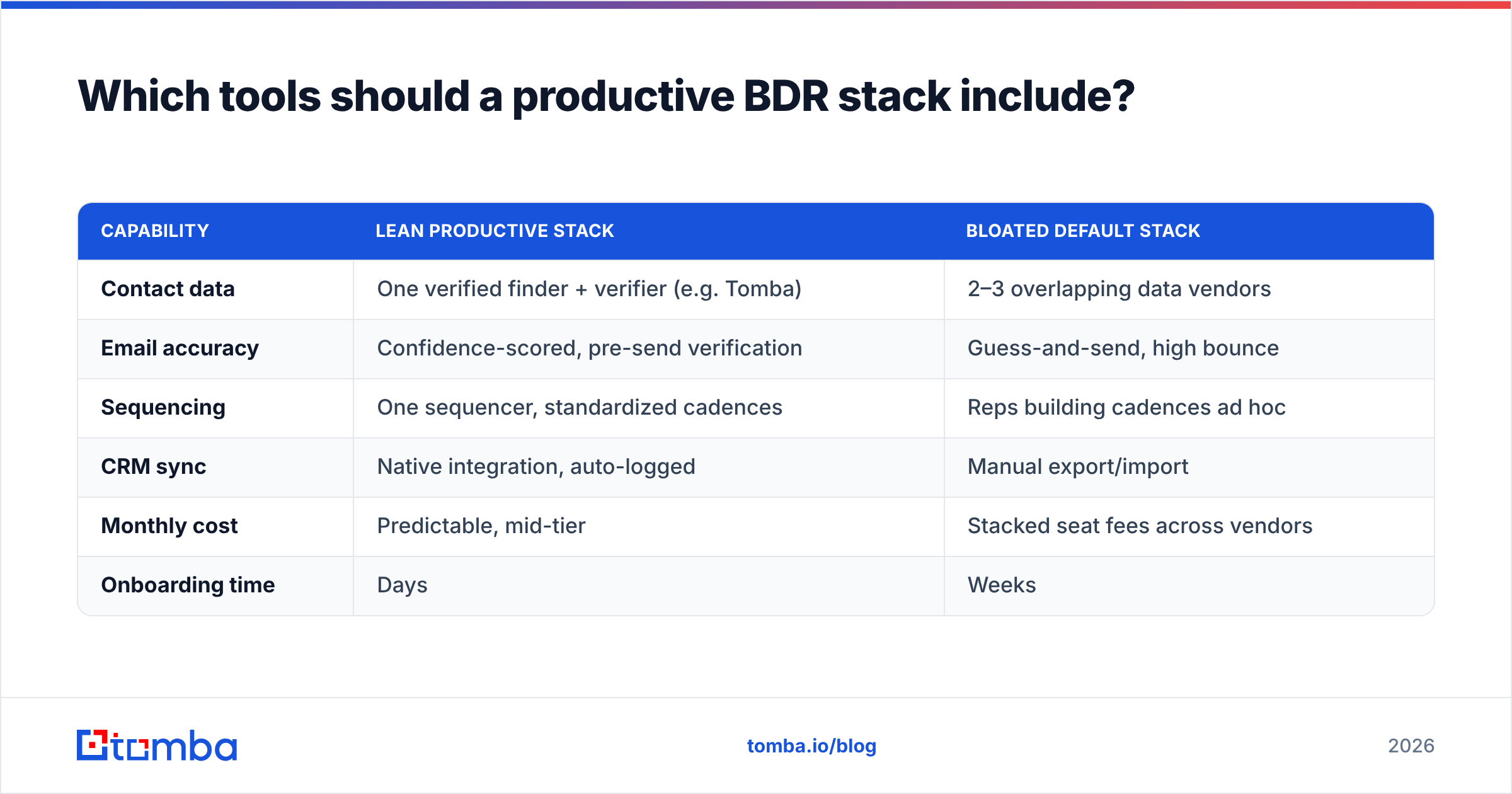
You don't need fifteen tools. You need four jobs done well: find accurate contacts, verify them, sequence outreach, and sync everything to the CRM without manual copying. Below is how a lean, productivity-first stack compares against the bloated default many teams drift into.
| Capability | Lean productive stack | Bloated default stack |
|---|---|---|
| Contact data | One verified finder + verifier (e.g. Tomba) | 2–3 overlapping data vendors |
| Email accuracy | Confidence-scored, pre-send verification | Guess-and-send, high bounce |
| Sequencing | One sequencer, standardized cadences | Reps building cadences ad hoc |
| CRM sync | Native integration, auto-logged | Manual export/import |
| Monthly cost | Predictable, mid-tier | Stacked seat fees across vendors |
| Onboarding time | Days | Weeks |
Tomba fits the data layer of that lean stack. Its Tomba pricing starts with a free tier (25 searches/month), then Starter at $49/mo, Growth at $99/mo, and Pro at $249/mo — so a small BDR team can find and verify contacts without stacking multiple data vendors. It connects to the rest of the workflow through a HubSpot integration, Salesforce integration, and a Google Sheets add-on, which keeps reps out of the copy-paste loop.
For broader context on building and managing an outbound motion, HubSpot's sales blog and peer reviews on G2 are useful neutral references when you're evaluating where each tool earns its seat.
How do you measure whether productivity actually improved?#
Run a simple before/after using the metric stack above. Pick one quarter as baseline, change one variable at a time, and watch the conversion ratios — not the raw activity counts.
A realistic improvement path for a team fixing data quality first:
- Week 1–2: Bounce rate drops from ~9% to under 3% after introducing find-then-verify. Deliverability stabilizes.
- Week 3–4: Reply rate ticks up because messages actually reach inboxes, not spam folders.
- Month 2: Selling-time ratio climbs as enrichment and CRM sync remove manual research and logging.
- Month 3: Meetings-held and accepted pipeline rise — the lagging indicators finally move because the leading ones did.
If you only measured activity volume, none of this would show up cleanly — reps might even send fewer emails while booking more meetings. That's the entire point. Productivity is output per hour, and the cleanest way to raise it is to stop wasting hours on work a tool should do.
The bottom line#
BDR productivity is won in the parts of the day nobody celebrates: clean lists, verified emails, standardized sequences, and a CRM that updates itself. Reps don't need to grind harder — they need the friction removed so the hours they already work convert into pipeline.
Start with the data layer, because bad contacts quietly sabotage everything downstream. Give your team verified emails and confidence scores instead of guesswork, and let them spend their energy on conversations instead of copy-paste. The Tomba Email Finder does exactly that — find the right professional email by name, domain, or company, verify it before you send, and sync it straight into your workflow. Spin up the free tier, point it at your next list, and measure the bounce rate before and after. The productivity gain shows up in week one.
// get started
Find, verify and enrich your first contacts today
Start on the free plan with 25 searches a month, then scale when your team is ready.
Free plan · No credit card required · GDPR & CCPA
// about the author