Best Data Cleaning Tools in 2026: Top 9 Compared & Ranked
Dirty CRM data quietly burns budget and tanks deliverability. Here are the best data cleaning tools of 2026, ranked by what they actually fix.
Bad data is the most expensive line item nobody puts on the budget. Your reps work dead leads, your emails bounce into spam folders, and your dashboards lie to your VP. Cleaning that data is not a one-time spring-cleaning chore — it is a recurring maintenance discipline, and the tool you pick decides whether it takes ten minutes a week or ten hours.
This guide ranks the best data cleaning tools for B2B teams in 2026, with concrete pricing, what each one actually fixes, and where it falls short.
TL;DR#
- The best data cleaning tools fix different problems. Some dedupe and standardize, some validate emails and phones, some enrich missing fields. No single tool does all three perfectly.
- For email and contact hygiene specifically, verification-first tools like Tomba, ZeroBounce, and Bouncer win because dirty contact data is what kills deliverability.
- For spreadsheet-style cleaning (dedup, transform, normalize), OpenRefine and Excel Power Query are free and powerful but manual.
- For enterprise governance, Talend and Informatica handle scale but cost five figures and need engineers.
- Budget pick: start with a free verifier plus OpenRefine; upgrade to an API-driven cleaner like Tomba once volume justifies it.
What does "data cleaning" actually mean in a B2B stack?#
Think of your CRM like a fridge. Every week new groceries (leads) come in, some items spoil (people change jobs), labels fall off (missing fields), and you end up with three half-empty ketchup bottles (duplicates). Data cleaning is the routine of throwing out the spoiled stuff, merging the duplicates, and relabeling what's salvageable.
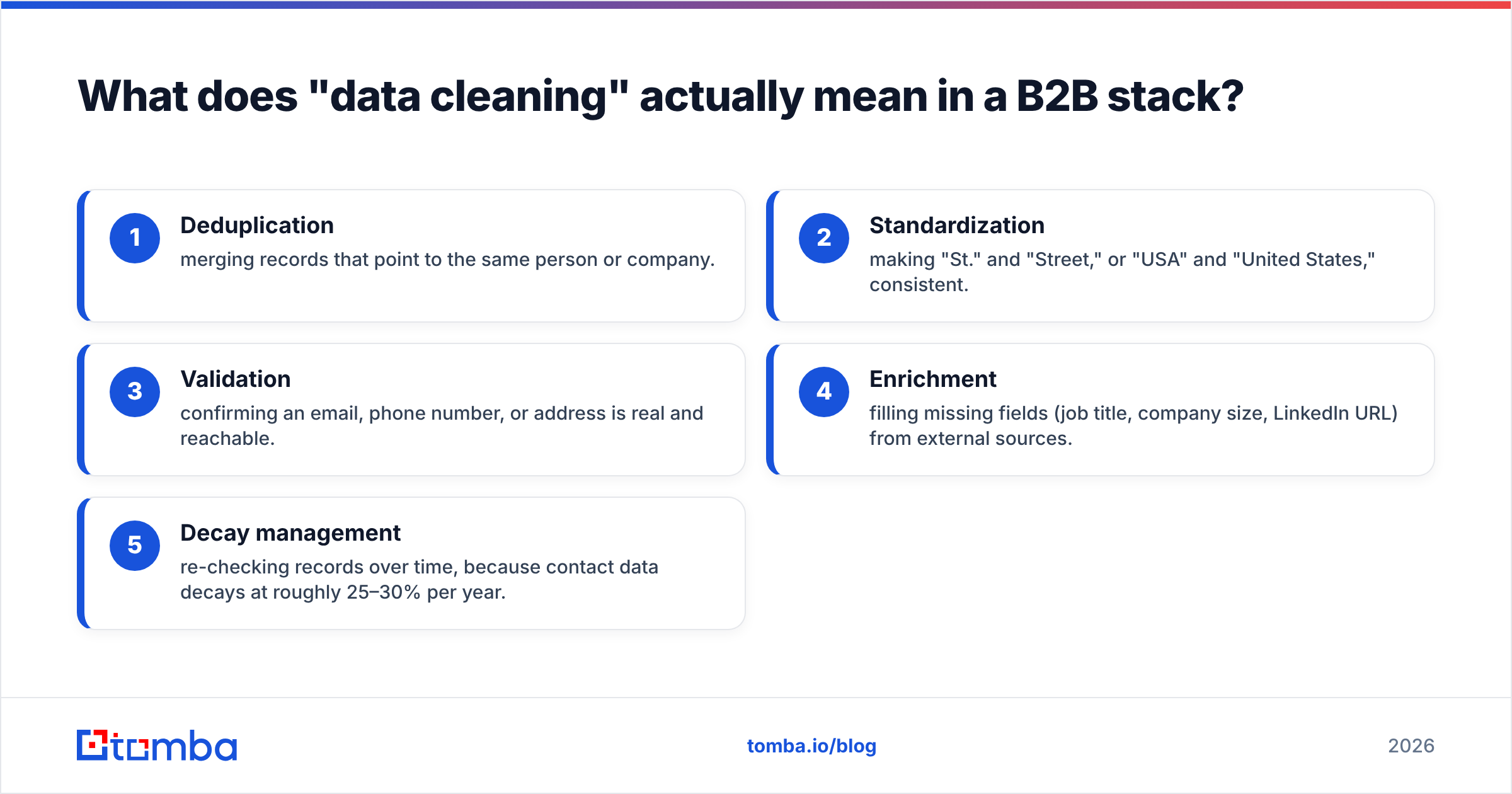
In practice, "data cleaning" bundles several distinct jobs:
- Deduplication — merging records that point to the same person or company.
- Standardization — making "St." and "Street," or "USA" and "United States," consistent.
- Validation — confirming an email, phone number, or address is real and reachable.
- Enrichment — filling missing fields (job title, company size, LinkedIn URL) from external sources.
- Decay management — re-checking records over time, because contact data decays at roughly 25–30% per year.
Most "data cleaning tools" are strong at one or two of these and weak at the rest. That is the single most important thing to understand before you pay for anything.
)
What are the best data cleaning tools in 2026?#
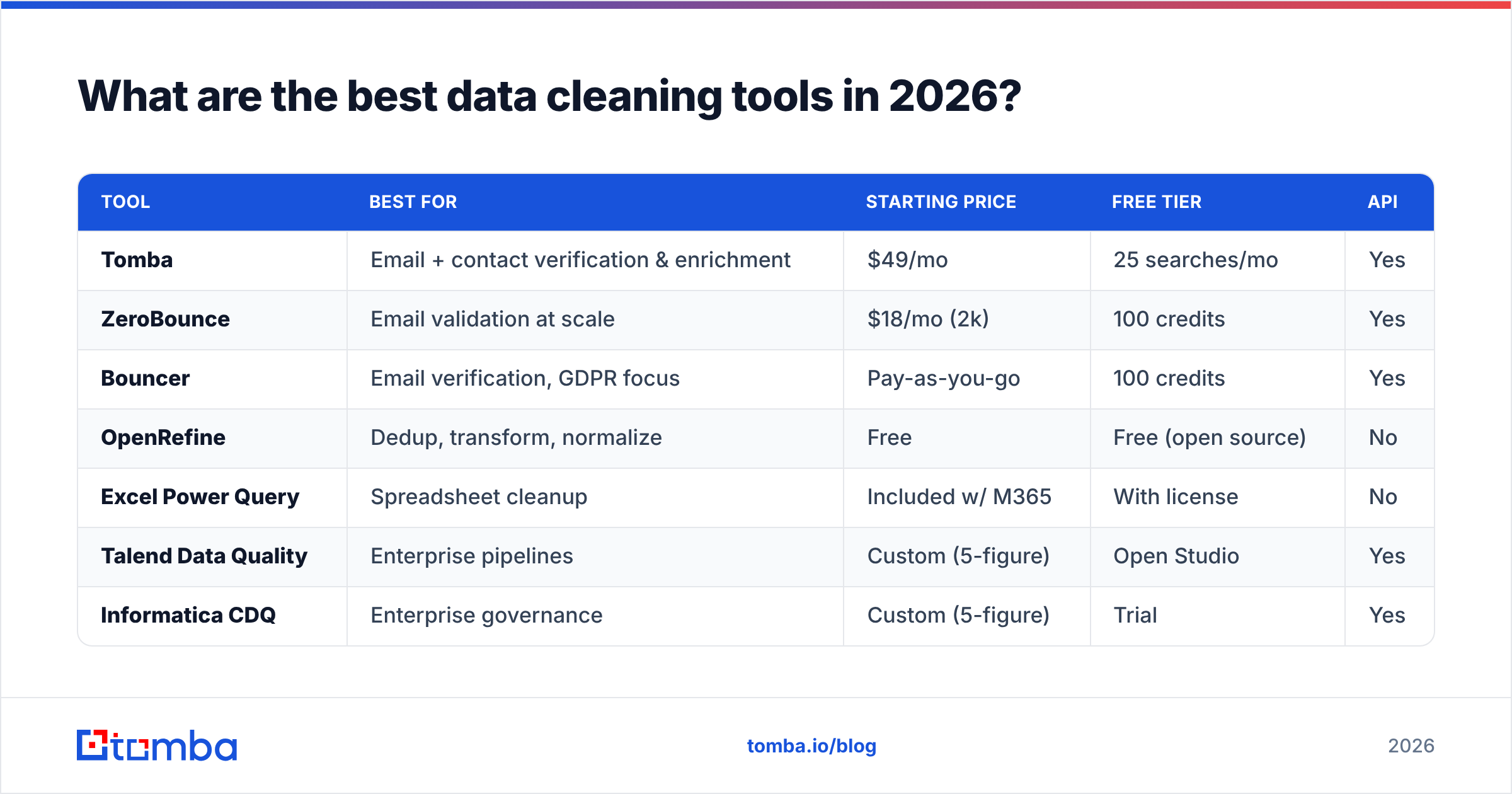
Here is the shortlist, grouped by the job they do best. Pricing reflects entry tiers as published by each vendor in early 2026; always confirm on the vendor's own page before buying.
| Tool | Best for | Starting price | Free tier | API |
|---|---|---|---|---|
| Tomba | Email + contact verification & enrichment | $49/mo | 25 searches/mo | Yes |
| ZeroBounce | Email validation at scale | $18/mo (2k) | 100 credits | Yes |
| Bouncer | Email verification, GDPR focus | Pay-as-you-go | 100 credits | Yes |
| OpenRefine | Dedup, transform, normalize | Free | Free (open source) | No |
| Excel Power Query | Spreadsheet cleanup | Included w/ M365 | With license | No |
| Talend Data Quality | Enterprise pipelines | Custom (5-figure) | Open Studio | Yes |
| Informatica CDQ | Enterprise governance | Custom (5-figure) | Trial | Yes |
| Dedupely | CRM dedup (HubSpot/Pipedrive) | $15/mo | Trial | Limited |
| WinPure | On-prem matching & cleansing | ~$999/yr | Trial | No |
A few notes on how to read that table. Price alone is a trap — OpenRefine is free but costs you hours of manual work, while a $49/mo API can clean 100,000 rows while you sleep. Match the tool to the bottleneck, not to the invoice.
Which tool is best for cleaning email lists?#
If your dirty data problem is mostly contacts and email lists — and for most sales and marketing teams it is — verification-first tools are the right category. A clean list directly protects your sender reputation and keeps you out of spam folders.
Tomba leads here for teams that need more than a yes/no on an email. Beyond validating addresses, it finds missing emails by domain or name, verifies catch-all domains, appends phone numbers, and enriches records — so cleaning and rebuilding happen in one pass. The email verifier handles syntax, MX records, SMTP checks, and known-bounce patterns, and the bulk tools let you process whole lists at once.
ZeroBounce is a strong pure-play validator with deep deliverability features (abuse-account detection, activity scoring). If all you ever need is "is this email good," it's excellent and cheap at volume.
Bouncer is the GDPR-conscious European pick, with clean pay-as-you-go pricing and fast batch processing.
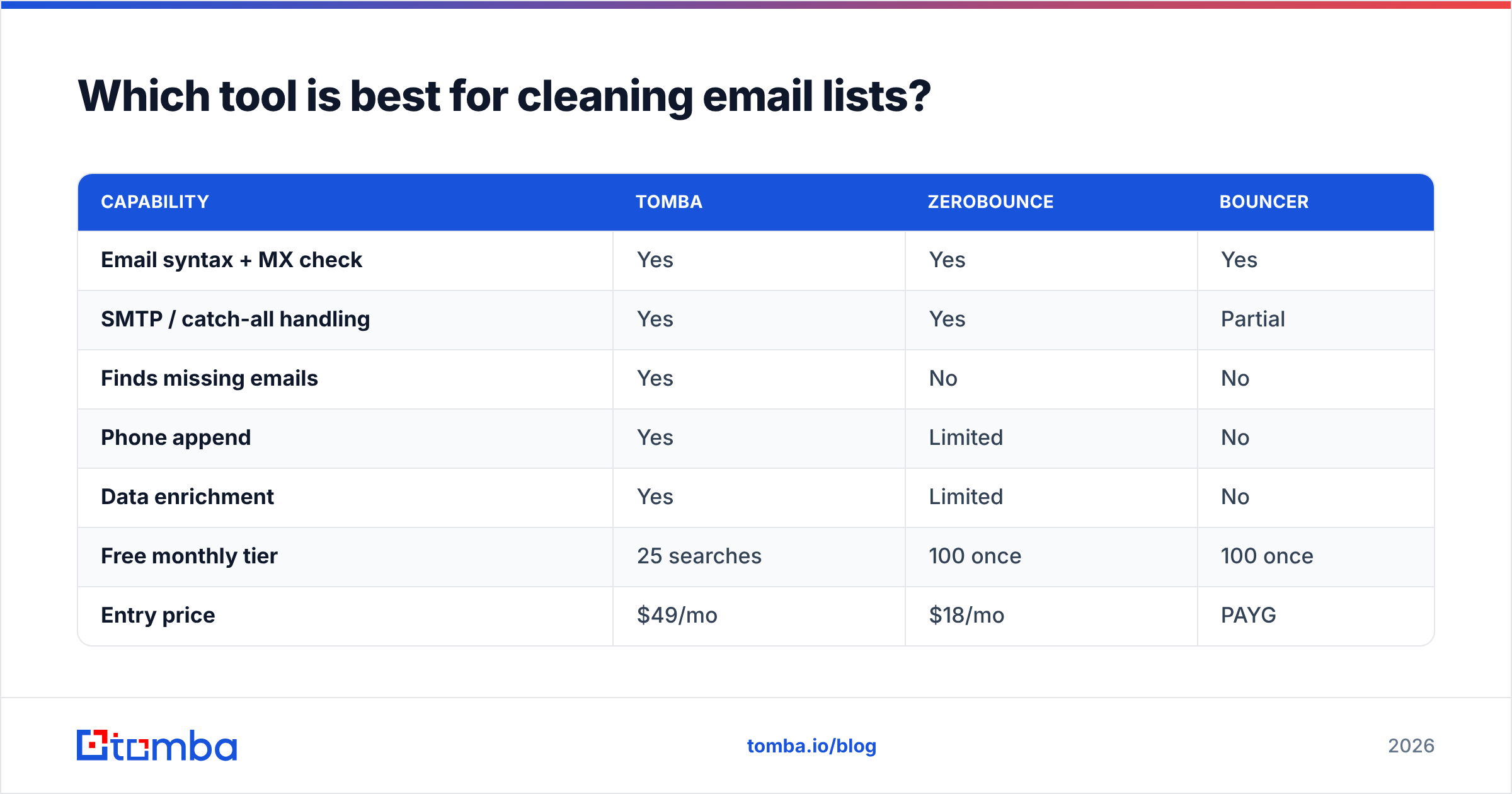
Here's how the verification-focused options stack up:
| Capability | Tomba | ZeroBounce | Bouncer |
|---|---|---|---|
| Email syntax + MX check | Yes | Yes | Yes |
| SMTP / catch-all handling | Yes | Yes | Partial |
| Finds missing emails | Yes | No | No |
| Phone append | Yes | Limited | No |
| Data enrichment | Yes | Limited | No |
| Free monthly tier | 25 searches | 100 once | 100 once |
| Entry price | $49/mo | $18/mo | PAYG |
The honest read: if you only validate, ZeroBounce is cheaper per email. If you need to clean, complete, and enrich in one workflow — which is the real job for most prospecting teams — Tomba covers more of the pipeline. Cross-check current ratings on G2 before committing.
What about spreadsheet and database cleaning?#
Not every cleaning job is about emails. Sometimes you've got a messy export with inconsistent country codes, trailing whitespace, and "Acme Inc" vs "Acme, Inc." vs "ACME INCORPORATED" scattered across 40,000 rows.
For that, two free tools punch far above their weight:
- OpenRefine (formerly Google Refine) is the open-source standard for messy tabular data. Its faceting and clustering features find near-duplicate text values automatically, and its "transform" expressions handle bulk normalization. It's free, runs locally, and there's a deep community library. The catch: it's manual and has a learning curve. See the project documentation to get started.
- Excel Power Query is built into Microsoft 365 and handles repeatable cleanup steps — split columns, trim, replace, merge — as a recorded pipeline you can re-run on next month's export. Great if your team already lives in Excel.
For deduplication inside a CRM specifically, Dedupely plugs into HubSpot and Pipedrive and merges duplicate contacts and companies with configurable rules. It won't validate or enrich, but for the narrow job of "stop having three records for the same person," it's clean and affordable.
When you finish a spreadsheet pass, run the contact columns through a free email checker and a remove-duplicates tool before you import — manual normalization doesn't catch dead addresses.
)
Do I need an enterprise data quality platform?#
Probably not — unless you're managing millions of records across multiple systems with compliance and governance requirements. In that case, Talend Data Quality and Informatica Cloud Data Quality are the heavyweight options.
These platforms do everything: profiling, matching, standardization, enrichment, and continuous monitoring across data warehouses, lakes, and operational systems. They also cost five figures a year, require dedicated data engineers, and take weeks to implement. Gartner and Forrester both track this category closely if you need analyst-grade comparisons — start with Gartner's data quality coverage when you're building a buying case.
The rule of thumb: if a business analyst is doing your cleaning, you want a self-serve tool. If a data engineering team owns a governed pipeline, an enterprise platform earns its cost. Most small and mid-market B2B teams sit firmly in the first camp and over-buy if they reach for Informatica.
How do I choose the best data cleaning tool for my team?#
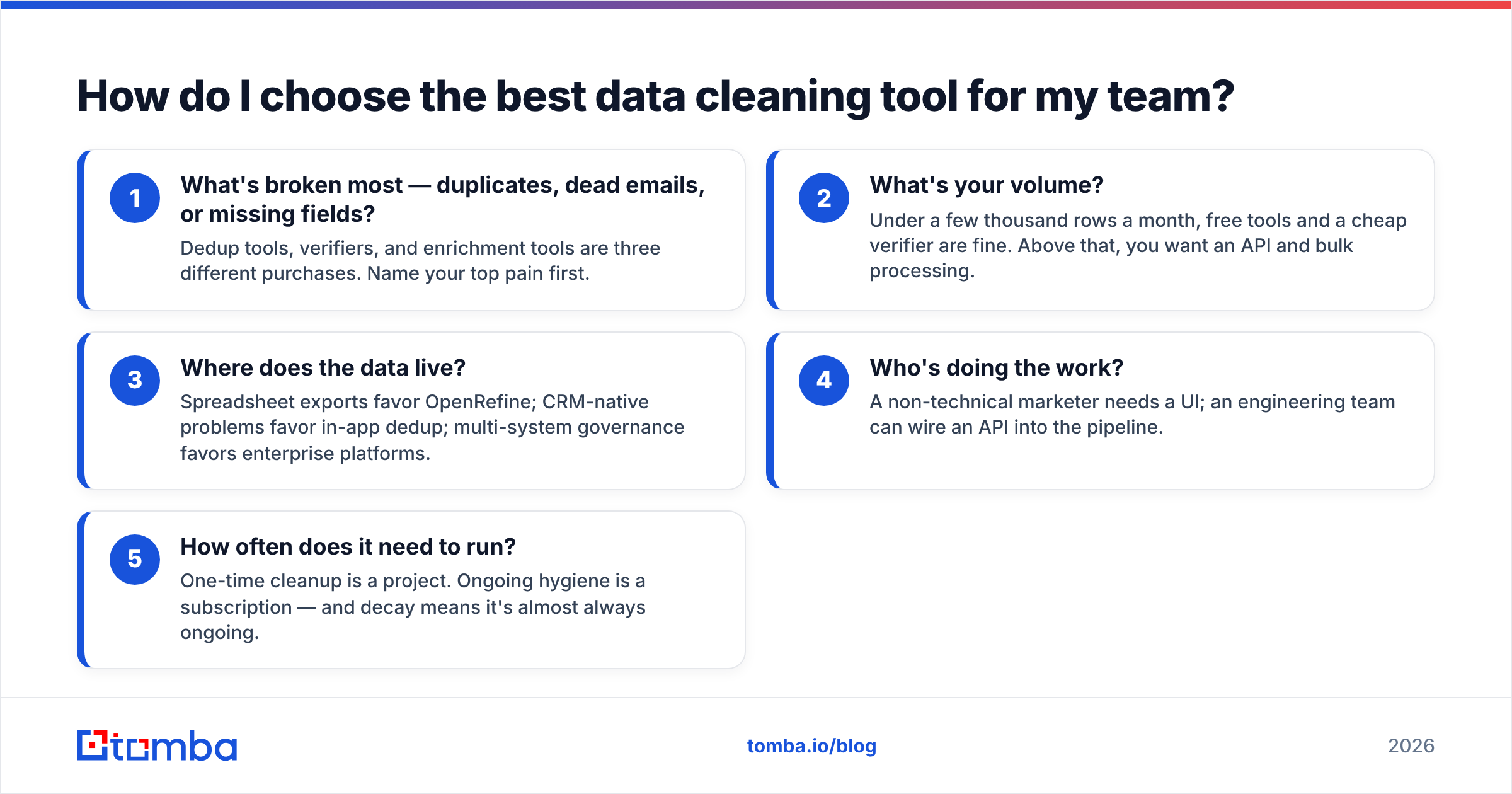
Work backward from your actual bottleneck, not from a feature list. Ask these five questions:
- What's broken most — duplicates, dead emails, or missing fields? Dedup tools, verifiers, and enrichment tools are three different purchases. Name your top pain first.
- What's your volume? Under a few thousand rows a month, free tools and a cheap verifier are fine. Above that, you want an API and bulk processing.
- Where does the data live? Spreadsheet exports favor OpenRefine; CRM-native problems favor in-app dedup; multi-system governance favors enterprise platforms.
- Who's doing the work? A non-technical marketer needs a UI; an engineering team can wire an API into the pipeline.
- How often does it need to run? One-time cleanup is a project. Ongoing hygiene is a subscription — and decay means it's almost always ongoing.
A practical starter stack for most B2B teams: OpenRefine for the occasional messy export, plus an always-on verification-and-enrichment service like Tomba wired into your CRM via native integrations so new records get cleaned on the way in, not months later.
How often should I clean my data?#
Continuously, in two layers. Run inbound cleaning the moment a record enters your system — validate the email, dedupe against existing records, enrich missing fields — so garbage never lands in the first place. Then run a scheduled sweep monthly or quarterly to catch decay: people who changed jobs, companies that rebranded, emails that went dark.
The math is unforgiving. At ~30% annual decay, a list you cleaned in January is roughly 7–8% stale by April and a quarter rotten by year-end. A once-a-year scrub means you're working substantially dirty data most of the time. Tools with scheduling and API hooks make the recurring sweep automatic; manual tools make it a chore you'll skip.
What does dirty data actually cost?#
Concretely: bounced emails hurt your deliverability and can blacklist your sending domain, which then suppresses your clean emails too. Reps waste selling time on disconnected numbers and dead addresses. Marketing pays per-record for tools and per-send for ESPs on contacts that will never convert. And every dashboard built on dirty data produces decisions built on fiction.
HubSpot and other CRM vendors publish guidance on database hygiene precisely because it quietly erodes pipeline — it's worth reading their data management resources alongside any tool you evaluate. The tool you choose isn't an expense; it's the thing that stops the bleeding you can't see on the invoice.
Final verdict: which data cleaning tool wins in 2026?#
There's no single winner — there's a winner per job:
- Best all-around for contact data: Tomba, because it cleans, verifies, completes, and enriches in one workflow.
- Best pure email validator on price: ZeroBounce.
- Best free spreadsheet cleaner: OpenRefine.
- Best CRM deduper: Dedupely.
- Best for enterprise governance: Talend or Informatica.
If your data problem is fundamentally about reaching real people — verified emails, working phone numbers, complete profiles — start with the tool built for that. Tomba's Email Finder and verification suite cleans your existing contacts, recovers missing addresses, and enriches records through one API or right inside your CRM, with a free tier (25 searches/month) to test before you commit and plans from $49/mo as you scale. Check the full Tomba pricing and start cleaning the data that actually drives revenue.
// get started
Find, verify and enrich your first contacts today
Start on the free plan with 25 searches a month, then scale when your team is ready.
Free plan · No credit card required · GDPR & CCPA
// about the author