Best Email Deliverability Tools in 2026 (Ranked & Compared)
Inbox placement is won before you hit send. Here are the best email deliverability tools of 2026 — for auth, warmup, seed testing, and list hygiene — compared on price, free tiers, and what they actually fix.
You can write the perfect cold email and still land in spam. Deliverability is the plumbing behind every campaign — authentication, sender reputation, warmup, seed testing, and list hygiene — and in 2026 the inbox providers are stricter than ever. This guide ranks the best email deliverability tools by what they actually fix, so you stop guessing why your open rates cratered.
TL;DR — The best email deliverability tools at a glance#
- Best for inbox placement testing: GlockApps and Validity Everest — seed-list tests show exactly where you land across Gmail, Outlook, and Yahoo.
- Best for warmup: Mailreach and Warmup Inbox — gradually build sender reputation on new domains.
- Best for authentication monitoring: Google Postmaster Tools (free) plus a dedicated DMARC monitor.
- Best for list hygiene (the root cause): a real-time email verifier like Tomba — bad addresses are the single biggest deliverability killer.
- Reality check: No tool saves a dirty list. Verify first, warm up second, monitor third.
Why does email deliverability even matter in 2026?#
Deliverability is the percentage of your sent emails that actually reach the inbox — not spam, not the promotions tab, not a silent block. Think of it like a reputation score at a nightclub: the bouncer (Gmail, Outlook, Yahoo) decides whether you get in based on your past behavior, not how good your outfit looks tonight.
In 2024 Google and Yahoo rolled out bulk-sender requirements — mandatory SPF, DKIM, DMARC, one-click unsubscribe, and a spam-complaint rate under 0.3%. By 2026 those thresholds are enforced harder and Microsoft has followed suit. Miss them and your mail gets throttled or bounced before a human ever sees it.
The painful part: most senders blame their copy when the real problem is infrastructure. A great deliverability stack covers four jobs — authenticate, warm up, test placement, and clean the list. Most tools only do one or two well, which is why teams end up stacking several.
What are the different types of email deliverability tools?#
Before you buy, know which category you actually need. Stacking three warmup tools won't help if your authentication is broken.
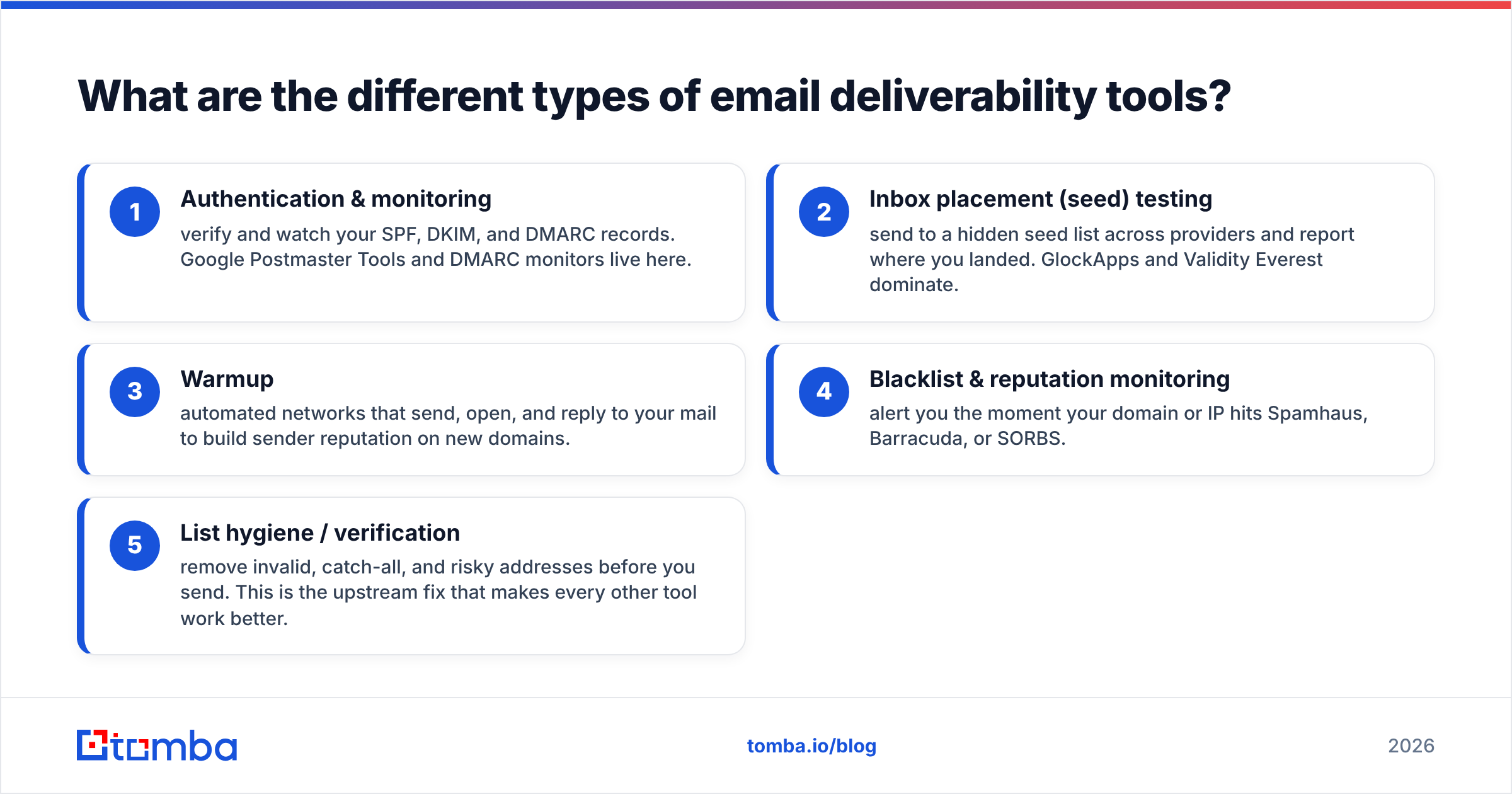
- Authentication & monitoring — verify and watch your SPF, DKIM, and DMARC records. Google Postmaster Tools and DMARC monitors live here.
- Inbox placement (seed) testing — send to a hidden seed list across providers and report where you landed. GlockApps and Validity Everest dominate.
- Warmup — automated networks that send, open, and reply to your mail to build sender reputation on new domains.
- Blacklist & reputation monitoring — alert you the moment your domain or IP hits Spamhaus, Barracuda, or SORBS.
- List hygiene / verification — remove invalid, catch-all, and risky addresses before you send. This is the upstream fix that makes every other tool work better.
A balanced stack pulls from at least three of these. Treat them as layers, not competitors.
What are the best email deliverability tools in 2026?#
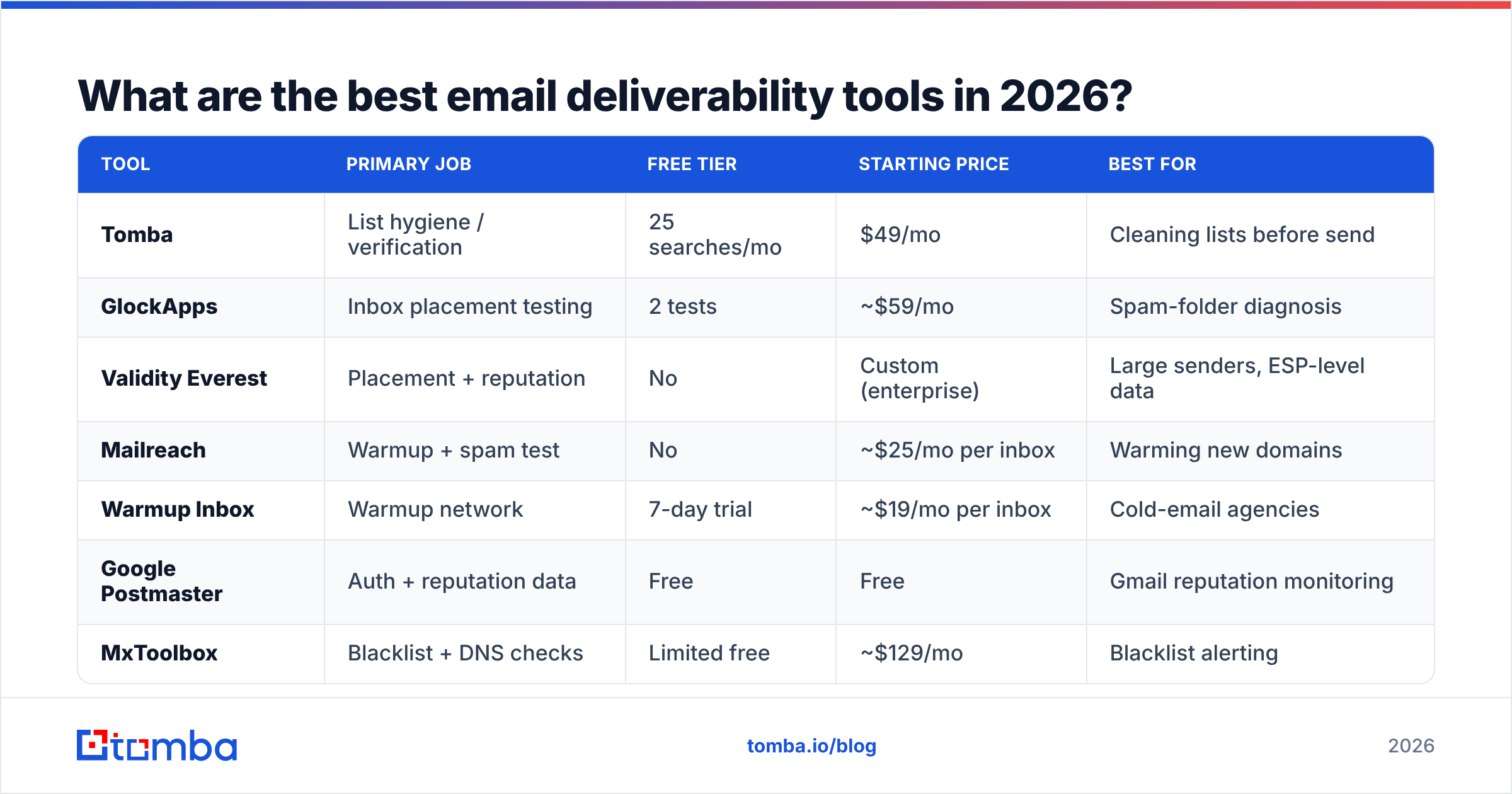
Here's the side-by-side. Prices are entry-level published rates as of 2026 and move around, so confirm on each vendor's site before buying.
| Tool | Primary job | Free tier | Starting price | Best for |
|---|---|---|---|---|
| Tomba | List hygiene / verification | 25 searches/mo | $49/mo | Cleaning lists before send |
| GlockApps | Inbox placement testing | 2 tests | ~$59/mo | Spam-folder diagnosis |
| Validity Everest | Placement + reputation | No | Custom (enterprise) | Large senders, ESP-level data |
| Mailreach | Warmup + spam test | No | ~$25/mo per inbox | Warming new domains |
| Warmup Inbox | Warmup network | 7-day trial | ~$19/mo per inbox | Cold-email agencies |
| Google Postmaster | Auth + reputation data | Free | Free | Gmail reputation monitoring |
| MxToolbox | Blacklist + DNS checks | Limited free | ~$129/mo | Blacklist alerting |
Tomba — best for list hygiene and verification#
The cheapest way to improve deliverability is to never email a dead address. Tomba's email verification checks syntax, MX records, SMTP response, and catch-all status in real time, so your bounce rate stays under the 2% that providers punish. Plans start on a free tier (25 searches/month) and scale to Starter at $49/mo, Growth at $99/mo, and Pro at $249/mo — see full Tomba pricing for credits per tier. You can also bulk verify an entire CSV before a campaign.
GlockApps — best for spam-folder diagnosis#
GlockApps sends to a seed list across 70+ providers and shows your exact placement — inbox, spam, or missing — plus your authentication status and spam-filter scores. When your open rate suddenly drops, GlockApps tells you whether it's a Gmail problem, an Outlook problem, or a content problem. Its DMARC analytics and uptime monitoring round out a strong mid-market kit.
Validity Everest — best for enterprise senders#
Everest (from Validity, the company behind the Sender Score) is the heavyweight. It blends seed testing, real subscriber data, inbox-placement guarantees with some providers, and reputation analytics most tools can't access. It's priced for enterprise and overkill for a solo cold emailer, but for high-volume marketing teams it's the most complete single platform.
Mailreach & Warmup Inbox — best for warmup#
New domains have no reputation, so blasting cold mail on day one gets you blocked. Warmup tools simulate organic activity — sends, opens, replies, and "mark as important" — to teach providers you're legitimate. Mailreach adds a spam-placement test; Warmup Inbox is popular with agencies running many inboxes. Pair either with an email warmup calculator to plan your ramp.
Is paid placement testing better than free monitoring tools?#
It depends on volume — they solve different problems and the best stacks use both.
Google Postmaster Tools is free and shows your Gmail domain reputation, spam rate, authentication pass rates, and delivery errors straight from Google. Every serious sender should have it connected. The catch: it only covers Gmail, needs meaningful volume before data appears, and tells you what happened, not why.
Paid seed-testing tools like GlockApps and Everest fill that gap. They tell you before a big send whether you'll hit the inbox across every major provider, and they isolate the cause — auth, content, or reputation. For a free starting point you can also run a quick sender reputation check and a blacklist scan without paying for anything.
Rule of thumb: under ~10k sends/month and Gmail-heavy? Start free with Postmaster plus a verifier. Multi-provider, high-volume, or revenue-critical? Add paid placement testing.
How do you actually pick the right deliverability stack?#
Match the tool to your bottleneck instead of buying the biggest suite. Diagnose in this order:
- Bounce rate above 2%? Your list is dirty. Start with verification — verify emails and remove catch-alls. No other tool matters until this is fixed.
- New domain or new IP? You need warmup. Ramp slowly over 3–6 weeks before any real volume.
- Authentication failing? Fix SPF, DKIM, and DMARC, then monitor with Postmaster and a DMARC tool. Use a free SPF checker to confirm your record is valid.
- Good auth, clean list, still in spam? Now it's placement testing — GlockApps or Everest to find content and reputation issues.
- High volume, multiple domains? Add blacklist monitoring (MxToolbox) so you're alerted within minutes of a listing.
Most teams overspend on layer 4 while ignoring layer 1. The unglamorous truth: list hygiene and authentication fix the majority of deliverability problems, and they're the cheapest layers to get right.
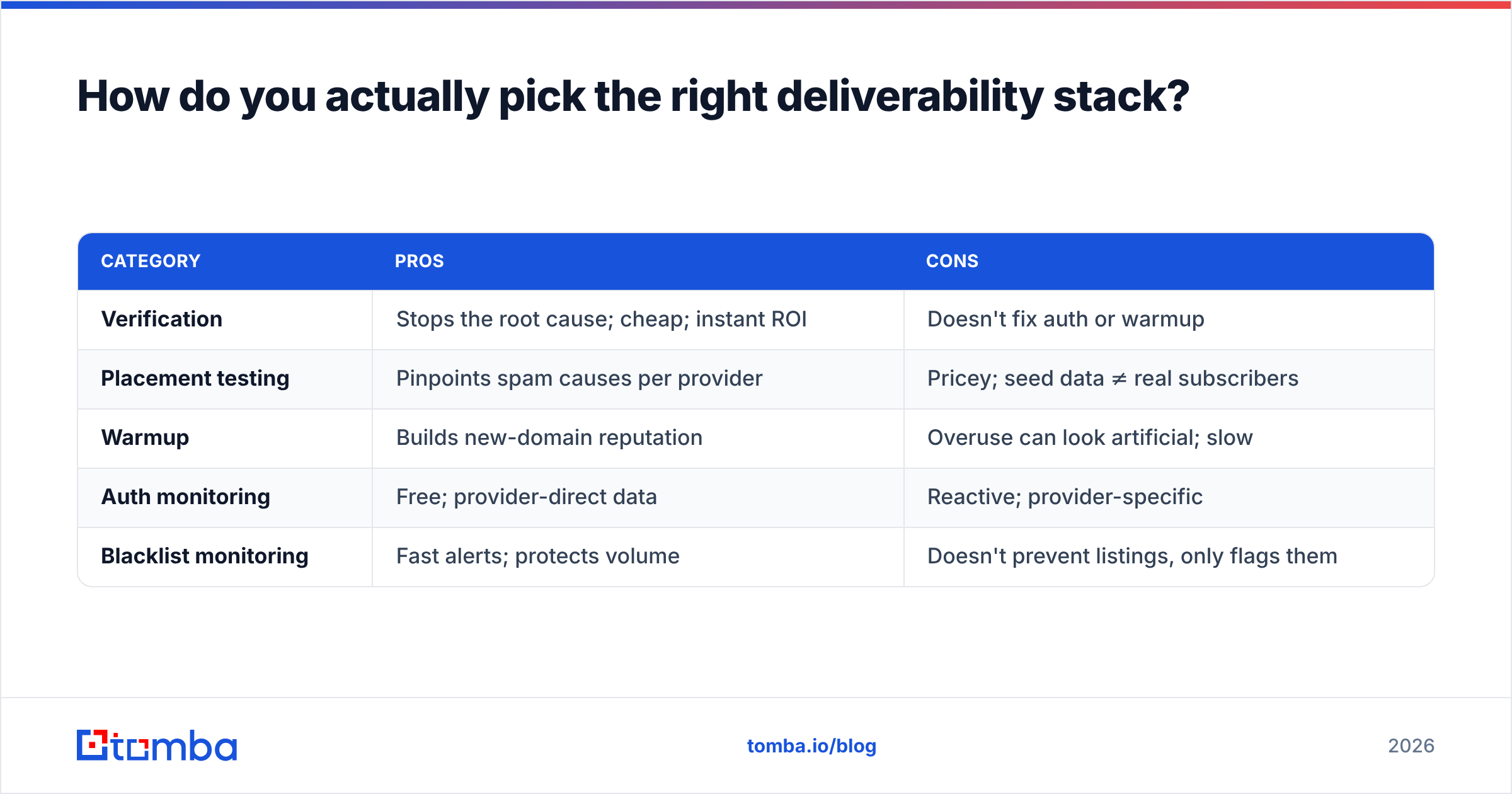
Quick pros and cons by category#
| Category | Pros | Cons |
|---|---|---|
| Verification | Stops the root cause; cheap; instant ROI | Doesn't fix auth or warmup |
| Placement testing | Pinpoints spam causes per provider | Pricey; seed data ≠ real subscribers |
| Warmup | Builds new-domain reputation | Overuse can look artificial; slow |
| Auth monitoring | Free; provider-direct data | Reactive; provider-specific |
| Blacklist monitoring | Fast alerts; protects volume | Doesn't prevent listings, only flags them |
What deliverability mistakes do these tools NOT fix?#
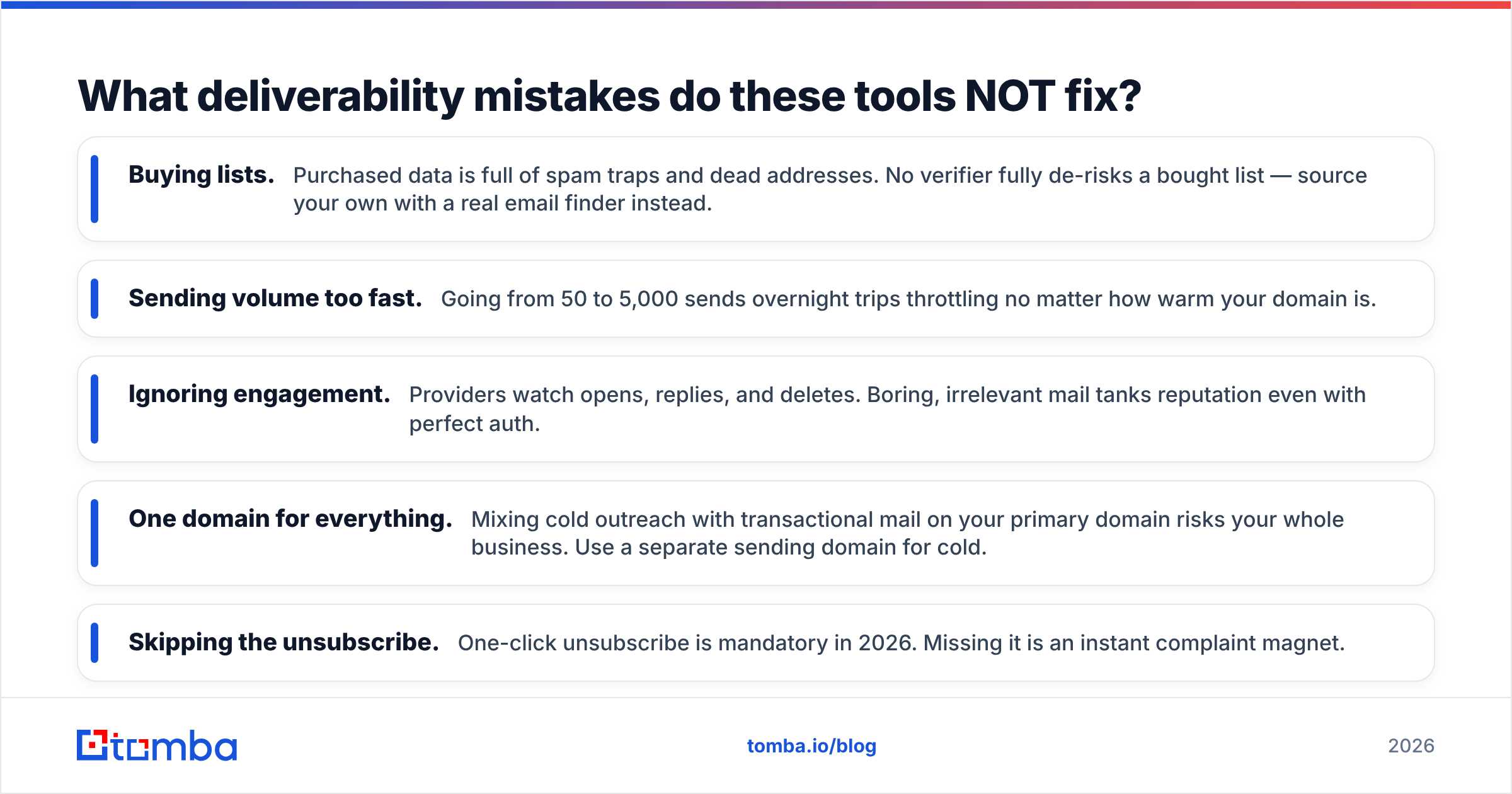
Tools are guardrails, not autopilot. Even the best stack won't save you from bad fundamentals.
- Buying lists. Purchased data is full of spam traps and dead addresses. No verifier fully de-risks a bought list — source your own with a real email finder instead.
- Sending volume too fast. Going from 50 to 5,000 sends overnight trips throttling no matter how warm your domain is.
- Ignoring engagement. Providers watch opens, replies, and deletes. Boring, irrelevant mail tanks reputation even with perfect auth.
- One domain for everything. Mixing cold outreach with transactional mail on your primary domain risks your whole business. Use a separate sending domain for cold.
- Skipping the unsubscribe. One-click unsubscribe is mandatory in 2026. Missing it is an instant complaint magnet.
For a deeper primer on the underlying concepts, the email deliverability glossary entry and independent review sites like G2 are worth a read before you commit budget.
Frequently asked questions#
What is the single most important deliverability tool? A real-time email verifier. Invalid addresses drive bounces, and high bounce rates are the fastest way to wreck sender reputation. Clean the list first; everything else compounds from there.
Do I need a warmup tool if my domain is old? Usually no. Established domains with consistent sending history already have reputation. Warmup matters most for new domains, new IPs, or domains returning from a long pause.
Are free deliverability tools enough? For low-volume, Gmail-focused senders, Google Postmaster plus a verifier covers most needs. Multi-provider and high-volume senders should add paid placement testing.
How often should I clean my email list? Before every major campaign, and at minimum quarterly for active lists. B2B data decays roughly 2–3% per month as people change jobs.
The bottom line#
The best email deliverability tools in 2026 work as layers: authenticate, warm up, test placement, and — most importantly — keep your list clean. Skip the cleanest layer and you'll spend on warmup and seed tests trying to fix a problem that started with a dead address.
Start at the root. Run your list through Tomba's email verifier to strip invalid, catch-all, and risky contacts before you send, and source new contacts that are valid from day one with the Tomba Email Finder. Clean data in means inbox placement out — and that's the only deliverability metric that pays.
// get started
Find, verify and enrich your first contacts today
Start on the free plan with 25 searches a month, then scale when your team is ready.
Free plan · No credit card required · GDPR & CCPA
// about the author