Best Power Dialer for 2026: Top 9 Tools Compared & Ranked
Comparing the best power dialer software for 2026 — features, pricing, connect rates, and the data layer that decides whether your dials ever turn into conversations.
Picking the best power dialer is less about the dialer and more about what you feed it. A dialer that fires 80 calls an hour into a list of dead numbers just gets you to "no answer" faster. This guide ranks the top tools for 2026, shows you what actually separates them, and explains the part most "best dialer" lists skip: the contact data underneath.
TL;DR#
- A power dialer auto-dials one number at a time from a list and drops you into live calls, cutting the dead time between dials — typically 2-3x more conversations per hour than manual dialing.
- The best tools for 2026 are Orum, PhoneBurner, Kixie, Aircall, JustCall, and Salesfinity, with platform suites like Apollo, Outreach, and Salesloft bundling a dialer into broader sequencing.
- Power dialer vs predictive vs parallel dialer is the real decision: each trades compliance risk and "first-hello" awkwardness against raw volume.
- Connect rate is capped by your phone data quality — wrong numbers and stale direct dials waste every productivity gain a dialer gives you.
- Pair any dialer with verified mobile and direct-dial numbers from a tool like the phone finder so your reps spend the hour talking, not redialing.
What is a power dialer, and how is it different from a predictive dialer?#
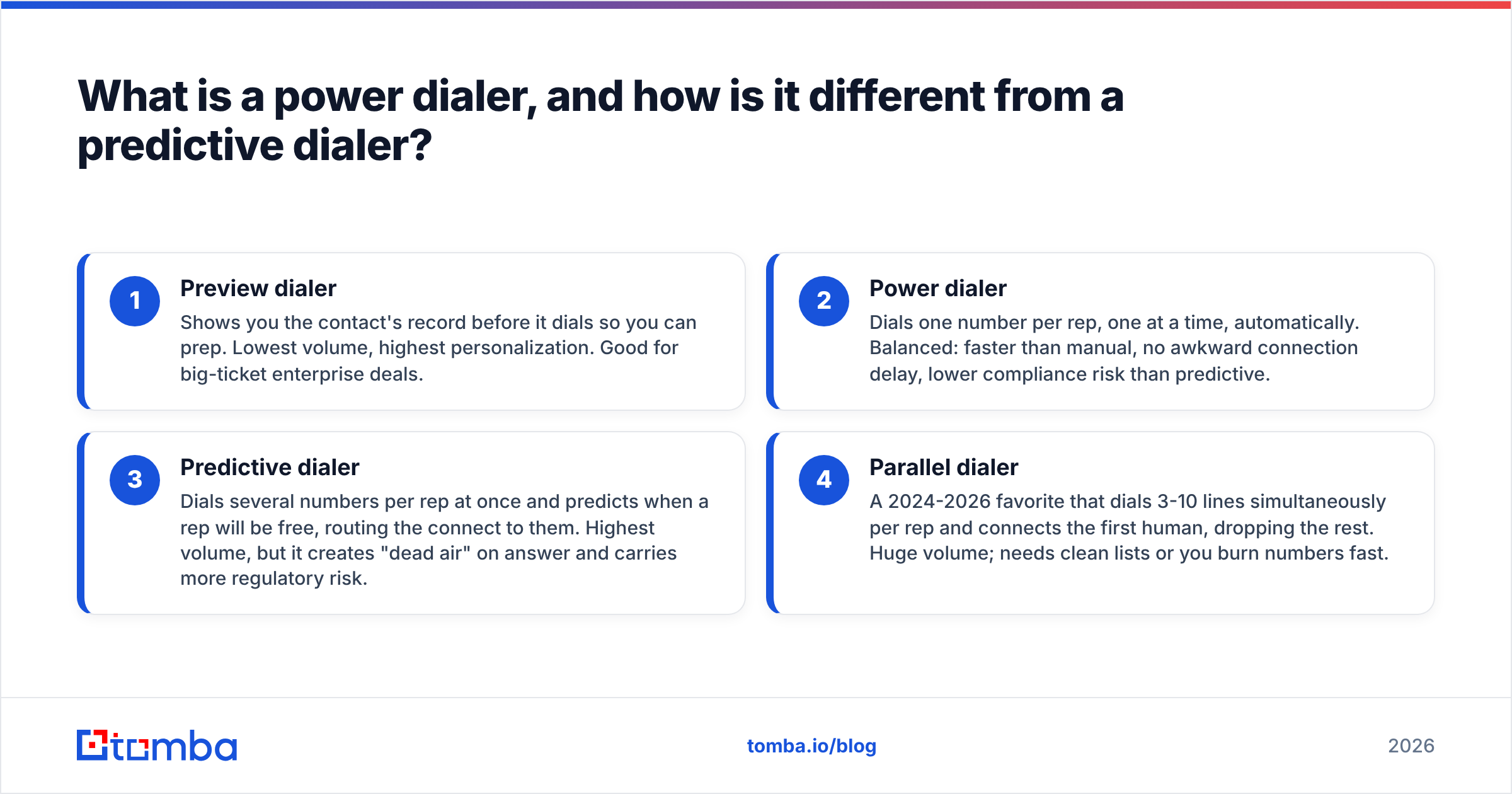
A power dialer is like a conveyor belt for phone calls. You load a list, the system dials the next number automatically the moment you finish the last call, and you talk to whoever picks up. No copying numbers, no manual dialing, no staring at a list deciding who's next.
That's different from the other two common modes:
- Preview dialer — Shows you the contact's record before it dials so you can prep. Lowest volume, highest personalization. Good for big-ticket enterprise deals.
- Power dialer — Dials one number per rep, one at a time, automatically. Balanced: faster than manual, no awkward connection delay, lower compliance risk than predictive.
- Predictive dialer — Dials several numbers per rep at once and predicts when a rep will be free, routing the connect to them. Highest volume, but it creates "dead air" on answer and carries more regulatory risk.
- Parallel dialer — A 2024-2026 favorite that dials 3-10 lines simultaneously per rep and connects the first human, dropping the rest. Huge volume; needs clean lists or you burn numbers fast.
If you only remember one thing: a power dialer is the safe default for most B2B sales teams. It moves fast without the answer-delay and compliance headaches of predictive and parallel modes.
Which is the best power dialer in 2026?#
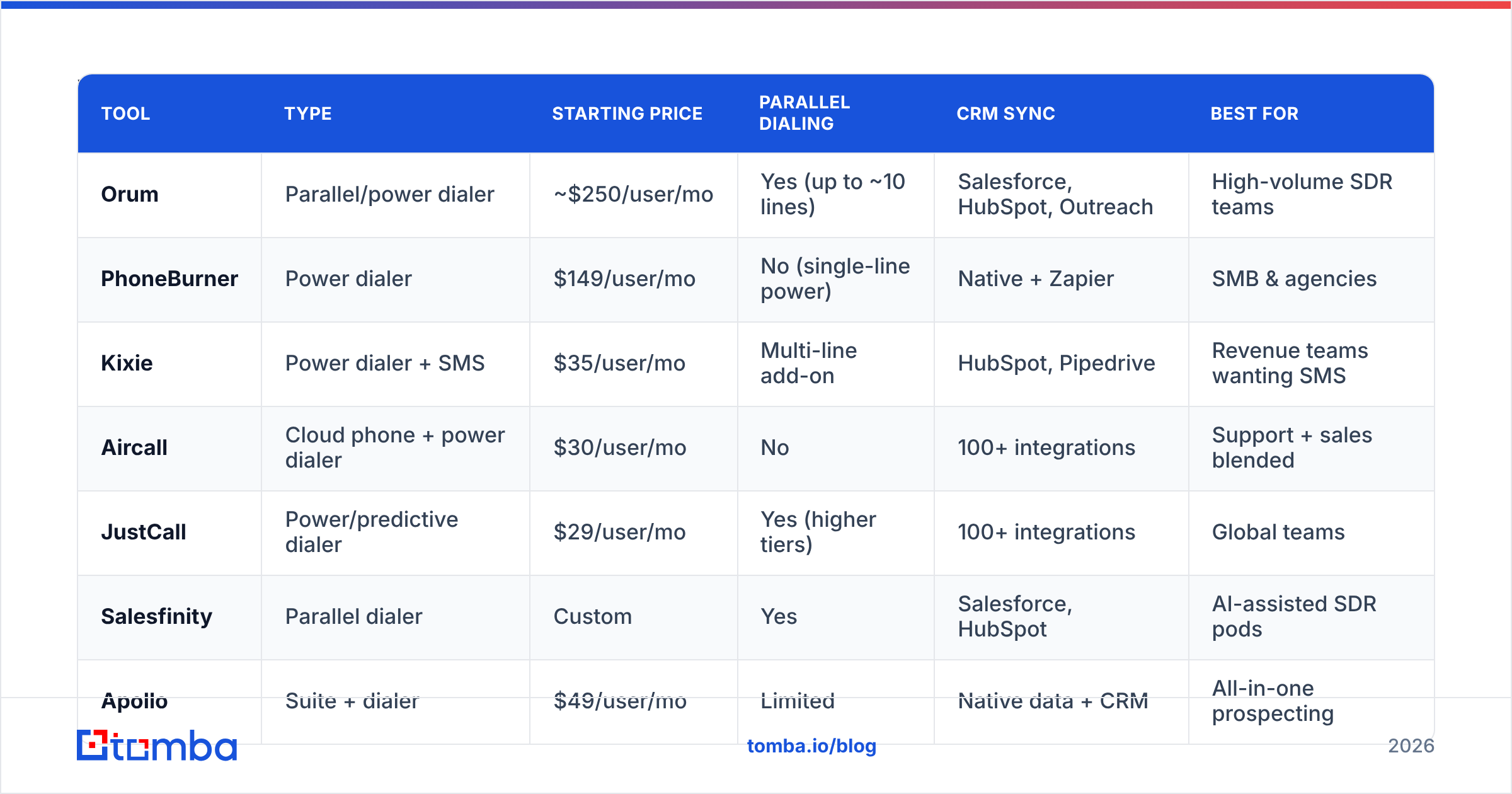
There's no single winner — the best power dialer depends on whether you want a standalone calling tool or a full sales-engagement suite. Here's how the leading options stack up.
| Tool | Type | Starting price | Parallel dialing | CRM sync | Best for |
|---|---|---|---|---|---|
| Orum | Parallel/power dialer | ~$250/user/mo | Yes (up to ~10 lines) | Salesforce, HubSpot, Outreach | High-volume SDR teams |
| PhoneBurner | Power dialer | $149/user/mo | No (single-line power) | Native + Zapier | SMB & agencies |
| Kixie | Power dialer + SMS | $35/user/mo | Multi-line add-on | HubSpot, Pipedrive | Revenue teams wanting SMS |
| Aircall | Cloud phone + power dialer | $30/user/mo | No | 100+ integrations | Support + sales blended |
| JustCall | Power/predictive dialer | $29/user/mo | Yes (higher tiers) | 100+ integrations | Global teams |
| Salesfinity | Parallel dialer | Custom | Yes | Salesforce, HubSpot | AI-assisted SDR pods |
| Apollo | Suite + dialer | $49/user/mo | Limited | Native data + CRM | All-in-one prospecting |
| Outreach | Sequencing + dialer | Custom (enterprise) | No | Salesforce-first | Enterprise sales orgs |
| Salesloft | Sequencing + dialer | Custom (enterprise) | No | Salesforce, MS Dynamics | Enterprise cadence teams |
A few takeaways:
- Pure dialers (Orum, PhoneBurner, Kixie, Salesfinity) win on call experience, local presence, and voicemail drop quality.
- Suites (Apollo, Outreach, Salesloft) win when you want calling to live inside the same tool as your email sequences and pipeline. If you're weighing those, our breakdowns of an Outreach alternative and a Salesloft alternative are useful gut-checks before you sign an annual contract.
- Cloud-phone hybrids (Aircall, JustCall) are the move if your team handles inbound support and outbound prospecting on the same numbers.
For independent reviews across all of these, G2's power dialer category is a solid cross-check on pricing and satisfaction scores.
How much should a power dialer cost?#
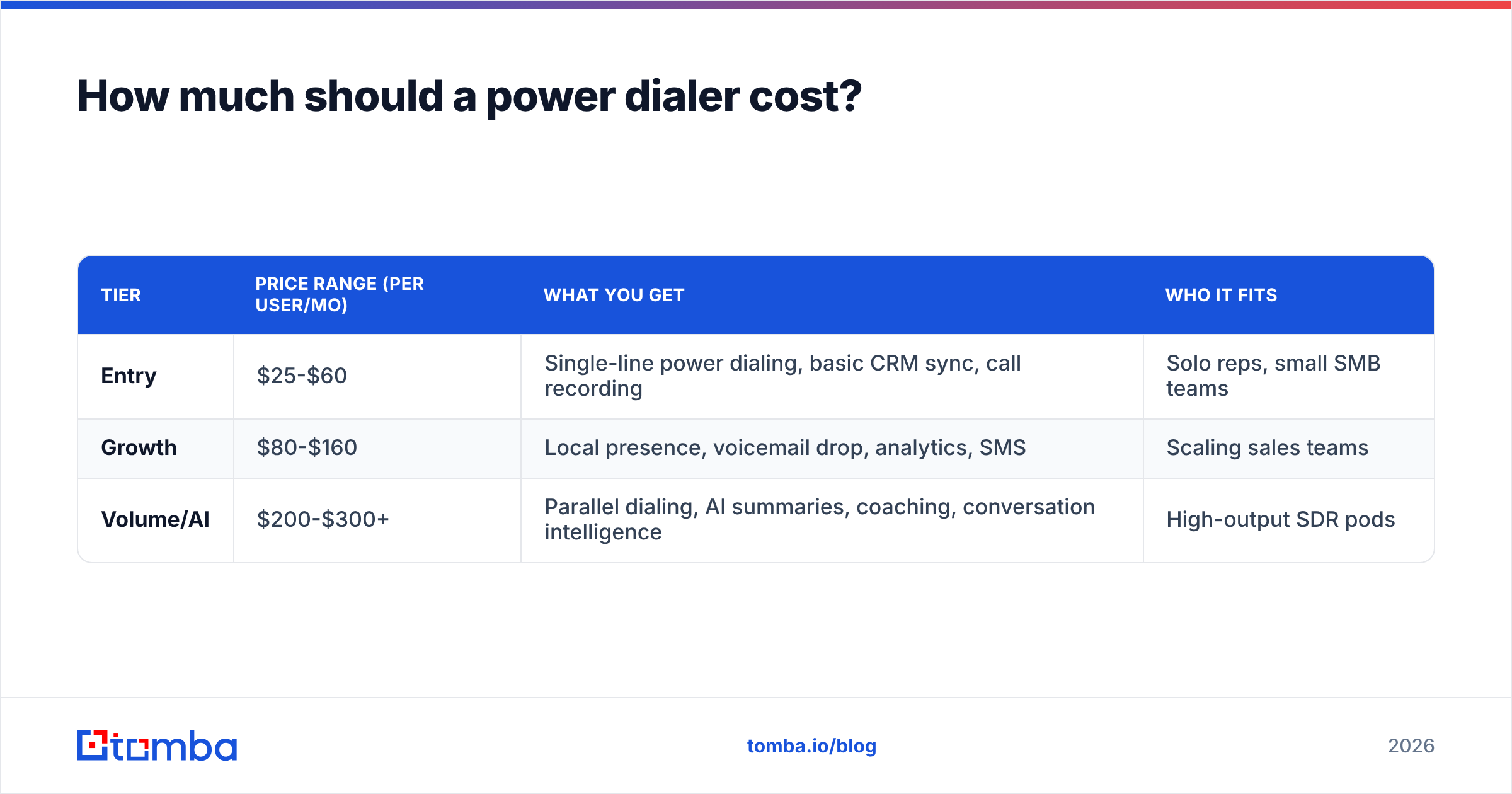
Pricing splits into three tiers, and the gap between them is mostly about volume and AI features.
| Tier | Price range (per user/mo) | What you get | Who it fits |
|---|---|---|---|
| Entry | $25-$60 | Single-line power dialing, basic CRM sync, call recording | Solo reps, small SMB teams |
| Growth | $80-$160 | Local presence, voicemail drop, analytics, SMS | Scaling sales teams |
| Volume/AI | $200-$300+ | Parallel dialing, AI summaries, coaching, conversation intelligence | High-output SDR pods |
Two cost traps to watch:
- Per-minute and number fees. Some "cheap" plans add usage charges that dwarf the seat price once reps hit real volume.
- Annual lock-in. Enterprise suites quote custom pricing and push annual contracts. Pilot with a small seat count first.
Remember the real cost equation isn't dollars per seat — it's dollars per conversation. A $250/mo parallel dialer that connects 12 conversations an hour can be cheaper per outcome than a $35/mo tool dialing bad numbers.
Does a power dialer actually improve connect rates?#
Yes — but only the part it controls. A power dialer removes the 15-20 seconds of dead time between manual dials, so reps spend more of the hour in live conversations. That's a genuine productivity multiplier.
What a dialer cannot fix is the list. If 30% of your numbers are wrong, disconnected, or route to a gatekeeper's old extension, no amount of dialing speed helps. You just reach voicemail faster.
This is the quiet truth behind every "best dialer" comparison: connect rate is a product of two things —
- Dialer mechanics — speed, local presence, voicemail drop, retry logic.
- Data quality — whether the number is a current, direct mobile line for the actual decision-maker.
You can buy the first. You have to source the second.

What features separate the best power dialers from the rest?#
Once you've decided on power vs predictive vs parallel, these are the features that actually move pickup and conversion:
- Local presence / dynamic caller ID — Matches your outbound number to the prospect's area code. This alone can lift answer rates meaningfully, though carrier spam-labeling rules in 2026 mean you must rotate and register numbers properly (STIR/SHAKEN attestation).
- Voicemail drop — Pre-recorded voicemails you leave with one click, so reps don't repeat the same message 60 times a day.
- Branded caller ID — Shows your company name on the prospect's screen. A growing differentiator now that spam-likely labels kill so many cold calls.
- CRM write-back — Calls, dispositions, and recordings sync automatically to Salesforce, HubSpot, or Pipedrive. If you're logging calls manually, the dialer isn't doing its job.
- Conversation intelligence — AI transcription, talk-time ratios, and call scoring. Increasingly bundled into the volume tier.
- Cadence integration — Calls fire as steps inside a multi-touch sequence alongside email and LinkedIn, so a rep's day is one queue, not three.
If you want calling stitched into email and social touches, look at how sales automation platforms sequence those steps — the dialer is one node in a wider play, not the whole motion.
How do you feed a power dialer good numbers?#
Garbage in, garbage out — so the highest-ROI move is fixing the input, not just the dialer. Here's the workflow that keeps a dialer fed with numbers worth calling:
- Build the target list by company and role using a B2B database or your CRM's ICP filters.
- Find direct dials and mobiles, not switchboards. A phone finder returns the contact's actual line so reps skip the gatekeeper.
- Validate before you dial. Run numbers through a phone validator to drop disconnected and invalid lines before they ever hit the dialer — that's wasted minutes and seat cost you reclaim.
- Enrich the record so the rep sees title, company, and email context on screen. Layer in data enrichment to fill gaps your CRM left blank.
- Sync back. Push dispositions to your CRM so tomorrow's list reflects today's outcomes.
Do this and a mid-tier dialer outperforms a premium one running on a stale export. The data layer is the lever, not the dialer's marketing page.
Power dialer vs parallel dialer: which should you pick?#
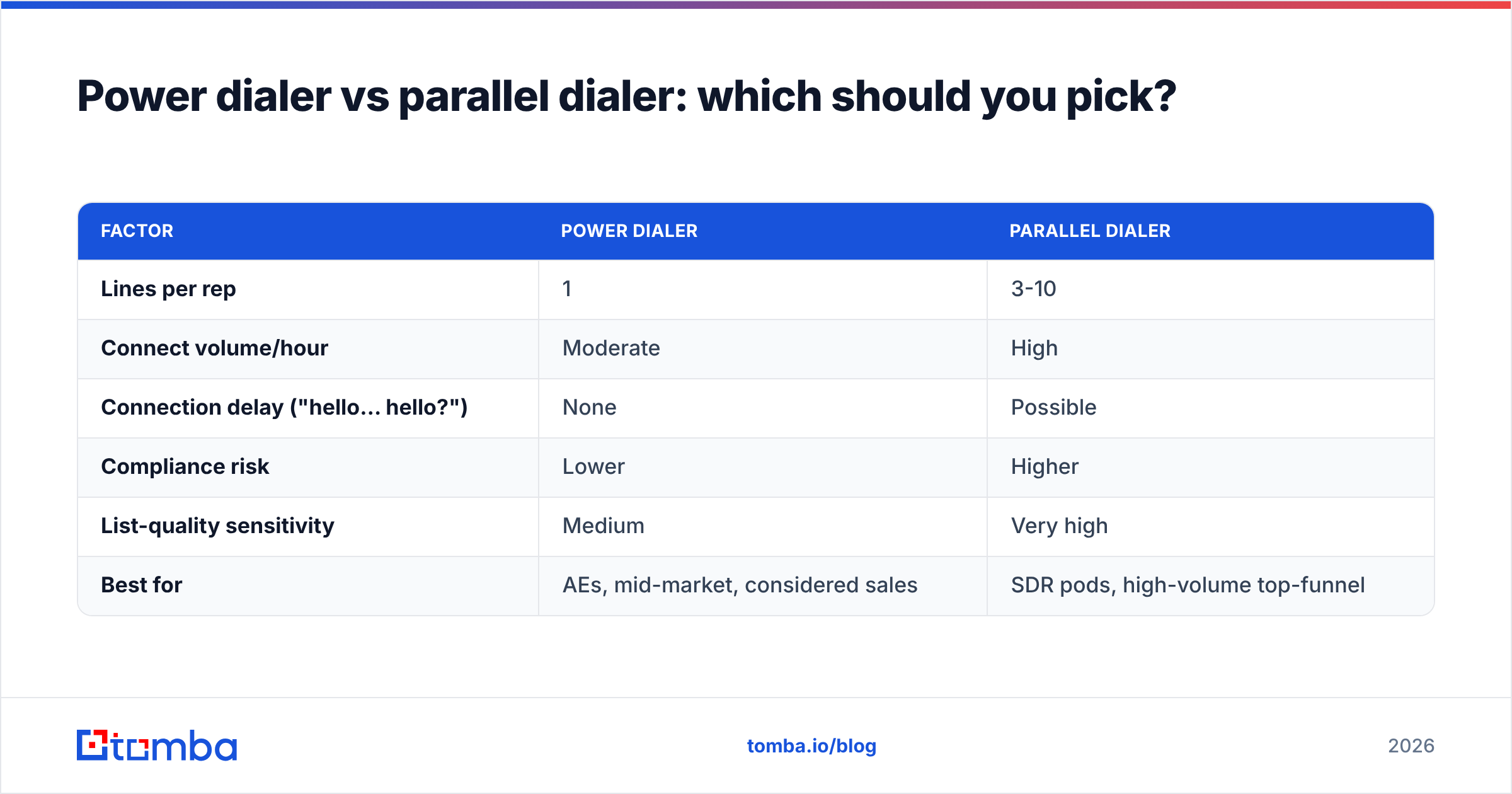
Pick a power dialer for quality conversations and compliance safety; pick a parallel dialer for raw top-of-funnel volume. Here's the honest trade-off:
| Factor | Power dialer | Parallel dialer |
|---|---|---|
| Lines per rep | 1 | 3-10 |
| Connect volume/hour | Moderate | High |
| Connection delay ("hello… hello?") | None | Possible |
| Compliance risk | Lower | Higher |
| List-quality sensitivity | Medium | Very high |
| Best for | AEs, mid-market, considered sales | SDR pods, high-volume top-funnel |
The catch with parallel dialing: because it dials many lines at once and abandons the extras, it's far more sensitive to list quality and far more exposed to spam-labeling and abandonment regulations. Run a parallel dialer on a dirty list and you'll torch your numbers' reputation in a week. That's exactly why verified, deduplicated data matters more as you dial more aggressively — clean your list first with tools like remove duplicates and a validator pass.
What about compliance in 2026?#
Short version: dial like the rules are being enforced, because they increasingly are. A few non-negotiables for outbound calling teams:
- Honor DNC lists and maintain your own internal do-not-call suppression.
- Watch abandonment rates on predictive and parallel modes — most jurisdictions cap them.
- Register your numbers for STIR/SHAKEN attestation so carriers don't flag you as spam-likely. The FCC's robocall and caller-ID rules are the canonical reference here.
- Get consent right for any SMS follow-up your dialer triggers.
A good dialer helps you stay inside these lines with built-in suppression and rate controls. But compliance is a process you own, not a feature you buy.
Final verdict: the best power dialer is the one with the best data behind it#
If you want a clean recommendation: Orum or Salesfinity for high-volume SDR pods, Kixie or PhoneBurner for SMB and mid-market, and Apollo, Outreach, or Salesloft if you want the dialer to live inside your full sequencing stack. Compare a few on Capterra and run a two-week pilot before committing to an annual seat.
But whichever you choose, the dialer is only half the system. The connect rate that decides your ROI is set by the numbers you load. A premium dialer running on stale, gatekeeper-heavy lists will lose to a basic one running on verified direct dials every single time.
That's where Tomba fits — not as a dialer, but as the data layer that makes any dialer worth running. Use the Tomba Email Finder and phone finder to build verified, enriched contact lists, validate the numbers before they hit your queue, and feed your reps a day of real conversations instead of dead air. Start free with 25 searches a month, then scale on a Tomba plan — Starter is $49/mo — once your pipeline proves it out. Fix the data, and the dialer takes care of the rest.
// get started
Find, verify and enrich your first contacts today
Start on the free plan with 25 searches a month, then scale when your team is ready.
Free plan · No credit card required · GDPR & CCPA
// about the author