Best Software for Sales in 2026: The Complete Stack Guide
The best software for sales isn't one tool — it's a stack. Here's how to pick a CRM, prospecting data, outreach, and enrichment that actually move pipeline in 2026.
Picking the "best software for sales" feels like it should have one answer. It doesn't. Sales software is a stack, not a single app, and the team that wins is the one whose layers actually talk to each other. This guide breaks the stack into the layers that matter, names the tools worth shortlisting in 2026, and shows you how to assemble them without overspending.
TL;DR#
- The best software for sales is a stack, not a single product — a CRM core, a prospecting/data layer, an outreach engine, and enrichment/verification glue.
- Start with the CRM, because everything else integrates into it. HubSpot and Pipedrive lead the mid-market; Salesforce owns enterprise.
- Your data layer decides your ceiling — bad contact data wastes every dollar you spend on outreach. This is where an accurate email finder earns its keep.
- Don't pay for overlap. Many "all-in-one" platforms duplicate features you already own. Map your stack before you buy.
- Tomba fits the data + verification layer at $49/mo starter, far cheaper than bundling enrichment into a $200+/seat sales-engagement suite.
What counts as "sales software" in 2026?#
Sales software is any tool that helps you find, contact, qualify, or close buyers. Think of it like a kitchen: the CRM is your fridge (where everything is stored and organized), the data layer is your grocery supply (raw ingredients), outreach tools are the stove (where the cooking happens), and analytics is the taste-test at the end. No single appliance makes dinner.
In practice, a modern sales stack splits into four layers:
- CRM / system of record — the database every deal lives in (Salesforce, HubSpot, Pipedrive).
- Prospecting & B2B data — where you discover accounts and contacts (Apollo, ZoomInfo, Tomba).
- Outreach & engagement — email sequences, calls, and LinkedIn touches (Outreach, Salesloft, Instantly).
- Enrichment & verification — the glue that keeps records clean and deliverable (data enrichment, email verifier, phone validation).
Most "best software for sales" lists fail because they compare a CRM against an email tool as if you must choose one. You don't. You need one strong pick per layer.
Which layer should you buy first?#
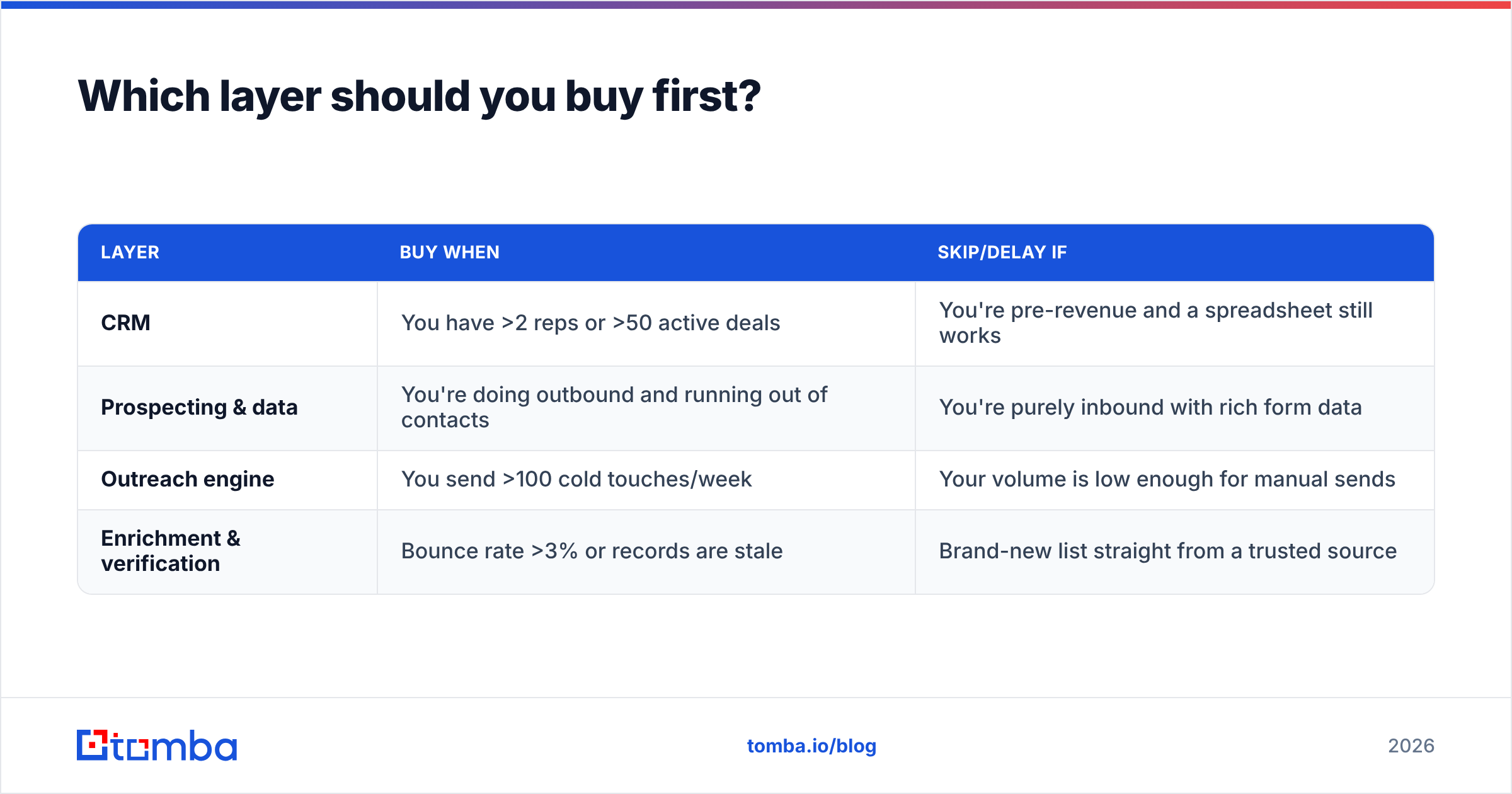
Buy the CRM first, then the data layer, then outreach. The CRM is the spine everything bolts onto, so choosing it early prevents painful migrations later.
| Layer | Buy when | Skip/delay if |
|---|---|---|
| CRM | You have >2 reps or >50 active deals | You're pre-revenue and a spreadsheet still works |
| Prospecting & data | You're doing outbound and running out of contacts | You're purely inbound with rich form data |
| Outreach engine | You send >100 cold touches/week | Your volume is low enough for manual sends |
| Enrichment & verification | Bounce rate >3% or records are stale | Brand-new list straight from a trusted source |
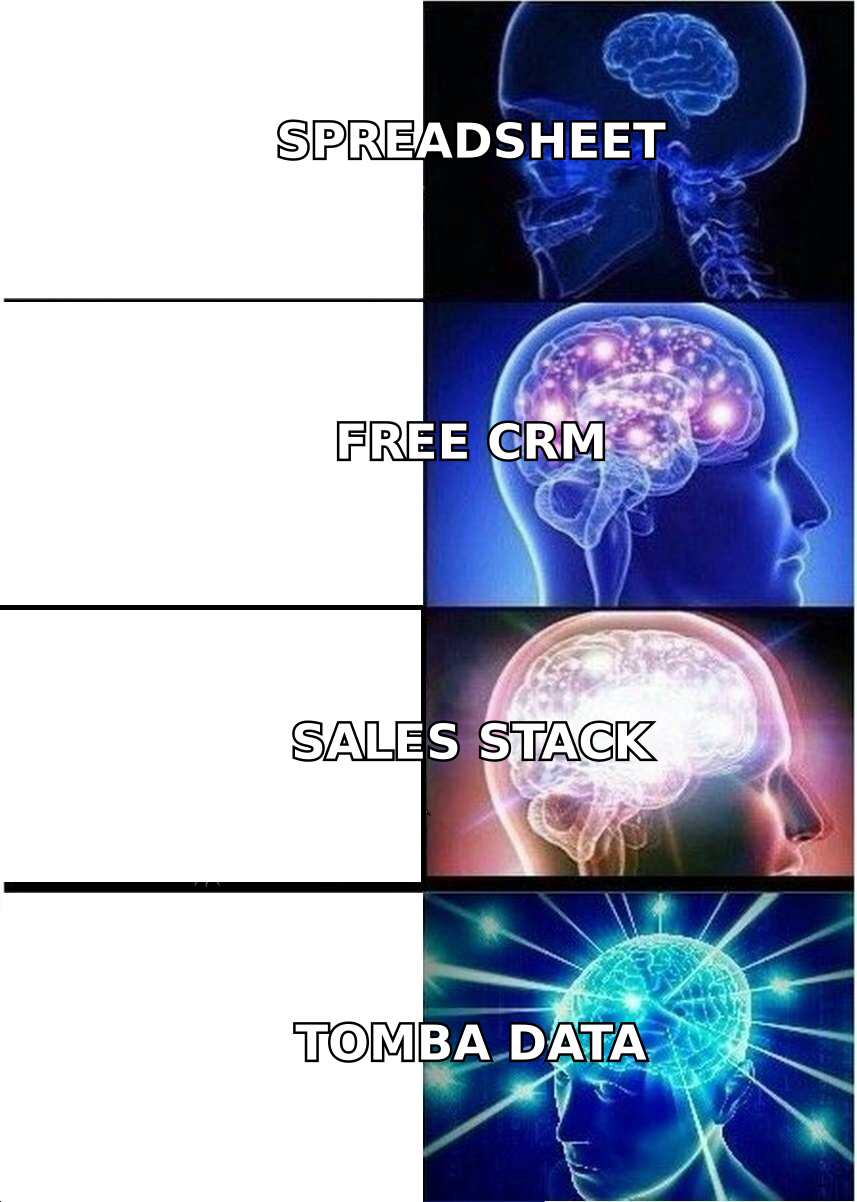
A common mistake: buying a $140/seat sales-engagement platform before you have clean data to feed it. That's like buying a sports car with no fuel. Get the B2B database and verification right first.
What is the best CRM software for sales?#
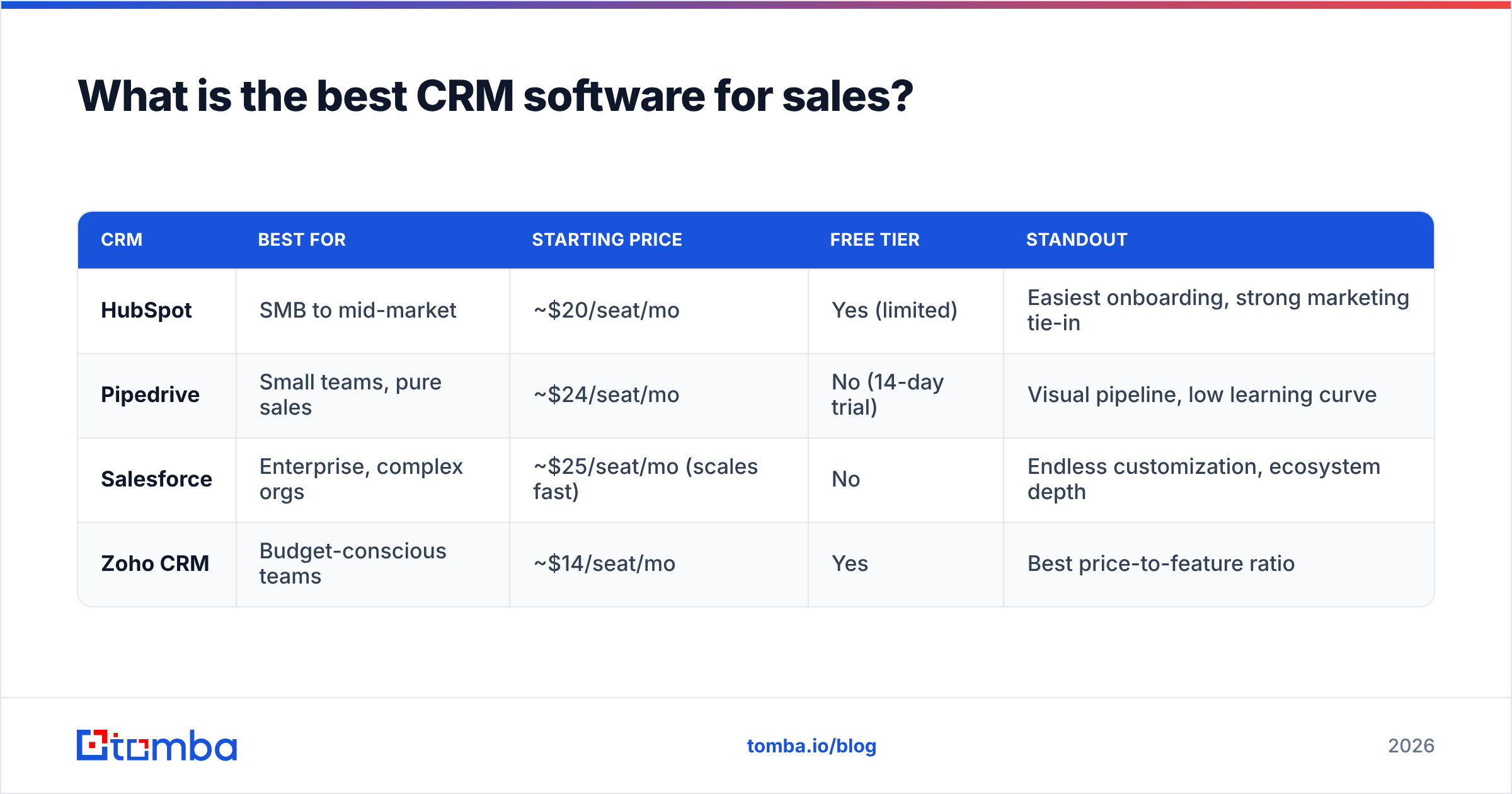
The best CRM depends on company size and process complexity. Here's the honest split for 2026.
| CRM | Best for | Starting price | Free tier | Standout |
|---|---|---|---|---|
| HubSpot | SMB to mid-market | ~$20/seat/mo | Yes (limited) | Easiest onboarding, strong marketing tie-in |
| Pipedrive | Small teams, pure sales | ~$24/seat/mo | No (14-day trial) | Visual pipeline, low learning curve |
| Salesforce | Enterprise, complex orgs | ~$25/seat/mo (scales fast) | No | Endless customization, ecosystem depth |
| Zoho CRM | Budget-conscious teams | ~$14/seat/mo | Yes | Best price-to-feature ratio |
If you're under 50 people, HubSpot or Pipedrive will cover 90% of needs without a consultant. If you're scaling past a few hundred reps with custom approval flows, Salesforce earns its complexity. For independent validation across categories, G2 grids are a useful sanity check against vendor marketing.
Whichever you pick, the CRM is only as good as the data inside it. A pretty pipeline full of stale contacts still loses deals. That's why the next layer matters more than most teams admit.
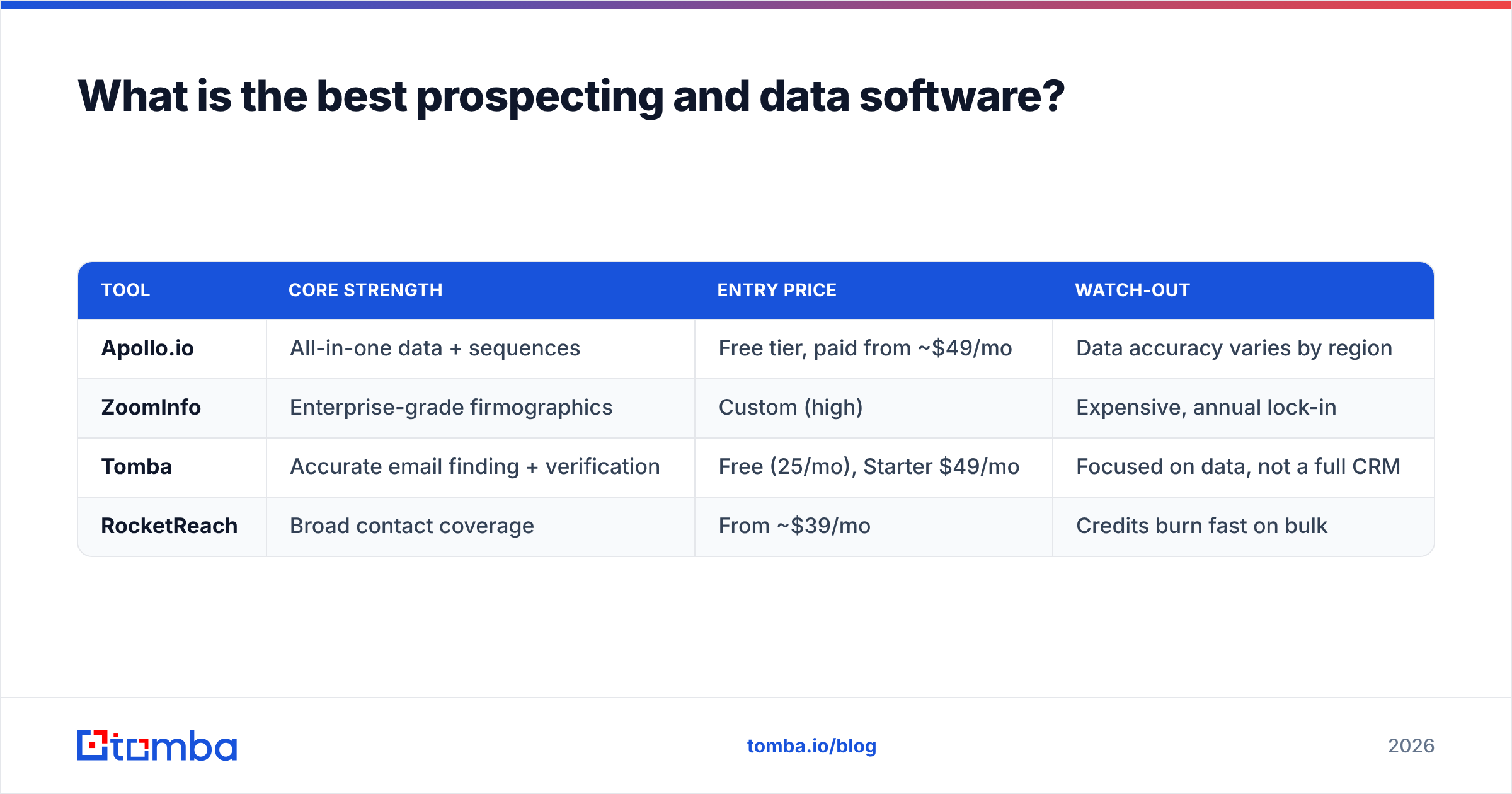
What is the best prospecting and data software?#
The best prospecting software gives you accurate contacts at a price that scales with your volume. This is the layer where teams overpay the most, because the big platforms bundle data you can buy cheaper à la carte.
| Tool | Core strength | Entry price | Watch-out |
|---|---|---|---|
| Apollo.io | All-in-one data + sequences | Free tier, paid from ~$49/mo | Data accuracy varies by region |
| ZoomInfo | Enterprise-grade firmographics | Custom (high) | Expensive, annual lock-in |
| Tomba | Accurate email finding + verification | Free (25/mo), Starter $49/mo | Focused on data, not a full CRM |
| RocketReach | Broad contact coverage | From ~$39/mo | Credits burn fast on bulk |
Tomba sits squarely in this layer. Instead of paying enterprise rates to bundle prospecting into a do-everything suite, you can run domain search to map every reachable contact at a target company, verify them, and push clean records into your CRM. If you're weighing the giants, the Apollo alternative and RocketReach alternative breakdowns show where a focused data tool wins on cost and accuracy.
The rule of thumb: pay for data accuracy and verification, not for a fifth sequencing tool you'll never fully use.
What is the best outreach and sales-engagement software?#
The best outreach software matches your channel mix and volume. High-volume cold email teams want deliverability-first tools; complex enterprise motions want multi-channel orchestration tied to the CRM.
- Instantly — built for cold-email volume with inbox rotation and warmup baked in. Strong for agencies and high-throughput SDR teams.
- Outreach / Salesloft — the enterprise standard for multi-channel sequences (email, calls, LinkedIn, tasks) with deep analytics. Heavier, pricier, CRM-tied.
- Reply.io / Saleshandy — mid-market sweet spot for sequencing without enterprise overhead.
- Lemlist — personalization-heavy (images, video) for teams that live or die on reply rates.
Whichever engine you choose, deliverability is the silent killer. Sending great copy to unverified addresses tanks your sender reputation and quietly routes you to spam. Run every list through an email verifier before the first send, and use a catch-all verifier for those tricky accept-all domains that other tools mark "unknown."
How do the tools fit together into one stack?#
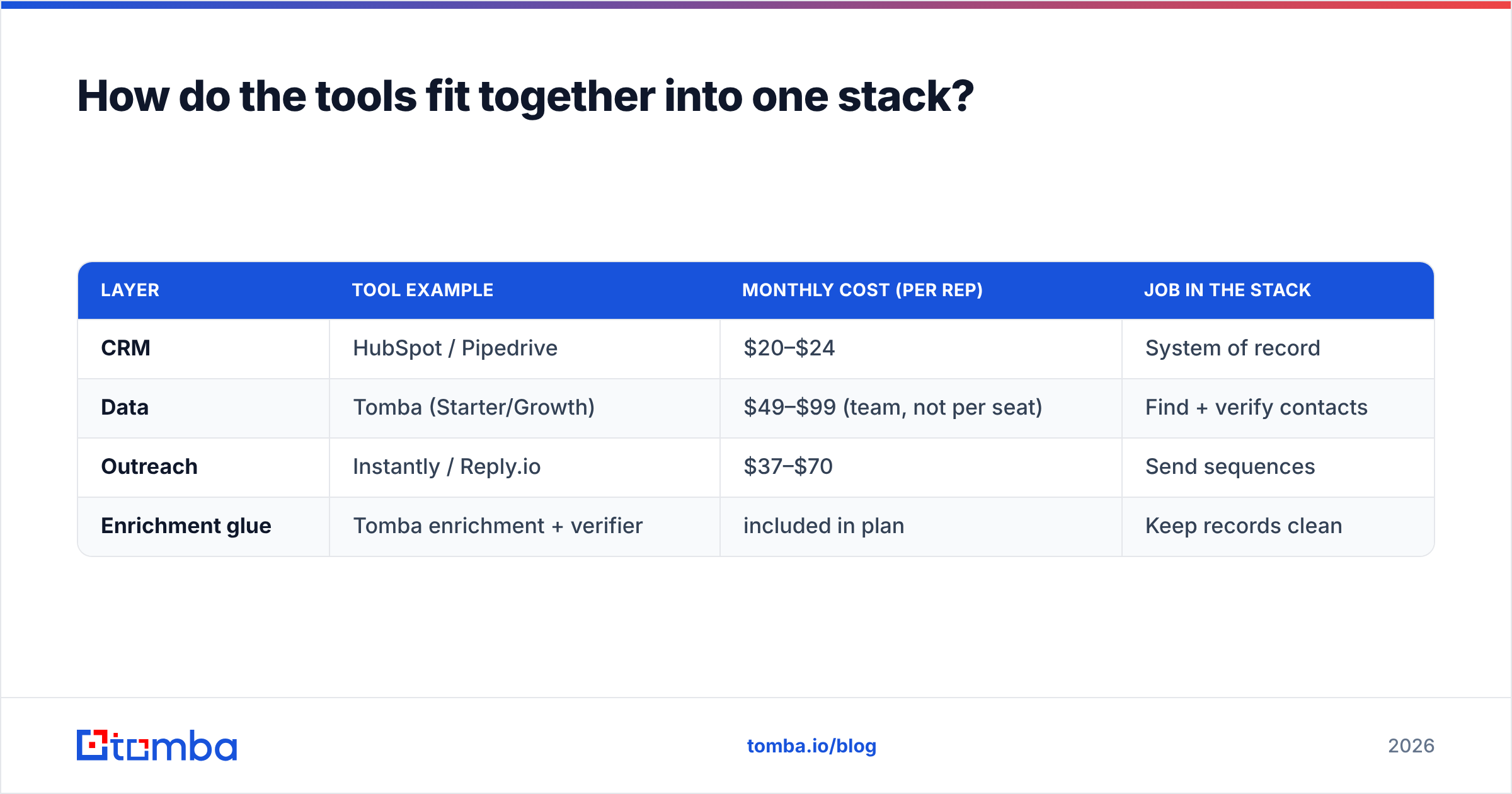
Think of the stack as a relay race: each tool hands the baton to the next, and a clean handoff matters more than any single sprinter. Here's a working mid-market setup and roughly what it costs per rep.
| Layer | Tool example | Monthly cost (per rep) | Job in the stack |
|---|---|---|---|
| CRM | HubSpot / Pipedrive | $20–$24 | System of record |
| Data | Tomba (Starter/Growth) | $49–$99 (team, not per seat) | Find + verify contacts |
| Outreach | Instantly / Reply.io | $37–$70 | Send sequences |
| Enrichment glue | Tomba enrichment + verifier | included in plan | Keep records clean |
Notice the data layer is priced per team, not per seat — a single Tomba pricing plan can feed an entire SDR pod. That's the leverage point: one accurate data subscription improves the ROI of every other tool you pay for per seat.
To wire it together without engineering work, lean on native integrations — push verified contacts straight into HubSpot or Salesforce, or automate the flow through Zapier. For ops teams living in spreadsheets, the Google Sheets add-on finds and verifies emails inline, and the bulk email finder handles list-scale jobs.
How much should a sales stack cost?#
A lean, effective stack runs $120–$250 per rep per month in 2026, before the CRM's marketing add-ons. Here's how teams overspend — and how to avoid it.
- Stop paying for overlapping data. If your outreach tool, your CRM enrichment, and a standalone data vendor all sell you contacts, you're buying the same person three times. Consolidate to one accurate source.
- Buy data per team, not per seat. Seat-based data pricing punishes growth. A pooled credit model (like Tomba's) scales with usage instead.
- Match the tier to real volume. Most teams buy the $249 plan and use a fraction. Start at the $49/mo Starter, watch consumption, and upgrade only when credits run dry.
- Verify before you send, not after you bounce. Cleaning a list costs pennies; a wrecked domain reputation costs weeks. Free up-front tools like the email checker and company email pattern finder cut bounces before they happen.
- Use free utilities for the long tail. Subject-line testing, signature generation, and SPF checks don't need paid seats — Tomba's free tools cover the basics.
For a deeper market view on category spend and consolidation trends, analyst resources like Gartner track how RevOps teams are cutting redundant tooling year over year — and consolidation around clean data is the consistent theme.
Is an all-in-one platform better than a best-of-breed stack?#
All-in-one wins on simplicity; best-of-breed wins on accuracy and cost. The right answer depends on your team's maturity.
| Factor | All-in-one (e.g. Apollo, ZoomInfo) | Best-of-breed stack |
|---|---|---|
| Setup speed | Faster — one login | Slower — multiple tools |
| Data accuracy | Average, generalist | Higher with a specialist data tool |
| Cost at scale | Climbs steeply per seat | Lower — pooled data, cheap outreach |
| Flexibility | Locked to vendor roadmap | Swap any layer anytime |
| Best for | Small teams wanting one bill | Teams optimizing reply + deliverability |
The pragmatic move for most teams in 2026: an all-in-one CRM core, plus a best-of-breed data layer because that's where accuracy directly drives revenue. You don't need a specialist for every box — you need one for the box that bounces emails and burns reputation.
What's the single highest-ROI upgrade?#
Fix your data layer first. Every other improvement — better copy, more sequences, faster follow-up — multiplies against your contact accuracy. If 20% of your list is wrong, you're throttling your entire funnel by 20% before a single email sends.
Concretely, that means three habits:
- Find emails from a verified source, not scraped guesses. Use a real email finder with confidence scoring.
- Verify every address before it enters a sequence, including catch-all domains.
- Enrich records with phone, role, and company data so reps personalize instead of spray-and-pray. A phone finder adds a second channel for the accounts that matter.
The bottom line#
The best software for sales in 2026 is a well-matched stack: a CRM you'll actually use, a data layer you can trust, an outreach engine sized to your volume, and verification glue that keeps it all deliverable. Buy the CRM first, fix the data second, and refuse to pay twice for the same contacts.
If you're assembling that stack, start with the layer that decides everything downstream. Tomba's Email Finder gives you accurate, verified business emails from a domain or a name — with a free tier (25 searches/month) to test the accuracy yourself, and a $49/mo Starter that feeds your whole team, not just one seat. Plug it into your CRM, verify before you send, and let every other tool in your stack work against clean data instead of guesses.
// get started
Find, verify and enrich your first contacts today
Start on the free plan with 25 searches a month, then scale when your team is ready.
Free plan · No credit card required · GDPR & CCPA
// about the author