BIMI DMARC Setup in 2026: The Complete Configuration Guide
BIMI puts your logo in the inbox, but only DMARC unlocks it. Here's exactly how the two connect, what to configure first, and what it costs in 2026.
You set up BIMI, uploaded a logo, and your brand mark still won't show next to your emails. The reason is almost always the same: BIMI DMARC work as a pair, and BIMI does nothing until DMARC is enforced. The order you set them up in decides whether your logo ever appears.
This guide breaks down how BIMI DMARC actually connect, what each mailbox provider requires in 2026, and the exact sequence to go from "no authentication" to a verified logo in the inbox.
TL;DR#
- BIMI rides on DMARC. Your domain needs a DMARC policy of
p=quarantineorp=reject(at 100% enforcement) before any inbox logo renders. - The order is fixed: SPF and DKIM first, then DMARC enforcement, then the BIMI record, then — for most providers — a verified mark certificate (VMC or CMC).
- A VMC costs money. Expect roughly $1,000–$1,500 per year per logo through certificate authorities like DigiCert or Entrust; Gmail and Apple require it, others are softening.
- The logo must be a specific SVG. SVG Tiny Portable/Secure (SVG P/S) only — not a PNG, not a regular SVG export.
- Get authentication clean first with tools like an SPF checker and a sender reputation audit. The logo is the reward at the end, not the starting point.
What is BIMI and how does it relate to DMARC?#
BIMI (Brand Indicators for Message Identification) is a standard that displays your verified brand logo next to authenticated emails in supporting inboxes. Think of it like the verified badge on a social media account. Anyone can claim to be your brand, but only the account that proved ownership gets the badge.
DMARC is the proof. BIMI is the badge. You cannot have the badge without the proof. That is why so many BIMI setups silently fail: the logo layer is fine, but the authentication underneath was never enforced.
Here is the dependency chain in plain terms:
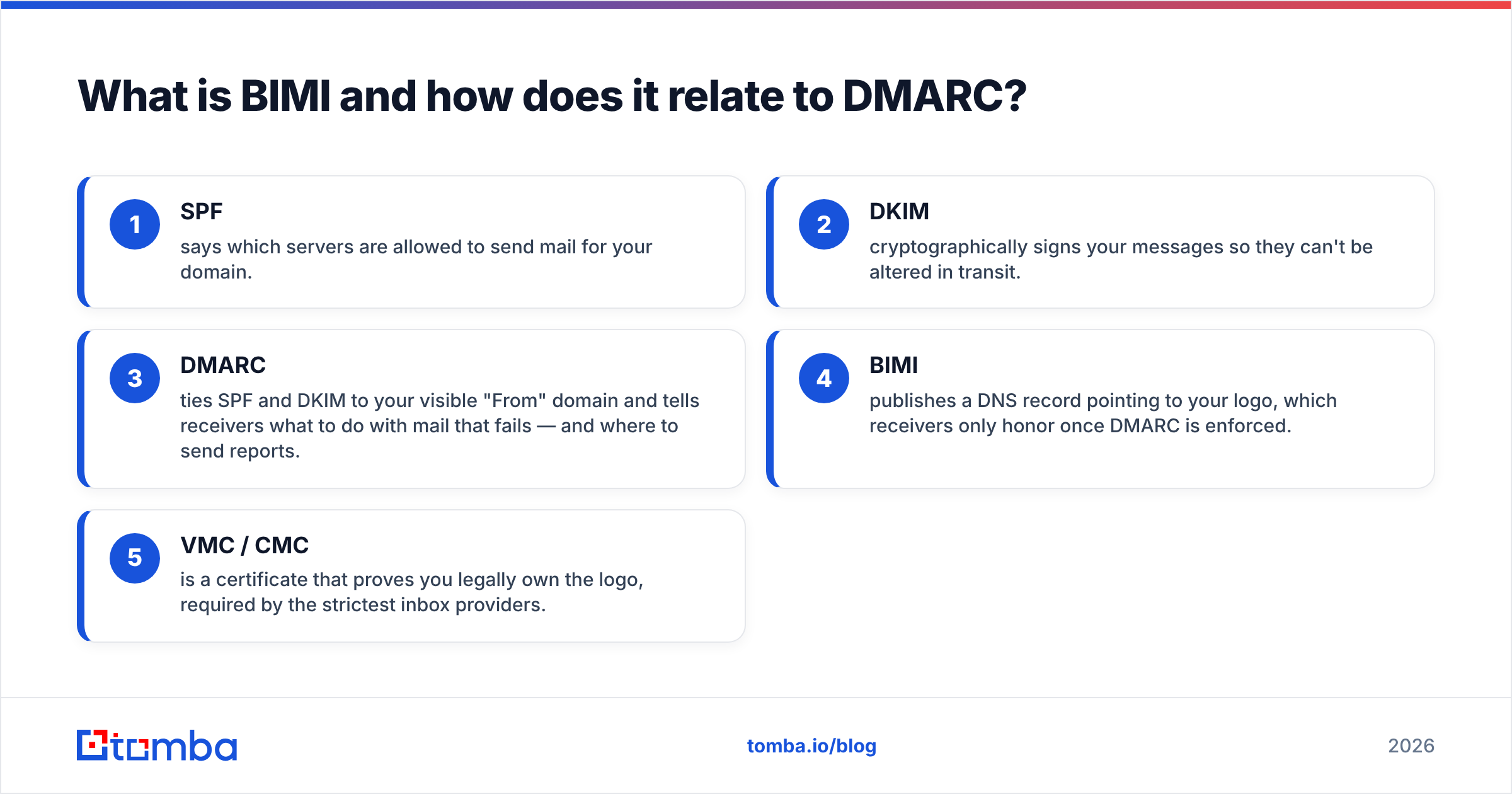
- SPF says which servers are allowed to send mail for your domain.
- DKIM cryptographically signs your messages so they can't be altered in transit.
- DMARC ties SPF and DKIM to your visible "From" domain. It also tells receivers what to do with mail that fails, and where to send reports.
- BIMI publishes a DNS record pointing to your logo, which receivers only honor once DMARC is enforced.
- VMC / CMC is a certificate that proves you legally own the logo, required by the strictest inbox providers.
Skip any earlier link and everything after it collapses. That is the single most important thing to know about email deliverability and brand indicators: they are layered, not parallel.
Why does BIMI require DMARC enforcement specifically?#
Because a logo is a trust signal, and a trust signal attached to spoofable mail is worse than no signal at all. If any spammer could attach your logo by publishing a BIMI record, the logo would mean nothing. Worse, it would help phishers impersonate you.
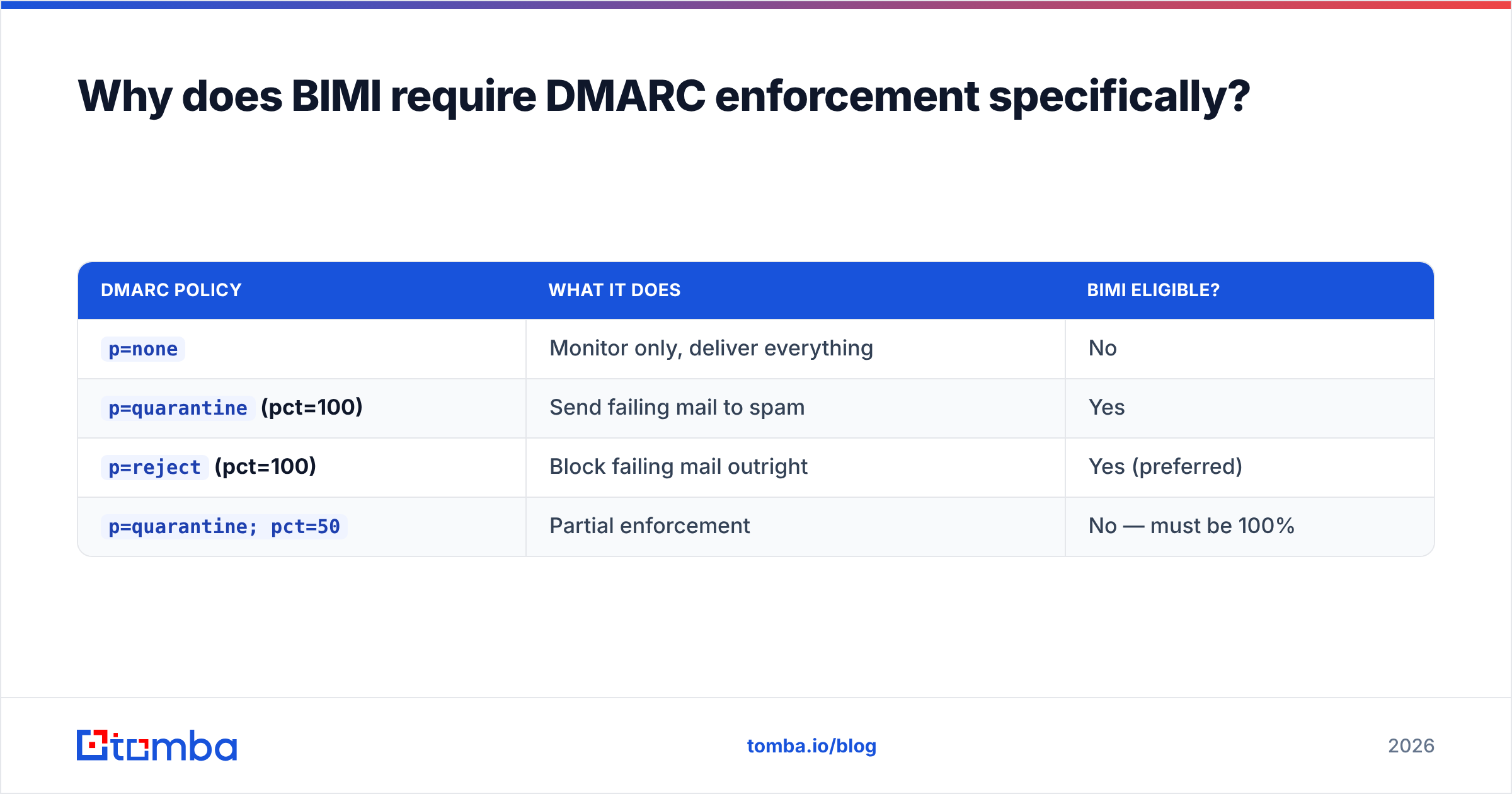
DMARC enforcement is the gate that makes the logo trustworthy. A DMARC policy of p=none only monitors; it tells receivers "watch failures but deliver anyway." That is fine for a diagnostic phase, but BIMI ignores p=none domains entirely. You need an enforcing policy:
| DMARC policy | What it does | BIMI eligible? |
|---|---|---|
p=none |
Monitor only, deliver everything | No |
p=quarantine (pct=100) |
Send failing mail to spam | Yes |
p=reject (pct=100) |
Block failing mail outright | Yes (preferred) |
p=quarantine; pct=50 |
Partial enforcement | No — must be 100% |
The pct tag matters more than people expect. A policy like p=quarantine; pct=25 is treated as not-yet-enforced by BIMI validators. Three-quarters of failing mail still slips through. Get to pct=100 (or drop the tag, which defaults to 100) before you expect a logo.
Moving to p=reject without preparation can block your own legitimate mail — newsletters from a platform you forgot to authorize, invoices from a billing tool, recruiter mail from an ATS. Read your DMARC aggregate reports for at least two to four weeks first. Confirm every legitimate source passes, and only then tighten the policy. Cleaning your lists with an email verifier first also cuts the bounce-driven reputation damage during the switch.
How do you set up BIMI DMARC step by step?#
Work bottom-up: authentication first, logo last. Here is the sequence that actually produces an inbox logo.
- Publish SPF. Add a single
v=spf1TXT record listing every sending source, ending in-allor~all. Validate it with an SPF record checker so you don't exceed the 10-DNS-lookup limit. - Enable DKIM. Turn on DKIM signing in every platform that sends as your domain — your ESP, your CRM, your transactional provider — and publish each public key.
- Deploy DMARC at
p=none. Start in monitor mode with anrua=reporting address so you can see who is sending as you. - Read the reports, fix the gaps. Authorize legitimate senders, kill shadow IT, confirm alignment. This is the slow part — budget weeks, not hours.
- Move to enforcement. Step up to
p=quarantine; pct=100, then ideallyp=reject. - Create the SVG P/S logo. Convert your brand mark to SVG Tiny Portable/Secure: square aspect ratio, no external references, no scripting, solid background.
- Get a VMC or CMC (if you target Gmail/Apple — covered below).
- Publish the BIMI DNS record as a TXT record at
default._bimi.yourdomain.compointing to the SVGl=URL and the certificatea=URL. - Validate and wait. Use a BIMI inspector, then allow time for caches and reputation to catch up.
A common failure point is step 6. Designers export a "regular" SVG from Illustrator and assume it works. It won't. BIMI requires the SVG Tiny P/S profile specifically, with the baseProfile="tiny-ps" attribute, a <title> element, and zero animation or external links. Most logos need to be re-tooled by hand or with a dedicated converter.
What is the difference between a VMC and a CMC?#
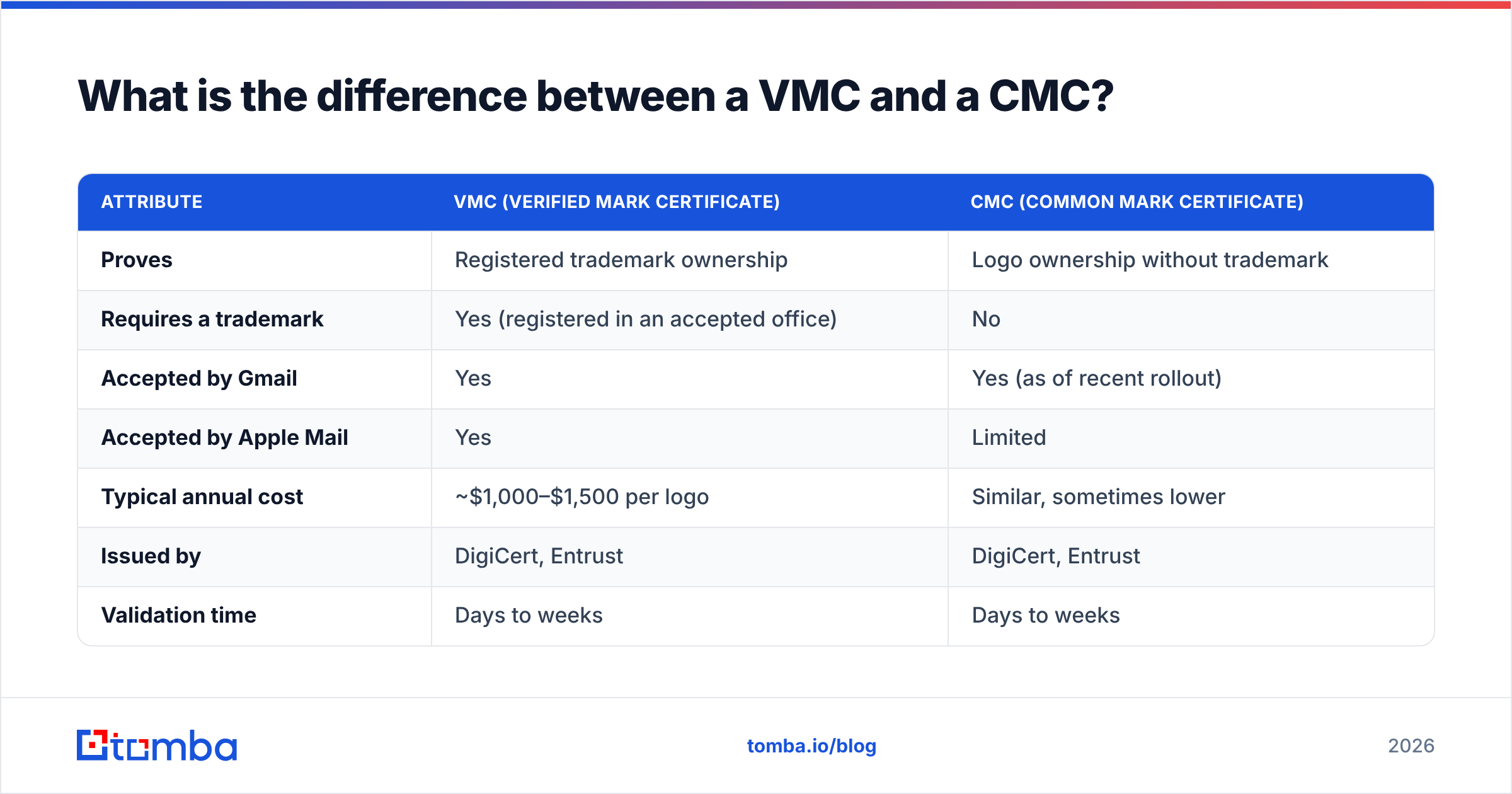
A VMC verifies a trademarked logo; a CMC verifies a logo you own but haven't trademarked. Both are certificates that prove the logo in your BIMI record is legitimately yours. The strict mailbox providers won't render a logo without one.
| Attribute | VMC (Verified Mark Certificate) | CMC (Common Mark Certificate) |
|---|---|---|
| Proves | Registered trademark ownership | Logo ownership without trademark |
| Requires a trademark | Yes (registered in an accepted office) | No |
| Accepted by Gmail | Yes | Yes (as of recent rollout) |
| Accepted by Apple Mail | Yes | Limited |
| Typical annual cost | ~$1,000–$1,500 per logo | Similar, sometimes lower |
| Issued by | DigiCert, Entrust | DigiCert, Entrust |
| Validation time | Days to weeks | Days to weeks |
The CMC was introduced because the trademark requirement priced out smaller brands and nonprofits. If your logo isn't trademarked and you don't want to file for one, a CMC is the lower-friction path. Just check current provider support, because Apple's honoring of CMCs has lagged Gmail's.
Some regional and privacy-focused inboxes display BIMI logos on DMARC enforcement alone. If you only care about those providers, you can publish a BIMI record without any certificate and still get partial coverage. You just won't see the logo in Gmail or Apple Mail, which is where most of your audience lives.
Which inbox providers actually show BIMI logos in 2026?#
Coverage has widened, but Gmail and Apple still set the bar that everyone else follows. Support falls into three tiers.
- Full support with certificate required: Gmail / Google Workspace and Apple Mail (iOS, iPadOS, macOS) display logos only with a valid VMC, and Gmail now also honors CMCs. Together these cover the majority of consumer and business inboxes.
- Support without a certificate: Fastmail and several privacy-oriented providers render the BIMI logo on DMARC enforcement alone, no VMC needed.
- Partial or rolling support: Yahoo and AOL (Yahoo Mail) were early BIMI adopters and display logos broadly; Microsoft Outlook has signaled BIMI support and has been rolling it out gradually rather than all at once.
The practical takeaway: if your audience is mostly on Gmail and Apple Mail, budget for a certificate. If you're targeting a niche audience on certificate-optional providers, you can get a logo for the cost of DNS records and an SVG conversion.
Don't treat BIMI as a deliverability hack. It does not directly boost inbox placement — DMARC enforcement and good sending reputation do that. BIMI is a downstream brand and trust benefit that rewards you for having already done the authentication work.
Does BIMI improve open rates and trust?#
Modest, real, and brand-dependent. Vendor and provider studies report single-digit to low-double-digit lifts in engagement when a verified logo is present, with the biggest gains for recognizable consumer brands. A logo your recipients already trust gives them a faster "this is safe to open" cue in a crowded inbox.
But the effect is a multiplier on an existing relationship, not a fix for a cold list. If your sender reputation is poor or your list is full of stale addresses, the logo won't save you. You may never reach enforcement cleanly in the first place. The order of operations is always:
- Clean data — verified, deliverable addresses
- Authentication — SPF, DKIM, DMARC at enforcement
- Reputation — consistent volume, low complaints, low bounces
- BIMI — the visible reward once 1–3 are solid
That is why list hygiene sits upstream of everything. You can confirm your domain isn't on a deny-list with a blacklist checker before you invest in a certificate. There's no point paying for a VMC if your reputation is already underwater.
Common BIMI and DMARC mistakes to avoid#
- Publishing BIMI before reaching
pct=100enforcement. The record validates syntactically but no logo renders. Check the policy, not just the BIMI TXT record. - Using a non-conforming SVG. A standard SVG export fails. It must be SVG Tiny P/S with the right base profile and no external references.
- Forgetting the certificate URL. Gmail and Apple need the
a=tag pointing to a valid VMC/CMC; a logo-onlyl=record gets ignored by them. - Jumping to
p=rejectblind. Always pass through a monitoring phase and read aggregate reports first, or you'll quarantine your own invoices and newsletters. - Non-square or low-contrast logos. BIMI logos render small and circular-cropped in many clients. A wide wordmark or thin lines disappear; use a bold, square, centered mark.
- Assuming BIMI fixes deliverability. It's a trust layer on top of good practice, not a substitute for it.
How does this fit a wider outbound and deliverability stack?#
BIMI is the last 5% of an authentication and reputation program — valuable, visible, but only meaningful once the foundation is solid. The foundation is verified contact data, properly authenticated domains, and disciplined sending. If you're building outbound from scratch, you'll get far more lift from accurate targeting and clean lists than from a logo.
That's where your contact data quality comes in. Before you worry about inbox logos, you need to send to real, reachable people on a domain that passes authentication. Tomba's Email Finder helps you build verified prospect lists by domain, name, or company. The addresses you send to stay deliverable, so your bounce rate stays low and the reputation that BIMI DMARC depend on stays safe.
Pair it with verification and keep your authentication enforced. The inbox logo then becomes the natural payoff of a clean sending program, not a frustrating dead end. See Tomba pricing — the free tier covers 25 searches a month to start.
Sources and further reading: the BIMI Group maintains the official specification and provider support list, DMARC.org documents the underlying authentication standard, and Wikipedia's BIMI overview gives a neutral primer on the standard's history.
Ready to find emails that actually work?
Join 150,000+ professionals who stopped guessing and started sending. Free credits on signup — no credit card required.
Get the Tomba newsletter
Practical outbound tactics and product updates — once every two weeks.
About the author