BIMI Logo: How to Display Your Brand Logo in Email (2026)
A BIMI logo puts your verified brand mark next to every email you send. Here's how BIMI works, what it costs, and the exact setup steps for 2026.
You open your inbox and scan a wall of grey circles with single initials. Then one row stands out: a crisp, full-color brand logo sitting right next to the sender name. That logo is BIMI at work, and it is one of the few signals that makes a B2B sender look trusted before the recipient reads a single word.
This guide explains what a BIMI logo is, what it requires, what it costs, and how to set one up correctly in 2026.
TL;DR#
- BIMI (Brand Indicators for Message Identification) displays your verified brand logo beside your emails in supporting inboxes like Gmail, Apple Mail, and Yahoo.
- BIMI is not a deliverability booster by itself — it is a reward for already passing DMARC at enforcement (
p=quarantineorp=reject). - To show the blue verified checkmark in Gmail and Apple Mail, you need a Verified Mark Certificate (VMC) or, for trademark-free brands, a Common Mark Certificate (CMC).
- Expect to pay roughly $1,000–$1,500/year for a VMC, plus the work of getting an SVG Tiny PS logo and a trademark in order.
- Before BIMI matters, your authentication and list hygiene have to be clean — a verified logo on top of a bad sender reputation buys you nothing.
What is a BIMI logo?#
A BIMI logo is a brand image that participating email clients pull from a record you publish in DNS and render next to your messages. Think of it like the verified badge on a social profile: the platform checks your identity once, then shows a visible mark so everyone else doesn't have to take your word for it.
Technically, BIMI is an open standard maintained by the BIMI Group. You publish a TXT record at default._bimi.yourdomain.com that points to two things: the URL of your logo file and (optionally) the URL of your mark certificate. When a supporting inbox receives an authenticated message from your domain, it looks up that record and displays your logo.
The key word is authenticated. BIMI is built directly on top of email authentication — specifically DMARC. If your mail isn't passing DMARC at an enforcement policy, the logo never shows, no matter how perfect the artwork is.

Wait — ignore that placement instinct. BIMI is a deliverability and brand topic, not an email-finder comparison, so this guide skips tool-benchmark charts and sticks to what actually moves the needle: your authentication stack and your logo assets.
What do you need to set up a BIMI logo?#
BIMI has a short list of hard requirements, and every one of them is a gate. Miss one and the logo silently fails to render.
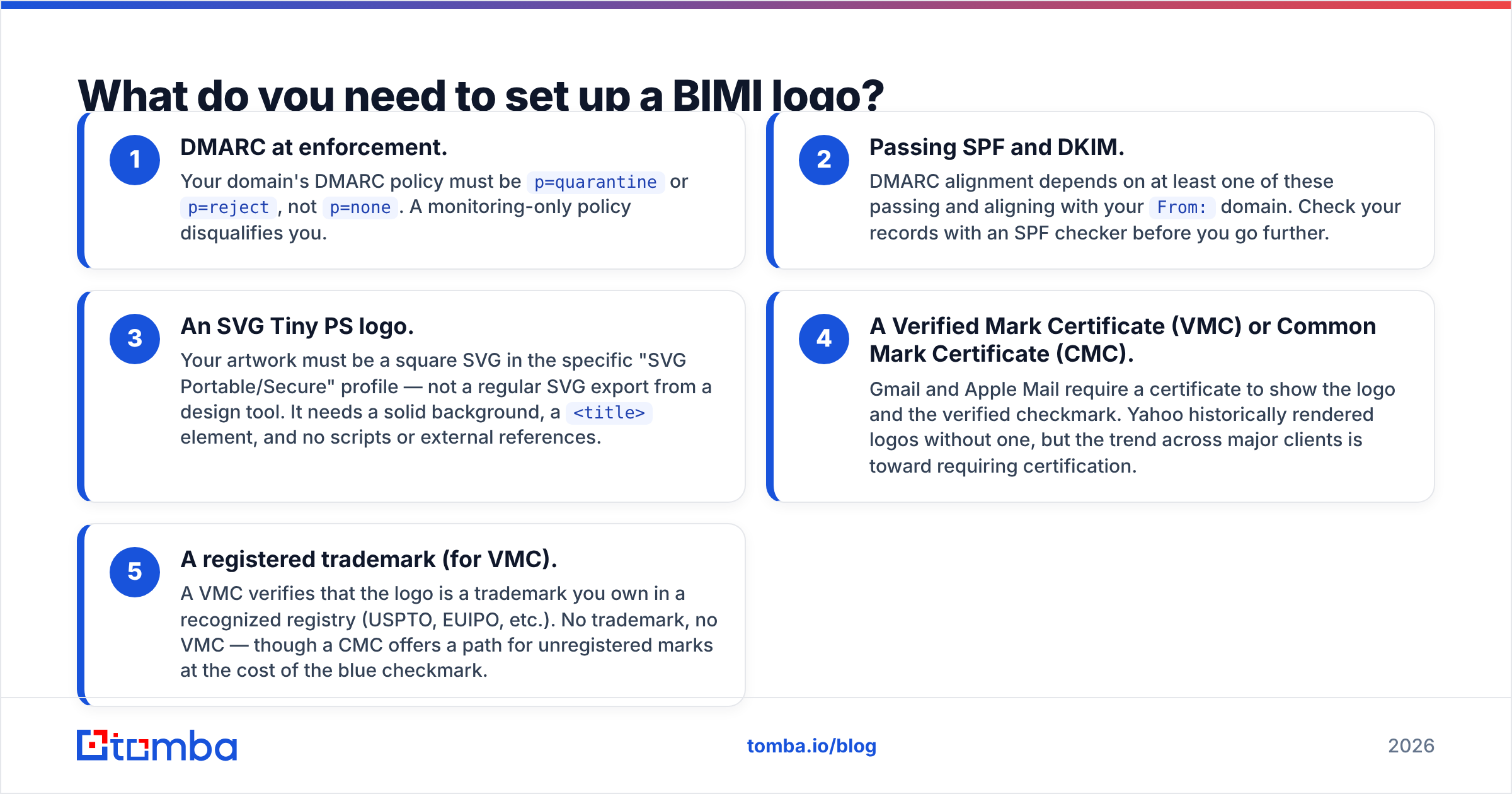
- DMARC at enforcement. Your domain's DMARC policy must be
p=quarantineorp=reject, notp=none. A monitoring-only policy disqualifies you. - Passing SPF and DKIM. DMARC alignment depends on at least one of these passing and aligning with your
From:domain. Check your records with an SPF checker before you go further. - An SVG Tiny PS logo. Your artwork must be a square SVG in the specific "SVG Portable/Secure" profile — not a regular SVG export from a design tool. It needs a solid background, a
<title>element, and no scripts or external references. - A Verified Mark Certificate (VMC) or Common Mark Certificate (CMC). Gmail and Apple Mail require a certificate to show the logo and the verified checkmark. Yahoo historically rendered logos without one, but the trend across major clients is toward requiring certification.
- A registered trademark (for VMC). A VMC verifies that the logo is a trademark you own in a recognized registry (USPTO, EUIPO, etc.). No trademark, no VMC — though a CMC offers a path for unregistered marks at the cost of the blue checkmark.

Disregard those two images — they're benchmark charts for a different kind of post. The point stands without them: BIMI rewards senders who have already done the unglamorous authentication work.
How much does a BIMI logo cost in 2026?#
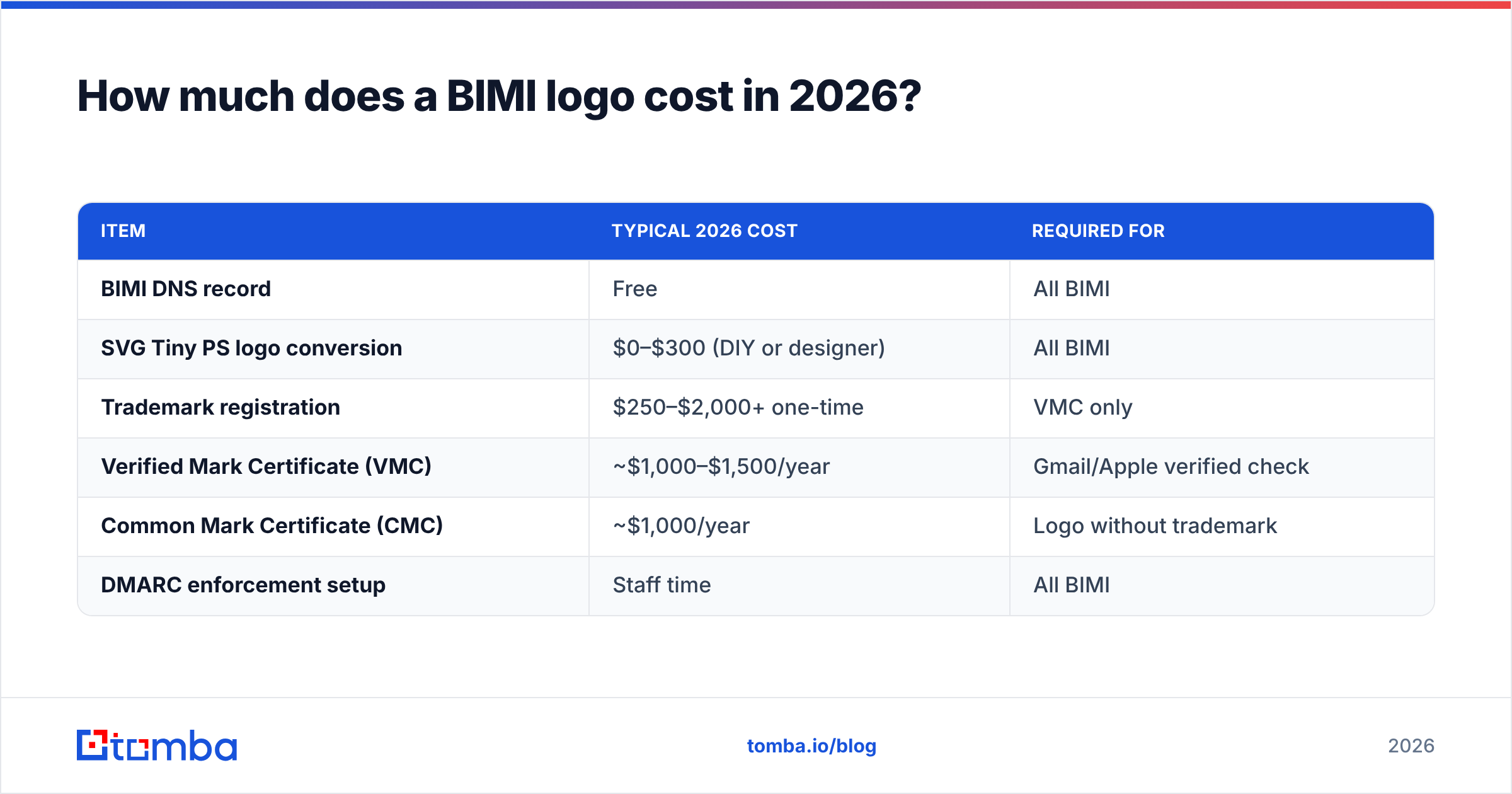
BIMI itself is free — the DNS record costs nothing. The expense is the certificate and the prerequisite trademark. Here's a realistic breakdown.
| Item | Typical 2026 cost | Required for |
|---|---|---|
| BIMI DNS record | Free | All BIMI |
| SVG Tiny PS logo conversion | $0–$300 (DIY or designer) | All BIMI |
| Trademark registration | $250–$2,000+ one-time | VMC only |
| Verified Mark Certificate (VMC) | ~$1,000–$1,500/year | Gmail/Apple verified check |
| Common Mark Certificate (CMC) | ~$1,000/year | Logo without trademark |
| DMARC enforcement setup | Staff time | All BIMI |
The two certificate authorities most senders use are DigiCert and Entrust. Pricing shifts year to year, so treat the figures above as a planning range, not a quote. For most mid-market B2B brands, the all-in first-year cost lands somewhere between $1,200 and $3,500 once you factor in a trademark you may not already hold.
VMC vs CMC: which certificate do you need?#
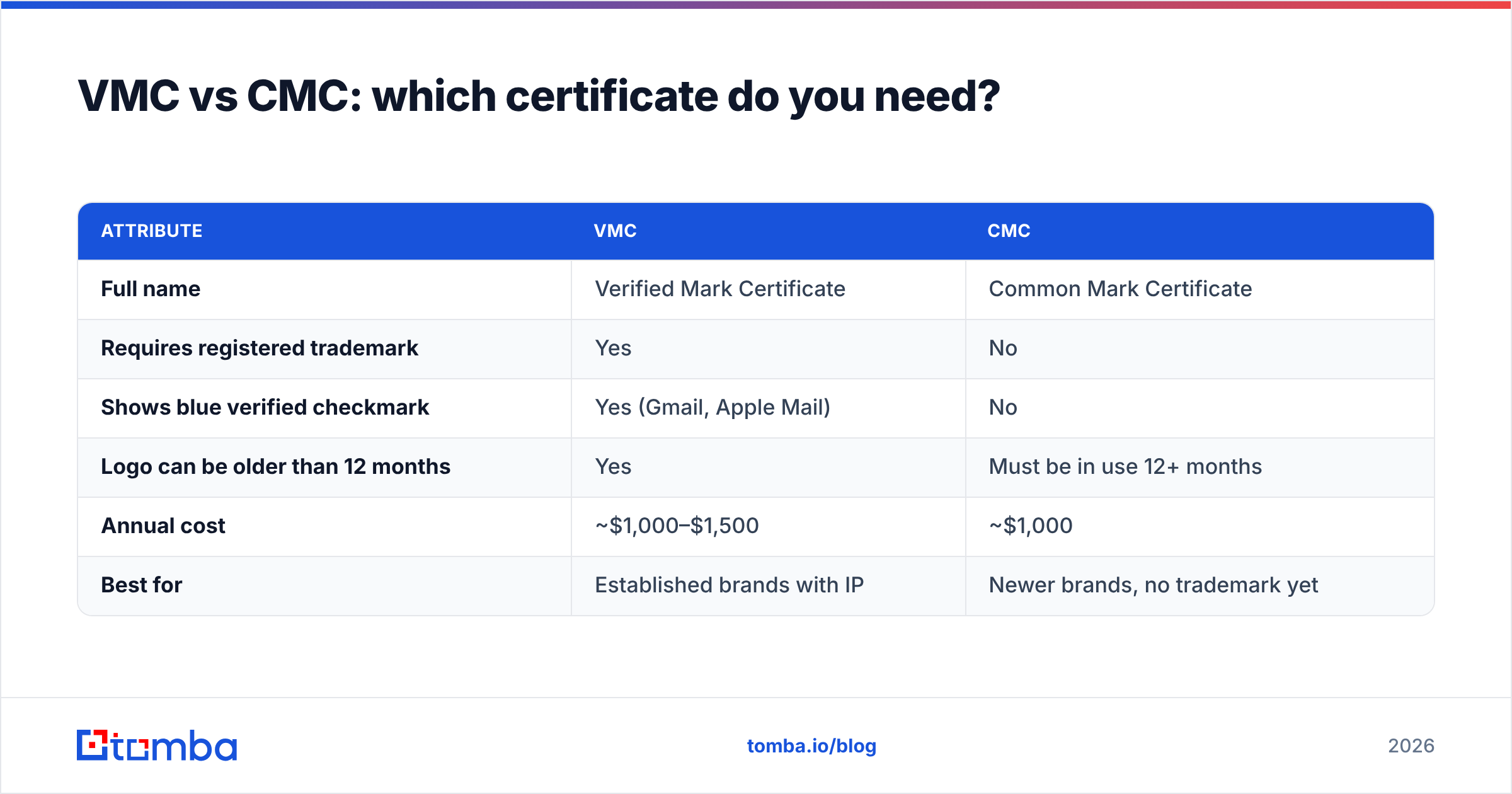
Pick based on whether you own a registered trademark and whether the blue verified checkmark matters to you.
| Attribute | VMC | CMC |
|---|---|---|
| Full name | Verified Mark Certificate | Common Mark Certificate |
| Requires registered trademark | Yes | No |
| Shows blue verified checkmark | Yes (Gmail, Apple Mail) | No |
| Logo can be older than 12 months | Yes | Must be in use 12+ months |
| Annual cost | ~$1,000–$1,500 | ~$1,000 |
| Best for | Established brands with IP | Newer brands, no trademark yet |
If you have a trademark, get the VMC — the verified checkmark is the most visible trust signal and the whole reason most teams pursue BIMI. If you don't yet hold a trademark and registration is months away, a CMC gets your logo into supporting inboxes now while you wait.
Does a BIMI logo actually improve deliverability?#
No — not directly. This is the single most common misconception, so be clear-eyed about it.
BIMI does not change whether your mail lands in the inbox or the spam folder. Mailbox providers don't give you a placement boost for having a logo. What BIMI does is improve open rates and brand recall once your mail is already delivered, because a recognizable logo makes recipients more likely to trust and open the message.
The causation runs the other way around from how people assume. You can't earn a BIMI logo without strong sender reputation and DMARC enforcement already in place. So senders who display BIMI logos tend to have great deliverability — but it's the authentication and reputation work that produced the deliverability, and BIMI is the visible badge sitting on top of it.
Treat BIMI as the finish line of a deliverability program, not a shortcut to one. If your DMARC is still at p=none, your roadmap is: fix alignment, move to enforcement, monitor reports, then add BIMI.

How do you set up a BIMI logo step by step?#
Here's the practical sequence. Each step depends on the one before it.
- Audit your authentication. Confirm SPF, DKIM, and DMARC all pass and align for every sending source. Verify your records exist and are syntactically valid with an SPF record lookup and a DMARC checker.
- Move DMARC to enforcement. Shift from
p=nonetop=quarantine(thenp=reject) only after DMARC aggregate reports confirm all legitimate mail passes. Rushing this step breaks legitimate mail. - Prepare the logo. Convert your brand mark to a square SVG Tiny PS file. It must be centered, on a solid (non-transparent) background, under ~32 KB, and stripped of scripts.
- Secure a trademark (if going for a VMC). Register your logo with a supported IP office if you haven't already. This is the longest lead-time item — often months.
- Buy the certificate. Purchase a VMC or CMC from DigiCert or Entrust. You'll validate domain control and (for VMC) trademark ownership.
- Host the assets. Place the SVG and the PEM certificate file on HTTPS URLs you control.
- Publish the BIMI DNS record. Add a TXT record at
default._bimi.yourdomain.comwith thev=BIMI1;tag, thel=logo URL, and thea=certificate URL. - Test and validate. Use the BIMI Group's inspector and send test mail to Gmail, Apple Mail, and Yahoo accounts to confirm the logo renders.
What should you check before BIMI is even worth it?#
BIMI is the visible tip of a much larger deliverability iceberg. Before you spend on a certificate, make sure the foundation is solid — otherwise you're putting a verified badge on mail that's already struggling.
- List quality. A verified logo doesn't save you from sending to dead, mistyped, or spam-trap addresses. Clean your lists and verify emails before they enter any campaign.
- Authentication coverage. Every sending tool — your ESP, CRM, support desk, invoicing system — needs to be DMARC-aligned, or those streams won't show your logo.
- Engagement signals. Mailbox providers weigh opens, replies, and complaints far more heavily than any badge. Strong engagement is what protects placement.
- Consistent
From:identity. BIMI keys off your domain. Erratic sending domains and subdomains dilute the signal and the brand recognition.
If you want the deeper background on the standard itself, the Wikipedia entry on BIMI is a neutral, frequently updated reference, and the BIMI Group maintains the canonical specification and a free record-generator tool.
Which inboxes support BIMI logos in 2026?#
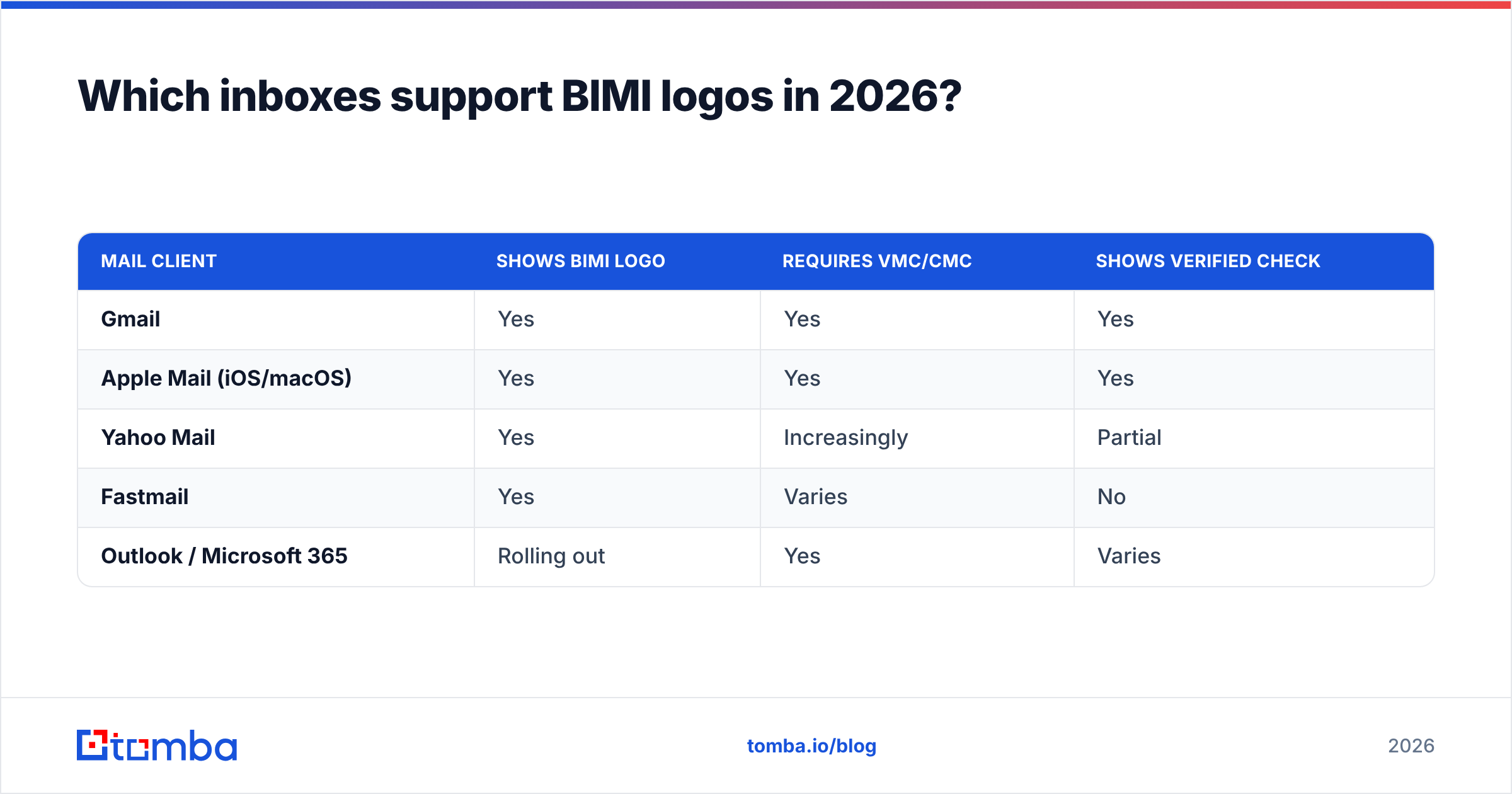
Support has broadened but is still uneven, and the certificate requirement varies by provider.
| Mail client | Shows BIMI logo | Requires VMC/CMC | Shows verified check |
|---|---|---|---|
| Gmail | Yes | Yes | Yes |
| Apple Mail (iOS/macOS) | Yes | Yes | Yes |
| Yahoo Mail | Yes | Increasingly | Partial |
| Fastmail | Yes | Varies | No |
| Outlook / Microsoft 365 | Rolling out | Yes | Varies |
The practical takeaway: optimize for Gmail and Apple Mail, since those two cover the bulk of B2B and consumer reach and both require a certificate. If Microsoft completes its broader rollout, the VMC you bought for Gmail will already satisfy it.
Common BIMI mistakes that block the logo#
A few failure modes account for most "I set it up but nothing shows" tickets:
- DMARC still at
p=none. The most common blocker by far. Enforcement is non-negotiable. - Wrong SVG profile. A standard SVG export is rejected; it must be SVG Tiny PS specifically.
- Transparent or non-square logo. Backgrounds must be solid and the canvas square.
- Certificate URL missing or expired. Gmail and Apple need a valid, current VMC/CMC referenced in the
a=tag. - Subdomain gaps. Mail from a subdomain needs its own BIMI and DMARC coverage; the root record alone won't cover it.
Where Tomba fits in your BIMI roadmap#
A BIMI logo is the visible reward for clean, well-authenticated email — and clean email starts with clean data. Before you invest in a VMC, make sure every address you contact is real, deliverable, and correctly formatted, because nothing erodes the sender reputation BIMI depends on faster than bouncing into dead inboxes and spam traps.
That's where Tomba's Email Finder earns its place in the stack. Use it to source accurate, verified professional emails by domain or name, pair it with the email verifier to scrub lists before every send, and protect the DMARC-passing reputation that makes your BIMI logo possible in the first place. Start free with 25 searches a month, and see full Tomba pricing when you're ready to scale. Get the data right first — the logo is the easy part.
Ready to find emails that actually work?
Join 150,000+ professionals who stopped guessing and started sending. Free credits on signup — no credit card required.
Get the Tomba newsletter
Practical outbound tactics and product updates — once every two weeks.
About the author