BIMI Record Explained: Setup, VMC & Deliverability in 2026
Your logo can show up next to every email you send — if your BIMI record is set up right. Here's exactly how BIMI, DMARC, and VMC fit together in 2026.
You send thousands of emails a month, and every one of them shows up as a gray circle with an initial. Meanwhile, the brands recipients actually trust display a crisp logo right next to the sender name. That logo isn't a Gmail accident — it's a BIMI record doing its job.
This guide breaks down what a BIMI record is, what it actually requires (spoiler: a lot more than a DNS line), and how to set one up the right way in 2026.
TL;DR#
- A BIMI record is a DNS TXT entry that tells inbox providers which logo to display next to your authenticated emails.
- BIMI only works on top of DMARC at enforcement (
p=quarantineorp=reject). No DMARC, no logo. - Gmail, Apple Mail, Yahoo, and Fastmail support BIMI; most now require a Verified Mark Certificate (VMC) or Common Mark Certificate (CMC) to actually show the logo.
- Your logo must be a square SVG Tiny P/S file, and a VMC costs roughly $1,000–$1,500/year from DigiCert or Entrust.
- BIMI doesn't directly boost deliverability, but it boosts open rates, brand trust, and confirms your authentication stack is healthy.
What is a BIMI record?#
A BIMI record is a single DNS TXT entry that points inbox providers to your brand logo and (optionally) your certificate, so your logo appears beside your emails. BIMI stands for Brand Indicators for Message Identification — an open standard maintained by the AuthIndicators Working Group.
Think of it like the verified checkmark on a social profile. Anyone can type a brand name into the "From" field, but only a domain that has proven control over its mail stream — through authentication — gets the visual badge. BIMI is the mechanism that turns "we authenticated this email" into "here's the logo to prove it."
The record itself lives at a specific subdomain: default._bimi.yourdomain.com. It looks like this:
v=BIMI1; l=https://yourdomain.com/logo.svg; a=https://yourdomain.com/vmc.pemv=BIMI1— the version tag (always this value).l=— the URL of your logo file (SVG Tiny P/S, served over HTTPS).a=— the URL of your VMC or CMC certificate (PEM format).
That's the whole record. The complexity isn't in the syntax — it's in everything that has to be true before the syntax matters.
How does a BIMI record actually work?#
When an inbox provider receives your email, it runs a chain of checks before deciding whether to render your logo. Here's the order:
- SPF and DKIM — The message must pass at least one of these authentication methods.
- DMARC alignment — The passing method must align with your
From:domain, and your DMARC policy must be at enforcement. - BIMI lookup — The provider queries
default._bimi.yourdomain.comfor your record. - Certificate validation — If a VMC is required, the provider validates the certificate chain and confirms the logo inside it matches the logo you're serving.
- Render — Only if every step passes does the logo appear.
Notice that BIMI is the last link in a long chain. Your email deliverability and authentication foundation has to be rock solid first. If DMARC isn't enforced, the provider never even checks step 3.
This is why so many teams add the DNS record, see nothing change, and assume BIMI is broken. The record is fine — the prerequisites aren't met.
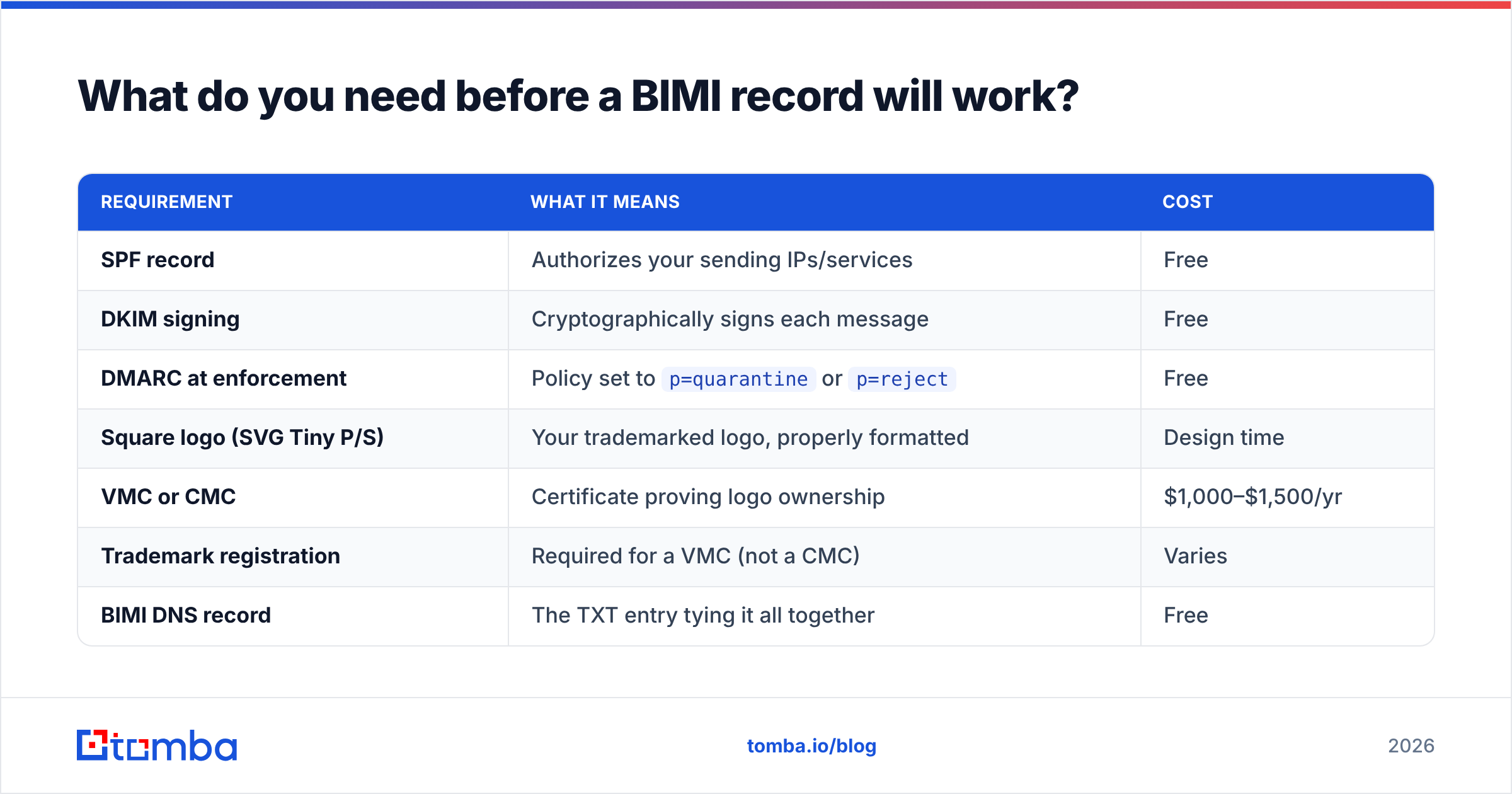
What do you need before a BIMI record will work?#
This is the part most "just add a TXT record" tutorials skip. Here's the real checklist, in order of dependency.
| Requirement | What it means | Cost |
|---|---|---|
| SPF record | Authorizes your sending IPs/services | Free |
| DKIM signing | Cryptographically signs each message | Free |
| DMARC at enforcement | Policy set to p=quarantine or p=reject |
Free |
| Square logo (SVG Tiny P/S) | Your trademarked logo, properly formatted | Design time |
| VMC or CMC | Certificate proving logo ownership | $1,000–$1,500/yr |
| Trademark registration | Required for a VMC (not a CMC) | Varies |
| BIMI DNS record | The TXT entry tying it all together | Free |
A few things worth calling out:
- DMARC must be at enforcement. A
p=nonepolicy — which only monitors — will not trigger BIMI. You needp=quarantine(withpct=100) orp=reject. - The logo format is strict. It must be SVG Tiny Portable/Secure (P/S), square aspect ratio, with a solid background and your logo centered. Raster formats like PNG or JPG are rejected.
- A VMC requires a registered trademark. If your logo isn't trademarked, you'll need a Common Mark Certificate (CMC) instead, which Gmail and others began accepting to lower the barrier.
Before you spend a cent on a certificate, confirm your authentication is healthy. Running your domain through an SPF checker and validating DKIM takes minutes and saves you from buying a VMC that can't display.
BIMI vs DMARC vs VMC: what's the difference?#
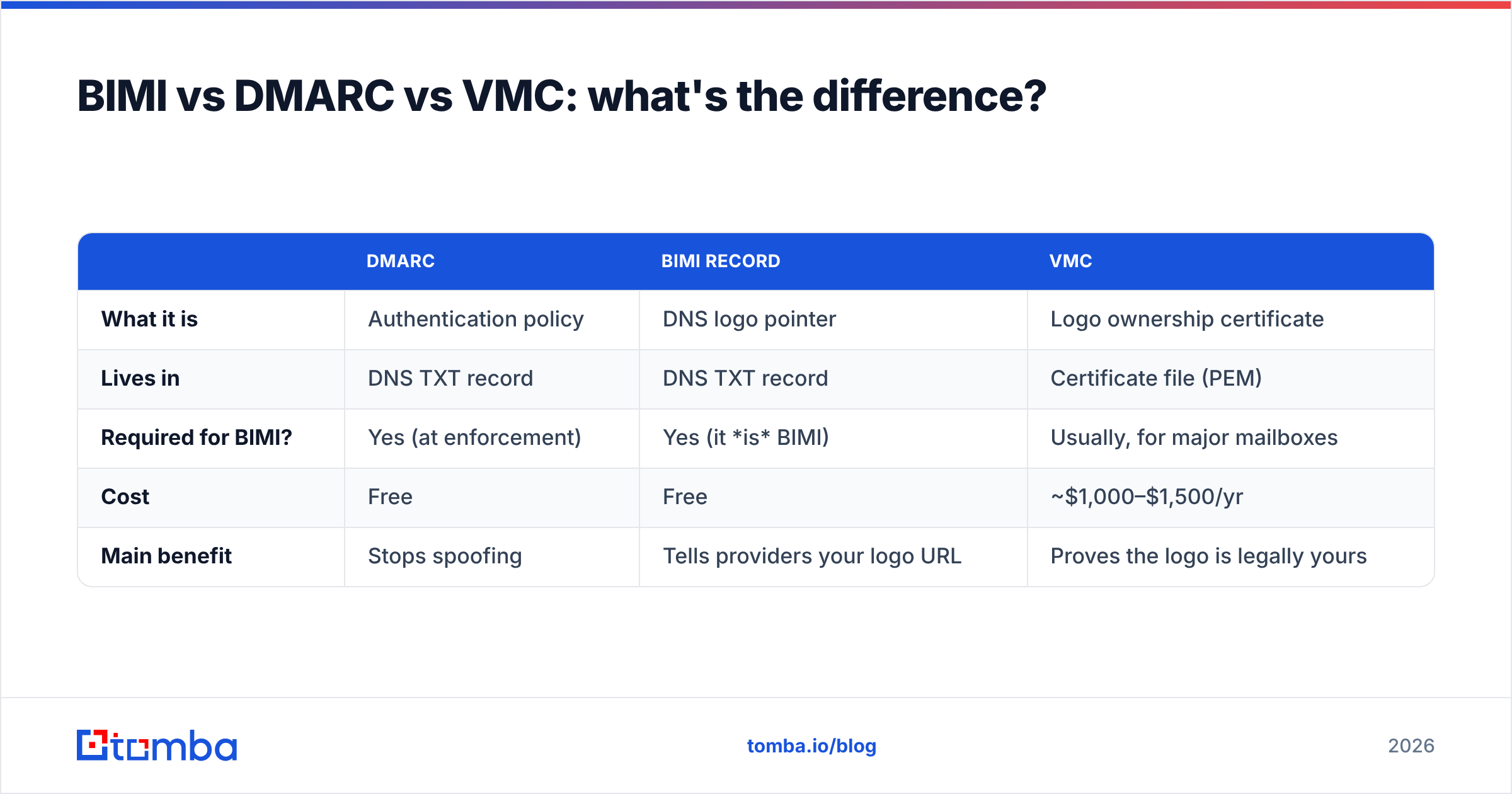
These three terms get used interchangeably, and they shouldn't be. Here's how they relate.
| DMARC | BIMI record | VMC | |
|---|---|---|---|
| What it is | Authentication policy | DNS logo pointer | Logo ownership certificate |
| Lives in | DNS TXT record | DNS TXT record | Certificate file (PEM) |
| Required for BIMI? | Yes (at enforcement) | Yes (it is BIMI) | Usually, for major mailboxes |
| Cost | Free | Free | ~$1,000–$1,500/yr |
| Main benefit | Stops spoofing | Tells providers your logo URL | Proves the logo is legally yours |
The mental model: DMARC is the security guard that verifies you are who you say you are. The BIMI record is the sign that says "here's my badge." The VMC is the government-issued ID proving the badge is genuinely yours. Inbox providers want all three before they'll vouch for you visually.
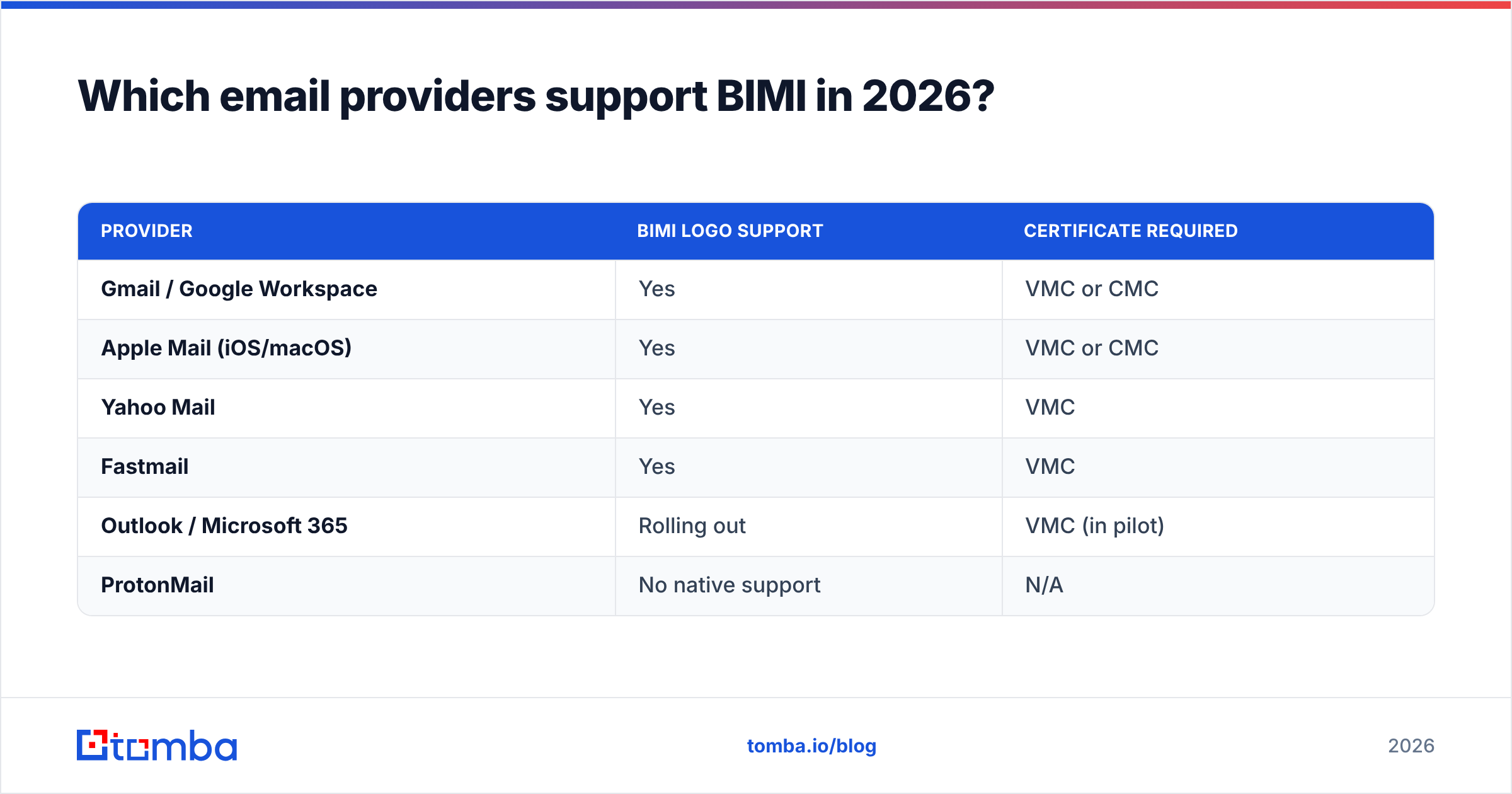
Which email providers support BIMI in 2026?#
Support has grown steadily, and the certificate requirements have loosened slightly with the introduction of CMCs. Here's the current landscape.
| Provider | BIMI logo support | Certificate required |
|---|---|---|
| Gmail / Google Workspace | Yes | VMC or CMC |
| Apple Mail (iOS/macOS) | Yes | VMC or CMC |
| Yahoo Mail | Yes | VMC |
| Fastmail | Yes | VMC |
| Outlook / Microsoft 365 | Rolling out | VMC (in pilot) |
| ProtonMail | No native support | N/A |
Microsoft has been the slow mover here, piloting BIMI support across Outlook.com and Microsoft 365. Given Microsoft's share of B2B inboxes, full rollout is the milestone most senders are waiting on. Check Google's own Gmail BIMI documentation for the most current requirements, since they update the certificate rules periodically.
How do you set up a BIMI record step by step?#
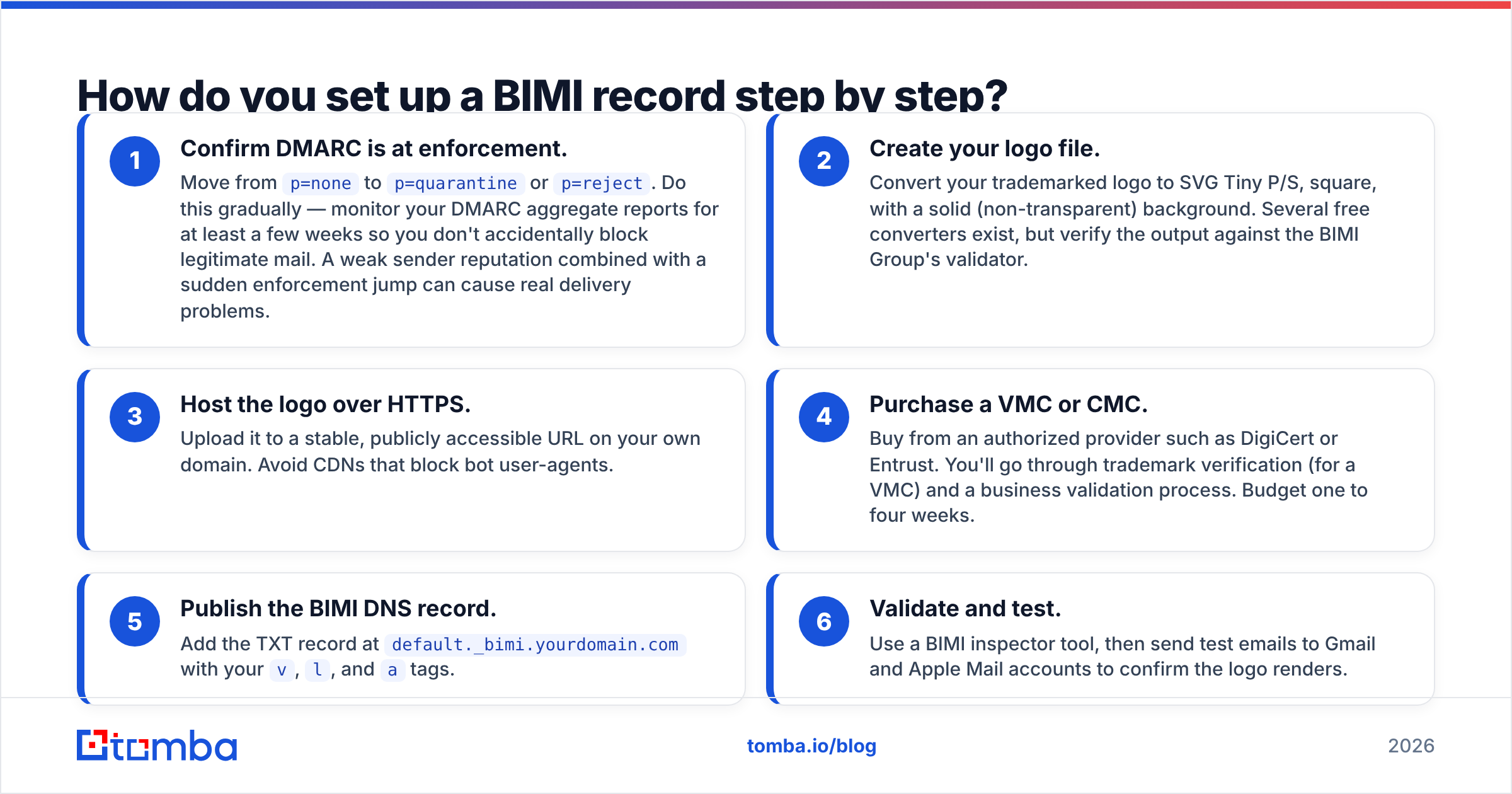
Assuming your authentication foundation is solid, here's the path from zero to logo.
- Confirm DMARC is at enforcement. Move from
p=nonetop=quarantineorp=reject. Do this gradually — monitor your DMARC aggregate reports for at least a few weeks so you don't accidentally block legitimate mail. A weak sender reputation combined with a sudden enforcement jump can cause real delivery problems. - Create your logo file. Convert your trademarked logo to SVG Tiny P/S, square, with a solid (non-transparent) background. Several free converters exist, but verify the output against the BIMI Group's validator.
- Host the logo over HTTPS. Upload it to a stable, publicly accessible URL on your own domain. Avoid CDNs that block bot user-agents.
- Purchase a VMC or CMC. Buy from an authorized provider such as DigiCert or Entrust. You'll go through trademark verification (for a VMC) and a business validation process. Budget one to four weeks.
- Publish the BIMI DNS record. Add the TXT record at
default._bimi.yourdomain.comwith yourv,l, andatags. - Validate and test. Use a BIMI inspector tool, then send test emails to Gmail and Apple Mail accounts to confirm the logo renders.
The whole process typically takes two to six weeks, with the certificate validation being the longest pole in the tent.
Does a BIMI record improve deliverability?#
Not directly — but it's a strong signal that the things which do drive deliverability are in place. A BIMI record can't lift you out of the spam folder on its own. Inbox placement is governed by reputation, engagement, list hygiene, and authentication.
What BIMI changes is what happens after you reach the inbox:
- Higher open rates. Studies from BIMI participants consistently show open-rate lifts in the 10–30% range when a recognizable logo appears, because the logo signals legitimacy at a glance.
- Stronger brand recall. Your logo appears in every inbox view, reinforcing recognition before the recipient even opens the message.
- Anti-phishing protection. Because BIMI requires DMARC enforcement, spoofers can't easily impersonate your domain — and they certainly can't borrow your logo badge.
There's also a hidden benefit: pursuing BIMI forces you to fix DMARC, SPF, and DKIM properly. That authentication cleanup is what genuinely helps deliverability. BIMI is the carrot that gets teams to finally do the unglamorous DNS work.
One caveat worth stating plainly: BIMI rewards senders who already have clean lists. If you're emailing addresses you never verified, enforcement-level DMARC and a pretty logo won't save you from bounces and spam complaints. Validate your contacts with an email verifier before you scale sends, not after.
What are common BIMI record mistakes?#
These are the failures that show up again and again when a logo refuses to render.
- DMARC stuck at
p=none. The single most common reason BIMI silently fails. Monitoring mode doesn't qualify. - Wrong logo format. PNG, JPG, or a non-Tiny-P/S SVG will be rejected. The aspect ratio must be exactly square.
- No VMC where one is required. Gmail and Apple won't display your logo without a valid certificate, even with a perfect record.
- Logo URL not publicly reachable. If the providers' crawlers can't fetch the file over HTTPS, nothing renders.
- Subdomain misalignment. The record must sit at
default._bimi, and your DMARC must align with the exactFrom:domain you're sending from. - Expired certificate. VMCs renew annually. Let one lapse and your logo vanishes overnight.
When something breaks, work backward through the chain: certificate, logo file, DNS record, DMARC, then DKIM/SPF. The problem is almost always lower in the stack than where you're looking.
Is a BIMI record worth it for your business?#
It depends on your volume and your brand exposure. Here's a quick way to decide.
- High-volume senders (newsletters, transactional, B2C marketing): Yes. The open-rate lift and anti-spoofing protection pay for the VMC many times over.
- B2B teams with strong brand recognition: Usually yes, especially if your prospects already know your logo. The trust signal shortens the gap between "received" and "opened."
- Early-stage startups, low send volume: Maybe later. Get DMARC to enforcement first — that's free and valuable on its own. Add BIMI once your brand and volume justify the certificate cost.
- Anyone not yet authenticated: No. Fix SPF, DKIM, and DMARC first. BIMI is the finish line, not the starting block.
The honest framing: BIMI is a brand and trust investment layered on top of deliverability hygiene. It won't fix a broken sending program, but for an already-healthy one, it's one of the highest-visibility upgrades available.
Find and verify the contacts behind your sends#
A flawless BIMI record only matters if you're emailing real people at real addresses. The fastest way to undermine your shiny new authentication stack is to blast invalid or guessed emails — that tanks your reputation and pulls your logo right back out of the inbox.
That's where Tomba fits in. Use the Tomba Email Finder to source accurate, professional email addresses by domain or name, then keep your lists clean so every authenticated, BIMI-branded message lands in front of someone who actually exists. Plans start free with 25 searches a month, with paid tiers from $49/mo — see the full Tomba pricing for details. Get the contacts right, get the authentication right, and let your logo do the rest.
// get started
Find, verify and enrich your first contacts today
Start on the free plan with 25 searches a month, then scale when your team is ready.
Free plan · No credit card required · GDPR & CCPA
// about the author