Email Bounce Rate in 2026: Causes, Fixes & Benchmarks
A high email bounce rate quietly kills your cold outreach and your sender reputation. Here's what counts as good, why bounces happen, and how to fix them fast.
TL;DR
- Email bounce rate is the percentage of messages that get rejected by a receiving mail server instead of landing in an inbox. Keep it under 2%; above 5% you're in danger.
- Bounces come in two flavors: hard bounces (permanent — the address doesn't exist) and soft bounces (temporary — full mailbox, server down, message too big).
- Mailbox providers read your bounce rate as a trust signal. A spike tells Gmail and Outlook you're mailing stale or purchased lists, and your sender reputation drops.
- The single biggest lever is list hygiene: verify addresses before you send, and never email a list you didn't build or clean.
- Tools like an email verifier and a catch-all verifier catch dead addresses before they ever cost you a bounce.
What is email bounce rate?#
Your email bounce rate is the share of emails you sent that came back undelivered. The formula is simple:
Bounce rate = (bounced emails ÷ total emails sent) × 100.
Send 1,000 emails, get 30 bounces back, and your bounce rate is 3%. That number sounds small, but to a mailbox provider it's a flashing warning light. Think of it like a delivery driver who keeps knocking on addresses that don't exist — after a while, the dispatcher stops trusting the route list and starts questioning every delivery.
There are two reasons this metric matters more than most marketers realize. First, every bounced email is a wasted send — no open, no reply, no revenue. Second, and more dangerously, bounces are one of the loudest signals you send to Gmail, Outlook, and Yahoo about the quality of your data. A clean list whispers "legitimate sender." A bouncing list screams "spammer."

What's the difference between a hard bounce and a soft bounce?#
Not all bounces are equal. Treating them the same way is how good senders accidentally torch their domain.
- Hard bounce — A permanent failure. The mailbox doesn't exist, the domain is invalid, or the server has blocked you outright. These are the dangerous ones. Each hard bounce is proof you mailed an address you never should have touched.
- Soft bounce — A temporary failure. The mailbox is full, the message exceeded a size limit, or the receiving server was briefly down. Most email platforms retry soft bounces automatically for 24–72 hours before giving up.
- Block bounce — A subtype where the receiving server actively refused your message due to reputation or content filters. Technically temporary, but a pattern of blocks means your domain is in trouble.
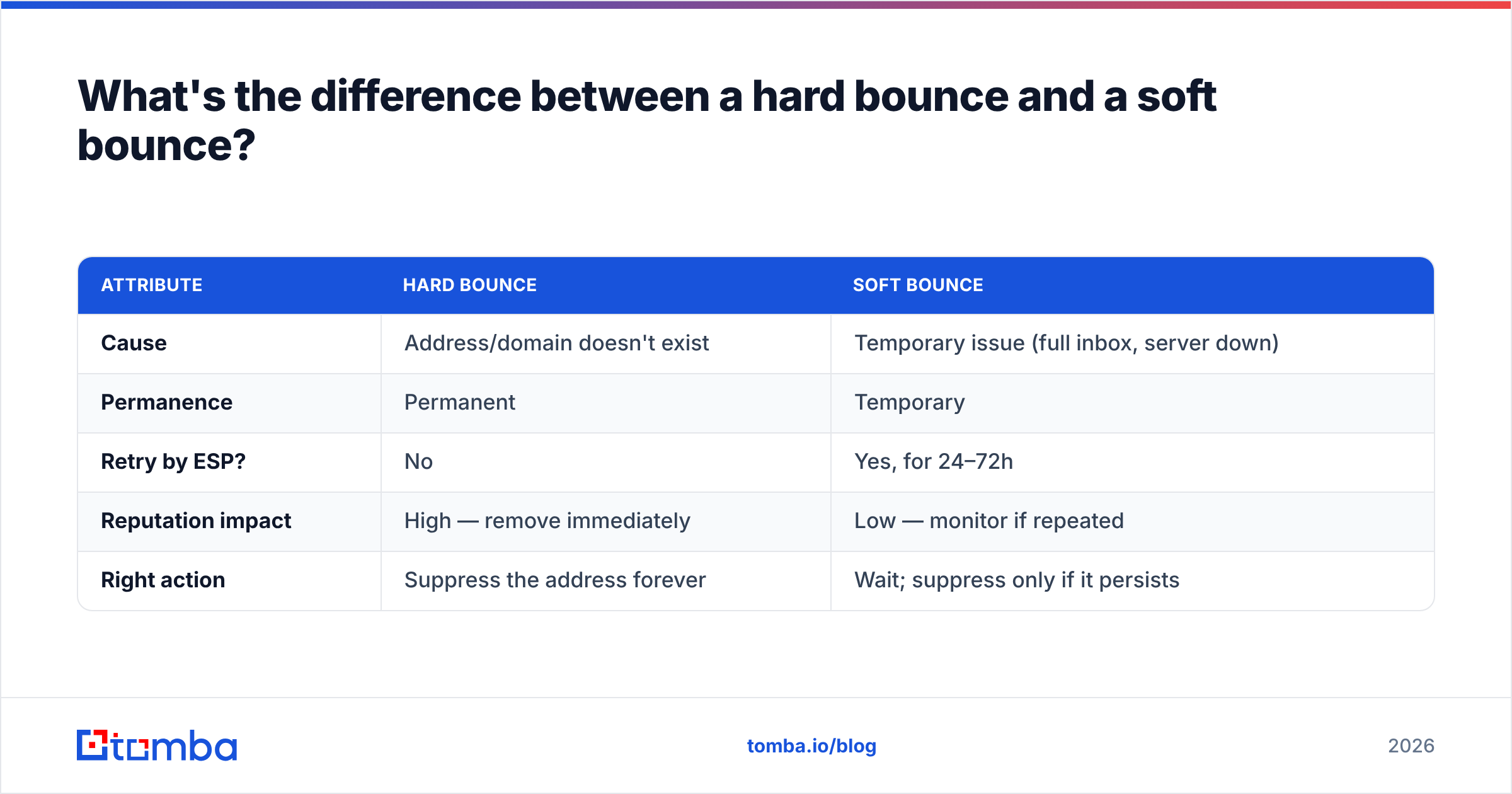
Here's how the two main types stack up:
| Attribute | Hard bounce | Soft bounce |
|---|---|---|
| Cause | Address/domain doesn't exist | Temporary issue (full inbox, server down) |
| Permanence | Permanent | Temporary |
| Retry by ESP? | No | Yes, for 24–72h |
| Reputation impact | High — remove immediately | Low — monitor if repeated |
| Right action | Suppress the address forever | Wait; suppress only if it persists |
The rule: suppress every hard bounce on the first failure. Soft bounces you can retry, but if the same address soft-bounces five sends in a row, treat it as dead.
What is a good email bounce rate in 2026?#
A good email bounce rate is under 2%, and the best-run lists sit below 1%. Once you cross 5%, most email service providers will throttle or warn you, and mailbox providers start routing you to spam.
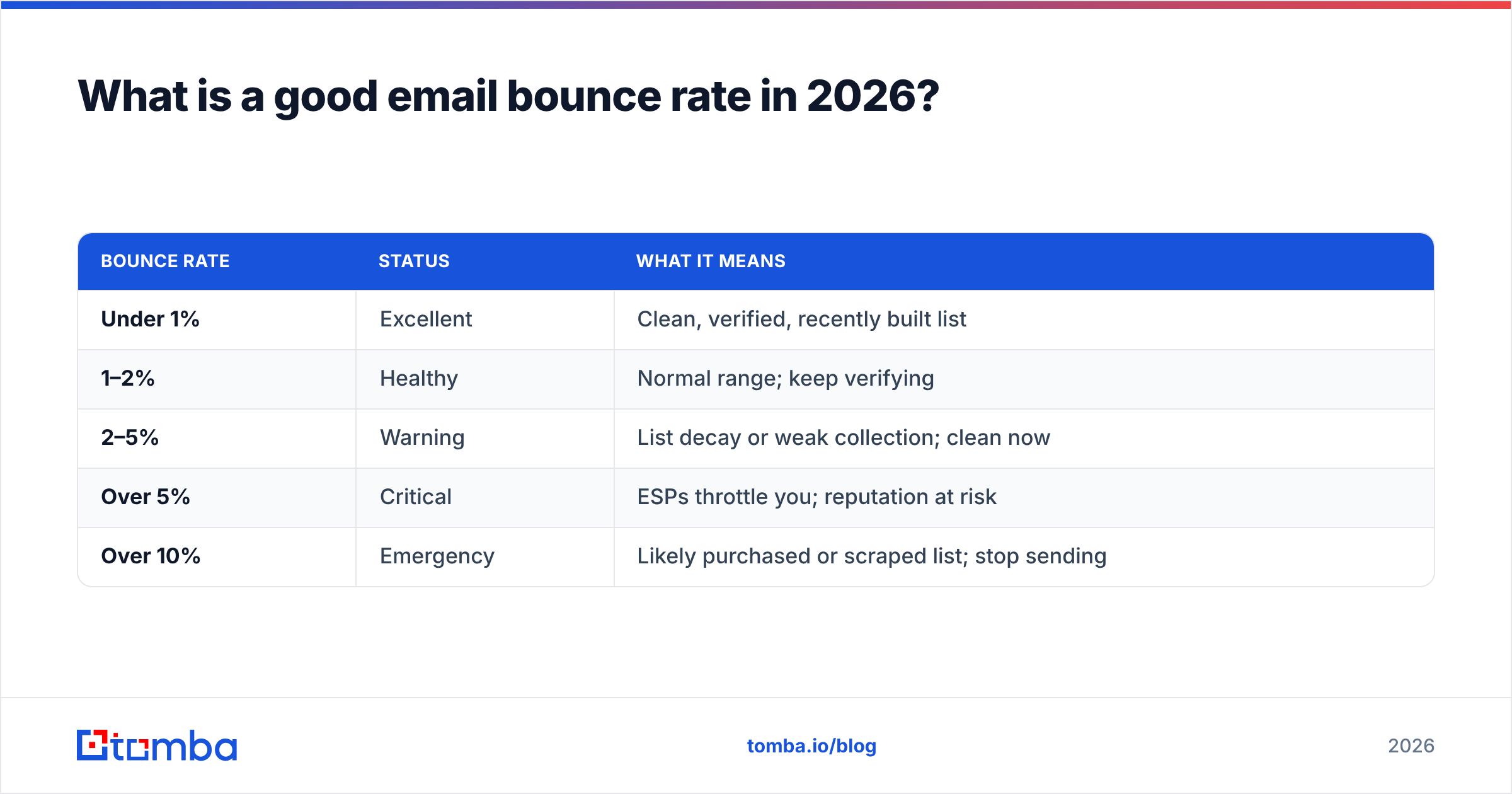
Benchmarks shift slightly by industry and by how you built your list, but the thresholds below hold up across cold outreach and marketing email alike.
| Bounce rate | Status | What it means |
|---|---|---|
| Under 1% | Excellent | Clean, verified, recently built list |
| 1–2% | Healthy | Normal range; keep verifying |
| 2–5% | Warning | List decay or weak collection; clean now |
| Over 5% | Critical | ESPs throttle you; reputation at risk |
| Over 10% | Emergency | Likely purchased or scraped list; stop sending |
Context matters. A brand-new cold campaign to a list you just sourced should still come in under 2% if you verified it first. If you're seeing 8% on a "fresh" list, the list wasn't clean — it was just new to you. Email data decays at roughly 2–3% per month as people change jobs, so even a perfect list rots if you let it sit. That's why verifying emails is a recurring task, not a one-time chore.
Why does a high bounce rate hurt sender reputation?#
A high bounce rate hurts because mailbox providers use it as a proxy for "does this sender know who they're emailing?" When you repeatedly hit dead addresses, you look exactly like a spammer working off a purchased list — because that's what spammers do.
Your sender reputation is the score Gmail, Outlook, and Yahoo assign to your sending domain and IP. It's built from signals like spam complaints, engagement, spam-trap hits, and — critically — bounce rate. A reputation hit doesn't just affect the campaign that bounced. It drags down inbox placement for every email you send afterward, including the ones to valid, engaged recipients.
There's a nastier consequence too: spam traps. Some dead addresses get recycled by providers into traps specifically designed to catch senders who don't clean their lists. Hit one, and you can land on a blocklist that takes weeks to escape. The connection is direct — the same poor email deliverability hygiene that produces hard bounces also produces spam-trap hits.

What causes email bounces?#
Most bounces trace back to one of a handful of root causes. Knowing which one you're dealing with tells you exactly what to fix.
- Invalid or non-existent addresses — The number one cause of hard bounces. Typos at signup, fake addresses, or contacts who left the company. This is what list verification solves.
- Stale data — Valid addresses that have since been deactivated. A B2B contact who changed jobs leaves a dead mailbox behind. Decay alone adds a few percent of bounces every quarter.
- Authentication failures — Missing or broken SPF, DKIM, or DMARC records. In 2024 Google and Yahoo made authentication mandatory for bulk senders, so a bad SPF record now causes outright rejections.
- Full or inactive mailboxes — A classic soft bounce. The address is real but the inbox is over quota or dormant.
- Content and reputation blocks — The receiving server rejects you based on spammy content, a blocklisted IP, or a damaged domain reputation.
- Catch-all domain ambiguity — Some domains accept every address at the SMTP layer, then silently discard the invalid ones. These hide bounces until they suddenly don't.
That last one deserves special attention, because catch-all domains are where a lot of "mystery bounces" come from.
How do catch-all domains inflate your bounce rate?#
A catch-all domain is configured to accept email sent to any address at that domain — anything@company.com returns a "valid" response at the verification stage, even when the mailbox doesn't exist. Standard verification tools mark these as "accept-all" or "unknown" because they genuinely can't tell real from fake with a simple SMTP check.
The problem: you send to what looks like a valid address, the catch-all server accepts it, and then it quietly drops the message — or bounces it later, after your campaign metrics already counted it as delivered. Catch-alls are common at larger companies, so if you're doing B2B outreach, a chunk of your list is probably catch-all.
The fix is deeper validation. A dedicated catch-all finder and catch-all verification use additional signals — pattern matching, historical data, and confidence scoring — to tell you whether an address on a catch-all domain is actually deliverable, instead of shrugging and labeling it "unknown." For cold outreach into enterprise domains, this is the difference between a 1% and a 6% bounce rate.
How do you lower your email bounce rate?#
Lowering your bounce rate comes down to one principle: never send to an address you haven't validated, and never let your data go stale. Here's the practical playbook.
- Verify before every campaign. Run your list through an email verifier right before you send, not months earlier. Verification catches syntax errors, dead mailboxes, and known invalids before they bounce. For large lists, a bulk verify job handles thousands of addresses at once.
- Use double opt-in for signups. Confirming new subscribers via a click filters out typos and fake addresses at the door. It shrinks your list slightly and improves every downstream metric.
- Suppress hard bounces immediately. Configure your ESP to remove any hard-bounced address automatically. Mailing it a second time is how reputation damage compounds.
- Authenticate your domain. Set up SPF, DKIM, and DMARC correctly. Check your SPF record and confirm DMARC is at least at
p=nonemonitoring. Without this, Gmail and Yahoo will reject bulk mail outright. - Validate catch-all addresses separately. Don't guess on accept-all domains. Use catch-all verification to score them instead of sending blind.
- Re-verify on a schedule. Because data decays 2–3% monthly, re-clean any list older than 90 days before reusing it.
- Warm up new sending domains. Ramp volume gradually so providers learn your pattern. Our warmup calculator helps you set a sane ramp schedule.
The order matters. Verification and suppression alone will pull most senders from a 5% bounce rate down under 2% within a single cleaning cycle.
How does verification actually catch bounces before they happen?#
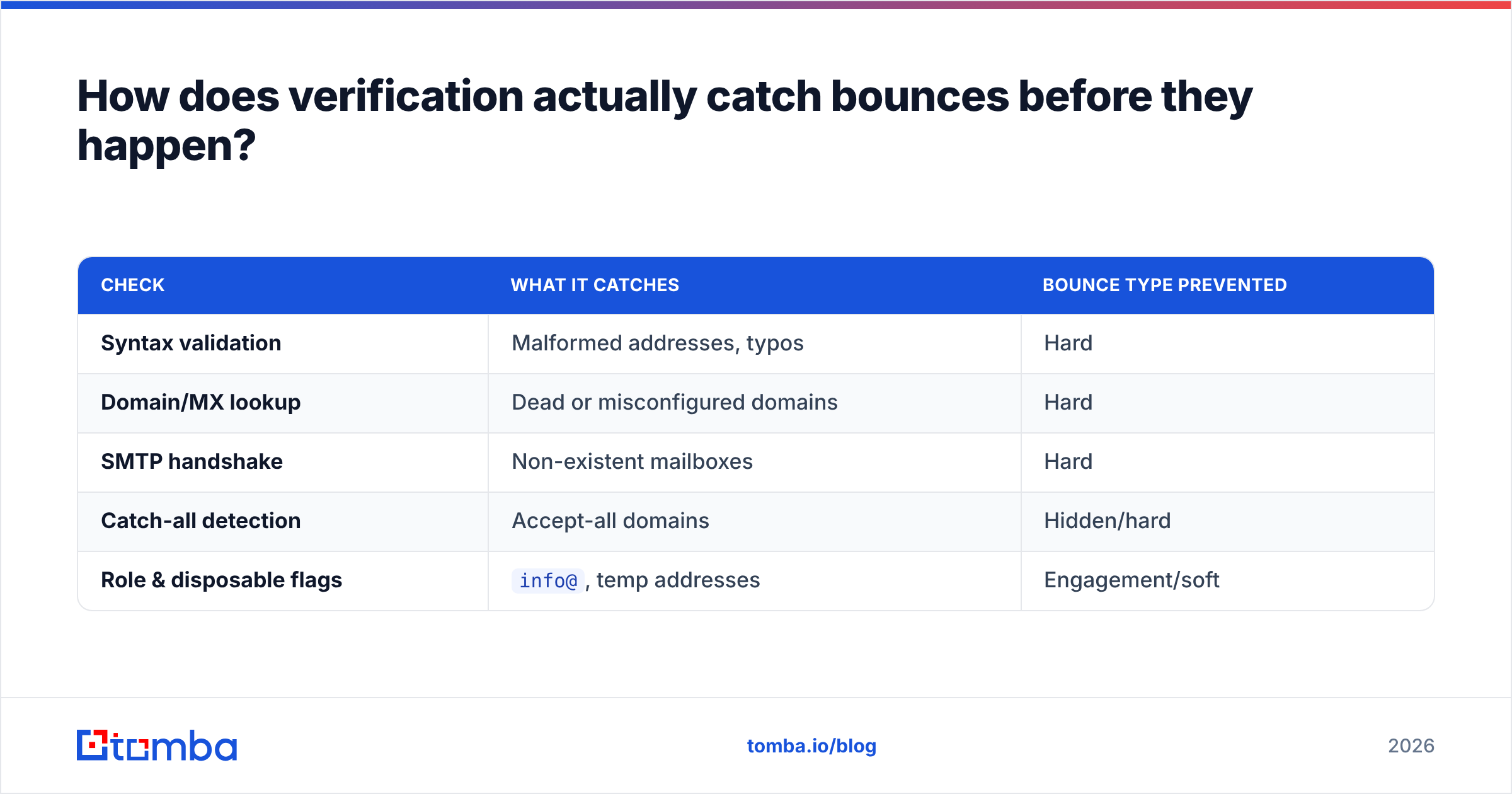
Verification works by simulating the steps a real send goes through, without delivering a message. A solid verifier runs several checks in sequence:
| Check | What it catches | Bounce type prevented |
|---|---|---|
| Syntax validation | Malformed addresses, typos | Hard |
| Domain/MX lookup | Dead or misconfigured domains | Hard |
| SMTP handshake | Non-existent mailboxes | Hard |
| Catch-all detection | Accept-all domains | Hidden/hard |
| Role & disposable flags | info@, temp addresses |
Engagement/soft |
The first three checks alone eliminate the majority of hard bounces. Catch-all detection handles the ambiguous middle. Role-account and disposable flags don't strictly bounce, but they tank engagement and quietly drag your reputation, so most senders suppress them too.
This is where building your list with accurate data in the first place pays off. When you use an email finder that returns a confidence score and verifies as it discovers, you're collecting deliverable addresses from the start instead of cleaning up a mess after the fact. Tomba sources addresses from public web data and cross-checks them against multiple signals — you can read how that works on the data sources page. Pairing accurate discovery with verification before send is the combination that keeps cold-outreach bounce rates consistently under 2%.
It's worth grounding this in the broader deliverability picture. Industry resources like the Gmail sender guidelines and HubSpot's own email deliverability research both put list hygiene and authentication at the top of the list of factors that decide whether you reach the inbox. Bounce rate isn't a vanity metric — it's the canary.
How often should you clean your email list?#
Clean your list before every major campaign, and fully re-verify any list older than 90 days. For high-volume senders mailing weekly, a monthly verification pass is the right cadence. The math is straightforward: at 2–3% monthly decay, a list you verified in January is already 6–9% degraded by April. Sending to that without re-cleaning is how a once-healthy 1% bounce rate creeps into the danger zone.
Set it up as a recurring step in your workflow rather than a panic response to a deliverability scare. If you manage outreach through a spreadsheet or CRM, integrations like the Google Sheets add-on or the HubSpot integration let you verify in place so cleaning never falls off the to-do list. You can compare what's included at each tier on the Tomba pricing page — the free tier covers 25 searches a month if you want to test the workflow before committing.
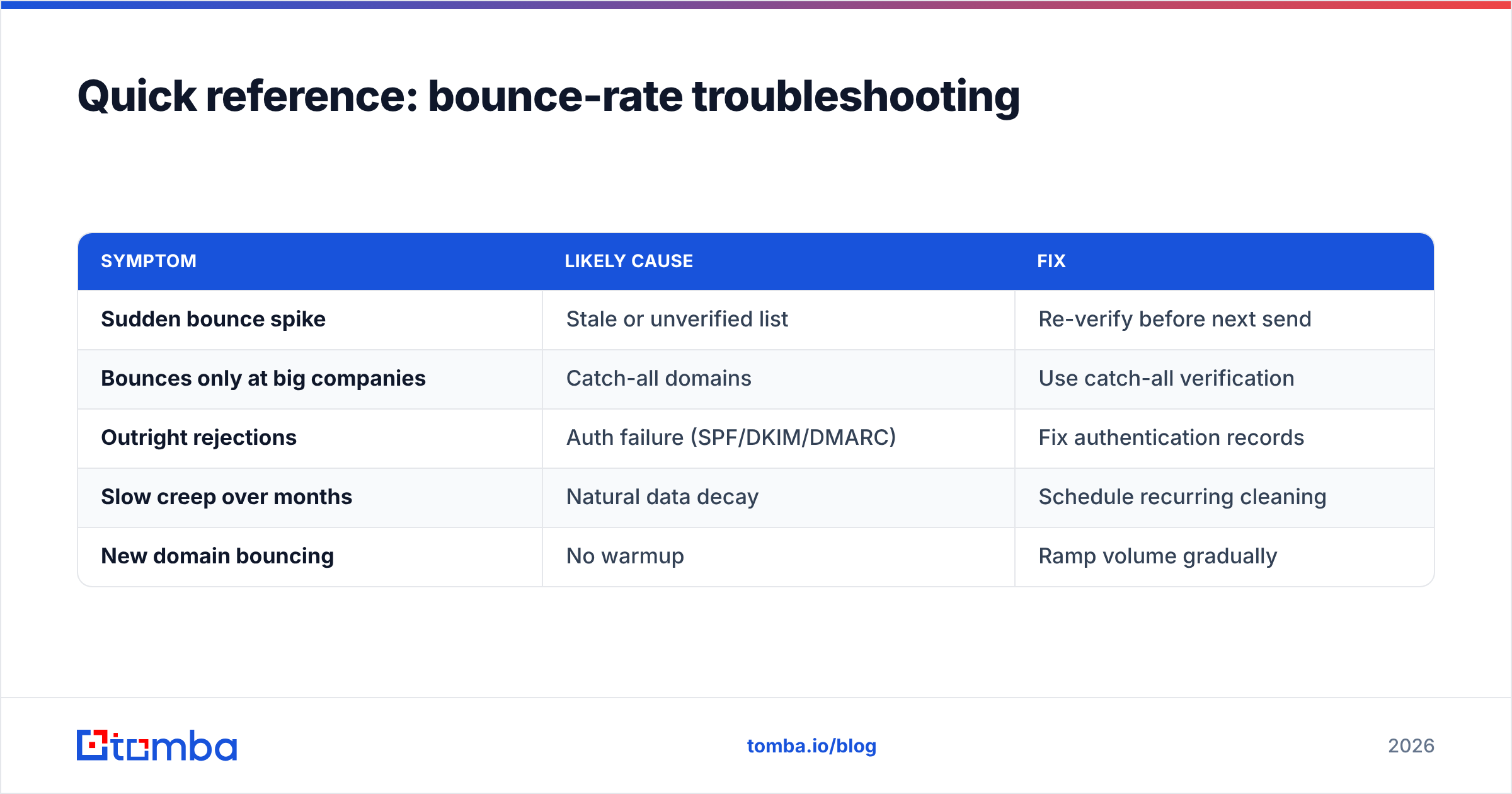
Quick reference: bounce-rate troubleshooting#
| Symptom | Likely cause | Fix |
|---|---|---|
| Sudden bounce spike | Stale or unverified list | Re-verify before next send |
| Bounces only at big companies | Catch-all domains | Use catch-all verification |
| Outright rejections | Auth failure (SPF/DKIM/DMARC) | Fix authentication records |
| Slow creep over months | Natural data decay | Schedule recurring cleaning |
| New domain bouncing | No warmup | Ramp volume gradually |
Lower your bounce rate at the source#
A bouncing list is almost always a data-quality problem wearing a deliverability costume. Fix the data, and the bounce rate fixes itself. Start by building your prospect lists with verified, high-confidence addresses instead of scraped guesses — the Tomba Email Finder returns professional emails by name, company, or domain with a confidence score attached, so dead addresses get filtered out before they ever reach your sequence. Run your existing lists through the email verifier on the same platform, set up a 90-day re-verification habit, and watch your bounce rate settle under 2% and stay there. Clean data in means inbox placement out — that's the whole game.
// get started
Find, verify and enrich your first contacts today
Start on the free plan with 25 searches a month, then scale when your team is ready.
Free plan · No credit card required · GDPR & CCPA
// about the author