Bulk Email Extractor: Best Tools & Methods for 2026
A bulk email extractor turns a list of domains or names into verified inboxes in minutes. Here's how the tools compare on accuracy, price, and compliance in 2026.

TL;DR
- A bulk email extractor takes a list of domains, company names, or LinkedIn URLs and returns professional email addresses at scale — replacing hours of manual copy-paste.
- The two metrics that actually matter are accuracy (how many addresses bounce) and throughput (how many you can process per run). Cheap scrapers fail both.
- Always pair extraction with verification. An unverified bulk list is the fastest way to wreck your sender reputation.
- Tomba's bulk email finder processes thousands of rows from a CSV, verifies inline, and exports clean — starting on a free tier.
- Budget by valid emails, not raw rows. A tool that's 40% cheaper but 30% less accurate costs you more once bounces and deliverability damage are priced in.
What is a bulk email extractor?#
A bulk email extractor is a tool that converts a large input list — domains, full names plus companies, or social profiles — into a structured set of business email addresses, all in one batch operation. Think of it like a translator for a stadium full of people: instead of asking each attendee their email one at a time, you hand over the seating chart and get every contact back at once.
Under the hood, most extractors do three things: they search public and proprietary sources for addresses tied to a domain, they infer the most likely pattern (first.last@, flast@, first@) when no direct record exists, and they score each guess against verification signals. The good ones return a confidence value per row so you know what to trust.
This is different from a plain "email scraper" that just regex-matches mailto: strings off a web page. Scrapers grab whatever is published — often role accounts (info@, sales@) and stale addresses — with no verification. A real extractor is closer to a find emails by domain engine: it knows the company's pattern and can build addresses for named people who never posted their email publicly.

Why not just copy-paste or scrape manually?#
Because it doesn't scale, and the quality is worse than it looks. Manually pulling 500 contacts is a full day of soul-crushing work, and you'll still miss patterns, fat-finger addresses, and collect dead inboxes. Free browser scrapers feel productive but mostly harvest generic role addresses that route to nobody who can buy from you.
The hidden cost is deliverability. Every hard bounce signals to mailbox providers that you don't know who you're emailing. Stack up enough and your email deliverability collapses — even your good messages start landing in spam. A 2026 outbound program lives or dies on list hygiene, and a sloppy extract poisons the well before your first send.
A proper bulk workflow flips that. You feed in a clean input, the extractor returns scored addresses, and a verification pass strips the risky ones before anything reaches your sequencer.
How does bulk email extraction actually work?#
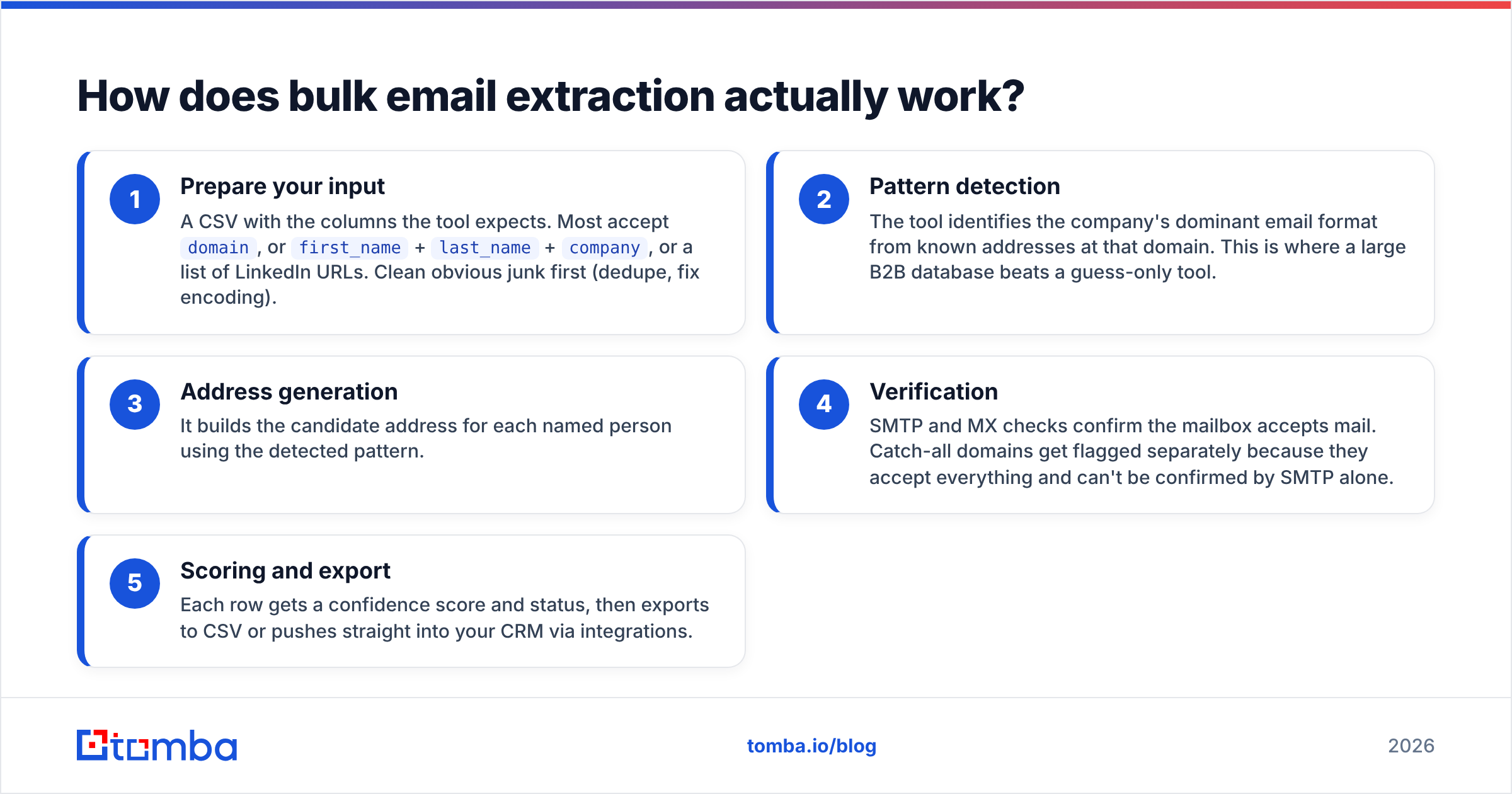
Here's the typical pipeline, step by step:
- Prepare your input — A CSV with the columns the tool expects. Most accept
domain, orfirst_name+last_name+company, or a list of LinkedIn URLs. Clean obvious junk first (dedupe, fix encoding). - Pattern detection — The tool identifies the company's dominant email format from known addresses at that domain. This is where a large B2B database beats a guess-only tool.
- Address generation — It builds the candidate address for each named person using the detected pattern.
- Verification — SMTP and MX checks confirm the mailbox accepts mail. Catch-all domains get flagged separately because they accept everything and can't be confirmed by SMTP alone.
- Scoring and export — Each row gets a confidence score and status, then exports to CSV or pushes straight into your CRM via integrations.
Step 4 is non-negotiable. If your extractor doesn't verify, you must run the output through a standalone email verifier before sending. Treat extraction and verification as one job, not two.
What should you look for in a bulk email extractor?#
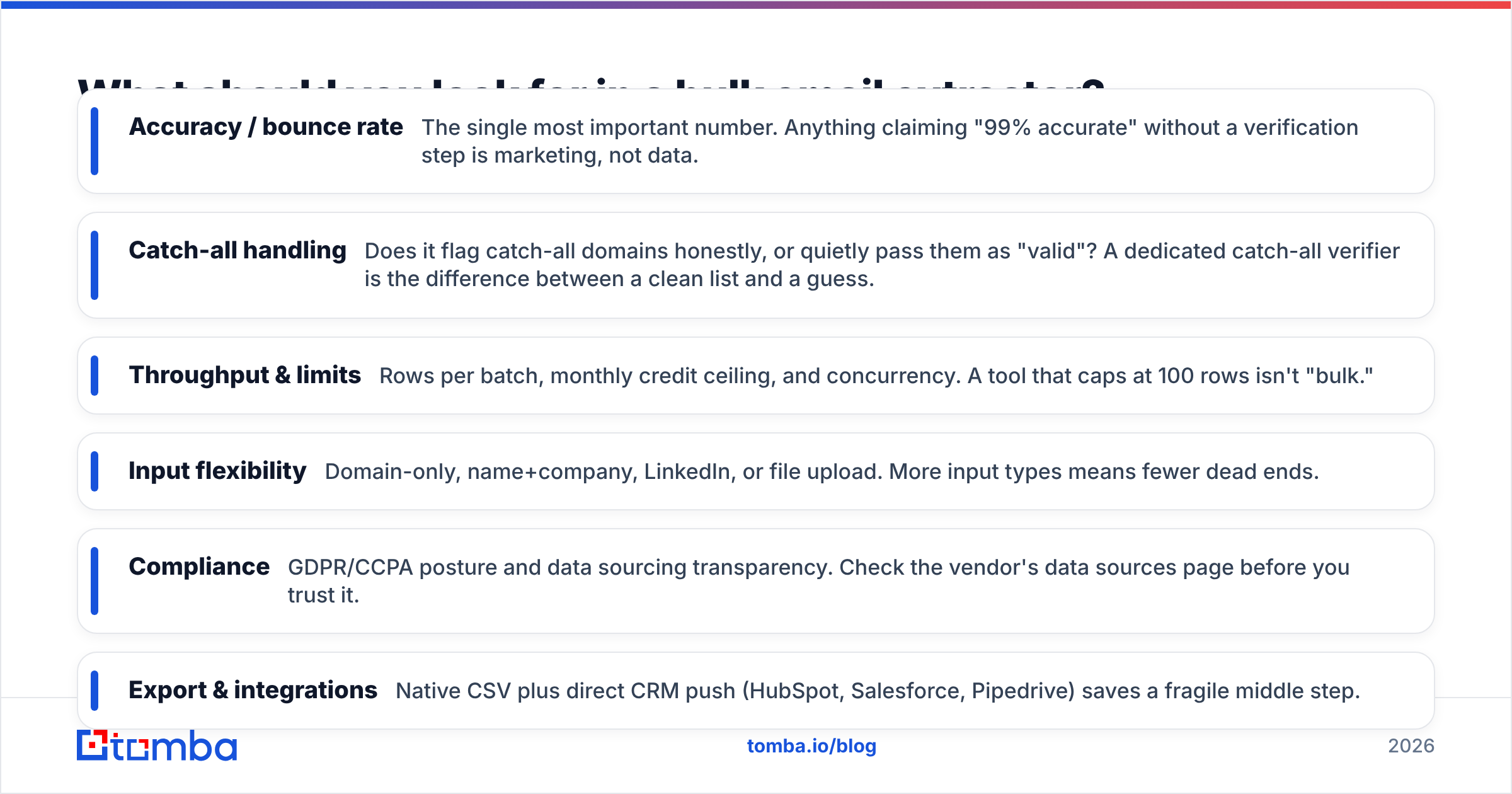
Score every tool you evaluate against these six attributes — they separate a list you can send to from a liability:
- Accuracy / bounce rate — The single most important number. Anything claiming "99% accurate" without a verification step is marketing, not data.
- Catch-all handling — Does it flag catch-all domains honestly, or quietly pass them as "valid"? A dedicated catch-all verifier is the difference between a clean list and a guess.
- Throughput & limits — Rows per batch, monthly credit ceiling, and concurrency. A tool that caps at 100 rows isn't "bulk."
- Input flexibility — Domain-only, name+company, LinkedIn, or file upload. More input types means fewer dead ends.
- Compliance — GDPR/CCPA posture and data sourcing transparency. Check the vendor's data sources page before you trust it.
- Export & integrations — Native CSV plus direct CRM push (HubSpot, Salesforce, Pipedrive) saves a fragile middle step.

Accuracy is where most "free" extractors quietly fail. They optimize for coverage — returning an address for every row so the output looks complete — even when half of those addresses are pattern guesses that bounce. The chart above shows why the gap between a verified extractor and a coverage-maximizing scraper is bigger than the marketing pages admit.
Which bulk email extractor is best in 2026?#
There's no single winner for every team, but the field splits cleanly by what you're optimizing for. Below is a head-to-head on the attributes that drive real cost.

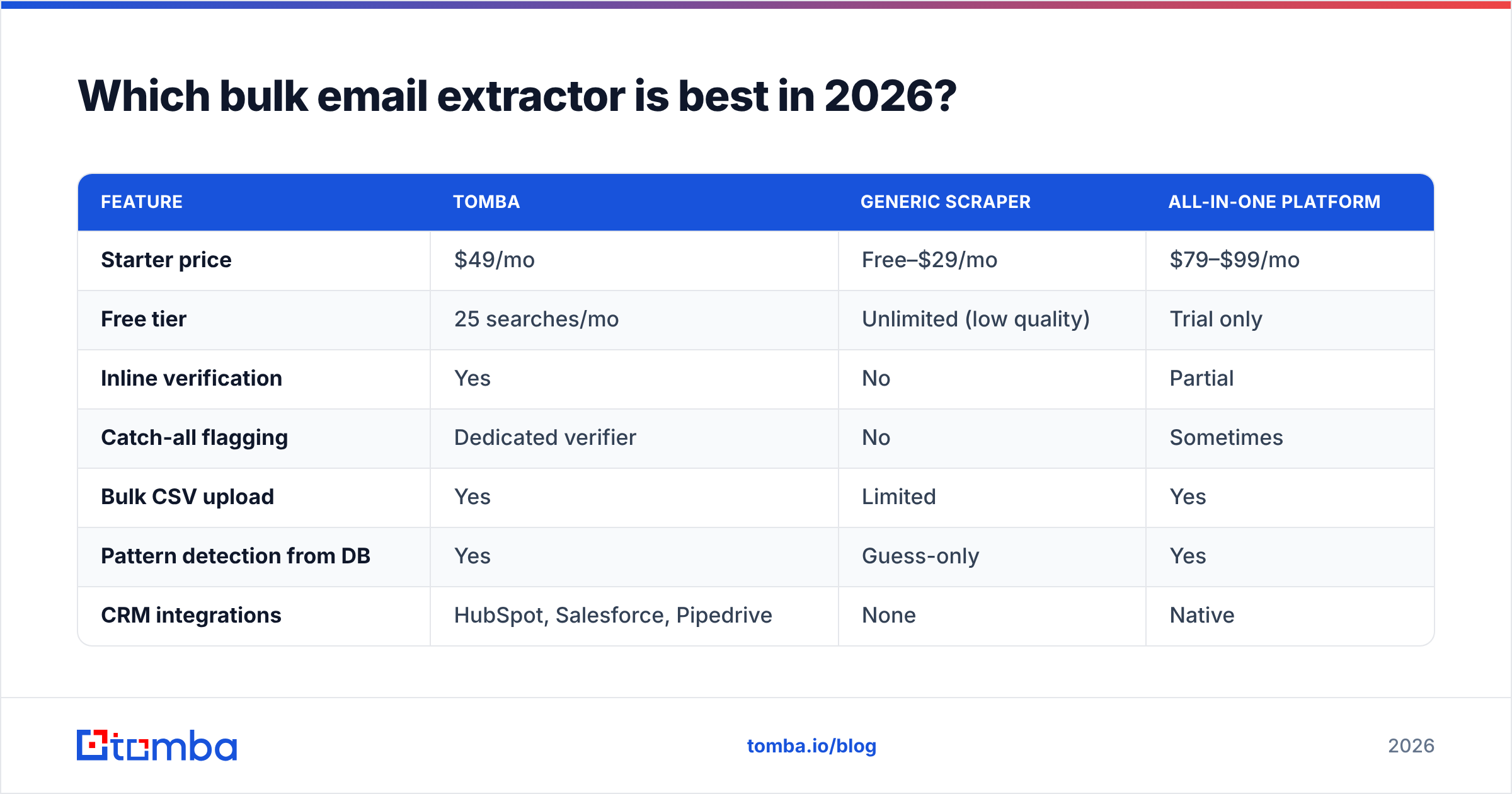
| Feature | Tomba | Generic scraper | All-in-one platform |
|---|---|---|---|
| Starter price | $49/mo | Free–$29/mo | $79–$99/mo |
| Free tier | 25 searches/mo | Unlimited (low quality) | Trial only |
| Inline verification | Yes | No | Partial |
| Catch-all flagging | Dedicated verifier | No | Sometimes |
| Bulk CSV upload | Yes | Limited | Yes |
| Pattern detection from DB | Yes | Guess-only | Yes |
| CRM integrations | HubSpot, Salesforce, Pipedrive | None | Native |
| Compliance docs | Public data-source page | Opaque | Public |
The pattern: free scrapers win on raw price and lose on everything that determines whether your campaign lands. All-in-one platforms bundle extraction with sequencing but charge a premium and often verify less rigorously than a focused tool. A dedicated extractor-plus-verifier like Tomba sits in the value sweet spot — accurate output without paying for a sequencer you may not need. You can see the full breakdown on the Tomba pricing page.
For an independent cross-check on any vendor here, read verified user reviews on G2 rather than trusting vendor self-scoring.

How do you keep a bulk-extracted list deliverable?#
Extraction is half the job; protecting your domain is the other half. Even a clean list will hurt you if you blast it cold from a fresh inbox.
Verify, then segment. Split your export into "valid," "catch-all," and "risky." Send confidently to valid, send cautiously (or skip) catch-all, and drop risky entirely. Mailbox providers like Gmail reward senders who keep bounce and spam rates low — segmentation is how you do that.
Warm up and ramp. Don't send 5,000 emails on day one from a cold domain. Ramp volume gradually so your sender reputation builds instead of cratering. Check your authentication with an SPF checker before the first send.
Re-verify before each campaign. B2B data decays 2–3% per month as people change jobs. A list extracted in January is meaningfully stale by April. Re-run it through verification, or use enrichment to refresh roles, before you reuse it.
Enrich, don't just extract. An email alone is a thin lead. Pairing extraction with data enrichment — title, company size, location — lets you personalize, which lifts reply rates far more than raw volume ever will.
How much should bulk email extraction cost?#
Budget by valid emails delivered, not by raw rows processed. This reframes every pricing comparison.
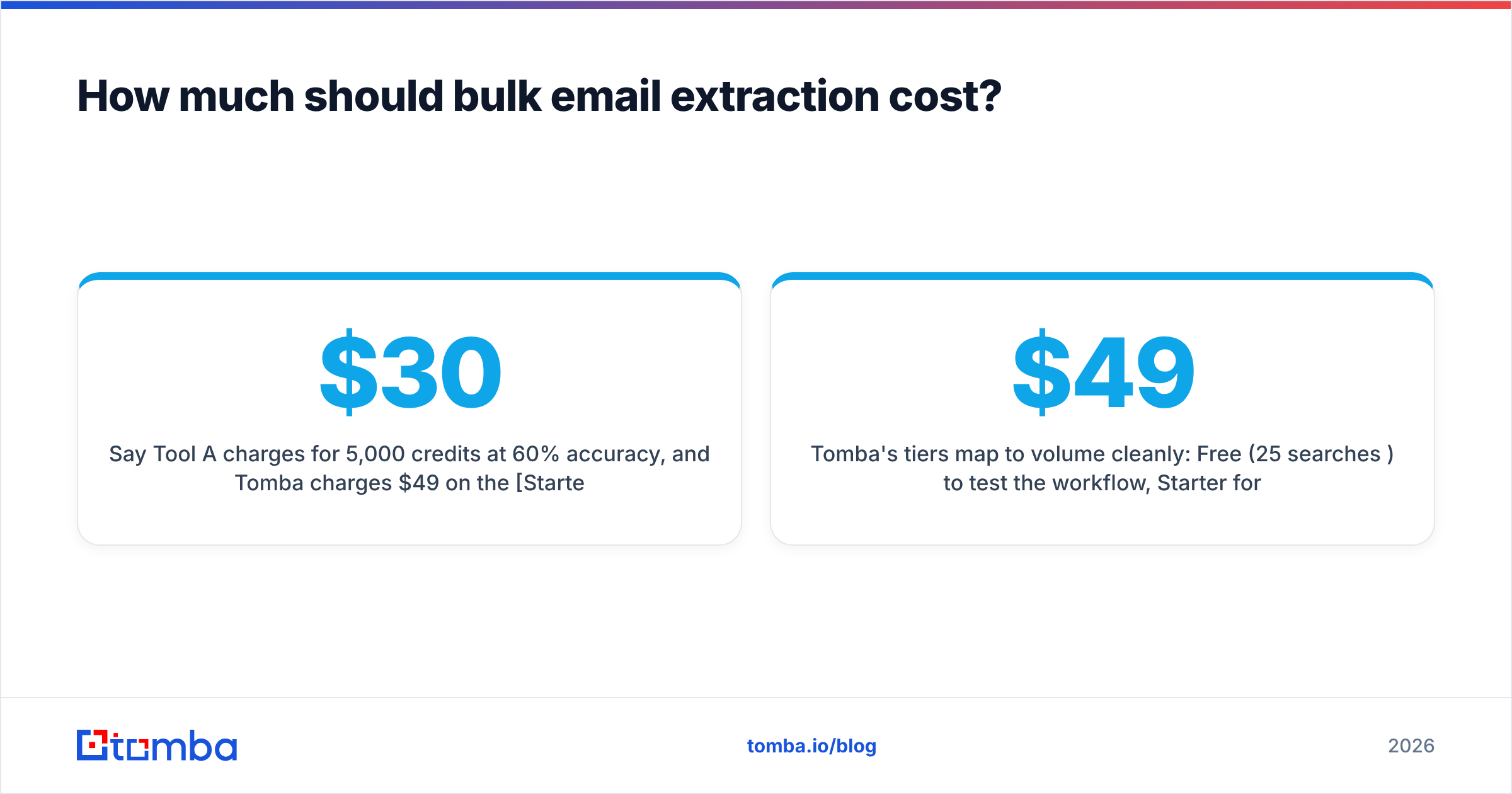
Say Tool A charges $30/mo for 5,000 credits at 60% accuracy, and Tomba charges $49/mo on the Starter plan at ~95% verified accuracy. Tool A gives you 3,000 usable addresses ($0.010 each). Tomba's Growth plan at $99/mo gives you far more deliverable contacts per dollar once you subtract the bounces, the deliverability damage, and the hours spent cleaning Tool A's output by hand. The "cheaper" tool is more expensive per valid contact.
Tomba's tiers map to volume cleanly: Free (25 searches/mo) to test the workflow, Starter $49/mo for solo SDRs, Growth $99/mo for active outbound teams, Pro $249/mo for high-volume operations, and Enterprise (custom) for data teams hitting the email finder API at scale. Run a small batch on the free tier first and measure your real bounce rate — that number, not the sticker price, tells you which tool is actually cheapest.
When should you use the API instead of the dashboard?#
Use the dashboard for one-off campaigns and ad-hoc lists. Switch to the API when extraction needs to be part of a system — auto-enriching new CRM records, building an internal lead tool, or processing lists on a schedule. The Tomba API exposes the same finder, verifier, and bulk endpoints the UI uses, so you can wire verified extraction directly into your stack. There's also a Tomba CLI for scripting and a free email extractor tool for pulling addresses out of raw text without any setup.
For spreadsheet-native teams, the Google Sheets add-on and Excel add-in run extraction in-cell — paste a column of domains, get verified emails next to them, no export round-trip.
Is bulk email extraction legal and compliant?#
It can be, and it depends entirely on sourcing and use. Extracting business email addresses for B2B outreach is broadly permitted under regulations like GDPR when you have a legitimate interest and honor opt-outs — but the rules vary by region, and consumer (B2C) data is far more restricted. The non-negotiables: use a vendor transparent about where its data comes from, include a clear unsubscribe in every send, and document your lawful basis. A reputable extractor sources from public professional data and refreshes it; a sketchy scraper hands you addresses of unknown provenance and leaves the liability with you. Read up on the basics of email marketing compliance before you launch a program at scale.
The bottom line#
A bulk email extractor is only as good as the deliverable list it produces. Optimize for accuracy and built-in verification, budget by valid emails rather than raw rows, and never decouple extraction from a verification pass. Get those three right and a bulk workflow turns days of manual prospecting into a clean, segmented list you can actually send to.
Ready to stop copy-pasting? Run your first batch through the Tomba Email Finder and bulk tools — upload a CSV of domains or names, get verified, scored, export-ready addresses, and start on the free tier with 25 searches before you commit to a plan. Accurate extraction and inline verification, in one pass.
// get started
Find, verify and enrich your first contacts today
Start on the free plan with 25 searches a month, then scale when your team is ready.
Free plan · No credit card required · GDPR & CCPA
// about the author