Business Email Address Lookup: Best Tools & Tips for 2026
A practical 2026 guide to business email address lookup: how it works, what makes a tool accurate, pricing compared, and how to find verified work emails fast.
(rendered separately)
TL;DR
- A business email address lookup finds a person's verified work email from their name, company domain, or LinkedIn profile — without guessing or scraping junk.
- Accuracy is the only metric that matters: a 70%-accurate tool quietly burns your sender reputation with bounces.
- The best tools combine pattern detection, SMTP verification, and catch-all handling. Free guessers do none of that reliably.
- Expect to pay roughly $0.01–$0.05 per verified email. Tomba starts at a free tier (25 searches/mo) and scales to $49/mo.
- Always verify before you send. Looking up an address and confirming it are two different jobs.
What is a business email address lookup?#
A business email address lookup is the process of finding a specific person's professional email — jane.doe@company.com — using something you already know about them: their full name and employer, their company's domain, or a LinkedIn URL. Think of it like a reverse phone book for work inboxes. You walk in with a name and a company, and you walk out with a deliverable address.
This is different from buying a static list. Purchased lists rot at roughly 22–30% per year as people change jobs, and they're shared across thousands of buyers. A live lookup queries current data and confirms the mailbox actually exists at the moment you ask. That distinction is the whole game when your sender reputation is on the line.
Under the hood, a quality lookup tool does three things in sequence:
- Pattern detection — It figures out the company's email format (
{first}.{last},{f}{last},{first}@) from known addresses on that domain. - Candidate generation — It applies that pattern to your target's name to build the most likely address.
- Verification — It pings the mail server (SMTP handshake) to confirm the mailbox accepts mail, then flags catch-all domains that accept everything.
Skip step three and you're just guessing with extra steps. That's why a real email finder is paired with an email verifier rather than sold as a one-trick guesser.

Why does accuracy matter more than volume?#
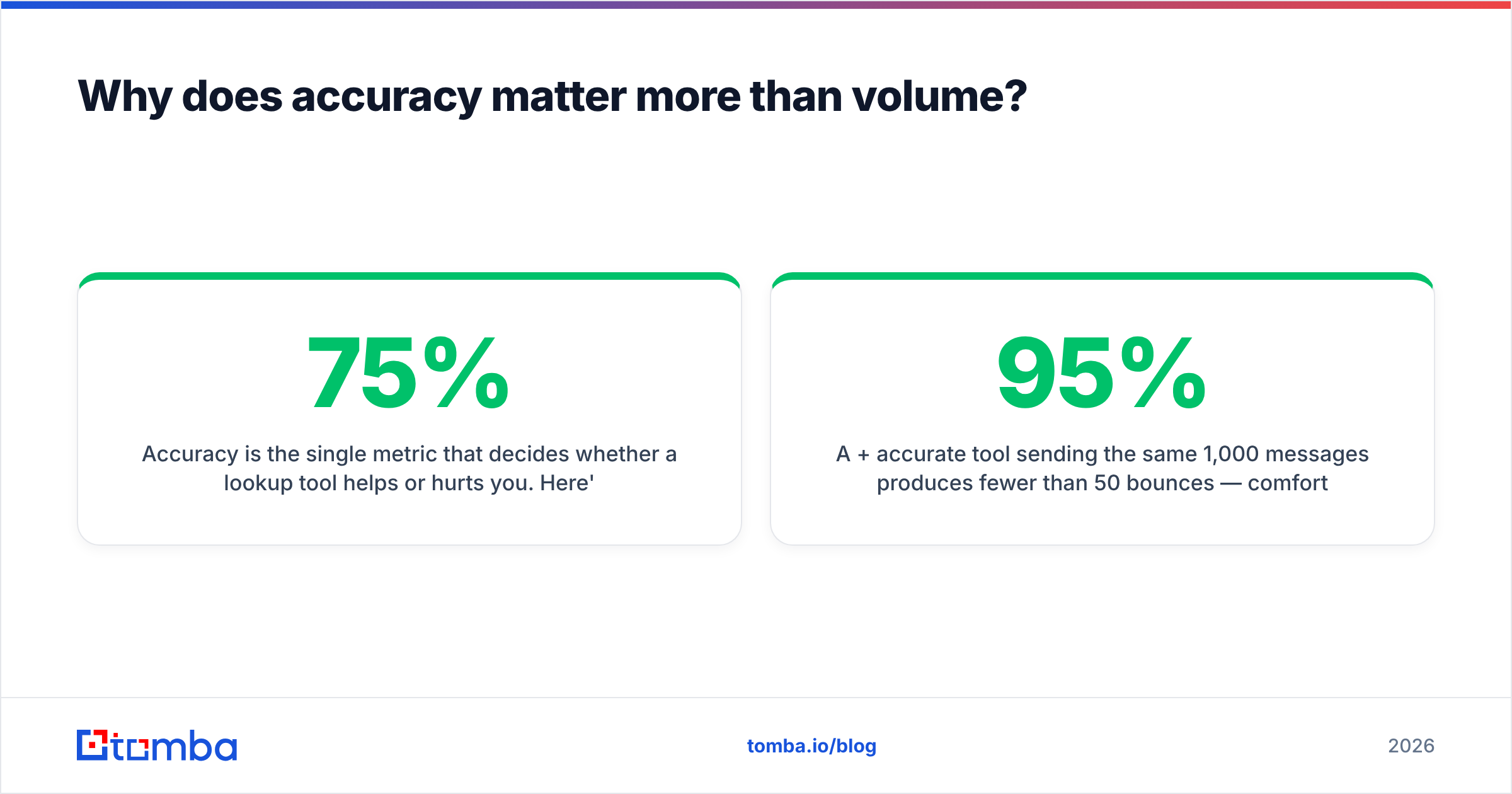
Accuracy is the single metric that decides whether a lookup tool helps or hurts you. Here's the math everyone ignores: if a tool returns 1,000 "emails" at 75% accuracy, you're sending 250 messages straight into bounces and spam traps. Mailbox providers read that bounce rate as a signal that you're a careless sender, and they start routing your good mail to spam too. One bad list poisons the well for weeks.
A 95%+ accurate tool sending the same 1,000 messages produces fewer than 50 bounces — comfortably under the ~3% threshold where Gmail and Outlook start penalizing you. The volume looked identical on the invoice. The outcome was night and day.
This is why I treat "number of emails found" as a vanity metric and "verified, deliverable, catch-all-flagged emails" as the real one. When you evaluate any business email address lookup tool, ask for the bounce rate on a 100-email test batch before you trust the marketing number. Pair the lookup with an email verifier and a catch-all verifier so nothing untested reaches your sequence.

How do the main lookup methods compare?#
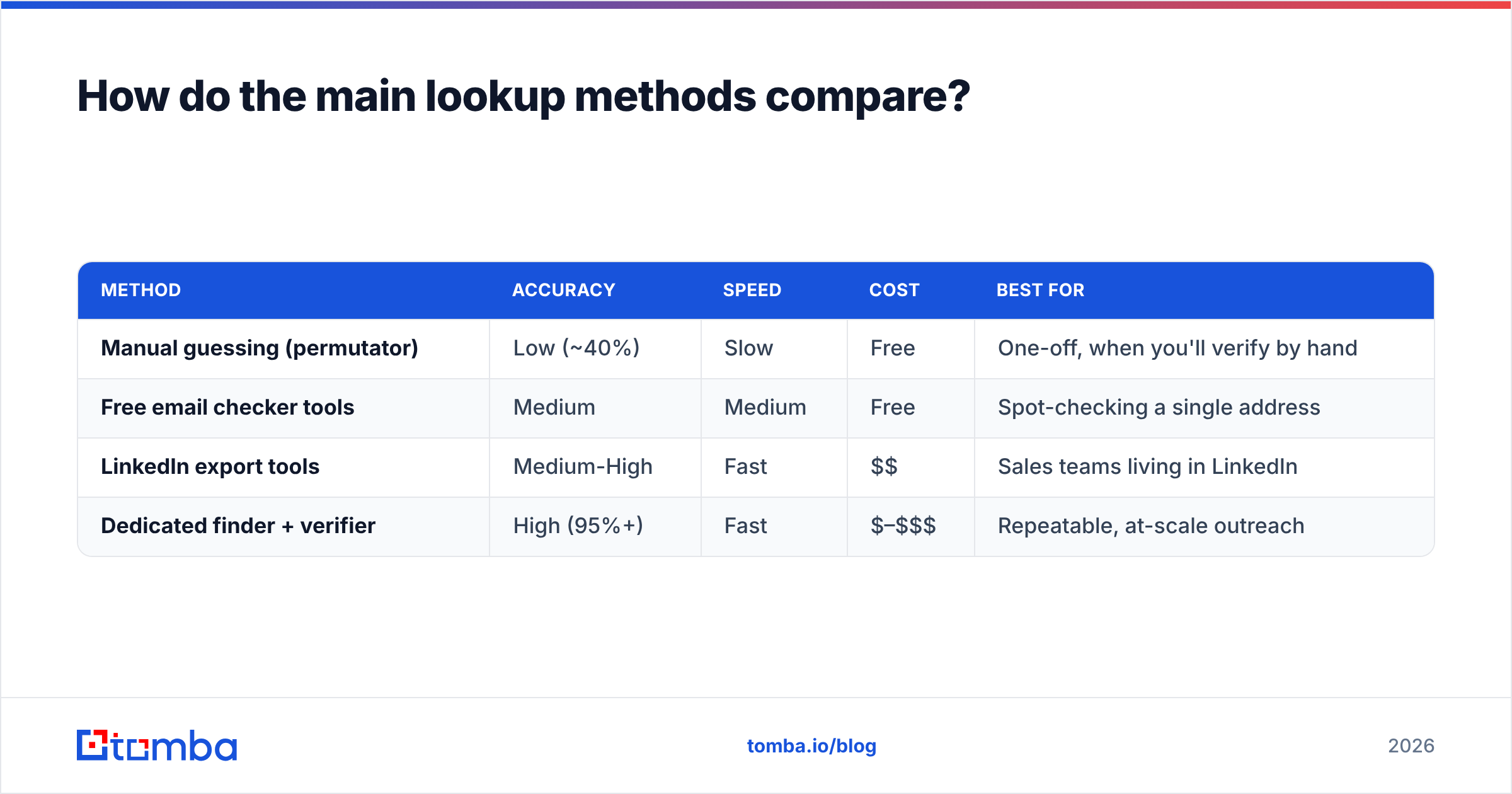
There are four ways people actually find business emails, and they sit on a spectrum from "free and unreliable" to "paid and verified." Here's how they stack up.
| Method | Accuracy | Speed | Cost | Best for |
|---|---|---|---|---|
| Manual guessing (permutator) | Low (~40%) | Slow | Free | One-off, when you'll verify by hand |
| Free email checker tools | Medium | Medium | Free | Spot-checking a single address |
| LinkedIn export tools | Medium-High | Fast | $$ | Sales teams living in LinkedIn |
| Dedicated finder + verifier | High (95%+) | Fast | $–$$$ | Repeatable, at-scale outreach |
The pattern is clear: free methods cost you time and deliverability instead of money. If you're looking up two emails for a personal note, a free email permutator plus a quick check is fine. If you're building a pipeline, a dedicated finder pays for itself the first time it saves you from a spam-folder relegation.
For LinkedIn-heavy workflows specifically, a LinkedIn finder pulls work emails directly from profile URLs, which beats copy-pasting names into a generic search.
What should you look for in a lookup tool?#
Not all tools that claim "business email address lookup" do the job well. Use this checklist to separate the real ones from the guessers:
- Real-time SMTP verification. The tool must confirm the mailbox at lookup time, not serve a cached guess from last year. This is non-negotiable.
- Catch-all detection. Some domains accept all mail, so a naive verifier marks every guess as "valid." A serious tool flags these as risky instead of pretending they're confirmed.
- Confidence scoring. You should see a percentage or grade, not a binary "found / not found," so you can decide what risk you'll tolerate.
- Bulk + API access. Looking up one email is a feature; looking up 10,000 is a workflow. You want both a bulk email finder and a clean email finder API.
- Transparent data sourcing. Know where the data comes from. Tomba publishes its data sources so you understand what you're paying for.
- Native integrations. If it doesn't push into your CRM, you'll lose addresses in spreadsheets. Look for HubSpot integration, Salesforce, and Google Sheets support.
A tool that nails the first three — verification, catch-all handling, confidence scoring — is already ahead of most of the market. The rest is convenience.
How does Tomba's lookup compare to other tools in 2026?#
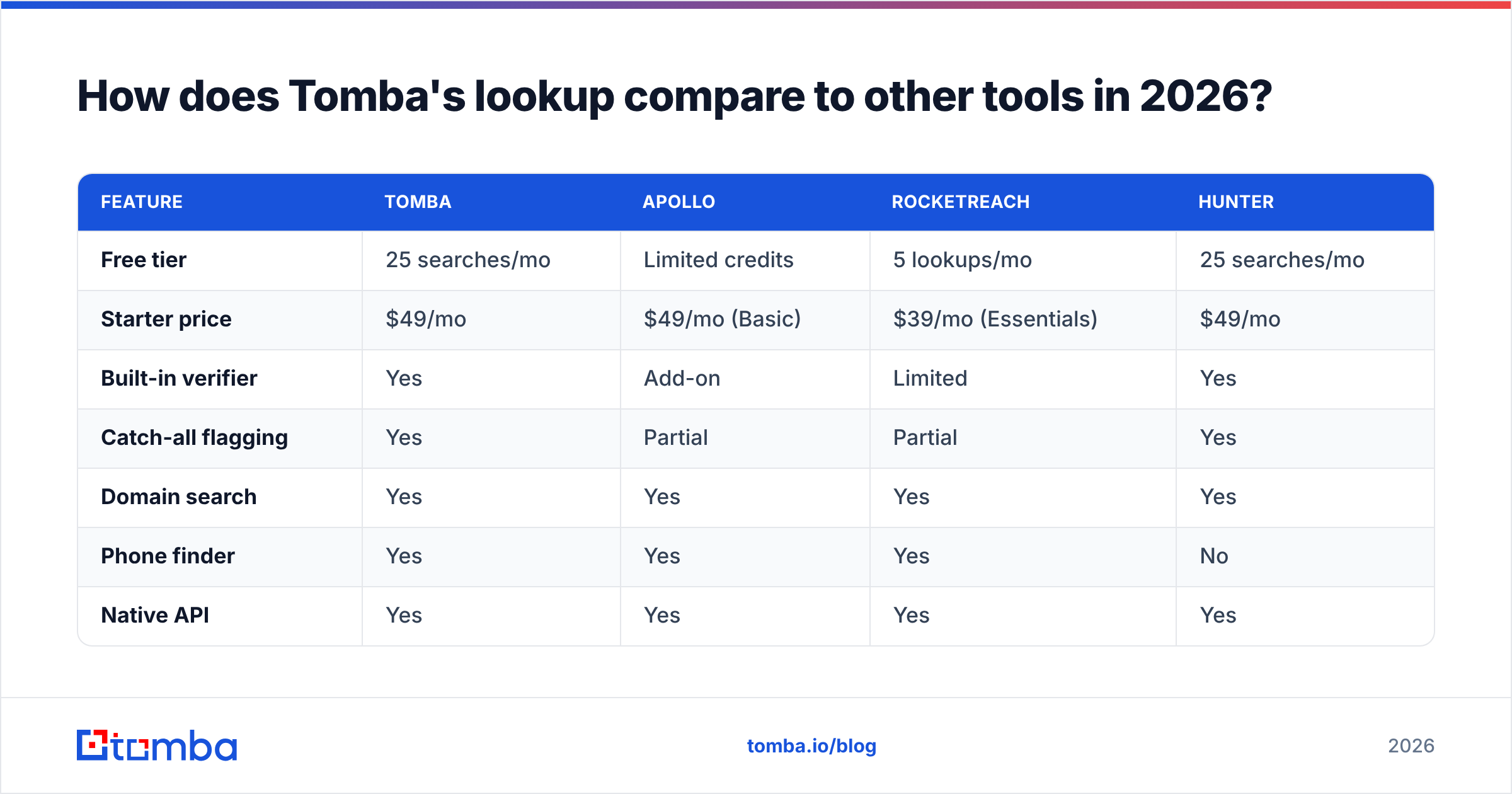
Below is an honest side-by-side of the popular options for business email lookup. Prices and tiers shift, so confirm on each vendor's own page before buying — for Tomba, the current Tomba pricing is listed publicly.
| Feature | Tomba | Apollo | RocketReach | Hunter |
|---|---|---|---|---|
| Free tier | 25 searches/mo | Limited credits | 5 lookups/mo | 25 searches/mo |
| Starter price | $49/mo | $49/mo (Basic) | $39/mo (Essentials) | $49/mo |
| Built-in verifier | Yes | Add-on | Limited | Yes |
| Catch-all flagging | Yes | Partial | Partial | Yes |
| Domain search | Yes | Yes | Yes | Yes |
| Phone finder | Yes | Yes | Yes | No |
| Native API | Yes | Yes | Yes | Yes |
The honest takeaway: every serious tool here can find a work email. The differences show up in verification depth and how they bundle phone numbers and enrichment. Apollo is a full sales engagement suite, so you're paying for the sequencer too. RocketReach leans on its contact database. Tomba focuses on accurate finding plus verification at a low entry price, which is why teams that just need clean addresses tend to land there. If you're cross-shopping, the Apollo alternative and RocketReach alternative breakdowns go deeper than I can here.


How do you do a business email lookup step by step?#
Here's the workflow I'd hand a new SDR on day one. It works whether you're using Tomba or any other capable tool.
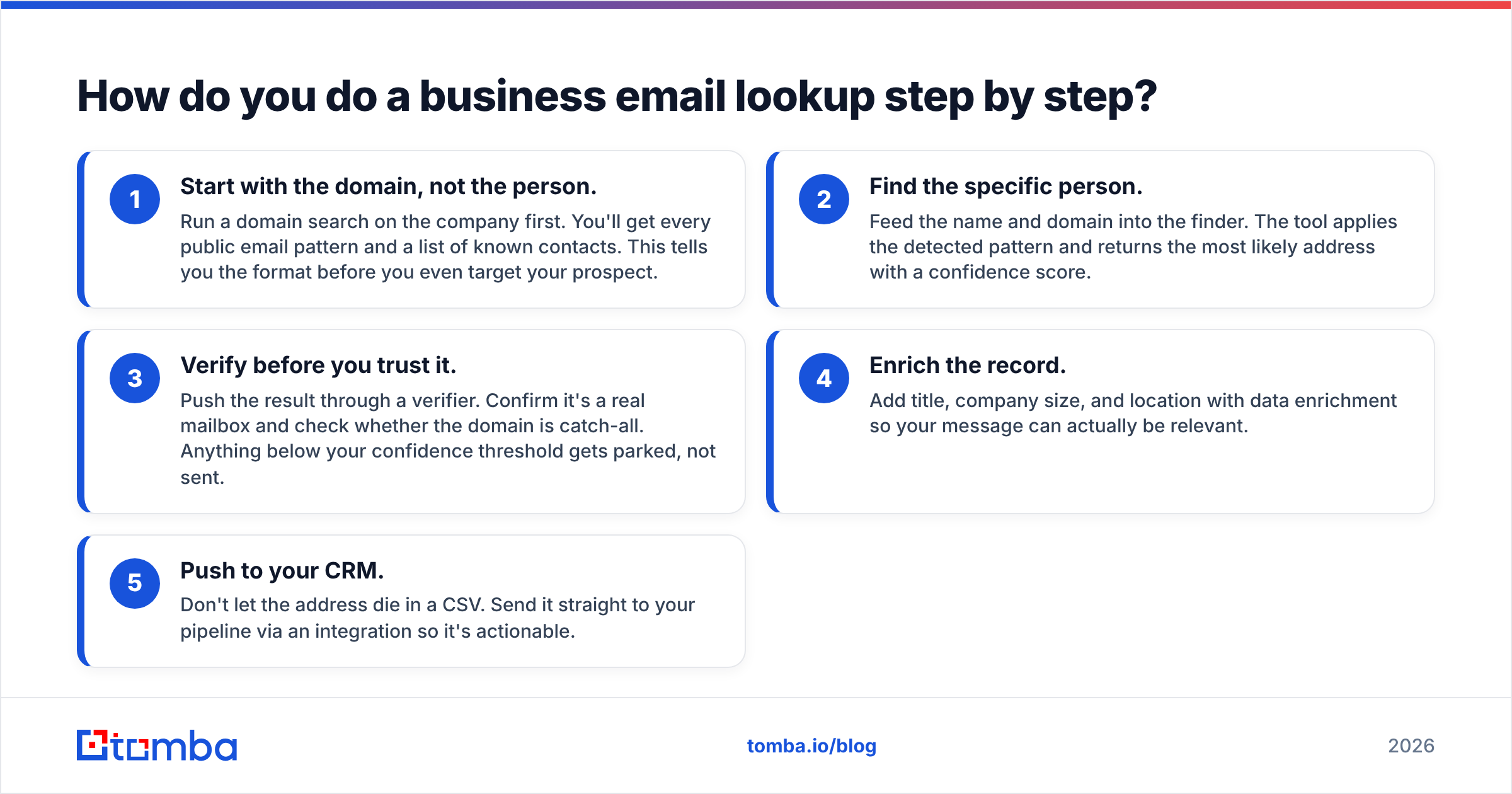
- Start with the domain, not the person. Run a domain search on the company first. You'll get every public email pattern and a list of known contacts. This tells you the format before you even target your prospect.
- Find the specific person. Feed the name and domain into the finder. The tool applies the detected pattern and returns the most likely address with a confidence score.
- Verify before you trust it. Push the result through a verifier. Confirm it's a real mailbox and check whether the domain is catch-all. Anything below your confidence threshold gets parked, not sent.
- Enrich the record. Add title, company size, and location with data enrichment so your message can actually be relevant.
- Push to your CRM. Don't let the address die in a CSV. Send it straight to your pipeline via an integration so it's actionable.
For volume, swap steps 1–4 for the bulk email finder: upload a list of names and domains, let it find and verify in one pass, then export. A 5,000-row list that would take a week by hand finishes in minutes.
If you live in spreadsheets, the Google Sheets add-on and the Chrome extension let you look up emails without leaving your workflow — which, in practice, is the difference between a tool you use and one you forget you bought.
Is business email lookup legal and compliant?#
Short answer: finding and using business email addresses is legal in most jurisdictions when you do it for legitimate B2B purposes and respect opt-outs. The longer answer depends on where your recipients are.
Under GDPR (EU), a work email tied to a role can be processed under "legitimate interest," but you must offer an easy unsubscribe and honor deletion requests. CAN-SPAM (US) is more permissive: you need accurate headers, a real physical address, and a working opt-out. The G2 software directory and standard compliance guides from established vendors like HubSpot cover the nuances in detail, and it's worth a read before any large campaign.
Two rules keep you safe in practice: only contact people in a genuine business context (not consumers at personal addresses), and make opting out trivial. A lookup tool gives you the address; staying compliant is on how you use it. For terminology you'll bump into — sender reputation, deliverability, bounce types — Tomba's B2B glossary is a decent quick reference.
What about verifying emails you already have?#
Lookup and verification are separate jobs, and you'll often need just the second one. If you already have a list — from a webform, an old export, a partner — you don't need to find anything; you need to confirm those addresses still work before you mail them.
Run existing lists through an email verifier in bulk. It'll separate valid, invalid, catch-all, and risky addresses so you only send to the safe ones. For a single address you're unsure about, the free email checker does the spot-check without a login. And if your domain itself is the problem — bad SPF, blacklist listing — tools like the SPF checker and blacklist checker catch issues that no amount of clean addresses will fix.
The principle holds no matter the source: never send to an address you haven't verified in the last few weeks. People leave jobs, mailboxes get deactivated, and yesterday's valid email is today's bounce.
Find verified business emails with Tomba#
If you need a business email address lookup that returns verified addresses rather than hopeful guesses, start with the Tomba Email Finder. It detects company email patterns, builds the right address from a name and domain, and confirms the mailbox with real SMTP verification and catch-all flagging — all before anything lands in your sequence. The free tier gives you 25 searches a month to test it on your own prospect list, and paid plans start at $49/mo when you're ready to scale. Pair it with the built-in verifier and bulk tools, and you've got the full find-verify-enrich loop in one place. Look up your next prospect, confirm the address is real, and send with confidence that your reputation stays intact.
// get started
Find, verify and enrich your first contacts today
Start on the free plan with 25 searches a month, then scale when your team is ready.
Free plan · No credit card required · GDPR & CCPA
// about the author