Business Email Finder Free: Best Free Tools to Try in 2026
Want a business email finder free of charge that actually returns valid addresses? Here's how free tiers really work, what to watch for, and the tools worth your time in 2026.
TL;DR
- A business email finder free tier is real and useful, but every vendor caps monthly credits — the trick is matching the cap to your actual prospecting volume.
- Free does not mean accurate. The tools worth using verify every address before they hand it to you, so you don't burn your sender reputation on bounces.
- Tomba gives you 25 free searches per month with full verification, no credit card. That's enough to test accuracy before you commit a dollar.
- For anything past a few dozen leads a month, a cheap paid plan ($49/mo range) almost always beats stitching together five free tools.
- Below: a side-by-side table of the main free options, accuracy notes, and a workflow to get verified work emails today.
What is a business email finder, and how does "free" actually work?#
A business email finder is a tool that takes what you already know — a person's name and their company domain, or just the domain — and returns their professional email address. Think of it like a phone book that was never printed: the data exists scattered across the public web, and the finder's job is to assemble, pattern-match, and verify it into one usable address.
"Free" almost always means a monthly credit allowance, not unlimited access. One search typically equals one credit, whether or not the tool finds anything. Vendors do this because finding and verifying an email costs them real money (SMTP checks, data licensing, infrastructure), so the free tier is a sampler, not a substitute for a paid plan.
Here's the part most "best free email finder" listicles skip: a free finder that returns unverified guesses is worse than no tool at all. If you send to 50 fabricated addresses, you rack up bounces, and mailbox providers start routing your real emails to spam. So when you evaluate any business email finder free option, judge it on two axes at once — how many free credits and whether each result is verified.

The chart above is the reason "how many free credits" is the wrong first question. A tool that gives you 100 free unverified guesses can easily underperform one that gives you 25 verified hits, because the verified tool's output is something you can actually send to.
Which free business email finders are worth using in 2026?#
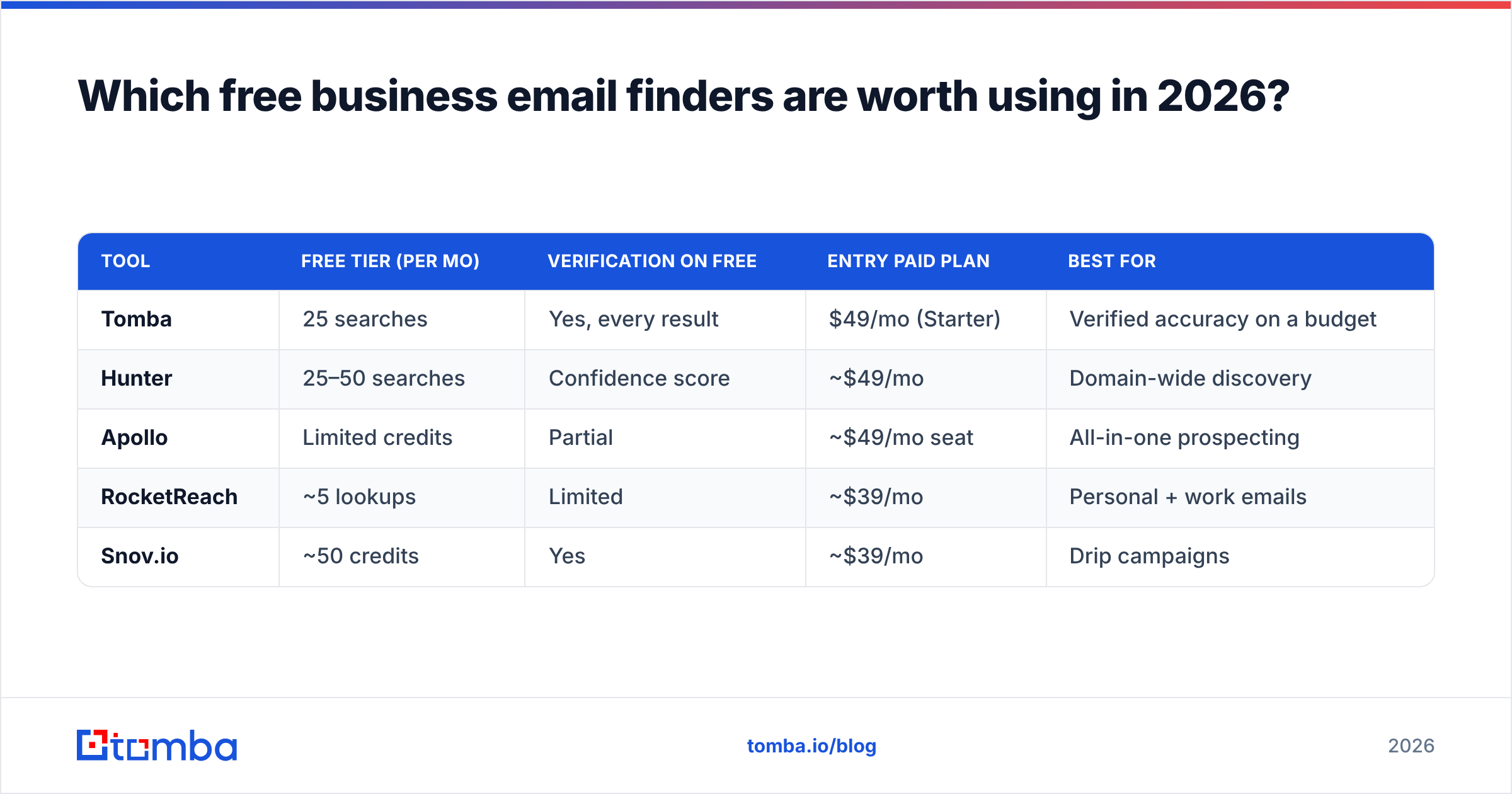
Below is a straight comparison of the most common free tiers. Prices are the entry paid plan, because the free tier is usually a gateway to it — and the paid step matters once you outgrow free.
| Tool | Free tier (per mo) | Verification on free | Entry paid plan | Best for |
|---|---|---|---|---|
| Tomba | 25 searches | Yes, every result | $49/mo (Starter) | Verified accuracy on a budget |
| Hunter | 25–50 searches | Confidence score | ~$49/mo | Domain-wide discovery |
| Apollo | Limited credits | Partial | ~$49/mo seat | All-in-one prospecting |
| RocketReach | ~5 lookups | Limited | ~$39/mo | Personal + work emails |
| Snov.io | ~50 credits | Yes | ~$39/mo | Drip campaigns |
A few honest caveats. Free-tier limits change often and vendors frequently bundle "searches" and "verifications" into one shared credit pool — so 50 credits can mean 25 finds plus 25 verifies, not 50 of each. Always read the credit definition, not the headline number.
If your need is "I want to find a handful of decision-maker emails this week and be sure they're real," a verified-by-default tool wins. If your need is "I'm building a 5,000-row list," no free tier covers that — you're choosing which paid plan to buy, and the free tier just tells you whose data is most accurate for your target market.

How accurate are free email finders, really?#
Accuracy is where free tiers separate themselves, and it comes down to method. There are three ways a finder produces an address, ranked from worst to best:
- Pure permutation — The tool guesses
jane.doe@company.com,jdoe@company.com,jane@company.comand hands you all of them with no checking. Cheap to build, useless to send to. A free email permutator does this on purpose as a brainstorming step, not a final answer. - Pattern + source matching — The tool already knows the company's dominant email format (say,
first.last@) from prior data, applies it, and cross-references public mentions. Better, but still needs the final step. - Pattern + SMTP verification — The tool applies the pattern, then pings the mail server to confirm the inbox exists before showing it to you. This is the gold standard, and it's what separates a usable free finder from a guess generator.
The catch with verification is catch-all domains — servers configured to accept mail for any address, which makes a plain SMTP check say "valid" for everything. A serious finder flags these. Tomba runs a dedicated catch-all verifier so you know when a "valid" result is actually a maybe, and you can decide how much to trust it.
For a quick gut check on any single address — free, no signup — run it through a free email checker before adding it to a campaign. It won't replace a finder, but it catches obvious dead addresses in seconds.
Is a free email finder enough, or do you need to pay?#
Short answer: free is enough to validate the tool, rarely enough to run the outreach. Here's the honest math on when to upgrade.
- Stay free if: you find fewer than ~25 contacts a month, you're testing accuracy across vendors, or you're a student/job-seeker pulling a few recruiter emails. The free tier is genuinely built for this.
- Upgrade if: you send weekly campaigns, you need bulk processing, you want API access, or you've confirmed a vendor's data is accurate for your niche and now want volume. At that point a Starter plan at $49/mo costs less than the hours you'd waste juggling five free tools and deduping their output.
The hidden tax of "staying free forever" is fragmentation. Five free tiers means five logins, five export formats, five different credit-reset dates, and a lot of manual removing duplicates. Most teams that try the multi-free-tool hack quietly consolidate onto one paid plan within a quarter.

How do I find a verified business email for free, step by step?#
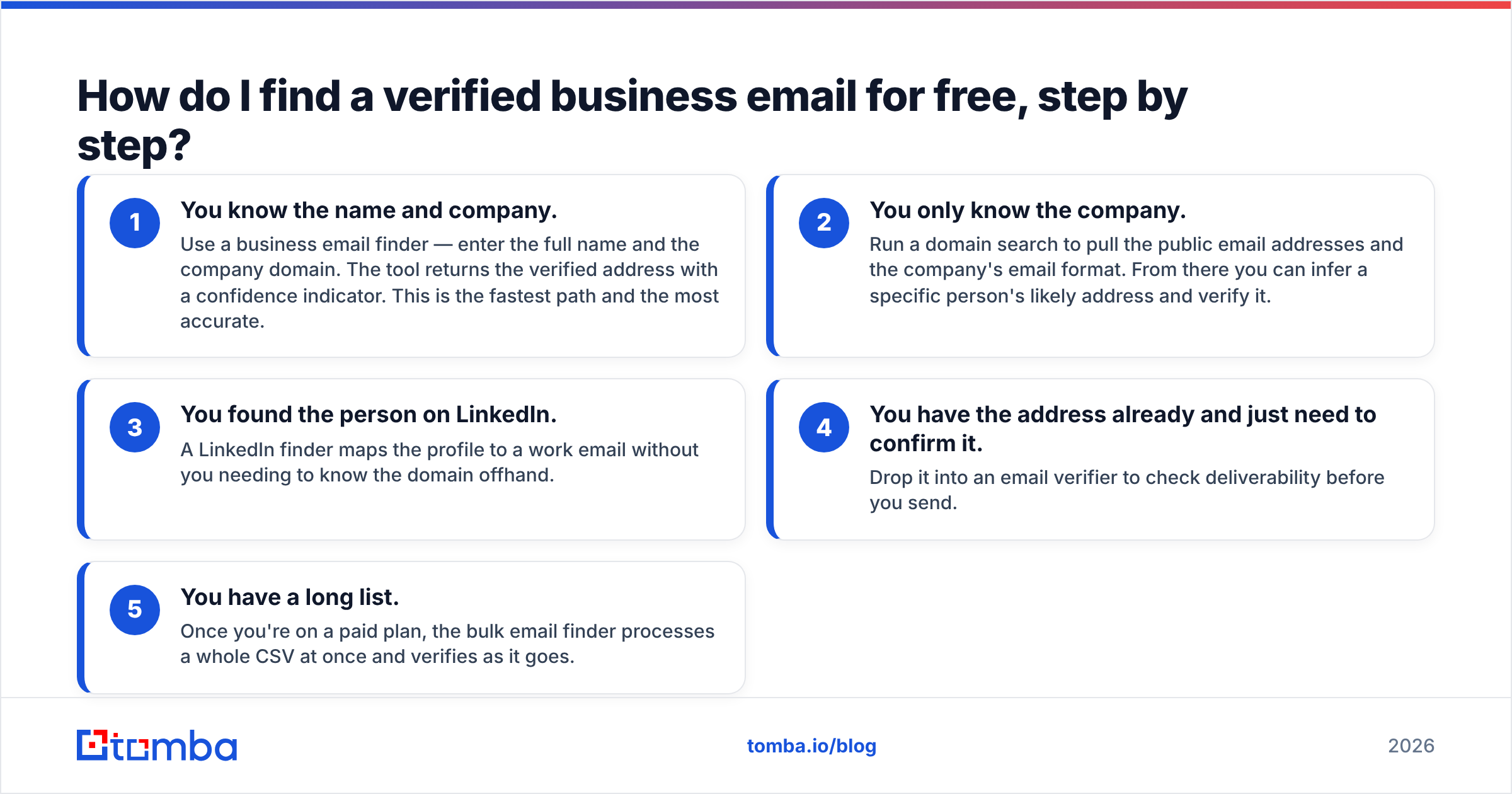
Here's a workflow that gets you sendable addresses today using free resources, in order of how much you already know.
- You know the name and company. Use a business email finder — enter the full name and the company domain. The tool returns the verified address with a confidence indicator. This is the fastest path and the most accurate.
- You only know the company. Run a domain search to pull the public email addresses and the company's email format. From there you can infer a specific person's likely address and verify it.
- You found the person on LinkedIn. A LinkedIn finder maps the profile to a work email without you needing to know the domain offhand.
- You have the address already and just need to confirm it. Drop it into an email verifier to check deliverability before you send.
- You have a long list. Once you're on a paid plan, the bulk email finder processes a whole CSV at once and verifies as it goes.
The principle running through all five: find, then verify, then send — never skip the middle step. Protecting your sender reputation is not optional. If you want the background on why bounces hurt you for weeks, the email deliverability primer covers the mechanics.
What should you watch out for with free email finders?#
Three traps catch people every time.
Unverified "results." Some free tools pad their hit rate by returning permutations dressed up as findings. If a tool gives you three possible addresses for one person with no verification status, treat all three as unconfirmed. Reputable tools like Hunter and Tomba attach a confidence score or verification status to each result so you know what you're holding.
Credit definition games. "1,000 free credits" can mean 1,000 rows scanned, not 1,000 emails found. Read the fine print, then test with 10 real prospects and count how many usable, verified addresses you actually get. That hit rate is the only number that matters.
Data freshness. People change jobs constantly. An address that was valid 18 months ago may now bounce. Vendors with active re-verification beat vendors selling a static dump — which is why understanding where the data comes from is worth two minutes before you trust a tool at scale. Independent reviews on G2 are a useful sanity check on freshness claims, since they aggregate real-user reports of bounce rates.

Free email finder vs. building your own list manually#
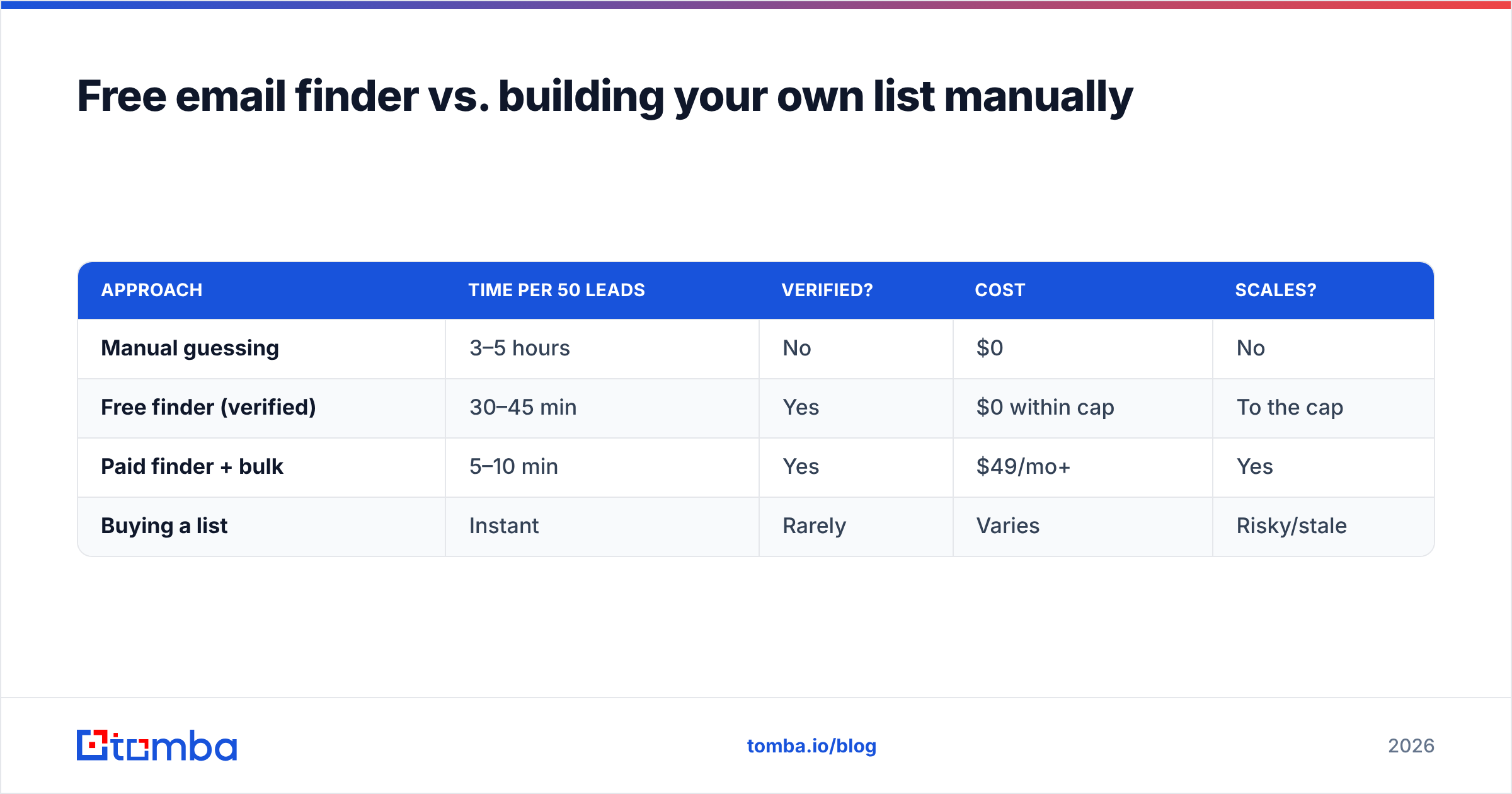
It's tempting to think you can skip tools entirely and just guess formats by hand. You can — for about five contacts. Here's the trade-off laid out.
| Approach | Time per 50 leads | Verified? | Cost | Scales? |
|---|---|---|---|---|
| Manual guessing | 3–5 hours | No | $0 | No |
| Free finder (verified) | 30–45 min | Yes | $0 within cap | To the cap |
| Paid finder + bulk | 5–10 min | Yes | $49/mo+ | Yes |
| Buying a list | Instant | Rarely | Varies | Risky/stale |
Manual guessing feels free but costs the most expensive thing you have — your hours — and produces the worst data. Buying a list is the opposite mistake: fast, cheap-looking, and usually full of stale or non-consented contacts that torch your deliverability. The verified free finder sits in the sweet spot for low volume, and the paid finder takes over the moment volume climbs.
How does Tomba's free tier compare on the things that matter?#
Tomba's free plan is built around the verified-by-default principle, not the credit-count headline. You get 25 searches a month with full verification, no credit card required to start. Every result runs through SMTP and catch-all checks, so what you export is what you can send.
Beyond the core finder, the free account opens the door to the wider toolkit — domain search, email verifier, the Chrome extension, and a Google Sheets add-on — so you can test the whole workflow, not just one feature, before deciding whether to upgrade. When you do scale, the Tomba API and bulk tools are there without a platform migration. If you're comparing against incumbents, the Apollo alternative and RocketReach alternative breakdowns get specific on data and pricing.
Frequently asked questions#
Is there a truly free business email finder? Yes — several vendors offer a genuinely free monthly tier. The honest limit is volume: 25–50 verified finds a month is typical. Anything beyond that needs a paid plan.
Are free email finders accurate? The good ones are, because they verify each address before showing it. Avoid any free tool that returns unverified guesses — those will hurt your sender reputation.
Can I find emails without paying anything? Yes, within a free tier's monthly cap. Combine a free finder with a free email checker to confirm results, and you can run small outreach campaigns at zero cost.
What's the catch with free tiers? Monthly credit caps and, with weaker tools, unverified results. Always test a vendor's real hit rate on 10 known prospects before trusting it.
Get verified business emails free, starting today#
Stop guessing email formats by hand and stop trusting tools that hand you unverified guesses. Start with the Tomba Email Finder free plan — 25 verified searches a month, no credit card, full SMTP and catch-all verification on every result. Use it to confirm Tomba's accuracy on your own target accounts, then move up to a paid plan only when your volume actually demands it. That's the honest way to buy a finder: prove it works for free, then pay for scale.
// get started
Find, verify and enrich your first contacts today
Start on the free plan with 25 searches a month, then scale when your team is ready.
Free plan · No credit card required · GDPR & CCPA
Get the Tomba newsletter
Product and data updates
// about the author