How to Check If a Yahoo Email Exists in 2026: Full Guide
Yahoo killed easy SMTP checks years ago. Here's how to check if a Yahoo email exists in 2026 without burning your sender reputation or guessing.
Yahoo Mail still has hundreds of millions of active mailboxes, which means it keeps showing up on your lead lists, signup forms, and cold-outreach exports. The problem: a Yahoo address that looks valid can be a typo, a long-dead account, or a spam trap. Send to enough of those and your bounce rate climbs, your sender reputation tanks, and your real prospects stop seeing you.
This guide shows you exactly how to check if a Yahoo email exists in 2026 — the methods that still work, the ones Yahoo has quietly broken, and how to verify at scale without torching your domain.
TL;DR#
- You usually cannot do a clean SMTP "RCPT TO" check on Yahoo anymore — Yahoo accepts almost everything at the SMTP layer and rejects later, so naive checks return false positives.
- The reliable path is layered: validate syntax → confirm Yahoo MX records → run a reputation/deliverability check via an API that models Yahoo's behavior.
- Never verify by sending a real "test" email from your main domain — that's how you land on blocklists.
- Use a dedicated email verifier (like Tomba's) for accuracy at scale instead of hand-rolling SMTP scripts.
- Catch-all and role addresses need special handling — a "valid" result isn't always a deliverable one.
Why is it so hard to check if a Yahoo email exists?#
Short answer: Yahoo deliberately makes mailbox probing unreliable to fight spammers and harvesters.
Think of it like a nightclub with a bouncer who waves everyone up to the door, then quietly turns away the people without a real invite once they're inside where you can't see it. Years ago you could knock on the mail server's door with an SMTP RCPT TO command and the server would tell you "yes, that user exists" or "no such user." Yahoo — like Gmail and Outlook — has largely shut that down.
Today, Yahoo's inbound servers typically accept the recipient at the SMTP handshake regardless of whether the mailbox exists, then either deliver or silently drop/bounce the message afterward. For you, that means a basic SMTP test will often say "valid" when the address is actually dead. This is the single biggest reason DIY Yahoo verification fails.
On top of that, Yahoo aggressively rate-limits and temporarily blocks IPs that make too many verification-style connections. So even a technically correct script gets throttled fast.
What actually determines if a Yahoo address is real?#
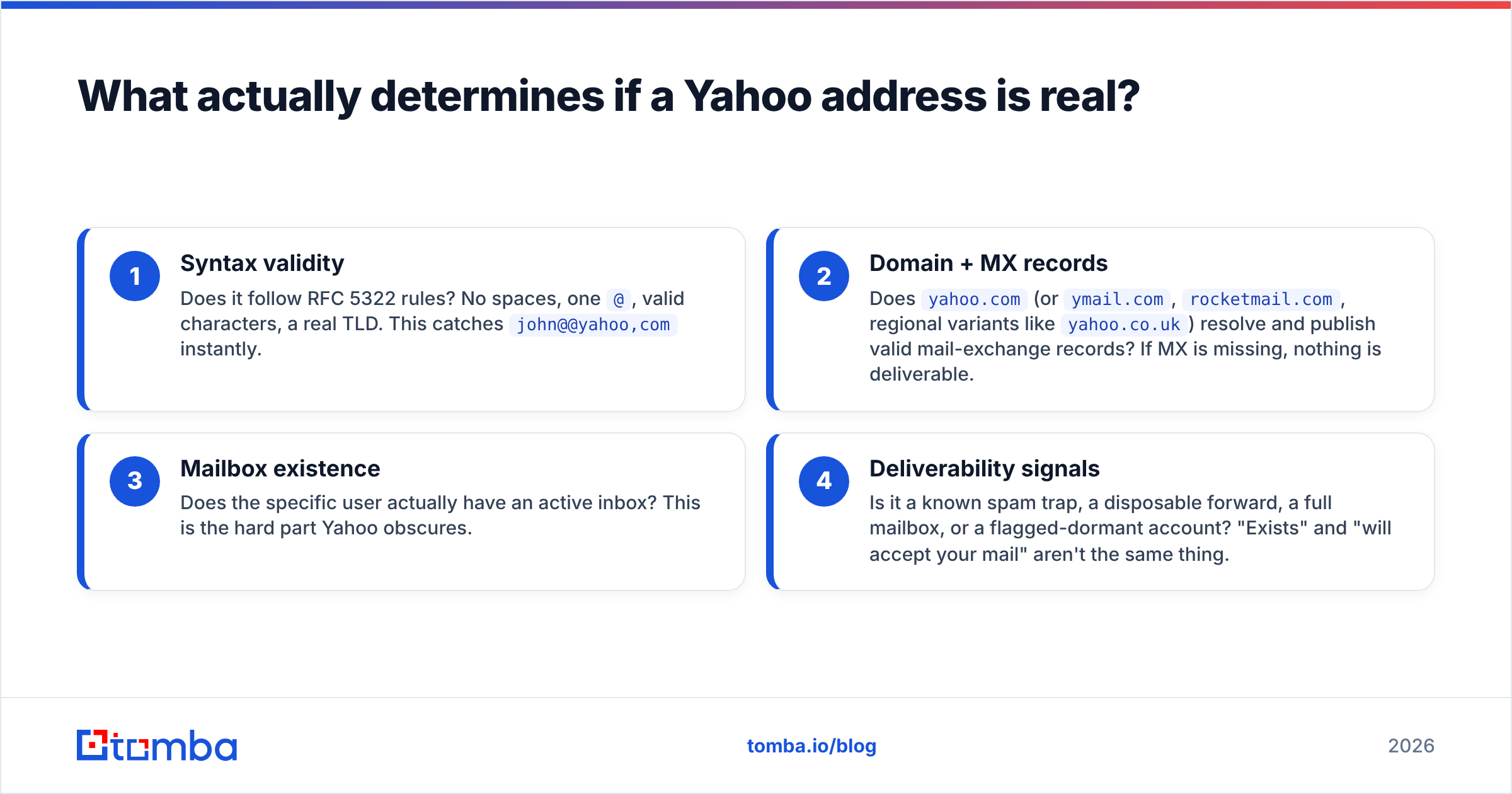
Before you pick a method, understand the four layers that decide whether name@yahoo.com is worth sending to:
- Syntax validity — Does it follow RFC 5322 rules? No spaces, one
@, valid characters, a real TLD. This catchesjohn@@yahoo,cominstantly. - Domain + MX records — Does
yahoo.com(orymail.com,rocketmail.com, regional variants likeyahoo.co.uk) resolve and publish valid mail-exchange records? If MX is missing, nothing is deliverable. - Mailbox existence — Does the specific user actually have an active inbox? This is the hard part Yahoo obscures.
- Deliverability signals — Is it a known spam trap, a disposable forward, a full mailbox, or a flagged-dormant account? "Exists" and "will accept your mail" aren't the same thing.
A good verification flow checks all four. Most free tools only check the first two and then guess at the rest.
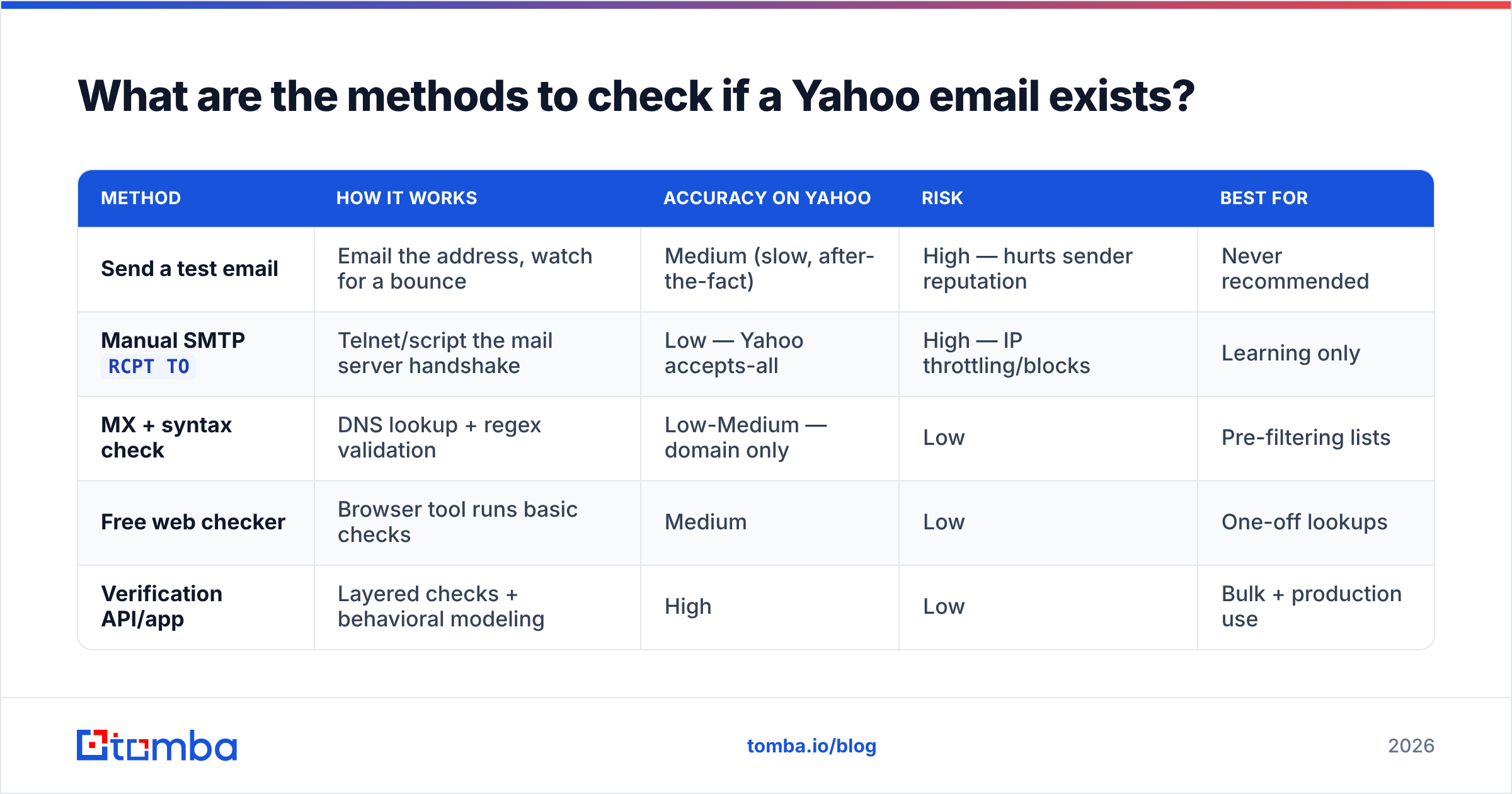
What are the methods to check if a Yahoo email exists?#
Here are the practical options, from least to most reliable, with the trade-offs spelled out.
| Method | How it works | Accuracy on Yahoo | Risk | Best for |
|---|---|---|---|---|
| Send a test email | Email the address, watch for a bounce | Medium (slow, after-the-fact) | High — hurts sender reputation | Never recommended |
Manual SMTP RCPT TO |
Telnet/script the mail server handshake | Low — Yahoo accepts-all | High — IP throttling/blocks | Learning only |
| MX + syntax check | DNS lookup + regex validation | Low-Medium — domain only | Low | Pre-filtering lists |
| Free web checker | Browser tool runs basic checks | Medium | Low | One-off lookups |
| Verification API/app | Layered checks + behavioral modeling | High | Low | Bulk + production use |
Method 1: Don't send a "test" email#
It's tempting to just email the address and see if it bounces. Resist it. Every hard bounce is recorded against your sending domain and IP. Do this across a list of unverified Yahoo addresses and you'll trip Yahoo's spam thresholds, where it matters most for email deliverability. You'll also wait hours for delayed bounces. This is the worst option dressed up as the easiest.
Method 2: Manual SMTP check (and why it lies on Yahoo)#
The classic approach: connect to the recipient's mail server on port 25 and issue HELO, MAIL FROM, and RCPT TO. A genuine "550 no such user" means the mailbox is dead.
The catch is everything from the previous section. Yahoo's MX servers (mta5.am0.yahoodns.net and friends) will usually answer 250 OK to RCPT TO for both real and fake mailboxes. So your script reports "valid" for definitely-not-a-real-person-9f8e@yahoo.com. You also need port 25 outbound open (most ISPs and cloud providers block it), a clean PTR record, and patience for throttling. Useful to understand; unreliable in production.
If you want to see the handshake behavior yourself, an SMTP tester lets you inspect responses without scripting it from scratch.
Method 3: Syntax + MX records (good pre-filter)#
This is the cheap, safe first pass. Validate the format, then do a DNS MX lookup on the domain. For Yahoo addresses you're confirming the domain is one of Yahoo's real mail domains with live MX records. It won't tell you the mailbox exists, but it instantly removes typos and dead domains before you spend money on deeper checks. Pair it with a free email checker for quick one-offs.
Method 4: Use a verification API or app#
For anything beyond a handful of addresses, a dedicated verifier is the only method that's both accurate and safe. Good tools don't rely on a single SMTP probe — they combine MX validation, known-pattern analysis, spam-trap and disposable-domain databases, catch-all detection, and behavioral modeling tuned specifically for providers like Yahoo, Gmail, and Outlook.
That's the core of what an email verifier does: it returns a deliverability verdict (valid, invalid, risky, catch-all, unknown) plus the reasons, so you can decide what to send. For lists, a bulk verify run handles thousands of Yahoo addresses in one pass without you touching port 25.
How do you check a single Yahoo email step by step?#
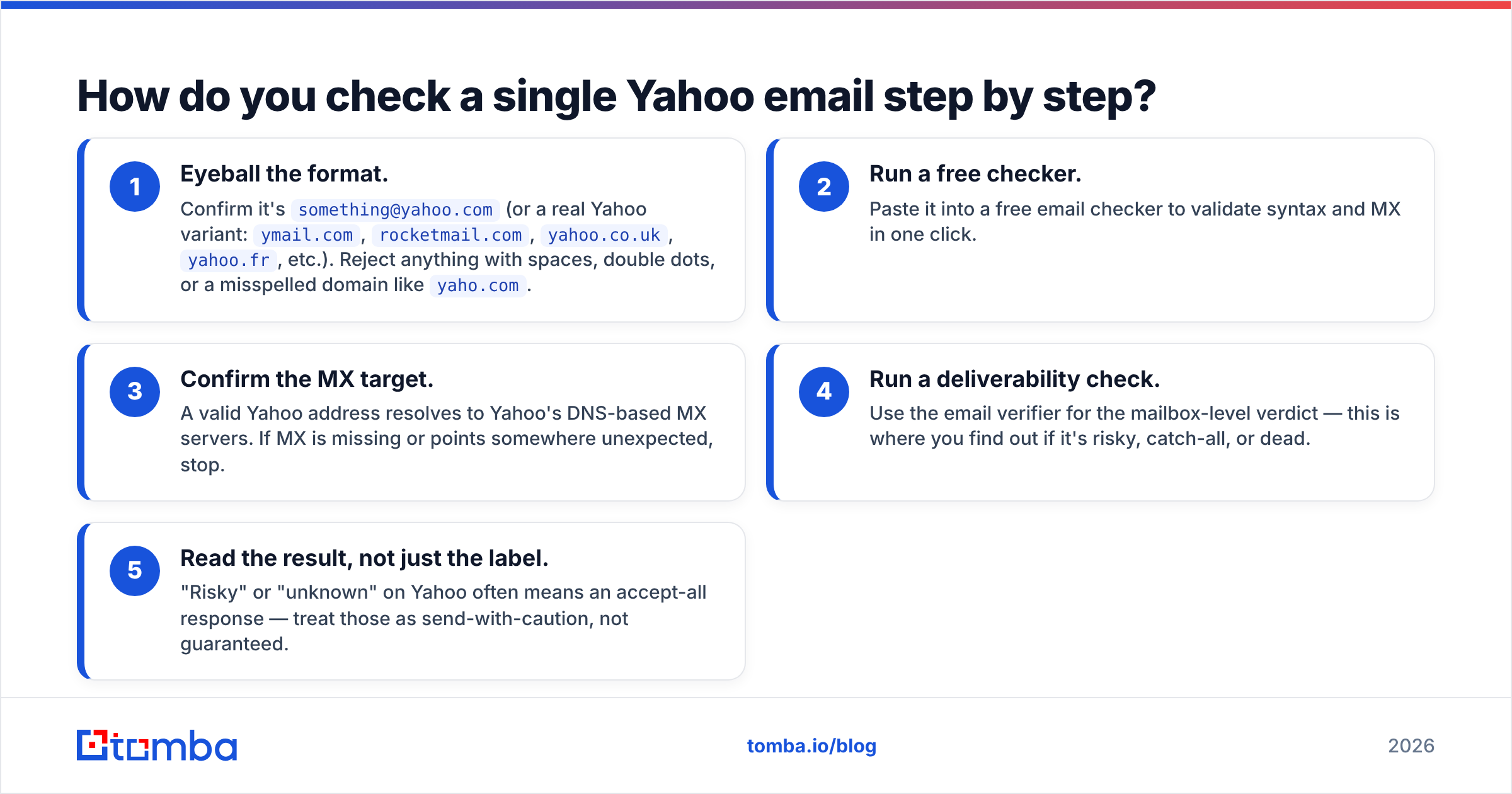
If you just need to verify one or two addresses right now:
- Eyeball the format. Confirm it's
something@yahoo.com(or a real Yahoo variant:ymail.com,rocketmail.com,yahoo.co.uk,yahoo.fr, etc.). Reject anything with spaces, double dots, or a misspelled domain likeyaho.com. - Run a free checker. Paste it into a free email checker to validate syntax and MX in one click.
- Confirm the MX target. A valid Yahoo address resolves to Yahoo's DNS-based MX servers. If MX is missing or points somewhere unexpected, stop.
- Run a deliverability check. Use the email verifier for the mailbox-level verdict — this is where you find out if it's risky, catch-all, or dead.
- Read the result, not just the label. "Risky" or "unknown" on Yahoo often means an accept-all response — treat those as send-with-caution, not guaranteed.
How do you verify Yahoo emails in bulk?#
Single-address checks don't scale. If you're cleaning a list of 5,000 leads with a few hundred Yahoo addresses mixed in, you want batch processing.
The workflow:
- Deduplicate first. Strip duplicates and obvious junk before you spend credits — a remove-duplicates tool does this in seconds.
- Upload to a bulk verifier. Tomba's bulk email finder and verifier processes the whole file and tags each row.
- Segment by result. Send confidently to
valid. Suppressinvalid. Holdcatch-all/risky/unknownfor a warm-up sequence or skip them on cold sends. - Automate it. If verification is part of your pipeline, the email verification API lets you check addresses at signup, on form submit, or during a CRM sync — before bad data ever lands.
For teams running this continuously, wiring the API into your stack beats manual uploads. You can verify a Yahoo address the moment a lead enters your CRM instead of cleaning the mess quarterly.
What about catch-all and disposable Yahoo addresses?#
Two edge cases trip people up.
Catch-all behavior. A catch-all domain accepts mail for any address, real or not. Standard Yahoo consumer mail isn't a classic catch-all, but Yahoo's accept-all SMTP responses produce the same practical headache: you can't confirm the mailbox from the handshake alone. A quality catch-all verifier uses additional signals to estimate deliverability rather than blindly trusting the 250 OK.
Disposable and alias addresses. Yahoo offers disposable addresses and aliases, and plenty of throwaway forwarders mimic Yahoo. These pass syntax and MX checks but lead nowhere useful. A verifier with an up-to-date disposable-domain list flags them so you don't waste sends.
The takeaway: a green "valid" from a syntax-only tool is not the same as "this person will read your email." Always layer a deliverability check on top.
Which tools should you use to check if a Yahoo email exists?#
It depends on volume and how much you care about accuracy.
- One-off lookup, free: the free email checker handles syntax + MX with zero setup.
- Accuracy on a real list: the email verifier gives you mailbox-level verdicts with reasons.
- Thousands of addresses: bulk verification plus deduplication.
- In-product / automated: the verification API.
For benchmarking accuracy claims across vendors, third-party review sites like G2 and Capterra are useful neutral references. And for the underlying rules on what makes an address well-formed, the RFC 5322 specification on Wikipedia is the canonical source.
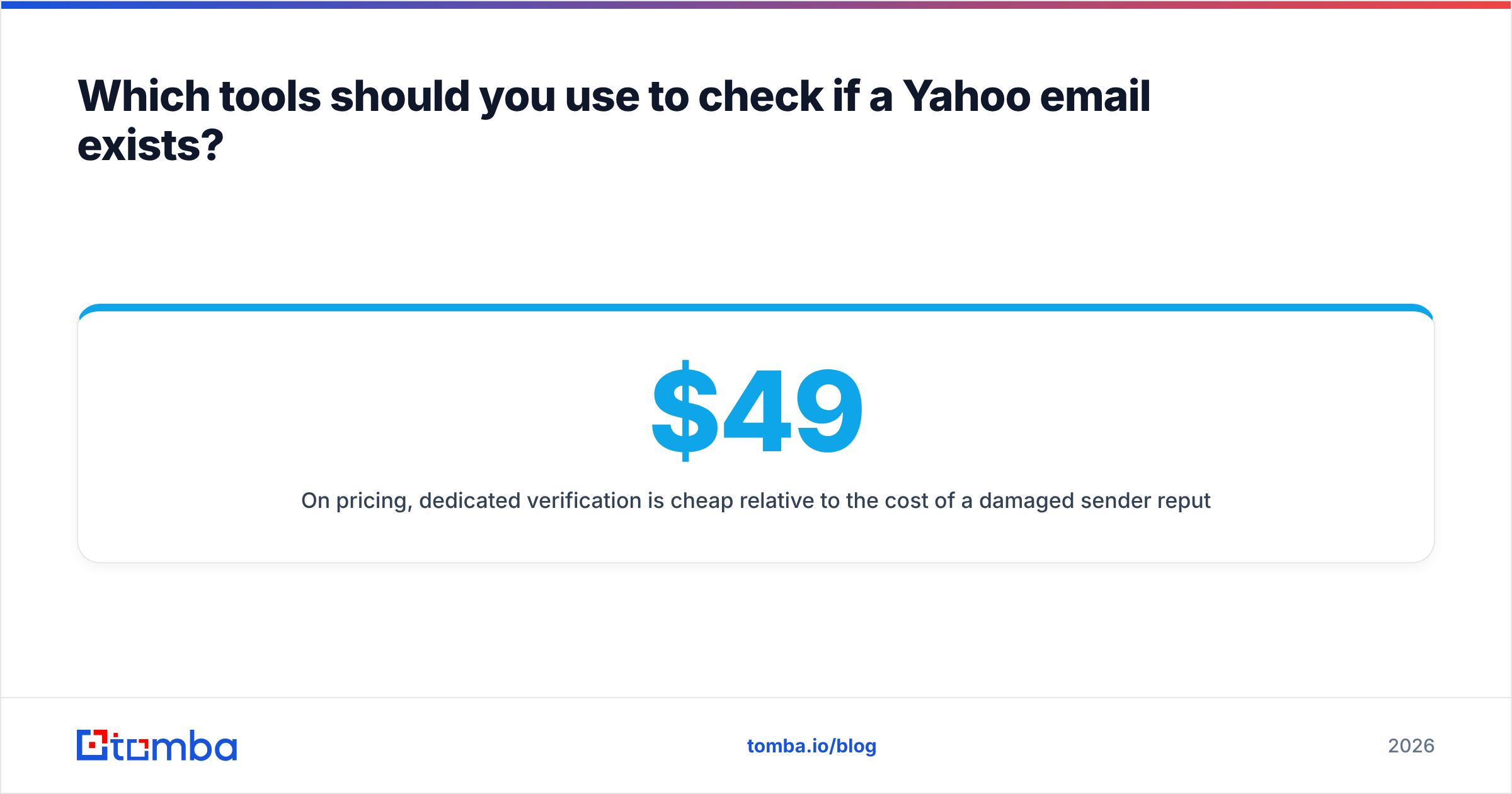
On pricing, dedicated verification is cheap relative to the cost of a damaged sender reputation. You can compare full Tomba pricing — the free tier covers 25 searches a month, Starter is $49/mo, and Growth ($99/mo) and Pro ($249/mo) scale up from there. For a few hundred Yahoo checks a month, the free or Starter tier is plenty.
How do you keep Yahoo deliverability healthy after verifying?#
Verification is the front door, not the whole house. Once your list is clean:
- Authenticate your domain. Yahoo enforces SPF, DKIM, and DMARC for bulk senders. Confirm your records with an SPF checker and tighten DMARC. Yahoo and Google's joint sender requirements are the authority here.
- Warm up gradually. Don't blast a freshly cleaned list at full volume. Ramp sending so Yahoo sees consistent, low-complaint behavior.
- Watch your reputation. Monitor complaint rates and use an email reputation checker to catch problems early.
- Re-verify periodically. Email decays roughly 22–30% per year. A Yahoo address that was valid in January may be abandoned by December. Re-run bulk verification quarterly.
Do this and your verified Yahoo addresses actually convert into inbox placement instead of spam folders.
Common mistakes to avoid#
- Trusting a single SMTP check. On Yahoo it's a false-positive machine. Layer your checks.
- Verifying from your sending IP. Use a tool that does this from its own infrastructure, not your production mail server.
- Treating "risky" as "invalid." Many Yahoo accept-all responses land in "risky/unknown" — segment, don't dump.
- Skipping re-verification. Stale lists quietly rot your metrics.
- Ignoring authentication. Clean data + broken SPF/DKIM still equals the spam folder.
The bottom line#
You can't reliably check if a Yahoo email exists with a quick SMTP probe anymore — Yahoo's accept-all behavior makes that approach actively misleading. The dependable method is layered: validate syntax, confirm Yahoo's MX records, then run a real deliverability check through a verifier that models Yahoo's quirks. For single lookups a free checker works; for lists, use a bulk verifier or API so you never send blind.
Ready to clean your Yahoo addresses without the guesswork? Run them through the Tomba Email Verifier — accurate, mailbox-level results with catch-all and disposable detection built in — and pair it with the Email Finder when you need to source fresh, verified contacts in the first place. Start free with 25 searches a month and only send to addresses that actually exist.
// get started
Find, verify and enrich your first contacts today
Start on the free plan with 25 searches a month, then scale when your team is ready.
Free plan · No credit card required · GDPR & CCPA
// about the author