Cloduraai vs Mailmeteor: Which B2B Sales Tool Wins in 2026?
Clodura.ai is a sales-intelligence and prospecting engine; Mailmeteor is a Gmail mail-merge sender. Here's which one actually fits your 2026 outbound stack — and where a dedicated data tool beats both.
Cloduraai vs Mailmeteor: Which B2B Sales Tool Wins in 2026?
You typed "Clodura.ai vs Mailmeteor" into a search bar expecting a head-to-head, but the honest answer is that these two tools barely play the same sport. One builds prospect lists and sales sequences from a B2B database; the other turns Gmail into a personalized mail-merge machine. Choosing between them is less "which is better" and more "which job am I actually trying to do."
This guide breaks down what each tool really does, where each one shines, where each one quietly fails, and how to combine the right pieces — including the data layer both of them depend on but neither fully nails.
TL;DR#
- Clodura.ai is a sales-intelligence and prospecting platform: B2B contact database, email finding, sequences, and intent signals. Best for teams building outbound lists from scratch.
- Mailmeteor is a Gmail-native mail-merge and email-campaign tool. Best for sending personalized bulk email from an address you already own, to a list you already have.
- They solve different stages of the same funnel. Clodura finds and sequences; Mailmeteor sends from Gmail. Many teams could use both.
- Neither is a best-in-class email data provider. Bounce rates sink campaigns regardless of which sender you use, so verification matters more than the logo on your dashboard.
- If your bottleneck is accurate emails and phone numbers, a focused finder like Tomba Email Finder plugs the gap both tools leave open.
What is Clodura.ai?#
Clodura.ai is an all-in-one sales prospecting platform aimed at outbound teams who need to build target lists without buying ten separate tools. Its pitch is "from prospecting to closing in one place," and the feature set reflects that: a B2B contact database (the company advertises hundreds of millions of contacts), an email finder and verifier, direct-dial phone numbers, buyer-intent and technographic signals, and a built-in email sequencer.
In practice, you use Clodura to answer "who should I contact?" You filter by industry, title, headcount, technology stack, or hiring signals, pull a list, and then either export it or run a cadence directly inside the platform. It competes with the Apollo alternative and RocketReach alternative crowd — database-first prospecting suites.
The trade-off with any database-first tool is freshness and accuracy. A contact record that was valid eighteen months ago may now point at someone who changed jobs, and the wider the database, the harder it is to keep every row clean. That's why verification is a recurring theme below.

What is Mailmeteor?#
Mailmeteor is a mail-merge tool that lives inside Gmail and Google Sheets. You keep your recipient list in a spreadsheet, write a template with merge fields like {{first_name}}, and Mailmeteor sends each recipient an individual, personalized message straight from your own Gmail or Google Workspace account. It adds tracking (opens, clicks), scheduling, follow-ups, and unsubscribe handling on top.
The key distinction: Mailmeteor does not find anyone for you. It assumes you already have a list of email addresses. It is a sending and personalization layer, not a data source. That's also its strength — because mail goes through your real Google account rather than a third-party relay, deliverability for small, clean lists tends to be strong, and the learning curve is close to zero if you already live in Gmail.
Mailmeteor is popular with founders, recruiters, educators, and small teams who want newsletters or simple cold sequences without the complexity (or price) of a full sales-engagement platform. It is not built to scale to enterprise-grade, multi-inbox outbound the way dedicated sequencers are.
Cloduraai vs Mailmeteor: how do they compare?#
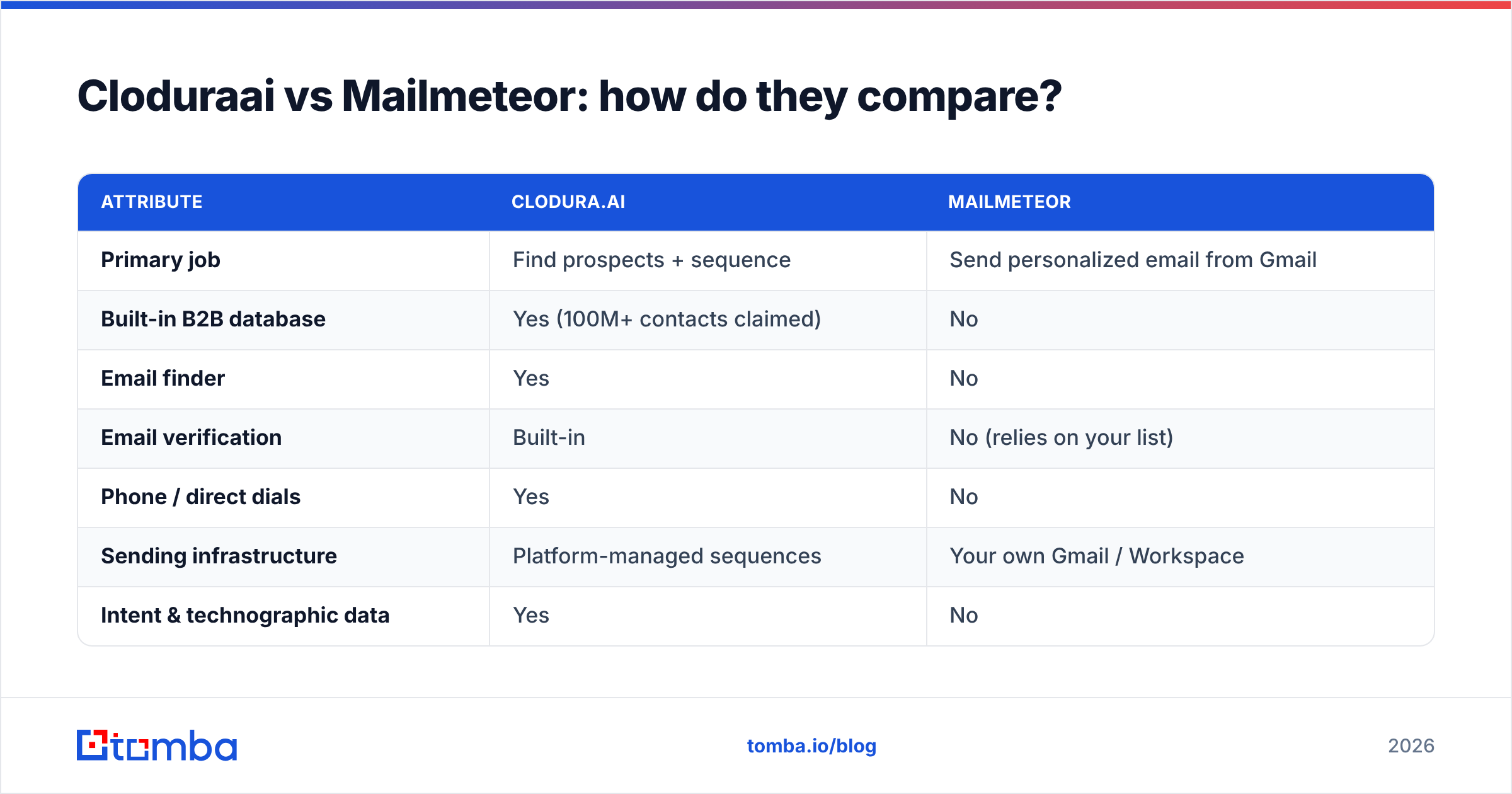
Here's the side-by-side. Notice how few rows are true overlaps — that's the whole story.
| Attribute | Clodura.ai | Mailmeteor |
|---|---|---|
| Primary job | Find prospects + sequence | Send personalized email from Gmail |
| Built-in B2B database | Yes (100M+ contacts claimed) | No |
| Email finder | Yes | No |
| Email verification | Built-in | No (relies on your list) |
| Phone / direct dials | Yes | No |
| Sending infrastructure | Platform-managed sequences | Your own Gmail / Workspace |
| Intent & technographic data | Yes | No |
| Ease of use | Moderate (full suite) | Very easy (Gmail-native) |
| Best for | Outbound teams building lists | SMBs sending to owned lists |
| Entry pricing | Free tier + paid plans | Free tier + low-cost paid plans |
The pattern is clear: Clodura is upstream (sourcing and orchestrating), Mailmeteor is downstream (delivering). If you only have one problem, pick the tool that matches that problem. If you have both problems, you may need both — or a leaner combination.
Which one should you choose?#
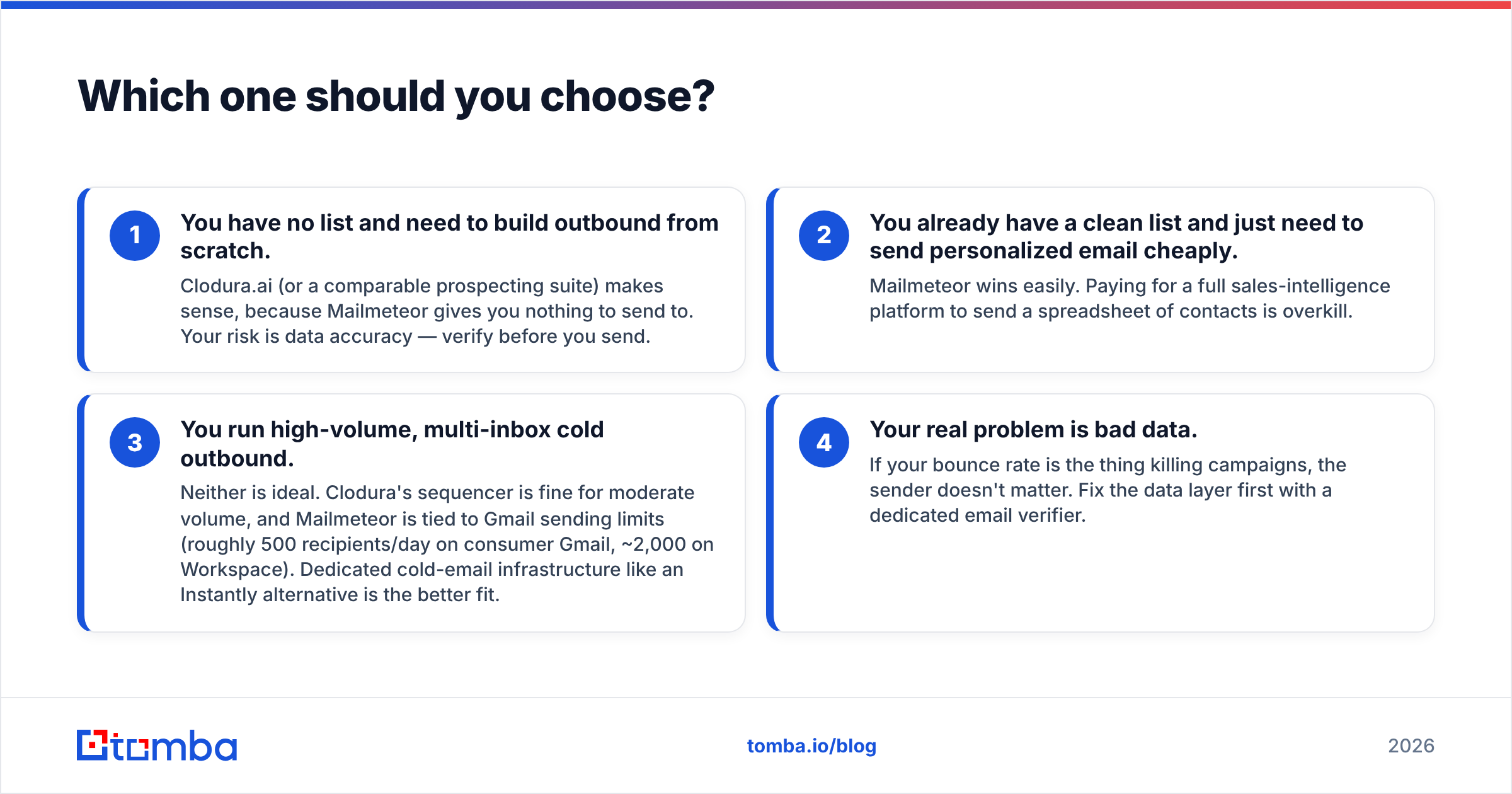
Match the tool to your actual bottleneck instead of the marketing headline. Here are the four most common scenarios:
- You have no list and need to build outbound from scratch. Clodura.ai (or a comparable prospecting suite) makes sense, because Mailmeteor gives you nothing to send to. Your risk is data accuracy — verify before you send.
- You already have a clean list and just need to send personalized email cheaply. Mailmeteor wins easily. Paying for a full sales-intelligence platform to send a spreadsheet of contacts is overkill.
- You run high-volume, multi-inbox cold outbound. Neither is ideal. Clodura's sequencer is fine for moderate volume, and Mailmeteor is tied to Gmail sending limits (roughly 500 recipients/day on consumer Gmail, ~2,000 on Workspace). Dedicated cold-email infrastructure like an Instantly alternative is the better fit.
- Your real problem is bad data. If your bounce rate is the thing killing campaigns, the sender doesn't matter. Fix the data layer first with a dedicated email verifier.
Why does data accuracy decide the winner?#
Because every send is only as good as the address behind it. You can have the slickest Gmail merge or the deepest prospecting database, but if 15% of your list bounces, three things happen at once: your messages never arrive, your sender reputation drops, and your domain inches toward the spam folder for the contacts that are valid. Poor email deliverability is a silent campaign killer that no sending tool fixes for you.
This is the gap in the Clodura-vs-Mailmeteor framing. Mailmeteor explicitly outsources data to you. Clodura includes a database and verifier, but bundled verification inside a broad suite is rarely as rigorous as a tool that does nothing but check whether a mailbox is real — including the catch-all domains that fool most checkers. Catch-all servers accept every address at the SMTP layer, so a naive verifier marks them "valid" and you still bounce. A dedicated catch-all verifier is the difference between a list that looks clean and one that is clean.
Independent reviews on G2 consistently show that buyers rank data accuracy and bounce rate above feature count when they renew or churn a prospecting tool. Features are easy to demo; clean data shows up in your reply rate three weeks later.
Where does Tomba fit between these two?#
Tomba sits at the data layer that both tools either skip or under-serve. Instead of choosing a suite for its sequencer or a sender for its Gmail integration, you treat accurate contact data as its own decision and feed it into whatever sending tool you prefer — Mailmeteor, Clodura's sequencer, or a dedicated cold-email platform.
Concretely, Tomba covers the find-and-verify stage:
- Find addresses by name and company with the email finder, or sweep an entire company with domain search.
- Verify in bulk before you import to Mailmeteor or launch a Clodura cadence, using the bulk email finder and verifier so you upload only deliverable rows.
- Enrich thin records with firmographics and direct dials via data enrichment and the phone finder.
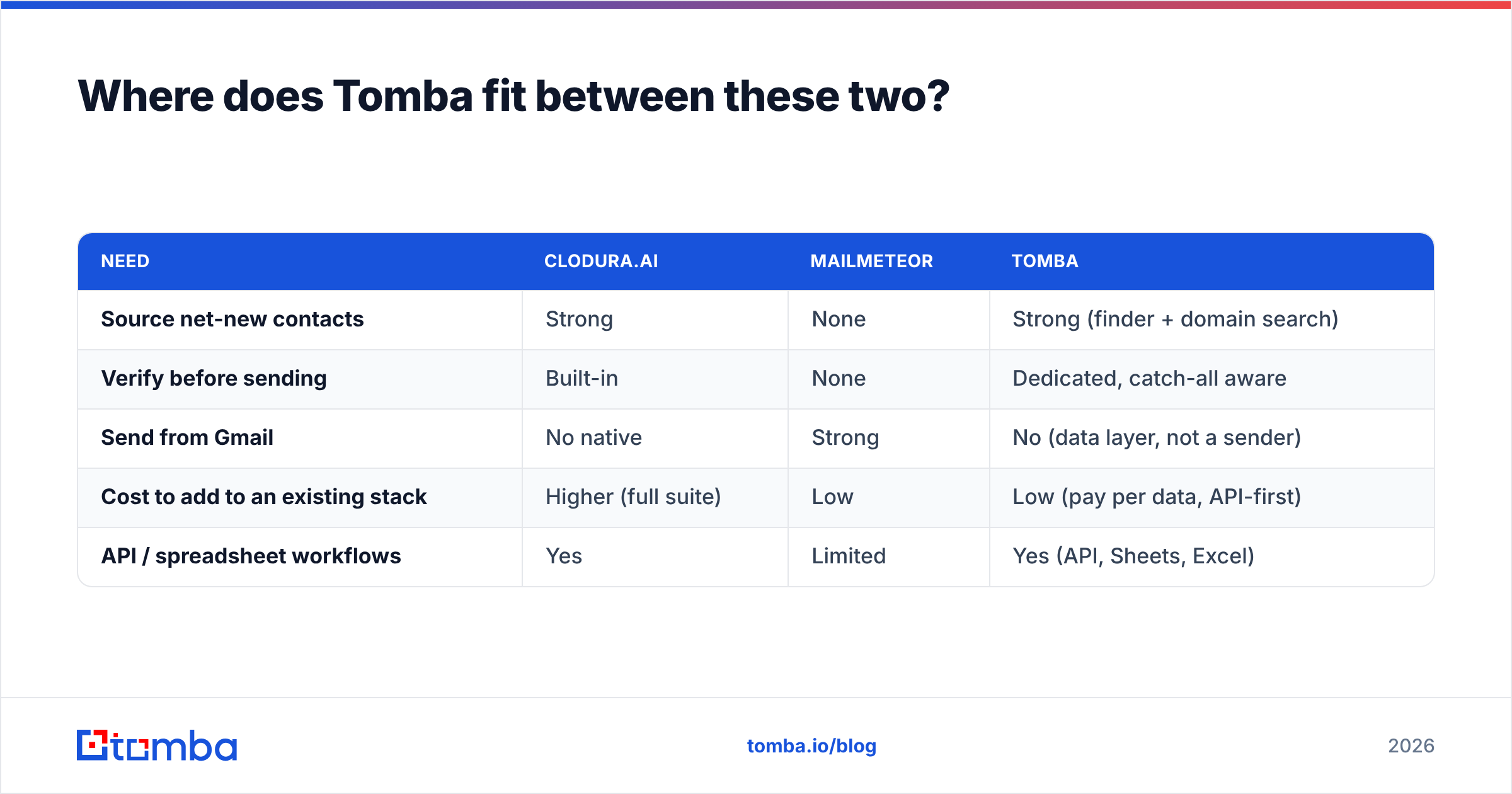
Here's how the three stack up by role rather than by brand:
| Need | Clodura.ai | Mailmeteor | Tomba |
|---|---|---|---|
| Source net-new contacts | Strong | None | Strong (finder + domain search) |
| Verify before sending | Built-in | None | Dedicated, catch-all aware |
| Send from Gmail | No native | Strong | No (data layer, not a sender) |
| Cost to add to an existing stack | Higher (full suite) | Low | Low (pay per data, API-first) |
| API / spreadsheet workflows | Yes | Limited | Yes (API, Sheets, Excel) |
The point isn't that Tomba replaces both tools. It's that the "vs" framing hides the real architecture of a healthy outbound stack: a data engine feeds a sender. Mailmeteor is a fine sender. Clodura can be both, but its data is the part most worth pressure-testing. Slotting a focused finder and verifier in front of either one is usually cheaper and more accurate than relying on a bundled database alone.
What does pricing look like in 2026?#
Pricing should be read against the job, not the sticker. Mailmeteor's plans are designed for individuals and small teams sending from one inbox, so they sit at the low end. Clodura.ai prices like a sales platform — you're paying for the database, credits, and sequencer together, which is reasonable if you use all three and expensive if you only need one.
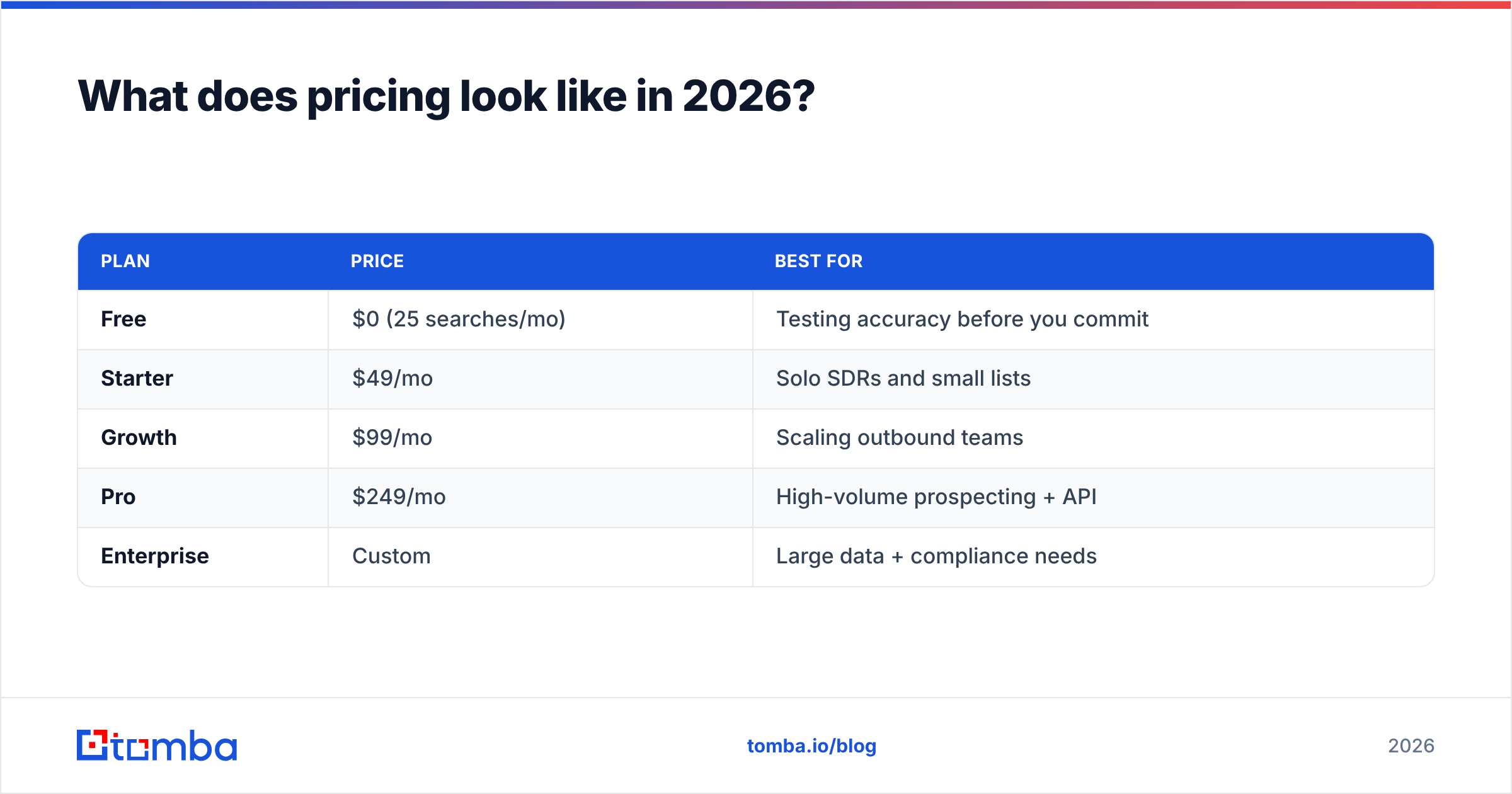
For the data layer specifically, Tomba pricing is built to bolt onto whatever you already run:
| Plan | Price | Best for |
|---|---|---|
| Free | $0 (25 searches/mo) | Testing accuracy before you commit |
| Starter | $49/mo | Solo SDRs and small lists |
| Growth | $99/mo | Scaling outbound teams |
| Pro | $249/mo | High-volume prospecting + API |
| Enterprise | Custom | Large data + compliance needs |
A practical 2026 setup for a lean team: verify and enrich lists with a focused data tool on the Starter or Growth plan, then send through Mailmeteor if you're Gmail-based and low-volume, or through Clodura's sequencer if you also bought it for the database. You pay for sending where sending is cheap and for data where accuracy actually moves your numbers.
Common mistakes when choosing between them#
- Buying Clodura just to send email. If you already have a list, you're paying for a database you won't use. Mailmeteor or a dedicated sender is cheaper.
- Expecting Mailmeteor to find contacts. It won't. You still need a find email addresses step before Mailmeteor does anything.
- Trusting any single bundled verifier. Always spot-check accuracy on a sample before a big send, especially against catch-all domains.
- Ignoring sending limits. Gmail caps daily volume; scaling cold outbound through Mailmeteor past those limits gets your domain flagged fast.
- Treating "more contacts" as "better data." A 100M-record database with 12% stale rows is worse than a tight, verified list of 2,000.
Is there a single best answer?#
No — and anyone selling you one is selling you their product, not your outcome. Clodura.ai wins when your problem is "I don't know who to contact and I want database, dials, and sequencing in one login." Mailmeteor wins when your problem is "I have a list and I want to send it personalized email from Gmail without complexity." They rarely compete for the same dollar.
What does decide every campaign, regardless of which you pick, is whether the addresses are real. That's the layer worth getting right first.
The bottom line#
Stop framing this as Clodura.ai versus Mailmeteor and start framing it as source → verify → send. Pick the sender that fits your volume and budget, pick the database only if you actually need net-new sourcing, and never let either tool be your only line of defense on data quality.
If accurate emails and phone numbers are your real bottleneck, start with the Tomba Email Finder and a free tier of 25 searches — find the contacts, verify them clean, then send them through whichever tool above fits your workflow. Clean data in front of a simple sender beats messy data behind an expensive suite every time.
// get started
Find, verify and enrich your first contacts today
Start on the free plan with 25 searches a month, then scale when your team is ready.
Free plan · No credit card required · GDPR & CCPA
// about the author