Clodura.ai vs MyEmailVerifier (2026): Which Tool Wins?
Clodura.ai is a full prospecting platform; MyEmailVerifier is a focused list-cleaner. Here's an honest breakdown of accuracy, pricing, and which one your team actually needs in 2026.
Clodura.ai vs MyEmailVerifier comes down to one choice. Do you want to build a list, or clean one? This guide weighs accuracy, pricing, and fit so you pick right.
TL;DR
- Clodura.ai is a full sales-intelligence and prospecting platform: contact database, email finding, sequences, and some built-in verification. MyEmailVerifier does one thing — clean and validate email lists you already have.
- They are not really rivals. One builds your list; the other cleans it. Most teams that pit them against each other actually need a bit of both.
- On raw verification, MyEmailVerifier is cheap and accurate for bulk cleaning. On prospecting depth, Clodura.ai wins because verification is bundled with data.
- If you want a single tool that both finds and verifies verified emails at the point of discovery, a dedicated email-data platform like Tomba covers both jobs without stitching two subscriptions together.
- Pick by workflow: buying/scraping lists in bulk → MyEmailVerifier. Building outbound from scratch → Clodura.ai or a finder-plus-verifier stack.
What are Clodura.ai and MyEmailVerifier?#
Think of it like building a house. Clodura.ai is the lumberyard plus the crew — it hands you the raw materials (contacts, company data, direct dials) and helps you assemble outreach. MyEmailVerifier is the building inspector — it doesn't give you materials. It just tells you which ones are sound before you use them.
Clodura.ai is an all-in-one sales-intelligence platform. It gives you a database of business contacts, an email finder, technographic and org-chart data, sequences, and a native email-verification step. Its pitch is "prospect-to-pipeline in one dashboard."
MyEmailVerifier is a specialist. You upload a list — from a scrape, a form, an old CRM export — and it flags invalid, risky, catch-all, and role-based addresses so your bounce rate stays low. It has no contact database and doesn't find new emails. It grades the ones you bring.
That difference frames the entire comparison. Comparing them head-to-head is a bit like comparing a grocery store to a food-safety lab. Both touch your "food," but they solve different problems.
Clodura.ai vs MyEmailVerifier: how do they compare at a glance?#
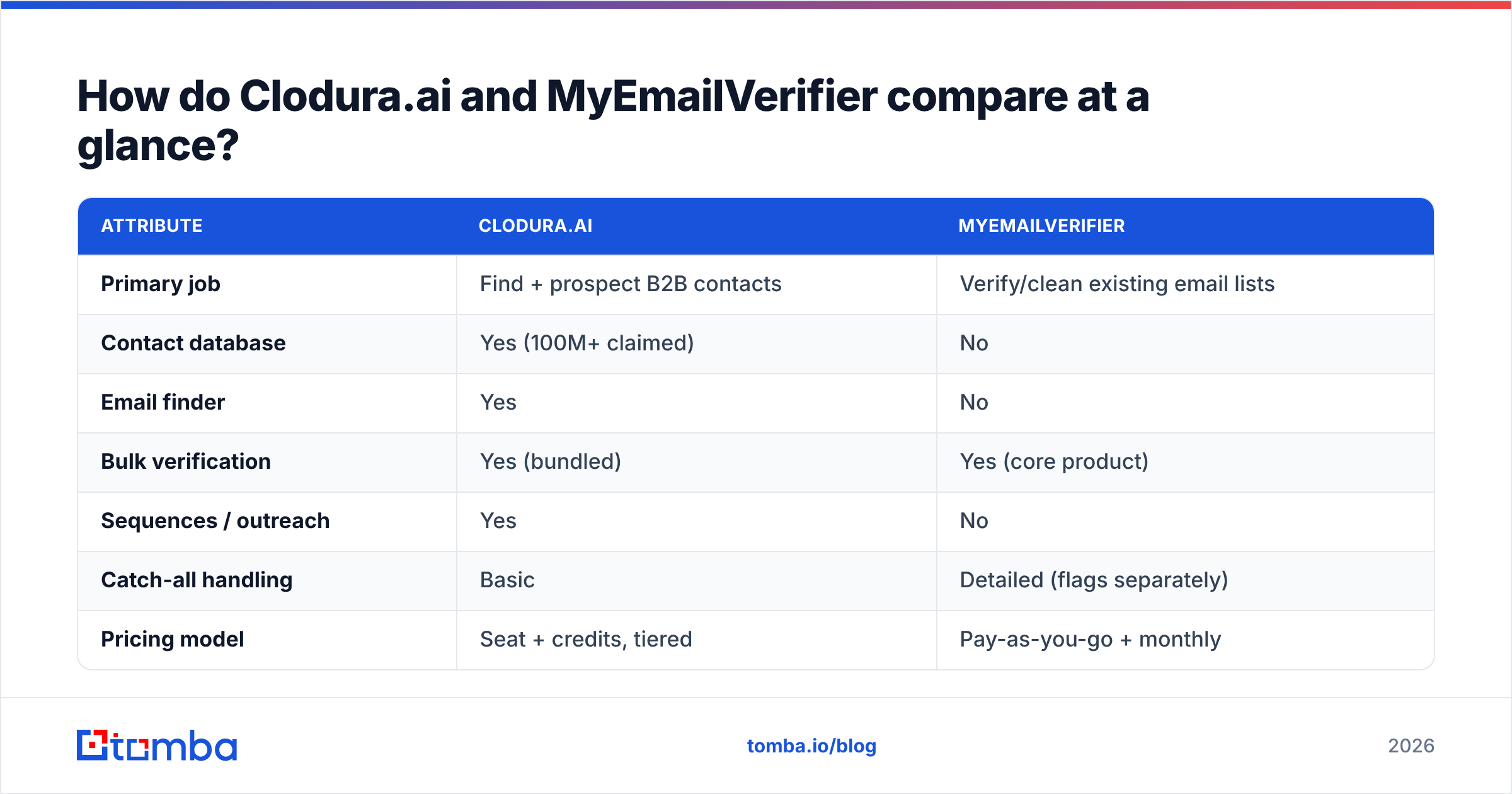
Here's the core-concept breakdown before we go deeper on each dimension:
| Attribute | Clodura.ai | MyEmailVerifier |
|---|---|---|
| Primary job | Find + prospect B2B contacts | Verify/clean existing email lists |
| Contact database | Yes (100M+ claimed) | No |
| Email finder | Yes | No |
| Bulk verification | Yes (bundled) | Yes (core product) |
| Sequences / outreach | Yes | No |
| Catch-all handling | Basic | Detailed (flags separately) |
| Pricing model | Seat + credits, tiered | Pay-as-you-go + monthly |
| Best for | Outbound teams building lists | Ops cleaning bought/scraped lists |
| Free tier | Limited free plan | Free trial credits |
The pattern is obvious: Clodura.ai is a platform, MyEmailVerifier is a utility. You can even run them together — build in Clodura.ai, then push borderline addresses through MyEmailVerifier for a second opinion. But paying for both to cover one workflow is where budgets quietly bleed.
Which is more accurate on email data?#
Accuracy depends on the job you're measuring. MyEmailVerifier is purpose-built for validation. On a raw list it typically returns cleaner deliverability grades. It exists to separate the valid from the invalid, and it does that well, with clear catch-all and role-account flags.
Clodura.ai's verification is "good enough" because it runs at the point of data delivery. But its bigger accuracy variable is the database itself. Sales-intelligence databases drift: people change jobs, titles go stale, and a contact that was accurate six months ago may bounce today. That's not unique to Clodura.ai — every database vendor fights decay. Still, it means a "verified" record can be wrong if the contact moved on.

The honest takeaway on Clodura.ai vs MyEmailVerifier: if your only worry is "will this list bounce," a dedicated verifier wins. If your worry is "do I even have the right person," a finder with fresh sourcing matters more. This is why teams increasingly want verification baked into discovery. Validating an address the moment you find it beats validating a spreadsheet weeks later. You can see how a combined approach looks with an email verifier that runs SMTP checks inline with the finder.
For the mechanics of what "valid," "risky," and "catch-all" actually mean, the email deliverability primer is a useful reference before you trust any tool's grade.
How does pricing compare?#
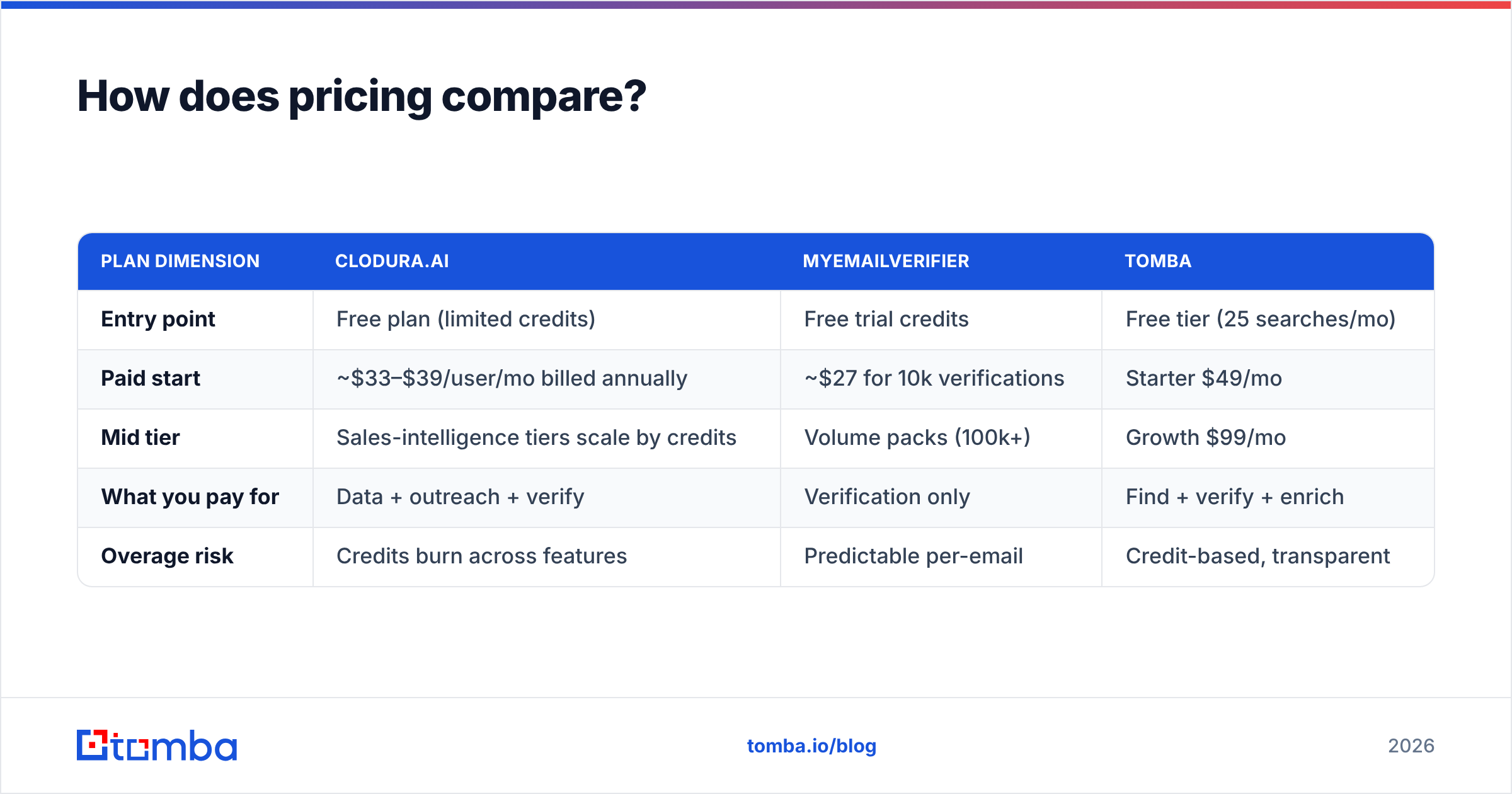
Pricing is where the two philosophies diverge hardest. MyEmailVerifier bills mostly on volume — you pay per email verified, with pay-as-you-go packs and cheaper monthly tiers. Clodura.ai bills like a platform — seats plus credit allocations across finding, exporting, and sequencing.
| Plan dimension | Clodura.ai | MyEmailVerifier | Tomba |
|---|---|---|---|
| Entry point | Free plan (limited credits) | Free trial credits | Free tier (25 searches/mo) |
| Paid start | ~$33–$39/user/mo billed annually | ~$27 for 10k verifications | Starter $49/mo |
| Mid tier | Sales-intelligence tiers scale by credits | Volume packs (100k+) | Growth $99/mo |
| What you pay for | Data + outreach + verify | Verification only | Find + verify + enrich |
| Overage risk | Credits burn across features | Predictable per-email | Credit-based, transparent |
A few honest notes. MyEmailVerifier is genuinely inexpensive if verification is all you need — buying a platform to clean a list is overkill. Clodura.ai looks affordable per seat. But credits are shared across finding, exporting, and sequencing, so heavy prospecting months can force an upgrade. And if you're weighing a third path, Tomba pricing folds finding and verification into one credit pool. That removes the "two subscriptions for one job" problem entirely. Always model your real monthly volume — the sticker price rarely matches the invoice.

When should you choose MyEmailVerifier?#
Choose MyEmailVerifier when you already have the emails and just need them clean. Concrete cases:
- You buy or scrape lists and need a hygiene pass before importing to your ESP.
- You run form/newsletter signups and want real-time API validation to block junk at the point of entry.
- Deliverability is the whole problem — your bounce rate crept up and your sender reputation is at risk.
- You're cost-sensitive and don't want to pay platform prices for a utility function.
In these scenarios a full platform is wasted spend. MyEmailVerifier's narrow focus is a feature, not a limitation. Pair it with a free email checker for quick one-off lookups and you've covered cleanup cheaply.
When should you choose Clodura.ai?#
Choose Clodura.ai when you're building outbound from zero and want fewer tabs open. Concrete cases:
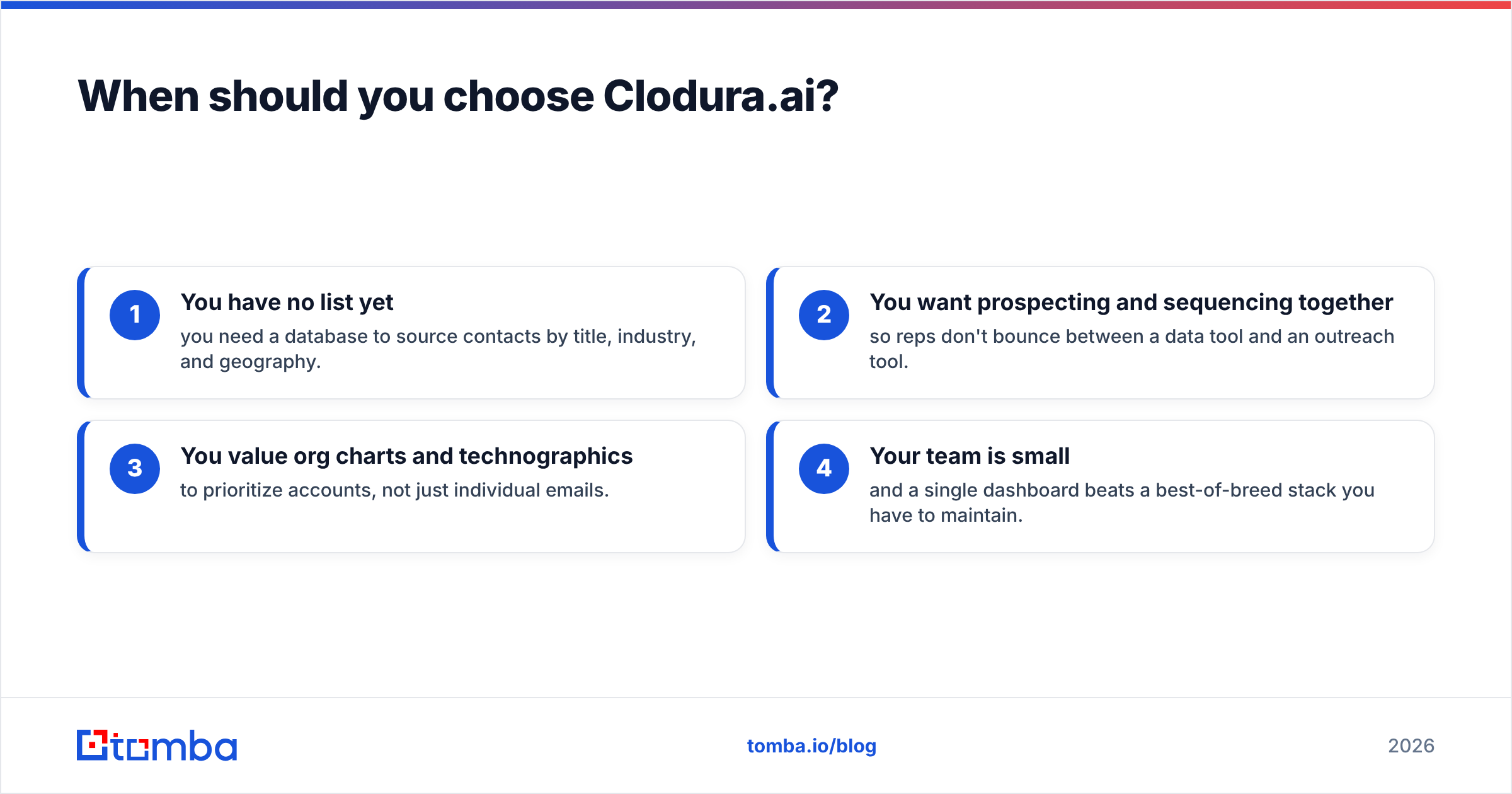
- You have no list yet — you need a database to source contacts by title, industry, and geography.
- You want prospecting and sequencing together so reps don't bounce between a data tool and an outreach tool.
- You value org charts and technographics to prioritize accounts, not just individual emails.
- Your team is small and a single dashboard beats a best-of-breed stack you have to maintain.
The trade-off is depth versus breadth. Clodura.ai does many things adequately; a specialist beats it on any single axis. If your revenue motion depends on prospecting volume, read up on sales prospecting workflows before committing to any one platform — the tool should fit the motion, not the reverse.
What's the third option most teams miss?#
A finder that verifies as it finds — so you never buy a separate cleaner. The Clodura.ai vs MyEmailVerifier debate assumes you must either buy a heavy platform or bolt a verifier onto your stack. There's a middle path: a focused email-data tool that returns already-verified emails at discovery time.
That's the gap tools like Tomba fill. You run a domain search or name-based lookup. Each result comes back with a confidence score and SMTP-level verification attached — no export-clean-reimport loop. For teams that also need reach beyond email, a phone finder and data enrichment sit in the same credit pool.
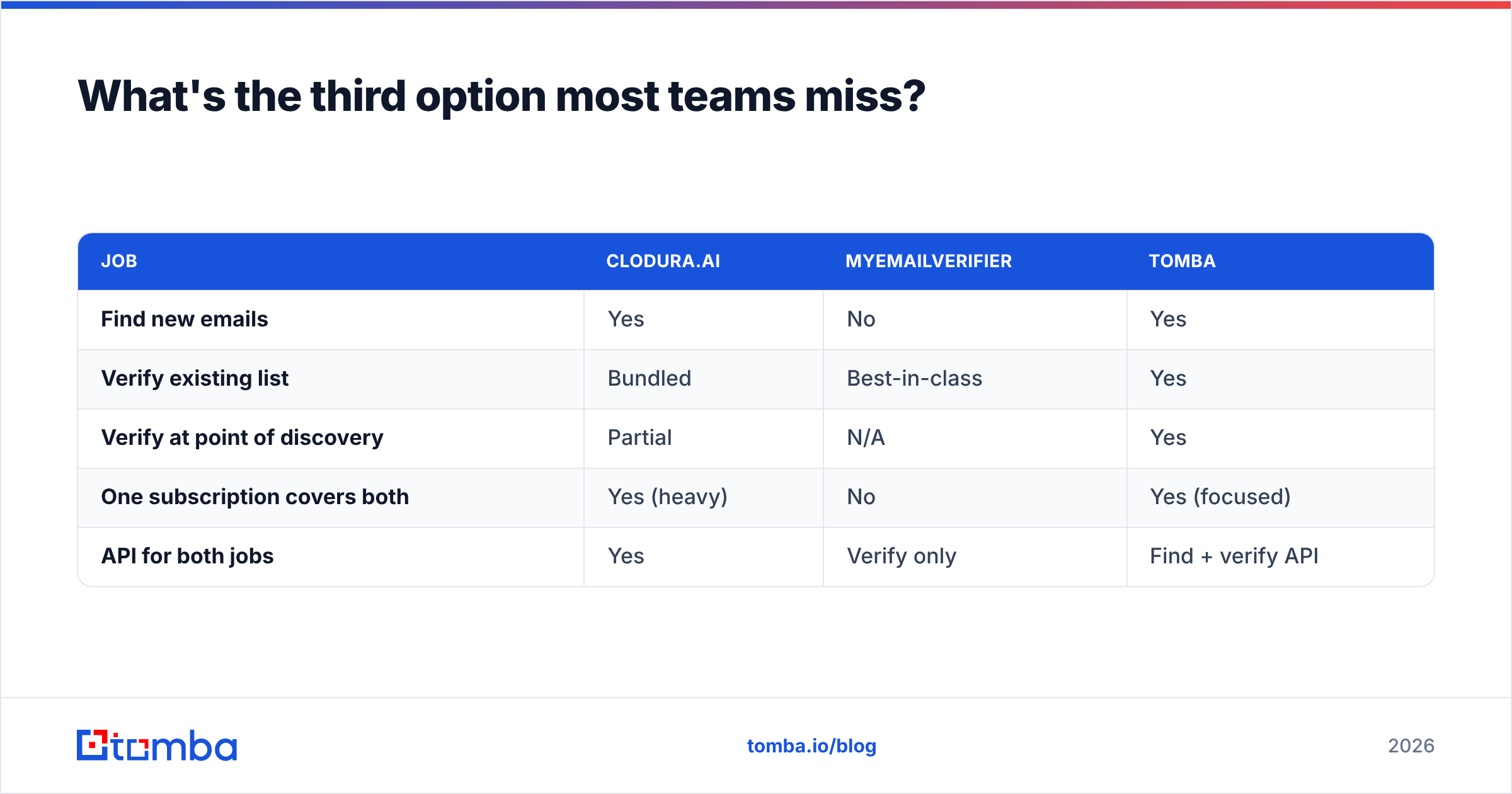
Here's how the three approaches stack up on the "find + verify" job specifically:
| Job | Clodura.ai | MyEmailVerifier | Tomba |
|---|---|---|---|
| Find new emails | Yes | No | Yes |
| Verify existing list | Bundled | Best-in-class | Yes |
| Verify at point of discovery | Partial | N/A | Yes |
| One subscription covers both | Yes (heavy) | No | Yes (focused) |
| API for both jobs | Yes | Verify only | Find + verify API |
The point isn't that one logo wins every row. It's that "Clodura.ai vs MyEmailVerifier" is often the wrong question. The right question is "do I need to build a list, clean a list, or both at once?"

What do independent reviews say?#
Don't take any vendor's word — including this post's framing. Cross-check on neutral review sites before you buy. Both tools have public profiles on G2 and Capterra where you can filter reviews by company size and use case. That matters because a 5-person startup and a 500-rep org will rate the same tool very differently.
Two things to look for in the reviews. First, how users describe bounce rates after using MyEmailVerifier, since that's its whole promise. Second, how Clodura.ai users describe data freshness over time, since database decay is the usual complaint for any sales-intelligence tool. Reviews that mention specific bounce percentages or specific stale-data experiences are worth more than star ratings alone.
Frequently asked questions#
Is Clodura.ai an email verifier? It includes verification, but that's a bundled feature, not its core product. Its main job is finding and prospecting B2B contacts. MyEmailVerifier is a dedicated verifier and nothing else.
Can I use both together? Yes. A common pattern is sourcing contacts in Clodura.ai, then running borderline or catch-all addresses through MyEmailVerifier for a second validation pass. It works but means paying for two tools to complete one workflow.
Which is cheaper? For pure verification, MyEmailVerifier is cheaper — you're not paying for a database and sequencer you won't use. For end-to-end prospecting, comparing per-seat Clodura.ai pricing to per-email verification pricing is apples to oranges. Model your actual volume.
What if I want one tool for both finding and verifying? That's the case for a dedicated email-data platform. In the Clodura.ai vs MyEmailVerifier trade-off, Tomba's email finder returns verified emails at discovery, so you skip the separate cleanup step. Bulk email finder handles list-scale jobs in the same pool.
The verdict#
Neither tool is "better" — they solve different problems, and the smartest buy depends on your workflow. Buying or scraping lists that need hygiene? MyEmailVerifier is the lean, accurate, affordable choice. Building outbound from scratch and wanting prospecting plus outreach in one place? Clodura.ai earns its platform price if you'll use the breadth.
So the Clodura.ai vs MyEmailVerifier answer is simple. If your real need is the one most teams actually have — find the right contact and know the email is valid before you send — you don't want a platform or a cleaner. You want both jobs done in one motion.
That's exactly what Tomba's Email Finder is built for. Search by domain, name, or company, get verified professional emails with confidence scores, and validate at the point of discovery so your list is clean before it ever reaches your ESP. Start on the free tier (25 searches/month), scale to Starter at $49/mo when you're ready, and skip the two-subscription tax entirely. Try a domain search now and see how many verified contacts you pull on the first run.
Related guides#
Ready to find emails that actually work?
Join 150,000+ professionals who stopped guessing and started sending. Free credits on signup — no credit card required.
Get the Tomba newsletter
Practical outbound tactics and product updates — once every two weeks.
About the author