CloudCall Pricing Reviews Pros and Cons: 2026 Buyer Guide
A neutral breakdown of CloudCall pricing, real user reviews, and the pros and cons that matter before you commit — plus the setup fees and contract terms buyers miss.
CloudCall markets itself as the phone system that lives inside your CRM. Click a contact in Bullhorn or Salesforce, and the call, recording, and notes sync on their own. That's a useful pitch for recruiters and busy sales teams. But the price on the website is rarely the price you pay. Below we cover CloudCall pricing reviews pros and cons in plain terms.
This is a neutral, buyer-side look at CloudCall pricing reviews pros and cons in 2026. We cover what each plan costs per seat. We flag the setup fees that don't show on the pricing page. And we share what real users say on G2 and Capterra — plus who should pick something else.
TL;DR#
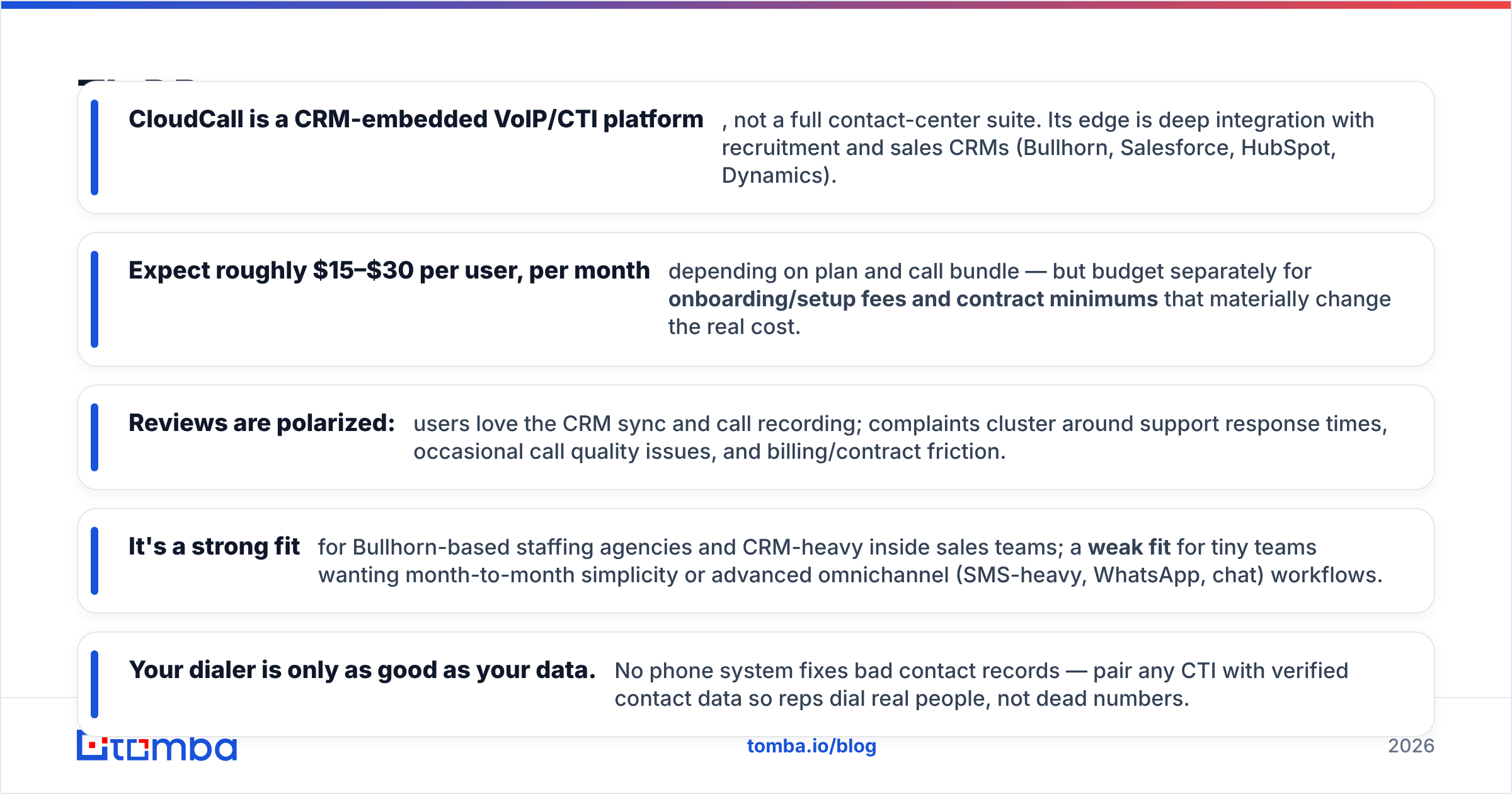
- CloudCall is a CRM-based phone platform, not a full contact-center suite. Its edge is deep integration with recruiting and sales CRMs like Bullhorn, Salesforce, HubSpot, and Dynamics.
- Expect roughly $15–$30 per user each month, based on your plan and call bundle. Budget on top for setup fees and contract minimums. They change the real cost by a lot.
- Reviews are split. Users love the CRM sync and call recording. Complaints focus on slow support, the odd call-quality issue, and billing friction.
- It's a strong fit for Bullhorn staffing agencies and CRM-heavy sales teams. It's a weak fit for tiny teams that want month-to-month simplicity, or heavy SMS, WhatsApp, and chat.
- Your dialer is only as good as your data. No phone system fixes bad records. Pair any dialer with verified data so reps call real people, not dead numbers.
What is CloudCall and who is it for?#
CloudCall is a cloud phone and CTI product. In plain terms, it turns your CRM into a phone. A rep clicks a contact record to call. The call is then logged, recorded, and transcribed against that record on its own. No one copies a number into a desk phone or a separate app.
Think of a walkie-talkie versus a headset wired into your control room. A plain VoIP app just makes calls. CloudCall makes calls and updates your records, with no one typing a note. That "no manual logging" promise is the whole reason CRM dialers exist.
Its home turf is recruiting and staffing. CloudCall has a long, close tie with Bullhorn. It also suits inside sales teams on Salesforce, HubSpot, Zoho, and Microsoft Dynamics. If your reps live in a CRM all day and make dozens of calls, you're the target buyer.

If your team barely uses a CRM, or you just need a light softphone for the odd call, this platform is more than you need.
How much does CloudCall cost in 2026?#
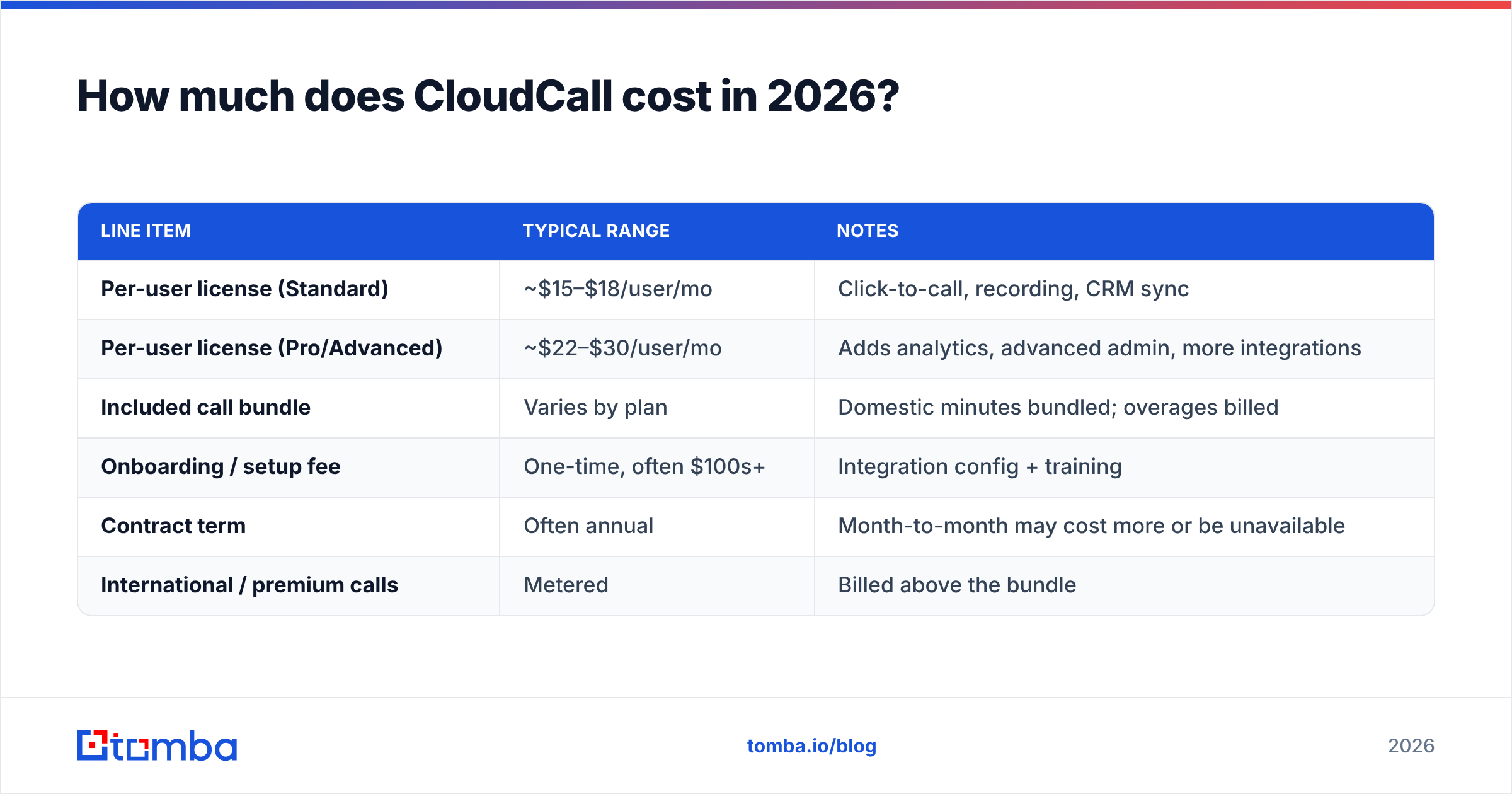
Short answer: plan on about $15–$30 per user each month for the software. Add a one-time setup fee. Many contracts also set a minimum seat count and term. Public pricing is tiered by user and bundles a block of calling minutes. International and premium-rate calls are billed on top.
Published pricing shifts by region, currency, and the bundle you negotiate. So treat the table below as a planning model, not a quote. Always confirm current numbers on the official CloudCall pricing page.
| Line item | Typical range | Notes |
|---|---|---|
| Per-user license (Standard) | ~$15–$18/user/mo | Click-to-call, recording, CRM sync |
| Per-user license (Pro/Advanced) | ~$22–$30/user/mo | Adds analytics, advanced admin, more integrations |
| Included call bundle | Varies by plan | Domestic minutes bundled; overages billed |
| Onboarding / setup fee | One-time, often $100s+ | Integration config + training |
| Contract term | Often annual | Month-to-month may cost more or be unavailable |
| International / premium calls | Metered | Billed above the bundle |
What catches buyers off guard isn't the headline seat price. It's the stack of add-ons: setup, number porting, international minutes, and the annual term. A $16/user quote for a 10-seat team can look very different once setup and a 12-month term are added.

What drives your real monthly bill#
- Seat count and tier. Call analytics and advanced admin live in the Pro tier. Many sales managers want them.
- Call volume and destinations. Bundled minutes cover normal domestic calls. Heavy or international calling is billed by the minute.
- Onboarding. Setup and training are often a separate, one-time charge.
- Contract length. Annual terms lower the per-seat rate. But they cut your flexibility if the fit is wrong.
- Add-on modules. SMS, extra numbers, and premium support can each carry their own charge.
CloudCall pricing reviews pros and cons: what users report#
Scores on G2 and Capterra put CloudCall in the solid-but-not-perfect range. There's a clear split between what users love and what frustrates them. Here's the honest balance.
| Pros | Cons |
|---|---|
| Deep CRM integration (esp. Bullhorn) | Support response times can lag |
| Automatic call logging + recording | Occasional call-quality / dropped-call reports |
| Click-to-call speeds up high-volume dialing | Contract and billing friction cited by some users |
| Call analytics for coaching (higher tiers) | Setup/onboarding adds cost and time |
| Reliable for recruitment workflows | Fewer omnichannel features than newer rivals |
What users praise most is the thing CloudCall was built for. Calls and outcomes appear in the CRM with no data entry. For a recruiter making 60 calls a day, that saved time is the whole point. Reviewers reward it again and again.
What users complain about most is a mix of slow support and the odd voice-quality glitch. That's the normal risk with any VoIP tool. Still, weigh it if your team can't handle downtime. A smaller but steady theme is contract and billing friction. These are buyers who didn't fully price the setup fee or the annual term before signing.

The takeaway isn't "good" or "bad." CloudCall rewards teams that match its design: CRM-first and call-heavy. It punishes teams that wanted a flexible, month-to-month, all-channel tool.
How does CloudCall compare to alternatives?#
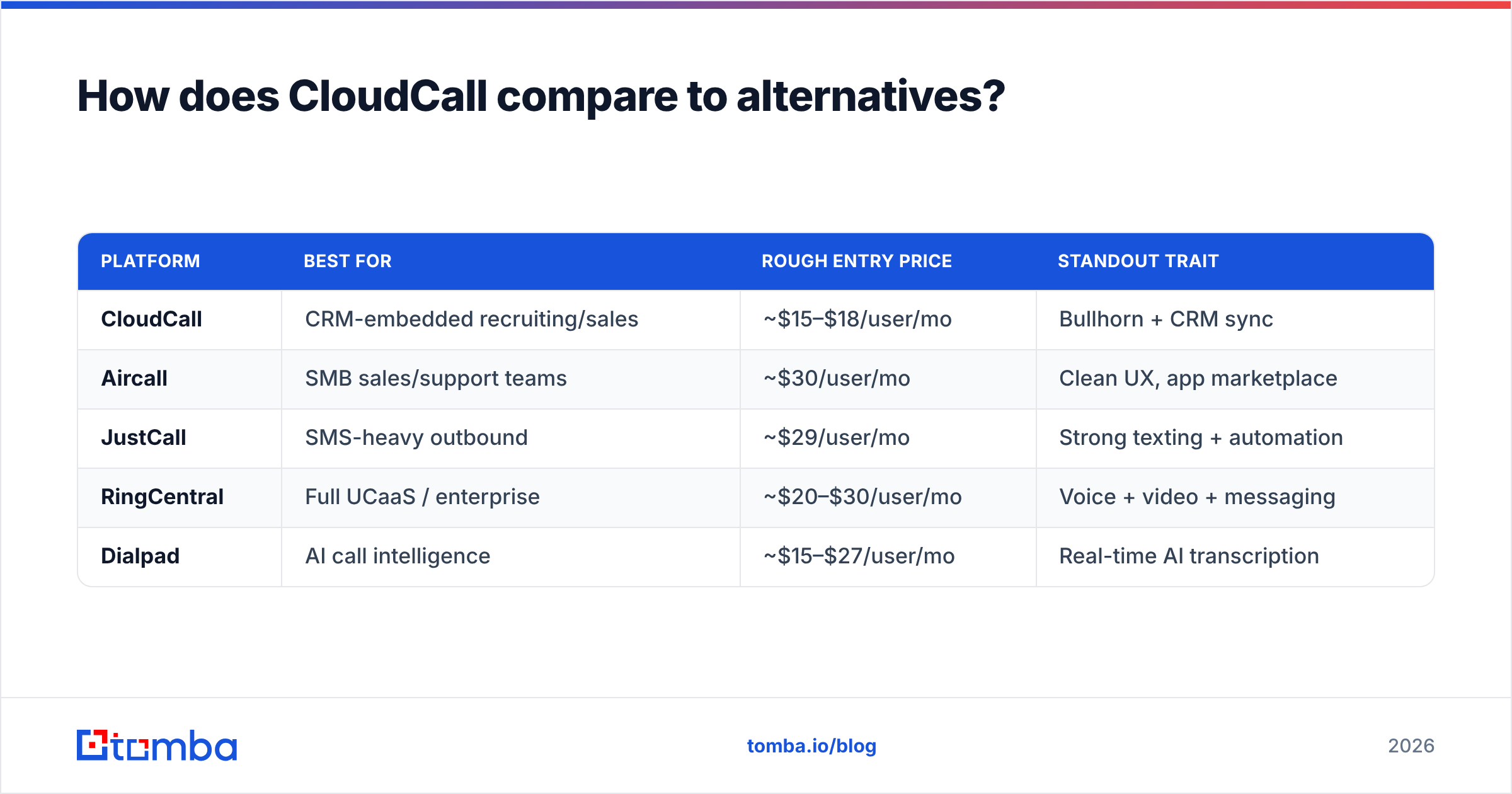
CloudCall competes in a crowded field of cloud phone systems. The right pick depends on what you want. CloudCall wins on CRM depth. Rivals often win on more channels and easy self-serve setup.
| Platform | Best for | Rough entry price | Standout trait |
|---|---|---|---|
| CloudCall | CRM-embedded recruiting/sales | ~$15–$18/user/mo | Bullhorn + CRM sync |
| Aircall | SMB sales/support teams | ~$30/user/mo | Clean UX, app marketplace |
| JustCall | SMS-heavy outbound | ~$29/user/mo | Strong texting + automation |
| RingCentral | Full UCaaS / enterprise | ~$20–$30/user/mo | Voice + video + messaging |
| Dialpad | AI call intelligence | ~$15–$27/user/mo | Real-time AI transcription |
A few practical rules of thumb:
- Choose CloudCall if you run on Bullhorn or a CRM you want calls logged into, and calling is your core motion.
- Choose Aircall or JustCall if you want fast self-serve setup, more SMS and channels, and month-to-month terms.
- Choose RingCentral or Dialpad if you need video, messaging, or built-in AI call analysis across the company.
No dialer solves the upstream problem. You can't call a number you don't have — or dial one that's wrong. So your data quality decides whether any of these tools pays off.
Is CloudCall worth it? A buyer's verdict#
CloudCall is worth it when its narrow strength matches your workflow. It's overpriced when it doesn't. Say you're a staffing agency on Bullhorn, or a sales team that lives in a CRM and dials all day. Then the auto logging and recording earn their keep. The per-seat cost is fair once you've budgeted for setup and term.
Maybe you're a small team that wants to try a phone system this month with no commitment. Or you need SMS-first, all-channel, or heavy AI features. Then a rival built for that will likely make you happier, and sometimes cost less.
Before you sign anything, do three things:
- Get the all-in quote in writing. Include seats, onboarding, term, and likely overages, not just the headline rate. Compare it to your own call-tracking benchmarks so you know your true cost per connected call.
- Run a pilot with your real CRM and a few reps. Confirm call quality and sync in your own setup.
- Fix your data first. A dialer only amplifies the list you feed it. Stale or wrong numbers burn rep time and raise your cost per connect, however good the software is.
That third point is where most teams quietly lose money. You can buy the best dialer on the market and still watch reps waste half their day on dead numbers.
How to make any dialer actually perform#
The fastest ROI lever isn't the phone system. It's the accuracy of who you're calling. Two moves matter most.
- Verify contact details before they hit the dialer. Check numbers so reps don't get stuck on dead or misrouted lines. A quick pass through a phone validator removes the numbers that would tank connect rates.
- Fill the gaps in your records. A CRM row may have a name and company but no direct line. Use a phone finder to source B2B numbers. Pair it with verified email so you have a backup when a call goes to voicemail.
Most teams run email outreach next to calling. Add data enrichment to your records, and every rep opens a record that's ready to use. They don't have to research it first. That's the gap between a dialer that saves time and one that just dials bad data faster.
Compare the math yourself. CloudCall's value is admin time saved per call. Clean data's value is wasted calls avoided. You want both.
Frequently asked questions#
Does CloudCall have a free trial? CloudCall usually offers demos and trials through sales, not an open self-serve free tier. Confirm current trial terms with CloudCall, since offers change by region.
Is CloudCall month-to-month or annual? Many CloudCall deals are annual, sometimes with minimum seat counts. Month-to-month may exist but can cost more per seat. Always confirm the term before signing.
What CRMs does CloudCall integrate with? CloudCall is best known for its Bullhorn integration. It also connects with Salesforce, HubSpot, Zoho, and Microsoft Dynamics, among others.
Are there hidden fees with CloudCall? They're not so much hidden as easy to overlook. Watch for setup fees, international and premium-rate charges above the bundle, and contract minimums. Ask for an all-in quote.
The bottom line#
This CloudCall pricing reviews pros and cons guide lands on one point. CloudCall earns its name with CRM-heavy recruiting and sales teams. Auto call logging, solid recording, and Bullhorn integration are real wins that reviews confirm. The cons — slow support, the odd call-quality report, and setup friction — are manageable. Just price the deal honestly and pilot before you commit.
But the biggest driver of your calling ROI sits upstream of the software. A great dialer calling bad numbers still loses. Before you scale outbound on any platform, feed it accurate, verified data.
Start there. Use the Tomba Email Finder to find verified emails for the contacts you're about to call. Then every dial has a follow-up channel, and every record is one reps can act on now. Check Tomba pricing, including a free tier with 25 searches a month. Make sure your phone system amplifies clean data, not the wrong list.
Related guides#
// get started
Find, verify and enrich your first contacts today
Start on the free plan with 25 searches a month, then scale when your team is ready.
Free plan · No credit card required · GDPR & CCPA
// about the author