What Is a Contact Extension? The 2026 Guide for Prospectors
A contact extension pulls verified emails and phone numbers straight from the page you're already on. Here's how they work, where they fail, and how to pick one in 2026.

What Is a Contact Extension? The 2026 Guide for Prospectors
You found the perfect prospect on LinkedIn. Now you need their email. So you copy the name, open a new tab, paste it into a finder tool, wait, copy the result, switch back, paste into your CRM. Multiply that by 60 contacts a day and you've built a full-time job out of tab-switching.
A contact extension collapses that whole loop into one click inside the tab you're already looking at. This guide explains what these tools actually do, where they quietly lose accuracy, and how to choose one that won't waste your credits in 2026.
TL;DR#
- A contact extension is a browser add-on (usually Chrome) that reveals a person's or company's email and phone number directly on the page you're viewing — LinkedIn, a company site, or a CRM record.
- The good ones don't guess. They match the profile against a verified database and run an SMTP check before showing you an address.
- Accuracy, catch-all handling, and credit efficiency separate a useful extension from one that burns budget on bounces.
- Standalone "scraper" extensions that only pattern-guess emails are a deliverability risk — they feed you unverified addresses.
- Tomba's Chrome extension pairs one-click capture with real verification, so what lands in your list is already checked.
What Is a Contact Extension, Exactly?#
A contact extension is a small program that lives in your browser toolbar and reads the page you're on to surface business contact data — typically a work email, sometimes a direct-dial phone number, and often enriched fields like job title, company size, and location.
Think of it like a universal translator sitting in your ear during a conversation. You're already talking to the prospect's LinkedIn profile; the extension quietly translates that profile into the contact details you can act on, without you leaving the room. Technically, it sends the page's identifying signals (name, company domain, profile URL) to a data provider's API, which returns the best-matching verified record.
There are three broad flavors, and mixing them up costs you money:
- Database-backed finders — match the profile to a maintained B2B dataset and return a verified address. Highest accuracy, credit-metered.
- Pattern guessers — infer
first.last@company.comfrom the name and domain, with no verification. Cheap, but bounce-prone. - Scrapers — pull whatever emails are already printed on a page (footers, "team" pages). Useful for public info, useless for decision-makers who never list their address.
The category most sales teams mean by "contact extension" is the first one, ideally with verification baked in so you're not shipping guesses to your outreach tool.
How Does a Contact Extension Actually Find an Email?#
Under the hood, a quality extension runs a short pipeline every time you click "find":
- Read the page. It extracts the person's name and the company domain from the profile or site you're viewing.
- Query the database. It looks for an existing verified record tied to that person at that domain.
- Fall back to pattern + verify. If there's no stored record, it generates likely formats (using the company's known email pattern) and tests them.
- Run an SMTP check. Before showing you anything, it pings the mail server to confirm the mailbox exists and isn't a catch-all.
- Return a confidence score. You see a percentage or a green/amber/red signal so you can decide whether to send.
That last step is the difference between a tool that protects your sender reputation and one that quietly erodes it. An unverified guess that bounces tells inbox providers you don't know who you're emailing — and that's exactly the signal that pushes you toward the spam folder.
If you want to understand the mechanics on their own, the standalone email finder and email verifier are the two engines a contact extension bundles into one toolbar button.
Why Not Just Copy Emails Off the Page Manually?#
Because it doesn't scale, and because most of the contacts you actually want don't publish their address anywhere.
Decision-makers hide their inboxes on purpose. The VP of Marketing you want to reach isn't listing her email on the company's contact page — that page routes to info@ or a webform. Manual copying only works for the low-value, publicly-listed addresses that everyone else is already hammering.
There's also the verification problem. Even when you do find an address by hand, you have no idea if it's still active. People change jobs; mailboxes get deprovisioned. A contact extension that verifies at the moment of capture saves you from building a list that's 20% dead on arrival.
What Separates a Good Contact Extension From a Bad One?#
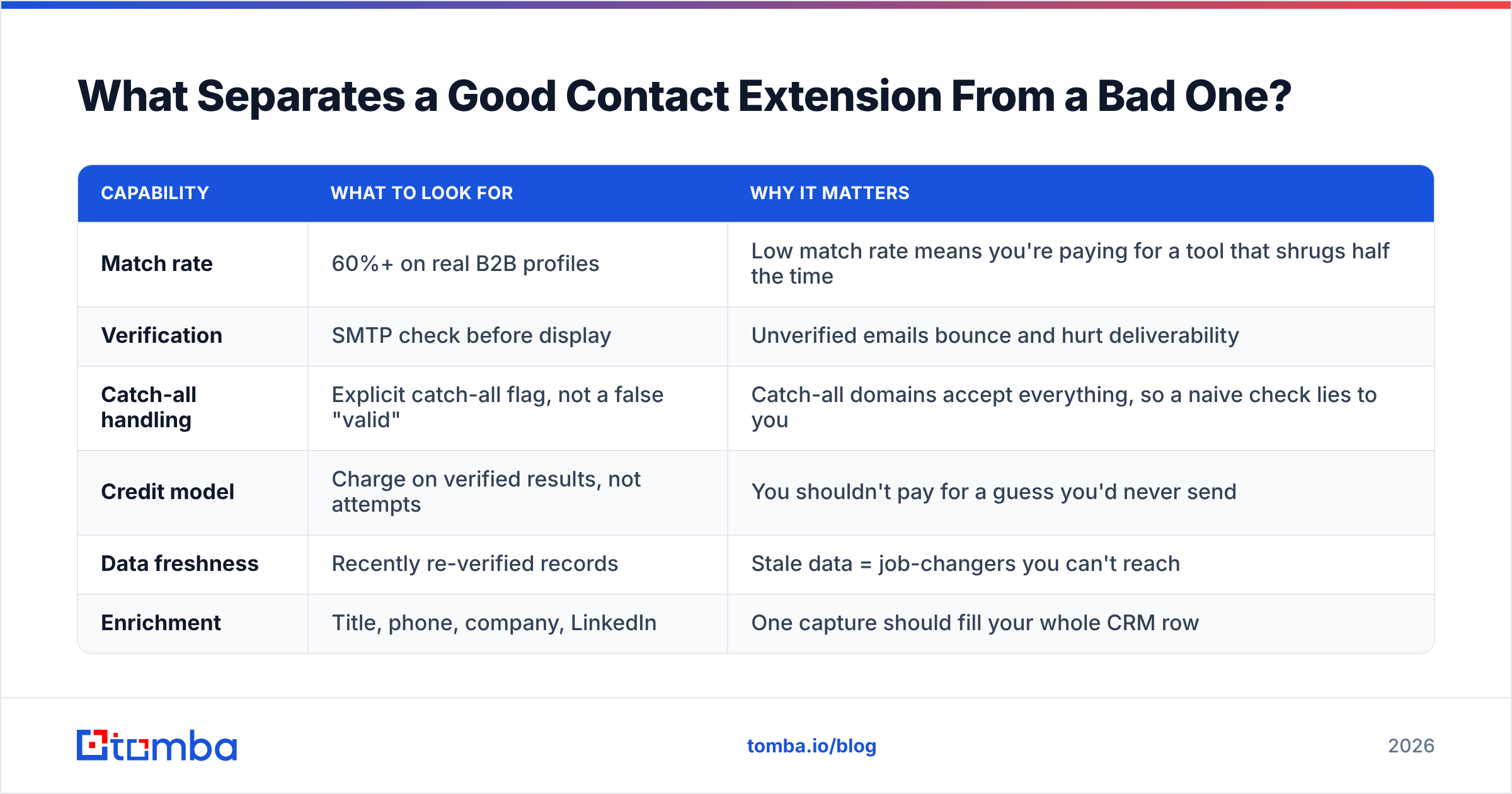
Four things: match rate, verification, catch-all handling, and credit efficiency. Here's how to read them.
| Capability | What to look for | Why it matters |
|---|---|---|
| Match rate | 60%+ on real B2B profiles | Low match rate means you're paying for a tool that shrugs half the time |
| Verification | SMTP check before display | Unverified emails bounce and hurt deliverability |
| Catch-all handling | Explicit catch-all flag, not a false "valid" | Catch-all domains accept everything, so a naive check lies to you |
| Credit model | Charge on verified results, not attempts | You shouldn't pay for a guess you'd never send |
| Data freshness | Recently re-verified records | Stale data = job-changers you can't reach |
| Enrichment | Title, phone, company, LinkedIn | One capture should fill your whole CRM row |
Catch-all domains deserve special attention. A catch-all server accepts mail to any address at the domain, so a lazy verifier reports every guess as "valid." A good extension flags the catch-all instead of pretending it confirmed the mailbox — the honest answer is "we can't be sure," and you'd rather know.
Contact Extension vs. Standalone Finder vs. Full Platform#
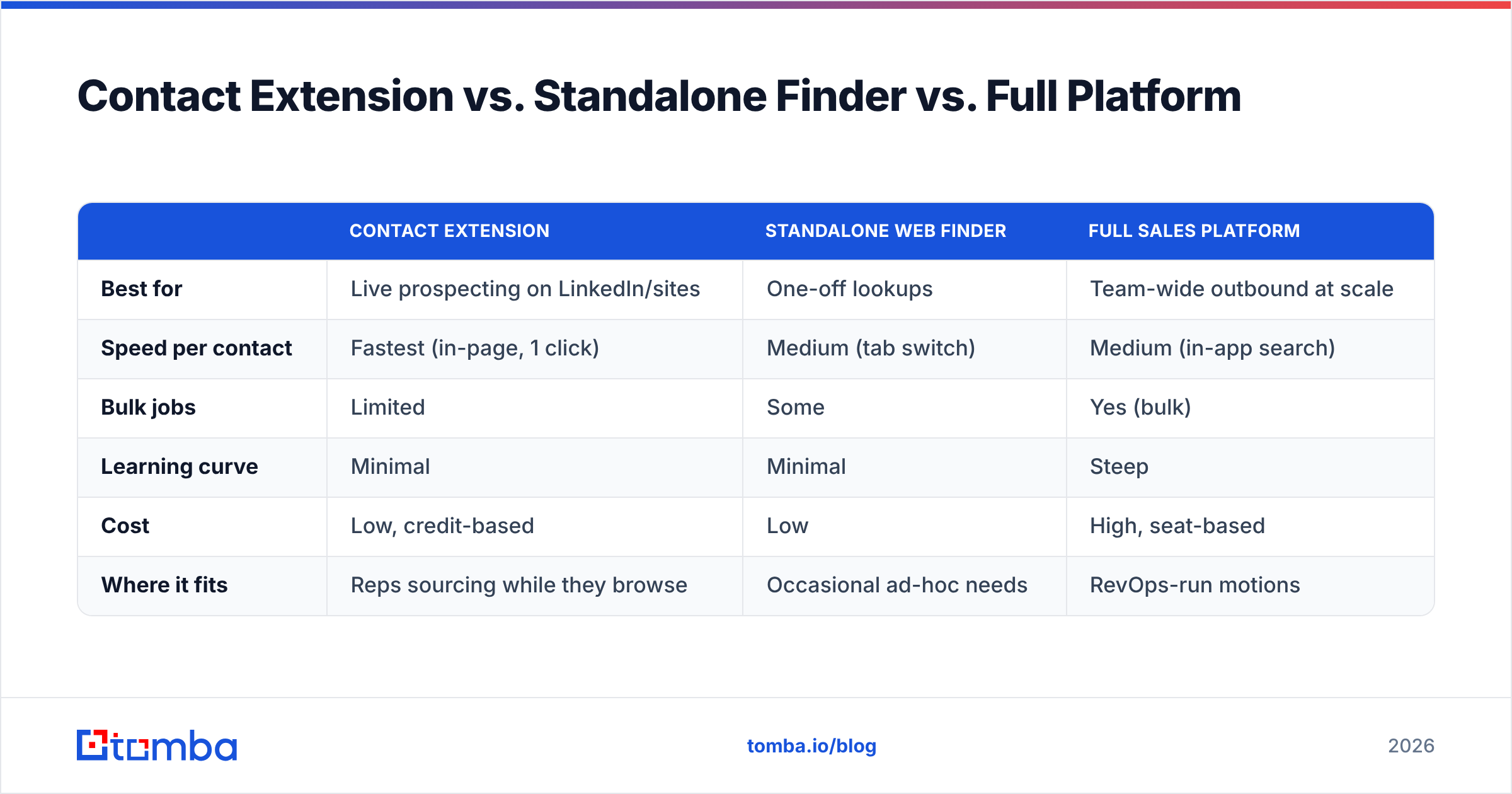
You have three ways to get contact data into your pipeline. They're not competitors so much as different points on a speed-versus-volume curve.
| Contact extension | Standalone web finder | Full sales platform | |
|---|---|---|---|
| Best for | Live prospecting on LinkedIn/sites | One-off lookups | Team-wide outbound at scale |
| Speed per contact | Fastest (in-page, 1 click) | Medium (tab switch) | Medium (in-app search) |
| Bulk jobs | Limited | Some | Yes (bulk) |
| Learning curve | Minimal | Minimal | Steep |
| Cost | Low, credit-based | Low | High, seat-based |
| Where it fits | Reps sourcing while they browse | Occasional ad-hoc needs | RevOps-run motions |
Most reps don't need to pick one. You browse with the extension for live sourcing, drop into the web app or domain search when you want every contact at an account, and reserve heavier platforms for orchestrated campaigns. The extension is the daily driver; the rest are for when the job changes shape.
What Does a Contact Extension Cost in 2026?#
Pricing is almost always credit-based: one verified contact equals one credit, and plans bundle a monthly credit pool. The trap is tools that charge per attempt — you pay whether or not they find anything. Read the fine print for "charged on results only," which is the fair model.
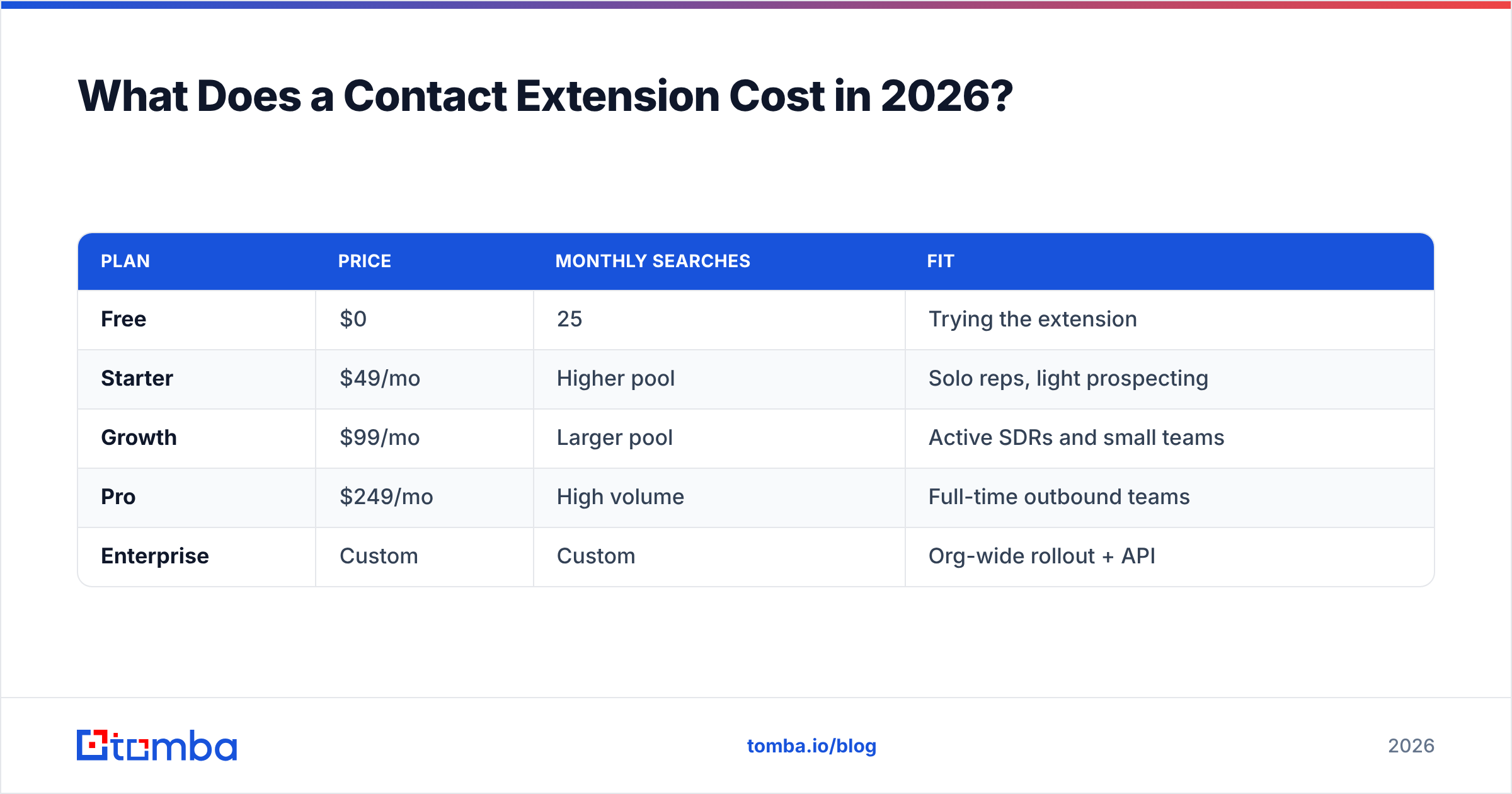
Here's where Tomba sits, so you have a concrete reference point. Full Tomba pricing is public:
| Plan | Price | Monthly searches | Fit |
|---|---|---|---|
| Free | $0 | 25 | Trying the extension |
| Starter | $49/mo | Higher pool | Solo reps, light prospecting |
| Growth | $99/mo | Larger pool | Active SDRs and small teams |
| Pro | $249/mo | High volume | Full-time outbound teams |
| Enterprise | Custom | Custom | Org-wide rollout + API |
Note the free tier: 25 searches a month is enough to test the extension against your own known contacts before you spend a cent. That's the right way to evaluate any finder — feed it 20 people whose real emails you already know and measure the match and accuracy yourself. Don't trust the marketing number; trust your own test.
How Do You Use a Contact Extension Without Wrecking Deliverability?#
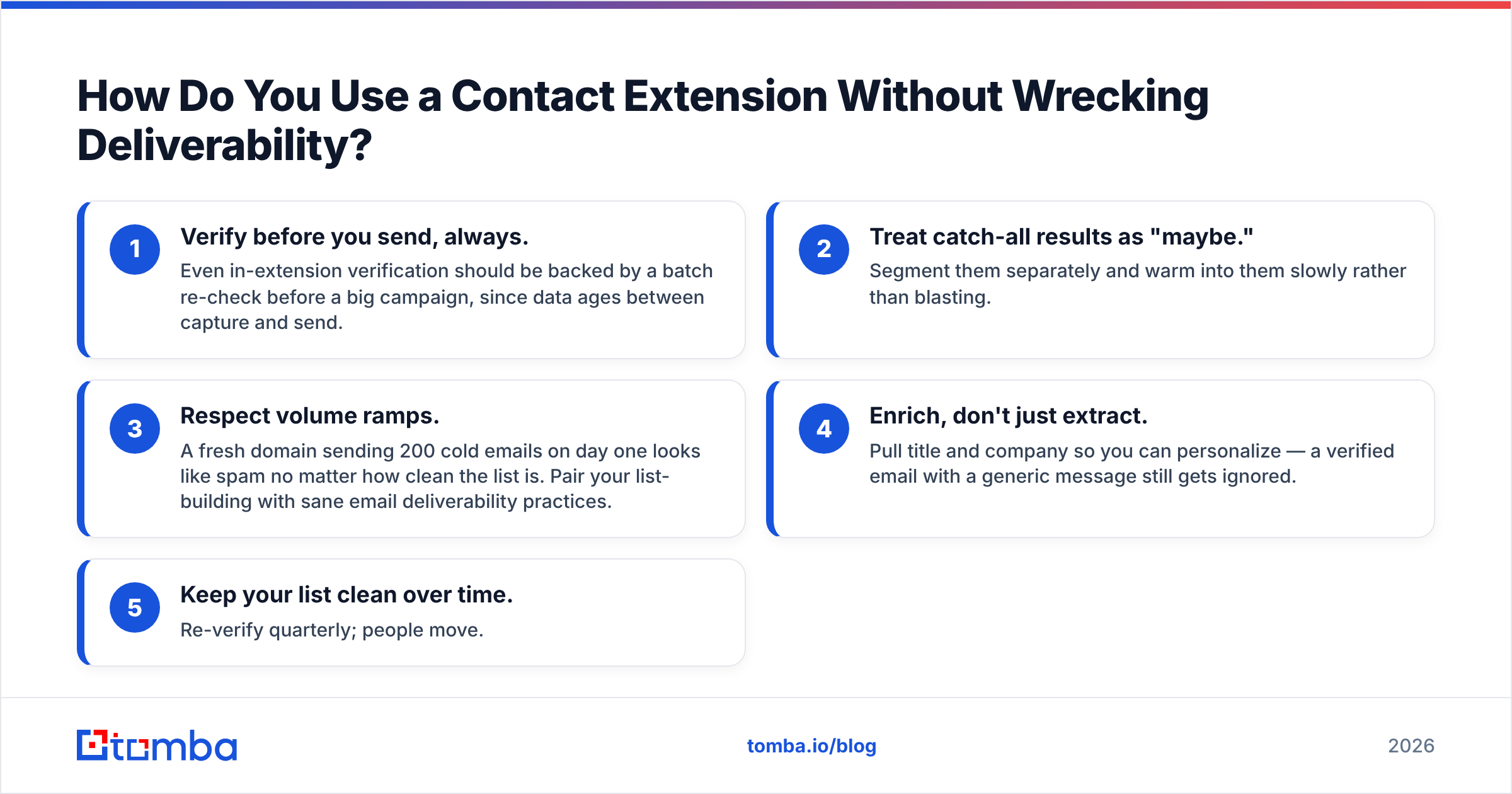
Finding the email is step one. Not getting burned by it is step two. A contact extension can hand you a technically-valid address that still tanks your campaign if you skip the basics.
Follow these guardrails:
- Verify before you send, always. Even in-extension verification should be backed by a batch re-check before a big campaign, since data ages between capture and send.
- Treat catch-all results as "maybe." Segment them separately and warm into them slowly rather than blasting.
- Respect volume ramps. A fresh domain sending 200 cold emails on day one looks like spam no matter how clean the list is. Pair your list-building with sane email deliverability practices.
- Enrich, don't just extract. Pull title and company so you can personalize — a verified email with a generic message still gets ignored.
- Keep your list clean over time. Re-verify quarterly; people move.
The extension solves the finding problem. It does not absolve you of the sending problem. The teams that win at outbound treat clean data and careful sending as one discipline, not two.
Is a Contact Extension Worth It for a Small Team?#
Yes — arguably more so than for a big one, because a small team can't afford wasted time or a scorched sending domain.
For a two-to-five person sales team, the math is simple. If each rep spends even 30 minutes a day hunting and pasting contact details, a one-click extension buys back roughly two and a half hours per rep per week. On a $49/mo Starter plan, that time saving pays for the tool many times over in the first week. The bigger win is quality: verified-at-capture data means your first cold campaign doesn't bounce its way onto a blocklist, which is a mistake a small team feels for months.
Where an extension is not enough: if you need thousands of contacts for a defined account list, reach for bulk lead generation or the Tomba API instead of clicking one profile at a time. Use the right tool for the job size.
The Bottom Line#
A contact extension earns its place when it does three things well: matches the person you're actually looking at, verifies the address before it shows it to you, and only charges you for results you'd genuinely send. Skip the pattern-guessers and scrapers — they feel free until the bounces cost you your inbox.
If you want capture and verification in the same click, install the Tomba Email Finder and its Chrome extension, then test it on 25 contacts you already know for free. Measure the match rate yourself, watch the verification flags, and let the results — not the pitch — decide whether it stays in your toolbar.
Related guides#
Ready to find emails that actually work?
Join 150,000+ professionals who stopped guessing and started sending. Free credits on signup — no credit card required.
Get the Tomba newsletter
Practical outbound tactics and product updates — once every two weeks.
About the author