Contact Sequence: How to Build a Multi-Touch Cadence in 2026
Most reps quit after two touches, then blame the list. A contact sequence fixes that — here's the touch count, channel mix, timing, and tooling that actually books meetings in 2026.
TL;DR
- A contact sequence is a pre-planned series of touches — email, phone, LinkedIn, sometimes video or direct mail — delivered on a fixed schedule to one prospect until they reply, opt out, or hit the end of the cadence.
- Most reps stop after two touches. Most replies to cold outbound arrive between touch three and touch eight. That gap is the whole ballgame.
- The 2026 benchmark shape: 9–12 touches over 18–24 business days, across at least two channels, with a hard exit rule.
- Sequence quality is capped by data quality. A perfectly-timed 11-touch cadence sent to a 30%-bounce list is just a faster way to burn your domain.
- Tooling matters less than most teams think. Sequencer choice is a preference; verified contact data and a real exit rule are not.
What is a contact sequence?#
A contact sequence is a scripted, scheduled series of outreach attempts aimed at a single prospect. Each step specifies three things: the channel (email, call, LinkedIn, voicemail), the timing (day N, business days only), and the intent (introduce, add value, ask, break up).
The word people usually reach for is "cadence," and in practice the two are interchangeable. Some teams draw a line — sequence = automated email steps, cadence = the full multi-channel plan including manual tasks — but nobody is checking your homework. What matters is that the plan exists on paper before the first send, not improvised after a prospect goes quiet.
The thing that separates a sequence from "following up when I remember" is that a sequence is a system with an ending. It has a defined number of steps, a defined gap between them, and a defined exit. Every prospect who enters it either replies, unsubscribes, or falls out the bottom on day 21 with a clean record and a "revisit in Q4" tag.
A quick analogy: a contact sequence is a flight checklist, not a conversation. Pilots don't decide mid-taxi whether to check the flaps. They run the list, every time, because the list encodes what experience already learned. Your sequence does the same thing for outbound — it encodes the follow-up discipline your reps won't sustain on willpower alone.
Why do most contact sequences fail after touch two?#
Because the person running them is a human being with a quota and a Slack notification.
The failure pattern is consistent enough to be boring. A rep sends touch one. Nothing. Sends touch two. Nothing. Concludes the prospect "isn't interested," moves them to a dead-leads view, and goes hunting for fresh names — because prospecting new logos feels like progress and following up feels like nagging.
The data says the opposite. Reply rates on cold email are famously thin at touch one, and the compounding effect of touches three through eight is where a well-built sequence earns its keep. HubSpot's sales research has been hammering this drum for a decade: the majority of closed-won outbound deals required more follow-up than the average rep is willing to do.
There are four concrete reasons sequences die early:
- No scheduled task. If touch three lives in a rep's memory instead of a queue, touch three does not happen. Sequences must be tasks in a system, not intentions.
- Every touch is the same ask. "Just bumping this up" three times in a row trains prospects to ignore your name. Each touch needs a different angle — new proof point, new question, different channel.
- Single channel. Email-only sequences fight the entire market for one inbox slot. Adding a call and a LinkedIn touch multiplies surface area without multiplying send volume.
- The list was bad and nobody said so. When 25% of your addresses bounce, the sequence looks like it failed. It didn't. The data did. Run every list through an email verifier before step one, or you're measuring your own noise.
What does a high-performing contact sequence look like in 2026?#
Here is a concrete 11-touch, 21-business-day structure that works for mid-market B2B. Treat it as a starting skeleton, not scripture — the channel mix should bend toward wherever your ICP actually lives.
| Day | Channel | Intent | Notes |
|---|---|---|---|
| 1 | Relevance-led intro | One trigger, one ask. Under 90 words. No attachment, no link. | |
| 1 | View profile (no connect) | Puts your name in their "who viewed" feed before the call. | |
| 3 | Phone | First dial | Best windows: 8–9am and 4–5pm local. Leave no voicemail yet. |
| 4 | Proof point | Named customer, one metric, same thread. | |
| 7 | Phone + voicemail | Dial two | 20-second voicemail: name, reason, "I'll follow up by email." |
| 8 | Voicemail follow-up | Two lines. References the voicemail. Highest single-touch reply rate in this cadence. | |
| 11 | Connection request | Note optional. Keep it under 200 characters if you send one. | |
| 14 | New angle | Different pain, different persona-level problem. New subject line. | |
| 16 | Phone | Dial three | Try a different time block than dials one and two. |
| 19 | Soft break-up | "Should I close the file?" — invites a fast no, which is worth having. | |
| 21 | Exit | Tag + recycle | Move to nurture. Set a 90-day re-entry date. Never delete. |
Three design rules are doing the heavy lifting there:
- Front-load the pace, back-load the space. Touches one through eight fall in the first eight days while your name is still warm. The last three stretch out, because a prospect who hasn't bitten by day eight needs distance, not pressure.
- Alternate channels deliberately. No two consecutive touches share a channel. A call after an email is a follow-up; two calls in a row is a stalker.
- Every touch stands alone. Assume the prospect never saw the previous one. That means no "as I mentioned below" in a cold email — it's usually a lie, and it reads like one.
How many touches should a contact sequence have?#
Nine to twelve, for most B2B motions. Below six you're leaving replies on the table; above fourteen you're taxing your domain reputation for diminishing returns and annoying people who would otherwise have been warm in six months.
The right number is really a function of deal size:
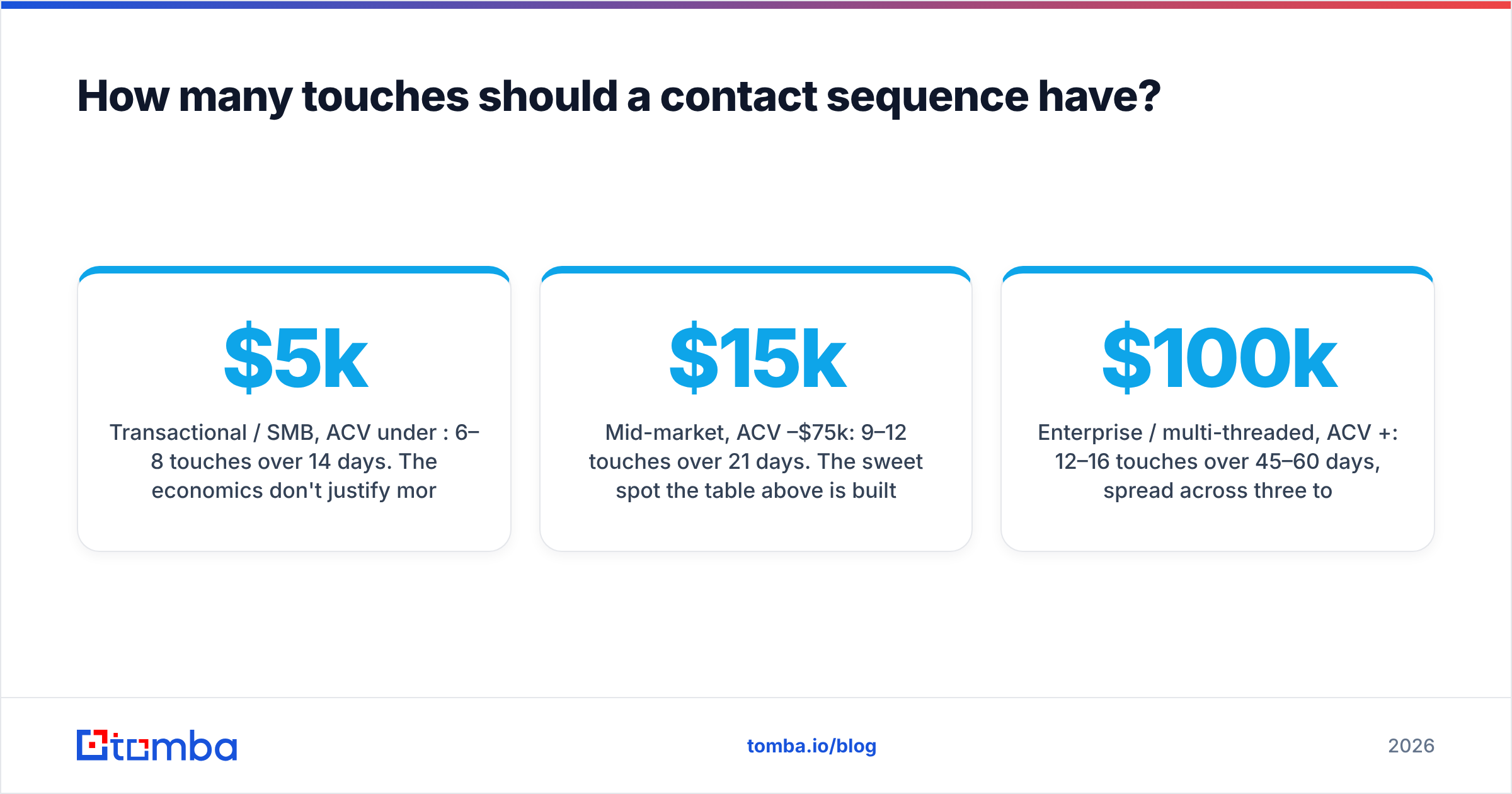
- Transactional / SMB, ACV under $5k: 6–8 touches over 14 days. The economics don't justify more rep time per contact, and buying cycles are short.
- Mid-market, ACV $15k–$75k: 9–12 touches over 21 days. The sweet spot the table above is built for.
- Enterprise / multi-threaded, ACV $100k+: 12–16 touches over 45–60 days, spread across three to five contacts at the same account. Here the sequence is per-account, not per-person, and each persona gets a slightly different script.
- Champion re-engagement (they left, you follow them): 4–5 touches. They already know you. Long sequences insult the relationship.
The multi-threading point deserves its own beat. A single-threaded contact sequence is a bet on one human's inbox habits. Analysts at Gartner have been documenting the buying-group expansion for years — the average B2B purchase now involves a committee, not a hero. If your sequence targets one name per account, you are running a 1-in-6 lottery on whether that name is the one who cares. Pull three to five contacts per target account with a domain search, and sequence them in parallel with role-specific angles.
Which channels belong in the sequence — email, phone, or LinkedIn?#
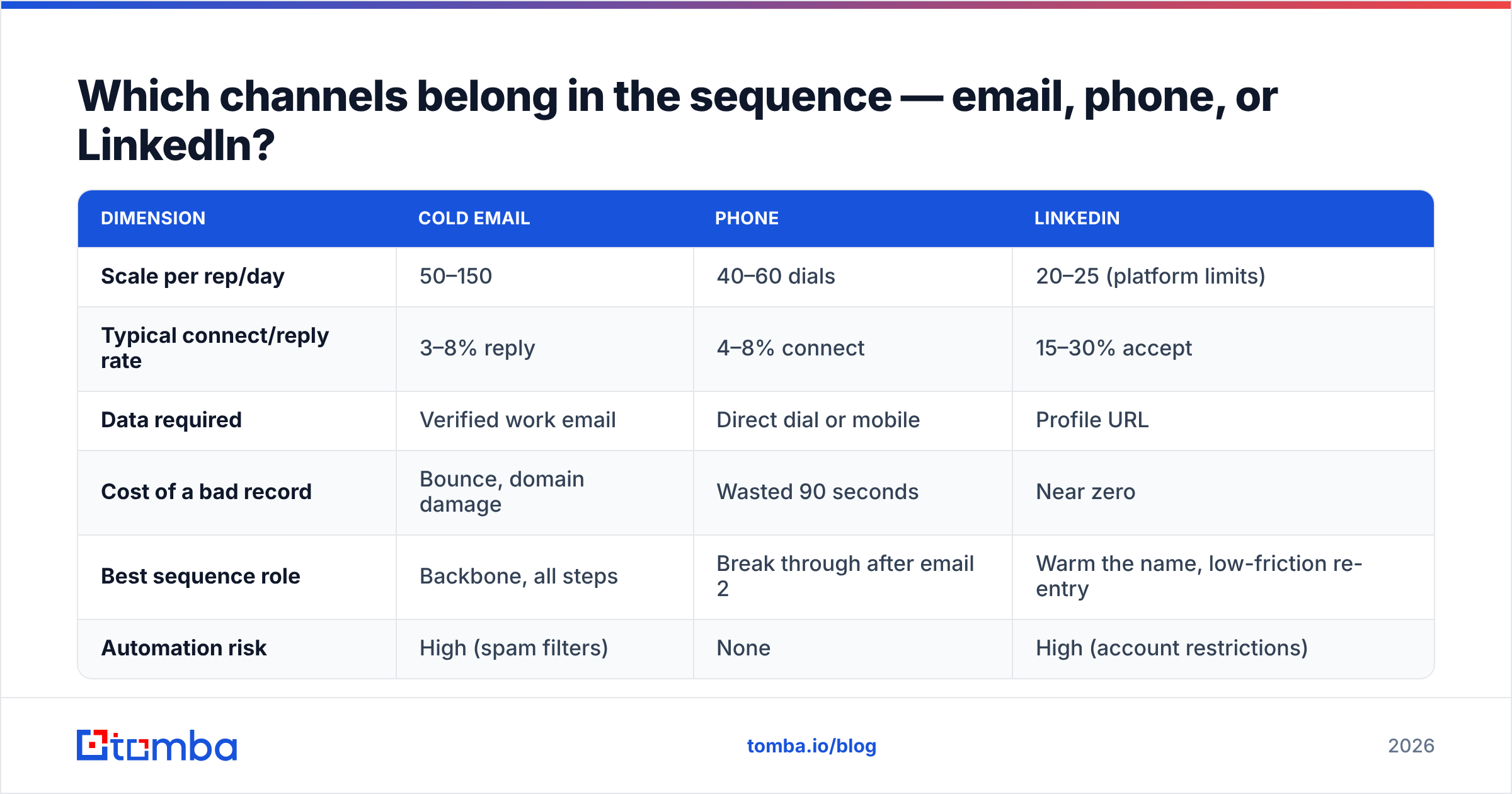
All three, with email as the spine and the other two as leverage. Here's how they actually compare on the dimensions that matter for cadence design:
| Dimension | Cold email | Phone | |
|---|---|---|---|
| Scale per rep/day | 50–150 | 40–60 dials | 20–25 (platform limits) |
| Typical connect/reply rate | 3–8% reply | 4–8% connect | 15–30% accept |
| Data required | Verified work email | Direct dial or mobile | Profile URL |
| Cost of a bad record | Bounce, domain damage | Wasted 90 seconds | Near zero |
| Best sequence role | Backbone, all steps | Break through after email 2 | Warm the name, low-friction re-entry |
| Automation risk | High (spam filters) | None | High (account restrictions) |
Three practical takeaways:
- Phone is the highest-leverage underused channel — not because dialing works better than it did in 2019, but because so many teams abandoned it that the line is quieter. It only works if you have real numbers; a call step is worthless without a phone finder feeding it direct dials rather than switchboard mains.
- LinkedIn is a warming channel, not a closing channel. Profile views and connection requests raise the odds your email gets opened. Pitching in a connection request DM is the fastest way to get muted.
- Email carries the argument. It's the only channel where you can make a full case, and the only one with real automation headroom — which also makes it the only one that can torch your sending domain. Protect it.
Which tools should run your contact sequence?#
The honest answer: the sequencer is the least differentiated part of your stack. Almost every serious option executes multi-channel steps, respects sending limits, and syncs to your CRM. Where teams actually get burned is upstream — bad contact data — and downstream — no exit hygiene.
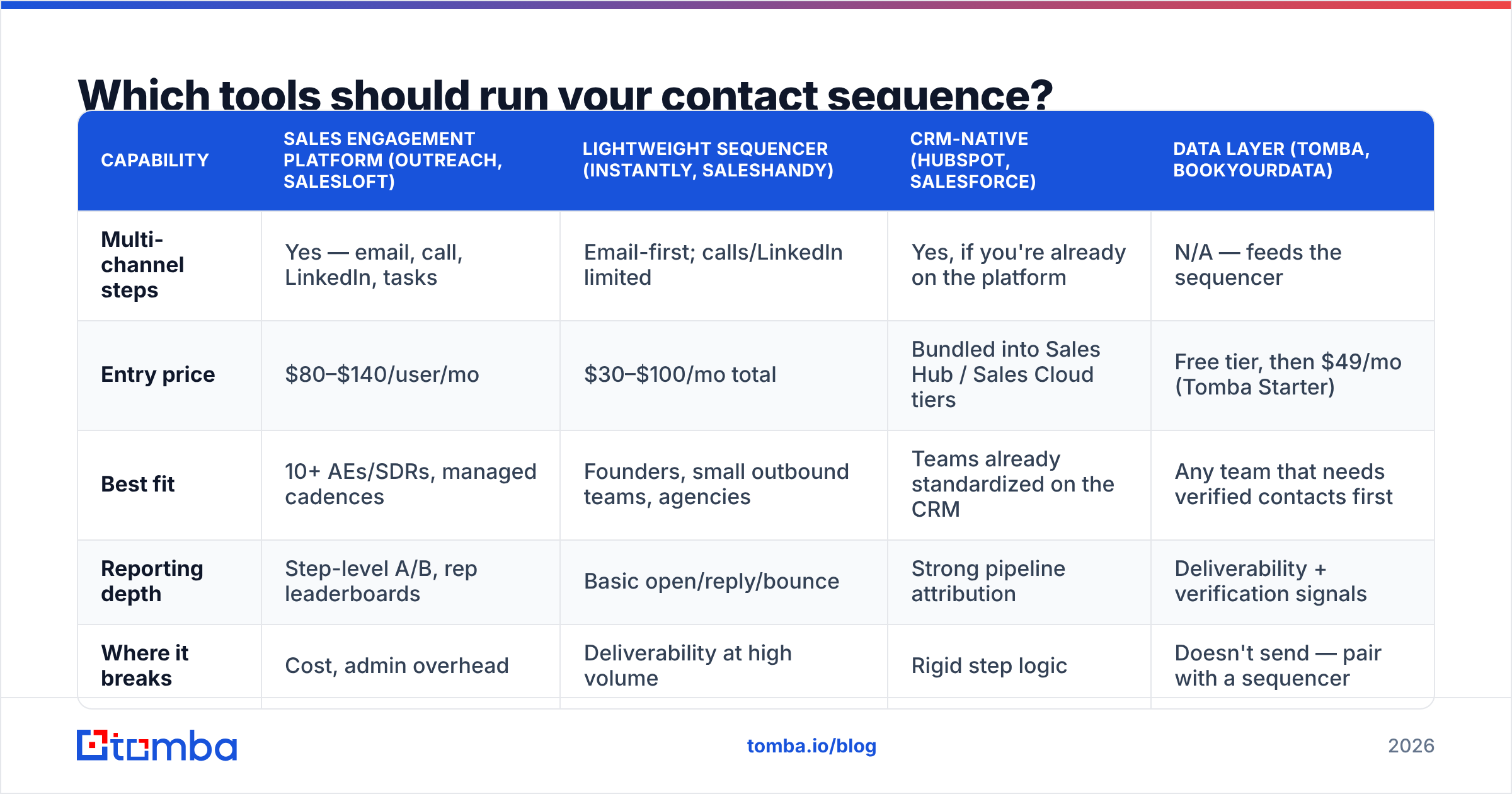
Still, the categories are worth knowing. Here's how the main options line up on the dimensions that affect sequence design:
| Capability | Sales engagement platform (Outreach, Salesloft) | Lightweight sequencer (Instantly, Saleshandy) | CRM-native (HubSpot, Salesforce) | Data layer (Tomba, BookYourData) |
|---|---|---|---|---|
| Multi-channel steps | Yes — email, call, LinkedIn, tasks | Email-first; calls/LinkedIn limited | Yes, if you're already on the platform | N/A — feeds the sequencer |
| Entry price | $80–$140/user/mo | $30–$100/mo total | Bundled into Sales Hub / Sales Cloud tiers | Free tier, then $49/mo (Tomba Starter) |
| Best fit | 10+ AEs/SDRs, managed cadences | Founders, small outbound teams, agencies | Teams already standardized on the CRM | Any team that needs verified contacts first |
| Reporting depth | Step-level A/B, rep leaderboards | Basic open/reply/bounce | Strong pipeline attribution | Deliverability + verification signals |
| Where it breaks | Cost, admin overhead | Deliverability at high volume | Rigid step logic | Doesn't send — pair with a sequencer |
Two notes on that table. First, sales engagement platforms are worth their price only if you have someone who owns cadence performance as a job — otherwise you've bought a Ferrari for a grocery run; check the sales engagement category on G2 and read the low-rated reviews, not the high ones. Second, the data layer isn't a competitor to the sequencer — it's the fuel line. Providers like BookYourData and Tomba both solve the "who am I actually emailing" problem; the sequencer just moves whatever you give it.
Which means the single highest-ROI thing most teams can do to improve sequence performance has nothing to do with tooling at all: verify the list, enrich the missing fields, and multi-thread the account. A mediocre sequence to a clean, well-researched list beats a beautiful sequence to a scraped one, every quarter, without exception.
How do you measure a contact sequence?#
Track four numbers per sequence, per week. Anything more and you'll optimize noise.
- Bounce rate. Target under 2%. Above 5%, stop the sequence immediately — this is a data problem, not a copy problem, and every additional send is damage to your sending domain.
- Reply rate by step. Not aggregate — by step. This is the number that tells you where to cut. If step 9 produces zero replies across 400 contacts, delete step 9.
- Positive reply rate. Replies that aren't "unsubscribe" or "wrong person." Aggregate reply rate flatters bad copy; this one doesn't. A healthy mid-market sequence lands 1.5–4% positive.
- Meetings booked per 100 contacted. The only number leadership should care about. Everything above it is diagnostic.
Two secondary signals worth watching monthly: unsubscribe rate (over 1% means your targeting is off, not your copy) and step-9-to-exit completion rate (if fewer than 70% of enrolled contacts actually reach the end of the sequence, your reps are silently abandoning it and your data is fiction).
For a deeper breakdown of what a healthy response rate looks like across segments, the benchmarks shift enough by industry that you should anchor to your own first-quarter numbers rather than a blog's.
How do you keep a contact sequence out of spam?#
Sequences fail on deliverability more often than they fail on strategy. The rules are unglamorous:
- Verify before you send. Every single time. Bounces are the fastest path to a poisoned domain, and a poisoned domain makes every future sequence worse.
- Warm the sending domain. New domains need 2–4 weeks of ramp before they carry volume. Use a warmup calculator rather than eyeballing it.
- Cap volume per mailbox. 30–50 cold sends per mailbox per day is the practical ceiling in 2026. Need more? Add mailboxes, not volume.
- Send in business hours, local to the prospect. A 3am send timestamp is a filter signal, and it's a rudeness signal to the humans who do see it.
- Kill the tracking pixel on step one. Open tracking has been unreliable since Apple Mail Privacy Protection, and the tracking domain is one more thing filters can hold against you.
- Honor the exit. One "no" ends the sequence. Not "one no, then the break-up email I already queued." That's how you end up in a spam complaint report.
Where does the sequence actually start?#
With a list you trust. Not with a subject line, not with a sequencer trial, not with a cadence template someone posted on LinkedIn.
Build the target account list, pull three to five real contacts per account with a B2B database or targeted lookups, verify every address, enrich the missing direct dials, and only then load the whole thing into the cadence you designed on paper. That order is not negotiable — every step you skip at the front shows up as a bounce, a wasted dial, or a quiet unsubscribe at the back.
Then run it. Full eleven touches. On the schedule. Even when the prospect goes silent, especially when the prospect goes silent. The sequence exists precisely because that silence is when your instincts are wrong.
Start with the data, not the drip. Before you build a single step, feed your sequence contacts it can actually reach — use the Tomba Email Finder to pull verified work emails by name, domain, or company, with a free tier of 25 searches a month to test your first account list and paid plans from $49/mo when you're ready to scale. Check the pricing details and load your cadence with addresses that land.
Related guides#
Ready to find emails that actually work?
Join 150,000+ professionals who stopped guessing and started sending. Free credits on signup — no credit card required.
Get the Tomba newsletter
Practical outbound tactics and product updates — once every two weeks.
About the author