Creative Ways to Follow Up With Prospects: 12 That Actually Work
Most follow-ups are just "bumping this to the top of your inbox." Here are 12 creative ways to follow up with prospects that earn replies, plus the cadence math and the moments each one backfires.
TL;DR
- "Just bumping this up" is not a follow-up. It adds zero new information and trains the prospect to ignore your name.
- The creative ways to follow up with prospects that actually work all share one trait: each touch delivers something the prospect did not have before — a data point, a teardown, an intro, a relevant trigger event.
- Most deals need 5–8 touches. Most reps stop at 2. The gap between those two numbers is where your pipeline is hiding.
- Channel-switching (email → LinkedIn → phone → email) beats hammering one inbox, but only if your contact data is accurate enough to reach the person on all three.
- Bad data kills good creativity. A brilliant Touch 4 sent to a bounced address is a brilliant Touch 4 that never existed.
Why do most follow-ups get ignored?#
Because they contain nothing.
Open your sent folder and read your last ten follow-ups. Strip out the pleasantries and count how many words are new information. "Just checking in," "circling back," "wanted to bump this," "any thoughts?" — none of those give the prospect a reason to reply. They give the prospect a chore. And a chore from a stranger gets archived.
The second reason is timing masquerading as rejection. Silence usually means "not now," not "never." HubSpot's sales research has hammered this point for years: buyers are busy, deals stall on internal budget cycles, and the rep who is still politely visible when the cycle unlocks is the rep who gets the meeting. The rep who took silence personally after two emails is not in the room.
The third reason is monotony. Five emails from the same address, same subject-line thread, same tone, same ask. Your prospect's brain pattern-matches you to noise by touch three. Creativity is not decoration here — it is the mechanism that keeps you visible.
What makes a follow-up "creative" instead of annoying?#
A creative follow-up is not a funnier subject line. It is a follow-up that passes three tests:
- New information test. Does this message contain something the prospect did not know before opening it? A benchmark, a competitor move, an article, a bug on their pricing page. If not, do not send it.
- Zero-obligation test. Can the prospect get value from it and not reply, and still feel positive about you? Value that is hostage to a reply is not value — it is a toll booth.
- Relevance-decay test. Would this message still make sense if you sent it to 200 other companies? If yes, it is a template, not a follow-up.
Everything below is built on those three tests. The tactics change; the tests do not.
What are the 12 most effective creative follow-ups?#
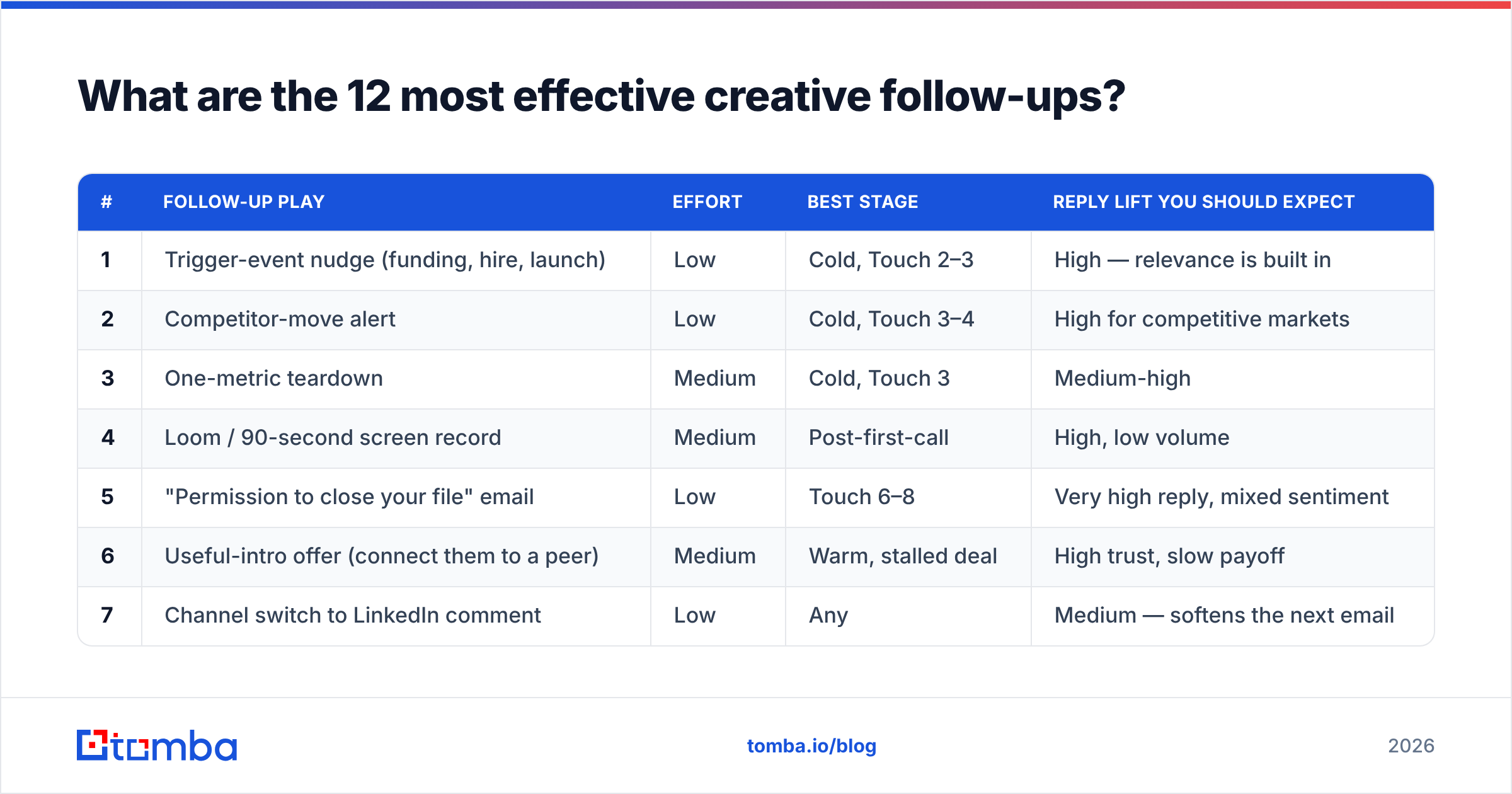
Here they are, ordered roughly from lowest effort to highest, with the deal stage each one fits.
| # | Follow-up play | Effort | Best stage | Reply lift you should expect |
|---|---|---|---|---|
| 1 | Trigger-event nudge (funding, hire, launch) | Low | Cold, Touch 2–3 | High — relevance is built in |
| 2 | Competitor-move alert | Low | Cold, Touch 3–4 | High for competitive markets |
| 3 | One-metric teardown | Medium | Cold, Touch 3 | Medium-high |
| 4 | Loom / 90-second screen record | Medium | Post-first-call | High, low volume |
| 5 | "Permission to close your file" email | Low | Touch 6–8 | Very high reply, mixed sentiment |
| 6 | Useful-intro offer (connect them to a peer) | Medium | Warm, stalled deal | High trust, slow payoff |
| 7 | Channel switch to LinkedIn comment | Low | Any | Medium — softens the next email |
| 8 | Voicemail + email one-two | Medium | Cold, Touch 4 | Medium-high combined |
| 9 | Internal-champion assist (send them a slide) | High | Late stage, stalled | Very high on real deals |
| 10 | Anniversary / renewal-window timing | Low | Dormant leads | Medium, excellent efficiency |
| 11 | Content callback (they engaged, you noticed) | Low | Warm, inbound | Medium-high |
| 12 | The graceful breakup + door left open | Low | Final touch | Medium — and it recycles later |
Now the detail on the ones that carry the most weight.
1. The trigger-event nudge. They raised a Series B, hired a Head of RevOps, opened a London office, shipped an integration. Any of those changes the math on your product. "Saw you hired [name] into RevOps last week — the first 90 days there usually means an audit of the data stack. Here's what three similar teams found when they ran that audit." Trigger events are the single highest-yield follow-up material available, and they are free.
2. The competitor-move alert. Neutral, factual, no pitch: "Your two closest competitors both launched a self-serve tier this quarter. Not selling you anything — thought it was worth flagging." You are now a source of market intelligence, not a vendor. That reframe survives four more touches.
3. The one-metric teardown. Not a full audit — one number. "I ran your careers-page domain through a quick check: 31% of the emails listed on it hard-bounce. That's the pattern we usually see when a company's outbound list is stale." Specific, verifiable, uncomfortable in a useful way. You can generate this kind of hook in minutes with a domain search or a quick pass through an email verifier.
4. The 90-second Loom. Record your screen. Show their page, their funnel, their signup flow — and one thing you would change. Cap it at 90 seconds. Reps who do this well report reply rates several times their text baseline, and the reason is simple: it is obviously not mass-sent.
5. "Permission to close your file." The most reliable reply-generator in B2B, and the most abused. One line: "Should I close your file on this, or is it just bad timing?" It works because it hands the prospect an easy exit and most people feel a small obligation to grant it. Use it once, at touch six or later, never at touch two.
9. The internal-champion assist. Late-stage deals stall because your champion has to sell you internally and has nothing to sell with. Send them the thing: a one-slide business case with their numbers in it, a security one-pager, a three-bullet answer to the objection their CFO will raise. This is the highest-conversion follow-up in existence and almost nobody does it, because it requires actually knowing where the deal is stuck.
12. The graceful breakup. Not passive-aggressive. Not "I guess you're not interested." Try: "I'll stop reaching out — the door's open if the priority moves up. Here's the benchmark doc either way, it's useful regardless of whether we ever talk." Then actually stop. Six months later, that thread reopens more often than you would think.

How many follow-ups is too many?#
The honest answer: it depends on channel mix, not raw count.
Six emails to the same inbox in three weeks is harassment. Six touches across email, LinkedIn, phone, and a comment on their post is a normal, professional sequence — the prospect experiences it as presence, not pressure. That distinction is everything.
A workable default cadence for a cold B2B prospect:
- Day 1 — Email 1: the reason you are reaching out, one specific observation, soft ask.
- Day 3 — LinkedIn: connect or comment. No pitch. Just show up as a human.
- Day 5 — Email 2: new information (trigger event, benchmark, teardown). Do not reference the first email.
- Day 9 — Phone + voicemail. Then email the same day referencing the voicemail.
- Day 14 — Email 3: the shortest one you write. Two sentences.
- Day 21 — Email 4: "permission to close your file."
- Day 30 — Graceful breakup + something useful they keep.
Seven touches, four channels, one month. Every touch carries something new. That is the shape of a sequence that does not get you blocked.
The multi-channel part is where most teams quietly fail — not because they lack the will, but because they lack the phone number. If you only have an email, your "multi-channel" cadence is just an email cadence with extra steps. A phone finder or a LinkedIn finder is the difference between a real omnichannel sequence and a theoretical one.
Does follow-up creativity matter more than data quality?#
No. And this is the part that most "creative follow-up" listicles skip.
Run the arithmetic. You build a seven-touch masterpiece of a sequence. Your list has a 22% bounce rate — which is roughly what an unverified scraped list looks like in practice. That means:
- 22% of your prospects never receive touch 1, let alone touch 7.
- Your bounce rate is now signalling to Google and Microsoft that you send to dead addresses, which drags down email deliverability for the 78% who are real.
- Your reply-rate metric is polluted, so you cannot tell whether the creative worked or the data failed.
Creativity multiplies deliverability. It does not substitute for it. A boring email to 100 real inboxes beats a brilliant email to 78 real inboxes and 22 bounces — and it beats it twice, because the second scenario is also damaging your sender reputation for next quarter.
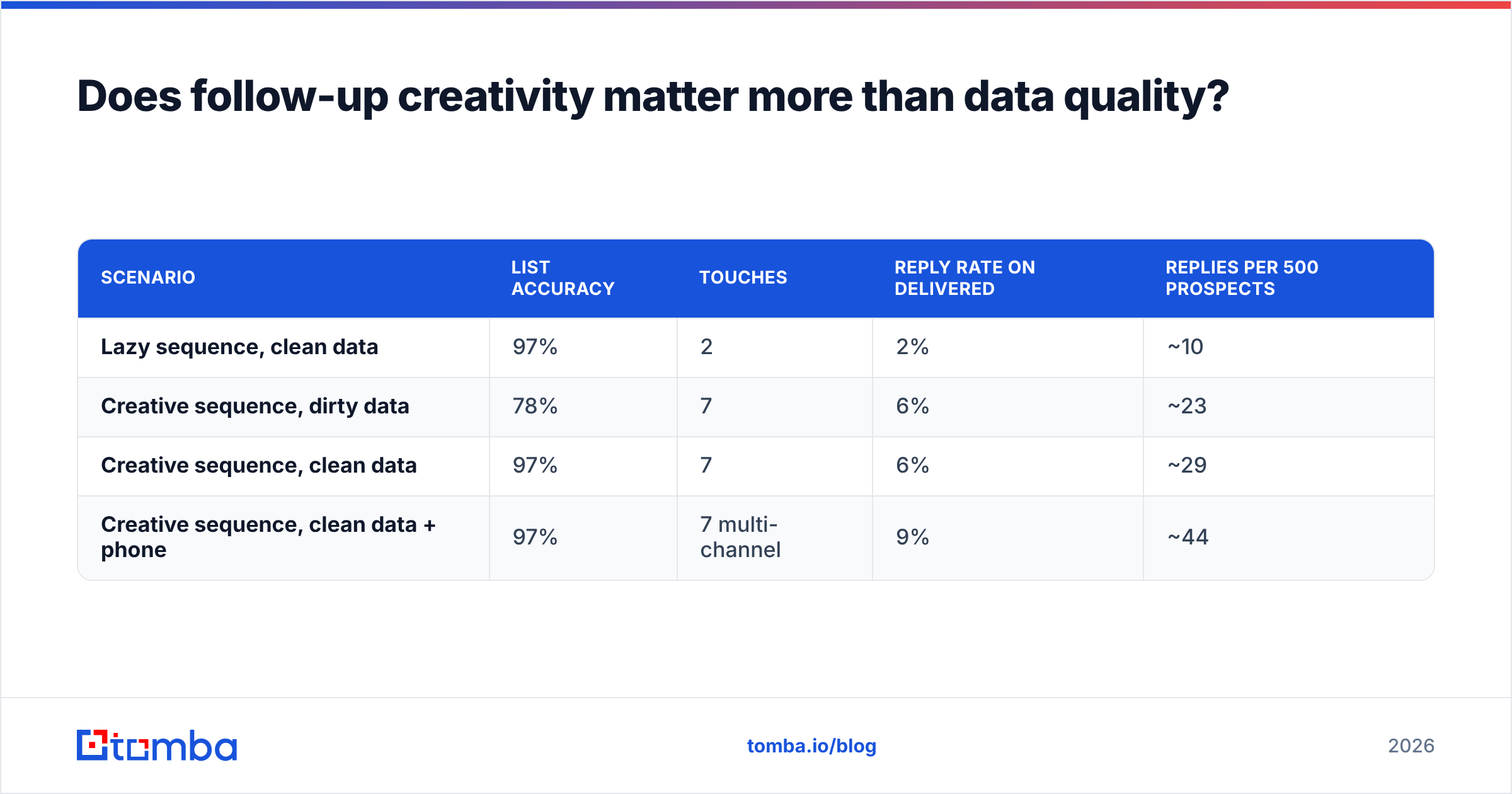
Here is how the two variables interact, using round numbers:
| Scenario | List accuracy | Touches | Reply rate on delivered | Replies per 500 prospects |
|---|---|---|---|---|
| Lazy sequence, clean data | 97% | 2 | 2% | ~10 |
| Creative sequence, dirty data | 78% | 7 | 6% | ~23 |
| Creative sequence, clean data | 97% | 7 | 6% | ~29 |
| Creative sequence, clean data + phone | 97% | 7 multi-channel | 9% | ~44 |
The jump from row 2 to row 4 is not a creativity jump. It is a data jump plus a channel jump. Same emails, same reps, roughly 90% more replies.
This is also why the platform choice matters more than teams admit. Tools in this category — Apollo, ZoomInfo, BookYourData, Tomba, Clearbit — differ far less in "features" than they do in how honest they are about what they cannot verify. A provider that returns a confident-looking guess for a catch-all domain is actively costing you deals. One that flags it as catch-all and lets you run a catch-all verifier is giving you the truth, which is less exciting and much more valuable.
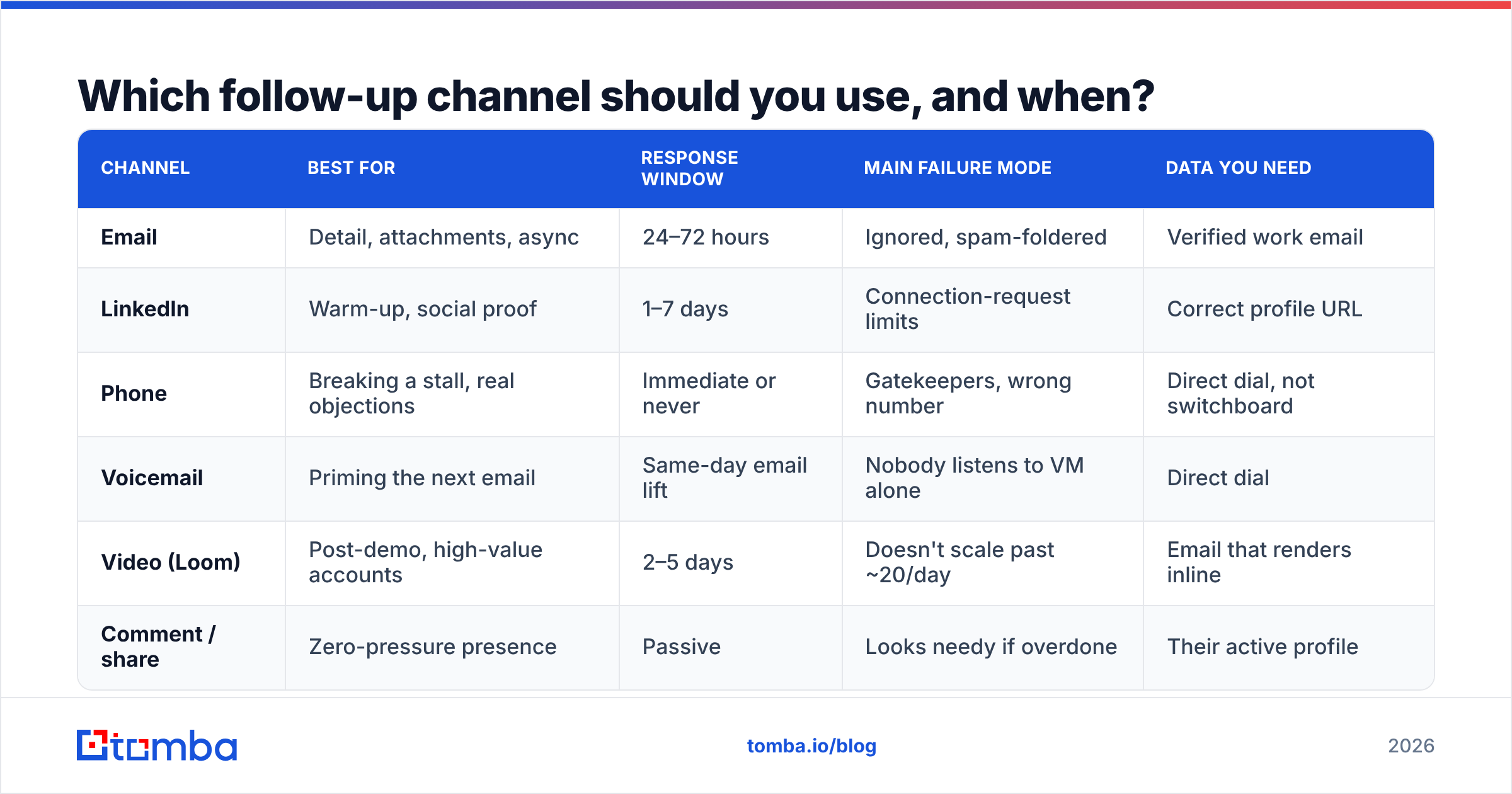
Which follow-up channel should you use, and when?#
| Channel | Best for | Response window | Main failure mode | Data you need |
|---|---|---|---|---|
| Detail, attachments, async | 24–72 hours | Ignored, spam-foldered | Verified work email | |
| Warm-up, social proof | 1–7 days | Connection-request limits | Correct profile URL | |
| Phone | Breaking a stall, real objections | Immediate or never | Gatekeepers, wrong number | Direct dial, not switchboard |
| Voicemail | Priming the next email | Same-day email lift | Nobody listens to VM alone | Direct dial |
| Video (Loom) | Post-demo, high-value accounts | 2–5 days | Doesn't scale past ~20/day | Email that renders inline |
| Comment / share | Zero-pressure presence | Passive | Looks needy if overdone | Their active profile |
Two rules for channel choice. First, never introduce yourself on a new channel — earn the second channel with the first. A cold call after a cold email lands very differently than a cold call from nowhere. Second, match channel to stage: phone breaks stalls, email carries detail, LinkedIn maintains presence, video closes the gap after a demo. Using phone as your presence channel is how you get blocked.
Industry sales-tech reviews on G2 show the same pattern across sequencing platforms: teams that run three or more channels consistently outperform single-channel teams on meetings booked, even when the single-channel teams send more total touches. Volume is not the lever. Coverage is.
How do you keep follow-ups personal at scale?#
You do not personalize every touch. You personalize the touches that decide the outcome.
The realistic split for a rep working 200 accounts:
- Touch 1 — semi-personalized. One real observation per prospect, everything else templated. Budget: 90 seconds per prospect.
- Touch 2 — fully templated. Trigger-event or benchmark content, segmented by industry, not by person. Budget: zero marginal time.
- Touch 3 — fully personalized for your top 20%. Teardown, Loom, or a genuinely specific hook. Everyone else gets a good template. Budget: 10 minutes each, top accounts only.
- Touch 4–6 — templated with a personalized first line. The first sentence carries the personalization load. The rest can be reused.
- Touch 7 — templated breakup. No personalization needed. The offer to stop is the personalization.
That is four templated touches and three human ones, and it holds up at 200 accounts. The mistake is trying to hand-write all seven for all 200 — you burn out by Wednesday and touch 4 never gets sent to anybody.
Where automation genuinely helps is the inputs, not the writing. Pulling firmographic and role data into your CRM so your templates render correctly, verifying addresses before the sequence fires, and enriching stale records — that is where data enrichment earns its cost. The writing should still sound like a person, because the moment it does not, every touch after it is wasted.
A last note on measurement. Track replies per prospect entered, not open rate. Open rate is now mostly noise thanks to privacy proxies, and reply rate on delivered emails flatters you by hiding your bounces. Replies per prospect entered is the only number that punishes bad data and rewards good follow-up at the same time — which is exactly what you want it to do. Set your target, review it monthly, and cut whichever touch in the sequence produces the fewest replies per hour of rep time. Usually that is touch 2. Sometimes it is your favorite one.
Start with a list that actually reaches people#
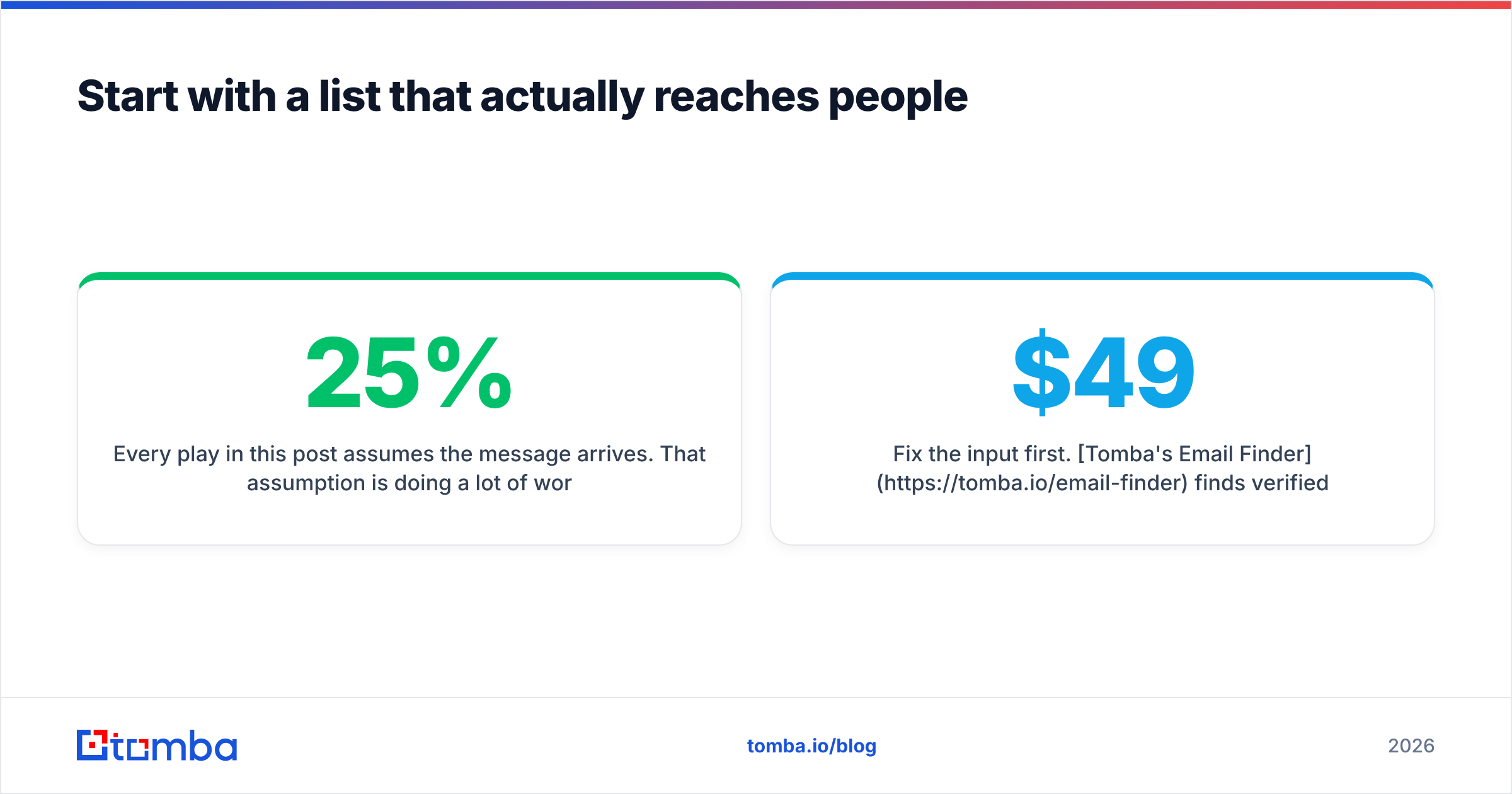
Every play in this post assumes the message arrives. That assumption is doing a lot of work, and for most outbound teams it is wrong by 15–25%.
Fix the input first. Tomba's Email Finder finds verified professional addresses by name, domain, or company, and flags the ones it cannot confirm instead of guessing — so your seven-touch sequence lands in seven real inboxes. The free tier gives you 25 searches a month to test it against a list you already have; paid plans start at $49/mo on Starter, with Growth at $99/mo when you scale the volume. Check the full Tomba pricing if you are comparing per-credit costs.
Get the data right, then get creative. In that order.
Related guides#
Ready to find emails that actually work?
Join 150,000+ professionals who stopped guessing and started sending. Free credits on signup — no credit card required.
Get the Tomba newsletter
Practical outbound tactics and product updates — once every two weeks.
About the author