CRM for Prospecting: How to Turn Your Pipeline Into a Lead Engine
A CRM won't fill itself. Here's how to pick, configure, and feed a CRM for prospecting so reps spend time selling instead of hunting for data.
Your CRM is only as good as the data you put into it. Buy the most expensive platform on the market, and if reps are still copying emails off LinkedIn by hand, you've bought a very pretty spreadsheet. This guide is about the other half of the equation: using a CRM for prospecting as an active lead engine, not a passive filing cabinet.
TL;DR#
- A CRM for prospecting is a system that captures, organizes, and moves new leads through early pipeline stages — it is not the same as an account-management CRM built for existing customers.
- The three things that matter most: fast contact capture, clean enrichment, and automation that removes manual data entry.
- Most CRMs are weak at one thing — supplying accurate contact data — so pair yours with a dedicated email finder and data enrichment layer.
- Pipedrive, HubSpot, and Salesforce dominate, but the "best" choice depends on team size, budget, and how much prospecting volume you push.
- Set up your stages, required fields, and enrichment automations before you import a single lead — retrofitting hygiene later is painful.
What is a CRM for prospecting?#
A CRM for prospecting is a customer relationship management tool configured around the top of the funnel — finding, qualifying, and engaging brand-new contacts — rather than the bottom, where you manage renewals and support tickets.
Think of it like the difference between a fishing net and an aquarium. An account-management CRM is the aquarium: it keeps the fish you already caught alive, fed, and healthy. A prospecting CRM is the net — it's built to catch new fish fast, sort the keepers from the throwbacks, and get them into the tank. Same category of product, very different job.
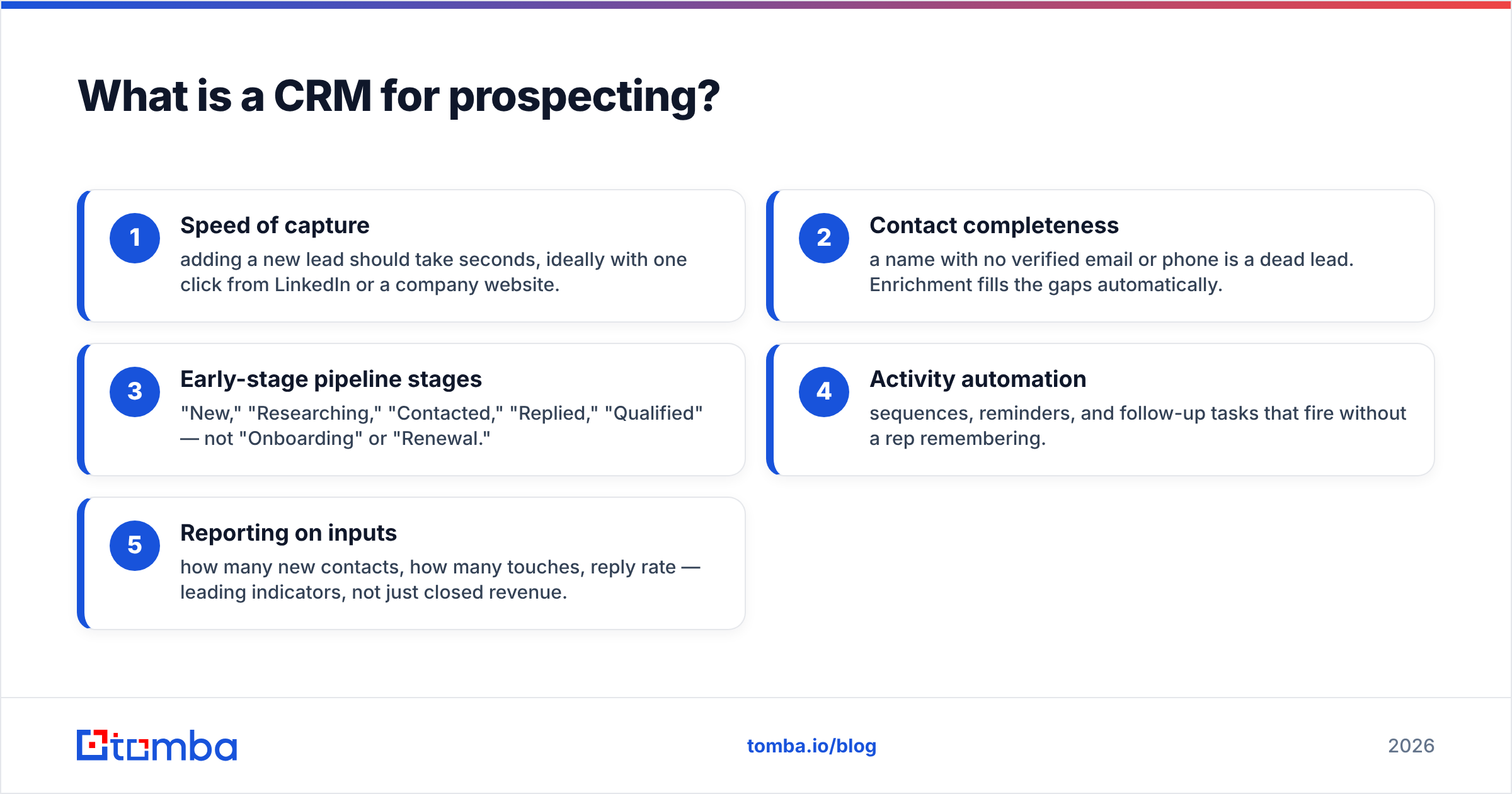
Technically, a prospecting-focused setup emphasizes:
- Speed of capture — adding a new lead should take seconds, ideally with one click from LinkedIn or a company website.
- Contact completeness — a name with no verified email or phone is a dead lead. Enrichment fills the gaps automatically.
- Early-stage pipeline stages — "New," "Researching," "Contacted," "Replied," "Qualified" — not "Onboarding" or "Renewal."
- Activity automation — sequences, reminders, and follow-up tasks that fire without a rep remembering.
- Reporting on inputs — how many new contacts, how many touches, reply rate — leading indicators, not just closed revenue.
If your CRM is optimized for the last item on a deal (invoicing, support) but slow at the first (adding and enriching a contact), it's fighting your prospecting team instead of helping it.
Why isn't a CRM enough for prospecting on its own?#
Because a CRM stores data — it rarely generates it. This is the gap almost every team underestimates.
Ask any SDR where their time actually goes and you'll hear the same answer: not writing emails, not making calls, but hunting for the right email address and double-checking it won't bounce. A CRM gives you a field called "Email." It does not fill that field. You do — or a tool does.

That's why high-output prospecting stacks always pair the CRM with a data layer. The CRM is the workflow and memory; the data layer is the fuel. When you connect an accurate email-finding and verification source directly to your CRM, three things happen:
- Reps stop tab-switching to LinkedIn, Google, and guess-the-format tools.
- Bounce rates drop because addresses are verified before the first send, protecting your email deliverability.
- Records arrive complete — title, company, verified email, sometimes phone — so segmentation and personalization actually work.
Tools like Tomba's domain search and bulk email finder exist precisely to feed this top-of-funnel motion, then hand clean records to whatever CRM you run. The CRM never has to be the data source — and honestly, it's usually bad at being one.
Which CRM is best for prospecting in 2026?#
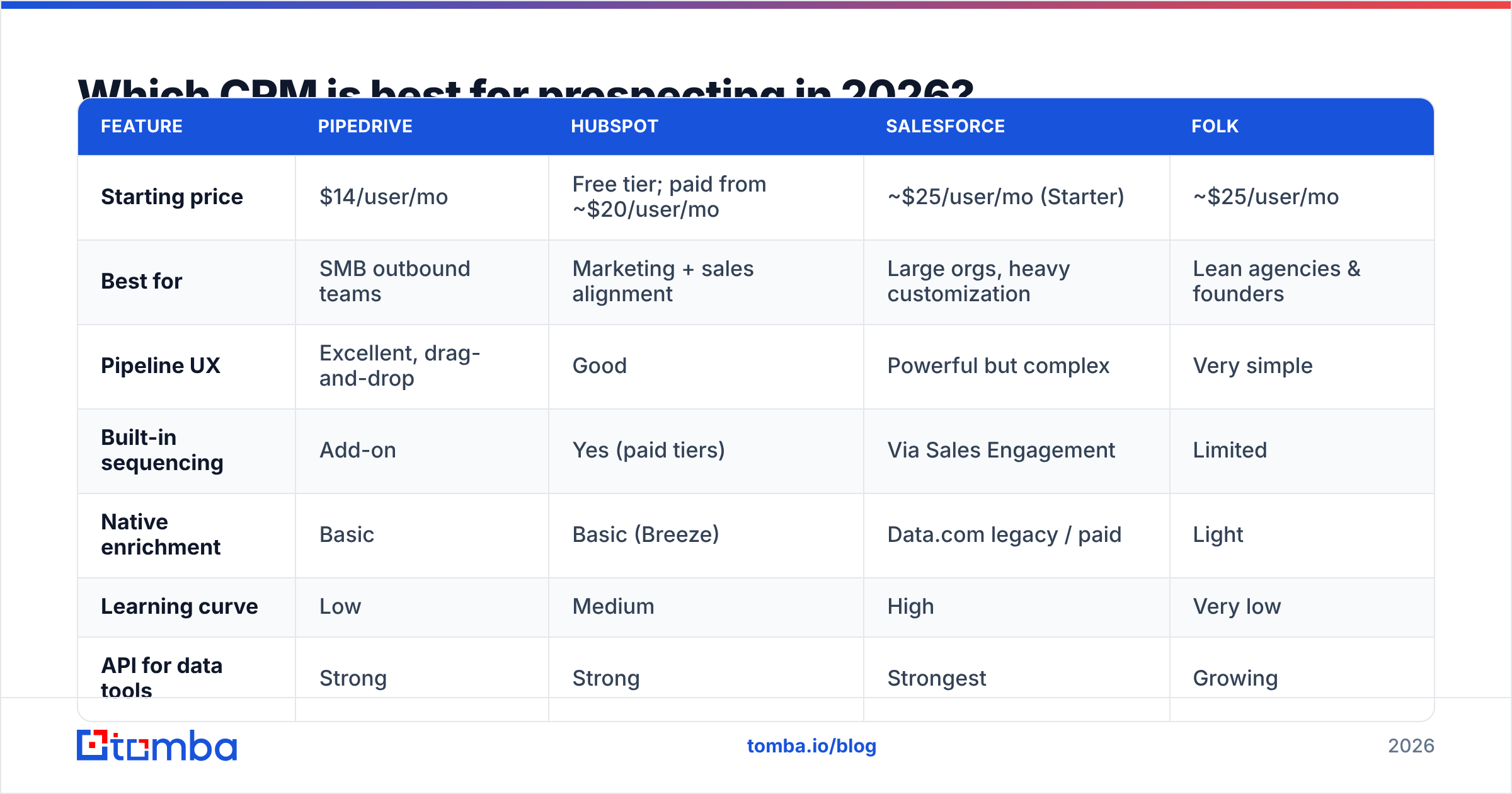
There's no universal winner, but a few platforms consistently show up in high-volume prospecting teams. Here's an honest side-by-side on the attributes that matter for outbound, not for enterprise account management.
| Feature | Pipedrive | HubSpot | Salesforce | Folk |
|---|---|---|---|---|
| Starting price | $14/user/mo | Free tier; paid from ~$20/user/mo | ~$25/user/mo (Starter) | ~$25/user/mo |
| Best for | SMB outbound teams | Marketing + sales alignment | Large orgs, heavy customization | Lean agencies & founders |
| Pipeline UX | Excellent, drag-and-drop | Good | Powerful but complex | Very simple |
| Built-in sequencing | Add-on | Yes (paid tiers) | Via Sales Engagement | Limited |
| Native enrichment | Basic | Basic (Breeze) | Data.com legacy / paid | Light |
| Learning curve | Low | Medium | High | Very low |
| API for data tools | Strong | Strong | Strongest | Growing |
A few honest takes:
- Pipedrive is the default recommendation for pure outbound SMB teams. It's fast, visual, and gets out of the way. Its native enrichment is thin, which is fine — you'll bolt on a real data source anyway.
- HubSpot wins when marketing and sales need to share one system. The free tier is genuinely useful for early-stage teams, though the good sequencing and reporting sit behind paid tiers. See HubSpot's own CRM overview for current tiering.
- Salesforce is the most powerful and the most work. If you have a RevOps function and complex territories, it's worth it. If you're three reps in a room, it's overkill. Salesforce rarely loses on capability; it loses on time-to-value.
- Folk and similar lightweight CRMs are quietly excellent for solo founders and agencies who want prospecting speed without setup overhead.
Cross-check any shortlist against real user reviews on G2 before committing — feature lists lie, review patterns don't.
How do you set up a CRM for prospecting the right way?#
Configure the machine before you feed it. Here's the setup order that saves you a cleanup project six months in.
1. Define early-stage pipeline stages. Keep them behavior-based and few: New → Researching → Contacted → Engaged → Qualified. Stages should reflect what the prospect did, not what you hope to do.
2. Set required fields for data hygiene. At minimum: full name, company, verified email, source. Making "verified email" required forces the enrichment step instead of letting half-empty records pile up.
3. Wire in enrichment at the point of capture. Don't import raw lists and clean later. Enrich on the way in. Connect an email finder API or a native integration so every new record gets a verified address and firmographics automatically.
4. Build your sequences and cadences. Map a multi-touch flow — email, follow-up, LinkedIn, call — with clear exit rules when someone replies.
5. Automate the busywork. Auto-create follow-up tasks, auto-log activity, auto-move stages on reply. Every manual step you remove is time returned to selling.
6. Instrument leading indicators. Track new contacts added, touches per day, and reply rate — not just closed deals. Those inputs tell you weeks earlier whether the pipeline is healthy.
The single biggest setup mistake is treating enrichment as a later problem. Records without verified emails don't just sit idle — they actively pollute your reporting, tank your deliverability when someone finally emails them, and erode trust in the whole system. Fix data quality at the door.
How does data enrichment plug into your CRM?#
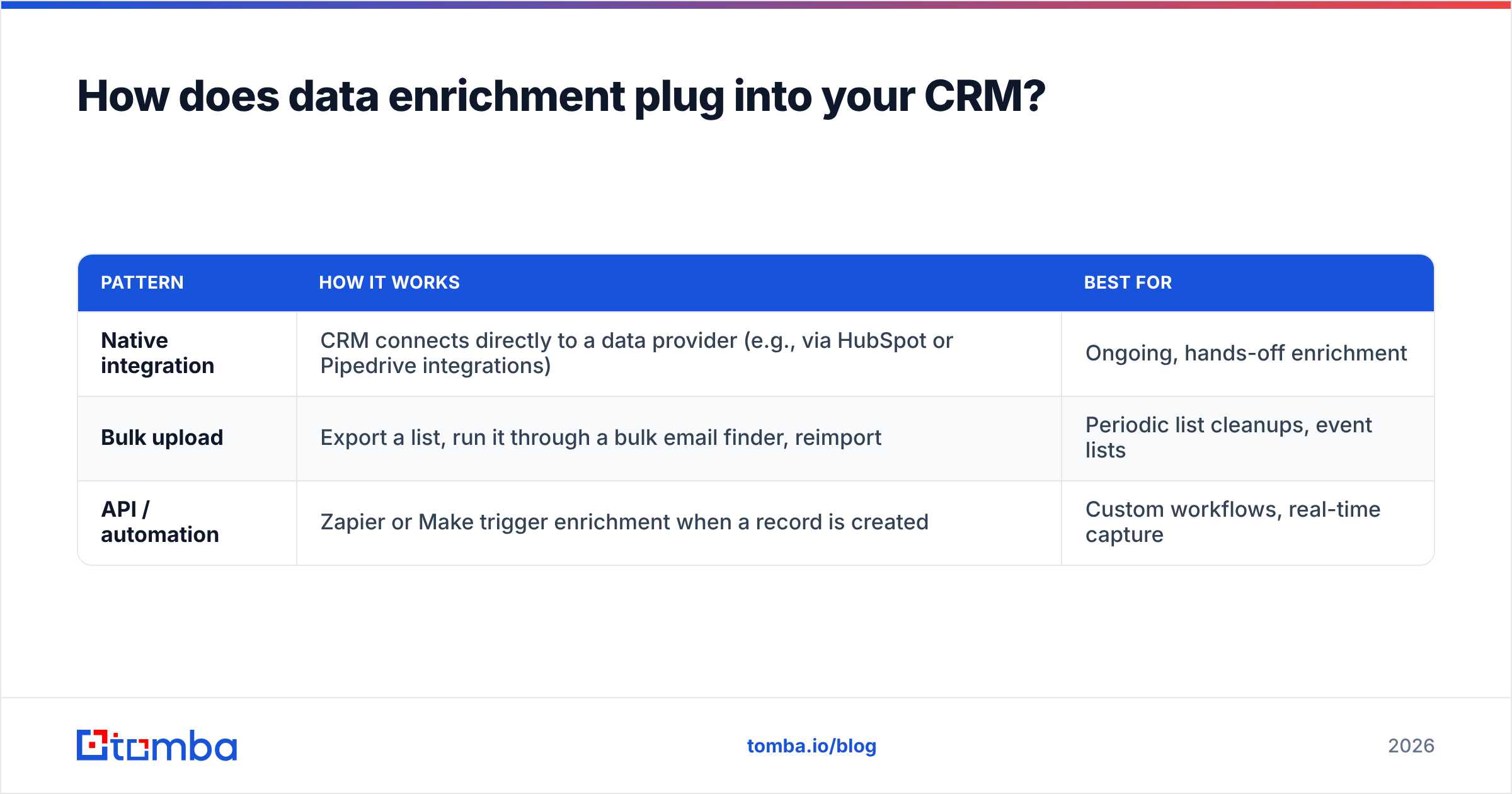
Enrichment is the bridge between "I have a name" and "I have a sellable contact." It runs in three common patterns, and most teams use more than one.
| Pattern | How it works | Best for |
|---|---|---|
| Native integration | CRM connects directly to a data provider (e.g., via HubSpot or Pipedrive integrations) | Ongoing, hands-off enrichment |
| Bulk upload | Export a list, run it through a bulk email finder, reimport | Periodic list cleanups, event lists |
| API / automation | Zapier or Make trigger enrichment when a record is created | Custom workflows, real-time capture |
Here's a concrete flow that works in almost any stack:
- A rep adds a new lead (or a form submission creates one).
- An automation fires: send the name + domain to an email-finding service.
- The service returns a verified email, confirms it with an email verifier, and appends the title and company.
- The complete, deliverable record lands back in the CRM, ready for sequencing.
No tab-switching. No manual guessing at first.last@company.com. No bounces on the first send. That last point matters more than it sounds — a spike in bounces damages your sender reputation, which quietly suppresses every future campaign, not just the bad list.
For teams that also want phone coverage, layering a phone finder into the same automation gives reps a multichannel record from the start.
What does a complete prospecting stack look like?#
A CRM is one layer of four. Here's how the pieces fit for a modern outbound team.
- Data layer — email finding, verification, and enrichment (this is where Tomba lives). It supplies accurate, deliverable contacts.
- CRM layer — Pipedrive, HubSpot, or Salesforce. Stores relationships, tracks pipeline, remembers history.
- Engagement layer — sequencing and sending tools that run cadences at scale.
- Signal layer (optional) — intent data or website visitor reveal that tells you who to prospect and when.
The mistake teams make is over-investing in the CRM and engagement layers while starving the data layer. You end up with a beautifully automated machine sending polished emails to addresses that bounce. Fix the fuel first.
If you're just starting, a lean version is enough: a lightweight CRM, a verified email source, and one sequencing tool. Compare full Tomba pricing against your CRM cost and you'll usually find the data layer is the cheapest, highest-leverage line item in the stack — Tomba's Free tier gives you 25 searches a month to test the fit, with Starter at $49/mo when you scale.
How much should you budget for a prospecting CRM stack?#
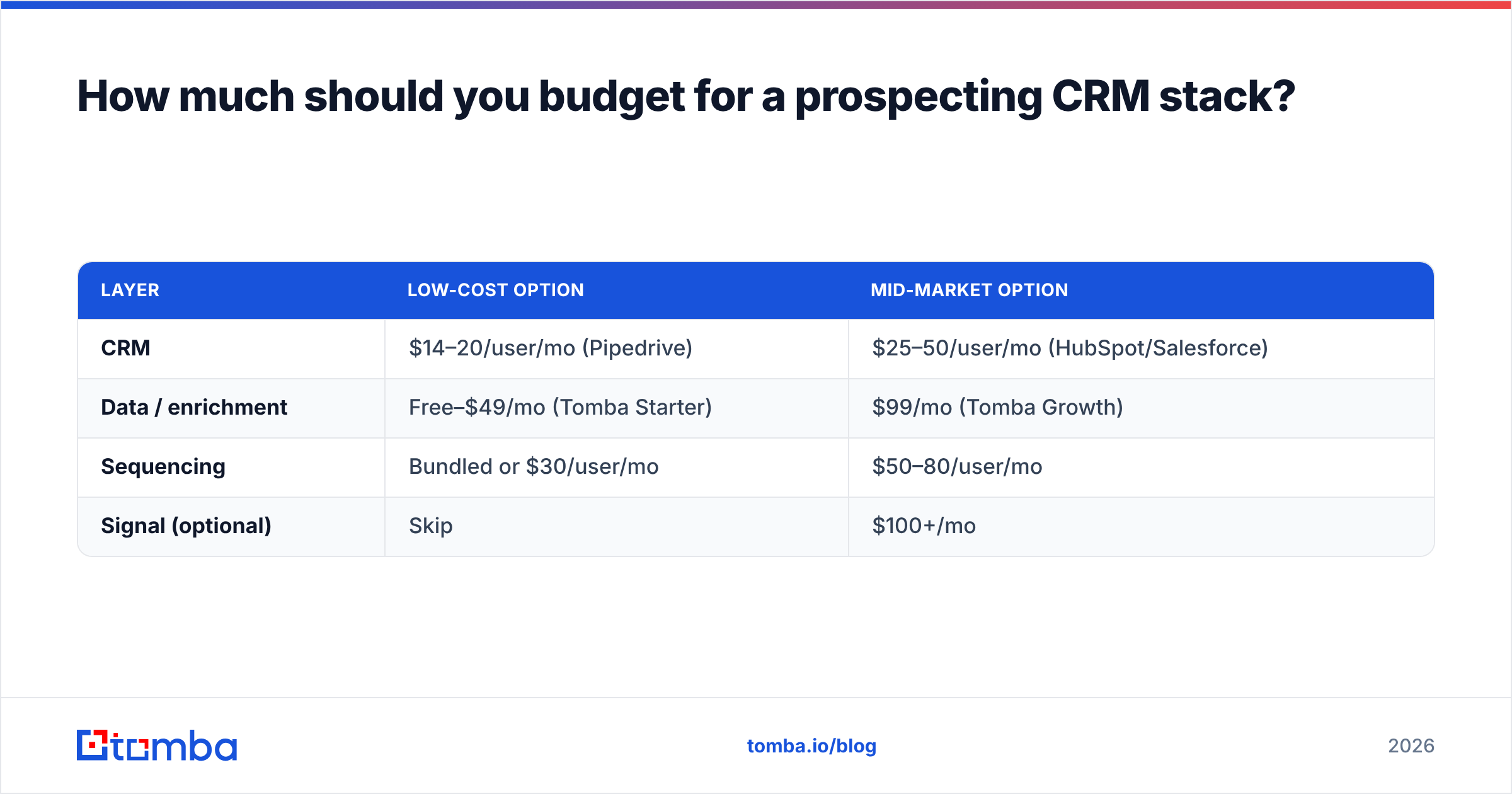
Budget by layer, not by logo. Here's a realistic monthly range for a small outbound team of three to five reps.
| Layer | Low-cost option | Mid-market option |
|---|---|---|
| CRM | $14–20/user/mo (Pipedrive) | $25–50/user/mo (HubSpot/Salesforce) |
| Data / enrichment | Free–$49/mo (Tomba Starter) | $99/mo (Tomba Growth) |
| Sequencing | Bundled or $30/user/mo | $50–80/user/mo |
| Signal (optional) | Skip | $100+/mo |
The data layer is almost always the smallest number and the biggest multiplier. A rep who spends 90 minutes a day hunting for emails is losing roughly a third of their selling time — enrichment that reclaims even half of that pays for itself in a week. That's the math worth running before you upgrade to a pricier CRM tier you may not need.
Common mistakes to avoid#
- Importing dirty lists. Garbage in, garbage forever. Verify before import, not after bounces.
- Too many pipeline stages. If reps can't remember what a stage means, it's noise. Five is plenty for prospecting.
- Making email optional. If the "verified email" field isn't required, half your records will lack one.
- Ignoring deliverability. Sending to unverified addresses burns your domain reputation for everyone on the team.
- Buying a CRM to solve a data problem. They're different problems. Solve data with a data tool.
The bottom line#
A CRM for prospecting is a workflow engine, not a data source. Pick the platform that fits your team's size and budget — Pipedrive for speed, HubSpot for alignment, Salesforce for scale — then feed it with a dedicated data layer so every record arrives complete and deliverable. The CRM organizes the hunt; it was never designed to do the hunting.
That hunting is exactly what the Tomba Email Finder handles. Find verified professional emails by name, company, or domain, confirm them before you send, and push clean records straight into your CRM through native integrations or the Tomba API. Start free with 25 searches a month, scale to Starter at $49/mo, and let your reps spend their day selling — not searching. Fill your pipeline with contacts that actually convert.
Related guides#
Ready to find emails that actually work?
Join 150,000+ professionals who stopped guessing and started sending. Free credits on signup — no credit card required.
Get the Tomba newsletter
Practical outbound tactics and product updates — once every two weeks.
About the author