Crustdata vs UpLead (2026): Which B2B Data Tool Wins?
Crustdata sells real-time data through an API; UpLead sells a searchable contact database with a UI. We compare pricing, accuracy, coverage, and API access to help you pick — and name a cheaper option that beats both on cost per verified contact.
Choosing between Crustdata and UpLead usually comes down to one question you have to answer before you look at a single pricing page: do you want raw data piped into your own systems, or a polished interface your reps can search on Monday morning? These two tools sit on opposite ends of that spectrum, and picking the wrong end wastes budget no matter how good the data is.
This comparison breaks down where each one earns its price, where it quietly falls short, and how to decide based on how your team actually works — not on marketing claims.
TL;DR: Crustdata vs UpLead in one glance#
- Crustdata is API-first. It streams real-time people, company, and signal data (funding, headcount changes, tech installs) into your CRM, RevOps stack, or product. Great for engineering-adjacent teams; overkill if you just want a list.
- UpLead is UI-first. It's a searchable B2B contact database with verification built in, aimed at sales reps who want to build a list and export it today.
- Accuracy differs by use case. UpLead advertises a 95% email accuracy guarantee with credit refunds on bounces; Crustdata leans on freshness and coverage breadth over a single headline number.
- Neither is the cheapest per verified contact. If your core need is finding and verifying business emails at volume, a dedicated finder like Tomba undercuts both on cost.
- Pick by workflow: engineers and RevOps → Crustdata; individual reps and SMB sales → UpLead; pure email discovery on a budget → a focused email finder.
What is Crustdata and who is it for?#
Crustdata is a data-as-a-service platform built around an API. Instead of logging into a dashboard to run searches, you (or your engineers) call endpoints that return structured people and company records, plus real-time signals like job changes, funding rounds, headcount growth, and technographics.
The pitch is freshness. Crustdata positions itself as delivering "real-time" data refreshed far more often than a static database, which matters for trigger-based outbound — reaching a prospect the week they raised a Series B, not three months later. It's the kind of tool that powers a custom lead-scoring model, an automated enrichment pipeline, or a competitive-intelligence dashboard.
That power comes with a cost profile most solo reps won't love. Crustdata assumes you have someone who can consume an API and do something with the payload. If nobody on your team writes code or configures a no-code pipeline, most of what you're paying for sits unused.

What is UpLead and who is it for?#
UpLead is a B2B prospecting database with a clean web interface. You filter by industry, title, company size, location, technology, and dozens of other attributes, then pull verified contacts into a list. Its headline feature is a real-time email verification step and a 95% accuracy guarantee — bounce a verified email and you get the credit back.
UpLead is built for the person doing the prospecting, not the person building the pipeline. A sales rep, a founder, or a small SMB team can sign up, run a search, and export a clean list to their CRM within minutes. No engineering required. That accessibility is the whole point, and it's why UpLead shows up on so many "best tools for SMB sales" lists on G2.
The trade-off is depth. You get a strong contact database and solid verification, but you don't get Crustdata's real-time signal firehose or the flexibility to bend the data to a custom model. It's a finished product, not a data source.
Crustdata vs UpLead: side-by-side comparison#
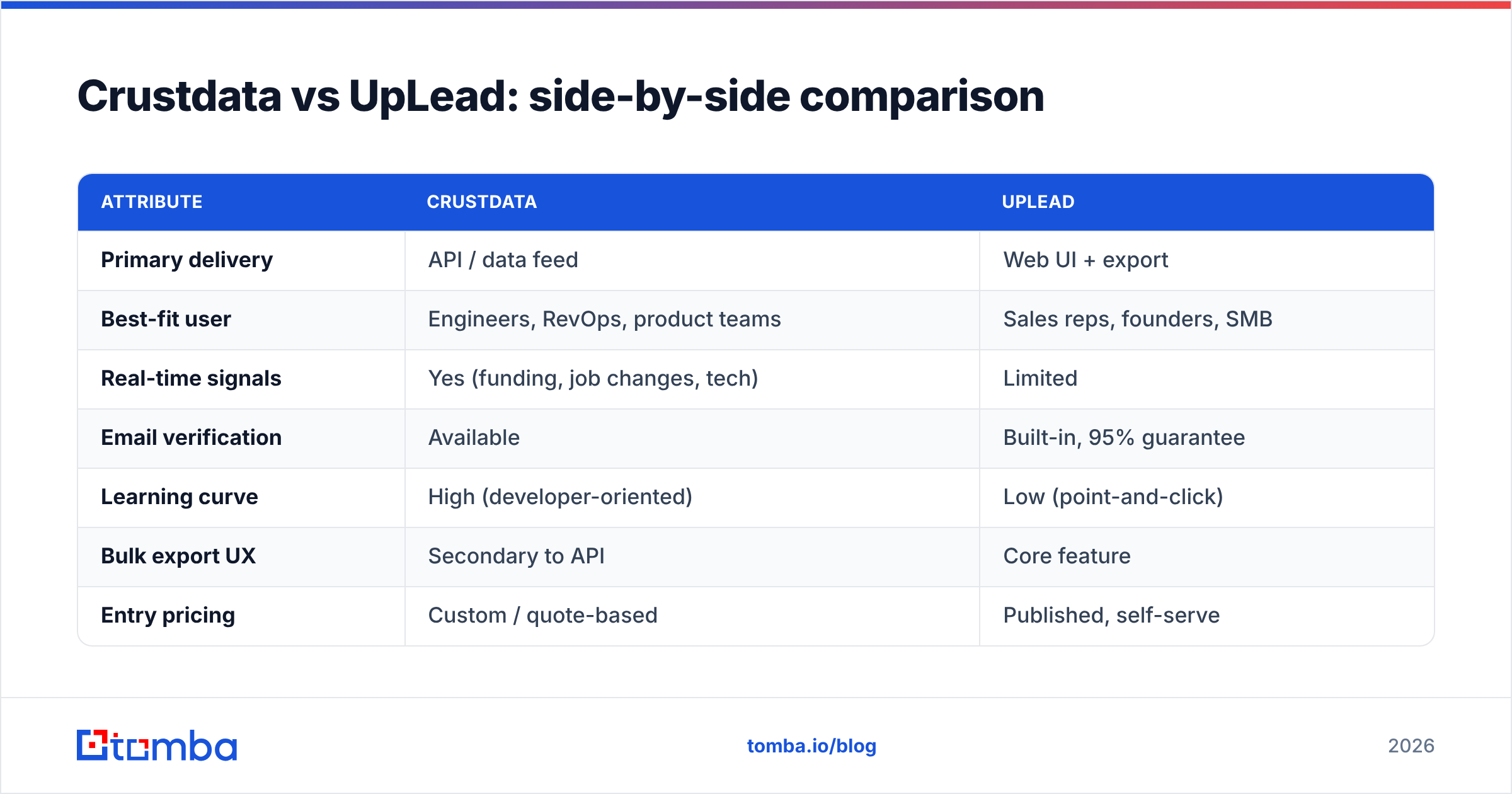
Here's how the two stack up on the attributes that actually change your buying decision:
| Attribute | Crustdata | UpLead |
|---|---|---|
| Primary delivery | API / data feed | Web UI + export |
| Best-fit user | Engineers, RevOps, product teams | Sales reps, founders, SMB |
| Real-time signals | Yes (funding, job changes, tech) | Limited |
| Email verification | Available | Built-in, 95% guarantee |
| Learning curve | High (developer-oriented) | Low (point-and-click) |
| Bulk export UX | Secondary to API | Core feature |
| Entry pricing | Custom / quote-based | Published, self-serve |
| Free trial | Limited / demo | 5 free credits |
The pattern is clear: Crustdata wins on data engineering flexibility and signal freshness, UpLead wins on speed-to-list and predictable, self-serve pricing. Neither is "better" in the abstract — they're built for different buyers.
Which has better data accuracy?#
Short answer: they measure accuracy differently, so compare on your own data before committing. UpLead makes accuracy a marketing centerpiece — a 95% email accuracy guarantee backed by verification-at-export and credit refunds on bounces. That's a concrete, testable promise, and it's reassuring for anyone sending cold email where a high bounce rate can wreck sender reputation.
Crustdata frames quality around freshness and coverage rather than a single bounce-rate number. Its argument is that a slightly-less-verified record that's current beats a "verified" record that went stale six months ago when the person changed jobs. For trigger-based outbound, that's a legitimate position.
In practice, accuracy always depends on your specific target segment. A tool that's excellent for US SaaS mid-market can be mediocre for European manufacturing SMBs. The only honest test is to run the same 100 target accounts through each tool and check the results yourself. Whatever tool you land on, run exports through a dedicated email verifier before you send — verification is cheap insurance against a damaged domain.
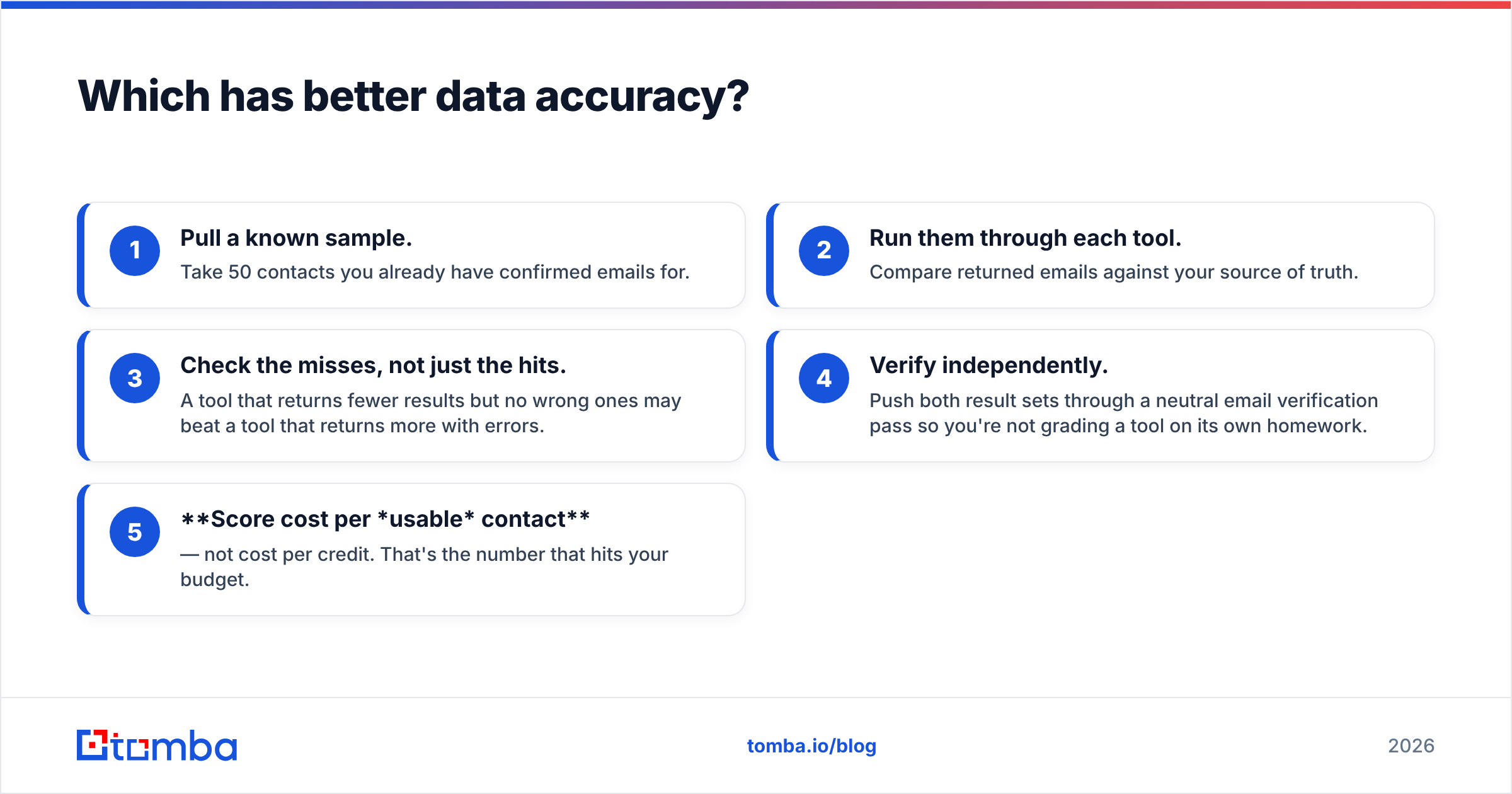
How to actually test accuracy in an hour#
- Pull a known sample. Take 50 contacts you already have confirmed emails for.
- Run them through each tool. Compare returned emails against your source of truth.
- Check the misses, not just the hits. A tool that returns fewer results but no wrong ones may beat a tool that returns more with errors.
- Verify independently. Push both result sets through a neutral email verification pass so you're not grading a tool on its own homework.
- Score cost per usable contact — not cost per credit. That's the number that hits your budget.
How do Crustdata and UpLead price compare?#
Pricing philosophy is where these two diverge hardest. UpLead publishes self-serve plans with a small free trial (5 credits), so you can estimate cost per contact before you talk to anyone. Crustdata leans toward custom, quote-based pricing tied to API volume and the specific datasets you need — normal for a data-API vendor, but it means you can't comparison-shop on a public page.
For budgeting, that difference matters:
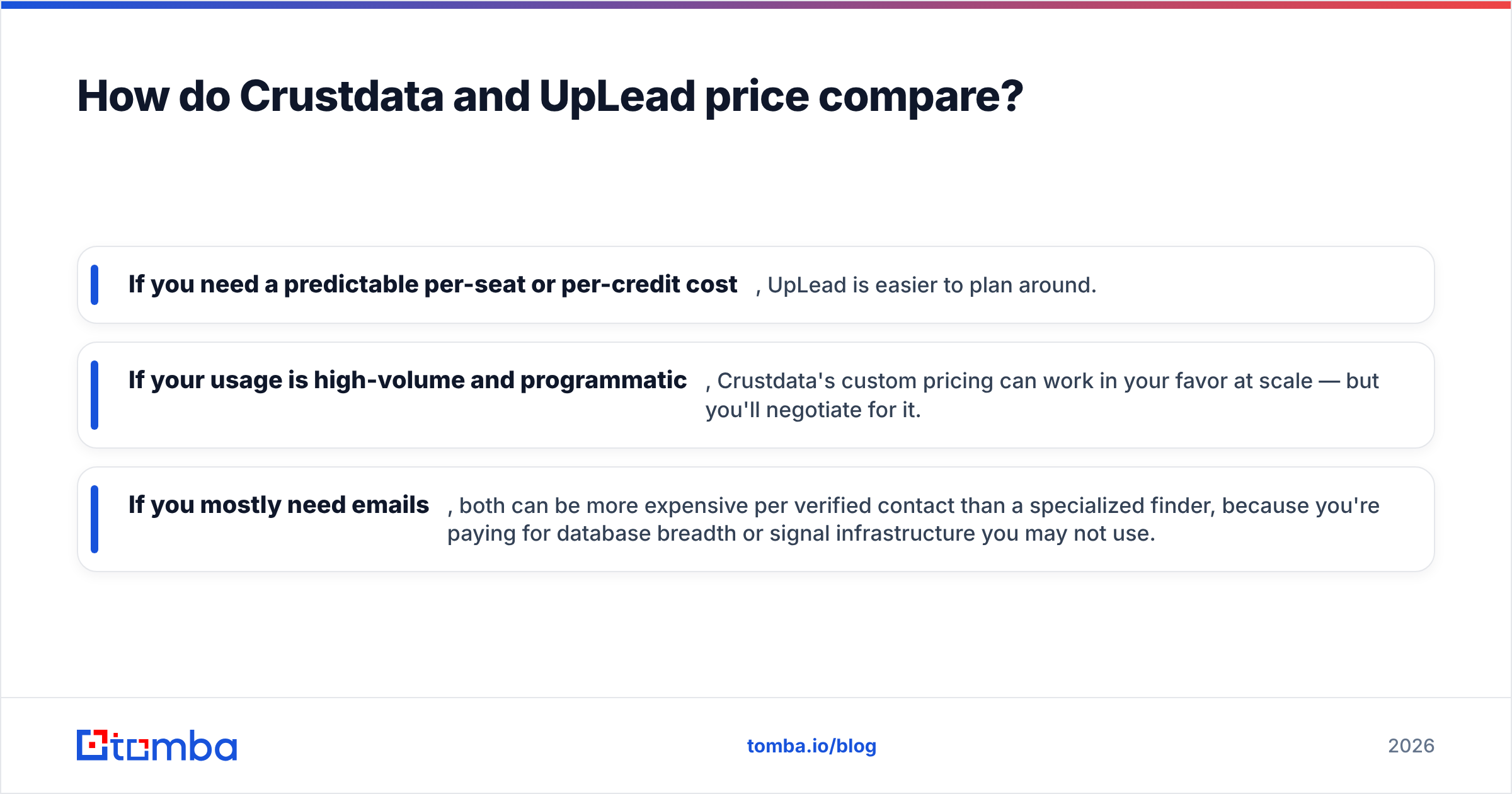
- If you need a predictable per-seat or per-credit cost, UpLead is easier to plan around.
- If your usage is high-volume and programmatic, Crustdata's custom pricing can work in your favor at scale — but you'll negotiate for it.
- If you mostly need emails, both can be more expensive per verified contact than a specialized finder, because you're paying for database breadth or signal infrastructure you may not use.
That last point is worth sitting with. A lot of teams buy a full data platform when what they actually do all day is: find the right person, get their email, verify it, send. If that's 80% of your workflow, a focused tool is the cheaper, faster path.
When should you skip both and use a dedicated email finder?#
Pick a focused email finder when your bottleneck is contact discovery, not data infrastructure. Crustdata and UpLead are the right call when you need real-time signals or a broad multi-attribute database. But plenty of teams are paying platform prices for what is, functionally, an email-lookup job.
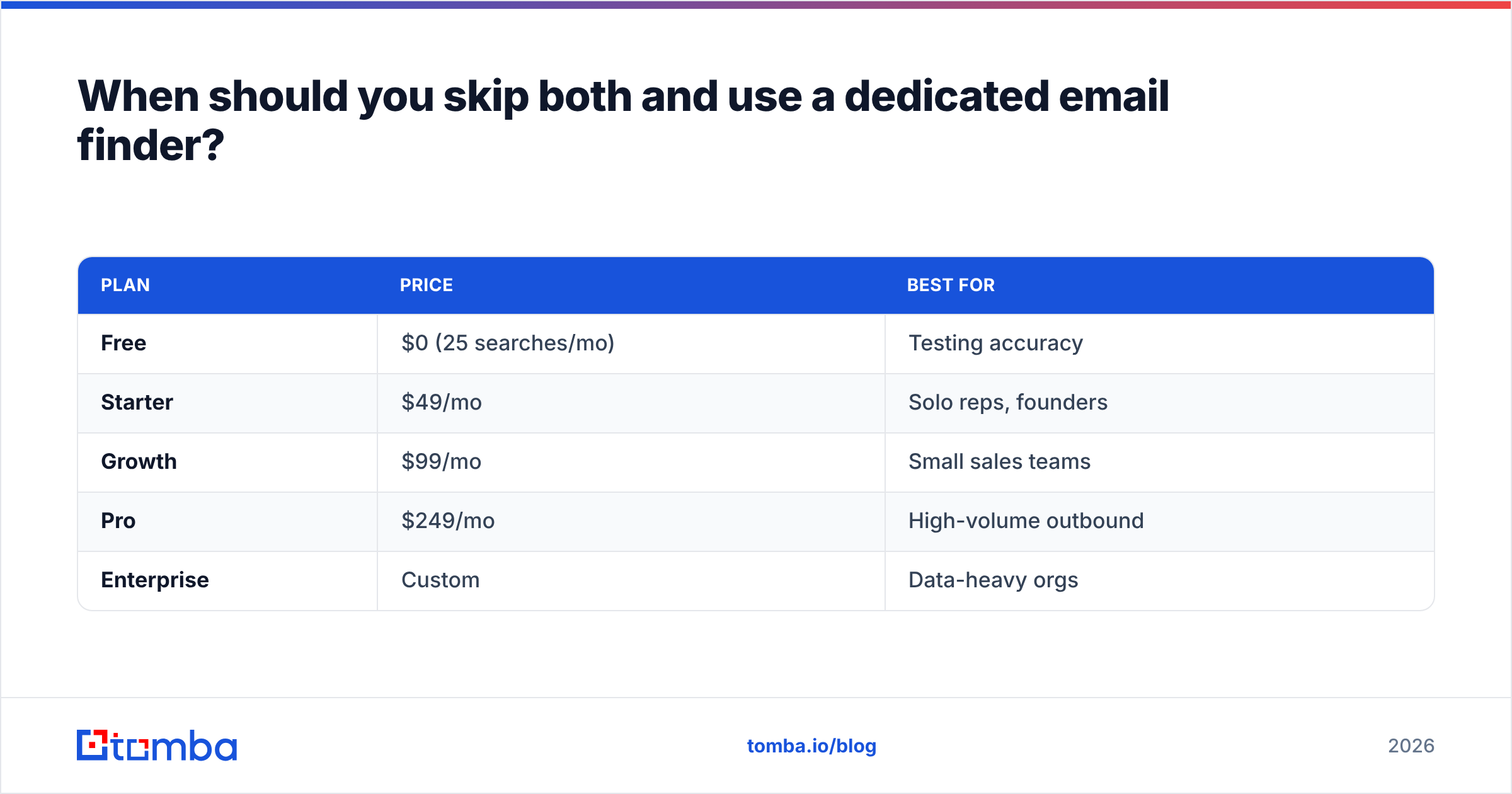
If your day looks like "I have a name and a company, I need a verified email," a purpose-built finder gets you there for less. Tomba is built exactly for that lane, and its pricing reflects a narrower, cheaper scope:
| Plan | Price | Best for |
|---|---|---|
| Free | $0 (25 searches/mo) | Testing accuracy |
| Starter | $49/mo | Solo reps, founders |
| Growth | $99/mo | Small sales teams |
| Pro | $249/mo | High-volume outbound |
| Enterprise | Custom | Data-heavy orgs |
Beyond the core finder, Tomba covers the adjacent jobs these platforms bundle: domain search for finding every email at a company, a bulk email finder for list building, data enrichment to fill CRM gaps, and a documented email finder API if you want Crustdata-style programmatic access without the enterprise contract. You can check exact Tomba pricing publicly — no quote required.
The honest framing: Tomba won't replace Crustdata's real-time funding-signal feed, and it isn't trying to. But for the core find-verify-send loop that dominates most outbound teams' actual time, it's the lower cost per verified contact.
Crustdata vs UpLead: which should you choose?#
Match the tool to the person who'll use it every day:
- Choose Crustdata if you have engineering or RevOps resources, want real-time signals to power trigger-based outbound, and plan to build data into custom scoring, enrichment, or product features. You're buying a data source, not a dashboard.
- Choose UpLead if individual reps need to build verified lists themselves, you value a published price and a concrete accuracy guarantee, and you don't want to write a line of code. You're buying a finished prospecting tool.
- Choose a dedicated finder if most of your workflow is discovering and verifying business emails, you want the lowest cost per contact, and you'd rather not pay for signal infrastructure or database breadth you won't fully use.
There's no shame in running two tools, either. Some teams keep UpLead or Crustdata for enrichment and signals, then lean on a cheaper finder for high-volume email discovery so they're not burning premium credits on routine lookups.
The bottom line#
Crustdata and UpLead solve genuinely different problems. Crustdata is a real-time data API for teams that build; UpLead is a self-serve contact database for teams that sell. Compare them on your target segment with a same-sample test, price on cost per usable contact, and be honest about whether you need a platform or just need emails.
If it's mostly emails — and for most outbound teams it is — start with the free tier of the Tomba Email Finder. Twenty-five searches is enough to benchmark accuracy on your own accounts before you spend a dollar, and if it holds up, you keep more of your budget for the campaigns that actually book meetings. Find the right person, get a verified email, and get back to selling.
Related guides#
Ready to find emails that actually work?
Join 150,000+ professionals who stopped guessing and started sending. Free credits on signup — no credit card required.
Get the Tomba newsletter
Practical outbound tactics and product updates — once every two weeks.
About the author