CSV Import Outreach Lists: The Complete 2026 Playbook
A clean CSV is the difference between a campaign that lands and one that bounces. Here is how to structure, clean, and import outreach lists the right way in 2026.

CSV Import Outreach Lists: The Complete 2026 Playbook
A clean CSV import outreach process is the difference between a campaign that lands and one that bounces. Most cold campaigns don't fail on weak copy. They fail because the list was garbage before it reached the sequencer. A CSV with mismatched columns, missing first names, and 30% dead addresses will tank your deliverability and your sender reputation in one send.
This guide walks through the full lifecycle of importing an outreach list: how to structure the file, clean it, verify it, map the fields, and load it into your tool. Do it right and you keep personalization intact and stay out of the spam folder.
TL;DR#
- A clean CSV beats a big CSV. 500 verified, well-mapped contacts beat 5,000 raw scraped rows every time.
- Standardize your headers first —
first_name,last_name,email,company,domain— before you open any import wizard. - Verify every address before import. A bounce rate above 3% starts to hurt your sender reputation.
- Map custom fields deliberately so
{{first_name}}never renders as "Hey Marketing Manager." - Enrich the gaps — missing emails, titles, or phone numbers — instead of importing half-empty rows.

What is CSV import outreach, and why does it break so often?#
A CSV import is simply the act of loading a spreadsheet of contacts into an outreach or CRM tool so it can send personalized emails at scale. Think of it like loading cargo onto a plane: if the weight is unbalanced or a crate is mislabeled, the whole flight is at risk — not just one box.
The reason imports break comes down to three predictable failures:
- Header chaos — one file says
Email, another saysE-mail Address, a third sayswork_email. The import wizard can't guess, so fields land in the wrong column. - Encoding and delimiter issues — a CSV exported from Excel in the wrong locale uses semicolons instead of commas, and accented names turn into
émojibake. - Dirty data — duplicates, catch-all domains, role-based addresses (
info@,sales@), and stale contacts who left the company two years ago.
Each one is avoidable. The trick is to treat the CSV as a pipeline stage with its own quality gate, not an afterthought you paste in five minutes before launch.
How should you structure the CSV before importing?#
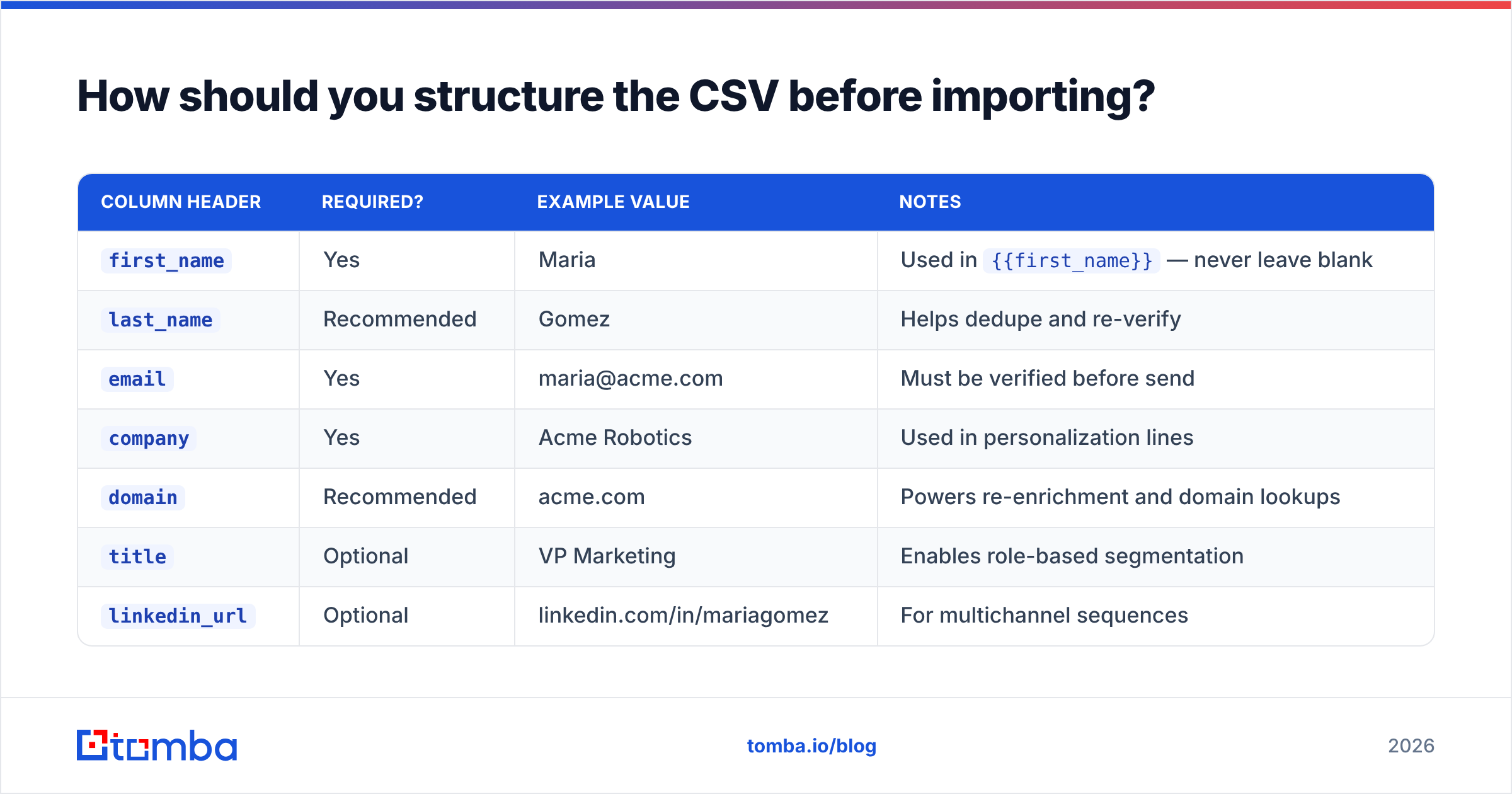
Standardize on a single schema and force every source to conform to it. Here is the baseline column set that maps cleanly into almost every outreach platform:
| Column header | Required? | Example value | Notes |
|---|---|---|---|
first_name |
Yes | Maria | Used in {{first_name}} — never leave blank |
last_name |
Recommended | Gomez | Helps dedupe and re-verify |
email |
Yes | maria@acme.com | Must be verified before send |
company |
Yes | Acme Robotics | Used in personalization lines |
domain |
Recommended | acme.com | Powers re-enrichment and domain lookups |
title |
Optional | VP Marketing | Enables role-based segmentation |
linkedin_url |
Optional | linkedin.com/in/mariagomez | For multichannel sequences |
custom_1 |
Optional | "loved your Q3 launch" | Manual personalization token |
Two rules make this bulletproof. First, use lowercase snake_case headers with no spaces — every tool parses them without a fight. Second, keep one contact per row and never merge two emails into a single cell. If a lead has two addresses, that's two rows or a deliberate choice of the primary.
If your raw export is a mess of inconsistent columns, run it through a remove duplicates pass and a header normalization step before anything else. Deduplicating on the email column alone will catch most of the noise.
Why does verification matter more than list size?#
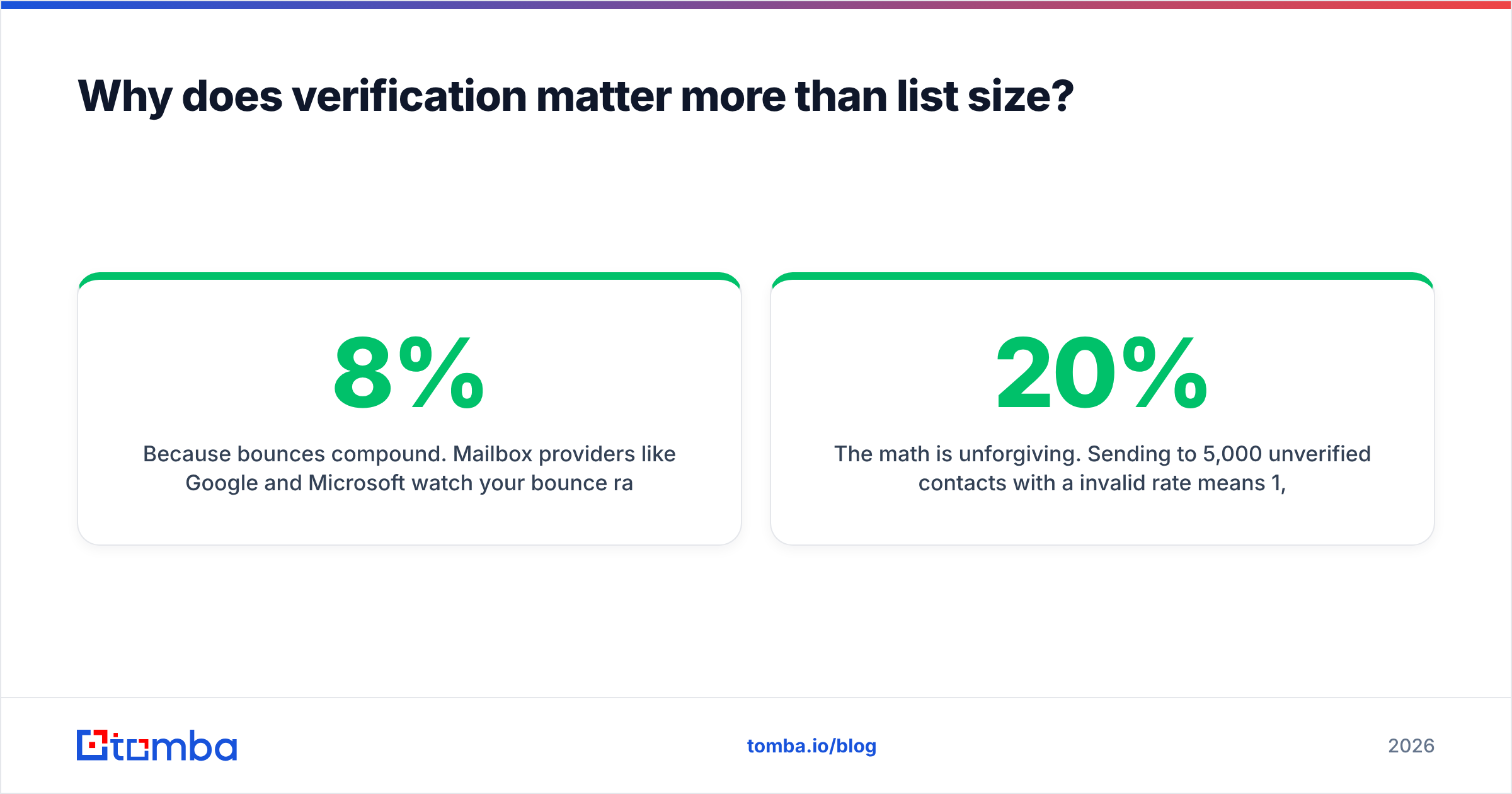
Because bounces compound. Mailbox providers like Google and Microsoft watch your bounce rate as a proxy for how carefully you source your lists. A campaign that bounces 8% of its sends signals "this sender scrapes indiscriminately," and your inbox placement drops for everyone on that domain — including your genuinely good leads.
The math is unforgiving. Sending to 5,000 unverified contacts with a 20% invalid rate means 1,000 hard bounces. That single send can push a warmed domain back into the spam folder for weeks. Sending to 500 verified contacts with a sub-1% bounce rate keeps your email deliverability intact and your replies flowing.
Run every list through an email verifier before import. A good verifier checks syntax, MX records, and SMTP acceptance, and flags catch-all domains separately so you can decide whether to risk them. Drop anything marked invalid, and segment catch-alls into a lower-priority batch you can approach more cautiously.
The order of operations is simple: structure → deduplicate → verify → enrich → map → import. Skip any step and you'll pay for it in bounce reports.
What is the right field-mapping workflow?#
Field mapping is the step where you tell the outreach tool which CSV column feeds which merge tag. Get it wrong and every email in the campaign goes out broken — publicly, to prospects, with no undo.
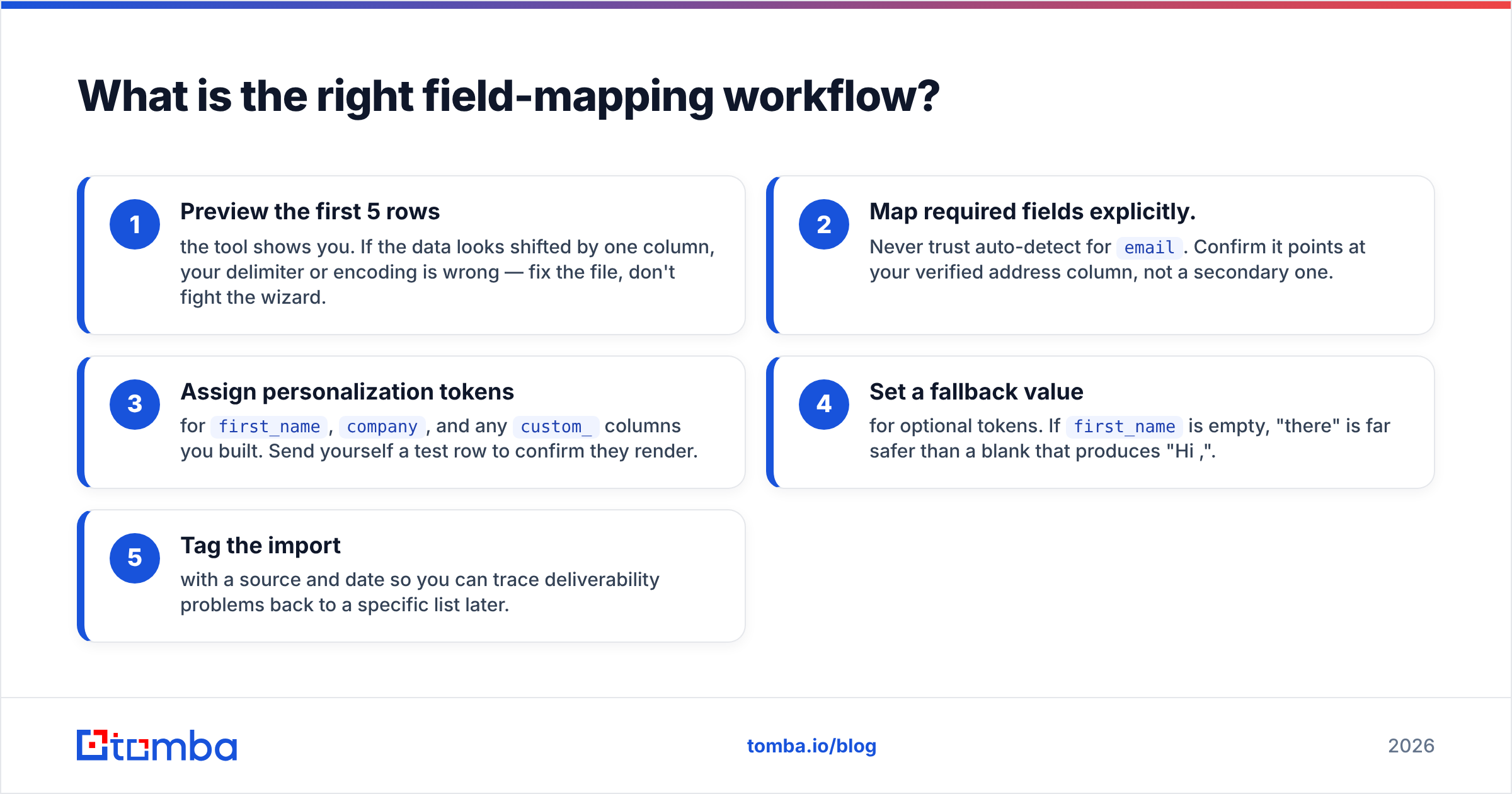
Follow this sequence in the import wizard:
- Preview the first 5 rows the tool shows you. If the data looks shifted by one column, your delimiter or encoding is wrong — fix the file, don't fight the wizard.
- Map required fields explicitly. Never trust auto-detect for
email. Confirm it points at your verified address column, not a secondary one. - Assign personalization tokens for
first_name,company, and anycustom_columns you built. Send yourself a test row to confirm they render. - Set a fallback value for optional tokens. If
first_nameis empty, "there" is far safer than a blank that produces "Hi ,". - Tag the import with a source and date so you can trace deliverability problems back to a specific list later.
A quick test-send to your own inbox before hitting launch is the cheapest insurance you'll ever buy. It catches broken tokens, weird spacing, and encoding artifacts in thirty seconds.
Which tools handle CSV import best in 2026?#
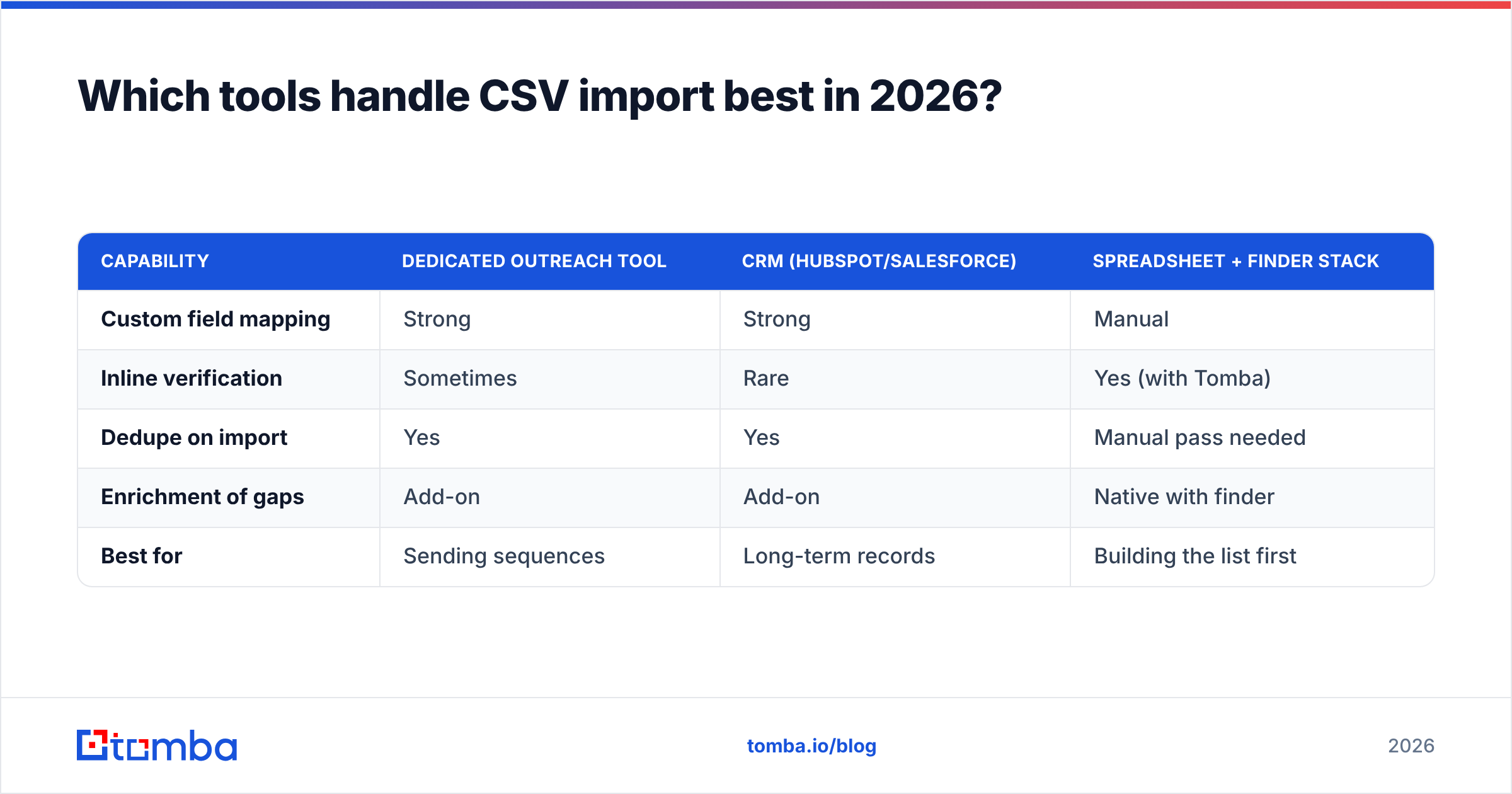
Not every platform treats the import step with equal seriousness. Some give you granular field mapping and inline verification; others just dump the file in and hope. Here's how the common categories compare for the import experience specifically.
| Capability | Dedicated outreach tool | CRM (HubSpot/Salesforce) | Spreadsheet + finder stack |
|---|---|---|---|
| Custom field mapping | Strong | Strong | Manual |
| Inline verification | Sometimes | Rare | Yes (with Tomba) |
| Dedupe on import | Yes | Yes | Manual pass needed |
| Enrichment of gaps | Add-on | Add-on | Native with finder |
| Best for | Sending sequences | Long-term records | Building the list first |
The pattern most teams land on: build and clean the list in a spreadsheet or finder tool, then import the finished, verified file into the sequencer or CRM. Tools like HubSpot and Salesforce are excellent systems of record, but they assume the data arriving is already clean — they won't find missing emails for you.
If you'd rather skip the manual spreadsheet stage entirely, the Google Sheets add-on and Excel add-in let you verify and enrich rows in place before you export the CSV. That keeps the whole cleanup loop in one file instead of bouncing between five tabs.

How do you fix the gaps instead of importing half-empty rows?#
Enrichment is the step that turns a partial list into a sendable one. A row with a name and company but no email is not a lead you can email — it's a lead you could email once you find the address.
Rather than deleting incomplete rows or importing them blank, run them through an enrichment pass:
- Missing emails: feed the name plus domain into an email finder to recover the professional address. This is the single highest-leverage fix, because it converts dead rows into live prospects.
- Missing companies or domains: reverse-resolve from an email or LinkedIn URL so segmentation and personalization tokens have something to reference.
- Missing titles: enrich from a data enrichment source so you can filter by seniority and role before sending.
- Whole-company sweeps: when you only have a domain, a domain search returns every discoverable address at that company, which you can then verify and slot into your schema.
The goal is a file where every row has at minimum a verified email, a first name, and a company — the three fields that make a personalized cold email possible. Everything above that is upside.
For teams importing thousands of rows at once, a bulk email finder processes the whole file in one job instead of row-by-row lookups, then hands you back a clean CSV ready to map.
What are the most common CSV import mistakes to avoid?#
These are the errors that show up again and again in post-mortems of campaigns that flopped:
- Importing before verifying. The number one cause of bounce-driven reputation damage. Verify first, always.
- Trusting auto-mapping blindly. The wizard guesses; you confirm. A one-column shift ruins the entire send.
- Leaving personalization fallbacks empty. "Hi ," is worse than no email at all — it screams automation.
- Ignoring encoding. Export as UTF-8. Accented names in Latin-1 turn into garbage that prospects notice.
- Keeping role-based addresses.
info@,contact@, andsales@inflate your list and rarely reach a decision-maker. Filter them out or segment them separately. - Skipping the test send. Thirty seconds of checking beats a public misfire to 2,000 inboxes.
Treat each of these as a checklist item in your pre-launch routine. Once it becomes muscle memory, imports stop being the scary part of a campaign.
How does clean CSV import connect to the rest of your outbound?#
Your import quality sets the ceiling for everything downstream. A verified, well-mapped list means your response rate measures your copy — not your data. When bounces and broken tokens are out of the equation, every metric you look at afterward is honest signal you can actually optimize against.
That's the real payoff of taking the import step seriously. You stop guessing whether a weak reply rate is a messaging problem or a list problem, because you've already ruled out the list as a variable. Clean data in, clean signal out.
If you want to see how peers benchmark data quality across providers, G2's data-intelligence category is a solid neutral reference for comparing accuracy claims before you commit to a source.
Get your outreach lists import-ready with Tomba#
Every clean import starts with accurate data. Tomba's Email Finder fills the missing-email gaps in your CSV, and the built-in email verifier confirms every address is deliverable before it ever hits your sequencer — so you import lists that land, not lists that bounce. Start on the free tier with 25 searches a month, and scale up through the Starter plan at $49/mo when your outbound volume grows. Build the list once, build it clean, and let your copy do the rest.
Related guides#
Ready to find emails that actually work?
Join 150,000+ professionals who stopped guessing and started sending. Free credits on signup — no credit card required.
Get the Tomba newsletter
Practical outbound tactics and product updates — once every two weeks.
About the author