Dedicated IP vs Shared IP Cold Outreach: The 2026 Guide
Most cold email senders pick the wrong IP model and blame their copy. Here's the volume math, the warmup cost, and the honest breakdown of when a dedicated IP actually beats a shared pool.
Dedicated IP vs shared IP cold outreach is a debate most teams get backwards. They buy a dedicated IP. Placement gets worse for two months. Nothing improves after that. Here is the short version: the IP is rarely the thing holding your cold email back.
TL;DR
- A dedicated IP only helps if you can send enough consistent volume to build a reputation on it — realistically 5,000+ emails per month per IP, sent on a steady schedule. Below that, a well-managed shared pool wins.
- Cold outreach at typical B2B volumes (50–200 emails/day per mailbox) almost never justifies a dedicated IP. Your reputation is being judged on the sending domain far more than the IP.
- Warming a fresh dedicated IP takes 4–8 weeks and you will see worse inbox placement during that window than on day one of a shared pool.
- Shared pools carry neighbor risk, but reputable ESPs actively police them. The bigger risk to your placement is your own list quality — bounces and spam traps do more damage than any neighbor.
- The real fix for most senders is upstream: verified contacts, correct SPF/DKIM/DMARC, low-volume-per-mailbox sending, and reply-worthy copy. IP strategy is a tie-breaker, not a cure.
What Actually Determines Whether Cold Email Lands?#
Your IP is one input among many, and it is not the biggest one.
A receiving system — Google, Microsoft, or a filter like Proofpoint — weighs a stack of signals before it picks a folder. Roughly in order of weight for cold B2B outreach:
- Authentication — Does SPF, DKIM, and DMARC pass and align with the From domain? Fail this and nothing else matters. Google and Yahoo's 2024 bulk-sender requirements made DMARC effectively mandatory, and enforcement has only tightened since.
- Domain reputation — The history of the sending domain. This is the signal that follows you across IPs, ESPs, and mailbox migrations. It is stickier and harder to reset than IP reputation.
- Recipient engagement — Opens are noisy post-MPP, but replies, "not spam" actions, and message-moves are strong positive signals. Deletes-without-reading and spam complaints are strong negative ones.
- List hygiene — Hard bounce rate and spam-trap hits. A 5% bounce rate on a cold campaign tells the receiver you bought a list.
- IP reputation — The sending IP's complaint and volume history.
- Content signals — Spammy phrasing, link shorteners, mismatched link domains, image-heavy HTML.
Notice that IP reputation sits fifth. That ranking explains a story you have probably lived. A team buys a dedicated IP, sees no lift, and calls deliverability a black box. They fixed the fifth-biggest variable while their list was still 12% invalid.

What Is a Dedicated IP, and What Is a Shared IP?#
A dedicated IP is a sending IP address assigned to you alone. Every reputation signal on that address — good or bad — is yours. No one else's sending affects it.
A shared IP is a pool of addresses used by many senders on the same platform. Your ESP routes messages across the pool, and reputation is collective. If a neighbor gets blocklisted, you can feel it. If the pool has years of clean, high-volume history, you inherit that credibility from your first send.
Here is the part most people miss. A "dedicated IP" is not automatically a good IP. A brand-new dedicated IP has no reputation at all, and to mailbox providers, no reputation looks a lot like suspicious. Fresh IPs get throttled, greylisted, and routed to spam while receivers build a profile on you.
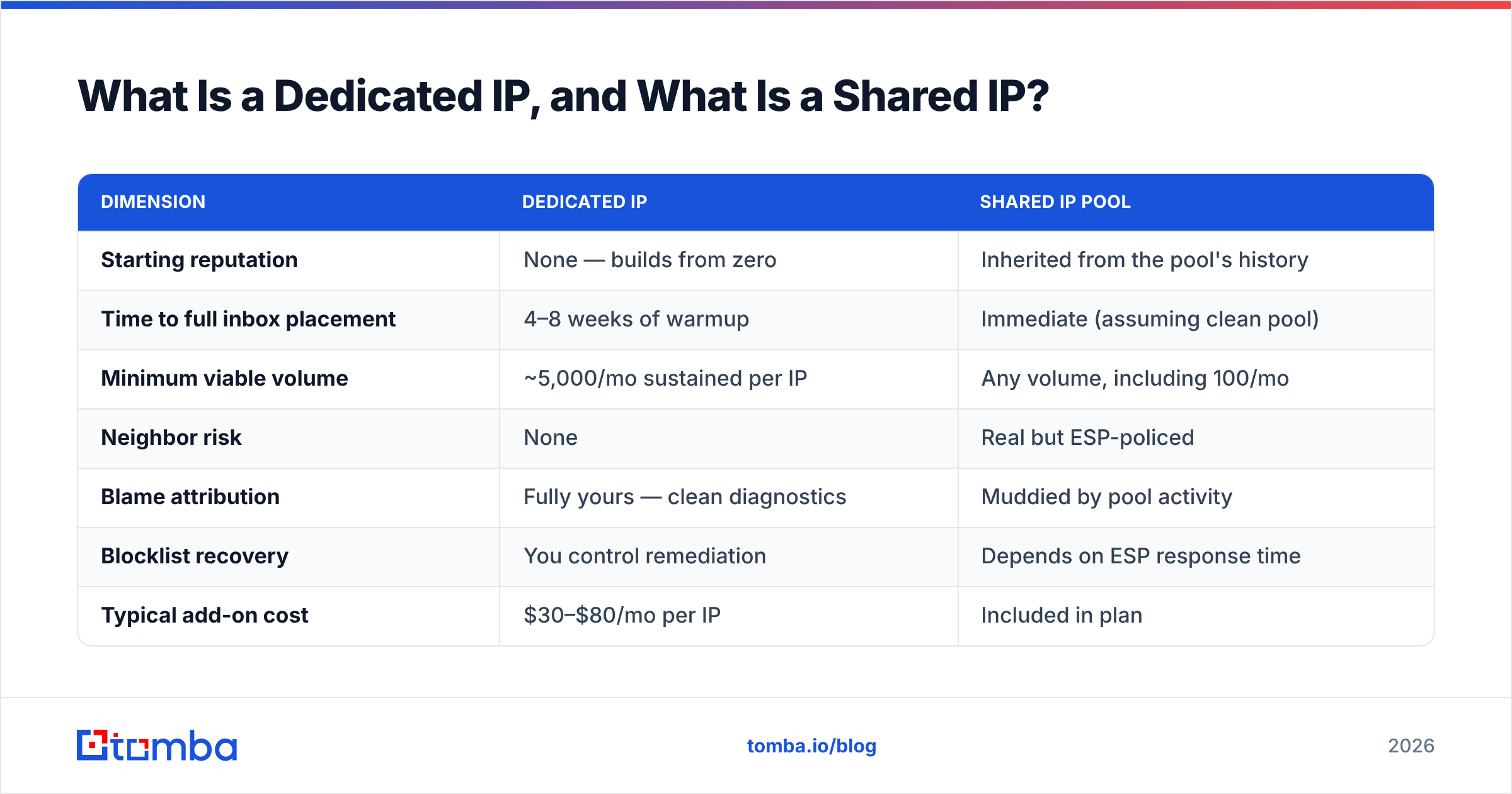
Here's how the two models break down across the dimensions that actually affect a cold outreach program:
| Dimension | Dedicated IP | Shared IP pool |
|---|---|---|
| Starting reputation | None — builds from zero | Inherited from the pool's history |
| Time to full inbox placement | 4–8 weeks of warmup | Immediate (assuming clean pool) |
| Minimum viable volume | ~5,000/mo sustained per IP | Any volume, including 100/mo |
| Neighbor risk | None | Real but ESP-policed |
| Blame attribution | Fully yours — clean diagnostics | Muddied by pool activity |
| Blocklist recovery | You control remediation | Depends on ESP response time |
| Typical add-on cost | $30–$80/mo per IP | Included in plan |
| Best for | High-volume, consistent senders | Cold outreach, bursty sending, SMBs |
| Worst for | Low or irregular volume | Regulated or compliance-heavy sending |
Dedicated IP vs Shared IP Cold Outreach: Which One Wins?#
Usually the shared pool — and the reason is volume consistency, not quality.
Mailbox providers build IP reputation from a rolling window of send history. To hold a positive profile, an IP needs regular, predictable traffic. The commonly cited floor is around 5,000 messages per month. The practical floor for a stable profile is higher — closer to 50,000 a month, sent daily.
Now do the math on a normal cold outreach setup. Best practice in 2026 is 20–50 sends per mailbox per day across several warmed mailboxes. A team running 10 mailboxes at 40/day sends roughly 12,000 messages a month. It usually sends them through Google Workspace or Microsoft 365 relays, where you do not control the IP at all.
That last point quietly ends the debate for most teams. Nearly every modern sequencer sends through connected Google or Microsoft mailboxes. Those messages leave on Google's or Microsoft's shared outbound infrastructure. There is no dedicated IP option to choose.
The dedicated IP vs shared IP cold outreach question only goes live when you relay through an ESP like SendGrid, Amazon SES, Postmark, or Mailgun.
When a dedicated IP genuinely makes sense:
- You send 100k+ messages/month on a consistent schedule. Enough volume for receivers to build a real profile, and enough that a shared pool's noise becomes a liability rather than an asset.
- You are in a regulated or high-scrutiny vertical. Finance, healthcare, and legal senders often need to prove sending isolation to auditors or enterprise customers.
- Your shared pool has demonstrably hurt you. You have Google Postmaster Tools data showing IP reputation as the failing signal while your domain reputation stays high.
- You run transactional and marketing traffic on separate paths. Separating password resets from campaigns protects the traffic that absolutely must arrive.
- You need forensic diagnostics. With a dedicated IP, every placement change traces back to something you did — no ambiguity, faster root-cause analysis.
If none of those five describe you, a dedicated IP is a $50/month expense that makes your deliverability worse for two months and neutral afterward.
What Does IP Warmup Actually Cost You?#
Time and inbox placement — both more than people budget for.
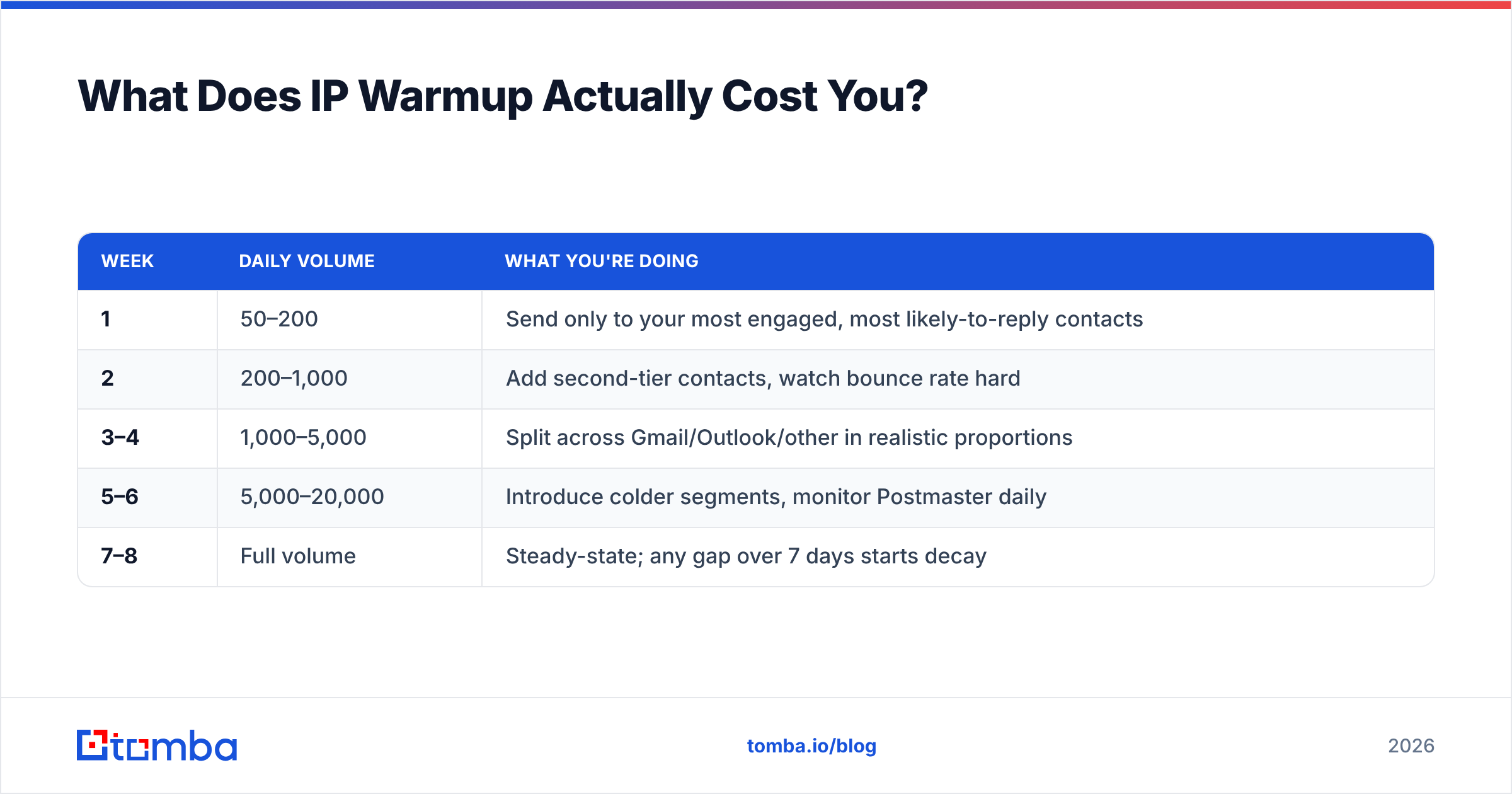
A dedicated IP warmup schedule looks roughly like this, though every ESP publishes its own variant:
| Week | Daily volume | What you're doing |
|---|---|---|
| 1 | 50–200 | Send only to your most engaged, most likely-to-reply contacts |
| 2 | 200–1,000 | Add second-tier contacts, watch bounce rate hard |
| 3–4 | 1,000–5,000 | Split across Gmail/Outlook/other in realistic proportions |
| 5–6 | 5,000–20,000 | Introduce colder segments, monitor Postmaster daily |
| 7–8 | Full volume | Steady-state; any gap over 7 days starts decay |
Three things make this expensive in practice.
You must warm with your best contacts. The warmup window needs high engagement. That means burning your most responsive prospects on small sends instead of at full campaign scale.
Gaps undo progress. Pause for two weeks — a holiday freeze, a quarter-end lull, a rebrand — and reputation decays. Shared pools have no such fragility because the pool keeps sending.
Warmup does not fix your domain. IP warmup and domain warmup are separate jobs. A new domain on a warmed dedicated IP still gets filtered, because domain reputation is the signal that persists. Run the numbers on both with an email warmup calculator before you commit to a timeline.
How Real Is Shared IP "Neighbor Risk"?#
Real, but smaller and easier to manage than the dedicated-IP sales pitch implies.
The fear is straightforward. Someone else on your pool blasts a purchased list, the pool's IPs land on Spamhaus, and your outreach gets caught in the blast radius. That does happen. It happens most on cheap SMTP providers that accept any signup with a credit card.
It happens far less on providers with real compliance operations. Good ESPs segment pools by sender quality, watch complaint rates per customer in near real time, and suspend abusers within hours. Several tier their pools so that high-engagement senders never share space with cold, low-engagement traffic.
Your practical defenses on a shared pool:
- Choose your provider by compliance rigor, not price. Ask directly how pools are segmented and what the complaint threshold for suspension is. A vendor that cannot answer is telling you the answer.
- Monitor blocklists yourself. Run a periodic blacklist checker against your sending domain and your provider's ranges. Catching a pool problem in hours instead of weeks is the whole game.
- Keep DMARC alignment tight. Strong authentication means receivers judge you on your domain even when the IP is shared. This is the single highest-leverage protection against neighbor damage.
- Watch Google Postmaster Tools. It reports IP reputation and domain reputation separately. If domain stays high while IP drops, you have a pool problem. If both drop, you have a you problem.
That last diagnostic is worth memorizing. It is the only reliable way to know whether your IP model is the real constraint.

What Should You Fix Before Touching IP Strategy?#
The three things that outrank IP choice, in order.
1. List quality. A cold list with 8–15% invalid addresses is normal for scraped or aging data. It will sink you no matter what your infrastructure looks like. Hard bounces above 2% tell receivers you are not keeping a permission-based list. Above 5%, expect throttling.
Running every address through an email verifier before send is the highest-ROI deliverability action available, and it costs a fraction of a dedicated IP. Catch-all domains — very common in enterprise B2B — need a catch-all verifier, since standard SMTP checks return ambiguous results on them.
2. Authentication. SPF, DKIM, and DMARC configured and aligned. Start with a DMARC policy of p=none and reporting turned on. Move to p=quarantine once you have confirmed alignment across every sending source. Verify your record with an SPF checker and confirm nothing broke when you added a new sending tool. Google's sender guidelines spell out the exact requirements for bulk senders.
3. Volume architecture. Instead of pushing more volume through fewer IPs, spread it across more mailboxes and more sending domains. Three secondary domains with three mailboxes each, sending 30/day per mailbox, gives you 270 daily sends. No single point of failure, and no warmup cliff. Most high-performing outbound teams converged on this pattern, and it makes the dedicated IP question largely moot.
Only after those three are solid does IP strategy move the needle. And by then, most teams find they no longer need to change it.
How Do the Options Compare on Total Cost?#
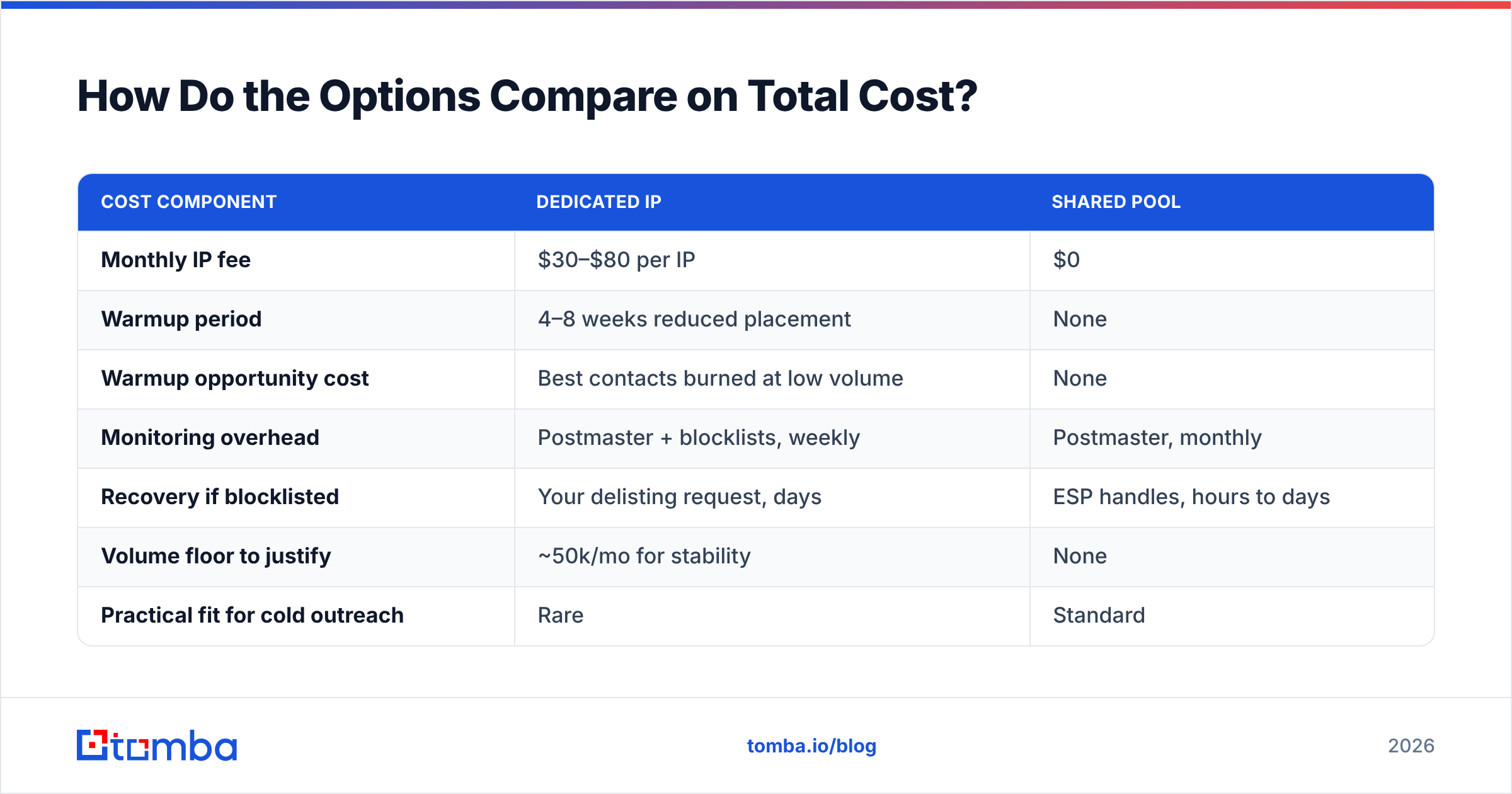
Sticker price is the smaller half of the equation.
| Cost component | Dedicated IP | Shared pool |
|---|---|---|
| Monthly IP fee | $30–$80 per IP | $0 |
| Warmup period | 4–8 weeks reduced placement | None |
| Warmup opportunity cost | Best contacts burned at low volume | None |
| Monitoring overhead | Postmaster + blocklists, weekly | Postmaster, monthly |
| Recovery if blocklisted | Your delisting request, days | ESP handles, hours to days |
| Volume floor to justify | ~50k/mo for stability | None |
| Practical fit for cold outreach | Rare | Standard |
Take a team sending 12,000 cold emails a month. The dedicated IP costs about $600 a year in fees, plus two months of degraded placement, plus ongoing monitoring time. It solves a problem that was never their bottleneck. The same budget spent on verification and better-sourced contacts moves reply rate in a way you can measure.
What Setup Do High-Performing Outbound Teams Actually Run?#
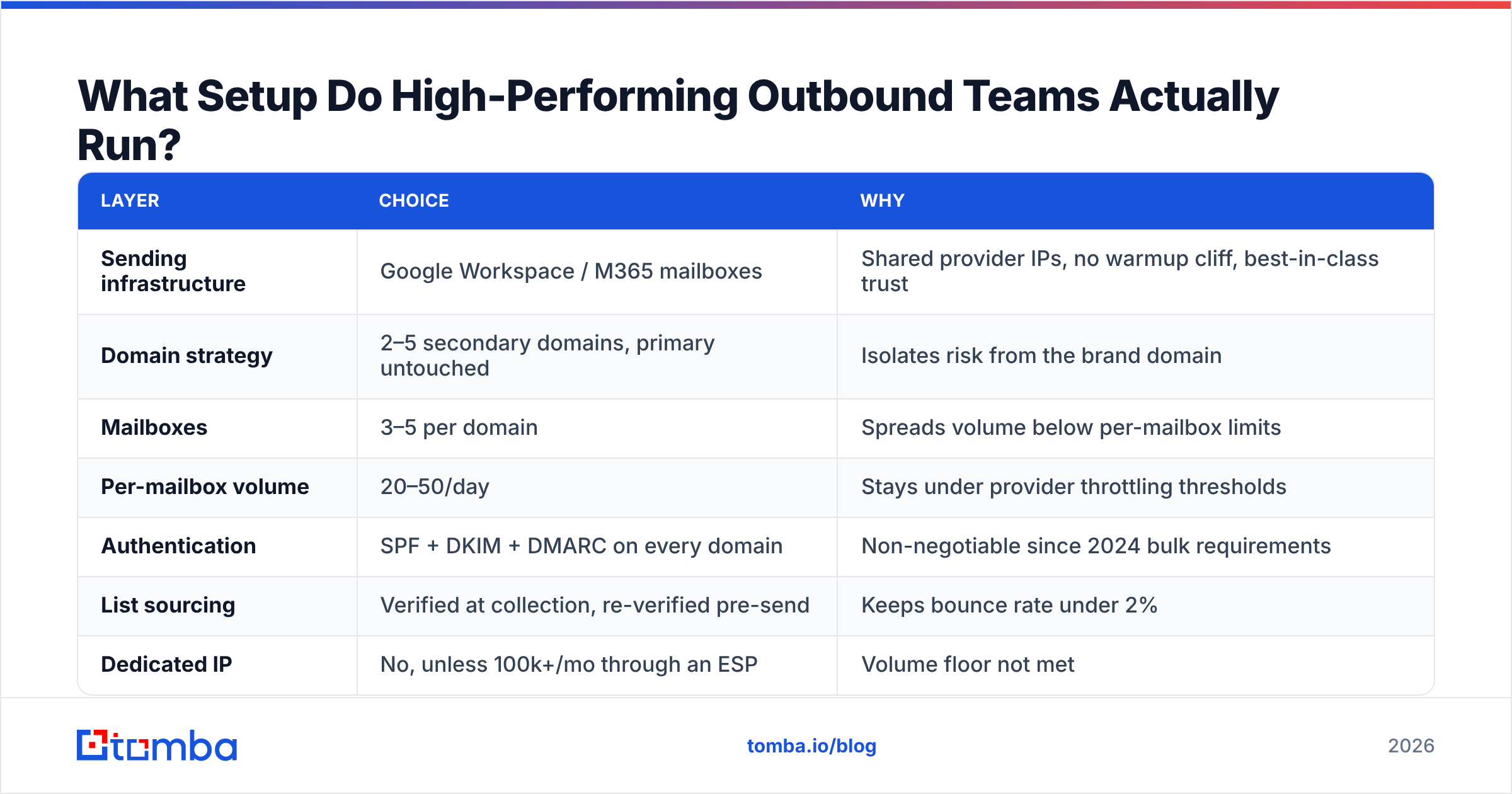
The consensus stack in 2026 looks like this:
| Layer | Choice | Why |
|---|---|---|
| Sending infrastructure | Google Workspace / M365 mailboxes | Shared provider IPs, no warmup cliff, best-in-class trust |
| Domain strategy | 2–5 secondary domains, primary untouched | Isolates risk from the brand domain |
| Mailboxes | 3–5 per domain | Spreads volume below per-mailbox limits |
| Per-mailbox volume | 20–50/day | Stays under provider throttling thresholds |
| Authentication | SPF + DKIM + DMARC on every domain | Non-negotiable since 2024 bulk requirements |
| List sourcing | Verified at collection, re-verified pre-send | Keeps bounce rate under 2% |
| Dedicated IP | No, unless 100k+/mo through an ESP | Volume floor not met |
Notice that "dedicated IP" sits at the bottom, and only with a condition attached. Spreading volume across mailboxes and domains does the work an IP strategy usually gets credit for — and it does it with no warmup period.
If you do run a dedicated IP alongside this — say, for a separate high-volume newsletter or transactional stream — keep it strictly separated from cold traffic. Mixing cold outreach into an IP that also carries transactional mail is how companies end up with password reset emails in the spam folder.
When Should You Switch Models?#
Three concrete triggers, and one non-trigger.
Switch to dedicated when: your monthly volume through a single ESP crosses roughly 100,000 messages, your send schedule is genuinely steady week to week, and Google Postmaster Tools shows IP reputation clearly worse than domain reputation for more than 30 days straight.
Switch back to shared when: your volume drops below the maintenance floor for more than a month, or you cannot commit to daily sending. A neglected dedicated IP is worse than no dedicated IP.
The non-trigger: "our reply rates dropped." That is almost always a targeting, list-quality, or copy problem. Before you touch infrastructure, pull the bounce rate, check the spam complaint rate in Postmaster, and run a sample of the list through verification. Most of the time, the answer is sitting in one of those three numbers.
Teams working from good data run into this less often, because the failure mode starts upstream. If you pull contacts from a source with strong verification built in — check the data sources behind any provider you use — your bounce rate stays low enough that infrastructure never becomes the limiting factor. Peers in the space like BookYourData built their positioning on the same principle: pay for accuracy at the source, and you spend far less time debugging deliverability later.
Frequently Asked Questions#
Does a dedicated IP improve open rates? Not directly. It can improve inbox placement at high volume, which raises the ceiling on opens. At cold-outreach volumes it typically has no measurable effect, and during warmup it makes placement worse.
Can I use a dedicated IP with Gmail or Outlook mailboxes? No. When you send through a connected Google Workspace or Microsoft 365 mailbox, the message leaves via that provider's outbound infrastructure. Dedicated IPs are an ESP/SMTP-relay feature.
How many dedicated IPs do I need? One per distinct traffic type, and only if each type independently clears the volume floor. Splitting 30,000 monthly messages across three dedicated IPs is strictly worse than sending all 30,000 from one.
Does IP reputation transfer if I switch ESPs? No. IP reputation lives with the address. Domain reputation follows you — which is why domain hygiene matters more than IP selection for anyone sending under six figures a month.
Is a shared IP safe for regulated industries? Often yes, with a compliance-focused provider that segments pools and can document it. Isolation requirements from your legal or security team are the real deciding factor, not deliverability performance.
The Practical Takeaway#
Pick the shared pool, and spend the difference on data quality.
For most cold outreach programs — anything under roughly 100,000 messages a month with uneven weekly volume — a shared IP on a reputable provider beats a fresh dedicated one. It starts with borrowed credibility. It skips the warmup window. It costs nothing extra.
So settle the dedicated IP vs shared IP cold outreach question in one pass. Check three numbers: monthly volume, bounce rate, and your Postmaster domain score. If volume is under 100k and bounces sit above 2%, the IP is not your problem. Clean the list first.
// get started
Find, verify and enrich your first contacts today
Start on the free plan with 25 searches a month, then scale when your team is ready.
Free plan · No credit card required · GDPR & CCPA
// about the author