EfficientPIM Pricing, Reviews, Pros and Cons (2026 Guide)
EfficientPIM sells a lifetime license in a subscription world. Here is what the plans actually cost, what reviewers praise, where it breaks down for sales teams, and when a CRM plus a data tool beats it.
TL;DR
- EfficientPIM is a Windows desktop personal information manager — notes, contacts, tasks, calendar, diary, and a password vault in one local app. It is not a CRM and does not pretend to be.
- Pricing is refreshingly old-school: a free edition, and a one-time Pro license that lists around $59.95 per user (frequently discounted to roughly $30 in promos). No monthly seat fee.
- Reviews are consistently positive on speed, offline reliability, and value-for-money — and consistently critical on dated UI, weak mobile support, and thin cloud sync.
- The real cost is not the license. It is the missing pipeline layer: no lead sourcing, no email verification, no deal stages, no team activity reporting.
- Best fit: solo consultants, freelancers, and privacy-conscious professionals who want their data on their own disk. Poor fit: any outbound team running volume prospecting.
What is EfficientPIM, and who is it actually built for?#
EfficientPIM is a desktop personal information manager from Efficient Software, a small vendor that also ships EfficientPassword, EfficientNotes, EfficientCalendar, EfficientAddressBook, and EfficientToDoList as standalone apps. EfficientPIM is the bundle: it rolls all of those modules into a single Windows executable backed by a local database file.
The design philosophy is 2009 in the best possible way. You install it, it opens in under two seconds, everything lives on your machine, and you own the license forever. There is no browser tab, no seat count negotiation, no vendor telemetry dashboard tracking your usage.
Its module list, in practice:
- Contacts / address book — custom fields, groups, photos, birthday reminders, and a quick-search bar that filters as you type.
- Tasks and to-do lists — hierarchical subtasks, priorities, recurrence, and progress percentages.
- Calendar and appointments — day/week/month views with desktop alarms that fire whether or not you have internet.
- Notes and diary — rich-text notes with attachments plus a date-indexed journal, which is unusual in this category and one of the most-praised features in user reviews.
- Password manager — AES-encrypted credential storage with an auto-fill helper.
- Backup and portability — one-click local backup, plus a portable build that runs from a USB stick.
Who it is for: someone who manages a professional life, not a revenue pipeline. Independent consultants, lawyers, academics, freelance designers, IT admins tracking internal work. If you are the only person who needs to see the data, EfficientPIM is a legitimate answer.
Who it is not for: a two-to-fifty-person sales org. That gap matters and we will get to it below, because most people searching for EfficientPIM pricing are quietly evaluating it as a cheap CRM substitute.

How much does EfficientPIM cost in 2026?#
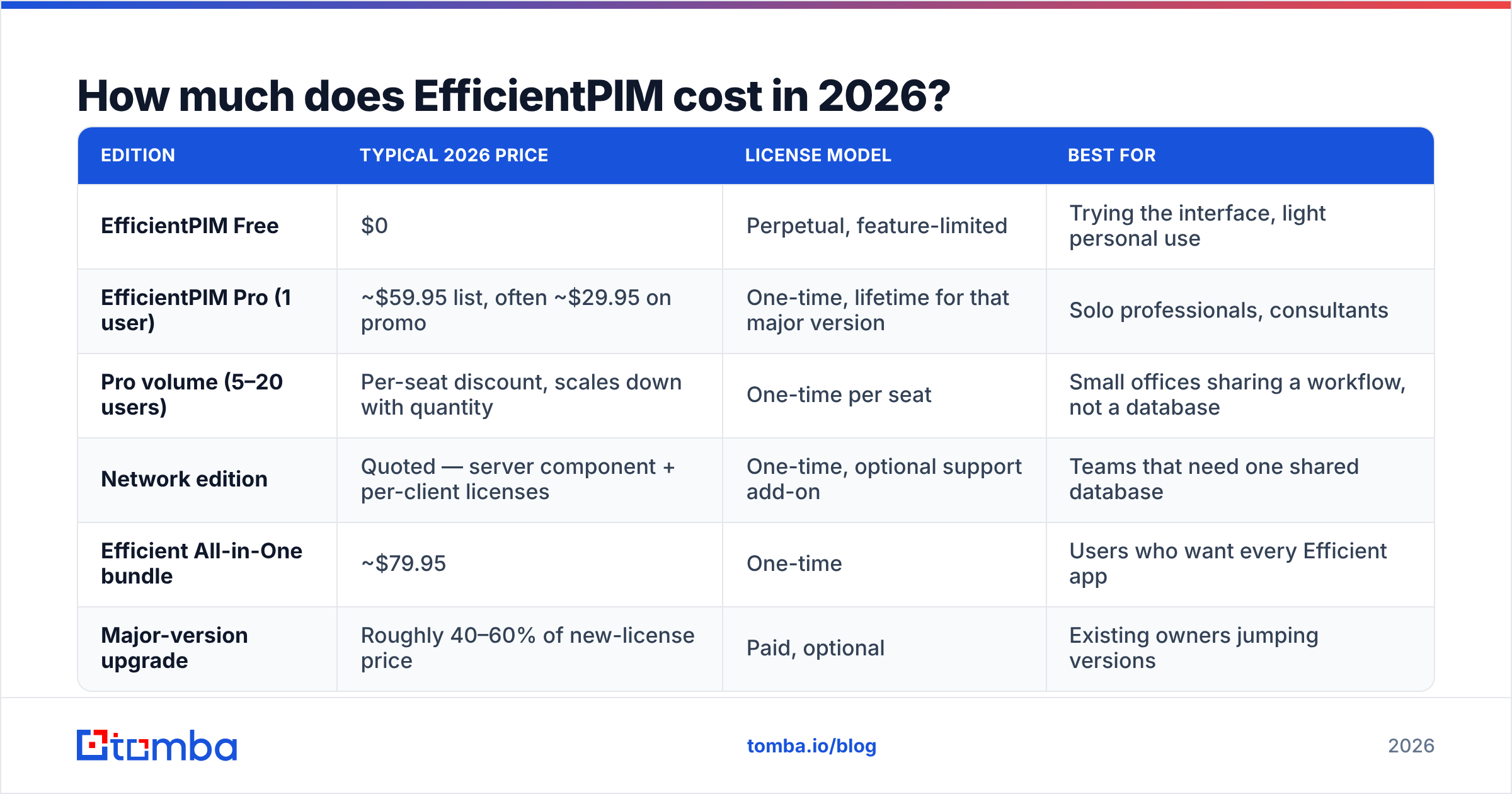
The headline: EfficientPIM is a perpetual-license product, not a subscription. You pay once for a major version and use it indefinitely; upgrades to future major versions are a separate (usually discounted) purchase.
Prices below reflect the vendor's public list pricing as we checked it, but Efficient Software runs promotions constantly — holiday sales, bundle discounts, and volume tiers all move the number. Verify the current figure on the official Efficient Software site before you buy.
| Edition | Typical 2026 price | License model | Best for |
|---|---|---|---|
| EfficientPIM Free | $0 | Perpetual, feature-limited | Trying the interface, light personal use |
| EfficientPIM Pro (1 user) | ~$59.95 list, often ~$29.95 on promo | One-time, lifetime for that major version | Solo professionals, consultants |
| Pro volume (5–20 users) | Per-seat discount, scales down with quantity | One-time per seat | Small offices sharing a workflow, not a database |
| Network edition | Quoted — server component + per-client licenses | One-time, optional support add-on | Teams that need one shared database |
| Efficient All-in-One bundle | ~$79.95 | One-time | Users who want every Efficient app |
| Major-version upgrade | Roughly 40–60% of new-license price | Paid, optional | Existing owners jumping versions |
Three cost details that get missed:
- "Lifetime" means lifetime of the major version. When version N+1 lands, you either stay put or pay the upgrade fee. That is still dramatically cheaper than a subscription over five years, but it is not literally free forever.
- The Network edition is where the price becomes fuzzy. Single-user Pro is a fixed, published number. Shared-database deployments require a quote, and that is the tier a growing team actually needs.
- Mobile access is not in the box. There is no first-party iOS/Android client with real two-way sync. Your workaround is syncing the database file through Dropbox or OneDrive, which is a workaround, not a feature — and it introduces file-lock conflicts if two people touch it simultaneously.
Compared against subscription tooling, the math is stark. A single Pro license at $59.95 costs less than one month of most mid-tier SaaS CRMs. Over three years, EfficientPIM costs about the same as five weeks of a $99/month tool. If your requirement genuinely is "store my stuff, remind me about things, stay offline," the value case is hard to argue against.
What do EfficientPIM reviews actually say?#
Aggregated sentiment across software directories like Capterra and download portals lands in a consistent place: high satisfaction from long-tenured individual users, low visibility among teams.
What reviewers repeatedly praise:
- Speed. Native Windows code on a local database means instant search across thousands of notes and contacts. No spinner, no rate limit, no "reconnecting."
- Offline reliability. Alarms fire on a plane. Reviewers who travel heavily cite this as the single reason they stay.
- The diary module. Very few tools combine a date-indexed journal with tasks and contacts in one searchable store. Users who adopt it describe it as the feature they cannot replace elsewhere.
- Price honesty. Buy once, own it. Multiple reviews frame this explicitly as relief from subscription fatigue.
- Responsive small-vendor support. Email replies from actual humans, often within a day.
What reviewers repeatedly criticize:
- The interface looks its age. Ribbon-and-tree-view Windows styling, dense toolbars, inconsistent icon sets. It is functional and fast, but nobody calls it modern.
- Windows-only. No native macOS or Linux build. Mac users are stuck with virtualization.
- Mobile is a gap, not a compromise. Cloud-file syncing is the answer, and reviewers say so with visible frustration.
- Collaboration is bolted on. The Network edition exists, but expectations formed by Google Workspace or Notion — real-time multi-user editing, comments, permissions — are not met.
- No integration ecosystem. No public API, no Zapier connector, no webhook layer. Data enters by typing or by CSV import, and it leaves by CSV export.
That last point is the one that decides whether EfficientPIM belongs in a revenue workflow.
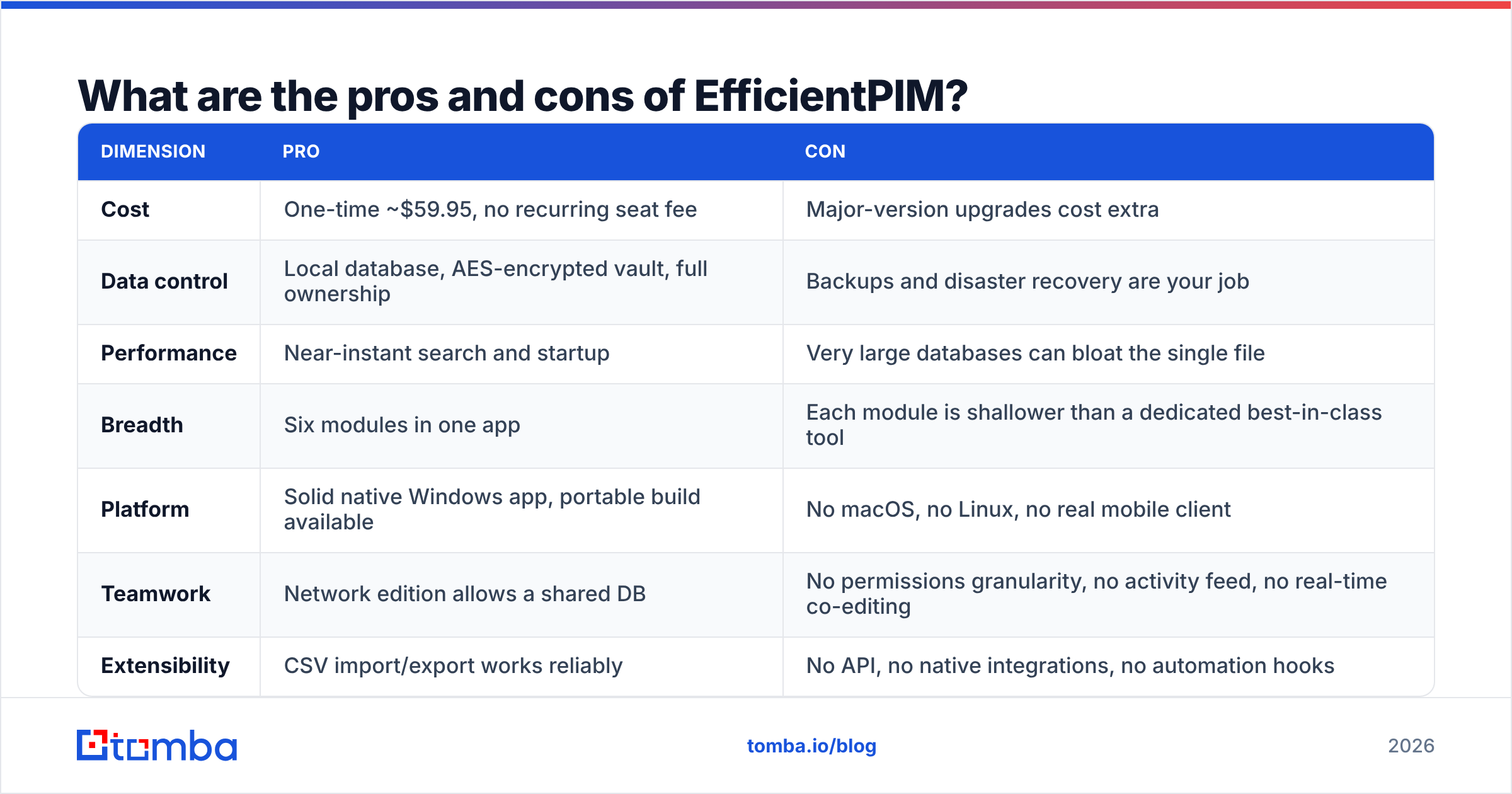
What are the pros and cons of EfficientPIM?#
| Dimension | Pro | Con |
|---|---|---|
| Cost | One-time ~$59.95, no recurring seat fee | Major-version upgrades cost extra |
| Data control | Local database, AES-encrypted vault, full ownership | Backups and disaster recovery are your job |
| Performance | Near-instant search and startup | Very large databases can bloat the single file |
| Breadth | Six modules in one app | Each module is shallower than a dedicated best-in-class tool |
| Platform | Solid native Windows app, portable build available | No macOS, no Linux, no real mobile client |
| Teamwork | Network edition allows a shared DB | No permissions granularity, no activity feed, no real-time co-editing |
| Extensibility | CSV import/export works reliably | No API, no native integrations, no automation hooks |
The honest summary: EfficientPIM is a very good personal system of record and a poor commercial system of record. Those are different jobs. Choosing it for the wrong one is where buyers get burned — the license was cheap, and six months later somebody is manually retyping contacts into a real CRM.
How does EfficientPIM compare to the alternatives?#
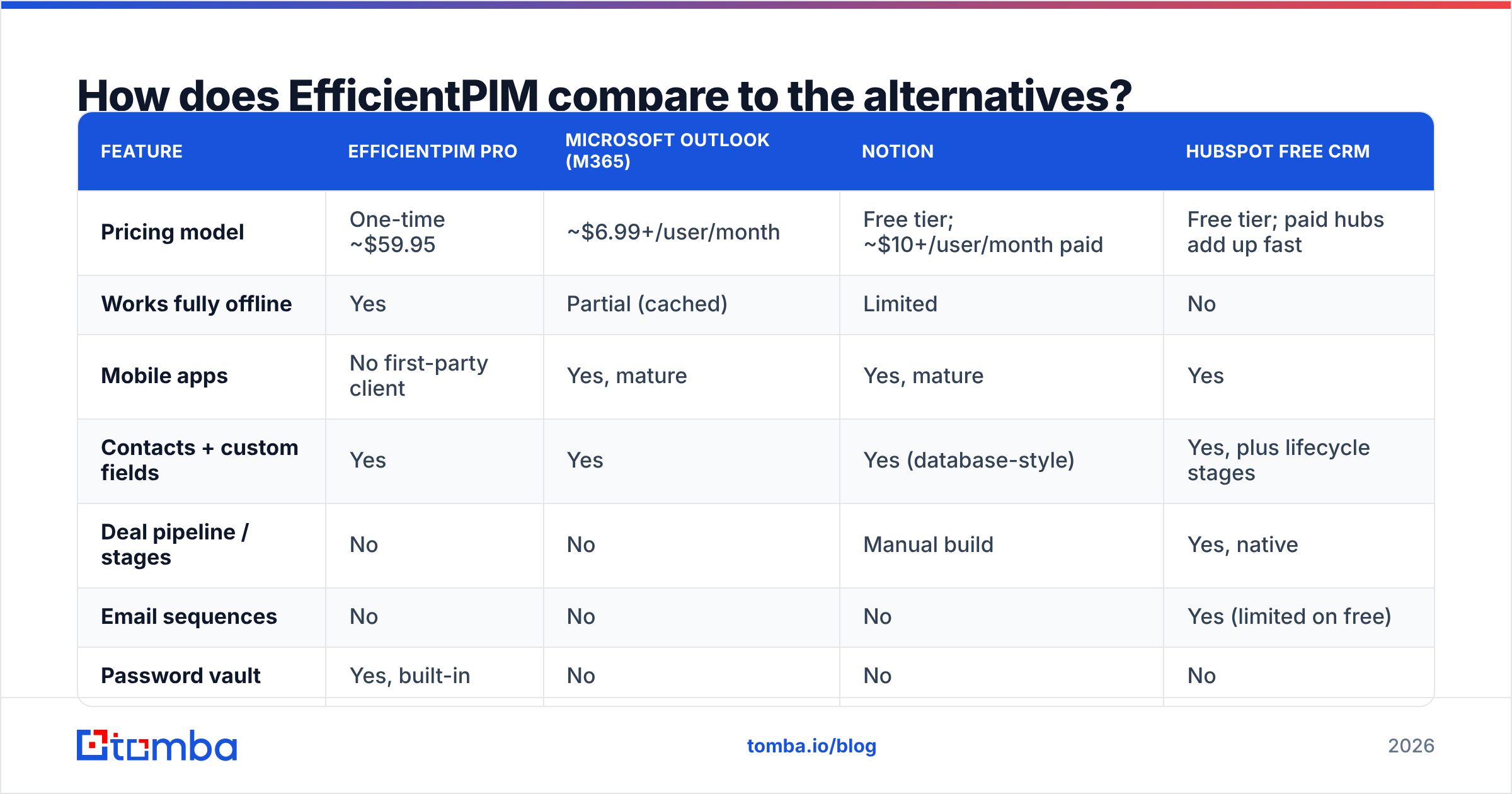
| Feature | EfficientPIM Pro | Microsoft Outlook (M365) | Notion | HubSpot Free CRM |
|---|---|---|---|---|
| Pricing model | One-time ~$59.95 | ~$6.99+/user/month | Free tier; ~$10+/user/month paid | Free tier; paid hubs add up fast |
| Works fully offline | Yes | Partial (cached) | Limited | No |
| Mobile apps | No first-party client | Yes, mature | Yes, mature | Yes |
| Contacts + custom fields | Yes | Yes | Yes (database-style) | Yes, plus lifecycle stages |
| Deal pipeline / stages | No | No | Manual build | Yes, native |
| Email sequences | No | No | No | Yes (limited on free) |
| Password vault | Yes, built-in | No | No | No |
| Diary / journal | Yes, native | No | Yes (manual) | No |
| API / integrations | None | Extensive | Extensive | Extensive |
| Team permissions | Minimal (Network ed.) | Yes | Yes | Yes |
| Best for | Solo, offline, privacy-first | Email-centric professionals | Flexible custom workspaces | Sales pipelines |
Read that table as three different purchases:
- EfficientPIM buys you ownership and speed.
- Outlook or Notion buys you cross-device continuity.
- HubSpot or Pipedrive buys you a pipeline and reporting.
Only the third one moves revenue. If you are choosing between EfficientPIM and a CRM, you are not really comparing products — you are deciding whether your problem is personal organization or pipeline execution.
Is EfficientPIM good enough for B2B sales?#
No, and it is worth being specific about why, because the failure is not about features you can live without — it is about the top of the funnel.
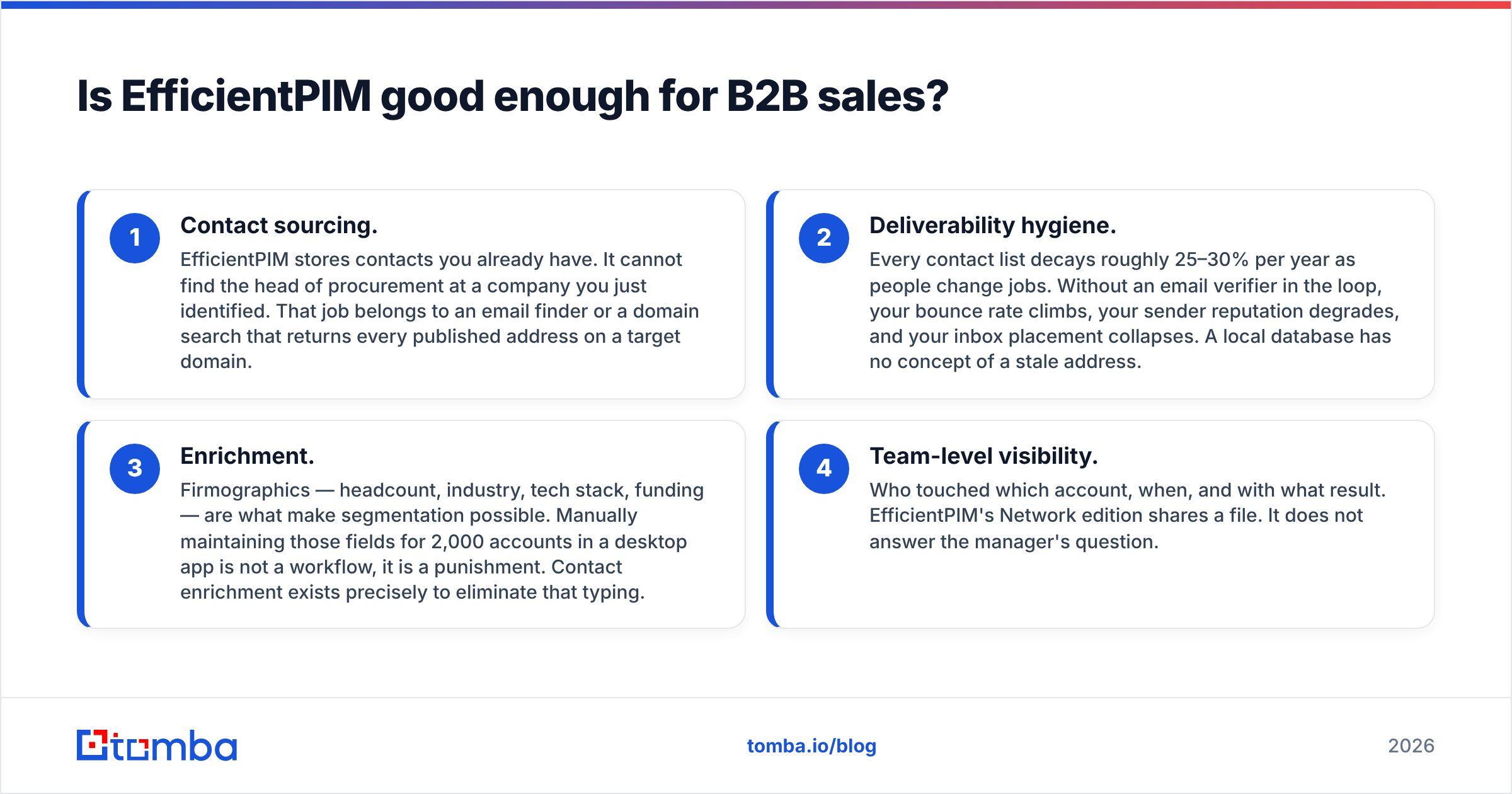
A working outbound motion needs four things EfficientPIM structurally cannot provide:
- Contact sourcing. EfficientPIM stores contacts you already have. It cannot find the head of procurement at a company you just identified. That job belongs to an email finder or a domain search that returns every published address on a target domain.
- Deliverability hygiene. Every contact list decays roughly 25–30% per year as people change jobs. Without an email verifier in the loop, your bounce rate climbs, your sender reputation degrades, and your inbox placement collapses. A local database has no concept of a stale address.
- Enrichment. Firmographics — headcount, industry, tech stack, funding — are what make segmentation possible. Manually maintaining those fields for 2,000 accounts in a desktop app is not a workflow, it is a punishment. Contact enrichment exists precisely to eliminate that typing.
- Team-level visibility. Who touched which account, when, and with what result. EfficientPIM's Network edition shares a file. It does not answer the manager's question.
The pattern that works, if you like EfficientPIM and want to keep it: treat it as your personal cockpit — your notes, your calendar, your credentials — and keep commercial contact data in a system built for it. Source and verify emails with a data tool, push them into a CRM, and let EfficientPIM be the place where your work lives rather than where the company's pipeline lives.
For scale, that pipeline should be automated. A bulk email finder handles list-level work, and the Tomba API lets you wire finding and verification directly into whatever CRM or spreadsheet your team already opens every morning — including Google Sheets if that is genuinely where your reps work.
Who should buy EfficientPIM — and who should skip it?#
Buy it if:
- You work on Windows, alone, and want your data on your own disk.
- You want a journal, a password vault, and a task manager without three separate subscriptions.
- Offline reliability matters — you travel, or your connectivity is unreliable.
- You are actively trying to reduce the number of recurring charges on your card.
Skip it if:
- Your team needs shared, permissioned, real-time access.
- You need iPhone or Android access to the same data.
- You are on macOS or Linux.
- Your actual job is outbound prospecting, in which case the missing sourcing and verification layers cost you far more than the $59.95 you saved.
The verdict on EfficientPIM pricing, reviews, pros and cons: it is a well-built, fairly priced piece of desktop software that does exactly what it claims and nothing more. The reviews are right on both counts — the value is real, and the modernity is not there. Nothing about the price is a trap. The trap is buying it to solve a revenue problem it was never designed to touch.
What should you pair it with?#
If EfficientPIM is where your personal work lives, the missing piece is verified contact data flowing in from outside. That is the layer that decides whether your outreach lands or bounces.
Start with the Tomba Email Finder. Give it a name and a company domain and it returns the professional address with a confidence score and the sources behind it — no scraping, no guessing at first.last@ patterns. The free tier covers 25 searches a month so you can test accuracy on accounts you already know the answer for, and paid plans start at $49/month on Tomba pricing if the results hold up. Keep EfficientPIM for your notes and your calendar. Let a purpose-built data layer handle the part that actually fills your pipeline.
Related guides#
Ready to find emails that actually work?
Join 150,000+ professionals who stopped guessing and started sending. Free credits on signup — no credit card required.
Get the Tomba newsletter
Practical outbound tactics and product updates — once every two weeks.
About the author