Finderio Pricing in 2026: Real Costs, Limits & Alternatives
Finderio's bundled per-user price looks unbeatable until you price it per verified email. Here's what the plans really cost, where the limits bite, and which alternatives win on cost per usable lead.
TL;DR
- Finderio (finder.io) is sold as part of the 500apps bundle, so the headline price is per user, not per credit — which makes it look far cheaper than standalone email finders until you divide by usable leads.
- The number that matters is not $/month. It's cost per verified, deliverable email. Bundled tools usually lose on that metric because credits get burned on unverified guesses.
- Budget for a separate verification step. Any finder that returns "risky" or "accept-all" results without a confidence score will quietly cost you domain reputation.
- For a like-for-like comparison, a standalone finder at $49/mo with verification included frequently beats a $14.99/user bundle once you account for bounce rate and re-work.
- Check the live vendor page before you buy — bundle pricing changes more often than standalone SaaS pricing, and annual-only discounts distort every comparison.
What is Finderio and who is it actually for?#
Finderio — branded finder.io — is an email finding and verification tool published by 500apps, a vendor whose entire model is bundling dozens of business apps under a single per-user subscription. You don't really buy Finderio. You buy the suite, and Finderio is one drawer inside it.
That distinction drives everything about the pricing analysis below. Standalone email finders (Hunter, Snov, Tomba, Findymail) price by credits: you pay for a volume of searches and verifications. Bundle vendors price by seat: you pay per user for access to everything, with usage caps buried in the fine print.
Both models are legitimate. They just optimise for different buyers:
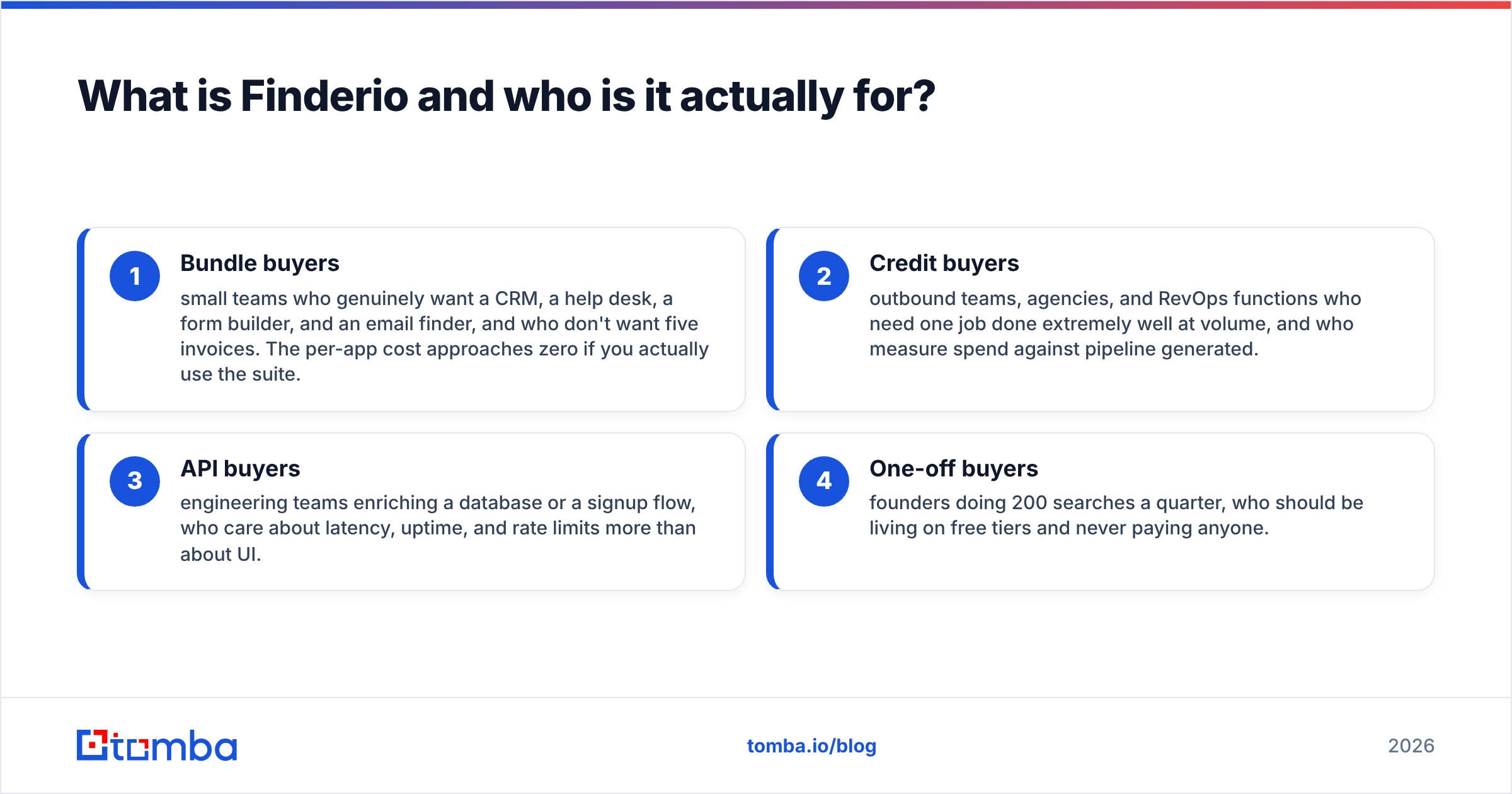
- Bundle buyers — small teams who genuinely want a CRM, a help desk, a form builder, and an email finder, and who don't want five invoices. The per-app cost approaches zero if you actually use the suite.
- Credit buyers — outbound teams, agencies, and RevOps functions who need one job done extremely well at volume, and who measure spend against pipeline generated.
- API buyers — engineering teams enriching a database or a signup flow, who care about latency, uptime, and rate limits more than about UI.
- One-off buyers — founders doing 200 searches a quarter, who should be living on free tiers and never paying anyone.
If you're in group 1, Finderio's pricing is genuinely attractive. If you're in groups 2 or 3, keep reading, because the per-seat maths stops working fast.
How does Finderio pricing actually work in 2026?#
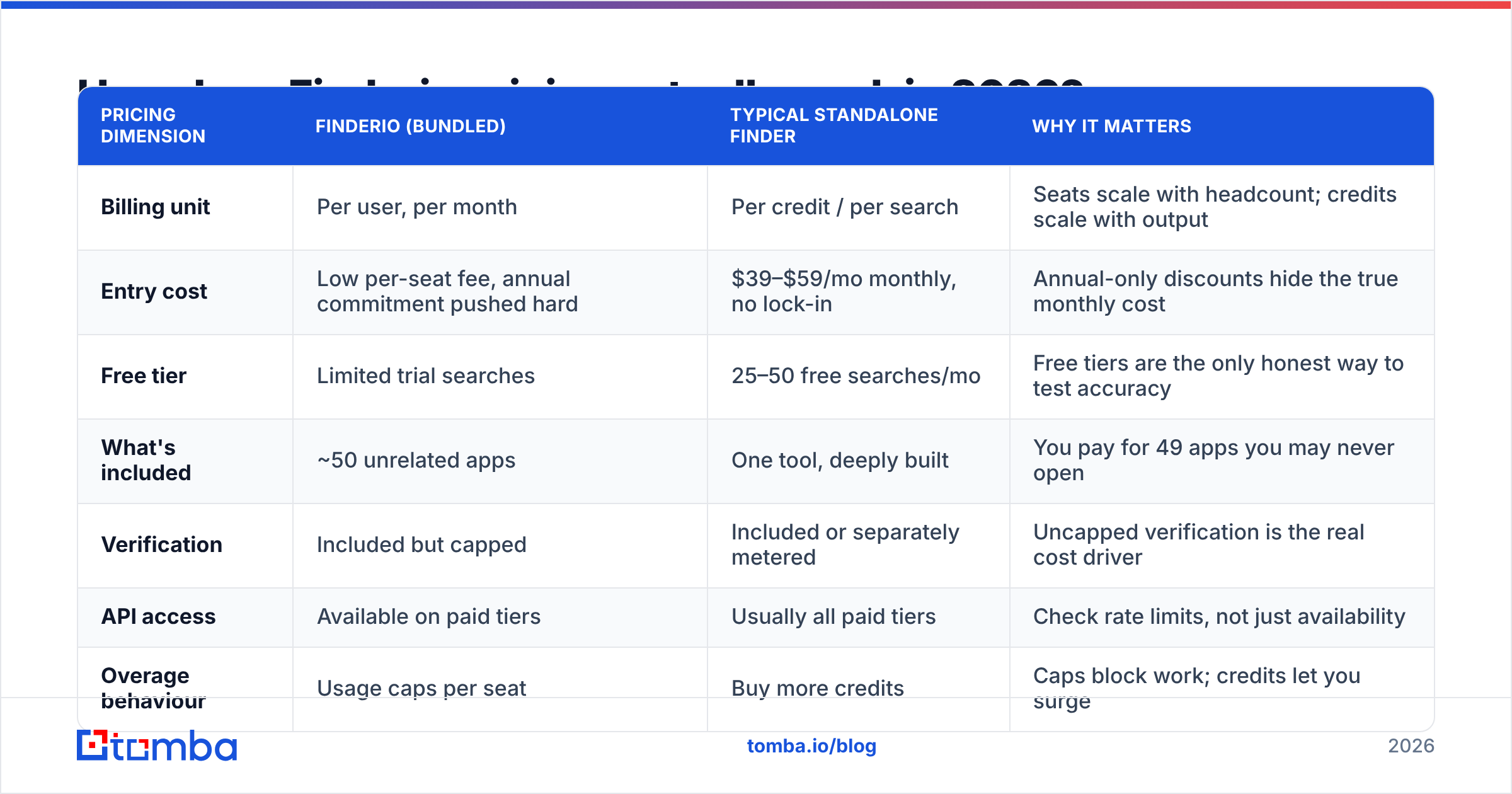
Finderio's list price has historically been the 500apps all-in-one seat price, quoted per user per month with a steep annual discount and a limited free tier. Because bundle vendors reprice frequently, treat the table below as a structural map rather than a quote — confirm current numbers on finder.io before you commit.
| Pricing dimension | Finderio (bundled) | Typical standalone finder | Why it matters |
|---|---|---|---|
| Billing unit | Per user, per month | Per credit / per search | Seats scale with headcount; credits scale with output |
| Entry cost | Low per-seat fee, annual commitment pushed hard | $39–$59/mo monthly, no lock-in | Annual-only discounts hide the true monthly cost |
| Free tier | Limited trial searches | 25–50 free searches/mo | Free tiers are the only honest way to test accuracy |
| What's included | ~50 unrelated apps | One tool, deeply built | You pay for 49 apps you may never open |
| Verification | Included but capped | Included or separately metered | Uncapped verification is the real cost driver |
| API access | Available on paid tiers | Usually all paid tiers | Check rate limits, not just availability |
| Overage behaviour | Usage caps per seat | Buy more credits | Caps block work; credits let you surge |
| Contract flexibility | Annual favoured | Monthly common | Monthly is worth paying a premium for in year one |
The trap here is not that Finderio is expensive. It's that the seat model punishes exactly the team that needs an email finder most. A three-person SDR team pushing 8,000 searches a month pays three seats. A one-person growth hire pushing the same 8,000 searches pays one seat — until they hit the per-seat cap and can't buy their way past it without adding phantom users.
Credit-based vendors like Tomba pricing invert that: Free (25 searches/mo), Starter $49/mo, Growth $99/mo, Pro $249/mo, Enterprise custom. You scale by volume, not by headcount, and a solo operator can run enterprise-grade volume on one login.

What are you really paying per verified email?#
Here's the calculation almost nobody runs before they buy. Take the monthly cost, divide by deliverable emails — not returned emails.
- Step 1 — Count returned results, not searches. A search that returns nothing still burns time. Most finders don't charge for a miss, but hit rate still determines your effective price.
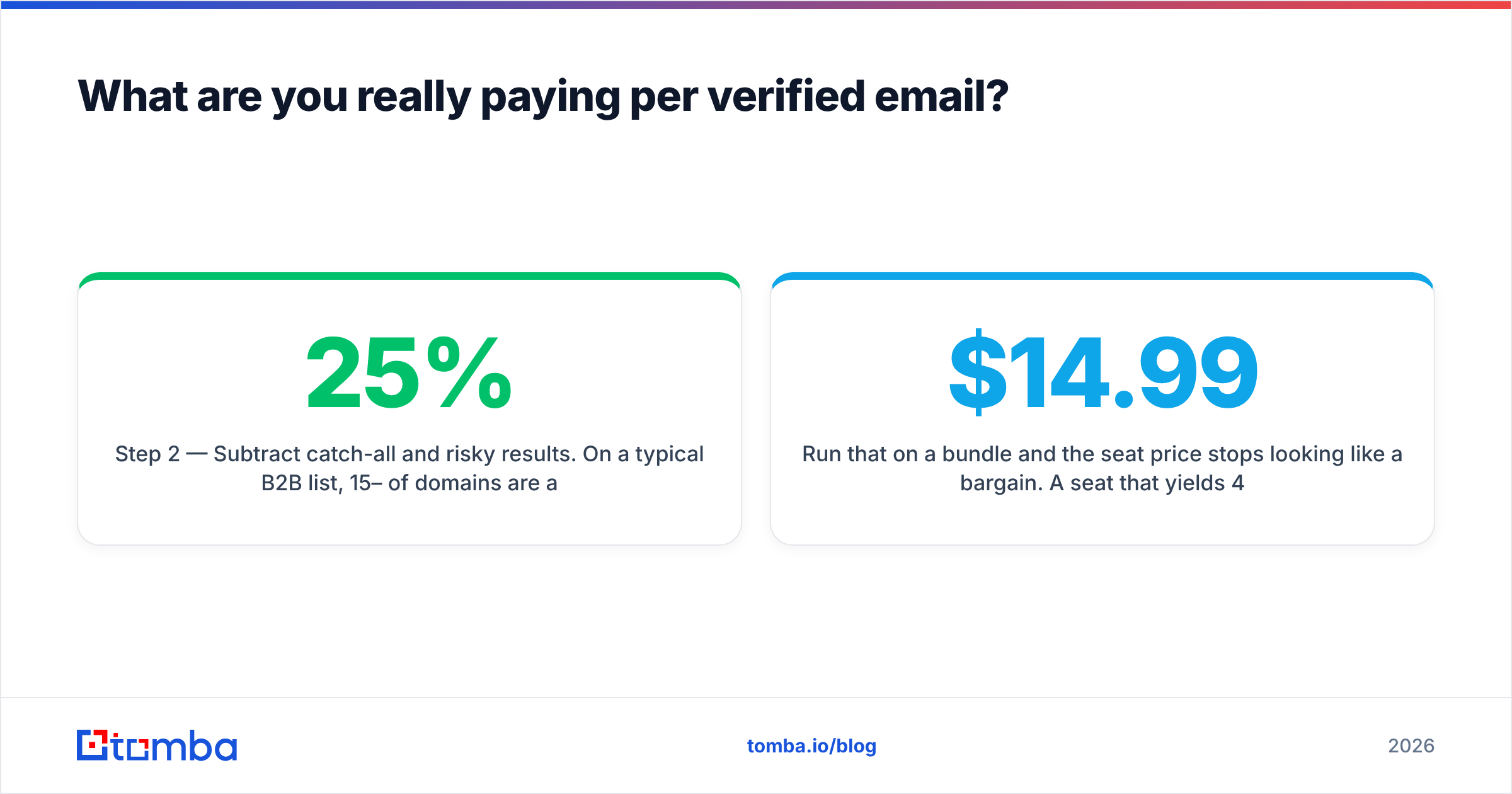
- Step 2 — Subtract catch-all and risky results. On a typical B2B list, 15–25% of domains are accept-all. Those addresses "verify" as valid at the SMTP layer and bounce anyway unless the vendor runs deeper checks. A dedicated catch-all verifier is the difference between a 2% and a 9% bounce rate.
- Step 3 — Subtract role accounts. info@, sales@, support@ inflate hit-rate stats and destroy reply rates. Count them as zero.
- Step 4 — Add the cost of your re-work. Every bounced send costs sender reputation, and reputation damage costs you deliverability on the good addresses in the same campaign.
- Step 5 — Divide. Monthly spend ÷ usable, verified, non-role emails = your true unit cost.
Run that on a bundle and the seat price stops looking like a bargain. A $14.99 seat that yields 400 usable contacts costs $0.037 per contact. A $49 plan that yields 2,500 usable contacts costs $0.020 — nearly half. The bundle only wins if you're at very low volume, which is precisely the scenario where a free tier would have covered you anyway.
How accurate is Finderio compared to other email finders?#
Accuracy is where bundled tools structurally struggle, and it's not a swipe at any one vendor — it's a resourcing reality. Maintaining a competitive email database means continuous crawling, pattern inference, SMTP infrastructure across many IPs, and a verification pipeline that handles greylisting and accept-all domains. A vendor splitting engineering across 50 apps allocates a fraction of what a single-product vendor allocates to that one problem.

What to test during a trial, regardless of vendor:
- Confidence scores, not booleans. A tool that says "valid" with no score is hiding uncertainty. You want a number you can threshold on (e.g. only send to ≥ 90).
- Accept-all handling. Feed it 20 known catch-all domains. If everything comes back "valid," the verifier is doing syntax and MX checks only.
- Pattern coverage on mid-market domains. Everyone nails microsoft.com. Test 30 companies with 50–500 employees — that's where databases thin out.
- Freshness. Pull 20 contacts you know changed jobs in the last six months. Stale records are the most expensive kind of wrong.
- Bulk behaviour. Upload 1,000 rows. Measure completion time, failure rows, and whether the export includes verification status per row. A proper bulk email finder returns status columns, not just addresses.
Run the same 100-row test file through every tool on your shortlist in the same week. Vendor-published accuracy stats are marketing; your own list is evidence. Third-party review aggregation on G2 is useful for spotting support and billing complaints, but it tells you nothing about accuracy on your ICP.
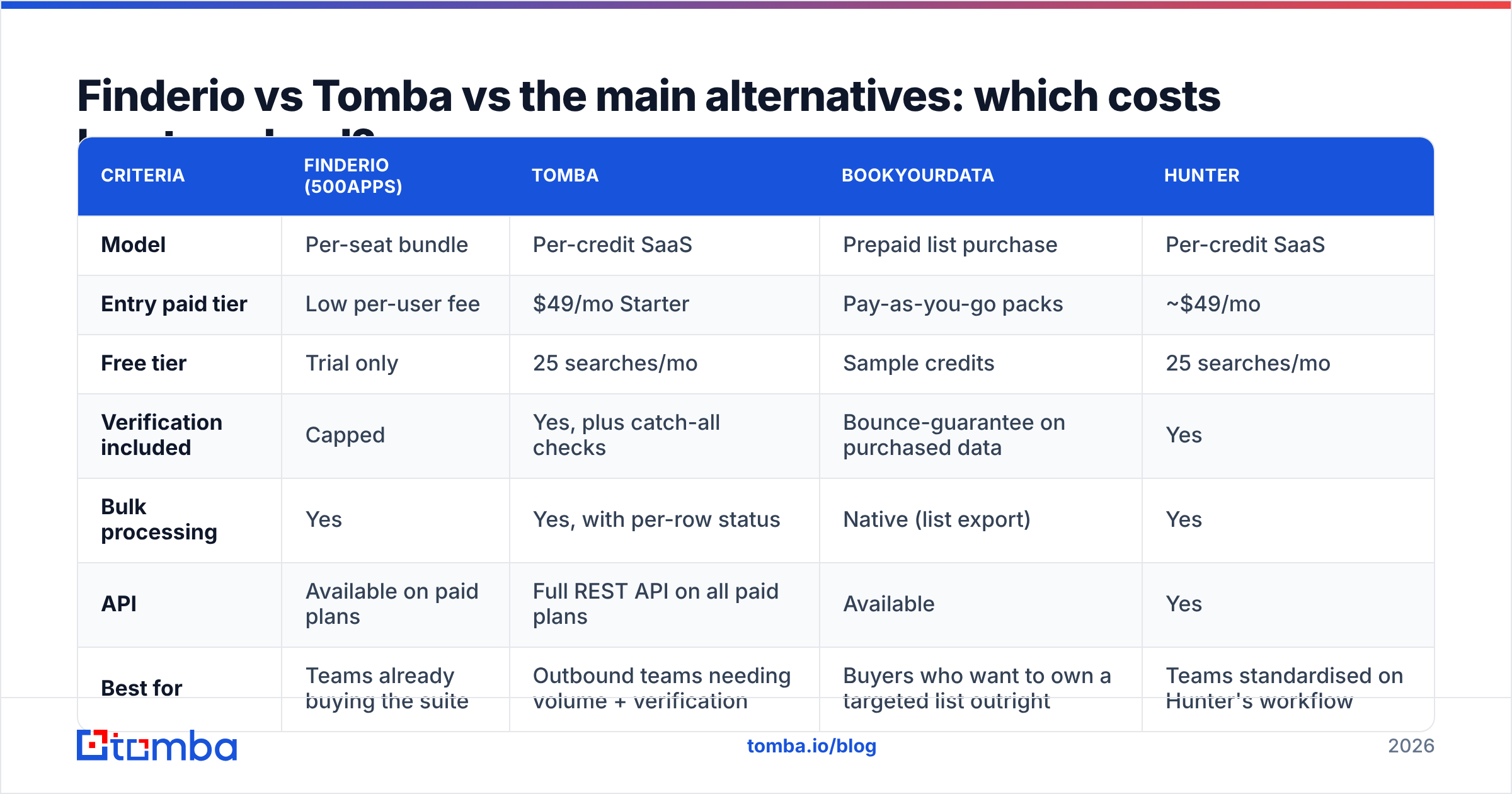
Finderio vs Tomba vs the main alternatives: which costs least per lead?#
| Criteria | Finderio (500apps) | Tomba | BookYourData | Hunter |
|---|---|---|---|---|
| Model | Per-seat bundle | Per-credit SaaS | Prepaid list purchase | Per-credit SaaS |
| Entry paid tier | Low per-user fee | $49/mo Starter | Pay-as-you-go packs | ~$49/mo |
| Free tier | Trial only | 25 searches/mo | Sample credits | 25 searches/mo |
| Verification included | Capped | Yes, plus catch-all checks | Bounce-guarantee on purchased data | Yes |
| Bulk processing | Yes | Yes, with per-row status | Native (list export) | Yes |
| API | Available on paid plans | Full REST API on all paid plans | Available | Yes |
| Best for | Teams already buying the suite | Outbound teams needing volume + verification | Buyers who want to own a targeted list outright | Teams standardised on Hunter's workflow |
| Weak spot | Depth per app | Fewer non-email tools | Not a live per-search finder | Higher cost at scale |

A few honest notes on that table:
BookYourData solves a genuinely different problem. If you want a targeted, filtered list you own outright — with a bounce guarantee attached — buying the list beats renting search credits. It's the right answer for one-shot campaigns into a defined segment, and it prices as a purchase rather than a subscription. That's a legitimately better fit than any per-search tool for certain jobs.
Hunter is the incumbent and a fair benchmark. Its pricing is transparent and its brand recognition is high; the trade-off is cost per credit at volume.
Tomba wins on the specific metric this post is about — cost per verified email — because verification, domain search, and catch-all checking sit inside the same credit pool rather than being sold as a separate SKU. The email verifier returns a status and a score per address, which is what lets you threshold before sending instead of after bouncing.
Finderio wins if — and only if — you're genuinely consolidating. If replacing four other subscriptions with the bundle saves $300/month, the email finder being merely adequate is an acceptable trade. Just make that trade consciously rather than because the seat price looked small.
What hidden costs should you budget for?#
Every pricing page omits the same four line items. Add them yourself before comparing.
- Annual lock-in. Bundle discounts are typically annual-prepay. If the tool underperforms in month two, you've bought ten more months of it. Price the monthly option even if you intend to go annual.
- Seat creep. Per-user pricing means onboarding an SDR costs you a licence. Per-credit pricing means onboarding an SDR costs you nothing until they generate volume. Model both at 12-month headcount, not today's.
- Verification as a second vendor. If the built-in verifier can't handle accept-all domains, you'll buy a dedicated verifier. That's a real second invoice, and it belongs in the Finderio column of your spreadsheet.
- Deliverability damage. This is the big one and the hardest to quantify. A 12% bounce rate on a new sending domain can suppress inbox placement for weeks. Google and Microsoft both tightened bulk sender requirements in recent years — HubSpot's deliverability guidance covers the current expectations. Cheap data that bounces is the most expensive data you can buy.
Protect against #4 mechanically: verify before every send, suppress anything below your confidence threshold, and monitor sender reputation continuously rather than after a campaign tanks.
Is Finderio worth it in 2026?#
Yes, if you're buying the bundle for the bundle. If your team will actually use the CRM, the help desk, the project tool, and the email finder, the per-seat price is hard to argue with, and the finder is a free-ish bonus on top of a genuinely cheap suite. Consolidating five invoices into one has real operational value that never shows up in a feature matrix.
No, if email finding is a core revenue function. Outbound teams live and die on data quality. When your pipeline depends on 5,000 accurate, verified contacts a month, you want the vendor whose entire roadmap is that problem — not the vendor for whom it's app #23. The savings from a cheap seat evaporate the first time a campaign bounces at 11% and your domain reputation takes a month to recover.
The decision rule: if your monthly search volume is under ~300, use free tiers and stop optimising. Between 300 and 3,000, run the per-verified-email calculation above and pick whichever number is lower. Above 3,000, buy the standalone tool with API access and never think about seats again.
How should you run the comparison yourself?#
Give it one afternoon. Build a 100-row test file drawn from your actual ICP — mid-market companies, mixed geographies, a few known catch-all domains, and ten contacts whose current employer you can independently confirm. Run it through every shortlisted tool inside the same week, on free tiers where possible.
Score four columns: hit rate, verified-deliverable rate, role-account contamination, and cost of those 100 rows. The winner is rarely the cheapest sticker price and rarely the most expensive one. It's the tool that turns your monthly budget into the most contacts you can actually email without wrecking your domain.
Then re-run it in six months. Databases drift, vendors reprice, and a tool that won in Q1 can lose by Q4 — which is exactly why annual lock-in deserves more scepticism than it usually gets.
Ready to price it out on your own list? Start with the Tomba Email Finder free tier — 25 searches a month, no card, with verification and confidence scores included on every result. Run your 100-row test file, check the deliverable rate against whatever you're paying for today, and upgrade to Starter at $49/mo only if the numbers justify it. That's the whole pitch: measure cost per verified email, not cost per seat, and let the data decide.
Related guides#
Ready to find emails that actually work?
Join 150,000+ professionals who stopped guessing and started sending. Free credits on signup — no credit card required.
Get the Tomba newsletter
Practical outbound tactics and product updates — once every two weeks.
About the author