Finderio vs LFBBD Lead For Business: 2026 Data Showdown
One tool finds emails live from a domain. The other sells you a pre-built list. We compare Finderio and LFBBD on accuracy, pricing, data freshness, and compliance — plus when neither is the right call.
Finderio vs LFBBD Lead For Business comes down to one choice. You can find emails live, or you can buy a list someone built months ago. Both cost money. Only one of them is fresh on the day you hit send.
TL;DR
- Finderio vs LFBBD Lead For Business is a contest between opposite data models: Finderio does live, on-demand email lookup, while LFBBD sells pre-built B2B contact lists you download.
- Live lookup wins on freshness and cost-per-usable-contact. Pre-built lists win on speed-to-first-campaign and on niches where you don't already have a target account list.
- Neither tool removes your need for verification. A downloaded list decays about 2-2.5% per month. A live lookup can still hand you a catch-all, and you can't confirm those without an SMTP check.
- If you already know which companies you want, live lookup plus verification is the cheaper path. If you're still defining your ICP, a list gives you a sample of the market fast.
- Tomba sits in the live-lookup camp with a free tier of 25 searches/mo and Starter at $49/mo, plus a catch-all verifier most lookup tools skip.
Finderio vs LFBBD Lead For Business: what are they?#
They are not the same category of product, even though they compete for the same budget line.
Finderio is an email-finding tool. You give it a domain, a person's name, or a company. It returns the most likely professional email address plus a confidence score. Nothing is stored on your side until you run the query. It belongs to the same family as Hunter, Snov.io, and the Tomba Email Finder — pattern detection plus source crawling plus SMTP validation, run at request time.
LFBBD Lead For Business is a database product. You filter by industry, geography, company size, and job title. Then you export a CSV of contacts that already exist in the vendor's index. The value is coverage and speed: you can go from zero to 5,000 rows in under ten minutes.
The mental model that helps here: Finderio is a well you drill when you're thirsty. LFBBD is a warehouse of bottled water. The well gives you fresh water on demand, but only where you drill. The warehouse gives you volume right now, but every bottle has a fill date you didn't choose.
That difference drives everything else — cost structure, accuracy decay, compliance exposure, and which team should own the tool.
How do their data models actually differ?#
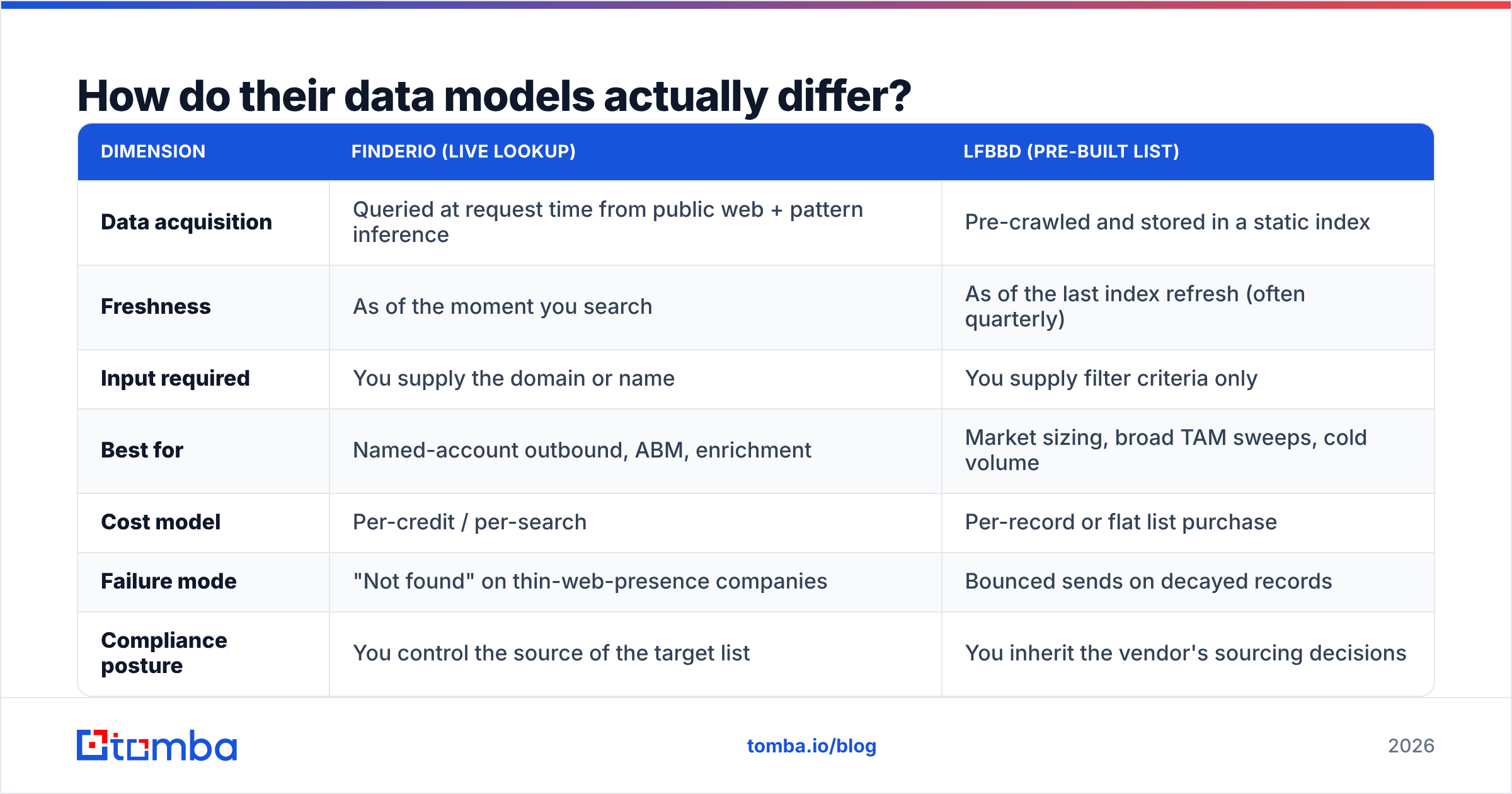
| Dimension | Finderio (live lookup) | LFBBD (pre-built list) |
|---|---|---|
| Data acquisition | Queried at request time from public web + pattern inference | Pre-crawled and stored in a static index |
| Freshness | As of the moment you search | As of the last index refresh (often quarterly) |
| Input required | You supply the domain or name | You supply filter criteria only |
| Best for | Named-account outbound, ABM, enrichment | Market sizing, broad TAM sweeps, cold volume |
| Cost model | Per-credit / per-search | Per-record or flat list purchase |
| Failure mode | "Not found" on thin-web-presence companies | Bounced sends on decayed records |
| Compliance posture | You control the source of the target list | You inherit the vendor's sourcing decisions |
Read the failure-mode row twice. It's the row that determines your sender reputation.
A live lookup that fails returns nothing — you skip the contact, no send, no bounce. A decayed database record fails after you've already hit send. That asymmetry is why deliverability teams prefer lookup-first workflows. It's also why any list purchase should go through an email verifier before it touches your sending domain.

Which one is more accurate in 2026?#
Accuracy is the wrong single number. Break it into three:
- Coverage — what share of your target contacts does the tool return anything for? Databases usually win here on volume, because they've already indexed millions of records. But coverage on your specific ICP can be far lower than the headline number.
- Precision — of the addresses returned, what share are deliverable? Live lookup wins here. The address is validated at query time against current DNS and SMTP state.
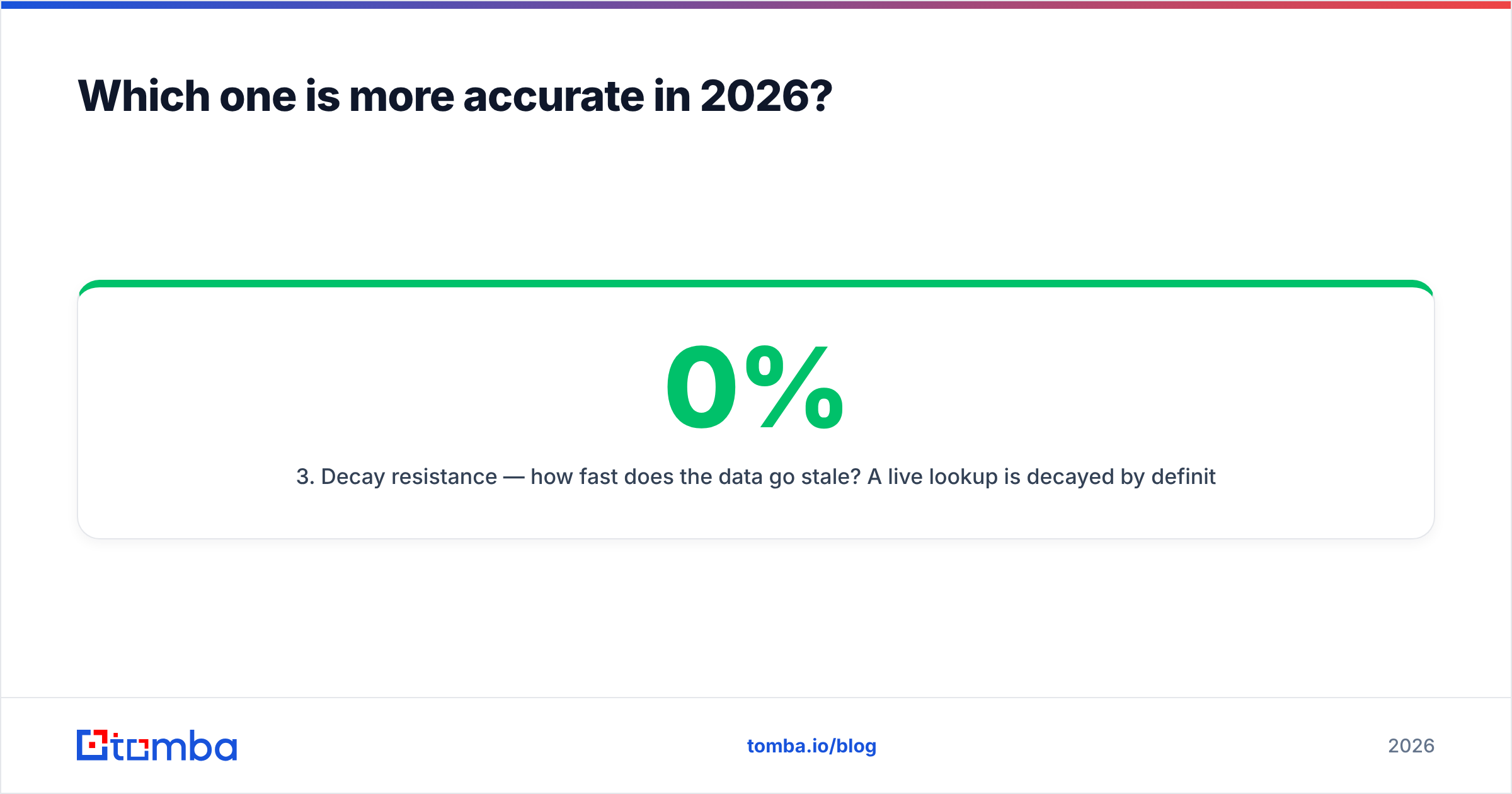
- Decay resistance — how fast does the data go stale? A live lookup is 0% decayed by definition. A purchased list starts decaying the day it's exported. Churn data from sources like Gartner puts B2B contact turnover at 25-30% a year. That works out to roughly 2-2.5% a month.
Here's the practical consequence. A list of 10,000 contacts bought in January is really a list of about 7,200 by December. You have no way to tell which 2,800 are dead without verifying. Verification costs money. So the true cost of a "cheap" list is list price plus verification plus the bounces that slip through anyway.
For live lookup, the equivalent hidden cost is misses. Some companies have too thin a web presence for any pattern to be inferred. Small local businesses, stealth-mode startups, and non-English-language sites are where lookup tools underperform databases.

What does each one cost in practice?#
Public pricing for both vendors shifts, so treat the shape as more durable than the exact number. The shape looks like this:
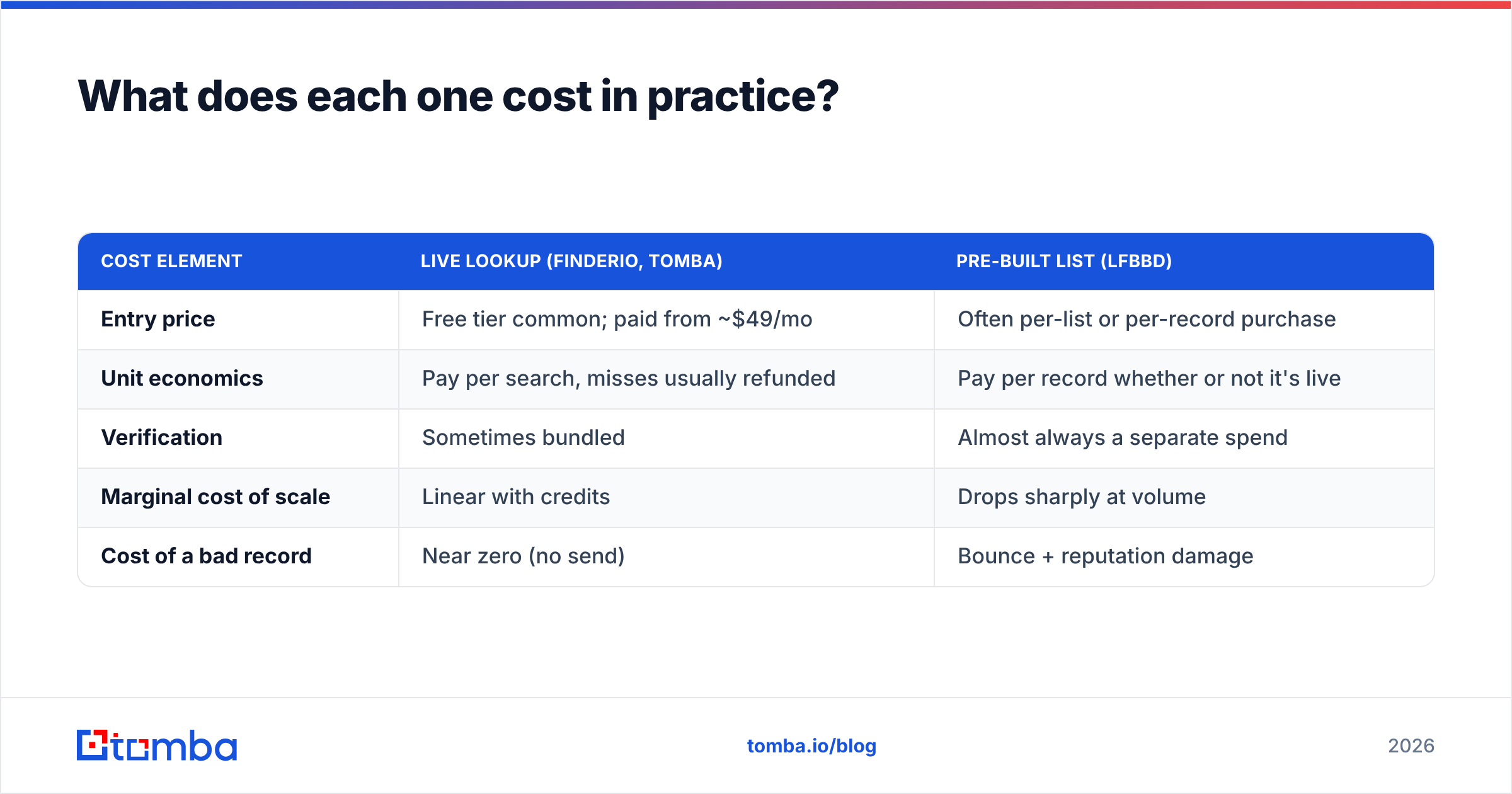
| Cost element | Live lookup (Finderio, Tomba) | Pre-built list (LFBBD) |
|---|---|---|
| Entry price | Free tier common; paid from ~$49/mo | Often per-list or per-record purchase |
| Unit economics | Pay per search, misses usually refunded | Pay per record whether or not it's live |
| Verification | Sometimes bundled | Almost always a separate spend |
| Marginal cost of scale | Linear with credits | Drops sharply at volume |
| Cost of a bad record | Near zero (no send) | Bounce + reputation damage |
For reference, Tomba pricing runs Free (25 searches/mo), Starter $49/mo, Growth $99/mo, Pro $249/mo, and custom Enterprise. Verification and catch-all verification sit inside the same credit pool, not as a bolt-on.
The arithmetic that matters: divide total spend by contacts you actually emailed and reached. A $0.02-per-record list that's 70% deliverable, plus $0.008/record verification, lands near $0.037 per reachable contact. A $0.05 live lookup that's 95% deliverable lands near $0.053. The list still wins on raw price. But that only helps if you have somewhere to put 10,000 contacts. If your sales team can work 300 accounts a quarter, the volume discount is theoretical.
Is LFBBD Lead For Business good for anything live lookup can't do?#
Yes, and it's worth being honest about it.
- You don't have a target list yet. Live lookup needs an input. If you can't name the companies, you can't query. A filterable database is a discovery tool; an email finder is a resolution tool.
- Market sizing and TAM work. Pulling 40,000 rows to count how many mid-market logistics firms in the EU have a VP of Ops is a database job, not a lookup job.
- Long-tail geographies. Regional databases sometimes carry contacts that global crawlers under-index.
- Fixed-budget procurement. A one-time list purchase is easier to get through finance than a recurring per-seat SaaS line.
- Offline channels. Direct mail and phone campaigns don't care about email decay in the same way, so the deliverability penalty is smaller.
Databases like LFBBD and peers such as BookYourData have carved out a real niche here. They're built for teams that need breadth before depth. Dismissing that as "just a list" misses what those buyers are solving for.
The mistake is using a database for a job it wasn't built for: enriching a named-account list you already own. That's where you pay database prices for lookup-quality work and get neither.
How should you actually combine them?#
Most teams that get this right run a hybrid. The escalation ladder looks like this:
- Define the ICP. Firmographics, not names. Industry, headcount band, tech stack, geography.
- Source the account list. This is where a database, a scraper, or your own CRM export does the work. You want company domains, not contacts.
- Resolve contacts live. Run each domain through a domain search to surface the people currently listed. Then find specific addresses by name. This is the step that beats a purchased contact list on precision.
- Verify before send. Even live results include catch-all domains where SMTP won't confirm. Route those through a catch-all check rather than guessing.
- Enrich for personalization. Job title, LinkedIn, phone, recent funding — data enrichment turns a valid address into a message worth reading.
- Re-verify quarterly. Anything sitting in your CRM for more than 90 days is a candidate for re-checking.

Step 2 is where LFBBD earns its keep. Steps 3 through 6 are where a lookup-and-verify stack does. Buying a contact-level list and skipping steps 3-4 is the pattern that torches sending domains.
What about compliance and data sourcing?#
This is the part most comparison posts skip. It's also the part your legal team will ask about first.
With live lookup, you control the input. You chose which companies to target, and you can document why. The tool resolves a business email for a person at a company you picked. Under GDPR's legitimate-interest framing, that's a defensible chain of reasoning. You can show the purpose and the proportionality.
With a purchased list, you inherit the vendor's sourcing decisions. You did not choose those contacts; an algorithm did, against filters. If a recipient asks where you got their data, "we bought a list" is a weaker answer than "we identified your company as a fit and looked up your published business contact." Reputable list vendors document their sourcing and honor suppression requests. Ask for that documentation in writing before you buy. Check the vendor's rating history on G2 for complaints about opt-out handling.
Practical checklist before any list purchase:
- Sourcing statement — where did each record originate, and is it documented per-record or per-batch?
- Suppression handling — how fast do opt-outs propagate, and do they apply retroactively to already-exported lists?
- Regional coverage — does the vendor treat EU, UK, and California records differently, as it should?
- Refresh cadence — quarterly is common; monthly is better; "continuous" usually means partial.
Which should you pick?#
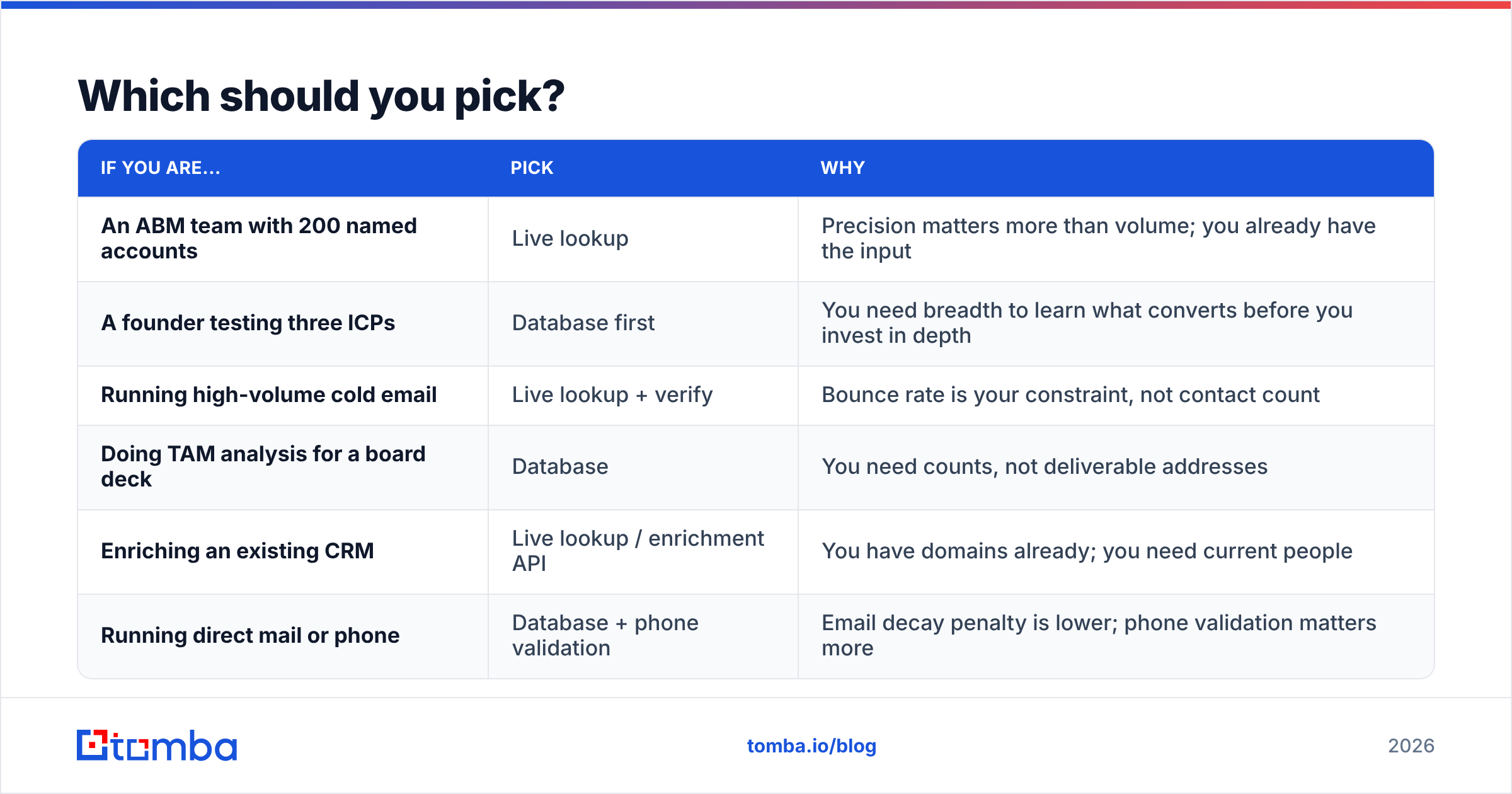
| If you are... | Pick | Why |
|---|---|---|
| An ABM team with 200 named accounts | Live lookup | Precision matters more than volume; you already have the input |
| A founder testing three ICPs | Database first | You need breadth to learn what converts before you invest in depth |
| Running high-volume cold email | Live lookup + verify | Bounce rate is your constraint, not contact count |
| Doing TAM analysis for a board deck | Database | You need counts, not deliverable addresses |
| Enriching an existing CRM | Live lookup / enrichment API | You have domains already; you need current people |
| Running direct mail or phone | Database + phone validation | Email decay penalty is lower; phone validation matters more |
The honest summary: Finderio vs LFBBD Lead For Business is not a choice between substitutes. Finderio-style lookup is a precision instrument for lists you already have. LFBBD-style databases are discovery instruments for markets you're still mapping. Treat them as interchangeable and you pay one of two prices. Either you pay lookup rates for market research, or you pay with your sender reputation for someone else's stale CSV.
If you're forced to pick one and you send at any real volume, pick live lookup. Bounce rate is the constraint that kills campaigns. A tool that returns nothing when it's unsure is safer than one that returns something that was true 14 months ago.

Frequently asked questions#
Can I test either one before paying? Live lookup tools almost always have a free tier. Tomba's is 25 searches/mo, enough to spot-check accuracy on ten companies you already know. Database vendors typically offer a sample file of 50-100 rows on request. Ask for one. A vendor that won't sample is a vendor that knows the sample won't impress you.
How do I benchmark them fairly? Take 50 contacts you already have confirmed addresses for. Run both tools blind against the same 50 and score coverage and precision separately. Do not use the vendor's own accuracy claim as your baseline.
What bounce rate should I target? Under 2% for a healthy sending domain. Under 1% if you're on a new domain still building sender reputation. Above 3%, mailbox providers start throttling you.
Do catch-all domains count as valid? No. A catch-all accepts everything, so SMTP confirmation tells you nothing. Treat them as a separate risk bucket. Either run a dedicated catch-all check or leave them out of your first send.
Start with the accurate side of the equation#
If your problem is "I have a list of companies and I need the right people at them," start with live lookup and verify before you send. Try the Tomba Email Finder free — 25 searches a month, no card. Verification and catch-all checking live in the same workflow, so you're not stitching three vendors together. Run it head-to-head against whatever list you're considering, on the same 50 companies, and let the bounce rate decide.
Related guides#
Ready to find emails that actually work?
Join 150,000+ professionals who stopped guessing and started sending. Free credits on signup — no credit card required.
Get the Tomba newsletter
Practical outbound tactics and product updates — once every two weeks.
About the author