Finderio vs Salesripe: Which B2B Contact Tool Wins?
Finderio finds emails one lookup at a time. Salesripe sells you a filtered list. That single difference decides which one belongs in your outbound stack — and where both quietly cost you money.
Finderio vs Salesripe is not really a feature fight. One tool finds a single email. The other sells you a filtered list. This guide compares both on accuracy, pricing and fit, and shows where each one quietly costs you money.
TL;DR
- They are not the same category. Finderio is a lookup tool — you give it a name and domain, it returns an email. Salesripe is a searchable B2B contact database — you filter by industry, title and geography, then export a list.
- Pick Salesripe if you have no target list yet and want to build one from filters, mostly for US-based SMB and mid-market prospecting.
- Pick Finderio if you already know who you want — accounts from a CRM, a conference list, a scraped LinkedIn export — and just need the address.
- Both leave a verification gap. Database exports go stale fastest; lookup tools return "likely" patterns that still need SMTP-level checking before you send.
- Neither is API-first. If your workflow is enrichment inside a pipeline (Clay, n8n, Make, your own backend), a developer-grade provider like Tomba usually costs less per usable record.
What are Finderio and Salesripe?#
Finderio is an email-finding utility. The core interaction is simple: supply a first name, last name and a company domain, and it returns the most probable work email plus a confidence indicator. It also does domain-level search (pull every address it knows for acme.com) and bulk uploads via CSV. It sits in the same product family as Hunter, Snov and Tomba — pattern detection plus validation, wrapped in a light UI.
Salesripe comes at prospecting from the opposite end. It is a prebuilt B2B contact database with a filter panel: industry (SIC/NAICS), job title, seniority, company size, revenue, location. You run a search, see a count, and export contacts — typically name, title, company, work email, direct or switchboard phone, and firmographics. The value proposition is coverage-on-demand: you do not need a target list, because the list is the product.
That distinction matters more than any feature checkbox. One tool answers "what is this person's email?". The other answers "who should I even be emailing?". Teams that conflate them end up paying for the wrong shape of data.
Finderio vs Salesripe: how do they actually differ?#
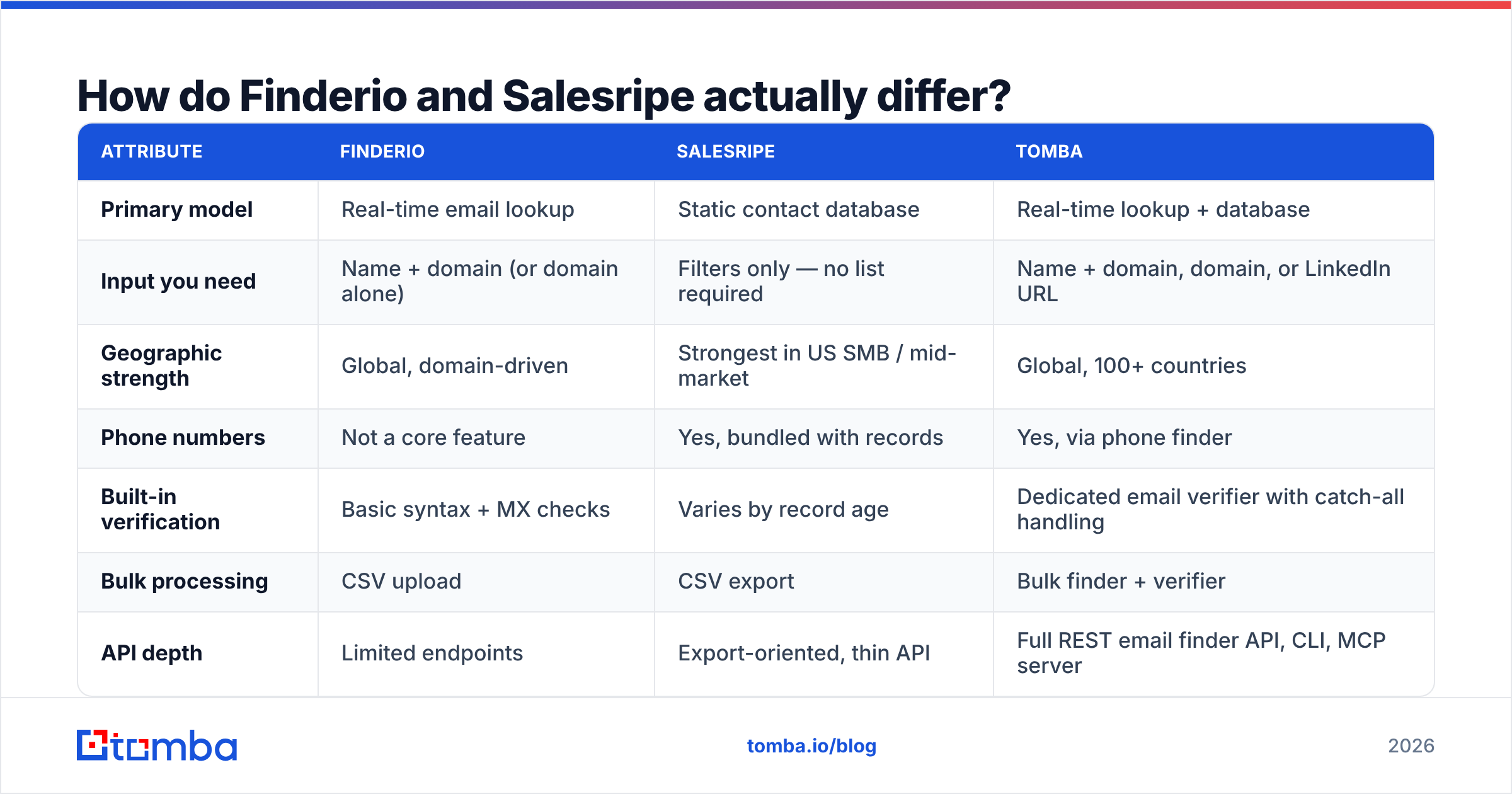
Here is the head-to-head on the attributes that change your cost per meeting, not the ones that look good on a landing page.
| Attribute | Finderio | Salesripe | Tomba |
|---|---|---|---|
| Primary model | Real-time email lookup | Static contact database | Real-time lookup + database |
| Input you need | Name + domain (or domain alone) | Filters only — no list required | Name + domain, domain, or LinkedIn URL |
| Geographic strength | Global, domain-driven | Strongest in US SMB / mid-market | Global, 100+ countries |
| Phone numbers | Not a core feature | Yes, bundled with records | Yes, via phone finder |
| Built-in verification | Basic syntax + MX checks | Varies by record age | Dedicated email verifier with catch-all handling |
| Bulk processing | CSV upload | CSV export | Bulk finder + verifier |
| API depth | Limited endpoints | Export-oriented, thin API | Full REST email finder API, CLI, MCP server |
| Free tier | Limited trial searches | Demo / sample records | 25 searches per month, no card |
| Entry paid plan | Verify current pricing page | Verify current pricing page | $49/mo Starter, $99/mo Growth |
| Best fit | Known-target enrichment | Cold list building from scratch | Both, plus pipeline automation |
Two honest caveats on that table. First, both vendors change plan structures often — treat the pricing row as a prompt to check their live pages rather than a quote. Second, "coverage" claims from any database vendor are self-reported. The only number that matters is how many of your exported rows actually accept mail.

Which one has better data accuracy?#
Different failure modes, so "better" depends on what you feed it.
Finderio's accuracy is bounded by pattern inference. It learns that Acme uses first.last@acme.com, then applies that pattern to your target. When the company has a consistent format and a reachable mail server, hit rates are high. Catch-all domains, randomized aliases and legacy patterns left over from an acquisition break that logic. Confidence scores drop, and you get a guess dressed as a result. A catch-all verdict is not a green light — it means the server accepts everything, including addresses that route nowhere. Run those through a catch-all verifier before they enter a sequence.
Salesripe's accuracy is bounded by record age. Database records are snapshots. B2B contact data decays at roughly 25-30% per year — people change jobs, companies rebrand, domains migrate. A record captured 14 months ago can be structurally perfect and completely dead. If a vendor does not tell you the last_verified_at date on each row, assume the worst and verify the whole export yourself.

The practical rule: never send to an unverified export, from any vendor. A 10,000-row list with a 12% invalid rate will torch your sender reputation within two sends. No amount of clever copy recovers a domain that Google has started filtering. Independent reviews on G2 show why. Verification quality, not raw database size, is the most complained-about part of this category.
How do the pricing models compare?#
The sticker price is the least useful number. What differs is what a "unit" means.
- Finderio charges per lookup. You pay for attempts, and unsuccessful searches may or may not be refunded depending on the plan. Cost scales with how many people you enrich.
- Salesripe charges per record exported. You pay for rows leaving the platform, whether or not they turn out to be deliverable. Cost scales with list size.
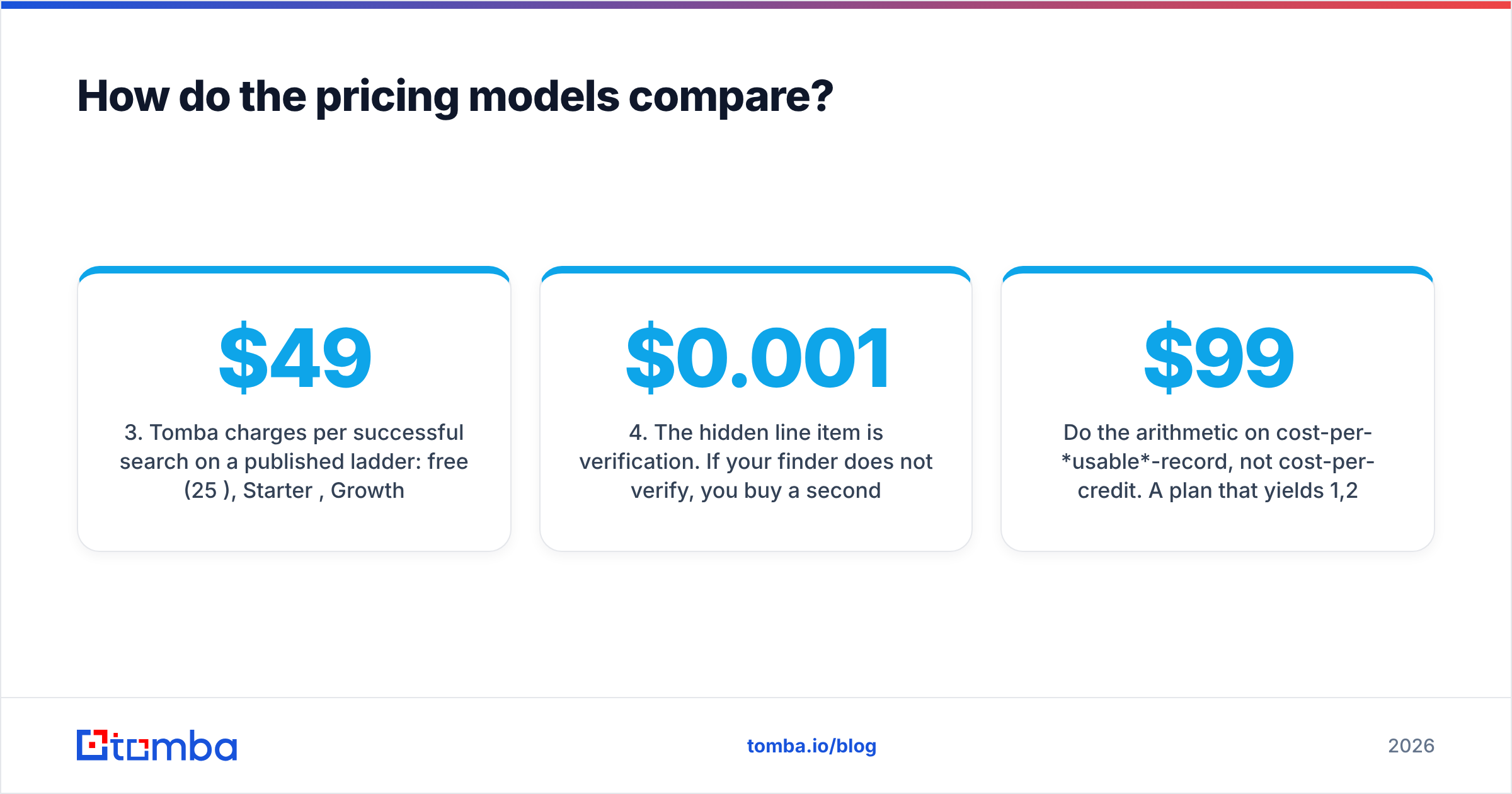
- Tomba charges per successful search on a published ladder: free (25/mo), Starter $49/mo, Growth $99/mo, Pro $249/mo, Enterprise custom — see Tomba pricing for current credit counts.
- The hidden line item is verification. If your finder does not verify, you buy a second tool. Budget $0.001-$0.007 per verification and add it to the real cost of every export.
- The second hidden line item is deduplication. Database exports overlap heavily between searches. Paying twice for the same contact is common and rarely refunded — run exports through a remove duplicates pass before you count credits consumed.
Do the arithmetic on cost-per-usable-record, not cost-per-credit. A $99 plan that yields 1,200 verified, deliverable contacts beats a $49 plan that yields 400.
Is Salesripe better for building lists from scratch?#
Yes, if your ICP is US-centric and firmographic.
Salesripe's filter-first model genuinely removes work when you are starting cold. If your ICP is "HVAC companies in Texas with 20-200 employees and $5M-$50M revenue, owner or VP Operations", a database gives you 800 rows in ten minutes. A lookup tool means sourcing the companies first, then the people, then the domains. That is hours of assembly before you find a single email.
Where the model strains:
- Non-US coverage thins out. European, LATAM and APAC records are less consistent. GDPR rules on legitimate interest also mean you cannot treat an EU export the way you treat a US one.
- Filters are firmographic, not behavioral. You can filter by revenue band. You cannot filter by "hiring for RevOps this quarter" or "just switched CRMs". Intent signals live elsewhere.
- Everyone else bought the same rows. A prebuilt database is a shared resource. If your competitors filter on the same ICP, they get the same 800 people. Differentiation has to come from your message.
- Exports go stale immediately. The day you download, the clock starts. Refresh cadence matters more than initial accuracy.
Is Finderio better for targeted, one-off lookups?#
Yes, and this is the more common real workflow than most vendors admit.
Most teams already know their accounts. They came from a CRM import, a conference attendee list, an inbound signup, a scraped LinkedIn Sales Navigator export, or the product's own website visitor data. In that situation, you do not need a database — you need an address for a specific human, and you need it now.
Finderio handles that pattern cleanly. Paste a name and domain, get a result. Upload a CSV of 500 name/domain pairs, get them back enriched. The interaction is low-friction and the mental model is obvious.
The ceiling shows up at scale and at the edges. Bulk jobs are UI-driven rather than pipeline-driven. So if you want enrichment to fire the moment a lead hits your CRM, you end up stitching together Zapier steps or writing glue code against a thin API. The other edge is input shape. Most modern prospecting starts from a LinkedIn profile URL, not a clean name/domain pair, and that calls for a LinkedIn finder instead of a name-based lookup.
Where do both tools leave gaps?#
Five gaps show up repeatedly in teardowns of both products. The first two are about data quality.
- Verification depth. Neither positions itself as a verification specialist. Syntax and MX checks catch typos. They do not catch abandoned mailboxes, role accounts, spam traps or catch-all domains. If your bounce rate sits above 3%, this is where it comes from.
- Data provenance. Ask any vendor where records come from and how consent is handled. Vague answers are a compliance risk under GDPR and CCPA. Tomba publishes its data sources precisely because buyers now ask.
The other three are about workflow.
- Automation surface. Both are primarily UI products. Modern GTM stacks want an endpoint — enrich on webhook, enrich on CRM create, enrich inside a Clay table. Check for real REST docs, rate limits and SDKs before you commit, not after.
- Phone coverage on the lookup side. Finderio is email-focused. If your motion is email plus cold calling-style multichannel, you need a second source for direct dials. Salesripe bundles them; most pure finders do not.
- Refresh cadence. Neither vendor makes it easy to re-verify a list you exported six months ago. That job falls to you, and it should be scheduled quarterly.
Which should you pick for outbound in 2026?#
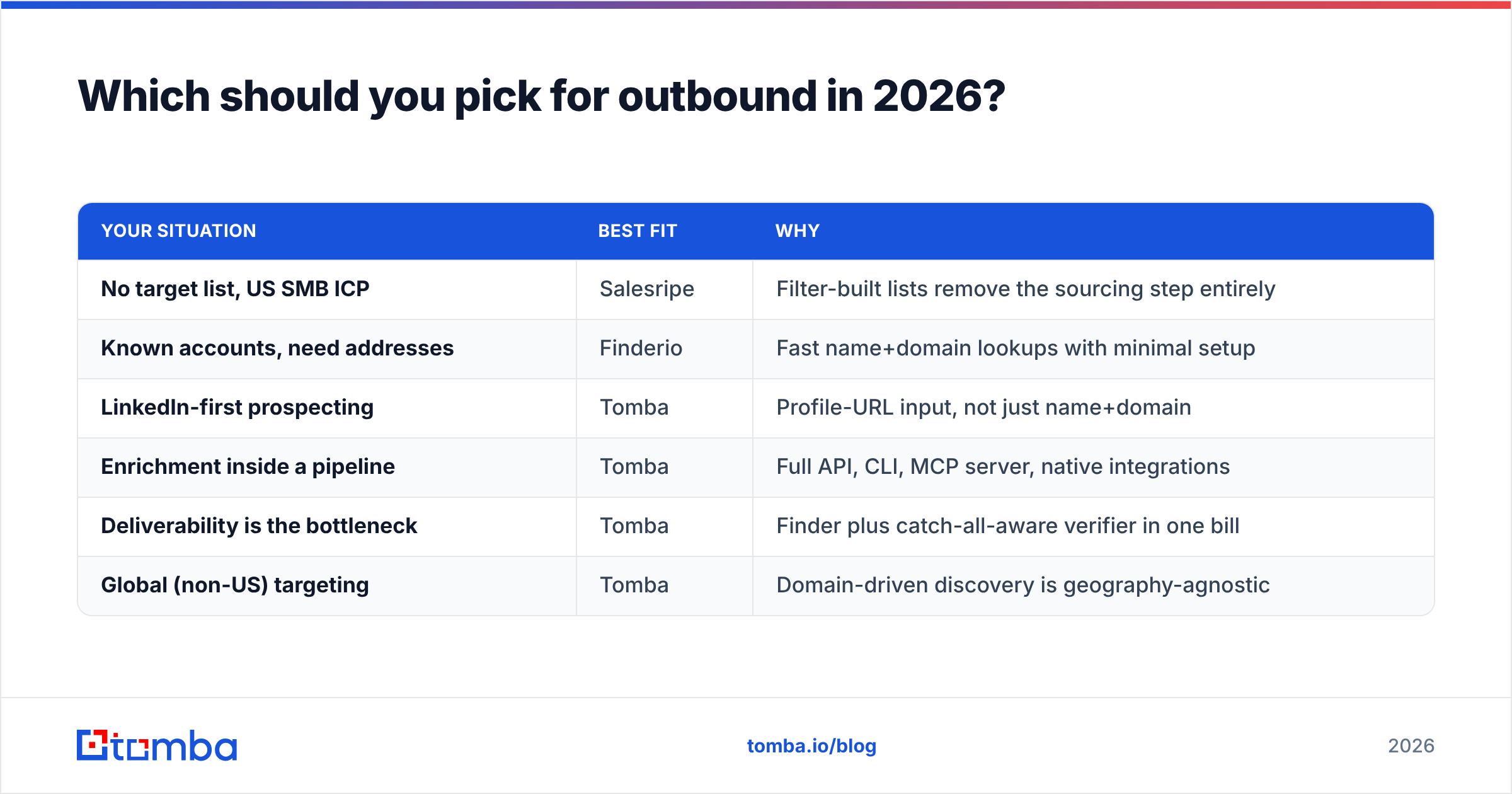
The Finderio vs Salesripe decision comes down to where your prospecting starts.
| Your situation | Best fit | Why |
|---|---|---|
| No target list, US SMB ICP | Salesripe | Filter-built lists remove the sourcing step entirely |
| Known accounts, need addresses | Finderio | Fast name+domain lookups with minimal setup |
| LinkedIn-first prospecting | Tomba | Profile-URL input, not just name+domain |
| Enrichment inside a pipeline | Tomba | Full API, CLI, MCP server, native integrations |
| Deliverability is the bottleneck | Tomba | Finder plus catch-all-aware verifier in one bill |
| Global (non-US) targeting | Tomba | Domain-driven discovery is geography-agnostic |
Here is the uncomfortable truth about this category. A lookup tool and a database solve different halves of the same problem. Most teams end up paying for both, then paying a third vendor to verify the output. Consolidating those three line items into one provider is usually where the savings are — not in shaving $20 off a starter plan.
If you want to test that claim cheaply, run the same 100 contacts through all three. Measure verified-deliverable rate, not raw match rate. Then divide by what you paid. The winner is rarely the one with the biggest advertised database.
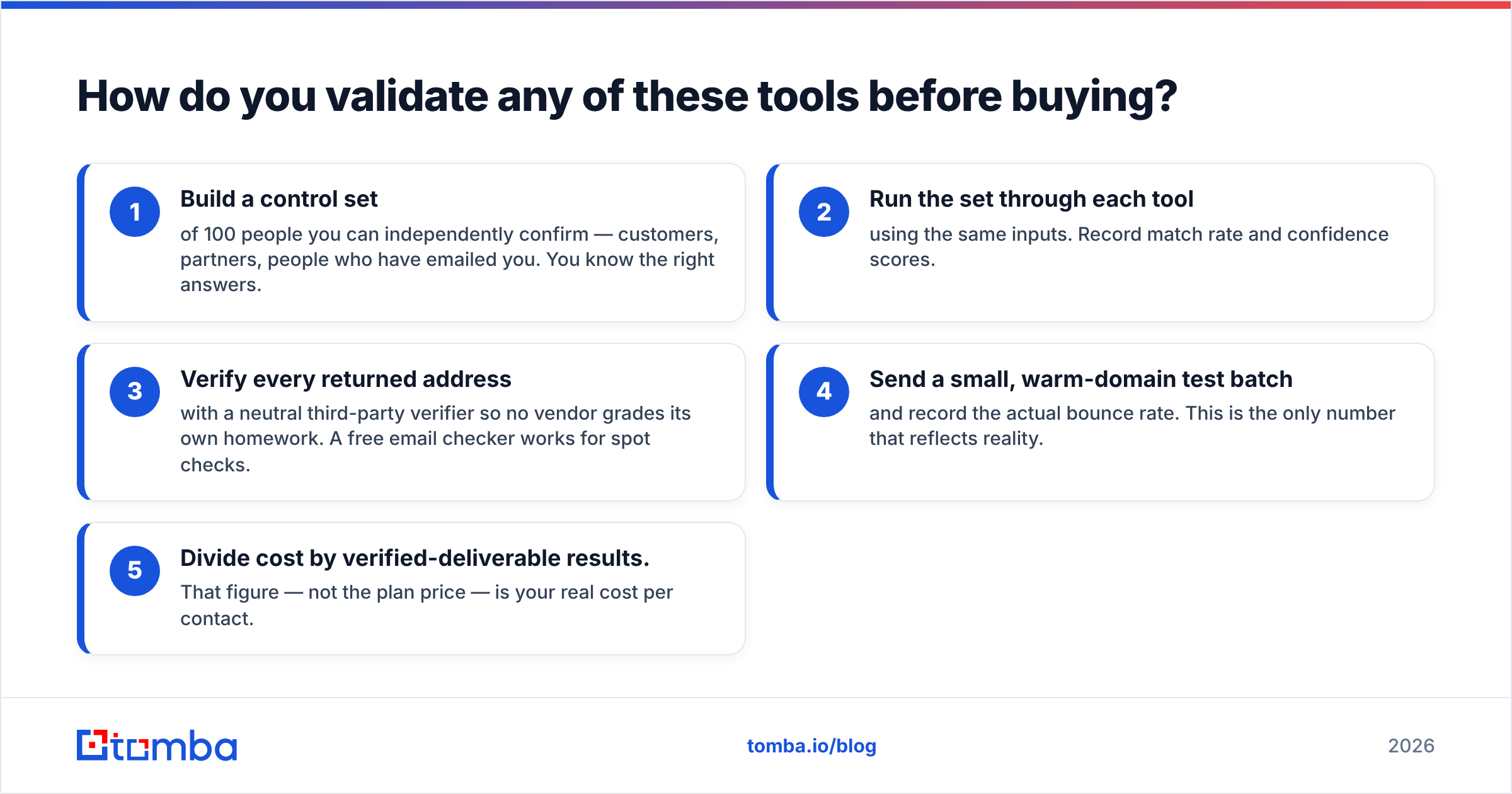
How do you validate any of these tools before buying?#
Run a 100-contact bake-off. It takes an afternoon.
- Build a control set of 100 people you can independently confirm — customers, partners, people who have emailed you. You know the right answers.
- Run the set through each tool using the same inputs. Record match rate and confidence scores.
- Verify every returned address with a neutral third-party verifier so no vendor grades its own homework. A free email checker works for spot checks.
- Send a small, warm-domain test batch and record the actual bounce rate. This is the only number that reflects reality.
- Divide cost by verified-deliverable results. That figure — not the plan price — is your real cost per contact.
Vendors will show you their own benchmarks. Public methodology matters, and comparison hubs like Capterra are useful for feature scope. Nothing substitutes for a control set built from data you already trust.
Ready to test a finder that verifies as it goes?#
If your bottleneck is bounce rate rather than list size, start with the Tomba Email Finder. The free tier gives you 25 searches a month with no card, Starter is $49/mo, and every result runs through the same catch-all-aware verification layer instead of shipping you a "probably" and wishing you luck. Run your 100-contact control set through it alongside Finderio and Salesripe, compare verified-deliverable rates, and let the numbers pick your stack.
Related guides#
Ready to find emails that actually work?
Join 150,000+ professionals who stopped guessing and started sending. Free credits on signup — no credit card required.
Get the Tomba newsletter
Practical outbound tactics and product updates — once every two weeks.
About the author