Finderio vs Warpleads: Which Lead Data Tool Wins in 2026?
Finderio sells verified B2B email lookups by domain. Warpleads sells export-heavy prospect lists for high-volume outbound. We compare accuracy, pricing, credits, and export limits — and name the better fit for each team.
TL;DR
- Finderio is a lookup-first email finder: you give it a domain or a name, it returns a verified business email. Best when your target list is already defined.
- Warpleads is an export-first prospecting database: you filter, you export tens of thousands of records, you feed a sequencer. Best when you need volume fast.
- They are not really competitors — they solve opposite halves of the same problem. Most teams that buy one end up needing the other's job done somewhere.
- On cost per usable contact, precision tools win when your ICP is narrow; bulk exporters win when your ICP is broad and your offer is cheap.
- If you want both motions on one credit pool with an API, a platform like Tomba is usually the cheaper consolidation than running two subscriptions.
What are Finderio and Warpleads, actually?#
Finderio (finderio.com) positions itself as a straightforward B2B email finder: enter a company domain or a first name + last name + domain pair, get back the most likely professional address plus a confidence signal. It leans on pattern detection (the first.last@, f.last@, firstl@ families) combined with a crawl index and SMTP-level checks. The workflow is one-record-at-a-time or CSV-in / CSV-out.
Warpleads (warpleads.com) sits on the other side of the funnel. It's a prospect database with filtering — industry, headcount, geography, title, sometimes technographic signals — and its headline feature is unlimited or very-high-volume exports. The pitch is straightforward: stop paying per contact, pull 50,000 records, load them into your sequencer, and let volume do the qualifying.
That difference in shape matters more than any feature checkbox. Finderio assumes you already know who you want to reach. Warpleads assumes you want the system to hand you a list.

Sorry — that renders as a plain image:
How do the two models differ in practice?#
Here is the core structural comparison. Read this before you read any pricing page, because the model determines whether the price is good.
| Dimension | Finderio (lookup-first) | Warpleads (export-first) |
|---|---|---|
| Primary input | Domain, or name + domain | Filters (industry, size, title, geo) |
| Primary output | One verified address per query | Bulk CSV of thousands of records |
| Credit logic | Charged per successful find | Charged per export volume / flat tier |
| Verification depth | SMTP + pattern confidence at query time | Varies; often verified in batch, staler |
| Natural user | Founder, agency, ABM rep, recruiter | SDR team, agency running volume outbound |
| Failure mode | Runs out of names to look up | Runs out of good names in the export |
| Typical list hygiene | High — you verify what you send | Lower — needs a second verification pass |
| Best paired with | A scraped or CRM-sourced target list | A standalone verifier before sending |
The "failure mode" row is the one people underestimate. A precision tool never gives you scale; a bulk tool never gives you precision. Both gaps cost money, just in different budget lines.
Which one is more accurate?#
Accuracy is the wrong single number to chase. What you actually care about is deliverable contacts per dollar, which is accuracy multiplied by match rate.
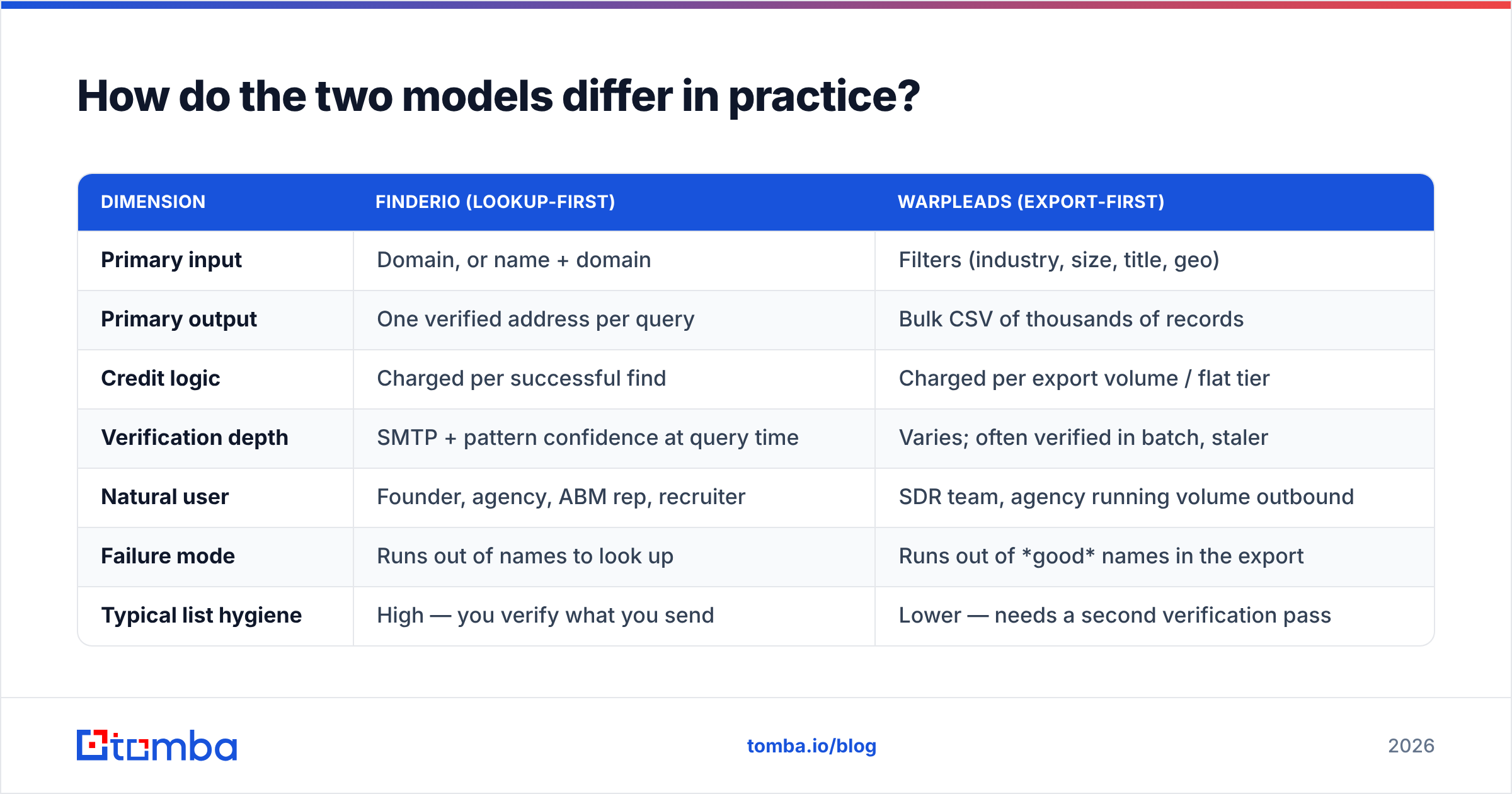
- Match rate is what percentage of your input rows return any address. Lookup tools like Finderio typically publish or imply match rates in the 55–75% band for common B2B domains, dropping sharply for sub-50-employee companies and non-English domains.
- Accuracy is what percentage of returned addresses actually accept mail. Query-time SMTP checking — Finderio's approach — tends to beat database-cached results because the record is validated the moment you ask for it.
- Staleness is the silent killer on export-first platforms. A database record verified eight months ago sits in a market with roughly 20–25% annual job turnover in tech sales roles. Do that math on a 50,000-row export and you're looking at thousands of dead rows before your first send.
- Catch-all noise distorts both. Domains with a catch-all MX accept everything, so a naive verifier marks them valid. You need an explicit catch-all verifier to tell a real inbox from a black hole.
The practical implication: if you export 50,000 rows from Warpleads and send without re-verification, your bounce rate is decided by whoever last touched that database — not by you. Run any bulk export through an independent email verifier before it reaches your sending domain. That single step is usually the difference between a 1.5% bounce rate and a 7% one, and Google and Yahoo's bulk-sender requirements put the enforcement threshold uncomfortably close to that range.
What does each one cost in 2026?#
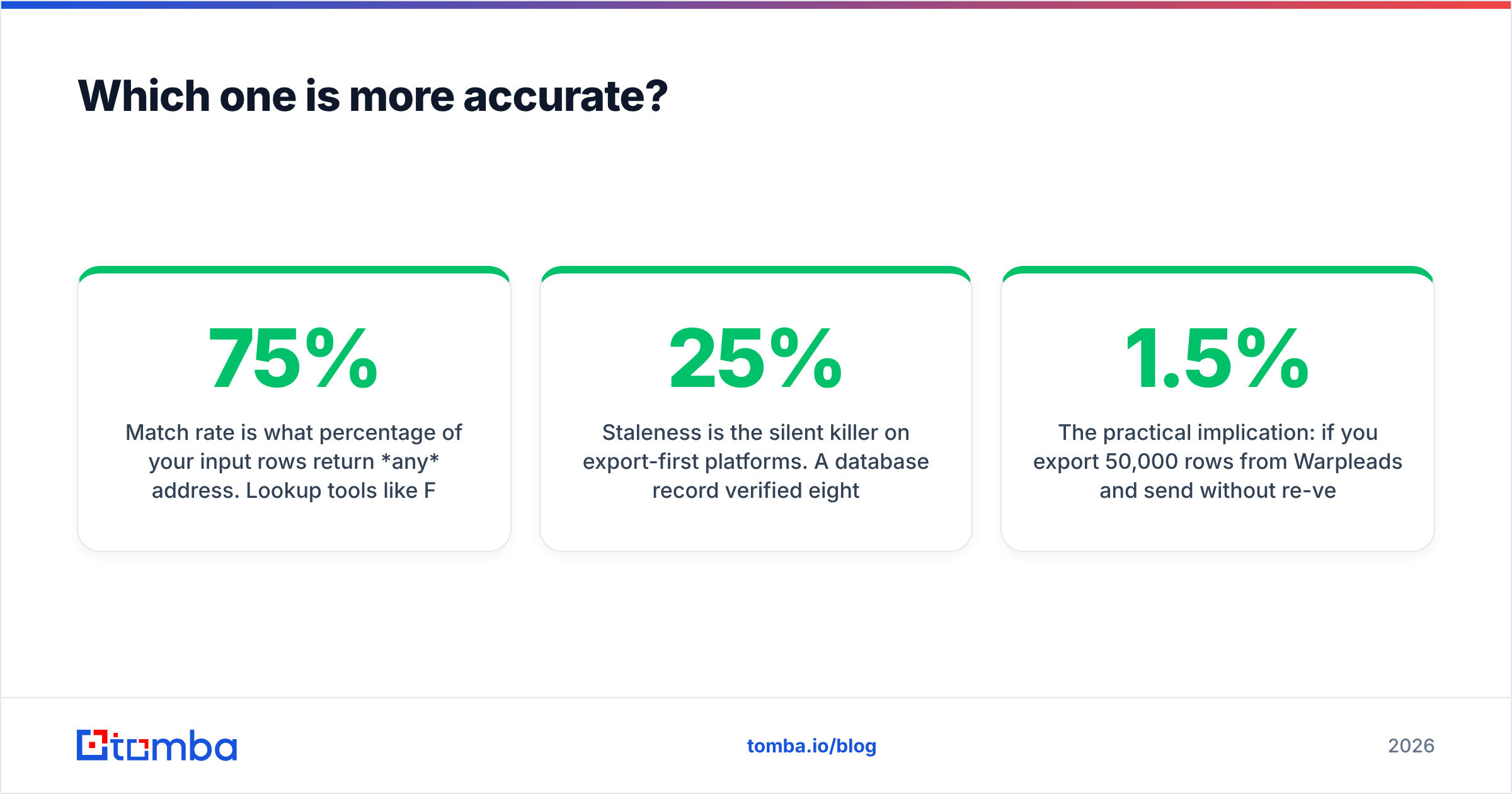
Public pricing for both tools shifts, and both run promotional tiers, so treat the figures below as the shape of the offer rather than a locked quote — check each vendor's own page before you buy. What matters is the unit being sold.
| Cost factor | Finderio | Warpleads | Tomba |
|---|---|---|---|
| Pricing unit | Per credit / lookup | Per export volume or flat tier | Per credit, shared across tools |
| Free tier | Limited monthly lookups | Trial-style access | 25 searches/mo |
| Entry paid tier | Low-cost per-credit pack | Mid-tier volume plan | $49/mo Starter |
| Mid tier | Scales with credit volume | Higher export ceiling | $99/mo Growth |
| High tier | Enterprise / API quote | Custom | $249/mo Pro, Enterprise custom |
| Verification included | Yes, at query time | Partial — often needs a second pass | Yes, plus catch-all handling |
| API access | Yes | Limited | Full Tomba API, CLI, MCP |
| Bulk workflow | CSV enrichment | Native export | Bulk email finder + domain search |
The honest read on cost: a per-credit tool looks expensive until you count wasted sends. If a bulk export costs you nothing per row but 30% of the rows are dead, you paid in domain reputation, which is the one currency you cannot top up with a credit card. Conversely, if you need 40,000 contacts this quarter for a $99 product, per-credit pricing will bankrupt the campaign before it starts.
Compare the transparent tiers on Tomba pricing as a reference point for what a combined lookup-plus-verification pool costs, since that's the pool most teams end up needing anyway.
When should you choose Finderio?#
Pick the lookup-first model when these are true:
- Your ICP is narrow. You have a named account list — 200 to 2,000 companies — and you need the right person at each one, not more companies.
- You already have a source of names. LinkedIn Sales Navigator, a conference attendee list, a scraped directory, an existing CRM segment. You need the email, not the identity.
- Deliverability is a hard constraint. You're sending from a domain you can't afford to burn — a primary company domain, or an established sending infrastructure.
- Deal size is high. At $30k+ ACV, spending $0.05 versus $0.005 per contact is statistically irrelevant. Spending a week cleaning a bad list is not.
- You need a specific person. Author outreach, recruiter sourcing, partnership development — cases where "someone at the company" is worthless and "the VP of Data Engineering" is everything.
For that motion, domain search plus a per-contact finder is the right tool shape, and Finderio does it competently.
When should you choose Warpleads?#
Pick the export-first model when these are true:
- You're testing an offer, not a list. Early-stage GTM where you genuinely don't know which vertical converts. Volume is a discovery mechanism.
- Your economics tolerate a low reply rate. Cheap product, self-serve close, no SDR time per lead.
- You have dedicated sending infrastructure. Burner domains, warmed inboxes, a rotation you can afford to lose.
- You have a verification step already. You're not sending the raw export — you're filtering it hard first.
- Your bottleneck is list-building hours, not list quality. If a rep spends 12 hours a week assembling lists, a bulk export buys that time back immediately.
The failure pattern to avoid: buying an unlimited-export plan, treating the export as a finished list, and sending straight from it. That's how teams end up in the spam folder wondering why their "verified" data underperformed. Verification is a step you own, not a step you outsource to a filter.
Is there a third option that covers both jobs?#
Yes, and it's the honest answer to most "X vs Y" searches in this category: teams that seriously run outbound usually end up buying both a finder and a verifier, then discover they're paying two vendors for one workflow.
Consolidation platforms handle both halves on a single credit pool. Tomba is one of them — the email finder covers the precision job, domain search and bulk operations cover the list-building job, and verification (including catch-all resolution) runs on the same credits rather than a second invoice. There's also a LinkedIn finder for the Sales-Navigator-to-email path that most reps actually use day to day.
Other credible names in the same space worth benchmarking: BookYourData for verified, pay-as-you-go B2B lists with a strong accuracy guarantee, Hunter for domain-level discovery, and Apollo for combined data-plus-sequencing. Independent user reviews on G2 and Capterra are more useful than any vendor comparison page — including this one — because they reflect match rates on real ICPs rather than curated demos.

How do you actually decide? A five-minute test#
Don't buy on a feature grid. Run this instead:
- Build a 100-row control list. Pull 100 companies you genuinely want, with a named target title at each. Real ICP, not the easy Fortune-500 names.
- Run it through both tools. Note the match rate — how many rows came back with an address at all.
- Verify the output independently. Use a neutral third tool, not the vendor's own verifier. A free email checker works for a spot sample.
- Compute cost per verified contact. Total spend divided by rows that survived step 3. This is the only number that matters.
- Send 50 of them. Track bounce rate. Anything above 3% means the data source is not production-ready for your sending domain.
Most teams find that the winner flips depending on ICP. A tool that hits 78% on US SaaS mid-market can hit 31% on European manufacturing. Vendor-published averages hide that variance completely — which is why running your own control list beats reading any comparison, including this one.
What's the final verdict on Finderio vs Warpleads?#
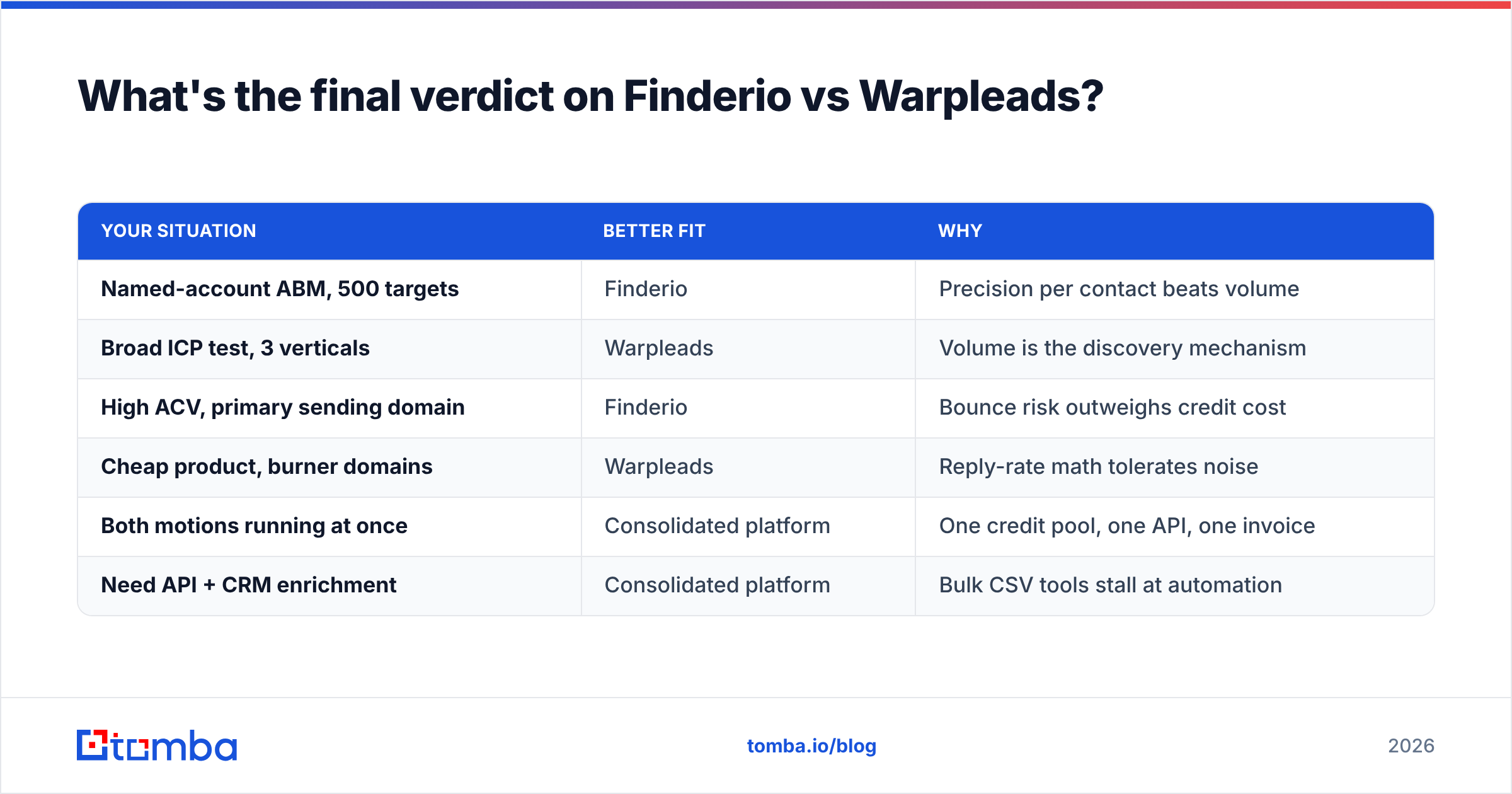
If your list is defined, choose the finder. If your list is the problem, choose the database. If both are true, consolidate.
| Your situation | Better fit | Why |
|---|---|---|
| Named-account ABM, 500 targets | Finderio | Precision per contact beats volume |
| Broad ICP test, 3 verticals | Warpleads | Volume is the discovery mechanism |
| High ACV, primary sending domain | Finderio | Bounce risk outweighs credit cost |
| Cheap product, burner domains | Warpleads | Reply-rate math tolerates noise |
| Both motions running at once | Consolidated platform | One credit pool, one API, one invoice |
| Need API + CRM enrichment | Consolidated platform | Bulk CSV tools stall at automation |
Neither tool is bad. They're answers to different questions, and most of the frustration people report with either one traces back to buying the wrong shape rather than the wrong brand.
One more thing worth checking before you commit: whether the tool's data can reach the rest of your stack. A CSV export that requires a manual upload every Monday is a real cost measured in rep hours. Native integrations with HubSpot, Salesforce, Sheets, or Zapier turn list-building from a task into a background process — and that's usually worth more than a few percentage points of match rate.
Ready to test your own control list? Start with the Tomba Email Finder — the free tier gives you 25 searches a month, no card required, so you can run the 100-row test above against your real ICP before spending anything. If the match rate and bounce numbers hold up on your accounts, paid plans start at $49/mo and the same credits cover verification, domain search, and bulk enrichment, so you're not buying a second tool to clean up after the first one.
Related guides#
Ready to find emails that actually work?
Join 150,000+ professionals who stopped guessing and started sending. Free credits on signup — no credit card required.
Get the Tomba newsletter
Practical outbound tactics and product updates — once every two weeks.
About the author