Findymail vs Getro (2026): Which One Fits Your GTM Stack?
Findymail is an email finder built for outbound. Getro is talent-network software for VC portfolios and communities. Here's how they actually differ, what each costs, and which one belongs in your 2026 stack.
TL;DR
- Findymail and Getro are not competitors. Findymail is a B2B email finder for outbound sales; Getro is job-board and talent-network software for VC firms, accelerators, and communities.
- If your question is "how do I get verified work emails for a cold sequence," Getro is the wrong shelf entirely. Compare Findymail against email-finding tools, not against Getro.
- If your question is "how do I run a portfolio job board and a talent pool," Findymail does none of that.
- Pricing models differ completely: Findymail publishes per-credit monthly tiers; Getro quotes annually per organization and doesn't list prices publicly.
- The overlap is thin but real: both put you in front of people. One gives you an inbox to email, the other gives you a pipeline of candidates who opted in.
Why are people comparing Findymail vs Getro at all?#
Because both tools show up in searches for "find contacts at portfolio companies."
Venture firms, accelerators, and community-led B2B teams have a strange dual need. They want to help portfolio companies hire (that's Getro's job), and they want to reach founders, operators, and prospects by email (that's Findymail's job). Somewhere in a Notion doc, the two names ended up on the same shortlist, and now the comparison exists.
So let's kill the ambiguity fast: these products do not replace each other. What follows is an honest breakdown of what each one actually is, what it costs, where the edges genuinely touch, and what to buy if you only have budget for one line item.
What is Findymail?#
Findymail is a B2B email finder built specifically for outbound teams. You give it a name and a company (or a LinkedIn URL, or a Sales Navigator list), and it returns a work email address. Its pitch has always been accuracy first: the product markets a bounce guarantee and runs its own verification layer instead of shipping raw guesses.
The core capabilities:
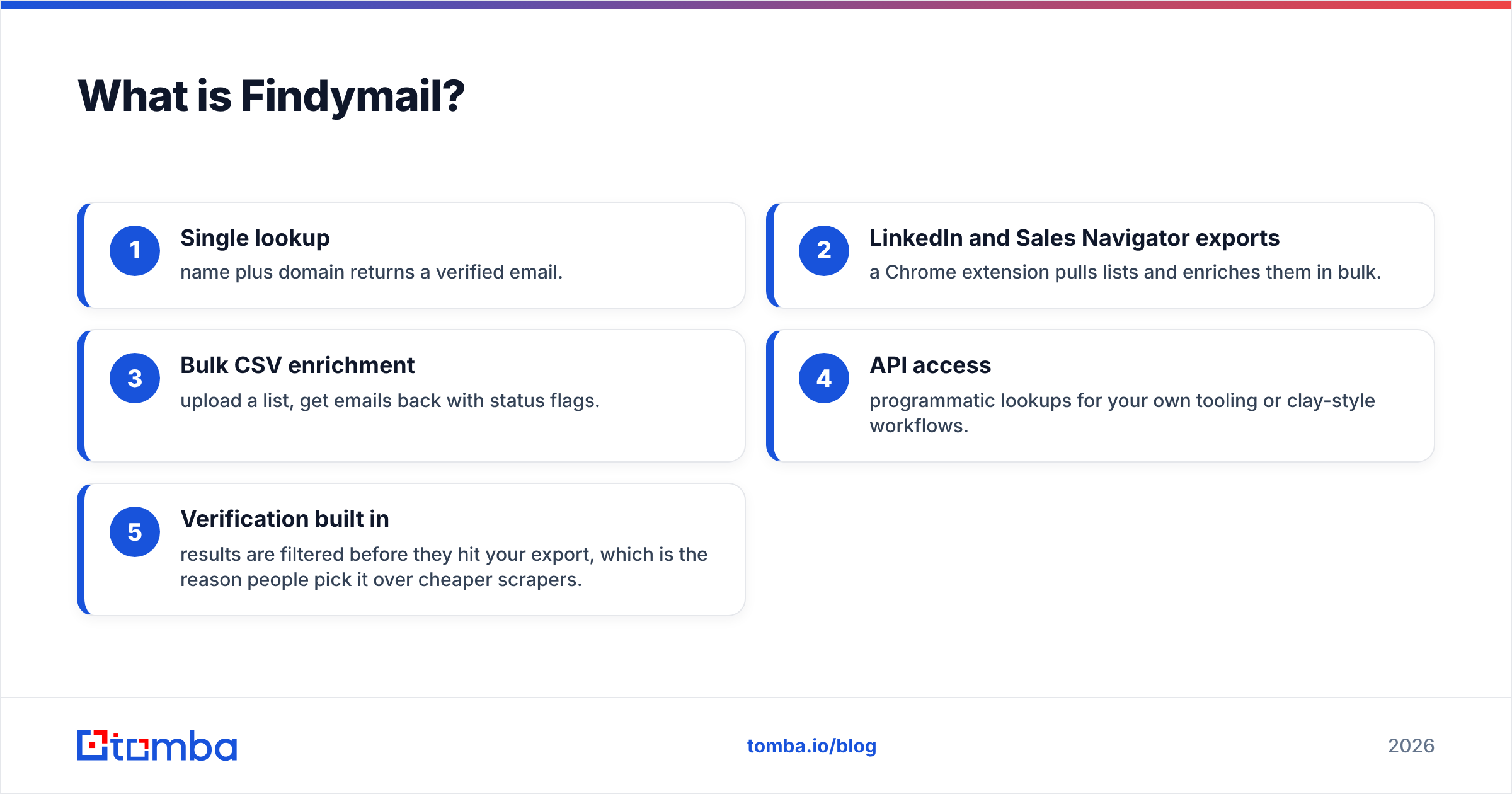
- Single lookup — name plus domain returns a verified email.
- LinkedIn and Sales Navigator exports — a Chrome extension pulls lists and enriches them in bulk.
- Bulk CSV enrichment — upload a list, get emails back with status flags.
- API access — programmatic lookups for your own tooling or clay-style workflows.
- Verification built in — results are filtered before they hit your export, which is the reason people pick it over cheaper scrapers.
Where it's weak: it's a point solution. There's no CRM, no sequencer, no job board, no talent pool, no intent data. It finds emails and hands them off. For a lot of teams that focus is exactly the appeal. You can see their current feature set at findymail.com.

What is Getro?#
Getro is talent infrastructure for networks — most visibly for venture capital firms. Its two products are Getro.jobs (a branded job board that aggregates open roles across every company in your portfolio) and Getro Connect (a searchable talent network where candidates opt in and your portfolio founders can browse them).
Concretely, Getro:
- Crawls portfolio company career pages and syncs open roles automatically, so the board doesn't rot.
- Hosts a branded job board on your domain, embedded or standalone.
- Runs an opt-in talent pool where candidates submit profiles and consent to being contacted.
- Reports on network activity — applications, clicks, which companies are hiring.
- Handles the community plumbing so a two-person platform team can support 80 portfolio companies.
Notice what's absent: Getro does not find email addresses for cold outreach. The contacts inside Getro Connect are people who raised their hand. That's a legal and ethical distinction, not a feature gap — the whole product is built on consent. Details are on getro.com.
How do Findymail and Getro compare head-to-head?#
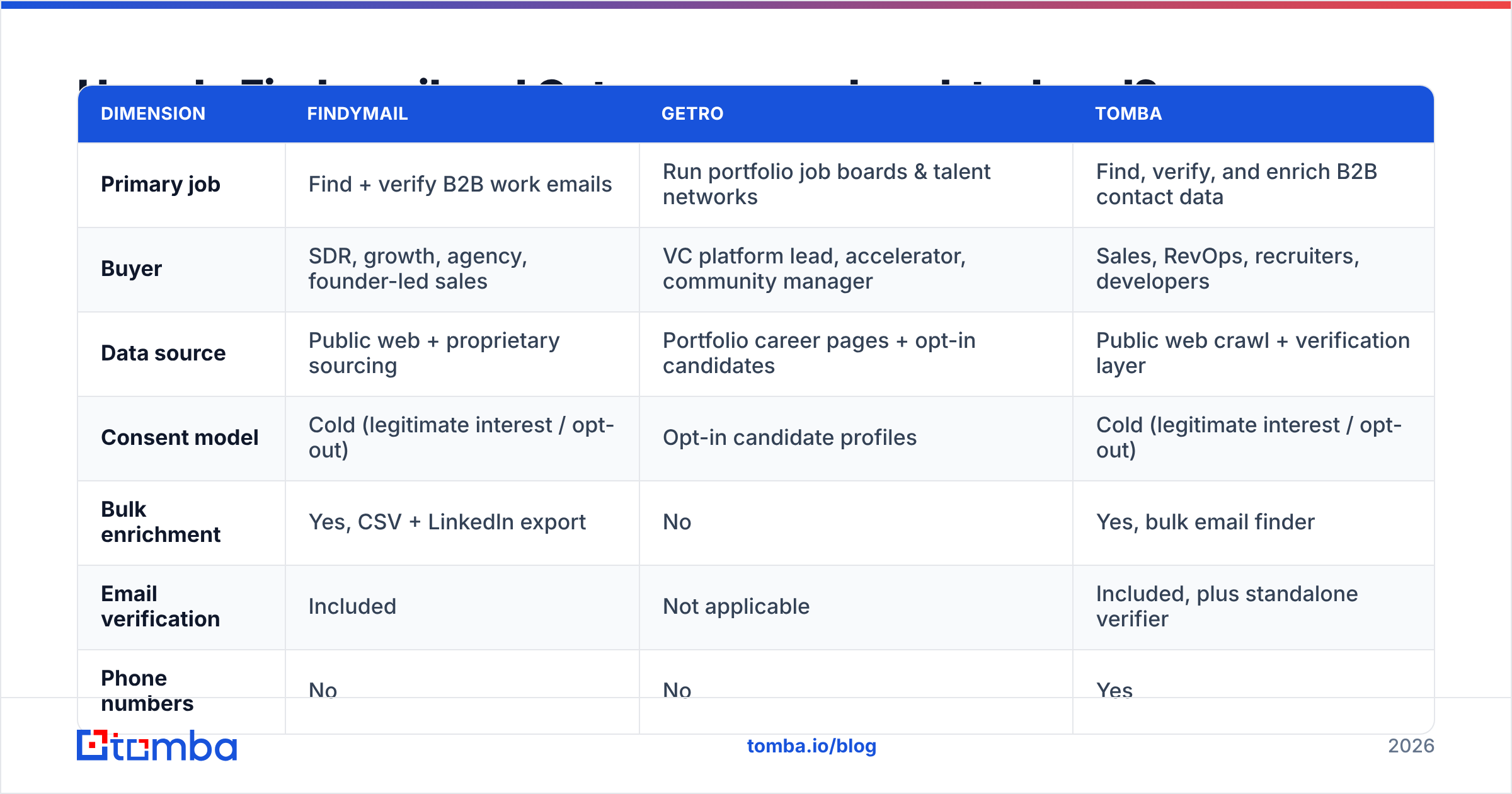
| Dimension | Findymail | Getro | Tomba |
|---|---|---|---|
| Primary job | Find + verify B2B work emails | Run portfolio job boards & talent networks | Find, verify, and enrich B2B contact data |
| Buyer | SDR, growth, agency, founder-led sales | VC platform lead, accelerator, community manager | Sales, RevOps, recruiters, developers |
| Data source | Public web + proprietary sourcing | Portfolio career pages + opt-in candidates | Public web crawl + verification layer |
| Consent model | Cold (legitimate interest / opt-out) | Opt-in candidate profiles | Cold (legitimate interest / opt-out) |
| Bulk enrichment | Yes, CSV + LinkedIn export | No | Yes, bulk email finder |
| Email verification | Included | Not applicable | Included, plus standalone verifier |
| Phone numbers | No | No | Yes |
| Free tier | Limited trial credits | No, demo-gated | 25 searches/mo, no card |
| Public pricing | Yes, monthly tiers | No, annual quote | Yes, $49 / $99 / $249 |
| API | Yes | Limited / partner-level | Yes, plus CLI and MCP |
The table makes the verdict obvious: the two products barely intersect. The only column where they even touch is "puts you in contact with humans," and they arrive there from opposite directions.
What does each one cost in 2026?#
Findymail publishes list pricing in monthly credit tiers. At the time of writing, the entry plan sits around $49/mo for roughly 1,000 emails, a mid tier near $99/mo for about 5,000, and a scale tier around $249/mo for 15,000. Credits are consumed per successful find, and unused credits generally don't roll over. Always check their live page before budgeting — email-finder pricing moves more often than most SaaS categories.
Getro does not publish pricing. It's quoted per organization, usually on an annual contract, and it scales with portfolio size and which modules you take (job board only, versus job board plus talent network). Expect a demo call, a scoping conversation, and an annual invoice rather than a credit card checkout. That's normal for the category — Getro's peers in VC platform tooling price the same way.
The practical consequence: you can test Findymail this afternoon for the cost of a team lunch. You cannot test Getro this afternoon at all. If speed of evaluation matters, that asymmetry is worth more than any feature checkbox.
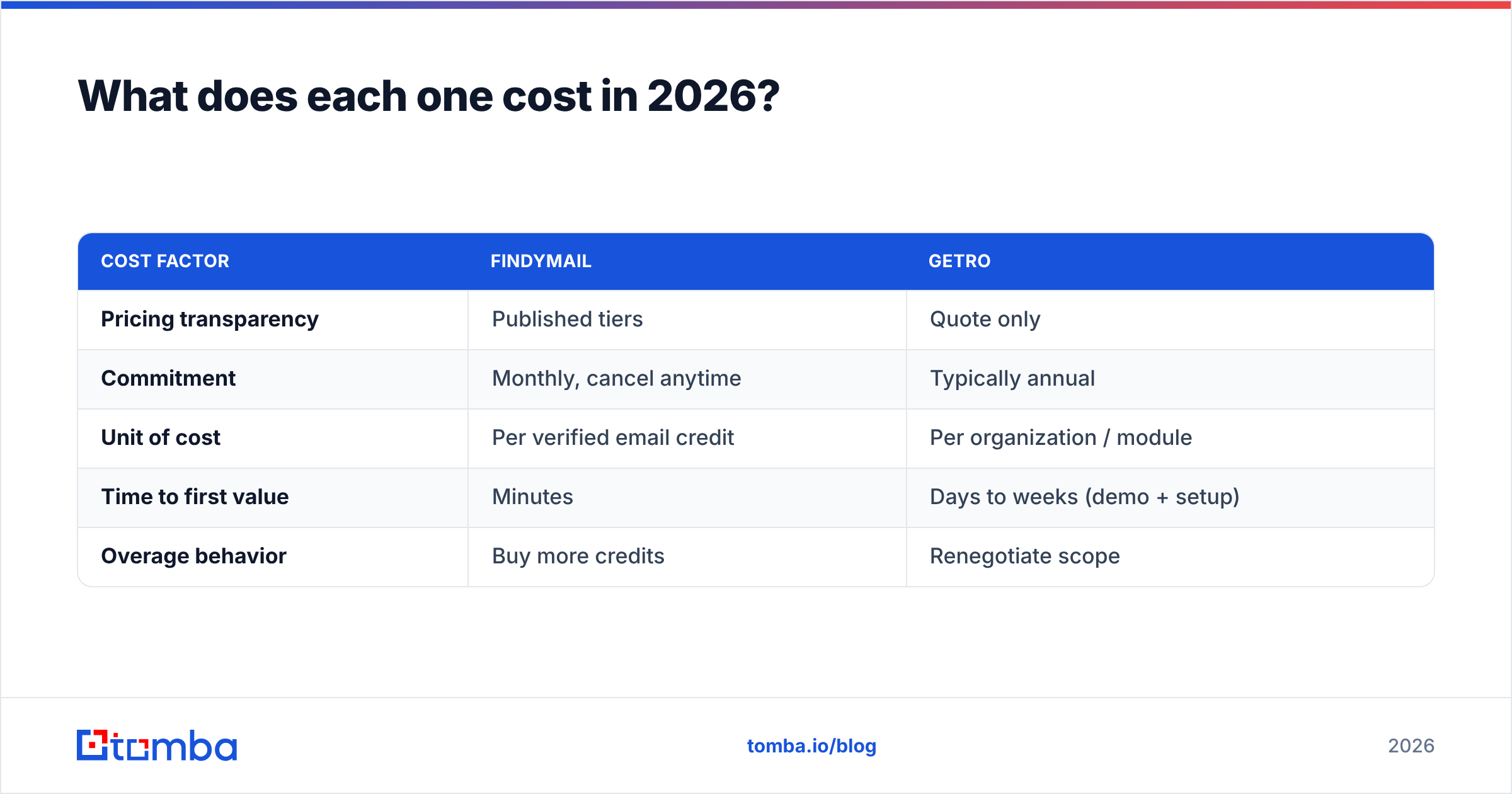
| Cost factor | Findymail | Getro |
|---|---|---|
| Pricing transparency | Published tiers | Quote only |
| Commitment | Monthly, cancel anytime | Typically annual |
| Unit of cost | Per verified email credit | Per organization / module |
| Time to first value | Minutes | Days to weeks (demo + setup) |
| Overage behavior | Buy more credits | Renegotiate scope |
Which one gives you better contact data?#
Wrong question, but here's the honest answer anyway: they're measuring different things.
Findymail's quality metric is bounce rate. A good email finder returns fewer addresses but stands behind the ones it returns. Findymail leans hard on this, and in practice that's what buyers report liking — a smaller, cleaner export beats a bloated one that torches your domain.
Getro's quality metric is relevance and consent. A candidate in Getro Connect isn't valuable because their email is deliverable; they're valuable because they explicitly want to hear about roles in your network. You can't benchmark those two things on the same axis.
If you're evaluating contact-data quality for outbound, the fair comparison set is Findymail against other finders — Tomba, Hunter, Apollo, Prospeo — not Findymail against Getro. We keep a breakdown of that specific matchup on the Findymail alternative page, including where each tool wins on coverage versus catch-all handling.
One thing worth flagging regardless of vendor: no finder is 100% accurate on catch-all domains. A catch-all server accepts everything at the SMTP layer, so "valid" is unprovable without a second signal. Any tool that reports catch-alls as clean valid hits is quietly handing you risk. Run them through a catch-all verifier before they enter a sequence.
Who should buy Getro instead of an email finder?#
Buy Getro if you can answer yes to most of these:
- You manage a portfolio or community of 15+ companies that hire regularly.
- You've been asked for a job board more than once by founders or members.
- Talent is your differentiated value-add — you win deals partly on hiring support.
- You need aggregation, not acquisition — the roles already exist, they're just scattered across 40 career pages.
- Your outreach is inbound-flavored — candidates come to you, you don't cold-email them.
If you nodded four or five times, Getro is a legitimate purchase and no email finder will substitute for it. Building the same thing in-house means writing and maintaining crawlers for dozens of ATS platforms, which is a real engineering commitment for a platform team of two.
If you nodded once, you don't need Getro. You need contact data.

Where does Tomba fit between the two?#
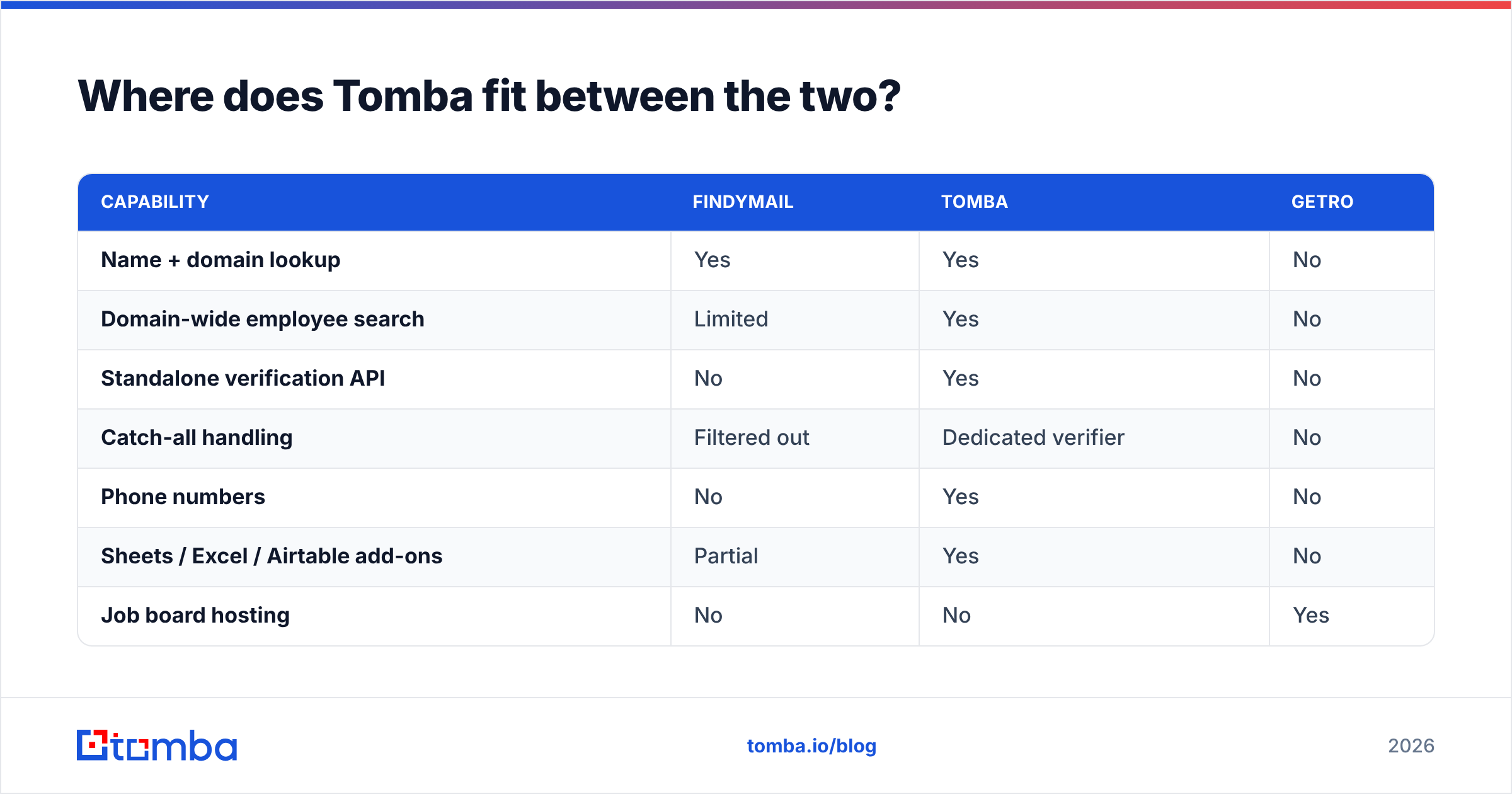
Tomba sits squarely on the Findymail side of the map — it's a contact-data platform, not community software. Where it differs from a pure finder is scope: the email finder is the core, but the verifier, domain search, catch-all checks, phone lookup, and enrichment all run on the same credit pool and the same API key.
That matters when your workflow isn't just "name in, email out." A typical VC platform or agency workflow looks like: pull a company list, run domain search to see who works there and in what pattern, enrich the shortlist, verify, then push into HubSpot. With a single-purpose finder you stitch three vendors together to do that. With a broader platform it's one integration.
| Capability | Findymail | Tomba | Getro |
|---|---|---|---|
| Name + domain lookup | Yes | Yes | No |
| Domain-wide employee search | Limited | Yes | No |
| Standalone verification API | No | Yes | No |
| Catch-all handling | Filtered out | Dedicated verifier | No |
| Phone numbers | No | Yes | No |
| Sheets / Excel / Airtable add-ons | Partial | Yes | No |
| Job board hosting | No | No | Yes |
| Opt-in talent pool | No | No | Yes |
| Starting price | ~$49/mo | $49/mo | Quote |
| Free tier | Trial credits | 25 searches/mo | No |
Pricing on the Tomba side is public and tiered the same way: free at 25 searches per month, Starter at $49/mo, Growth at $99/mo, Pro at $249/mo, Enterprise custom. Full breakdown lives on the Tomba pricing page.
To be fair to Findymail: if all you will ever do is convert Sales Navigator lists into verified emails, its narrow focus is a feature. Fewer knobs, less to learn. The moment you need phones, catch-all logic, or enrichment in the same pipeline, the single-purpose tool starts costing you an extra subscription.
What about deliverability once you have the list?#
This is where teams lose money regardless of which vendor they picked.
A verified list is necessary but not sufficient. Three things sink cold campaigns more often than bad data does:
- Sending too fast on a cold domain. Warm up for two to three weeks before volume. Ramp, don't launch.
- Skipping SPF, DKIM, and DMARC. Google and Yahoo enforcement made this non-negotiable for bulk senders; misconfigured auth means the spam folder no matter how clean your data is. Their published requirements are worth reading in full.
- Re-mailing stale lists. Contact data decays roughly 2-3% per month as people change jobs. A list verified in January is measurably worse by June.
Run every list through an email verifier immediately before send, not at the moment of purchase. The gap between "I bought these emails" and "I'm sending to these emails" is where bounce rates get born. If you want third-party signal on which vendors actually hold up under load, the G2 lead intelligence category is a reasonable place to read reviews that aren't written by vendors.
So which should you choose?#
Decide by the sentence that best describes your week:
- "I need 500 verified emails for a campaign by Friday." → An email finder. Findymail or Tomba. Getro cannot help you.
- "Our founders keep asking us to help them hire." → Getro. No email finder replaces a maintained job board.
- "Both, actually." → Both, actually. They're different budget lines and they don't conflict. Getro handles the inbound talent side; a finder handles the outbound contact side.
- "I want one vendor for emails, phones, and enrichment." → A broader data platform rather than a single-purpose finder.
- "I'm not sure the data is even good enough to justify either." → Start with a free tier, pull 25 contacts in your exact ICP, and check them manually. Twenty minutes of testing beats twenty pages of comparison content, including this one.
The genuinely bad outcome is buying Getro because a comparison post put it next to an email finder, then discovering in month two that you still have no contact data. Match the tool to the job, not to the shortlist you inherited.
Ready to test contact data before you commit?#
If your actual need is verified work emails — not a job board — start with the Tomba Email Finder. The free tier gives you 25 searches a month with no card, which is enough to test coverage against your real ICP rather than a vendor's demo list. Paid plans start at $49/mo, verification is included rather than bolted on, and the same API key covers domain search, catch-all checks, phones, and enrichment when your workflow outgrows single lookups.
Pull twenty contacts you already know the answer for. If the data holds up, scale it. If it doesn't, you've lost nothing but twenty minutes — which is exactly how tool evaluations should work.
Related guides#
Ready to find emails that actually work?
Join 150,000+ professionals who stopped guessing and started sending. Free credits on signup — no credit card required.
Get the Tomba newsletter
Practical outbound tactics and product updates — once every two weeks.
About the author