Findymail vs RampedUp: Which B2B Email Finder Wins in 2026
Findymail chases verified emails one contact at a time. RampedUp enriches whole CRMs. They are not the same product — and picking wrong costs you a quarter of pipeline. Here is the honest breakdown.
Findymail vs RampedUp is not a fair fight, because the two tools do different jobs. Findymail finds one verified email at a time. RampedUp cleans and enriches a whole CRM. Pick the wrong one and you pay for both by the end of the quarter.
TL;DR
- They solve different problems. Findymail is a per-contact email finder for outbound reps working off LinkedIn. RampedUp is a CRM-first enrichment layer for RevOps teams cleaning Salesforce or HubSpot.
- Findymail wins on single-lead precision. RampedUp wins on account coverage, TAM building, and bulk CRM hygiene.
- Pricing is not comparable. Findymail sells monthly credit tiers. RampedUp is quote-driven and usually annual.
- Neither is cheap with verification. Findymail bundles it. With RampedUp you often pay a separate verifier.
- Want both jobs on one bill? One stack that finds, verifies, and enriches — Tomba is free for 25 searches/mo, then $49/mo — usually beats two subscriptions.
What are Findymail and RampedUp, actually?#
Think of it like buying a knife versus buying a kitchen. Findymail is the knife: sharp, single-purpose, and you feel the quality every time you use it. RampedUp is the kitchen: it feeds a lot of people, but you do not carry it in your pocket.
Findymail launched as a reaction to a specific frustration. Most email finders return anything, valid or not, and burn your credits doing it. Its pitch is verified-only output. You search a person or paste a LinkedIn/Sales Navigator URL. Findymail then returns an address it has already run through its own validation pass — or it returns nothing and does not charge you. It is popular with solo founders, agencies, and two-to-ten-person SDR teams running Lemlist, Instantly, or Smartlead.
RampedUp comes from the other direction. It is a B2B contact and account intelligence platform that sits inside your CRM. Its core jobs are simple to list: enrich the records you already have, append missing contacts to target accounts, score and segment a total addressable market, and keep Salesforce from rotting. Buyers are usually RevOps, marketing ops, or a sales leader who has just learned that 38% of their CRM contacts changed jobs.
That difference in origin explains almost every other difference below.
Findymail vs RampedUp: what is the core difference?#
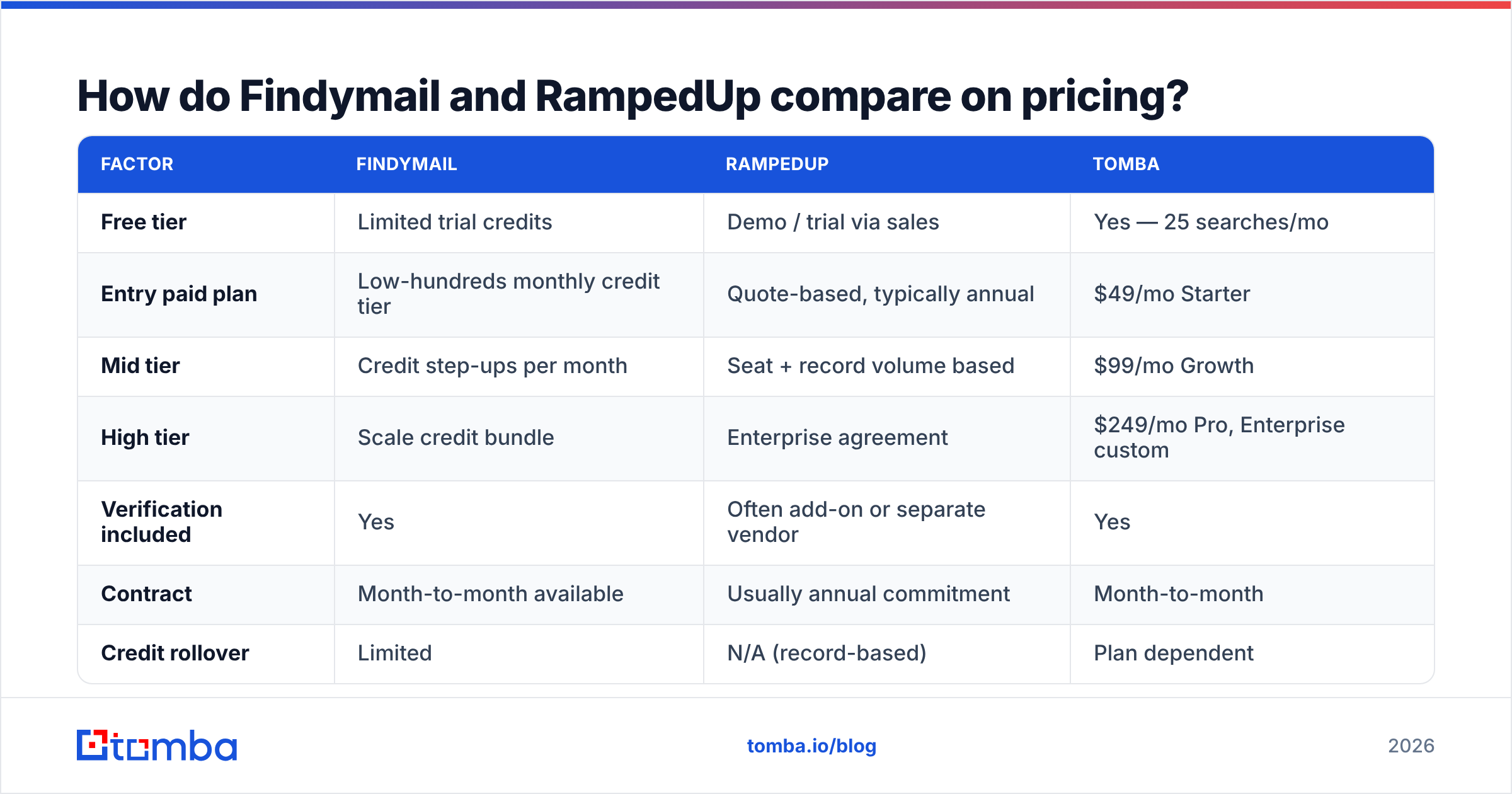
Here is the fastest way to see where each tool earns its keep:
| Dimension | Findymail | RampedUp |
|---|---|---|
| Primary job | Find + verify one email at a time | Enrich and expand CRM records at scale |
| Main user | SDR, founder, agency operator | RevOps, marketing ops, sales leadership |
| Entry point | Web app, Chrome extension, LinkedIn/Sales Nav | Salesforce / HubSpot native app |
| Data model | Real-time discovery + validation | Contact + account database with intent signals |
| Bulk workflow | CSV upload, list enrichment | Native CRM sync, scheduled refresh, TAM builder |
| Verification | Bundled, verified-only output | Available, but many teams add a separate verifier |
| Buying motion | Self-serve monthly credits | Sales-led, typically annual contract |
| Best at | Precision on a named person | Coverage across a named account list |
The practical read: if your bottleneck is "I know exactly who I want and I cannot get their address," that is a Findymail problem. If your bottleneck is "we have 40,000 records and no idea which ones are still real," that is a RampedUp problem.
Where teams get burned is assuming one tool covers both. It rarely does, and the second subscription arrives about six weeks later.

Which one actually finds more valid emails?#
Accuracy is where Findymail vs RampedUp stops being a clean comparison. Read any benchmark carefully — including this one.
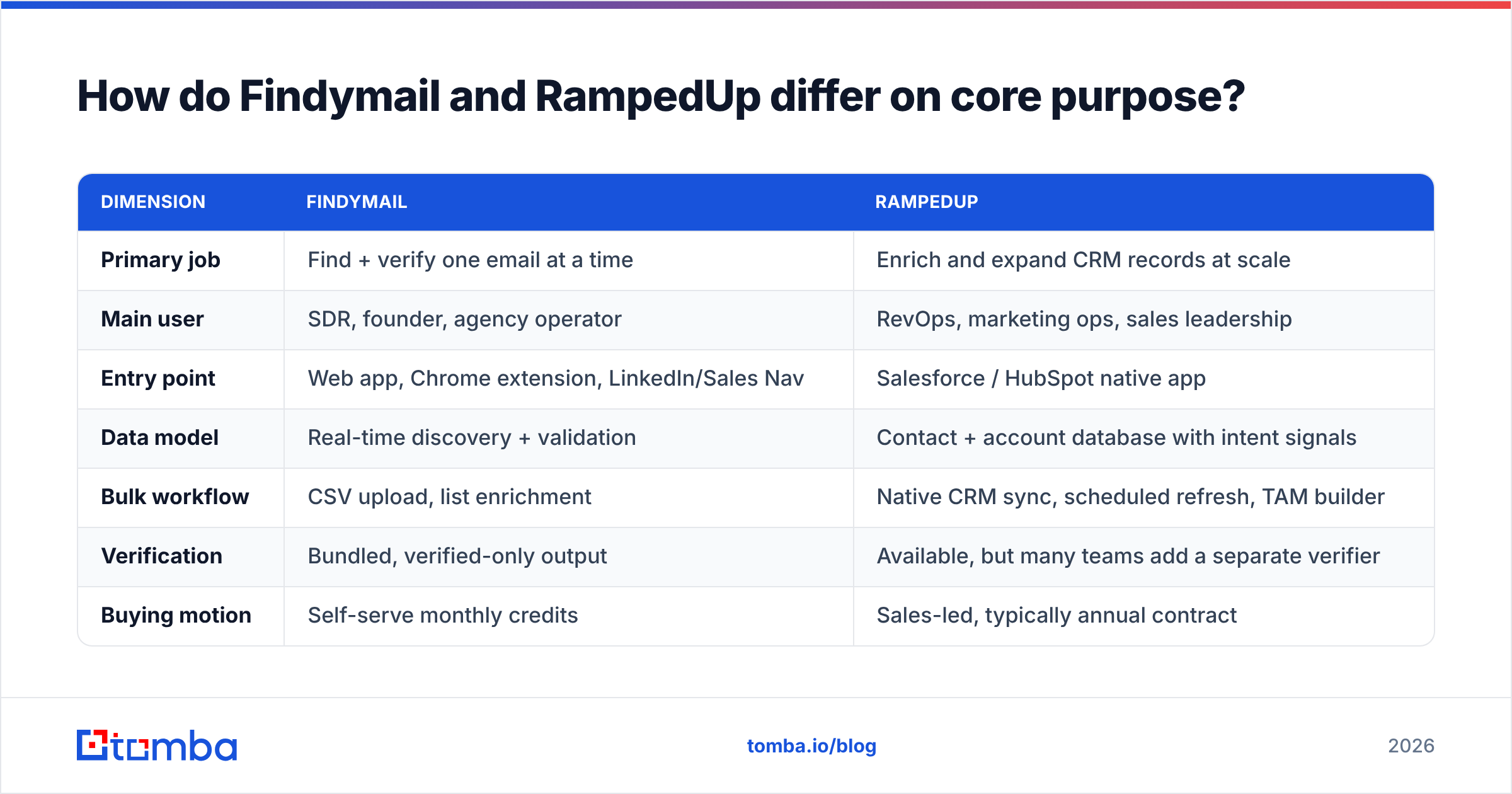
Findymail's accuracy claim works differently from a database vendor's. It only returns addresses that pass its validation step, so its precision looks excellent. But coverage — how often it returns anything at all — is the number you should measure. A tool with 98% precision and a 55% hit rate leaves nearly half your list empty.
RampedUp's numbers work the opposite way. Database-backed platforms hand you a match on most records, because they pull from a stored contact set. But stored data ages. Job changes run roughly 20–30% a year in B2B tech. A record last touched fourteen months ago is a coin flip, however confident the vendor's UI looks.

Run your own test before you sign anything. The method takes an afternoon:
- Build a 200-row control list from accounts you already sell into — mixed seniority, mixed company size, mixed geography. Use a realistic list, not a clean one.
- Run it through both tools on trial credits, same day, same file.
- Record two numbers per tool: hit rate (rows returned) and valid rate (rows that survive an independent email verifier, not the vendor's own).
- Compute usable yield = hit rate × valid rate. This is the only number that maps to pipeline.
- Divide cost by usable rows, not by credits. A $99 plan that yields 600 usable contacts beats a $49 plan that yields 210.
- Spot-check 20 rows manually. Send a single plain-text email and watch for hard bounces. Vendors' own validators grade their own homework.
Most teams that run this test find their real cost per usable contact is two to four times the sticker math. That is not a knock on either vendor. It is what happens when you compare credits instead of outcomes.
Findymail vs RampedUp pricing: what will you pay?#
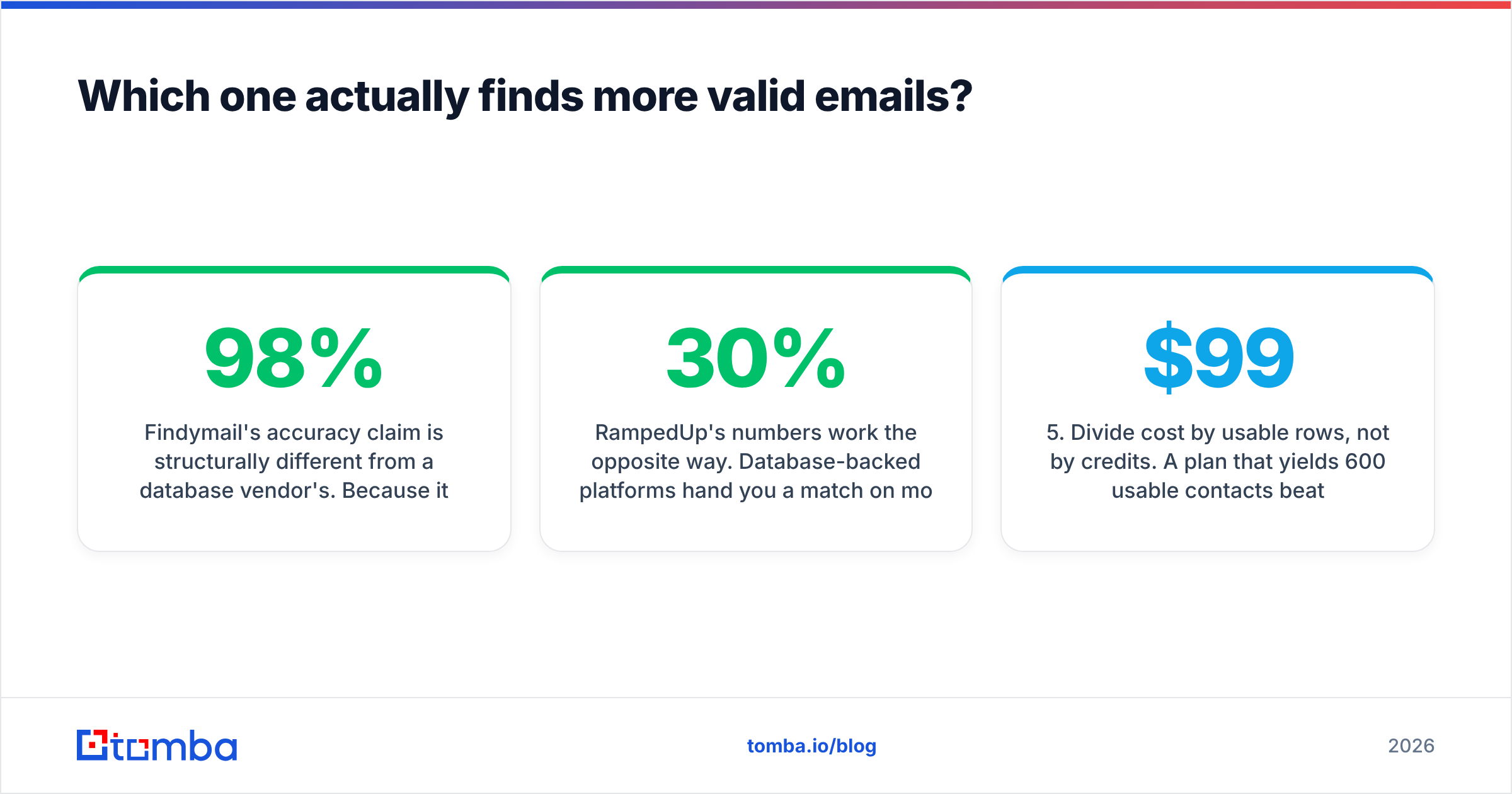
Pricing is the least honest part of any comparison post. Both vendors change tiers, and neither publishes everything. Treat the table below as directional and confirm on the vendor pages before you budget.

| Factor | Findymail | RampedUp | Tomba |
|---|---|---|---|
| Free tier | Limited trial credits | Demo / trial via sales | Yes — 25 searches/mo |
| Entry paid plan | Low-hundreds monthly credit tier | Quote-based, typically annual | $49/mo Starter |
| Mid tier | Credit step-ups per month | Seat + record volume based | $99/mo Growth |
| High tier | Scale credit bundle | Enterprise agreement | $249/mo Pro, Enterprise custom |
| Verification included | Yes | Often add-on or separate vendor | Yes |
| Contract | Month-to-month available | Usually annual commitment | Month-to-month |
| Credit rollover | Limited | N/A (record-based) | Plan dependent |
| API access | Yes | Yes | Yes, on all paid plans |
Three budget traps worth naming:
Trap one: annual lock-in on unproven data. RampedUp's sales motion means you often commit for twelve months before you have measured coverage on your own ICP. If your ICP is US mid-market SaaS, coverage is probably fine. If it is European manufacturing or LATAM logistics, test hard first.
Trap two: credit burn on failed searches. Findymail's not-found-not-charged policy is genuinely good, and a real differentiator. But "verified" in one vendor's language just means "passed our SMTP check." That is not the same as "will not bounce." Catch-all domains are the worst case: SMTP checks return nothing useful there, so you need a dedicated catch-all verifier to get a real answer.
Trap three: the second subscription. Teams start with Findymail for reps, then add an enrichment platform for RevOps six months later. Now you have two bills, two data sets, two definitions of "verified," and a merge conflict every time someone syncs to the CRM.

Which integrates better with your stack?#
RampedUp has a real structural advantage here. Findymail has a real workflow advantage. They are not the same thing.
RampedUp is CRM-native. It installs into Salesforce or HubSpot and works on objects, not on exports. That matters if your operating model is "the CRM is the source of truth." Scheduled enrichment, field-level mapping, dedupe rules, and account hierarchy all live where your admins already work. No CSV round-trips.
Findymail is rep-native. Chrome extension, LinkedIn and Sales Navigator support, direct pushes into sequencers like Lemlist, Instantly, and Smartlead. A rep never leaves the tab they are prospecting in. If your team lives in Sales Navigator rather than in the CRM, that is worth more than a native Salesforce package.
Ask yourself one question: where does a new contact get created in your process? If the answer is "in the CRM, by ops," go CRM-native. If the answer is "in a rep's browser, at 9:40am, mid-prospecting," go rep-native. Buying against your actual workflow is how tools end up unused by month three.
A third path exists and is under-considered: an API-first provider. If you have any engineering capacity, a well-documented email finder API lets you put lookups exactly where you need them — inside your enrichment job, your form handler, your warehouse sync. You are not stuck with whichever surface the vendor happened to build. Check the G2 category listings for how buyers rate each vendor's integration depth; overall scores hide it.
Who should choose Findymail?#
Pick Findymail if most of these are true:
- Your volume is under ~5,000 lookups a month. Credit tiers are efficient at this size.
- Reps prospect manually from LinkedIn or Sales Navigator rather than from CRM lists.
- You want month-to-month. No procurement, no annual commitment, no security review.
- Bounce rate is your top metric and you would rather get nothing than get a guess.
- You already have a sequencer and just need clean addresses flowing into it.
Findymail is a well-built product for a well-defined user. The main limit is ceiling. Once you need account-level coverage, TAM segmentation, or CRM-wide hygiene, you will be adding a second tool.
Who should choose RampedUp?#
Pick RampedUp if most of these are true:
- Your CRM is the system of record and data decay there is a measurable problem.
- You are building or refreshing a TAM and need account plus contact coverage, not one-off lookups.
- RevOps owns the budget and can absorb an annual contract and an implementation window.
- You need intent or firmographic signals layered onto contacts, not just an email address.
- Volume is high enough that per-credit pricing stops making sense.
The main limit is fit and flexibility: sales-led buying, annual terms, and coverage that varies a lot by geography and industry. Test your own ICP before signing.
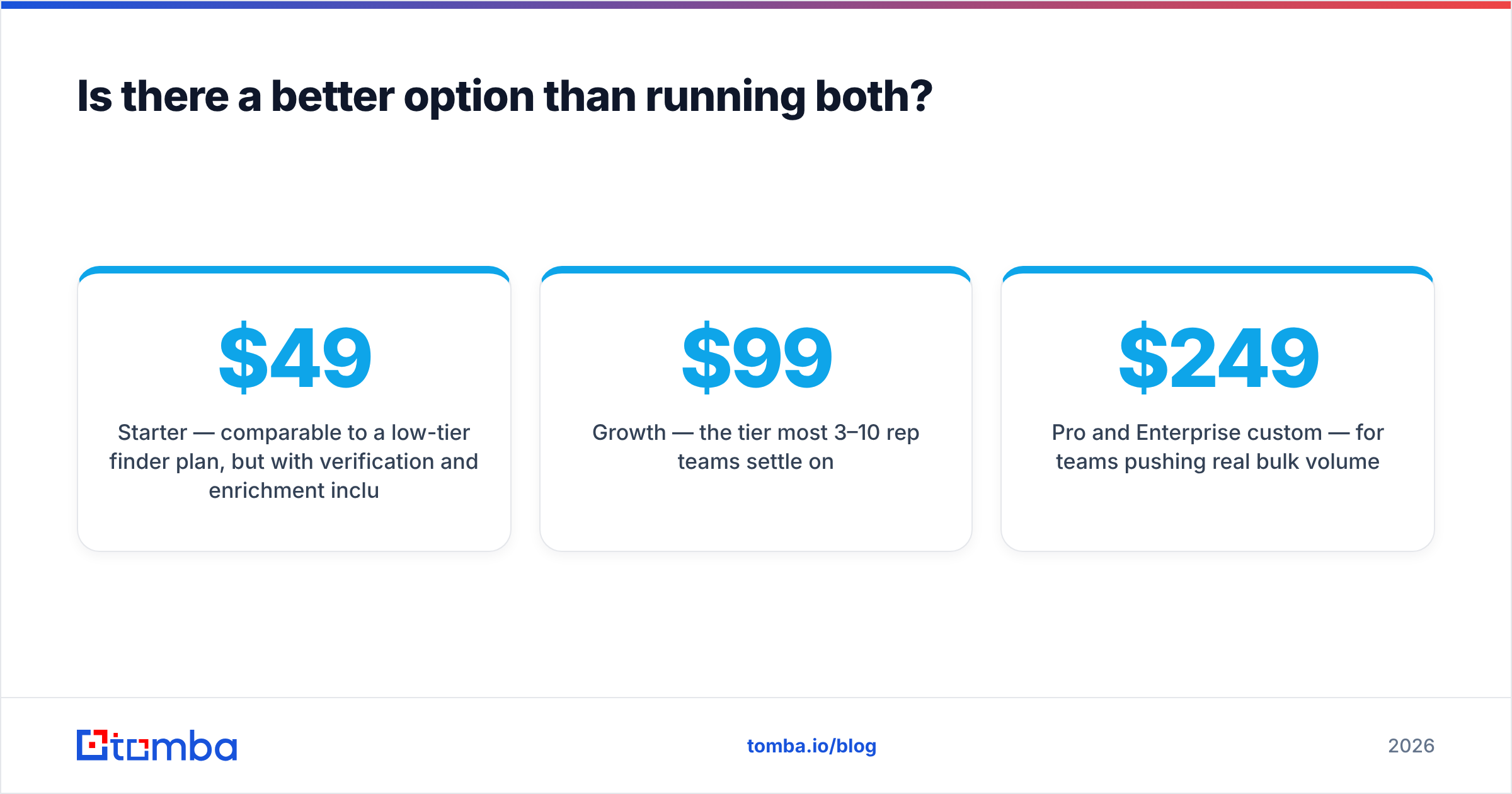
Is there a better option than running both?#
For most teams under 50 seats, yes. The argument is boring rather than clever: consolidation.
Teams end up with Findymail and an enrichment platform because neither covers the full job. But the full job is not exotic. Find the address. Verify it survives. Enrich the record with role and company data. Handle catch-all domains honestly. Expose all of it via API so it can run unattended.
That is the shape of a consolidated stack. Tomba's core is the email finder. Verification, domain search, catch-all handling, phone lookup, and data enrichment sit alongside it, not in a second contract. Practically:
- Free tier: 25 searches/mo — enough to run the 200-row test above in stages, at zero cost.
- Starter $49/mo — priced like a low-tier finder plan, but verification and enrichment are included.
- Growth $99/mo — the tier most 3–10 rep teams settle on.
- Pro $249/mo and Enterprise custom — for teams pushing real bulk volume.
Full Tomba pricing is public, which is itself a data point when you compare it against a quote-driven vendor. If you are weighing the finder side specifically, the Findymail alternative breakdown goes deeper on credit models than this post has room for.
To be fair, consolidation is not automatically right. If you need deep intent data and Salesforce-native governance, a specialist platform earns its price. If you need the tightest possible LinkedIn-to-sequencer workflow and nothing else, a specialist finder earns its price. Consolidation wins in the wide middle, where most teams sit.
What should you do next?#
Run the usable-yield test. Two hundred rows, both tools, one independent verifier, one afternoon. Compare cost per usable contact, not cost per credit. Then buy the tool that won on your data — not the one that won in someone else's benchmark, including this one.
If you want a third number in that comparison, start with the Tomba Email Finder free tier: 25 searches a month, no card, verification included in the result. Run the same 200 rows through it, put all three columns side by side, and let cost per usable contact decide. That is a cleaner argument than any vendor page — including ours.
Related guides#
Ready to find emails that actually work?
Join 150,000+ professionals who stopped guessing and started sending. Free credits on signup — no credit card required.
Get the Tomba newsletter
Practical outbound tactics and product updates — once every two weeks.
About the author