Firmographic Data Providers in 2026: How to Pick the Right One
Firmographic data decays faster than most GTM teams admit. Here is how the major providers actually compare on coverage, refresh cadence, pricing, and the fields that move pipeline.
TL;DR
- Firmographic data is company-level data: industry, employee count, revenue, location, ownership, tech stack. Every ICP, territory plan, and lead score sits on top of it.
- The gap between firmographic data providers is rarely "who has more companies." It is refresh speed, field-level fill rate, and whether you can audit a sample before you sign.
- Large vendors (ZoomInfo, D&B, Clearbit/Breeze) sell breadth and integrations at $20k–$80k+ a year. API-first firmographic data providers (Tomba, BookYourData, Coresignal, People Data Labs) sell narrower coverage for far less.
- Employee count and revenue decay fastest. They are also the fields most often misreported. Test those two yourself. Do not trust vendor showcase records.
- Buy for the segment you sell into. A vendor with 91% fill on 40,000 relevant accounts beats one with 60% fill on 100 million you will never call.
What is firmographic data, exactly?#
Firmographic data describes the company, not the person. Demographics tell you a buyer is a 38-year-old director in Berlin. Firmographics tell you her employer is a 240-person Series B fintech in Berlin. It has $30M in estimated revenue, runs Salesforce, and reports to a French parent.
Think of a résumé next to a company annual report. Both describe the same deal. Only one tells you whether the budget exists.
Here are the core fields that almost all firmographic data providers ship:
- Identity — legal name, DBA, domain, HQ address, phone, and a DUNS or similar ID. This is the join key. Get it wrong and every later enrichment lands on the wrong record.
- Size signals — headcount (total and by team), revenue (reported or modeled), funding raised, growth rate. These drive segmentation and routing more than any other field.
- Classification — SIC, NAICS, or the vendor's own industry list. Custom lists are often more useful for sales. They are also harder to match across two vendors.
The next three fields are where firmographic data providers start to differ:
- Structure — parent and subsidiary links, branch sites, ownership type. This matters if you sell to large groups and roll child accounts up to one parent.
- Tech overlay — the tools a company runs, sometimes with install dates. It is a separate data type, but nearly every vendor now bundles it.
- Events — hiring spikes, funding rounds, new offices, layoffs. These carry the most value and the shortest shelf life.
Fields one to four are table stakes. The price gap lives in five and six. It also lives in how fast the whole record refreshes.
Why does firmographic data decay so fast?#
Companies change faster than databases crawl them. A company database is a photo of a moving crowd. It is right the second it is taken, then slowly wrong.
Most estimates put B2B data decay at 25% to 30% a year. Firmographics are not spared. Headcount swings after one hiring push. Revenue estimates lag real numbers by two to four quarters. Domains change on a rebrand. Mergers fold two records into one, and many vendors keep both alive for months.
So a list you bought 14 months ago and never refreshed is about one-third fiction. You have no idea which third.

This is why refresh speed beats raw record count when you compare firmographic data providers. A vendor with 200 million profiles on an 18-month re-check cycle is worse than one with 30 million checked every quarter. That holds as long as both cover your segment.
Ask every vendor two questions they rarely raise on their own:
- How old is the median record in my segment? Not overall. Your segment.
- What triggers a re-crawl? Time alone, or events like funding, a domain change, or a hiring spike?
If a rep cannot answer the second one, the answer is time alone.
How do the major firmographic data providers compare?#
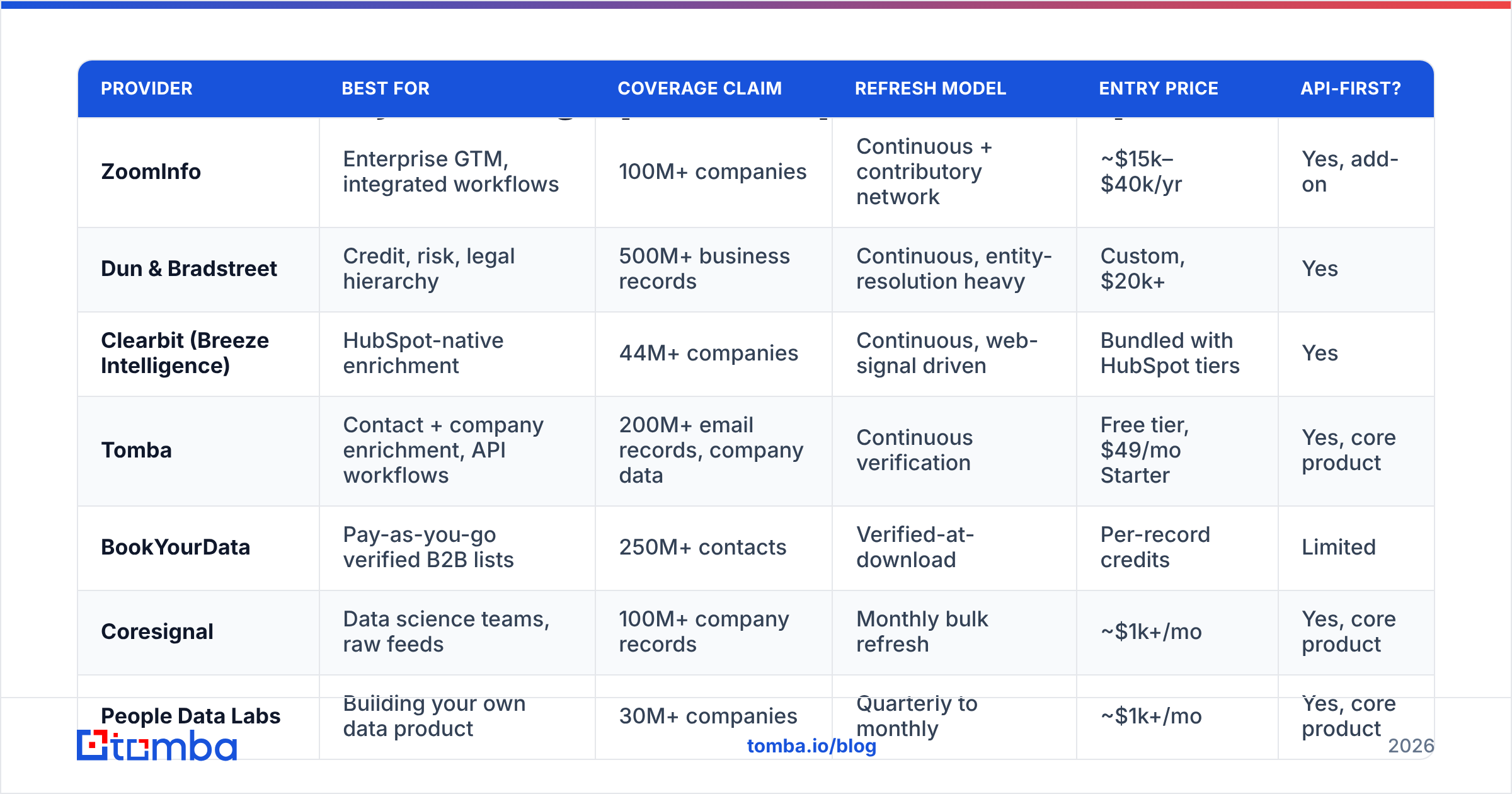
Here is the honest landscape in 2026. Prices move all the time. Treat them as ballpark, not quotes.
| Provider | Best for | Coverage claim | Refresh model | Entry price | API-first? |
|---|---|---|---|---|---|
| ZoomInfo | Enterprise GTM, integrated workflows | 100M+ companies | Continuous + contributory network | ~$15k–$40k/yr | Yes, add-on |
| Dun & Bradstreet | Credit, risk, legal hierarchy | 500M+ business records | Continuous, entity-resolution heavy | Custom, $20k+ | Yes |
| Clearbit (Breeze Intelligence) | HubSpot-native enrichment | 44M+ companies | Continuous, web-signal driven | Bundled with HubSpot tiers | Yes |
| Tomba | Contact + company enrichment, API workflows | 200M+ email records, company data | Continuous verification | Free tier, $49/mo Starter | Yes, core product |
| BookYourData | Pay-as-you-go verified B2B lists | 250M+ contacts | Verified-at-download | Per-record credits | Limited |
| Coresignal | Data science teams, raw feeds | 100M+ company records | Monthly bulk refresh | ~$1k+/mo | Yes, core product |
| People Data Labs | Building your own data product | 30M+ companies | Quarterly to monthly | ~$1k+/mo | Yes, core product |
| Apollo.io | SMB sales teams wanting all-in-one | 60M+ companies | Continuous + community | ~$49–$99/user/mo | Yes, higher tiers |
Three patterns fall out of that table.
One: you are picking a business model, not just a dataset. Seat-based tools (ZoomInfo, Apollo) charge per user. They bundle sequencing, dialers, and workflow. API-first firmographic data providers (Tomba, Coresignal, PDL) charge for volume and assume you own the workflow. If you already run Outreach or your own stack, seat bundles mean you pay twice. Compare that against an Apollo alternative that charges for data, not seats.
Two: hierarchy is a specialist skill. Some deals need every subsidiary rolled into one global parent. D&B is hard to beat there, and worth the premium. If you sell to companies of 50 to 500 people, you will never use it. Do not pay for it.
Three: verify-at-download beats stale-at-rest for one-off campaigns. BookYourData and other credit-based vendors check records the moment you pull them. That sidesteps decay for a single campaign. It is a fair model when you do not need a live database sitting inside your CRM.
How do you test firmographic data providers before you buy?#
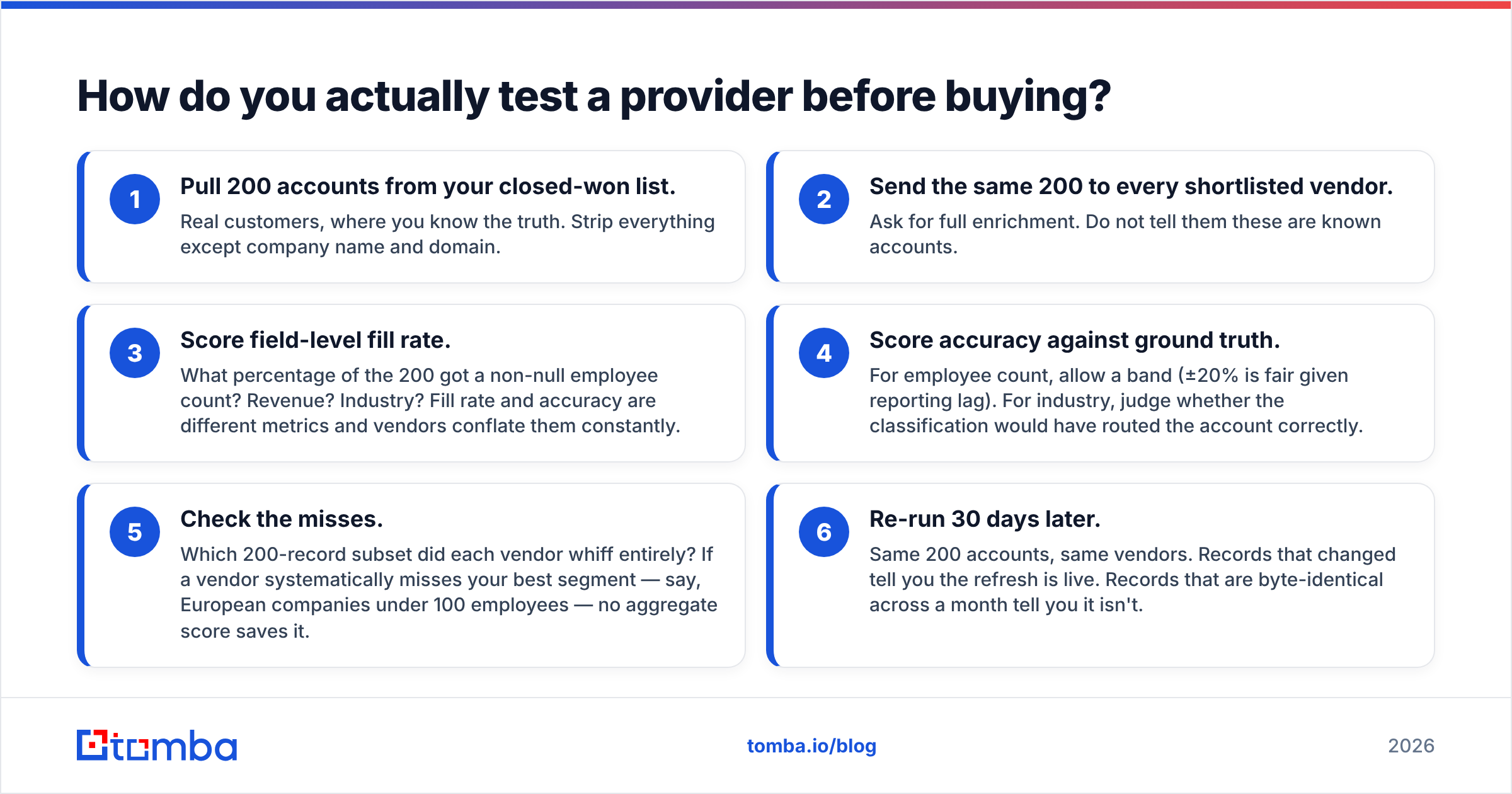
Run a blind sample test. It is the best hour you will spend in the whole review. Most teams skip it because the demo looked good.
The protocol starts with your own data:
- Pull 200 accounts from your closed-won list. These are real customers, so you know the truth. Strip everything but company name and domain.
- Send the same 200 to every shortlisted vendor. Ask for full enrichment. Do not tell them these are known accounts.
- Score fill rate field by field. How many of the 200 came back with a headcount? Revenue? Industry? Fill rate and accuracy are not the same thing, and vendors blur the two.
Then judge what came back:
- Score accuracy against the truth. For headcount, allow a band. Plus or minus 20% is fair given reporting lag. For industry, ask whether the label would have routed the account correctly.
- Check the misses. Which records did each vendor whiff on? If a vendor keeps missing your best segment, say European firms under 100 people, no average score saves it.
- Re-run 30 days later. Same accounts, same vendors. Records that changed prove the refresh is live. Records that are identical prove it is not.
Step six is the one nobody runs. It is also the one that separates marketing claims from reality.
Test the contact layer on the same accounts while you are at it. Firmographics without reachable people is a spreadsheet, not a pipeline. Run those domains through a domain search. Count how many named, verified addresses come back per account. That ratio, not the company count, decides whether your SDRs can act on the segment.

What does firmographic data actually cost?#
More than the sticker price. Overage is where budgets die.
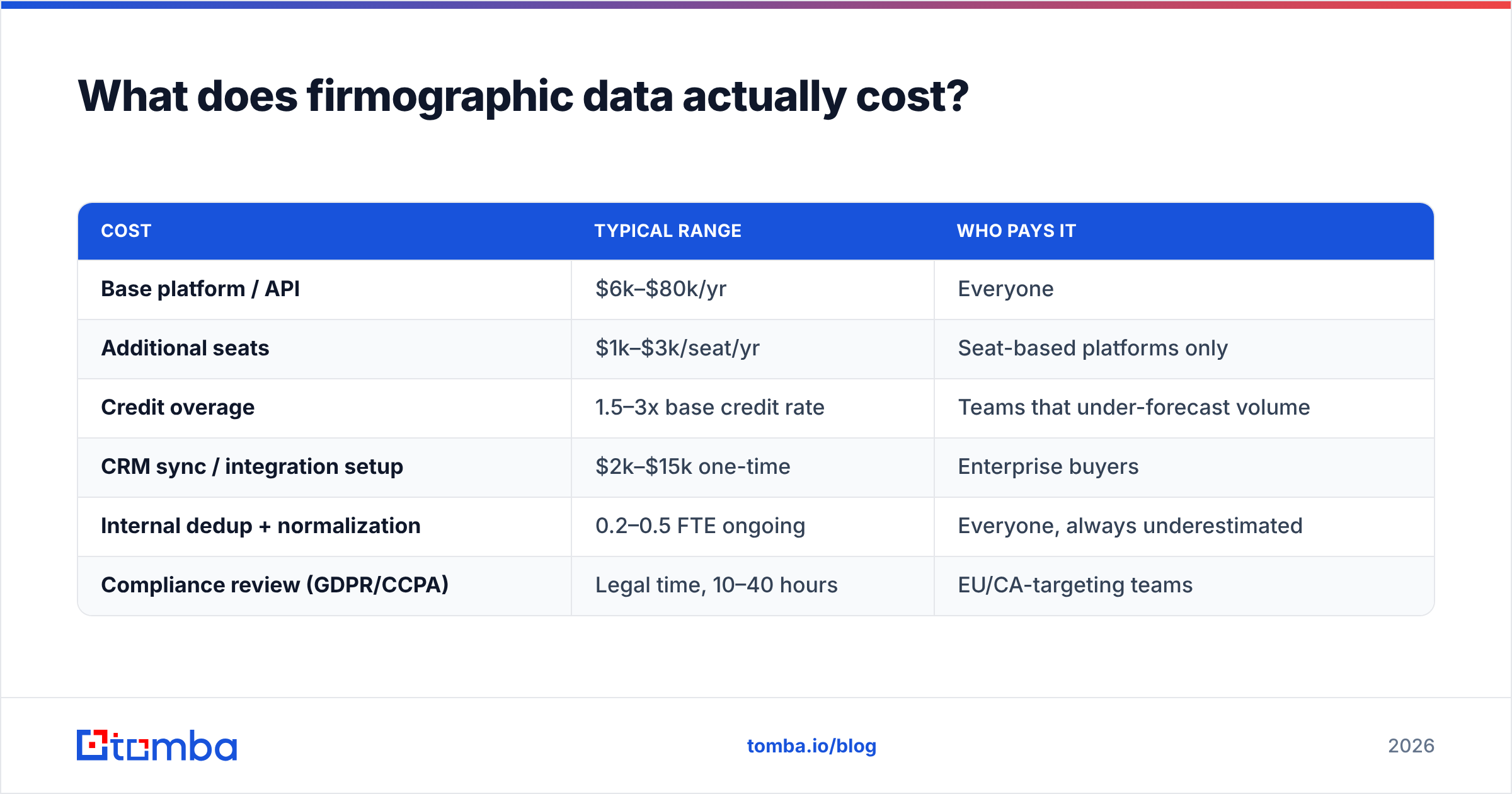
The visible costs are simple: platform fee, per-seat licenses, credit packs, API call tiers. The hidden ones are below.
| Cost | Typical range | Who pays it |
|---|---|---|
| Base platform / API | $6k–$80k/yr | Everyone |
| Additional seats | $1k–$3k/seat/yr | Seat-based platforms only |
| Credit overage | 1.5–3x base credit rate | Teams that under-forecast volume |
| CRM sync / integration setup | $2k–$15k one-time | Enterprise buyers |
| Internal dedup + normalization | 0.2–0.5 FTE ongoing | Everyone, always underestimated |
| Compliance review (GDPR/CCPA) | Legal time, 10–40 hours | EU/CA-targeting teams |
Two line items deserve attention.
Credit overage is the most common budget surprise. Vendors size your contract on a hopeful annual volume. Real volume spikes when a campaign launches or someone backfills old records. Negotiate the overage rate up front, not in month seven.
Normalization work is the quiet one. Two firmographic data providers will call the same company "Software" and "Information Technology & Services." One reports 240 staff, the other 310. One says $30M, the other "$25M–$50M." Someone on your team has to reconcile that. Budget for it.
If you enrich in volume on a fixed budget, per-credit pricing with a clear ceiling is easier to control than seat licensing. Tomba's pricing runs Free (25 searches a month), Starter at $49/mo, Growth at $99/mo, and Pro at $249/mo. Enterprise is custom. Cost scales with usage, not with how many people log in.
Which fields should you actually pay for?#
Rank fields by how much they change a decision. Most teams buy everything and use four.
Pay for:
- Employee count, ideally split by team. It drives segments, routing, and pricing tier more than any other field.
- Domain and email pattern. These are the join key and the delivery path. Everything downstream needs the domain to be right.
- Funding and ownership events. High signal, time-sensitive, and hard to gather by hand at scale.
- Location at the entity level. Not just HQ. Find the office that buys. It sets territory and compliance.
Deprioritize:
- Modeled revenue for private firms. It is a guess built from headcount and industry averages. You can model it yourself.
- Deep SIC/NAICS codes. Useful in regulated fields and government work. Mostly decoration for SaaS.
- Broad tech data, unless your ICP is defined by one tool. "Uses Google Analytics" tells you nothing.
- Social handles and follower counts. They rarely carry a B2B deal.
If you buy only two fields, buy a verified domain and a current headcount. The rest is either derivable or nice to have.
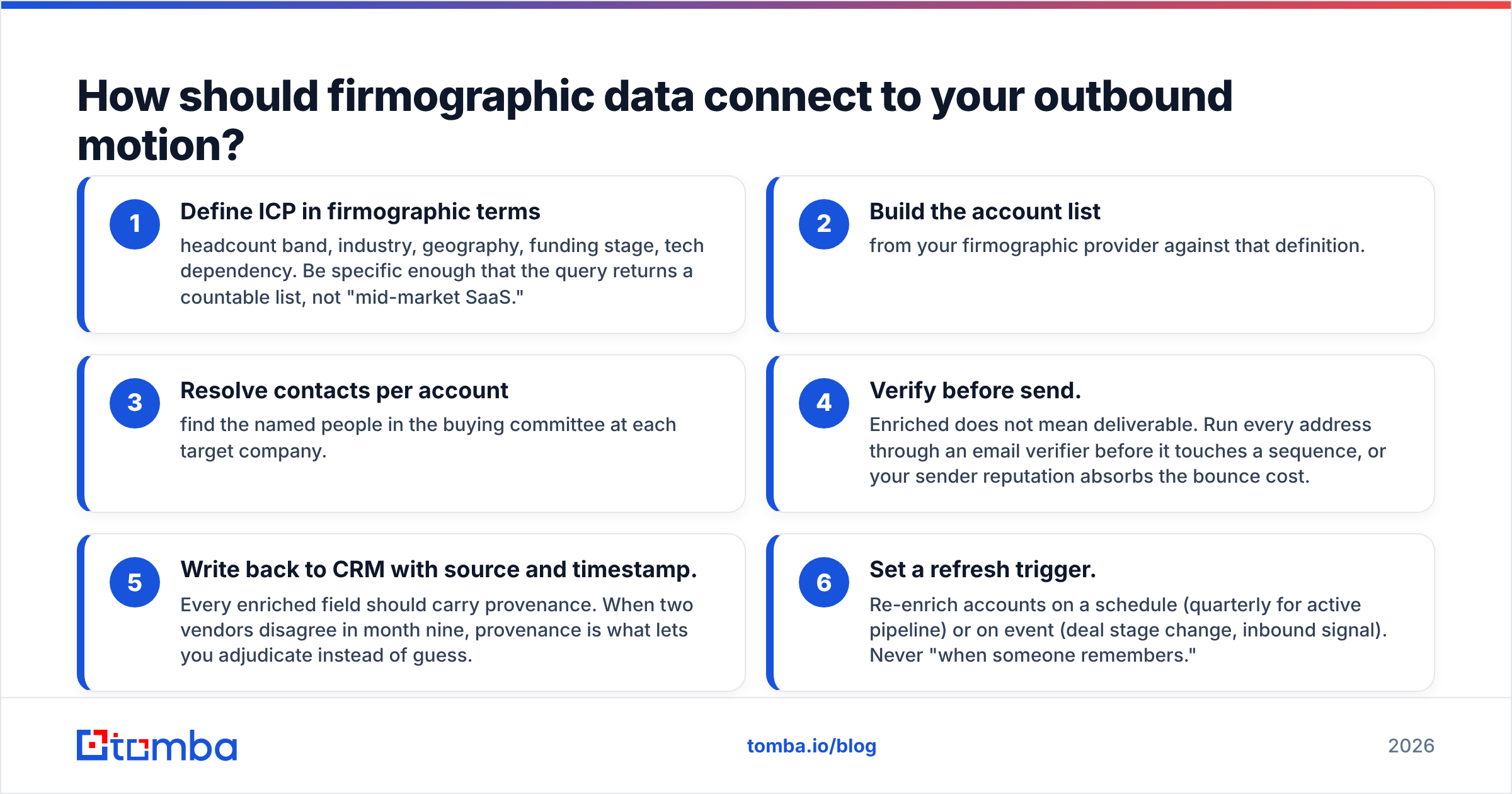
How should firmographic data feed your outbound motion?#
Firmographics qualify the account. Contact data reaches the human. Neither works alone. The handoff is where most stacks leak.
The working sequence has two halves. First, build the list:
- Define your ICP in firmographic terms — headcount band, industry, geography, funding stage, tech. Be specific enough that the query returns a countable list, not "mid-market SaaS."
- Build the account list from your firmographic data provider against that definition.
- Find contacts per account. Name the people on the buying committee at each target company.
Then protect the send:
- Verify before you send. Enriched does not mean deliverable. Run every address through an email verifier first, or your sender reputation pays for the bounces.
- Write back to the CRM with source and timestamp. Every field should carry its origin. When two vendors disagree in month nine, that record lets you settle it instead of guess.
- Set a refresh trigger. Re-enrich on a schedule, quarterly for live pipeline, or on an event. Never "when someone remembers."
Step five pays off 18 months later. Most CRMs end up with an employee_count field nobody trusts, because nobody knows where the number came from. Two extra columns, source and enriched_at, fix that for good.
For high-volume list building, the bulk email finder route is faster than working one account at a time in a UI. Upload domains, get named contacts back. If you have engineers, wire the Tomba API into your pipeline and drop the manual export step.
What are the compliance limits in 2026?#
Firmographic data is lower risk than personal data. Company attributes are not personal data under GDPR. The trouble starts at the join.
- Company-level fields (headcount, revenue, industry, HQ address) sit mostly outside GDPR. Low risk.
- Attach a named person — even a work email — and you now process personal data. You need a lawful basis. Legitimate interest is the usual route in B2B. It needs a written balancing test, not a checkbox.
- CCPA and CPRA treat business contact info as personal data for California residents. Honor deletion across your enriched records, not just your signup database.
- Provenance matters. Ask where the data came from. "Public web sources" is a non-answer. Firmographic data providers that publish their data sources are easier to defend in a DPIA than ones that stay quiet.
The practical bar is simple. Log which vendor gave you which field, and when. Honor deletion requests downstream. Do not assume the vendor's compliance posture covers you. It does not. You are the controller.
Read the ICO's guidance on legitimate interests and vendor reviews on G2 before you sign anything that touches EU records.
Which of the firmographic data providers should you pick?#
Match the vendor to the constraint that actually binds you.
- You need legal hierarchy and credit risk → Dun & Bradstreet. Nothing else maps corporate structure as well.
- You want data, sequencing, and dialing in one place → ZoomInfo or Apollo. You overpay on data to get workflow. That can be a fair trade.
- You live in HubSpot → Breeze Intelligence. Native beats better-but-disconnected in practice.
- You are building a product or pipeline on the data → Coresignal, People Data Labs, or Tomba's API. Volume pricing, no seats, raw access.
- You need one verified list for a campaign → BookYourData. The credit model avoids paying for a year you will not use.
- You need contacts and verification on a small budget → Tomba. Start free and scale by usage, not headcount.
"Who has the most data" is the wrong question. Ask who has the most correct data on the 20,000 accounts you actually sell to. Then ask what it costs to keep it correct. Run the 200-account blind test. It answers that in an afternoon, and it has never once matched the demo.
Ready to test the contact layer?#
Firmographic data providers tell you which companies to chase. They do not tell you who to email. Once you pick a company-data vendor, the next bottleneck is turning those domains into verified, named contacts that do not bounce.
Start with the Tomba Email Finder. Search by domain, name, or company. Get confidence-scored addresses back, then verify them before they hit a sequence. The free tier gives you 25 searches a month, enough to run your own accuracy test on accounts you already know.
Ready to find emails that actually work?
Join 150,000+ professionals who stopped guessing and started sending. Free credits on signup — no credit card required.
Get the Tomba newsletter
Practical outbound tactics and product updates — once every two weeks.
About the author