Free Lead Management Software: 2026 Honest Buyer's Guide
Free lead management software can run a real pipeline — until it can't. Here's what the top free tiers actually give you in 2026, where each one breaks, and how to know when paying is cheaper than staying free.
TL;DR
- Free lead management software is genuinely usable in 2026 — HubSpot, Zoho, Bitrix24, EspoCRM and Odoo all run a real pipeline at $0, and most teams under five reps never hit a hard wall.
- The limits that actually bite are rarely record counts. They're email sending caps, automation/workflow locks, reporting depth, and per-user seat rules.
- HubSpot Free wins on polish and unlimited contacts; Zoho Free wins on features-per-dollar; Bitrix24 wins on unlimited users; EspoCRM and Odoo win if you can self-host.
- The real cost of a free CRM is data entry. Empty fields — no email, no phone, no company — are what kill free-tier pipelines, not row limits.
- Budget rule of thumb: stay free until you have three or more people touching leads daily, then a $15–$25/user CRM plus a $49/mo enrichment tool beats any workaround stack.
What is free lead management software?#
Free lead management software is any tool that lets you capture, store, assign, track, and follow up on leads without paying — permanently, not as a 14-day trial. Think of it like a free checking account: the core function works fine, but the bank makes its money on the features you eventually need, like wire transfers and overdraft.
The category overlaps heavily with "free CRM," but they aren't identical. A CRM manages the entire customer lifecycle, including closed-won accounts, renewals, and support tickets. Lead management is the front half only: intake, qualification, routing, scoring, and handoff. Some tools do only the front half well and cost nothing for exactly that reason.
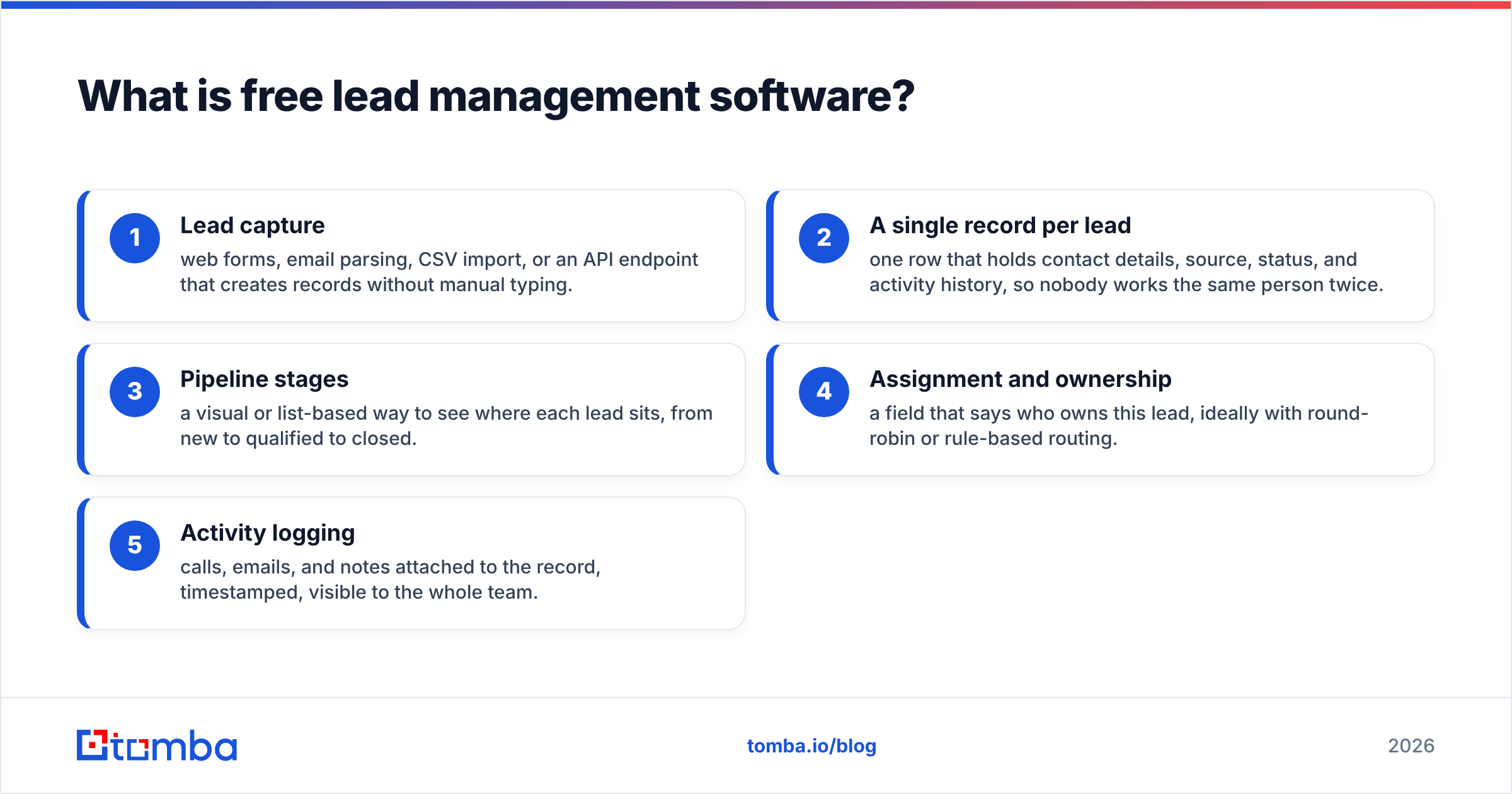
A serviceable free lead management tool needs five things:
- Lead capture — web forms, email parsing, CSV import, or an API endpoint that creates records without manual typing.
- A single record per lead — one row that holds contact details, source, status, and activity history, so nobody works the same person twice.
- Pipeline stages — a visual or list-based way to see where each lead sits, from new to qualified to closed.
- Assignment and ownership — a field that says who owns this lead, ideally with round-robin or rule-based routing.
- Activity logging — calls, emails, and notes attached to the record, timestamped, visible to the whole team.
Anything beyond that — scoring models, sequences, forecasting, custom objects — is where vendors start charging. That's the honest line, and it's roughly consistent across every product below.
Which free lead management tools are actually worth using in 2026?#
Five tools genuinely deserve consideration. Everything else is either a trial in disguise, a dead project, or a freemium shell with a hard 100-record cap that makes it useless past week two.
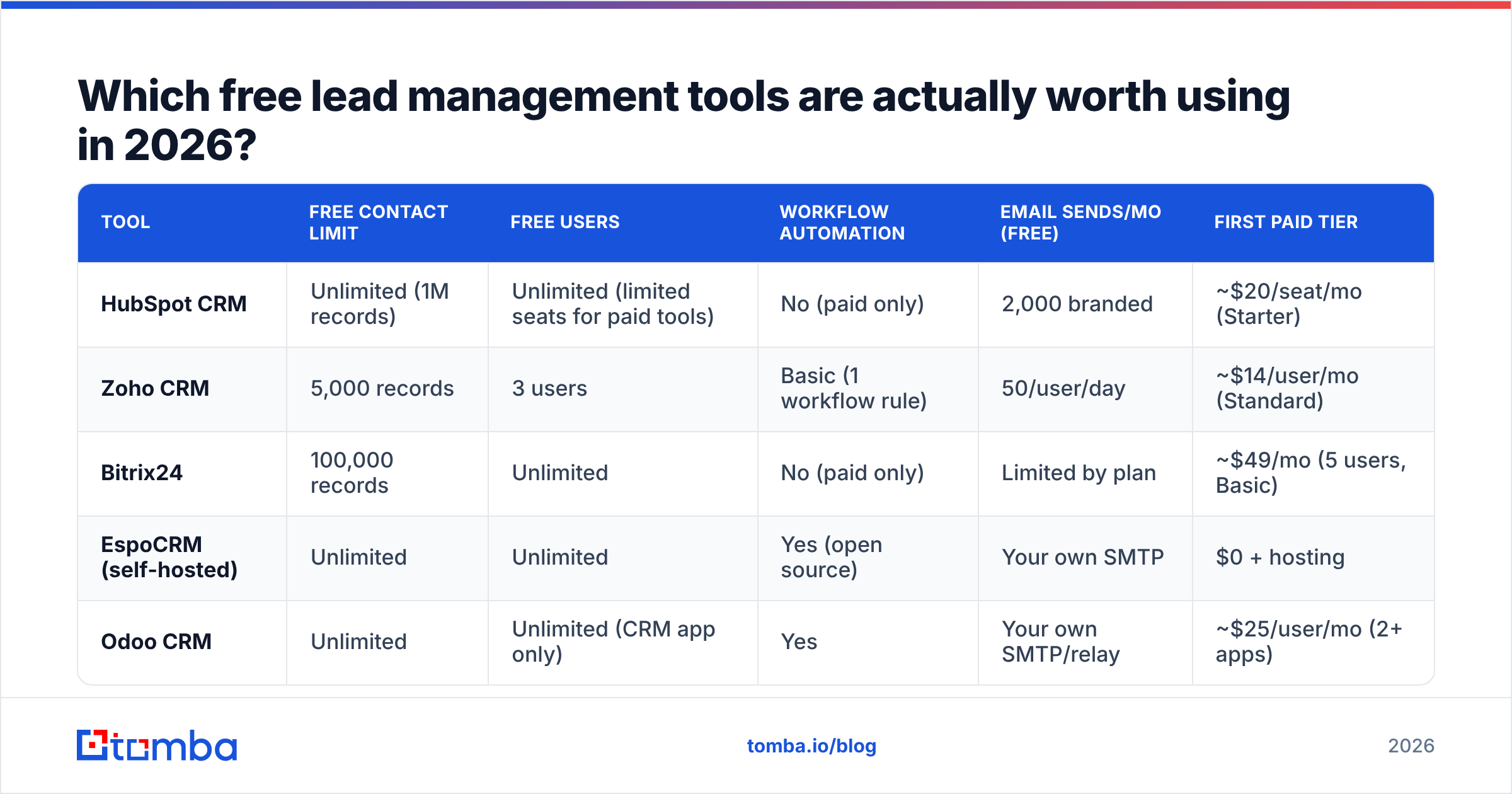
| Tool | Free contact limit | Free users | Workflow automation | Email sends/mo (free) | First paid tier |
|---|---|---|---|---|---|
| HubSpot CRM | Unlimited (1M records) | Unlimited (limited seats for paid tools) | No (paid only) | 2,000 branded | ~$20/seat/mo (Starter) |
| Zoho CRM | 5,000 records | 3 users | Basic (1 workflow rule) | 50/user/day | ~$14/user/mo (Standard) |
| Bitrix24 | 100,000 records | Unlimited | No (paid only) | Limited by plan | ~$49/mo (5 users, Basic) |
| EspoCRM (self-hosted) | Unlimited | Unlimited | Yes (open source) | Your own SMTP | $0 + hosting |
| Odoo CRM | Unlimited | Unlimited (CRM app only) | Yes | Your own SMTP/relay | ~$25/user/mo (2+ apps) |
How to read that table. HubSpot's "unlimited contacts" is real and it's the single most generous number in the category — but every genuinely time-saving feature (sequences, workflows, custom reporting) is gated. Zoho's 5,000-record cap sounds small; in practice a team doing focused outbound to a defined ICP takes 8–14 months to reach it. Bitrix24's unlimited-user free tier is the outlier that no one else matches, and it's why agencies and Eastern European SMBs use it heavily.
Self-hosted options change the equation entirely. EspoCRM and Odoo's Community edition have no artificial ceilings because there's no vendor metering your usage — you're paying in DevOps time instead of dollars. Budget four to six hours for initial setup and roughly an hour a month for updates and backups. If nobody on your team is comfortable with a VPS and a cron job, treat these as paid options with a hidden labor cost.
What do free tiers actually restrict?#
Vendors rarely limit the thing you expect. Record counts are cheap to store; what costs them money — and what makes you upgrade — is different.
- Automation, not storage. The number one paywall across every major vendor is workflow automation. HubSpot gates workflows entirely behind Professional. Zoho Free allows one workflow rule per module. This is deliberate: automation is what makes a CRM sticky, so it's what you pay for.
- Email volume and branding. Free plans cap sends and stamp the vendor's logo on your templates. HubSpot Free gives 2,000 branded emails a month. Zoho Free limits you to 50 emails per user per day. Neither is enough for real outbound sequences.
- Reporting depth. You get dashboards; you don't get custom reports, attribution, or forecast modeling. If your board asks "which channel produced closed-won revenue last quarter," a free tier can't answer it without a CSV export and manual work.
- Seat count and permissions. Zoho caps free at three users. Most free tiers offer no role-based permissions, meaning every user sees every record — a real problem the moment you have contractors or a partner in the account.
- Support. Free means community forums and docs. When your import breaks at 11pm before a campaign launch, nobody is answering.
- Integrations and API calls. Free API quotas are typically 10–25% of paid quotas. If you're syncing from an enrichment tool or a form builder, you will notice.
None of these are scams. They're a rational pricing ladder, and independent review data on G2 consistently shows the same upgrade trigger: teams leave free tiers over automation and reporting, not storage.
Is free lead management software good enough for a real sales team?#
Yes — up to a specific and predictable point. Here's the honest boundary.
Free works when: you have one to three people touching leads, fewer than ~200 new leads a month, a single pipeline, no complex routing rules, and your outbound sending happens in a dedicated tool rather than inside the CRM. Solo founders, bootstrapped agencies, and pre-seed startups run entire go-to-market motions this way and lose nothing.
Free breaks when: you need round-robin assignment, lead scoring that updates automatically, multi-step follow-up sequences, territory-based permissions, or any report your CEO will look at more than once. It also breaks when two people start editing the same record in different ways and there's no audit trail to resolve it.
The math is straightforward. A rep who spends 40 minutes a day on manual data entry and follow-up reminders that a paid tier would automate costs you roughly 14 hours a month. At even a modest fully loaded rate, that's several hundred dollars of labor to avoid a $20/seat subscription. Free stops being free the moment the workaround costs more than the upgrade.
There's a second failure mode that's more common and less discussed: empty fields. Free CRMs give you the container, not the contents. A pipeline of 800 leads where 340 have no verified email address and 600 have no direct phone number isn't a pipeline — it's a to-do list. This is where lead management software and lead data diverge, and where most free-tier stacks quietly fail.
How do you fill a free CRM with usable lead data?#
Separate the two problems. Your CRM stores and routes; something else has to find and verify the contact details. Trying to solve both with one free tool is why people conclude "free CRMs don't work."
A practical stack that costs very little:
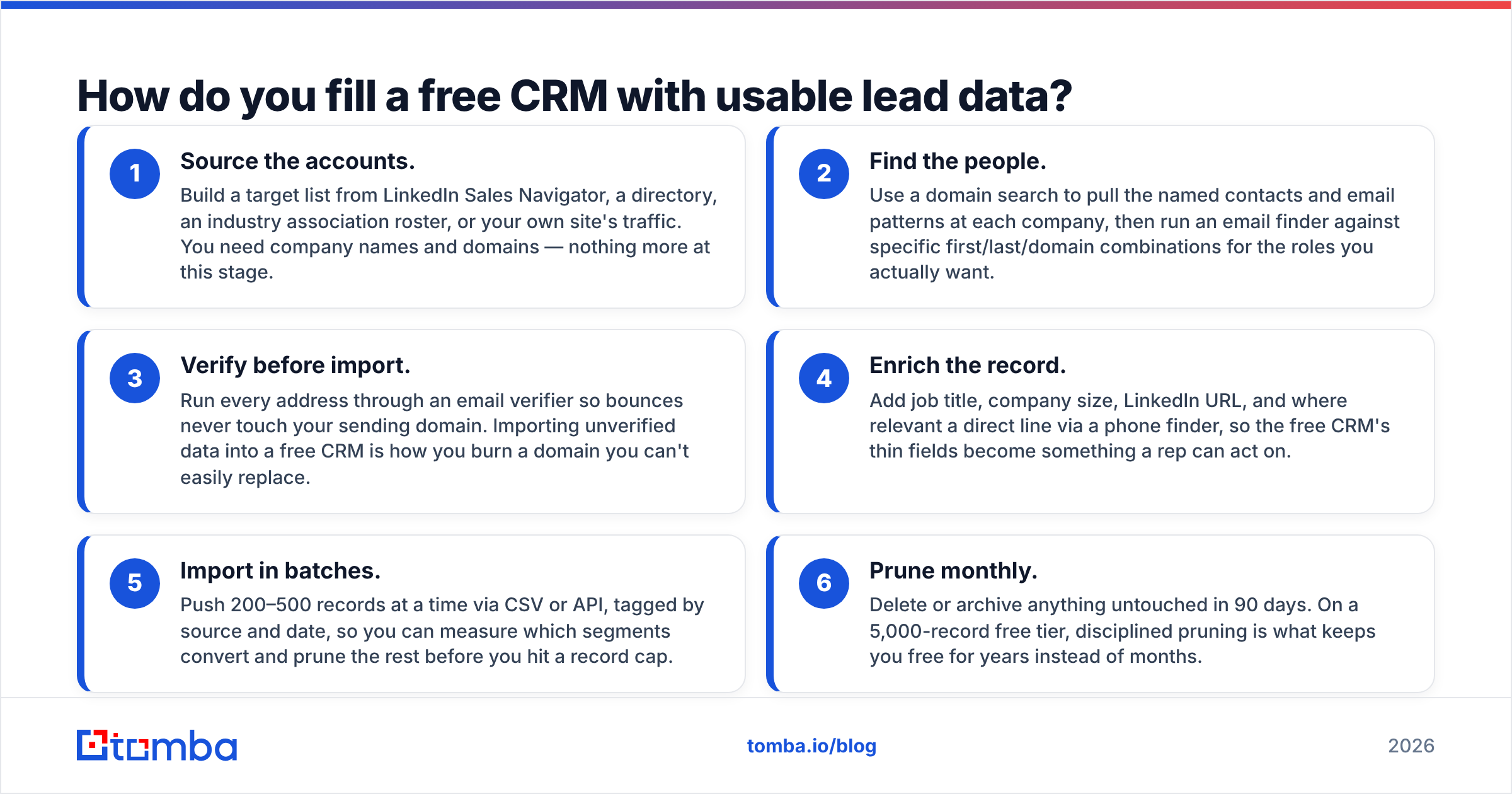
- Source the accounts. Build a target list from LinkedIn Sales Navigator, a directory, an industry association roster, or your own site's traffic. You need company names and domains — nothing more at this stage.
- Find the people. Use a domain search to pull the named contacts and email patterns at each company, then run an email finder against specific first/last/domain combinations for the roles you actually want.
- Verify before import. Run every address through an email verifier so bounces never touch your sending domain. Importing unverified data into a free CRM is how you burn a domain you can't easily replace.
- Enrich the record. Add job title, company size, LinkedIn URL, and where relevant a direct line via a phone finder, so the free CRM's thin fields become something a rep can act on.
- Import in batches. Push 200–500 records at a time via CSV or API, tagged by source and date, so you can measure which segments convert and prune the rest before you hit a record cap.
- Prune monthly. Delete or archive anything untouched in 90 days. On a 5,000-record free tier, disciplined pruning is what keeps you free for years instead of months.
Vendors that specialize in one layer generally beat all-in-one free tiers at that layer. BookYourData is a solid option if you'd rather buy a pre-built, verified list than build one — it's a pay-as-you-go model with a verification guarantee, which suits teams doing a one-time market push rather than continuous prospecting. Tomba fits the opposite pattern: continuous, self-serve discovery and verification where you control the targeting, starting at $0 for 25 searches a month and $49/mo on Starter. Both approaches are legitimate; pick by whether your list needs are episodic or ongoing.

How do the free tiers compare on the things that matter?#
Feature checklists are the wrong lens. Compare on friction — how quickly the tool stops helping.
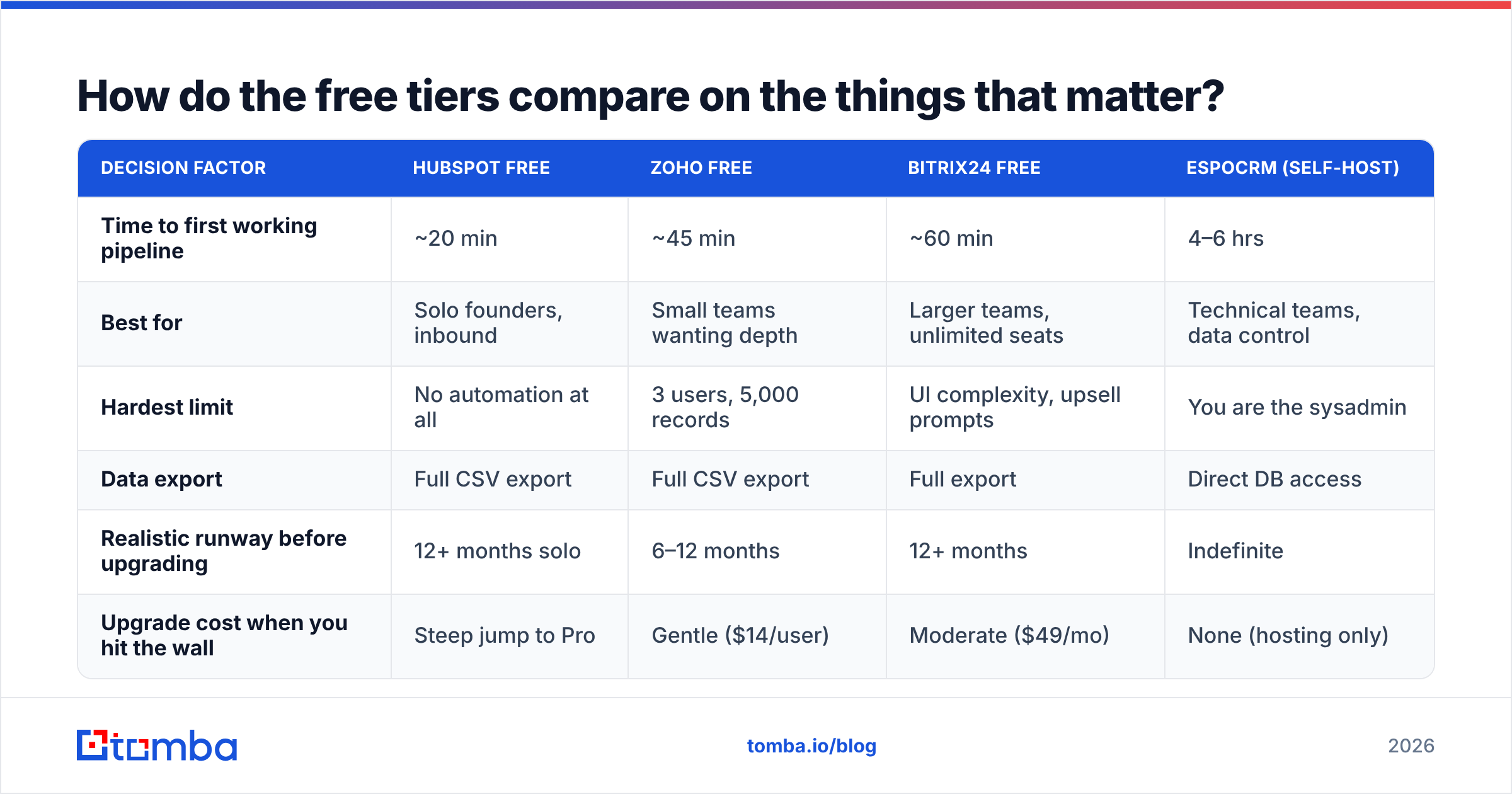
| Decision factor | HubSpot Free | Zoho Free | Bitrix24 Free | EspoCRM (self-host) |
|---|---|---|---|---|
| Time to first working pipeline | ~20 min | ~45 min | ~60 min | 4–6 hrs |
| Best for | Solo founders, inbound | Small teams wanting depth | Larger teams, unlimited seats | Technical teams, data control |
| Hardest limit | No automation at all | 3 users, 5,000 records | UI complexity, upsell prompts | You are the sysadmin |
| Data export | Full CSV export | Full CSV export | Full export | Direct DB access |
| Realistic runway before upgrading | 12+ months solo | 6–12 months | 12+ months | Indefinite |
| Upgrade cost when you hit the wall | Steep jump to Pro | Gentle ($14/user) | Moderate ($49/mo) | None (hosting only) |
The "upgrade cost when you hit the wall" row is the one buyers under-weight. HubSpot's free tier is the most pleasant place to start and one of the more expensive places to grow — the jump from Starter to Professional, where workflows live, is significant. Zoho's ladder is gradual, which is why teams that expect to grow steadily often start there despite the smaller free allowance. Check current Tomba pricing and your CRM vendor's own pricing page before committing, since every vendor in this category repriced at least once in the last 18 months.
Two operational notes that don't fit in a table:
Data portability is your real insurance. Before you commit, export a test CSV from any free tier and open it. If custom fields, activity history, and notes come through intact, you can leave later. If they don't, you're locked in regardless of what the pricing page says. Every tool above passes this test; many smaller freemium CRMs do not.
Deliverability is downstream of data quality. A free CRM won't warn you that 30% of your imported addresses are dead. High bounce rates damage sender reputation fast, and once it's damaged, your emails land in spam regardless of which CRM you're using. Verification isn't an optional polish step — it's the thing that keeps the rest of the stack working. Microsoft and Google both tightened bulk-sender requirements in recent years; the current HubSpot and Salesforce deliverability docs both make list hygiene a prerequisite, not a recommendation.
When should you stop using free lead management software?#
Upgrade when any two of these are true:
- Three or more people touch leads daily and you're resolving conflicts in Slack.
- You've built a manual workaround — a spreadsheet, a Zap, a recurring calendar reminder — to replace a feature the paid tier includes.
- You can't answer a revenue question from the tool without exporting to Excel.
- Lead response time has slipped past an hour because assignment is manual.
- You're near a hard cap (records, users, or API calls) and pruning no longer buys you room.
One of these alone is survivable. Two compounds. The teams that get burned are the ones that stay free for 18 months past the point of pain because the subscription line item feels more visible than the wasted hours.
The counter-advice matters too: don't upgrade because a sales rep told you your pipeline "needs" scoring. Automated lead scoring on a 200-lead pipeline is theater. You know your best leads by name. Scoring earns its keep somewhere north of a thousand active records with genuinely varied fit — below that, a well-maintained set of pipeline stages and an honest win rate review beats any model.
What's the fastest way to set this up this week?#
Pick one CRM and one data source. Two decisions, done in an afternoon.
- Day 1: Sign up for HubSpot Free (if you want polish) or Zoho Free (if you want depth). Create four pipeline stages and nothing else. Resist custom fields for now.
- Day 2: Build a 200-account target list. Domains only.
- Day 3: Run domain search and email finding across those domains, verify everything, and export a clean CSV.
- Day 4: Import in one batch, tagged by source and date.
- Day 5: Work the list. Log every touch. At the end of week two, look at which source tag produced replies and cut the rest.
That's a complete lead management system for the cost of one enrichment subscription, and it will carry most teams through their first several hundred thousand in pipeline.
The bottom line#
Free lead management software in 2026 is good enough to run a real business on — the free tiers from HubSpot, Zoho, Bitrix24, EspoCRM, and Odoo are all legitimate, and the differences between them come down to seats, automation, and how steep the ladder gets when you outgrow them. The thing free tiers can't give you is data. An empty CRM is a very tidy way to track nothing.
If you're building a pipeline on a free CRM, spend your budget on the layer that free tools genuinely can't cover: finding and verifying the contacts that go into it. Start with the Tomba Email Finder — 25 free searches a month to test accuracy against a domain you already know, then $49/mo on Starter when you're ready to fill that pipeline properly. Verify before you import, and your free CRM will stay useful a lot longer than the vendor's pricing page assumes.
Related guides#
// get started
Find, verify and enrich your first contacts today
Start on the free plan with 25 searches a month, then scale when your team is ready.
Free plan · No credit card required · GDPR & CCPA
Get the Tomba newsletter
Product and data updates
// about the author