GetProspect vs Global Database: Which B2B Data Tool Wins in 2026?
GetProspect vs global database: one sells filtered search, the other sells breadth. One fits ICP-driven outbound, the other fits territory planning. Here's how to pick — and where a verification-first finder beats both.
GetProspect vs global database providers is a choice between two buying models, not two versions of the same tool. GetProspect sells search. A global database sells breadth. Pick the wrong one and you pay for rows you never email.
TL;DR
- GetProspect is a search-first tool. You filter a 200M+ contact index by title, industry, and location, then export what fits your ICP. You pay per contact you pull, not for the whole index.
- A "global database" — BookYourData, Cognism, ZoomInfo, Lusha and similar bulk-list vendors — sells access to breadth. Credits unlock big territory slices at once. That is great for market sizing. It is risky for cold email if you skip verification.
Two numbers decide the winner:
- Index size is not the differentiator. What counts is how many of the emails you export actually deliver. A 200M index at 82% valid beats a 700M index at 61% valid, every time.
- Cost per usable contact is the only pricing metric that matters. Divide plan price by (credits × validity rate), not by credits.
- Best hybrid setup for most teams: use a global database for account discovery and TAM mapping. Then run a verification-first finder like Tomba's email finder on the contacts you actually plan to email.
GetProspect vs global database: what are you comparing?#
You are comparing two purchasing models, not two identical products.
GetProspect sits in the "searchable index + LinkedIn extension" category. You define an ICP filter — say, Heads of Growth at 50–200-person SaaS companies in the Nordics. The tool returns matching people with work emails attached. You spend credits as you reveal contacts.
It also ships a Chrome extension for pulling people off LinkedIn search results, plus a light CRM layer for list management.
A global database provider sells breadth as the product. The pitch is coverage: hundreds of millions of profiles across every region, often bundled with phone numbers, intent signals, and technographics.
BookYourData, for example, sells pay-as-you-go B2B lists with a verified-at-purchase guarantee. That is a different commercial model from subscription-credit tools, and a useful one if you want a defined list without a yearly contract. Cognism and ZoomInfo sit at the enterprise end, with annual seats and platform pricing.
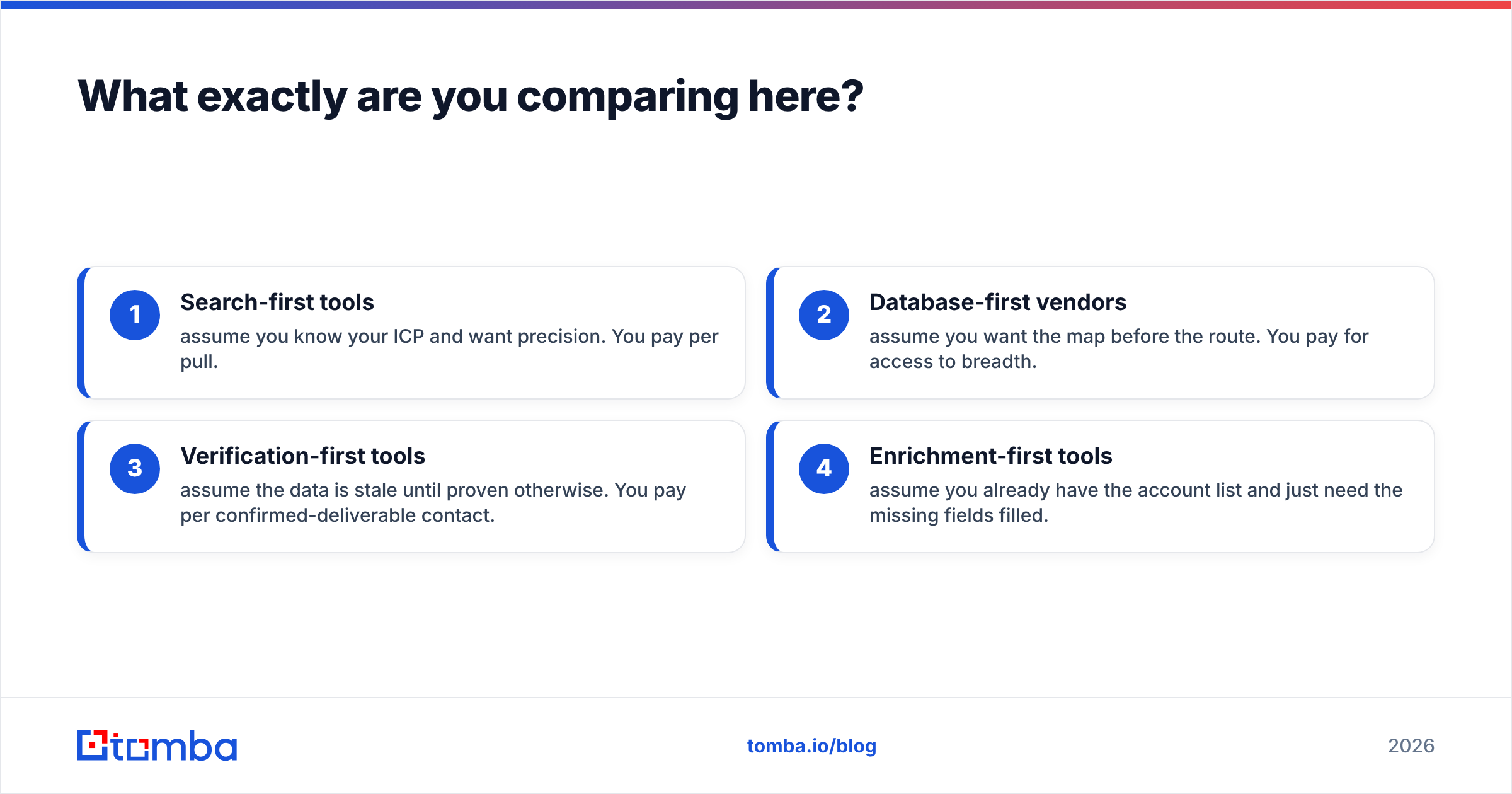
The distinction that matters:
- Search-first tools assume you know your ICP and want precision. You pay per pull.
- Database-first vendors assume you want the map before the route. You pay for access to breadth.
- Verification-first tools assume the data is stale until proven otherwise. You pay per confirmed-deliverable contact.
- Enrichment-first tools assume you already have the account list and only need the missing fields.
Most teams need two of these four, not one. The mistake is buying one and pretending it covers all four jobs.

Is GetProspect's data more accurate than a global database?#
Not by default. Accuracy comes from freshness policy, not headcount.
Here is the mechanic nobody puts on a pricing page: every B2B contact record decays. Gartner and other analyst firms peg B2B data decay at roughly 25–30% per year. Job changes, rebrands, and domain moves drive it. A record collected 18 months ago has a coin-flip chance of being wrong today, whoever sold it to you.
So the accuracy question splits into three smaller ones:
- When was the record last touched? A vendor that re-crawls every quarter beats one that re-crawls once a year, even with a smaller index.
- Is the email checked at export time, or at collection time? A check done at collection means little 12 months later. You want verification at export.
- How are catch-all domains handled? Roughly 15–20% of business domains accept all mail at the SMTP layer. A naive verifier marks them "valid" while knowing nothing. If your vendor counts catch-alls as valid, its headline accuracy number is inflated. Run a proper catch-all verifier before you trust those rows.
GetProspect runs an email-verification step in its export flow, which puts it ahead of raw list dumps. Global-database vendors vary a lot here. BookYourData verifies at purchase and replaces bounces, which beats the industry median. Some cheaper list brokers verify essentially never.
The practical test is cheap. Buy the smallest sample from each candidate, export 200 contacts, and run them through an independent email verifier. The bounce rate you see on that sample is the number to plug into your cost math. Treat published accuracy claims as marketing until your own sample backs them up.

GetProspect vs global database: the head-to-head comparison#
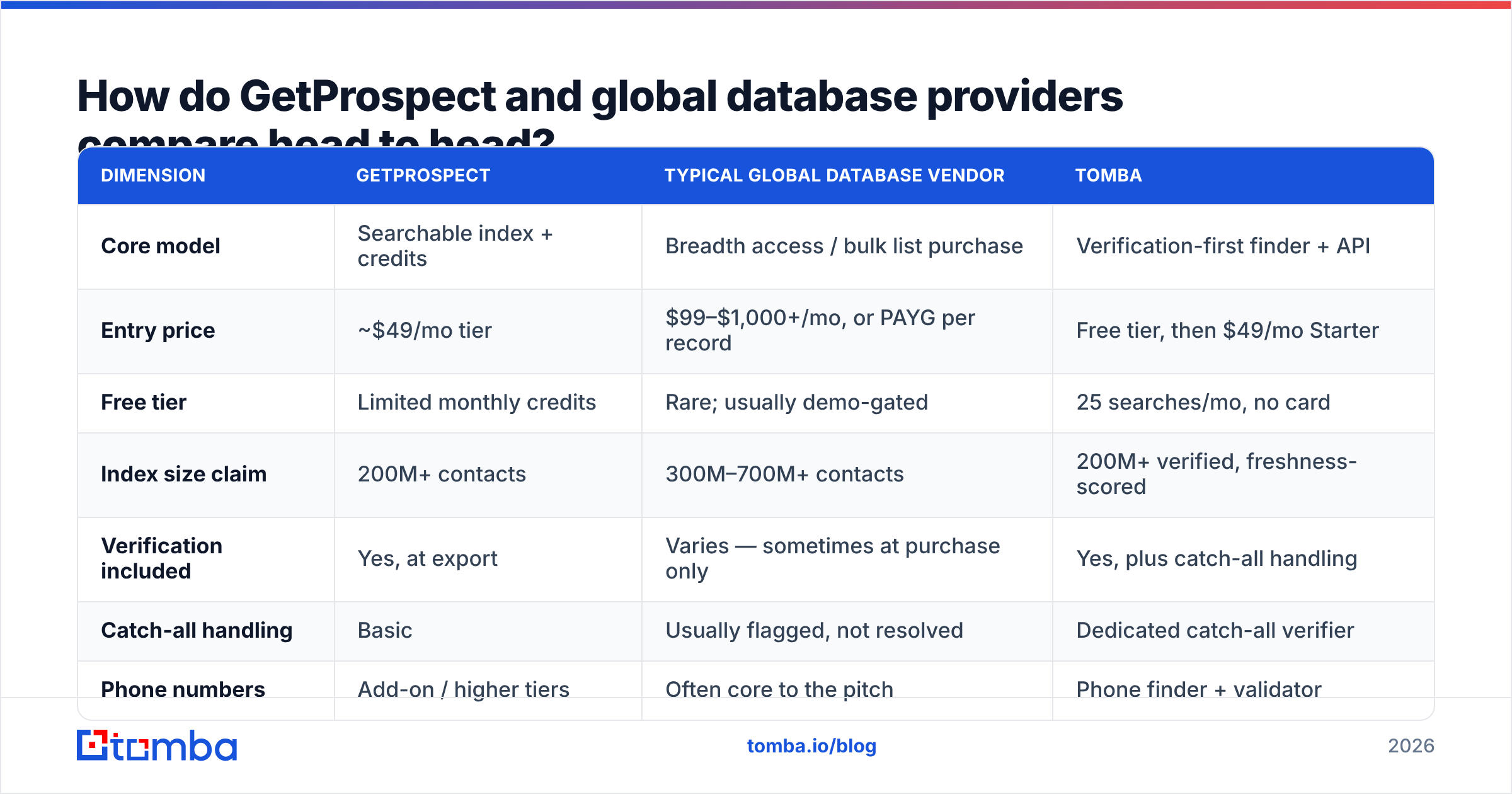
| Dimension | GetProspect | Typical global database vendor | Tomba |
|---|---|---|---|
| Core model | Searchable index + credits | Breadth access / bulk list purchase | Verification-first finder + API |
| Entry price | ~$49/mo tier | $99–$1,000+/mo, or PAYG per record | Free tier, then $49/mo Starter |
| Free tier | Limited monthly credits | Rare; usually demo-gated | 25 searches/mo, no card |
| Index size claim | 200M+ contacts | 300M–700M+ contacts | 200M+ verified, freshness-scored |
| Verification included | Yes, at export | Varies — sometimes at purchase only | Yes, plus catch-all handling |
| Catch-all handling | Basic | Usually flagged, not resolved | Dedicated catch-all verifier |
| Phone numbers | Add-on / higher tiers | Often core to the pitch | Phone finder + validator |
| LinkedIn extraction | Chrome extension | Varies by vendor | Chrome extension + LinkedIn finder |
| API access | Yes, tiered | Enterprise tiers usually | Yes, on all paid plans |
| Contract | Monthly / annual | Often annual for enterprise tiers | Monthly, cancel anytime |
| Best for | ICP-filtered outbound lists | TAM mapping, territory planning | Deliverability-critical sending |

Read that table with one bias correction in mind. Buyers over-weight the "index size" row, and it predicts campaign results worst of all. A vendor claiming 700M contacts is usually counting every scraped profile shell, including records with no email at all. The number you care about is deliverable contacts matching your ICP — and no vendor publishes it.
What does each option cost per usable contact?#
This is where the comparison stops being fuzzy.
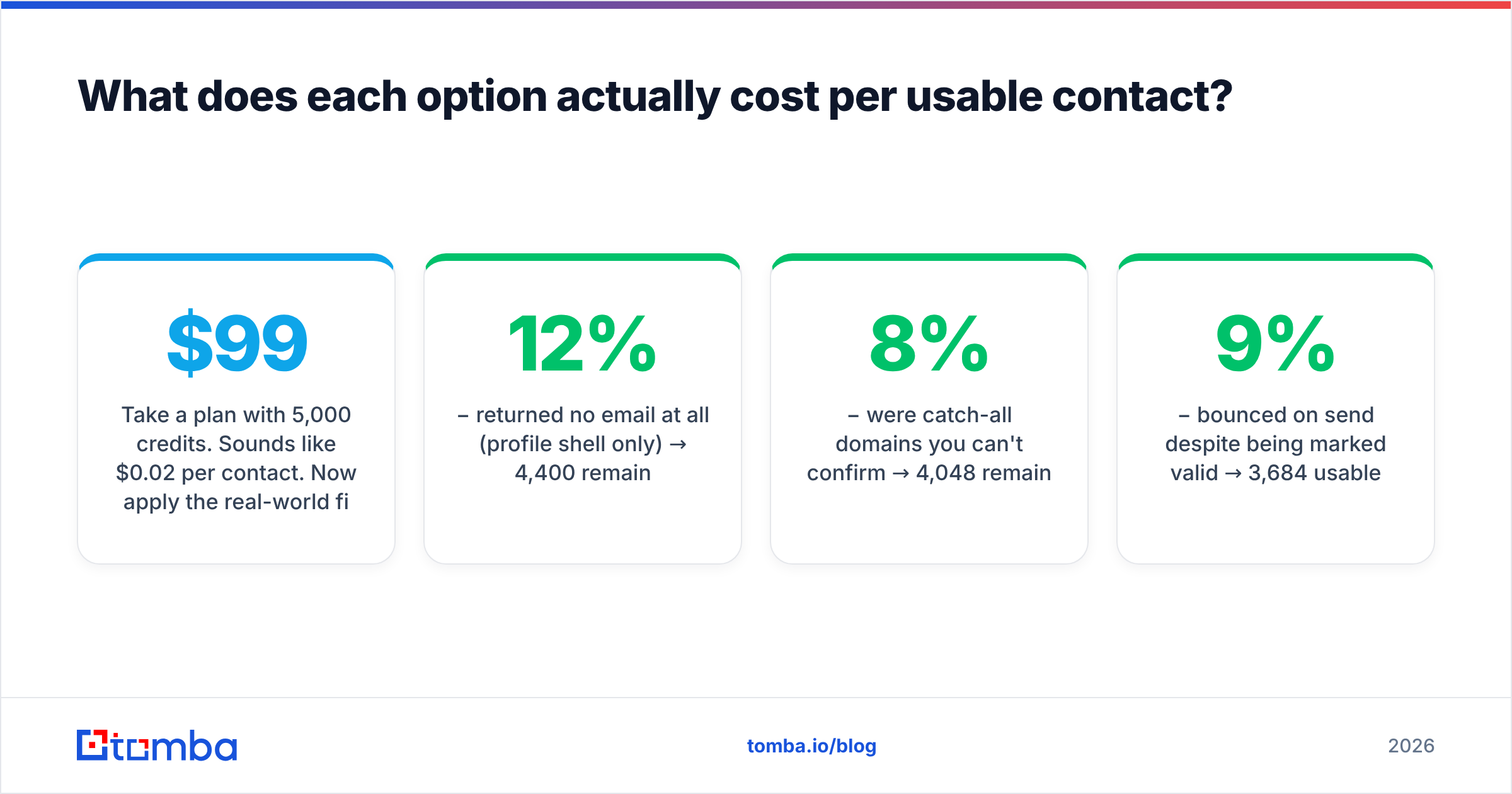
Take a $99/month plan with 5,000 credits. That looks like $0.02 per contact. Now apply the real-world filter chain:
- 5,000 credits pulled
- −12% returned no email at all (profile shell only) → 4,400 remain
- −8% were catch-all domains you can't confirm → 4,048 remain
- −9% bounced on send despite being marked valid → 3,684 usable
Your real cost is $99 ÷ 3,684 = $0.027 per usable contact, 35% above the sticker math. And that is a well-behaved vendor. Run the same chain on a 61%-valid bulk list and the effective price nearly doubles, while your sender reputation absorbs the damage.
Three cost factors never appear on a pricing page:
- Bounce cost. Every hard bounce above roughly 2% hurts sender reputation. That suppresses inbox placement for the valid half of your list, and the damage compounds across campaigns.
- Rollover policy. Credits that expire monthly are worth less than credits that roll over. If you send in bursts, expiring credits can waste 30–40% of what you paid for.
- Re-verification cadence. A list you bought in January needs re-checking by April. Budget for that, or budget for the bounces.
Compare that with Tomba pricing: Free (25 searches/mo), Starter at $49/mo, Growth at $99/mo, Pro at $249/mo, and custom Enterprise. Verification and catch-all resolution sit inside the same credit instead of a separate line item. That bundling is what moves the usable-contact number, not the headline price.
When should you choose a global database instead?#
Breadth genuinely wins in three cases, and pretending otherwise would be dishonest.
You're doing territory planning or TAM sizing. Say you need to know how many manufacturing firms with 200+ employees exist in DACH. A search-first tool with per-contact credits is the wrong instrument. You want a database you can slice and count without paying per row. That is a research job, not a sending job.
You need firmographic depth beyond contact details. Revenue bands, funding rounds, tech stack, hiring signals, org charts. Enterprise database vendors invest heavily here, and a focused email finder usually does not. If your revenue operations team scores accounts on 15 attributes, you need a data platform, not a lookup tool.
You want a defined, pre-verified list with no subscription. Pay-as-you-go vendors like BookYourData suit teams that run two campaigns a quarter and hate recurring seats. You know the list size, the price, and the bounce guarantee up front. That is a clean purchase for episodic outbound.
A global database is the wrong call when you simply need to email a specific set of people you have already identified. Buying breadth to solve a precision problem is how teams end up with 40,000 contacts, a 14% bounce rate, and a burned sending domain.

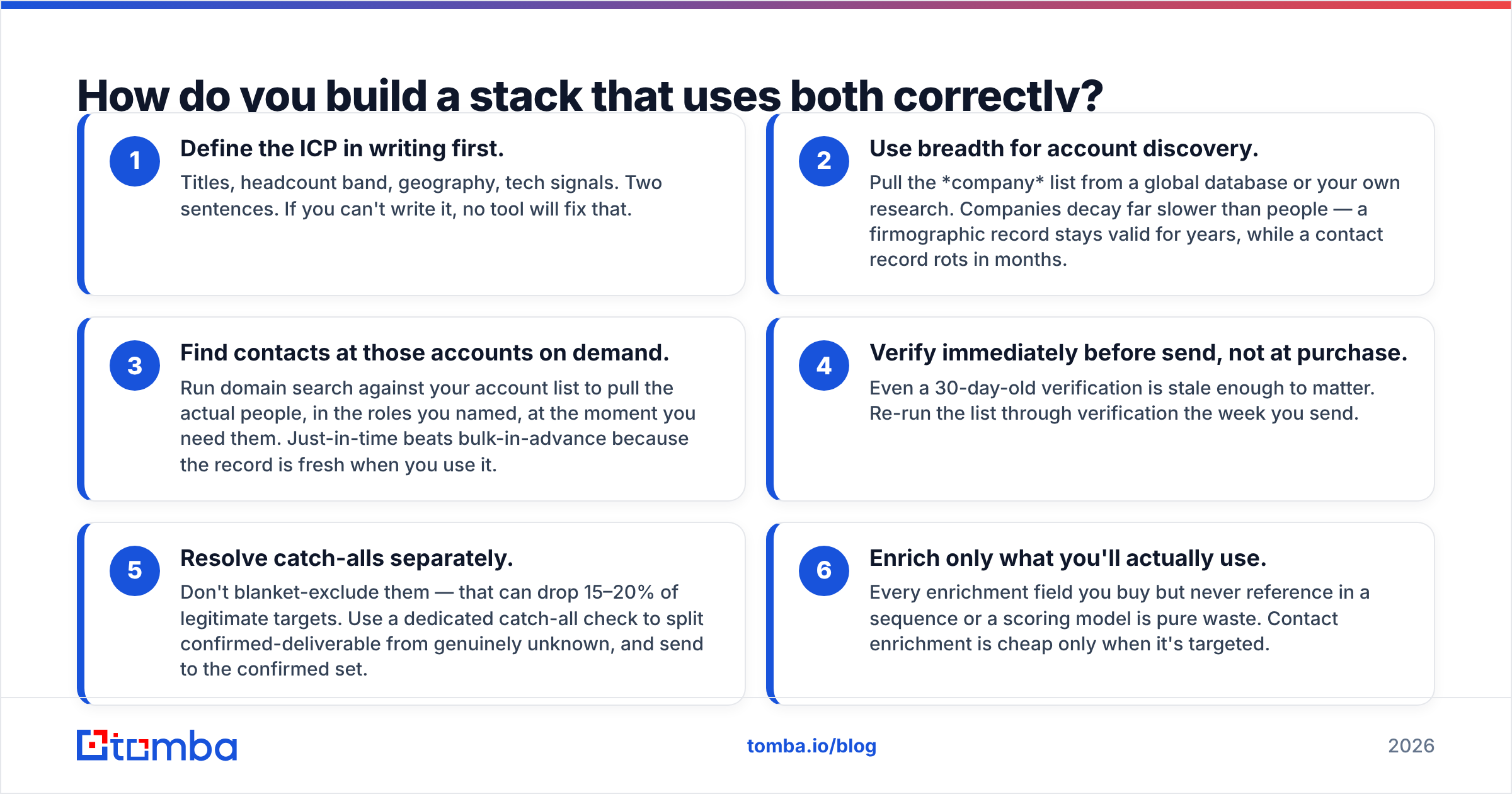
How do you build a stack that uses both?#
Treat data acquisition as a pipeline with distinct stages, not one purchase.
Write the ICP down first. Titles, headcount band, geography, tech signals. Two sentences. If you can't write it, no tool will fix that.
Use breadth for account discovery. Pull the company list from a global database or your own research. Companies decay far slower than people: a firmographic record stays valid for years, while a contact record rots in months.
Find contacts at those accounts on demand. Run domain search against your account list to pull the actual people, in the roles you named, at the moment you need them. Just-in-time beats bulk-in-advance because the record is fresh when you use it.
Verify right before send, not at purchase. Even a 30-day-old check is stale enough to matter. Re-run the list the week you send.
Resolve catch-alls separately. Don't blanket-exclude them; that can drop 15–20% of legitimate targets. Use a dedicated catch-all check to split confirmed-deliverable from truly unknown, then send to the confirmed set.
Enrich only what you'll use. Any field you buy but never reference in a sequence or a scoring model is waste. Contact enrichment is cheap only when it's targeted.
This sequencing matters more than the vendor choice. Teams that buy 50,000 contacts in January and send them in June get burned by decay, whoever sold them the list. Teams that find and verify in the same week get much better response rates on a fraction of the data spend.
Does GetProspect's LinkedIn extension change the math?#
Somewhat. It is a real workflow advantage with a real ceiling.
Pulling contacts straight from a LinkedIn search page is fast. Your ICP filter becomes LinkedIn's filter, which is usually richer than a static database taxonomy. If your team already lives in Sales Navigator, an extension removes an export-import round trip per list.
The ceiling: LinkedIn extraction depends on LinkedIn's tolerance, and that shifts. LinkedIn's own user agreement restricts automated data collection, and enforcement has tightened repeatedly. Any browser-side scraping workflow carries account-level risk that a server-side API does not. That is not a reason to avoid extensions. It is a reason not to make one your only acquisition channel.
Tools handle this differently. Tomba's LinkedIn finder resolves profile URLs to verified work emails server-side, so the step never depends on a browser session staying logged in. For volume, or for an automated pipeline, an email finder API with rate limits you control is the more durable base.
Which one should you actually buy?#
Match the tool to the job. Stop looking for one vendor that does everything.
Buy GetProspect if you run ICP-filtered outbound at moderate volume and your team works out of LinkedIn. Search and light list management sit in one place, and the credit model scales sensibly.
Buy a global database if you need TAM sizing, territory planning, or deep firmographics. Same answer if you want pay-as-you-go lists with a bounce guarantee for occasional campaigns.
Buy Tomba if deliverability is your binding constraint. Verification, catch-all resolution, and domain search share one credit. The free tier covers 25 searches, and $49/mo Starter is a low-risk way to benchmark accuracy against your current tool.
Buy two of them if you're doing serious outbound. Breadth for discovery, precision for sending. Most high-performing teams land here, and it usually costs less than one enterprise seat.
Read as a whole, GetProspect vs global database is less a duel than a division of labour. One finds the accounts. The other confirms the people you email.
Run the sample test before you commit to any of them. Pull 200 contacts from each candidate against the same ICP, verify them independently, and compare bounce and match rates. Two hours of testing tells you more than every comparison page on the internet, including this one.
Ready to benchmark your current list? Start with the Tomba Email Finder. The free tier gives you 25 searches a month with no card — enough for a real head-to-head against whatever database you pay for now.
Every result comes back with a verification status and a confidence score. That lets you measure the one number that drives pipeline: how many of these emails land in an inbox.
Related guides#
Ready to find emails that actually work?
Join 150,000+ professionals who stopped guessing and started sending. Free credits on signup — no credit card required.
Get the Tomba newsletter
Practical outbound tactics and product updates — once every two weeks.
About the author