GetProspect vs LeadzenAI: Which Email Finder Wins in 2026?
GetProspect and LeadzenAI both promise verified B2B contacts, but they solve different problems. Here's how they compare on data coverage, verification, pricing, and export limits — plus when neither is the right pick.
TL;DR
- GetProspect is a LinkedIn-first prospecting database: a Chrome extension, a searchable B2B contact database, list management, and a free tier that gets most people through evaluation without a card.
- LeadzenAI is an India-headquartered lead-intelligence platform built around real-time and bulk search, with stronger coverage of APAC and Indian company data than most Western tools.
- Neither wins outright. GetProspect wins on Western/EMEA coverage, UI polish, and CRM-adjacent list workflows. LeadzenAI wins on regional data depth and on phone-number enrichment for markets other vendors thin out.
- Both charge in ways that hide the real number: what matters is cost per usable, verified contact, not headline price per credit.
- If you need an API-first email finder with transparent per-contact economics and separate verification, run a third tool alongside your shortlist before you commit annually.
What are GetProspect and LeadzenAI?#
They target the same job — turn a company or a person into a reachable email address — from opposite ends of the market.
GetProspect is a B2B email finder and contact database with a LinkedIn Chrome extension at its center. The typical workflow: run a Sales Navigator search, click the extension, pull profiles into a GetProspect list, and let the platform find and verify work emails. It also exposes a filterable database (by industry, headcount, job title, location, tech stack) so you can build lists without touching LinkedIn at all. Lists behave a little like a lightweight CRM — custom columns, tags, CSV export, and native pushes to common sales tools.
LeadzenAI approaches it as a lead-intelligence engine. Its core surfaces are real-time search (look up a person or company on demand), bulk search (upload a list, get it enriched), and a browser extension. Its differentiator is regional: coverage of Indian and broader APAC companies, including SMB and mid-market records that US-centric databases either miss or return as generic info@ catch-alls. It also leans harder into phone numbers and firmographic signals than most pure email finders.
The practical translation: GetProspect is a list-building tool for Western outbound teams. LeadzenAI is a data-coverage play for teams selling into markets where Western databases go quiet.
How do GetProspect and LeadzenAI compare feature by feature?#
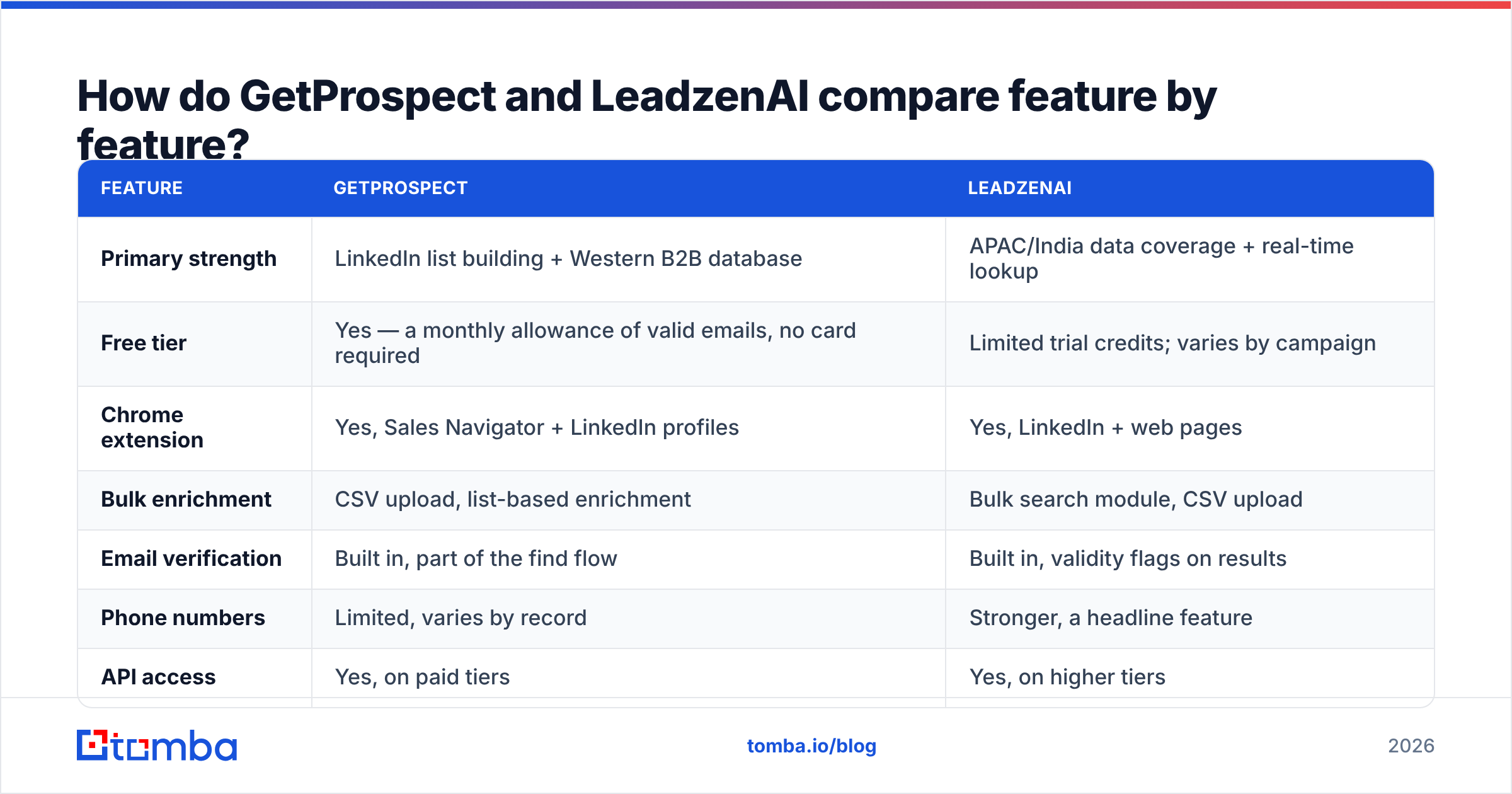
| Feature | GetProspect | LeadzenAI |
|---|---|---|
| Primary strength | LinkedIn list building + Western B2B database | APAC/India data coverage + real-time lookup |
| Free tier | Yes — a monthly allowance of valid emails, no card required | Limited trial credits; varies by campaign |
| Chrome extension | Yes, Sales Navigator + LinkedIn profiles | Yes, LinkedIn + web pages |
| Bulk enrichment | CSV upload, list-based enrichment | Bulk search module, CSV upload |
| Email verification | Built in, part of the find flow | Built in, validity flags on results |
| Phone numbers | Limited, varies by record | Stronger, a headline feature |
| API access | Yes, on paid tiers | Yes, on higher tiers |
| Native CRM pushes | HubSpot, Pipedrive, Zapier and similar | Zapier/webhooks, fewer native connectors |
| Best-fit buyer | SDR teams prospecting US/EU accounts | Teams selling into India, SEA, Middle East |
| Weak spot | Thin outside North America and Europe | Smaller Western dataset, less mature UI |
Two honest caveats before you screenshot that table. First, both vendors iterate on packaging faster than any blog can track — treat plan names, credit allowances, and connector lists as directional, and confirm on the vendor's own pricing page before you buy. Second, feature parity checkboxes lie. "Email verification included" means something very different when one tool returns a binary valid/invalid and another returns risk tiers, catch-all detection, and role-account flags.

Which tool has better data accuracy?#
It depends entirely on where your accounts are — and that is not a dodge, it is the whole answer.
Every email finder is a stitched-together system of crawled public pages, contributed data, pattern inference, and SMTP-level verification. Coverage follows wherever the vendor's crawl and contribution pipeline is densest. GetProspect's density is North America and Western Europe. LeadzenAI's density is India first, then wider APAC and the Gulf.
Run the same 200-row test list through both and you will typically see:
- US/UK SaaS mid-market: GetProspect returns a materially higher hit rate, and a higher share of those hits verify clean.
- Indian IT services, manufacturing, and SMB: LeadzenAI returns emails where GetProspect returns nothing or a generic company inbox.
- Enterprise accounts in either region: both do fine on VP-and-below titles and both degrade on C-level, where records churn fastest.
- Catch-all domains: this is where both tools' reported accuracy diverges most from real-world bounce rates.
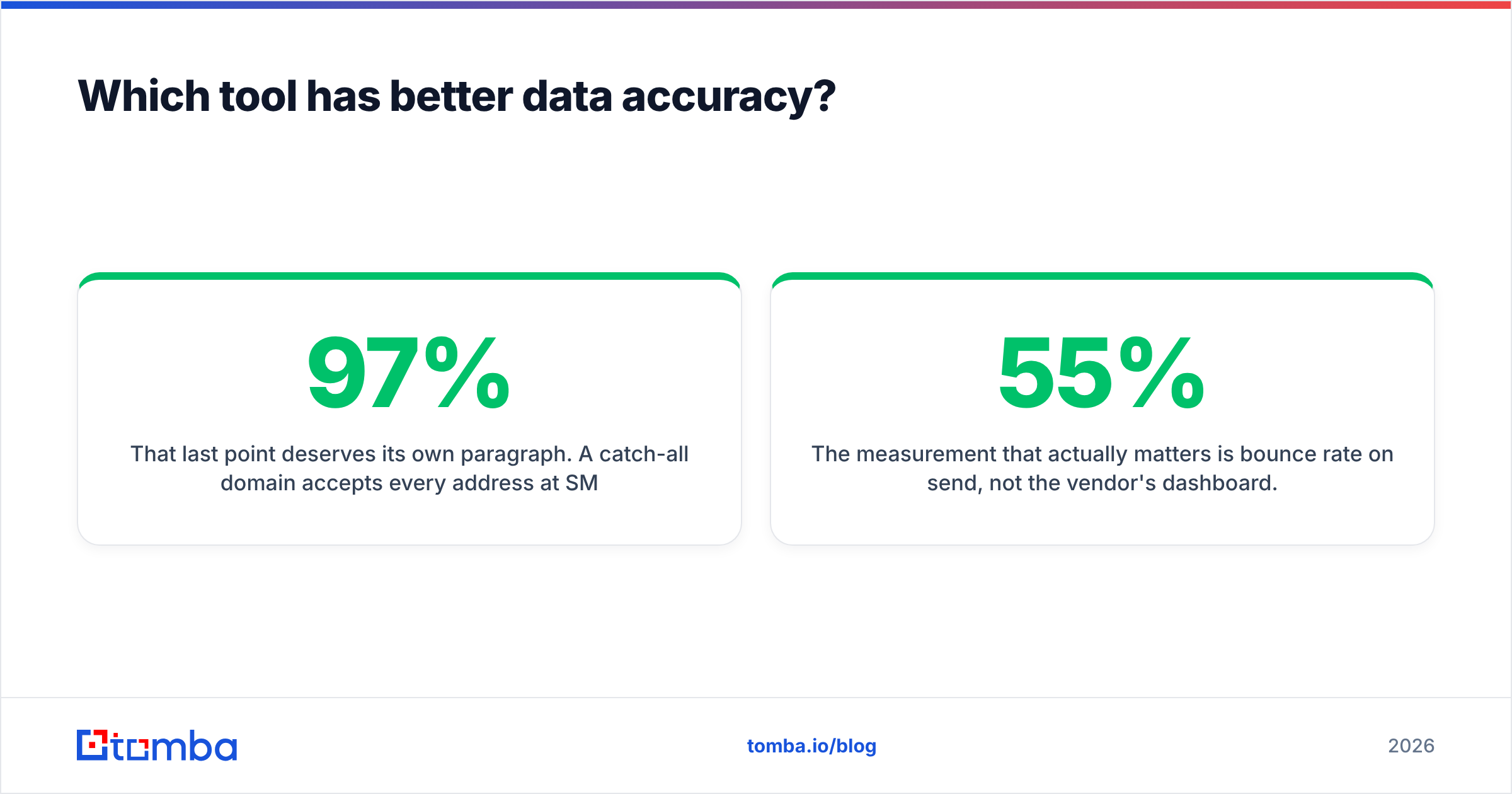
That last point deserves its own paragraph. A catch-all domain accepts every address at SMTP time, so a naive verifier marks everything "valid" and your bounce rate finds out the truth two days later. If a vendor reports 97% accuracy but counts catch-alls as valid, that number is marketing. Ask specifically how catch-alls are scored — or run them through a dedicated catch-all verifier before they hit a sequence.

The measurement that actually matters is bounce rate on send, not the vendor's dashboard. Keep two numbers per tool during your trial: hit rate (rows that returned an email) and bounce rate (of those, how many hard-bounced). A tool with a 55% hit rate and a 1% bounce rate beats a tool with an 80% hit rate and a 7% bounce rate — because the second one is quietly burning your sender reputation.
How does pricing really compare?#
Both tools use credits, and both let credits mean slightly different things at different tiers — which is exactly where budget forecasts go wrong.
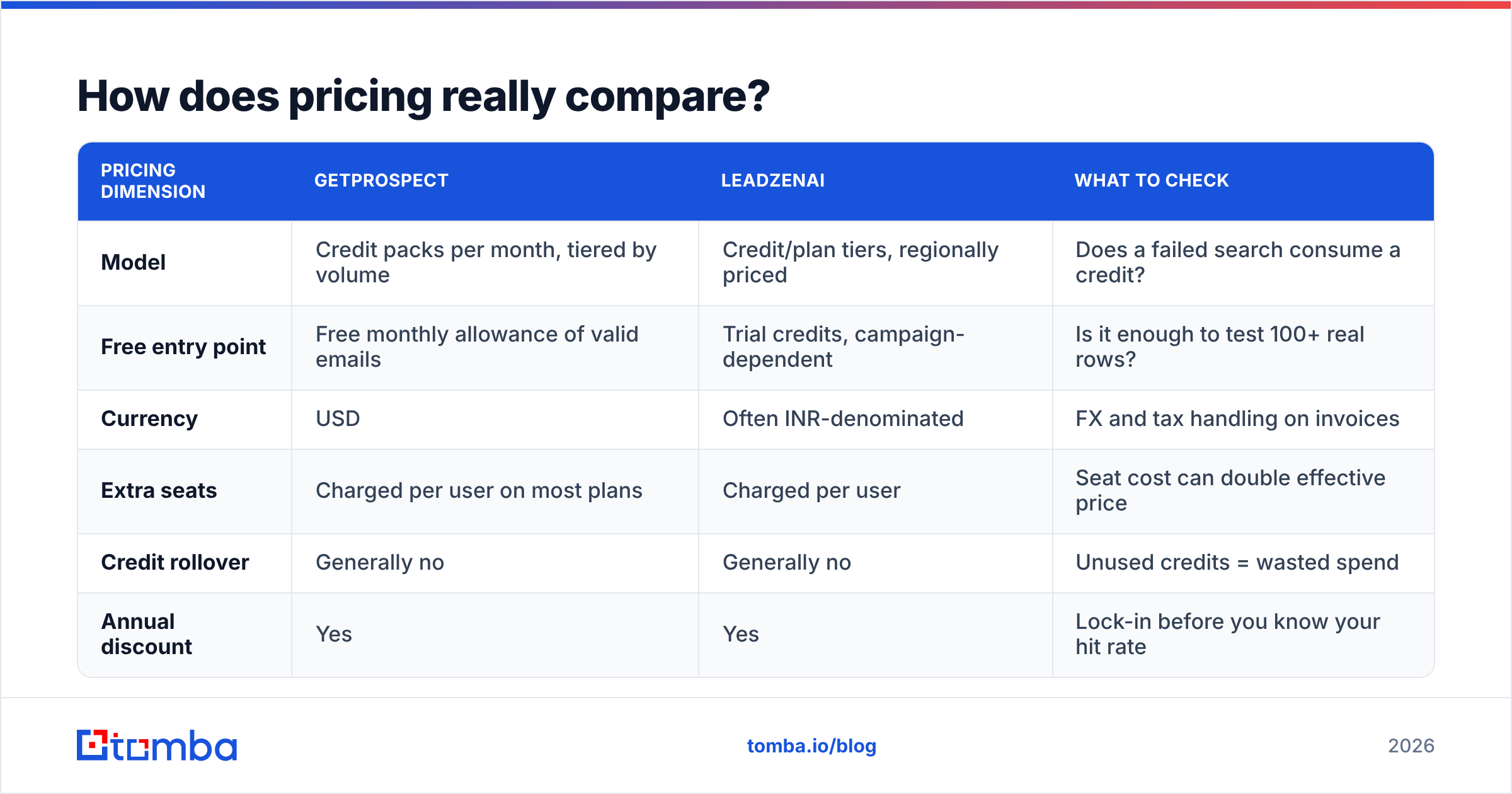
| Pricing dimension | GetProspect | LeadzenAI | What to check |
|---|---|---|---|
| Model | Credit packs per month, tiered by volume | Credit/plan tiers, regionally priced | Does a failed search consume a credit? |
| Free entry point | Free monthly allowance of valid emails | Trial credits, campaign-dependent | Is it enough to test 100+ real rows? |
| Currency | USD | Often INR-denominated | FX and tax handling on invoices |
| Extra seats | Charged per user on most plans | Charged per user | Seat cost can double effective price |
| Credit rollover | Generally no | Generally no | Unused credits = wasted spend |
| Annual discount | Yes | Yes | Lock-in before you know your hit rate |
The number to compute is not price per credit. It is fully loaded cost per contact you actually emailed:
- Start with plan cost. Monthly price plus every seat you genuinely need.
- Divide by credits, not by promises. If 2,000 credits are included, that's your denominator.
- Multiply by your measured hit rate. A 60% hit rate means 2,000 credits produce 1,200 addresses.
- Multiply again by verification pass rate. If 85% of those survive verification, you have 1,020 usable contacts.
- Now divide. A $99 plan at 2,000 credits looks like $0.05/contact and is really closer to $0.10.
- Add the tools you still need. A separate verifier, an enrichment step, or a phone provider all belong in the same line item.
Do that math for both vendors with your ICP list and the ranking usually flips at least once. It is also the fastest way to see whether a bundled platform beats a lean, API-first stack. For reference, Tomba pricing runs a free tier at 25 searches/month, Starter at $49/mo, Growth at $99/mo, Pro at $249/mo, and custom Enterprise — with verification included rather than sold as a separate bolt-on.
Who should choose GetProspect?#
Pick GetProspect if most of these are true:
- Your ICP sits in North America or Western Europe. That is where its dataset is deepest and its verification is most reliable.
- LinkedIn is your primary sourcing surface. The Sales Navigator extension workflow is genuinely good, and list management afterwards is better than most competitors'.
- You want lists to live in the tool. Custom columns, tags, and shared team lists reduce the "everything lives in a CSV somewhere" problem.
- Your team is non-technical. No API required to get value; the UI carries the whole workflow.
- You want to test before paying. The free allowance is generous enough to evaluate honestly.
Skip it if you sell into India, Southeast Asia, or the Gulf, or if you need phone numbers as a first-class output rather than an occasional bonus field.
Who should choose LeadzenAI?#
Pick LeadzenAI if:
- Your accounts are in India or APAC. This is the clearest reason to choose it, and it is a strong one — the coverage gap versus Western tools is real.
- You need phone alongside email. Multichannel outbound into these markets often works better on the phone than in the inbox, and LeadzenAI treats numbers as a primary field. (If you go this route, validate numbers before dialing — a phone validator removes dead lines before your reps burn time on them.)
- You want real-time lookup, not just database browsing. The on-demand search model suits research-heavy, lower-volume, higher-ACV motions.
- Regional pricing matters. INR-denominated plans can be materially cheaper for teams billing in the same currency.
Skip it if your outbound is US/EU-first, if you need deep native CRM connectors, or if you need enterprise procurement artifacts like SOC 2 reports and DPAs on day one — verify what's available before you commit.
Where do both tools leave gaps?#
Three gaps show up in almost every head-to-head of this kind.
Gap 1 — verification is bundled but not separable. When finding and verifying are one flow, you cannot independently verify a list from another source: your existing CRM, an event export, a partner list. Teams end up buying a second verification tool anyway. A standalone email verifier that takes any list, from anywhere, removes that duplication.
Gap 2 — API depth. Both offer APIs, but as an add-on to a UI-first product. If you are building enrichment into a signup flow, a lead-routing workflow, or a data pipeline, you want an API that was the product from the start — with predictable rate limits, real SDKs, and stable response schemas.
Gap 3 — regional blind spots run both ways. GetProspect thins out in APAC; LeadzenAI thins out in the US mid-market. If your ICP spans both, one vendor will always be doing half the job. That is a legitimate reason to run a global-coverage tool as the primary and keep a regional specialist for the accounts it misses.
Worth naming here: this category is wider than two names. If you are buying pre-built lists rather than searching for individual contacts, providers like BookYourData solve a different shape of the problem well — pay-as-you-go, no subscription, download and go. Match the buying model to your motion before you compare feature grids.
How should you actually test them before buying?#
Run the same protocol on both. Anything less and you are comparing marketing pages.
- Build one 200-row control list. Real accounts from your actual pipeline, spread across your real regions and title bands. Not a curated list of famous companies.
- Run it through both tools on the same day. Data freshness drifts; same-day runs keep the comparison honest.
- Record hit rate per segment. By region and by seniority. Averages hide the failures that will hurt you most.
- Verify both outputs with a neutral third tool. Never grade a vendor with its own scorecard. A free email checker or a bulk pass gives you an independent read.
- Send a real 100-contact batch from a warmed domain. Measure hard bounces at 48 hours. This is the only number that settles arguments.
- Compute fully loaded cost per emailed contact. Using the six-step math above, with seats included.
Two days of work, and it typically saves four figures a year plus one painful annual contract. Reviews on G2 are useful for spotting support and billing complaints, but they cannot tell you which tool covers your accounts. Only your own list can.
Is there a better option for 2026?#
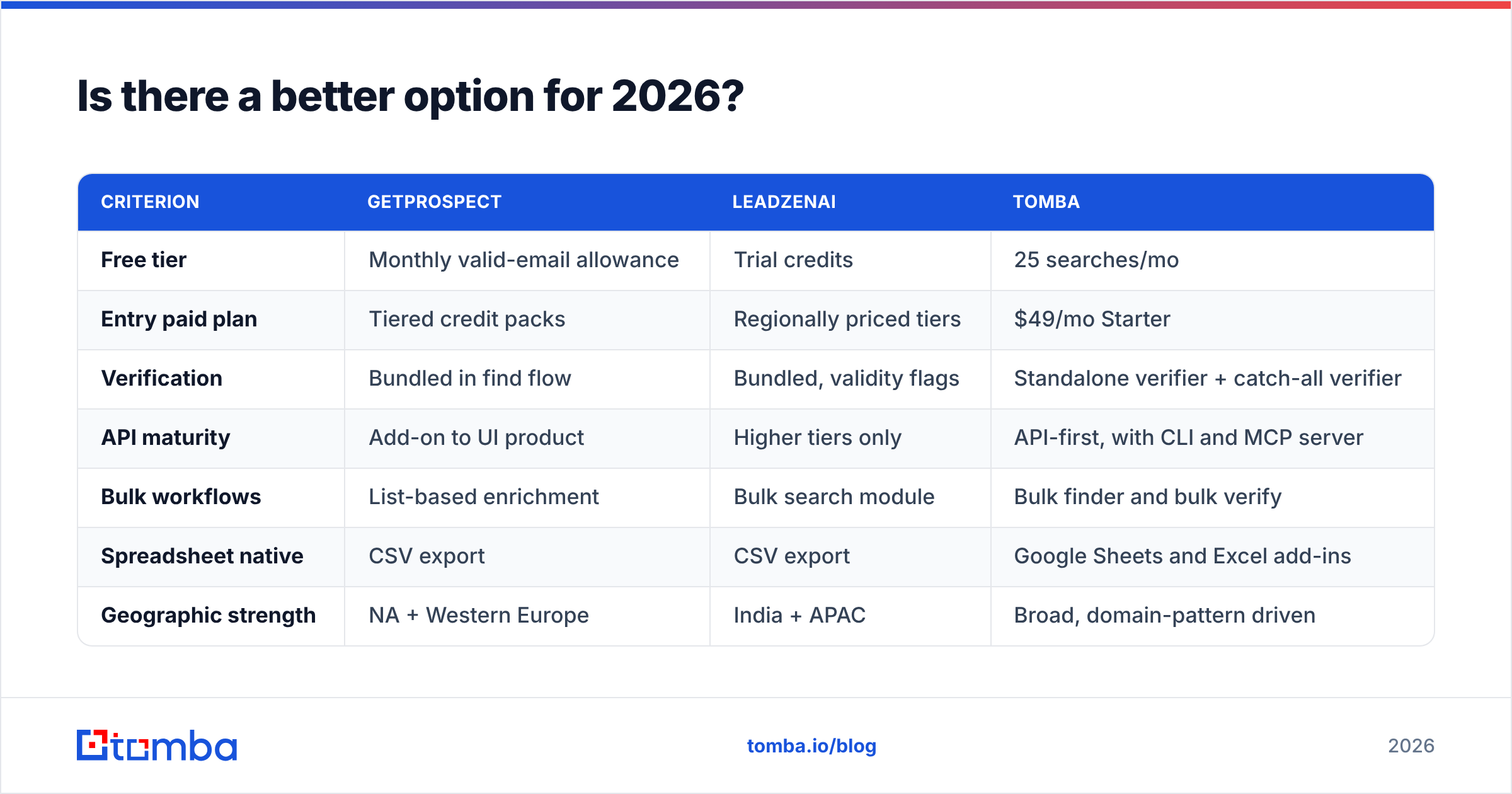
If your outbound spans multiple regions and you want finding, verification, and enrichment under one predictable price, it is worth adding a third name to the shortlist rather than forcing a binary choice.
| Criterion | GetProspect | LeadzenAI | Tomba |
|---|---|---|---|
| Free tier | Monthly valid-email allowance | Trial credits | 25 searches/mo |
| Entry paid plan | Tiered credit packs | Regionally priced tiers | $49/mo Starter |
| Verification | Bundled in find flow | Bundled, validity flags | Standalone verifier + catch-all verifier |
| API maturity | Add-on to UI product | Higher tiers only | API-first, with CLI and MCP server |
| Bulk workflows | List-based enrichment | Bulk search module | Bulk finder and bulk verify |
| Spreadsheet native | CSV export | CSV export | Google Sheets and Excel add-ins |
| Geographic strength | NA + Western Europe | India + APAC | Broad, domain-pattern driven |
Tomba's angle is different from both: it starts from the domain. Give it a company website and domain search returns the addresses and the email pattern behind them, which is why coverage holds up in regions where LinkedIn-derived datasets get thin. Verification, catch-all checks, and enrichment sit alongside as separate callable services rather than as a bundle you cannot unpick — so you can use one piece without paying for the whole platform.
The verdict#
Sell into the US and Europe from LinkedIn? GetProspect. Sell into India and APAC, and need phones? LeadzenAI. Sell into both, or building on an API? Neither is the obvious answer — shortlist all three and let your control list decide.
Whichever way you go, do not skip step 4. Grading a vendor with its own verification is how teams end up with a 6% bounce rate and a domain reputation problem that takes a month to repair.
Ready to see how a third dataset performs against your control list? Run the same 200 rows through the Tomba Email Finder — the free tier covers 25 searches a month with no card, verification is included rather than metered separately, and if the hit rate on your accounts beats your current tool, the switch pays for itself before your next annual renewal.
Related guides#
Ready to find emails that actually work?
Join 150,000+ professionals who stopped guessing and started sending. Free credits on signup — no credit card required.
Get the Tomba newsletter
Practical outbound tactics and product updates — once every two weeks.
About the author