GetProspect vs ListClean: Which B2B Email Tool Wins in 2026?
GetProspect finds emails. ListClean cleans them. Comparing the two head-to-head only makes sense once you know which half of the pipeline is actually costing you replies — here's the honest breakdown, with pricing, accuracy, and where each one quietly fails.
TL;DR
- GetProspect and ListClean are not really competitors. GetProspect is a finder (LinkedIn-first prospecting plus a B2B contact database); ListClean is a verifier (bulk list hygiene and real-time API checks). Comparing them is like comparing a well to a water filter.
- If your problem is "I don't have enough contacts," GetProspect is the relevant tool. If your problem is "my bounce rate is 9% and Google throttled me," ListClean is the relevant tool.
- Buying both means paying two subscriptions, exporting CSVs between them, and losing the ability to verify at the moment of discovery — which is when verification is cheapest and most accurate.
- Pricing runs in opposite directions: finders charge per contact found (dollars per thousand), verifiers charge per email checked (fractions of a cent).
- If you want one bill and one workflow, a combined platform — Tomba, and to a lesser extent a couple of peers — covers find + verify + catch-all handling in a single credit pool.
What are GetProspect and ListClean, exactly?#
Most "GetProspect vs ListClean" searches come from people who've been told to "fix the list" and aren't sure which tool fixes which part. So start here.
- GetProspect is a lead-sourcing tool. Its center of gravity is the LinkedIn Chrome extension: you browse a Sales Navigator search, click, and it pulls names, titles, companies, and business email addresses into a list. It also ships a searchable B2B database with filters for industry, headcount, geography, and job title.
- ListClean is a list-hygiene tool. You upload a CSV (or hit the API), and it returns a status per address — deliverable, undeliverable, risky, catch-all, role-based, disposable. It does not find anything. It grades what you already have.
- The overlap is thin but real. GetProspect applies its own validation to emails before it hands them over, so a slice of ListClean's job is already done. The question is whether that slice is deep enough for your sending volume.
- The gap is where money leaks. Contacts sourced months ago, scraped from a conference site, imported from a departing rep's spreadsheet, or bought from a list vendor never touched GetProspect's validation. Those are exactly the records that bounce.
- Neither tool solves sequencing. Both feed an outbound stack; neither replaces Instantly, Smartlead, Outreach, or your CRM.
Once you frame it that way, "which is better" stops being the useful question. The useful question is: at what point in my pipeline is data quality failing?
How do GetProspect and ListClean compare head-to-head?#
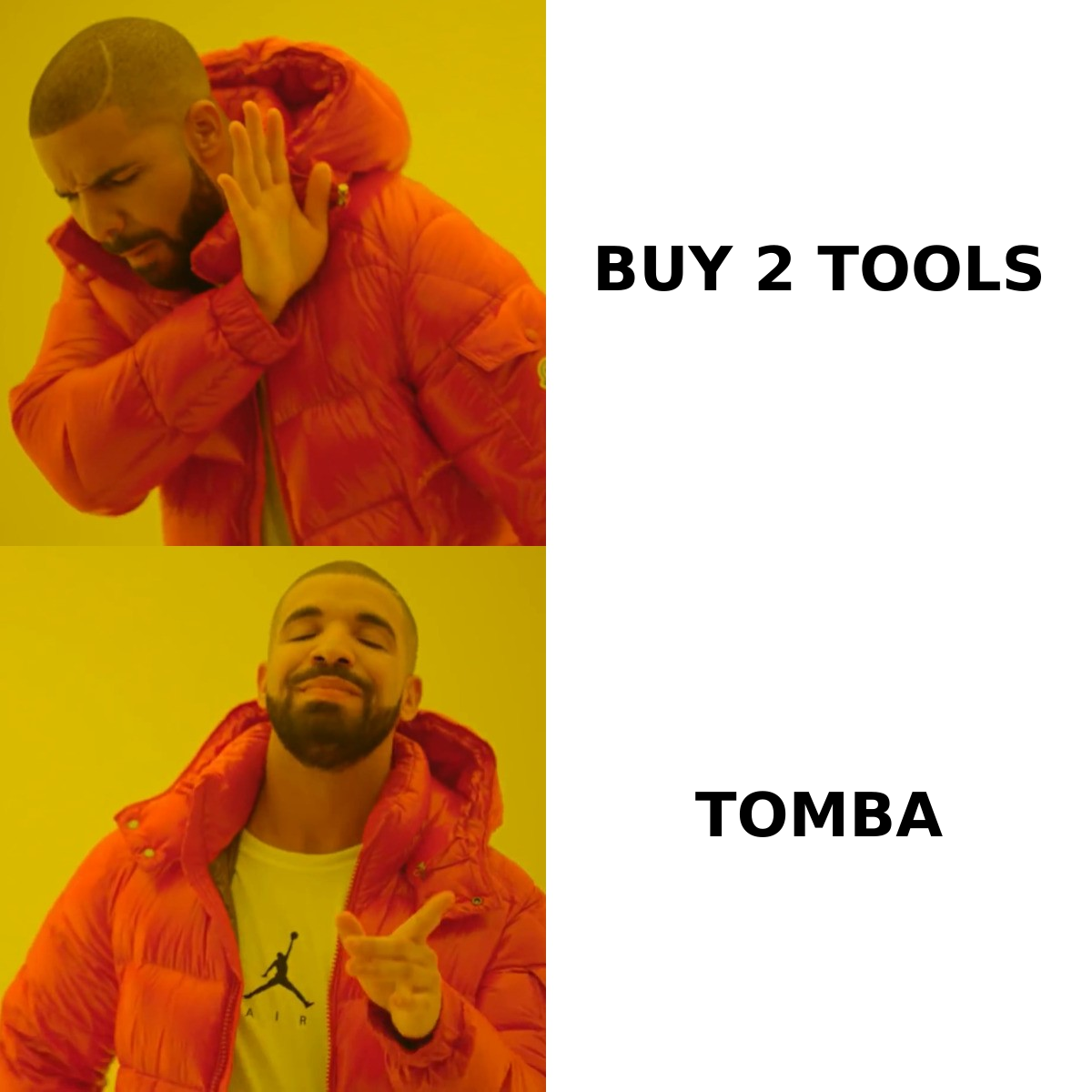
Here's the honest side-by-side. Pricing reflects publicly listed plans at the time of writing — both vendors change tiers, so check the live pages before you budget.
| Attribute | GetProspect | ListClean | Tomba |
|---|---|---|---|
| Primary job | Find emails from LinkedIn + database | Verify and clean existing lists | Find and verify |
| Free tier | ~50 valid emails/month | Small trial credit pack | 25 searches/month |
| Entry paid price | ~$49/mo (published starter tier) | Pay-as-you-go credits, no subscription required | $49/mo Starter |
| Billing model | Monthly credits, per contact found | Prepaid credits, per email checked | Monthly credits across all tools |
| LinkedIn extension | Yes — its core strength | No | Yes (LinkedIn finder) |
| Bulk CSV processing | Yes (import/export) | Yes — the main interface | Yes (bulk email finder) |
| Real-time API | Yes | Yes | Yes (Tomba API) |
| Catch-all handling | Flags them, limited resolution | Flags as "accept-all" / risky | Dedicated catch-all verifier |
| Phone numbers | Limited | No | Yes |
| Best for | Reps building lists from LinkedIn | Ops teams cleaning inherited data | Teams that want one pipeline |

Read that table with your own bottleneck in mind. A two-person SDR team living inside Sales Navigator gets more from GetProspect. A RevOps lead who just inherited 180,000 CRM contacts of unknown vintage gets more from ListClean. They are answering different complaints.
Which one is more accurate — and what does "accurate" even mean here?#
Accuracy means two different things for these two tools, and vendors exploit the ambiguity.
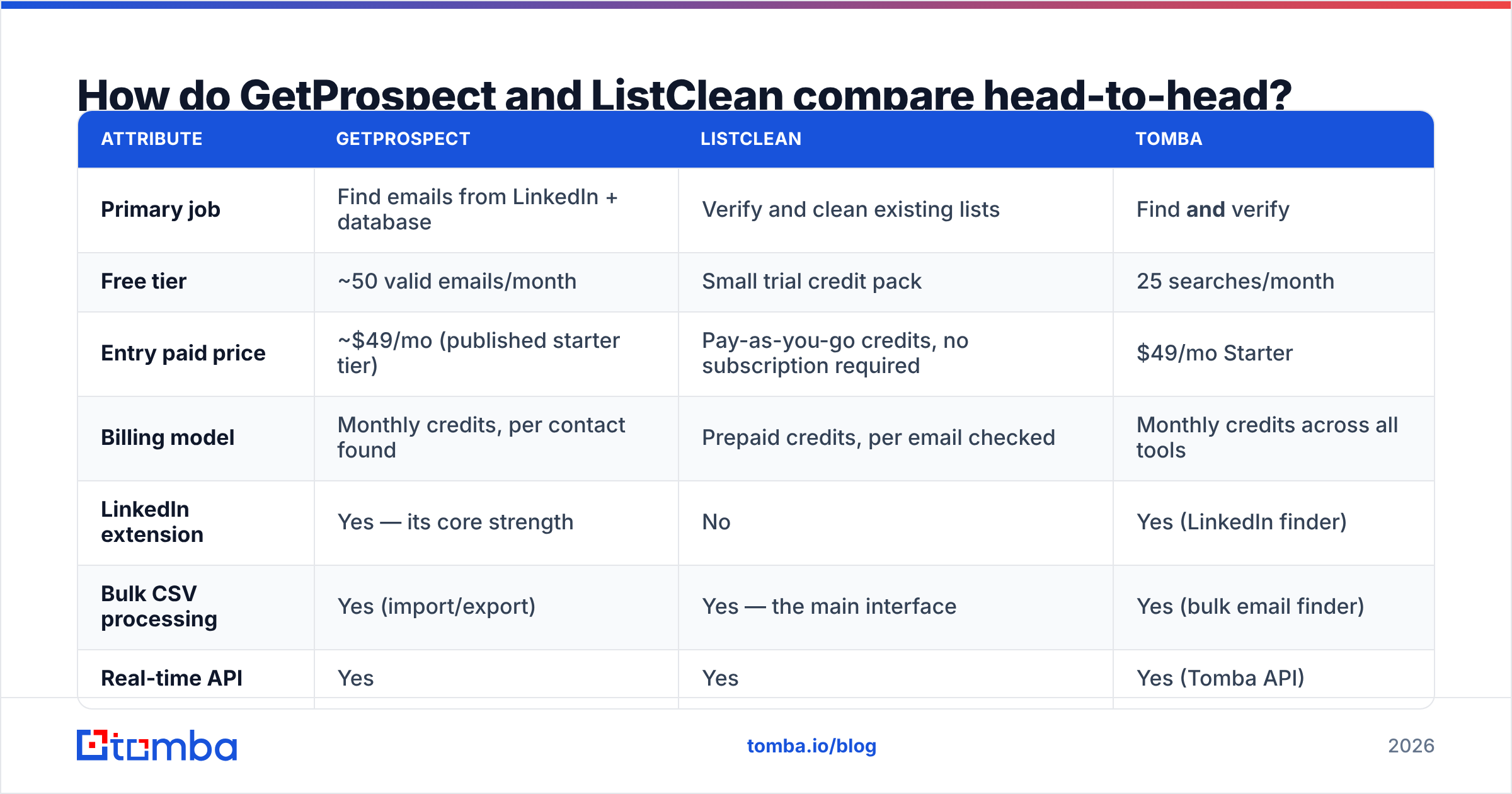
For a finder, accuracy = coverage × correctness. Coverage is what percentage of your target list returns any email at all. Correctness is what percentage of those returned emails actually reach a human. A tool can post a gorgeous 98% "accuracy" number while only returning emails for 40% of your list — the 98% is measured on the 40% it chose to answer. Always ask for both numbers.
For a verifier, accuracy = how often the verdict matches reality. The hard cases are catch-all domains (the server accepts everything at the SMTP handshake, so a naive check learns nothing) and providers like Microsoft 365 that deliberately obscure mailbox existence. A verifier that dumps 30% of your list into "risky" and shrugs hasn't verified anything — it's moved the decision back to you.

In practice, both tools benchmark well on easy domains and diverge on hard ones. GetProspect's LinkedIn-sourced emails tend to be strong for mid-market SaaS and tech, thinner for regional non-tech companies and for firms with unusual mail setups. ListClean is a competent SMTP-layer verifier; like every verifier, its catch-all bucket is where the ambiguity piles up.
The structural weakness of running them in sequence: time. You find in January, verify in March, send in April. B2B contact data decays at roughly 2–2.5% per month as people change roles — Gartner and most data vendors put annual decay somewhere between 25% and 30%. Every week between find and verify is decay you paid for twice.
What does each one actually cost per usable contact?#
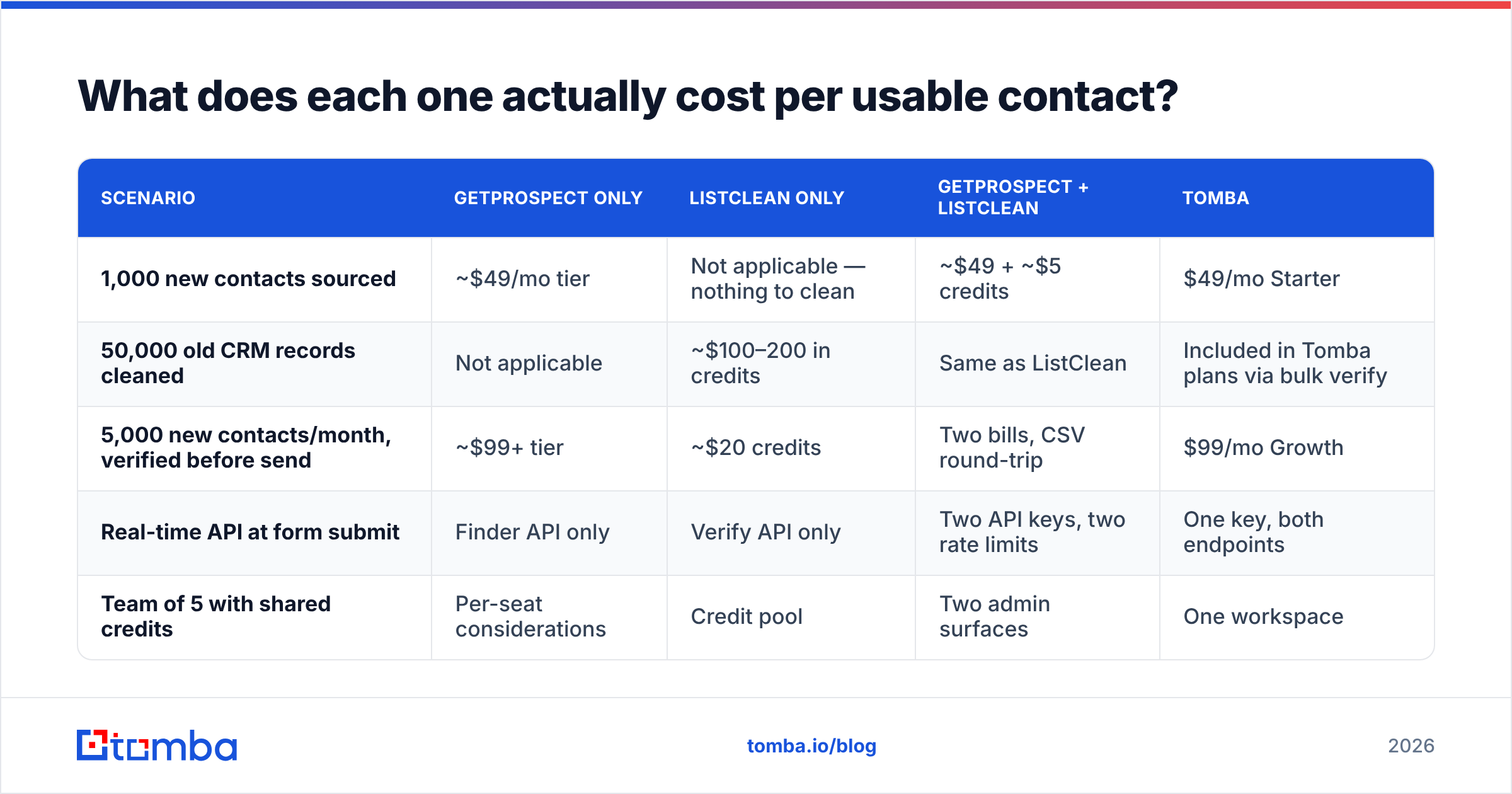
Sticker price is misleading because the units differ. Normalize on cost per contact you can safely email.
| Scenario | GetProspect only | ListClean only | GetProspect + ListClean | Tomba |
|---|---|---|---|---|
| 1,000 new contacts sourced | ~$49/mo tier | Not applicable — nothing to clean | ~$49 + ~$5 credits | $49/mo Starter |
| 50,000 old CRM records cleaned | Not applicable | ~$100–200 in credits | Same as ListClean | Included in Tomba plans via bulk verify |
| 5,000 new contacts/month, verified before send | ~$99+ tier | ~$20 credits | Two bills, CSV round-trip | $99/mo Growth |
| Real-time API at form submit | Finder API only | Verify API only | Two API keys, two rate limits | One key, both endpoints |
| Team of 5 with shared credits | Per-seat considerations | Credit pool | Two admin surfaces | One workspace |
Three things fall out of that table.
One: if you only ever do one job, the single-purpose tool is fine and often cheaper. Nobody needs a suite to clean a list once.
Two: the moment you do both jobs monthly, the two-tool stack costs more than the subscription difference suggests. The real cost is the CSV round-trip — export, upload, wait, download, re-import, reconcile duplicates. That's a recurring human hour, not a line item.
Three: verification is dramatically cheaper when it happens at discovery. Verifying an address the moment you find it costs one check. Verifying it three months later costs a check plus the risk that the person left.
Where does each tool quietly break down?#
GetProspect's failure modes. Coverage drops outside its sweet spot — expect thinner results for small non-tech companies, some EMEA and APAC regions, and roles that don't maintain a public LinkedIn presence. Credits are consumed on found contacts, so an unproductive search burns budget with nothing to show. And because it's LinkedIn-centric, it inherits LinkedIn's biases: if your ICP doesn't live there, you'll feel it immediately.
ListClean's failure modes. It can only grade what you feed it. If your list is 40% stale, a verifier tells you it's 40% stale — it does not replace the missing 40%. Catch-all domains remain the industry-wide soft spot; you'll get a "risky" flag and a decision to make. And bulk verification is inherently retrospective: you find out about the bad data after you already paid to acquire it.
The shared failure mode. Neither tool protects your sender reputation on its own. A perfectly verified list sent from a cold domain with no SPF alignment and 400 sends on day one will still land in spam. Verification is necessary, not sufficient.

Do you actually need both tools?#
Only if you're committed to best-of-breed point solutions and have the ops capacity to glue them together. Most teams under 50 people don't.
The alternative is a platform where finding and verifying share one credit pool and one API. That's the category Tomba sits in, along with peers like Hunter and BookYourData — the latter being a solid choice specifically when you want a pre-built, human-verified contact list rather than a self-serve search tool. Each has a different center of gravity; the shared advantage over a two-tool stack is that verification happens at the moment of discovery.
Here's what the combined workflow removes:
- The CSV round-trip. No export/import cycle between systems.
- The decay window. Verified at find time, not months later.
- The duplicate credit spend. You don't pay a finder for a contact and then pay a verifier to tell you it was bad.
- The second admin surface. One workspace, one billing page, one set of API rate limits.
- The catch-all guesswork. A dedicated catch-all finder resolves a meaningful share of "accept-all" domains instead of parking them in a risky bucket.
For a fuller vendor landscape, G2's lead intelligence category is a reasonable neutral starting point — filter by company size, because tools that shine for 500-person orgs frequently frustrate five-person teams.
Which should you choose for your situation?#
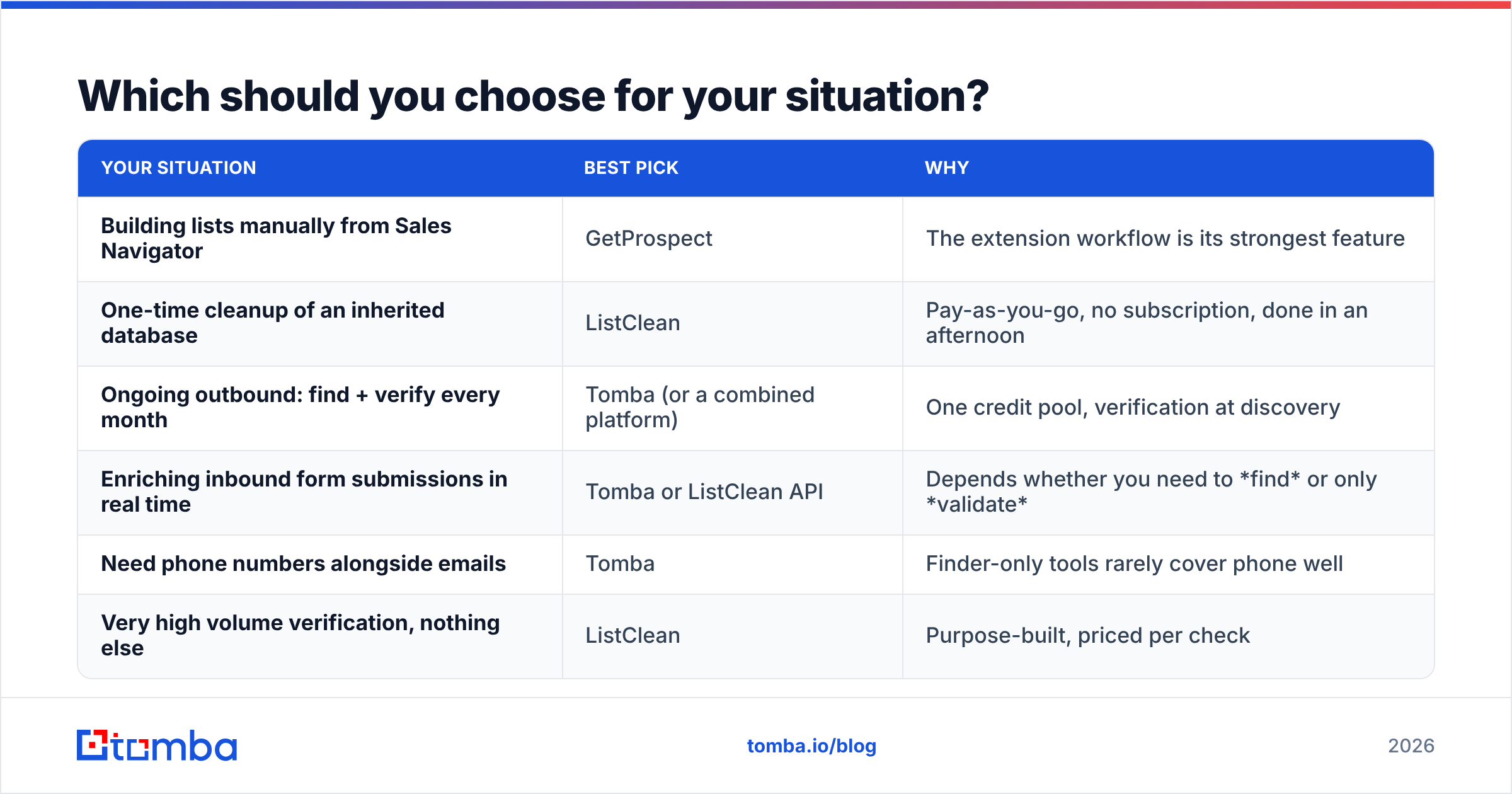
| Your situation | Best pick | Why |
|---|---|---|
| Building lists manually from Sales Navigator | GetProspect | The extension workflow is its strongest feature |
| One-time cleanup of an inherited database | ListClean | Pay-as-you-go, no subscription, done in an afternoon |
| Ongoing outbound: find + verify every month | Tomba (or a combined platform) | One credit pool, verification at discovery |
| Enriching inbound form submissions in real time | Tomba or ListClean API | Depends whether you need to find or only validate |
| Need phone numbers alongside emails | Tomba | Finder-only tools rarely cover phone well |
| Very high volume verification, nothing else | ListClean | Purpose-built, priced per check |
A practical sequencing note: whatever you pick, verify emails as close to send time as your workflow allows, keep bounce rate under 2%, and check your SPF and DMARC alignment before you scale volume. Google's bulk sender guidelines are the current floor, not a stretch goal — the tooling debate is irrelevant if authentication isn't in place.
What's the verdict on GetProspect vs ListClean?#
There isn't a winner, because they aren't playing the same game. GetProspect wins on the question "where do I get more contacts?" ListClean wins on the question "is this list safe to send to?" Pick based on which sentence you actually said out loud this week.
But if you found yourself thinking both — and most teams running consistent outbound do — then the two-tool stack is the wrong shape for the problem. You'll pay two bills to maintain a manual bridge between two systems that should have been one.
Start with a single pipeline instead. Tomba's Email Finder returns a verified, deliverability-scored address at the moment of discovery — domain search, LinkedIn lookup, bulk enrichment, and catch-all resolution all draw from the same credit pool, with a free tier of 25 searches a month to test coverage against your own ICP before you commit. Run 100 of your hardest target accounts through it and compare the hit rate to whatever you're using now. That's a fifteen-minute test, and it settles the question better than any comparison table — including this one.
Related guides#
Ready to find emails that actually work?
Join 150,000+ professionals who stopped guessing and started sending. Free credits on signup — no credit card required.
Get the Tomba newsletter
Practical outbound tactics and product updates — once every two weeks.
About the author