GetProspect vs Mailtester Ninja: Which Tool Wins in 2026?
One builds prospect lists from LinkedIn. The other verifies addresses for fractions of a cent. Here is where GetProspect and Mailtester Ninja actually overlap, where they don't, and which one belongs in your stack.
TL;DR
- These tools are not really competitors. GetProspect is a prospecting database plus LinkedIn extension that finds contacts. Mailtester Ninja is a bulk verification engine that checks addresses you already have.
- Pick GetProspect if you need to build lists from scratch, filter by title/industry/headcount, and push contacts into a CRM.
- Pick Mailtester Ninja if you already have a list and want the cheapest per-check validation available — it prices in fractions of a cent, well below ZeroBounce or NeverBounce.
- The honest gap: GetProspect's built-in verification is adequate but not forensic, and Mailtester Ninja cannot source a single new contact.
- A combined finder + verifier (Tomba, Hunter, Apollo) usually beats stitching two single-purpose tools together once you cross ~2,000 contacts a month.
What are GetProspect and Mailtester Ninja?#
They solve two different halves of the same problem: getting a working email address in front of a prospect.
GetProspect is a B2B contact database with a Chrome extension. You search a database of tens of millions of business profiles, filter by job title, company size, industry, location, and technology, then export enriched rows — email, company, LinkedIn URL, sometimes a phone number. Its most-used feature is the LinkedIn extension: run a Sales Navigator search, click extract, and GetProspect pulls the visible profiles into a list with emails appended. It also ships a lightweight CRM-ish list manager so you can tag, dedupe, and hand off to your sequencer.
Mailtester Ninja is the opposite in almost every dimension. It does one job — determine whether an email address will accept mail — and it does it at a price point that undercuts most of the verification market. There is a free API key, a web UI for single checks, bulk CSV upload, and a REST endpoint that returns a status per address. No database, no prospecting filters, no Chrome extension for LinkedIn. It's plumbing, not a lead source.
So "GetProspect vs Mailtester Ninja" is really a question about where your bottleneck is. If you can't find contacts, a verifier is useless. If your bounce rate is 9% on a list you already bought, a database won't fix it.
How do GetProspect and Mailtester Ninja compare head-to-head?#
Here's the practical breakdown. Pricing moves; treat these as directional and confirm on each vendor's page before you buy.
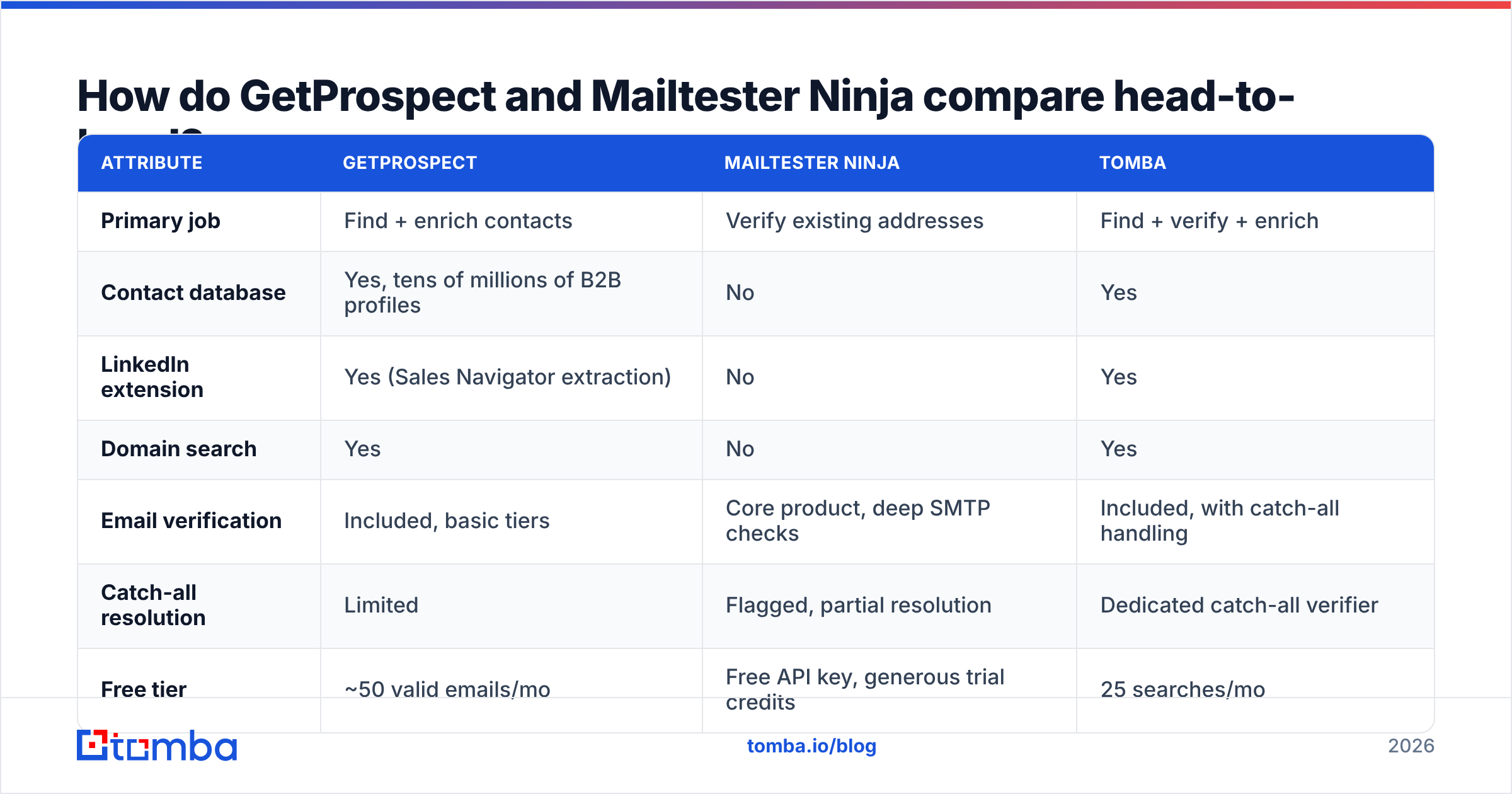
| Attribute | GetProspect | Mailtester Ninja | Tomba |
|---|---|---|---|
| Primary job | Find + enrich contacts | Verify existing addresses | Find + verify + enrich |
| Contact database | Yes, tens of millions of B2B profiles | No | Yes |
| LinkedIn extension | Yes (Sales Navigator extraction) | No | Yes |
| Domain search | Yes | No | Yes |
| Email verification | Included, basic tiers | Core product, deep SMTP checks | Included, with catch-all handling |
| Catch-all resolution | Limited | Flagged, partial resolution | Dedicated catch-all verifier |
| Free tier | ~50 valid emails/mo | Free API key, generous trial credits | 25 searches/mo |
| Entry paid tier | ~$49/mo | Pay-as-you-go, cents per thousand | $49/mo Starter |
| API access | Yes, paid plans | Yes, from free tier | Yes, all paid plans |
| Phone numbers | Some records | No | Yes, via phone finder |
| Best for | List building from filters | Cleaning a list you already own | Teams needing both in one bill |
The row that decides most purchases is the second one. A verifier cannot manufacture a prospect. If your team's complaint is "we don't have enough accounts to email," Mailtester Ninja is not the fix regardless of how cheap it is.

Which one is more accurate?#
Different questions, different answers — and the accuracy conversation is where most comparison posts get lazy.
GetProspect's accuracy is a database question. When you export a contact, you're trusting the freshness of a record that may have been crawled months ago. Job changes are the killer: roughly 20–25% of B2B contacts change roles annually according to most published churn estimates, and a database that refreshes quarterly is structurally behind. GetProspect does run a validity check before it charges you a credit — the free tier is described in "valid emails," not "searches" — which is a genuinely fair billing model. But "valid" here means the address resolves, not that the person still holds the title you filtered on.
Mailtester Ninja's accuracy is an SMTP question. It connects to the receiving mail server and interrogates it about a specific mailbox. When the server answers honestly, this is close to ground truth. The complications are the same ones every verifier faces:
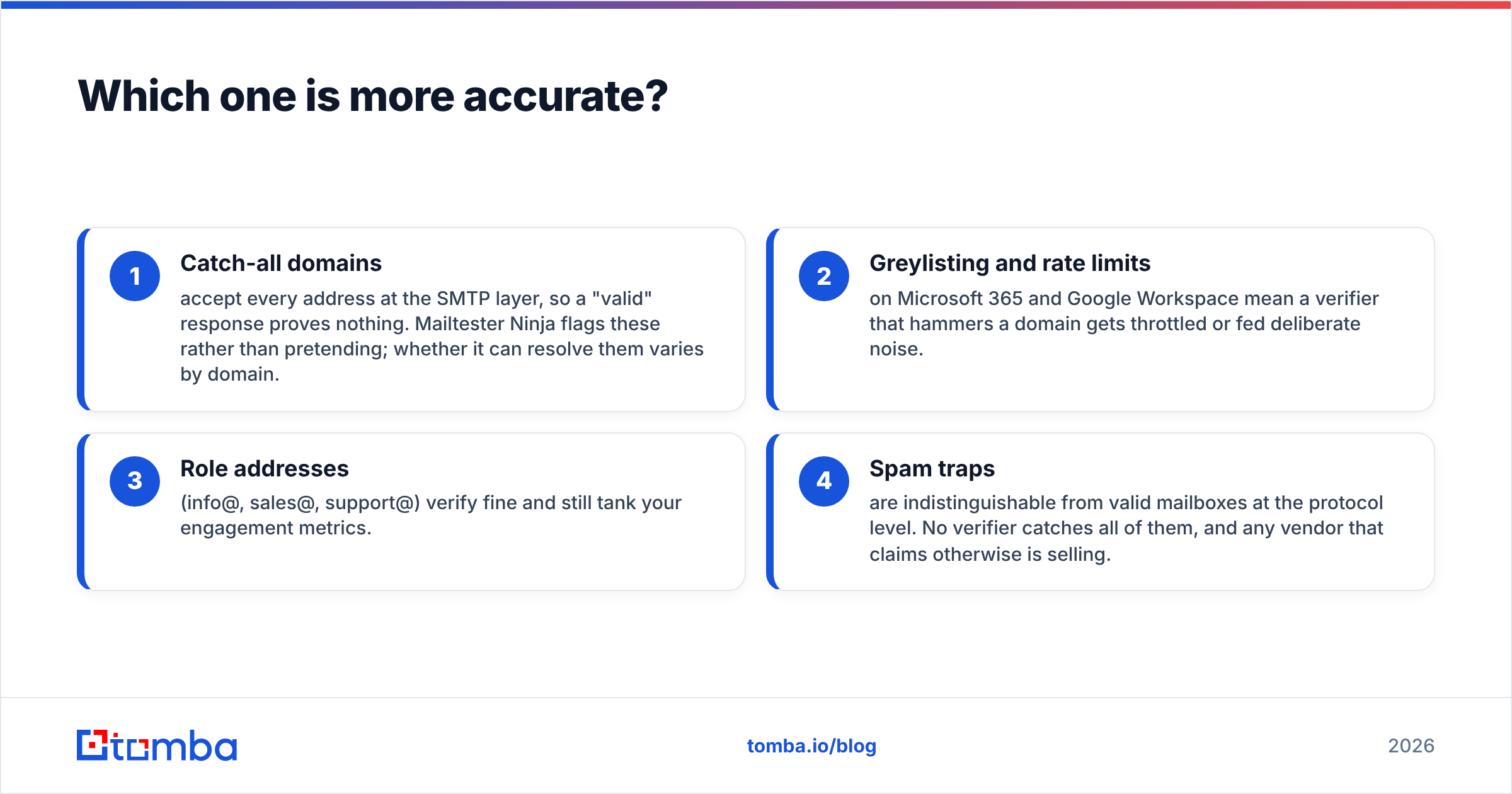
- Catch-all domains accept every address at the SMTP layer, so a "valid" response proves nothing. Mailtester Ninja flags these rather than pretending; whether it can resolve them varies by domain.
- Greylisting and rate limits on Microsoft 365 and Google Workspace mean a verifier that hammers a domain gets throttled or fed deliberate noise.
- Role addresses (info@, sales@, support@) verify fine and still tank your engagement metrics.
- Spam traps are indistinguishable from valid mailboxes at the protocol level. No verifier catches all of them, and any vendor that claims otherwise is selling.

The practical read: for a plain corporate domain on a real mail server, a dedicated verifier like Mailtester Ninja will be more rigorous than a database's built-in check. For catch-all-heavy verticals — agencies, enterprise IT, anything hosted behind a security gateway — you want a tool with an explicit catch-all verifier rather than a binary valid/invalid flag, because the binary answer is the wrong shape for the question.
What does each one actually cost?#
Cost per usable contact matters more than cost per credit, and the two tools bill on completely different units.
GetProspect sells email credits in monthly tiers. The free plan gives you roughly 50 valid emails a month — enough to evaluate, not enough to run a campaign. Paid plans open around the $49/month mark for low four-figure credit volumes and scale up from there, with annual billing knocking a chunk off. Credits typically don't roll over indefinitely, so a team with spiky prospecting cycles ends up either overbuying or hitting a wall mid-quarter.
Mailtester Ninja sells verification credits pay-as-you-go, and the headline is genuinely aggressive — you're looking at a small fraction of a cent per check, versus the roughly $0.004–$0.008 per verification that established players charge at low volume. On a 100,000-address list that difference is real money. It also offers a free API key, which makes it trivially easy to wire into a script before committing a dollar.
Here's where the math flips:
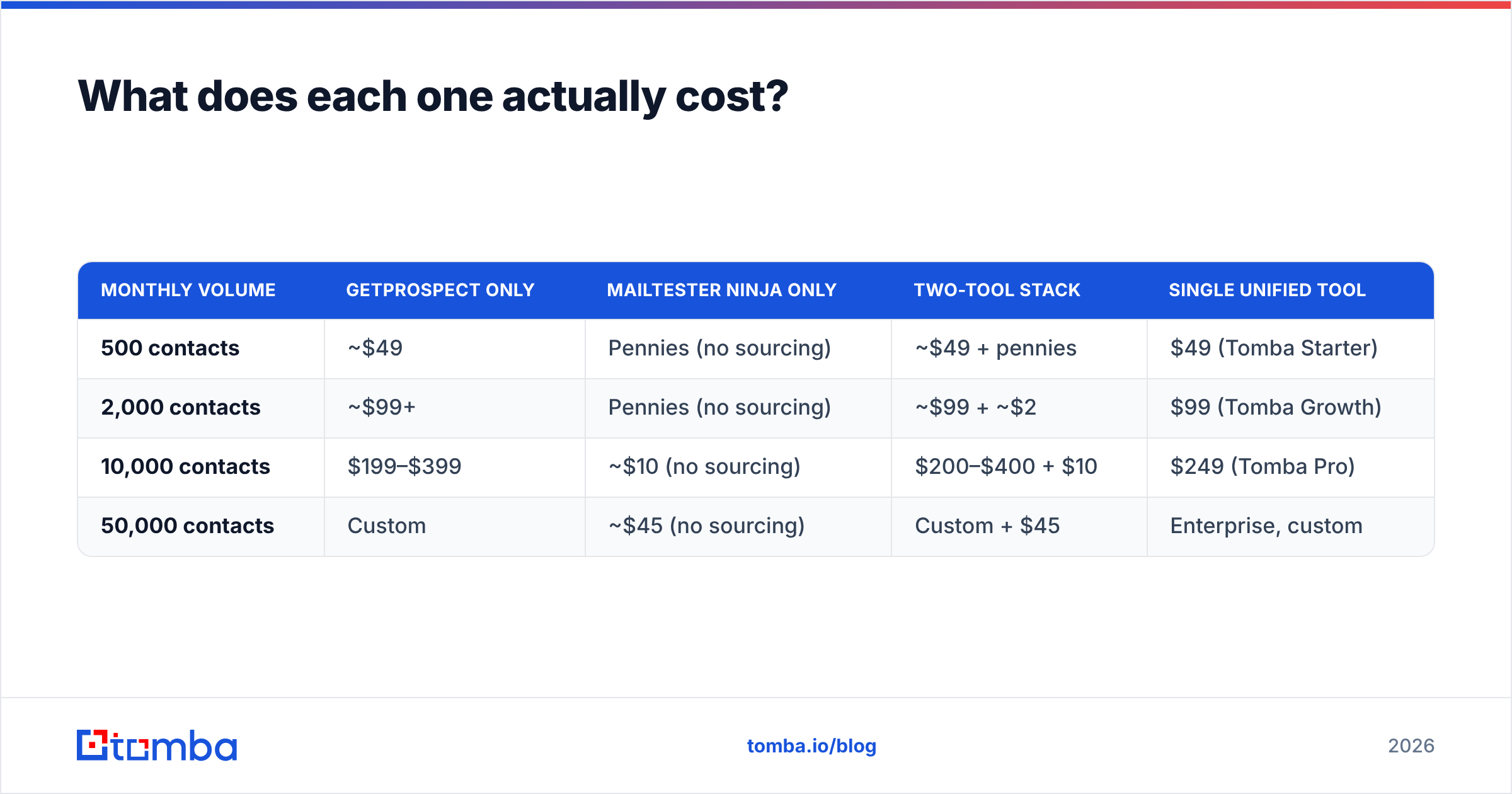
| Monthly volume | GetProspect only | Mailtester Ninja only | Two-tool stack | Single unified tool |
|---|---|---|---|---|
| 500 contacts | ~$49 | Pennies (no sourcing) | ~$49 + pennies | $49 (Tomba Starter) |
| 2,000 contacts | ~$99+ | Pennies (no sourcing) | ~$99 + ~$2 | $99 (Tomba Growth) |
| 10,000 contacts | $199–$399 | ~$10 (no sourcing) | $200–$400 + $10 | $249 (Tomba Pro) |
| 50,000 contacts | Custom | ~$45 (no sourcing) | Custom + $45 | Enterprise, custom |
Two things fall out of that table. First, Mailtester Ninja's cost is almost noise at any realistic volume — it's not the line item you optimize. Second, the sourcing cost dominates, which means the tool comparison that actually affects your budget is GetProspect versus other finders, not GetProspect versus a verifier. Compare Tomba pricing against GetProspect's tiers on that basis.

Should you use them together?#
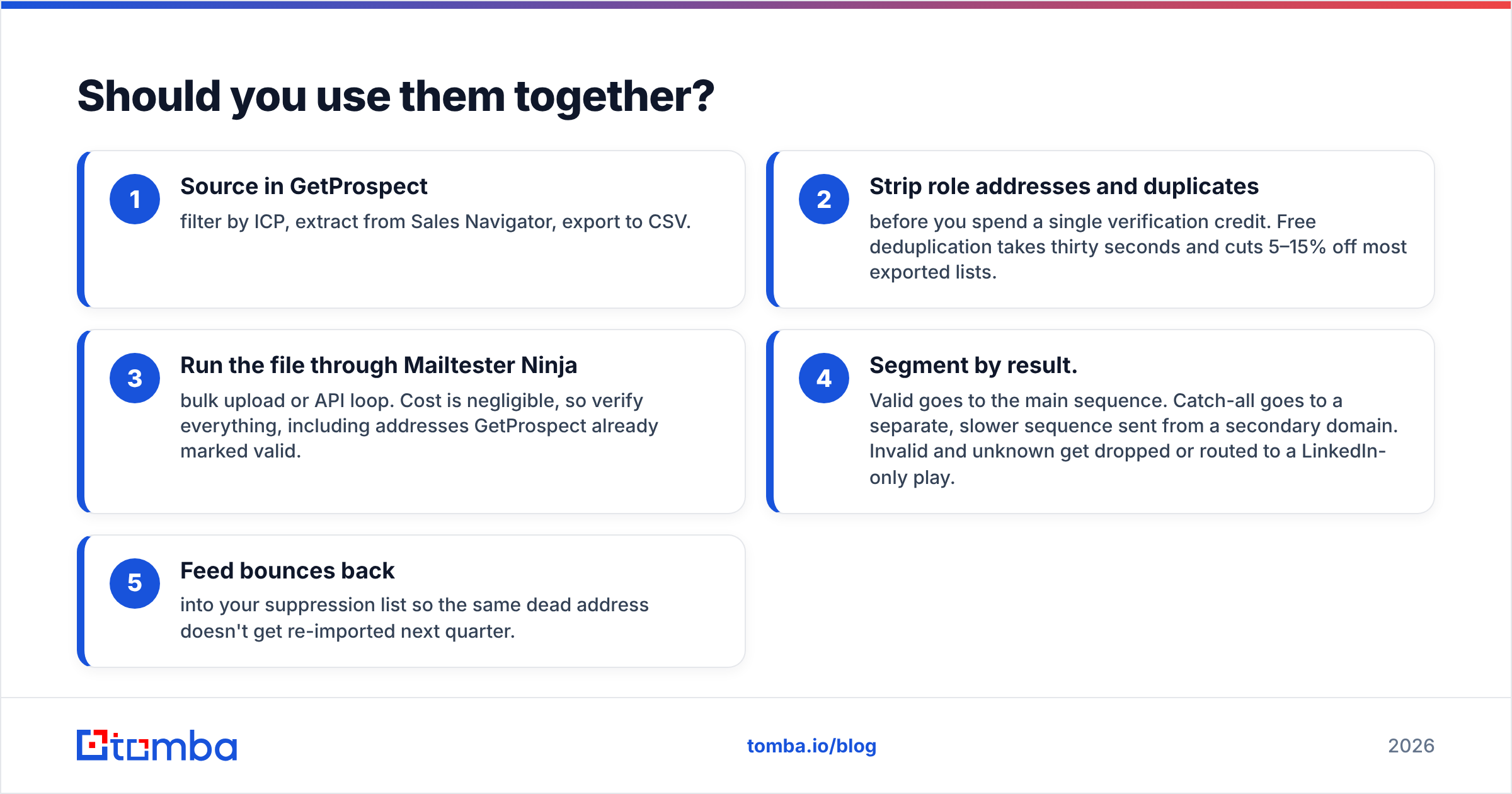
Yes, if you're already invested in GetProspect and running high-stakes campaigns. The pattern looks like this:
- Source in GetProspect — filter by ICP, extract from Sales Navigator, export to CSV.
- Strip role addresses and duplicates before you spend a single verification credit. Free deduplication takes thirty seconds and cuts 5–15% off most exported lists.
- Run the file through Mailtester Ninja — bulk upload or API loop. Cost is negligible, so verify everything, including addresses GetProspect already marked valid.
- Segment by result. Valid goes to the main sequence. Catch-all goes to a separate, slower sequence sent from a secondary domain. Invalid and unknown get dropped or routed to a LinkedIn-only play.
- Feed bounces back into your suppression list so the same dead address doesn't get re-imported next quarter.
That workflow works. Its weakness is operational friction: two logins, two billing relationships, two APIs to maintain, and a CSV handoff in the middle that someone inevitably forgets to run. Once you're doing this weekly, the manual step becomes the failure point — not the tooling.

The alternative is a platform where find and verify happen in the same API call. Tomba's email finder returns a confidence score and verification status inline, and the email verifier can be called independently on lists sourced elsewhere — so you can migrate the sourcing half without abandoning your existing verification habits. If you're a developer, the Tomba API collapses steps 1 through 4 above into a single enrichment endpoint you can call from your CRM's webhook.
Which should you choose for your use case?#
Match the tool to the actual constraint, not the loudest feature list.
Choose GetProspect if:
- LinkedIn Sales Navigator is your primary prospecting surface and you want one-click extraction.
- You need filter-based list building (title + headcount + industry) rather than domain-by-domain lookup.
- Your team is non-technical and lives in a browser extension, not an API.
- Predictable monthly credits fit your workflow better than metered usage.
Choose Mailtester Ninja if:
- You already have lists — from a partner, a trade show, an inherited CRM export, or a scraper — and bounce rate is your problem.
- You verify at high volume and per-check price is the dominant cost.
- You want a free API key to prototype against before any procurement conversation.
- You're comfortable reading raw SMTP status codes and building your own segmentation logic.
Choose a unified platform if:
- You want one vendor, one invoice, and one data enrichment pipeline.
- Catch-all domains are more than 15% of your target market and a binary flag isn't enough.
- Your outbound runs on automation, and a manual CSV export/import step will silently break it.
- You need finder, verifier, domain search, and phone lookup without a second procurement cycle.
For a broader sense of how the finder category stacks up on refund policies and data sourcing, third-party review aggregates on G2 are worth an hour — filter to reviews from companies your size, since enterprise and SMB experiences with these tools diverge sharply. It's also worth reading up on email deliverability fundamentals before you blame a data vendor for results that are actually a sender-reputation problem.
What do most teams get wrong here?#
They treat verification as a one-time cleanup instead of a standing process.
An address verified in January is not verified in June. B2B contact data decays continuously — people change jobs, companies get acquired, domains get consolidated after a merger, and mailboxes get deprovisioned. Whatever combination of tools you land on, the durable habit is re-verifying any list older than 60–90 days before it goes back into a sequence. That single rule prevents more bounces than any vendor switch.
The second common mistake: sending to catch-all domains at the same cadence as verified ones. Catch-all servers accept everything, which means your bounce rate looks beautiful while your messages quietly land nowhere and your engagement-based reputation erodes. Segment them. Send them from a domain you're willing to burn. Watch reply rate, not bounce rate, as the signal.
The third: buying a verifier to fix a targeting problem. If your reply rate is 0.4%, your list is probably clean and your ICP is wrong. No tool in this comparison solves that.
The verdict#
GetProspect wins on sourcing. Mailtester Ninja wins on price-per-verification. Neither wins outright, because they barely overlap. If forced to pick one and you have no list, take GetProspect — you cannot verify contacts you don't have. If you have a list and a bounce problem, Mailtester Ninja is one of the cheapest credible ways to fix it, and the free API key means testing costs you nothing but an afternoon.
But if you're setting up a stack from scratch in 2026, running two vendors for two halves of one workflow is a choice you'll re-litigate in six months. The consolidation math gets compelling fast: fewer integrations, one credit pool, and verification that happens at the moment of discovery rather than as a batch job someone remembers to run.
Try the Tomba Email Finder free — 25 searches a month, no card required. Search by domain, name, or company, get a confidence score and verification status on every result, and export straight to your CRM. If it doesn't beat your current two-tool workflow on cost per usable contact, you've lost nothing but a test run.
Related guides#
Ready to find emails that actually work?
Join 150,000+ professionals who stopped guessing and started sending. Free credits on signup — no credit card required.
Get the Tomba newsletter
Practical outbound tactics and product updates — once every two weeks.
About the author