GetProspect vs MillionVerifier: Which Tool Do You Need?
GetProspect finds B2B emails. MillionVerifier cleans them. They solve opposite halves of the same problem — here's how pricing, accuracy and workflow actually compare, and when one tool covers both.
TL;DR
- GetProspect vs MillionVerifier is not a real fight. GetProspect finds B2B email addresses. MillionVerifier checks the ones you already have.
- The real question is which half of your pipeline is broken. No contacts? You need a finder. Bounce rate at 6% and Google throttling you? You need a verifier.
Three more things to know before you pick:
- MillionVerifier is one of the cheapest bulk verifiers on the market. Credits are pay-as-you-go and they never expire. Expect a few dollars per thousand emails.
- GetProspect charges per valid email it finds. There is a small free tier, and paid plans scale with contact volume. It verifies too, but not as deeply as a dedicated tool.
- Two vendors means two bills, two APIs, and a CSV trip between them. Platforms like Tomba do find, verify, and enrich on one credit pool. That seam is the real decision most teams face.
GetProspect vs MillionVerifier: what does each tool do?#
Think of building a cold email list like cooking. GetProspect is the grocery run. It brings back the ingredients: names, emails, job titles, company data. MillionVerifier is the sink. It washes them and throws out the rotten ones before they hit the pan.
GetProspect is a B2B contact database and email finder. You search by company domain, job title, industry, location, or headcount. It returns work email addresses. It also ships a Chrome extension for LinkedIn, a light CRM layer for organising lists, and an API.
MillionVerifier does one job. You give it a list of email addresses, and it tells you which ones are deliverable. It runs syntax checks, MX lookups, and SMTP handshakes. It also spots disposable domains, role accounts, and catch-all servers. You get back a sorted file: good, bad, risky, unknown.
So "GetProspect vs MillionVerifier" is a bit like "hammer vs screwdriver." The better question is which one your workflow is missing. And whether you should pay two vendors at all.
What do you actually get from each tool?#
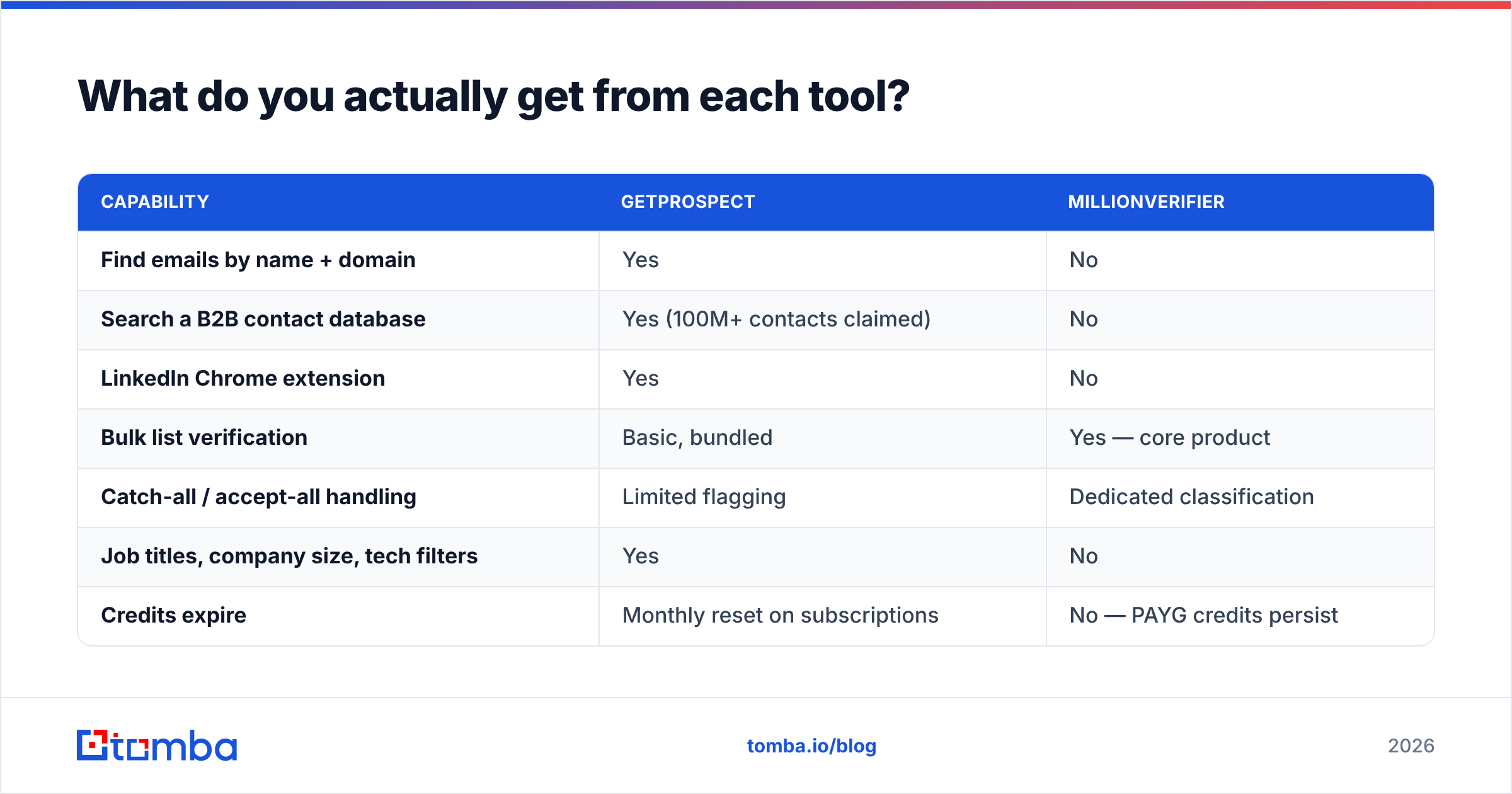
Here's the functional split, feature by feature. Most people skim straight to this part, so read it slowly. The "no" columns matter more than the "yes" ones.
| Capability | GetProspect | MillionVerifier |
|---|---|---|
| Find emails by name + domain | Yes | No |
| Search a B2B contact database | Yes (100M+ contacts claimed) | No |
| LinkedIn Chrome extension | Yes | No |
| Bulk list verification | Basic, bundled | Yes — core product |
| Catch-all / accept-all handling | Limited flagging | Dedicated classification |
| Job titles, company size, tech filters | Yes | No |
| Credits expire | Monthly reset on subscriptions | No — PAYG credits persist |
| Free entry point | ~50 valid emails/month | ~100 free verification credits |
| API access | Yes | Yes |
| Best for | Building lists from scratch | Cleaning lists before send |
The pattern is easy to see once it's laid out. There is almost no overlap. GetProspect verifies so its own output doesn't embarrass it. MillionVerifier skips the finder on purpose. It competes on being the cheapest, fastest scrubber in the category, not the broadest tool.

GetProspect vs MillionVerifier pricing in 2026#
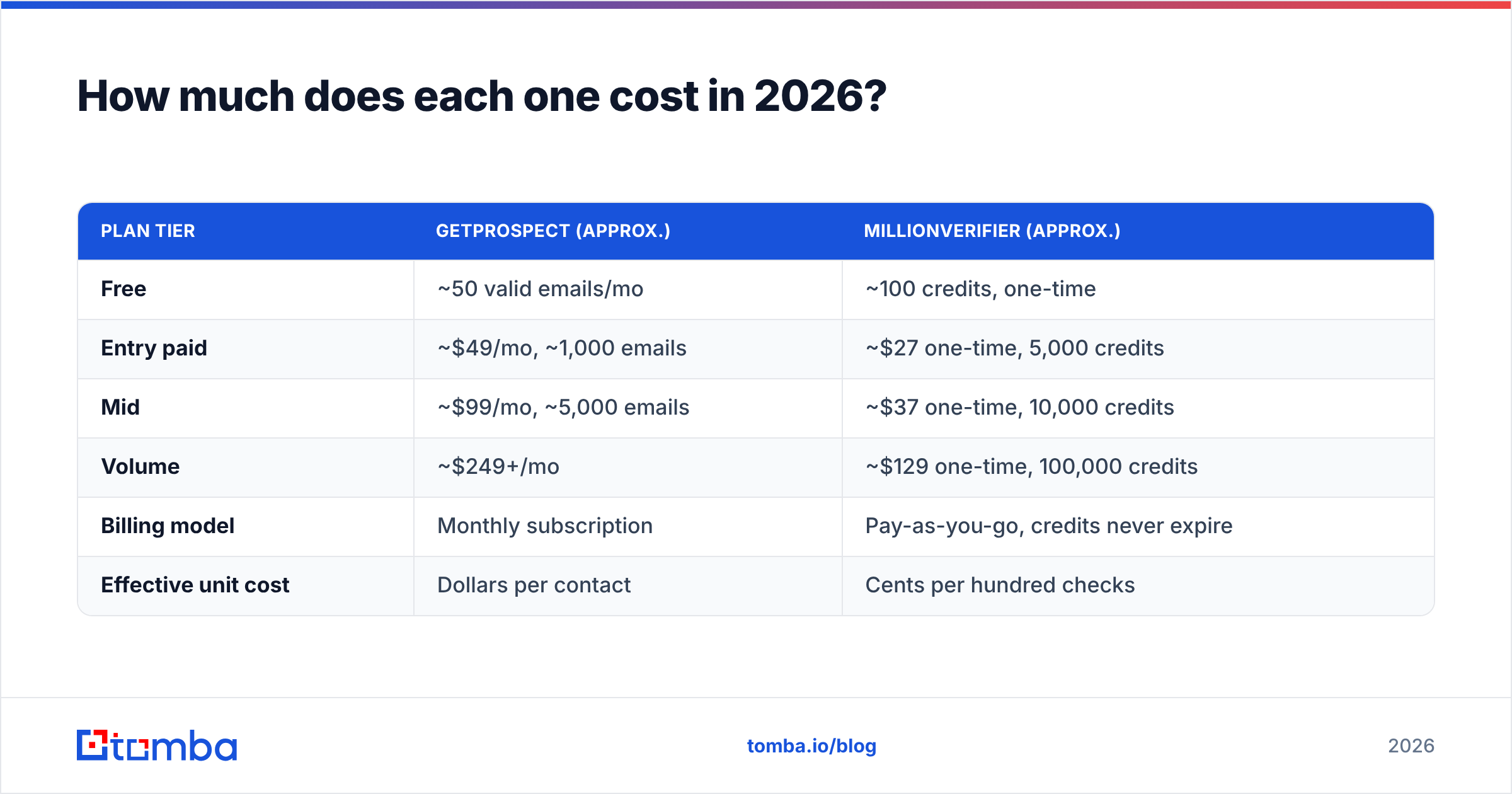
Pricing is where the two split hardest, because they charge for different units. GetProspect bills per valid email found. MillionVerifier bills per email checked, including the ones it tells you to bin.
| Plan tier | GetProspect (approx.) | MillionVerifier (approx.) |
|---|---|---|
| Free | ~50 valid emails/mo | ~100 credits, one-time |
| Entry paid | ~$49/mo, ~1,000 emails | ~$27 one-time, 5,000 credits |
| Mid | ~$99/mo, ~5,000 emails | ~$37 one-time, 10,000 credits |
| Volume | ~$249+/mo | ~$129 one-time, 100,000 credits |
| Billing model | Monthly subscription | Pay-as-you-go, credits never expire |
| Effective unit cost | Dollars per contact | Cents per hundred checks |
Treat those numbers as a guide, and check each vendor's page before you buy. Both have repriced in the last two years. The shape holds either way. Verification is a commodity, priced in fractions of a cent. Contact discovery is priced like data, because it is data.
That gap matters for your budget. A 50,000-record list costs about $70–$90 to verify. Sourcing the same list costs several thousand dollars. So comparing GetProspect vs MillionVerifier on price alone is like comparing a mortgage to a parking meter.
One more billing note. MillionVerifier credits don't expire, which suits agencies with uneven workloads: buy 100k once, draw down over a year. GetProspect's subscription credits reset every month, so unused discovery capacity evaporates. If your prospecting is seasonal, that's real money burned.
GetProspect vs MillionVerifier: which one is more accurate?#
The two tools define accuracy in different ways, so measure them apart.
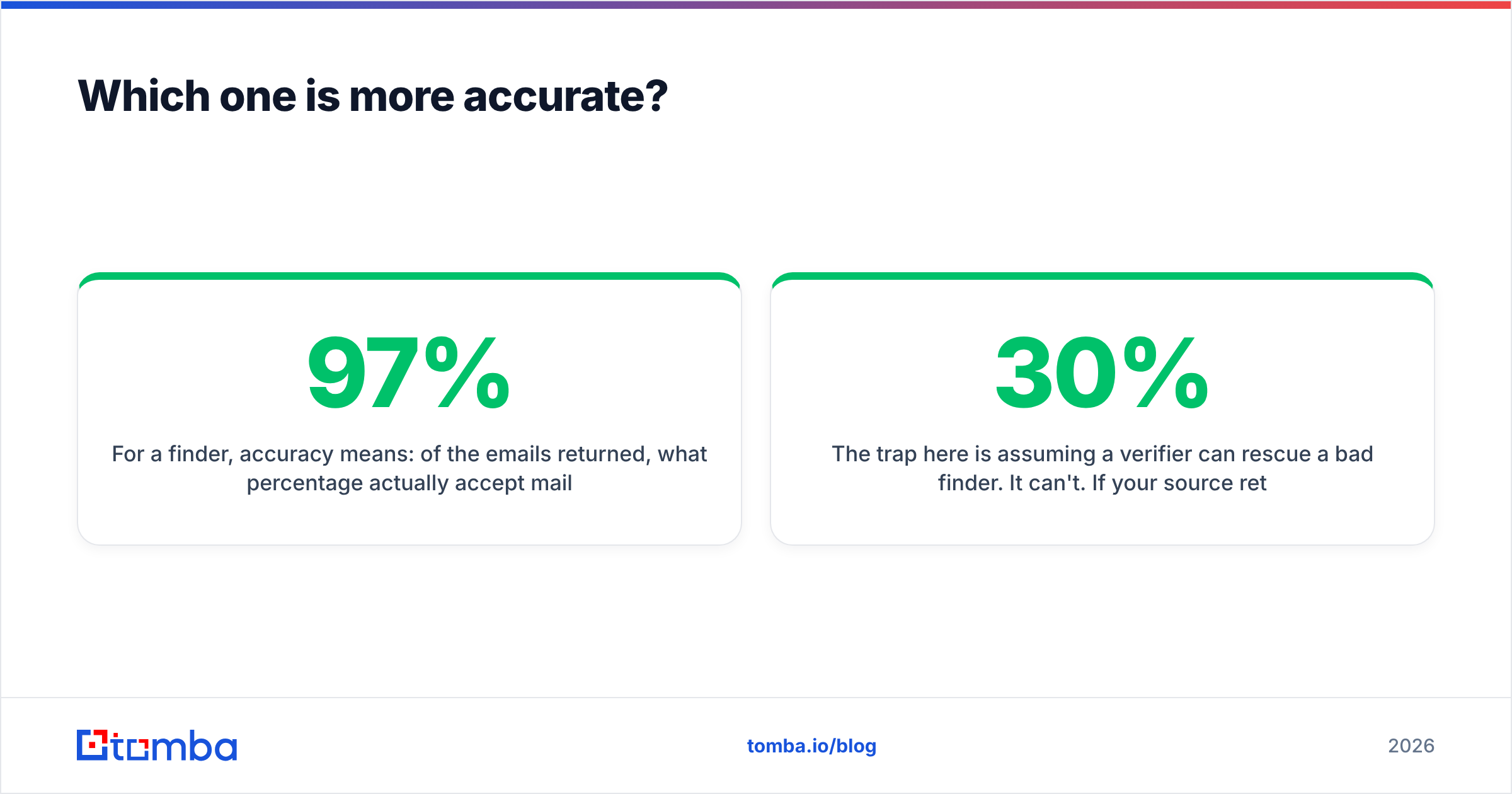
For a finder, accuracy means one thing: of the emails it returns, how many actually accept mail? Good finders land in the 92–97% range on standard corporate domains. They fall off hard on catch-all domains, free-mail addresses, and companies under 10 staff. GetProspect does well on mid-market and enterprise domains, where its database has depth. It thins out on very small companies, non-English regions, and brand-new startups. Every database-first vendor shares that limit.
For a verifier, accuracy has two sides. How many good addresses does it wrongly mark bad? Those false positives cost you pipeline. And how many bad ones slip through? Those cost you sender reputation. MillionVerifier's reputation on G2 rests on few false positives and fast turnaround on large files. It also labels catch-all domains instead of guessing. That's the honest call, even though it feels less satisfying.

Don't assume a verifier can rescue a bad finder. It can't. If your source returns 30% junk, the verifier deletes 30% of what you paid for. You get a smaller list and two bills. Accuracy has to be won at the discovery step. Verification is quality control, not manufacturing.
Run these benchmarks before you commit to either vendor:
- Build a 200-contact control set. Use people whose addresses you know are live: customers, past deals, teammates at partner companies.
- Run GetProspect blind on those names and domains. Measure hit rate and exact-match rate apart. Finding "an" email is not the same as finding "the" email.
- Seed a verification file with 50 known-good, 50 known-dead, and 30 known catch-all addresses. Run it through MillionVerifier and count the misses in each bucket.
- Repeat on your worst segment. Pick the industry or country where your bounce rate is highest. Vendor averages hide regional coverage gaps.
- Time the workflow end to end. Include the CSV export, the re-import, and the column mapping. Nobody invoices you for that friction, but it still costs you.
Do you need both tools — or just one?#
Here's the honest answer. Use GetProspect alone and you should still verify before high-volume sends. Use MillionVerifier alone and you need something upstream producing addresses. Neither product is complete on its own. That's why so many teams end up paying for both.
There is a third path that most comparison articles skip. Some vendors do discovery and validation on one credit pool. Tomba's email finder and email verifier share one account, one credit balance, and one API key. You find an address and validate it in the same call. No CSV export, no upload, no waiting, no re-import. For catch-all domains, the catch-all verifier settles the question most finders just hand back to you as a shrug.
That is the real GetProspect vs MillionVerifier decision for most teams: two vendors, or one. The cost math gets simpler too. Tomba's pricing starts free at 25 searches a month. Starter is $49/mo, Growth $99/mo, Pro $249/mo. That's one bill instead of a subscription plus credit top-ups. Cleaning a large historical list? The bulk email finder handles both jobs in the same run.

That said: if your finder already works and you only need the scrubbing layer, a pay-as-you-go verifier is genuinely hard to beat on unit price. Don't switch a working stack just to consolidate logos.
How do they compare against the wider market?#
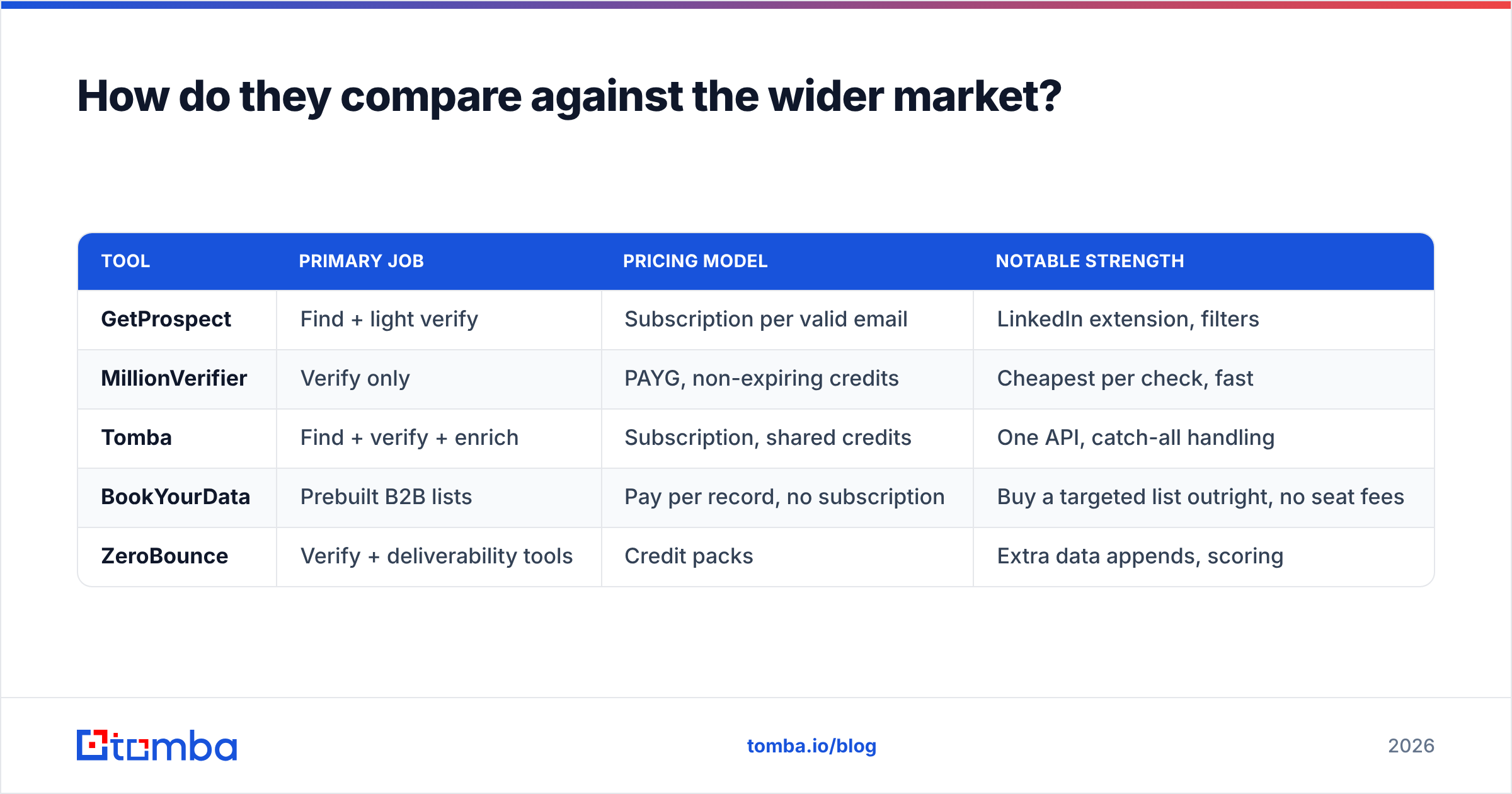
Neither tool exists in a vacuum. Here's where each sits among the alternatives you'll realistically shortlist.

| Tool | Primary job | Pricing model | Notable strength |
|---|---|---|---|
| GetProspect | Find + light verify | Subscription per valid email | LinkedIn extension, filters |
| MillionVerifier | Verify only | PAYG, non-expiring credits | Cheapest per check, fast |
| Tomba | Find + verify + enrich | Subscription, shared credits | One API, catch-all handling |
| BookYourData | Prebuilt B2B lists | Pay per record, no subscription | Buy a targeted list outright, no seat fees |
| ZeroBounce | Verify + deliverability tools | Credit packs | Extra data appends, scoring |
BookYourData earns a mention for another reason. It skips the find-vs-verify question entirely. You buy pre-built, pre-validated lists by filter. Would you rather buy a targeted 5,000-contact file once than run a discovery workflow every month? Then price that model out. It solves the same problem a different way, and it removes the tooling seam.
What should you actually pick?#
Choose by what's broken, not by feature count.
- No list and no data source. Start with a finder. GetProspect, Tomba, or a list vendor — whichever covers your ICP best in your test. A verifier alone gives you nothing to send.
- A big old list and rising bounce rates. Buy verification credits. MillionVerifier on pay-as-you-go is the low-risk move. You don't commit to a subscription to clean a one-time mess.
- More than ~5,000 emails a month, every month. You need both jobs covered. At that pace the two-vendor CSV shuttle becomes a weekly chore, and one platform pays for itself in hours long before it pays for itself in dollars.
Two more cases worth calling out:
- An agency with uneven client work. Non-expiring credits beat monthly subscriptions. Buy verification in bulk, then source contacts per campaign.
- Programmatic access inside a product or workflow. Compare the APIs, not the dashboards. One key covering both jobs — as with the Tomba API — removes a whole class of glue code.
One last note: verification goes stale. A list checked in March is measurably worse by September, because roughly a fifth of B2B contacts change jobs each year. Re-verify before every major send instead of trusting an old clean file. Put that recurring cost in your math from day one.
The bottom line#
The GetProspect vs MillionVerifier verdict: they aren't rivals, they're neighbours. GetProspect answers "who should I email?" MillionVerifier answers "will this email land?" You need both answers before a campaign goes out. The only real choice is whether you buy them from two vendors or one.
Would you rather skip the CSV bridge between two subscriptions? Run your next list through Tomba's Email Finder. Find, verify, and enrich on one credit pool, starting free at 25 searches a month with no card required. Test it against your own control set of known-good contacts before you renew anything else.
Related guides#
Ready to find emails that actually work?
Join 150,000+ professionals who stopped guessing and started sending. Free credits on signup — no credit card required.
Get the Tomba newsletter
Practical outbound tactics and product updates — once every two weeks.
About the author