GetProspect vs Pabbly: Full 2026 Comparison for B2B Teams
One tool finds B2B email addresses. The other automates and cleans what you already have. Here's how GetProspect and Pabbly actually compare on data, pricing, and workflow fit in 2026.
GetProspect vs Pabbly is an easy call once you see the split. One tool finds B2B email addresses. The other cleans and moves the data you already have.
TL;DR
- GetProspect vs Pabbly is not a fair fight, because the two tools do different jobs. GetProspect is a B2B contact database and email finder. Pabbly is a bundle of separate products — automation (Pabbly Connect), email marketing, email verification, and subscription billing.
- If your problem is "I don't have contact data," GetProspect solves it. Pabbly does not.
- If your problem is "I have data and need to clean, route, and send it," Pabbly's verification plus Connect handles it cheaply. GetProspect only covers part of that.
- Pabbly wins on breadth per dollar, helped by its lifetime deals. GetProspect wins on prospecting depth: LinkedIn extraction, filters, and enriched profiles.
- Most teams who weigh GetProspect vs Pabbly end up needing a finder plus a verifier. That is why a combined stack like Tomba Email Finder plus its email verifier often replaces both line items.
Why do people compare GetProspect vs Pabbly at all?#
Both tools show up in the same search: "cheap tool to get emails for cold outreach."
That is where the overlap ends. GetProspect is a prospecting tool. It runs on a B2B contact database and a LinkedIn Chrome extension. You search by company, title, industry, or headcount. You can also scrape a LinkedIn search page. It returns names with business email addresses.
Pabbly is a bundle. One company sells five or six SaaS products under a single brand. Three of them matter here. Pabbly Email Verification cleans bulk lists. Pabbly Email Marketing sends broadcasts. Pabbly Connect is a Zapier-style automation layer that glues the rest together. Pabbly has no B2B contact database. It cannot tell you the email of the VP of Engineering at a company you have never contacted.
So the honest framing is short. GetProspect creates data. Pabbly processes data. Buy one expecting the other's job and you will be unhappy within a week.

How do GetProspect and Pabbly compare head-to-head?#
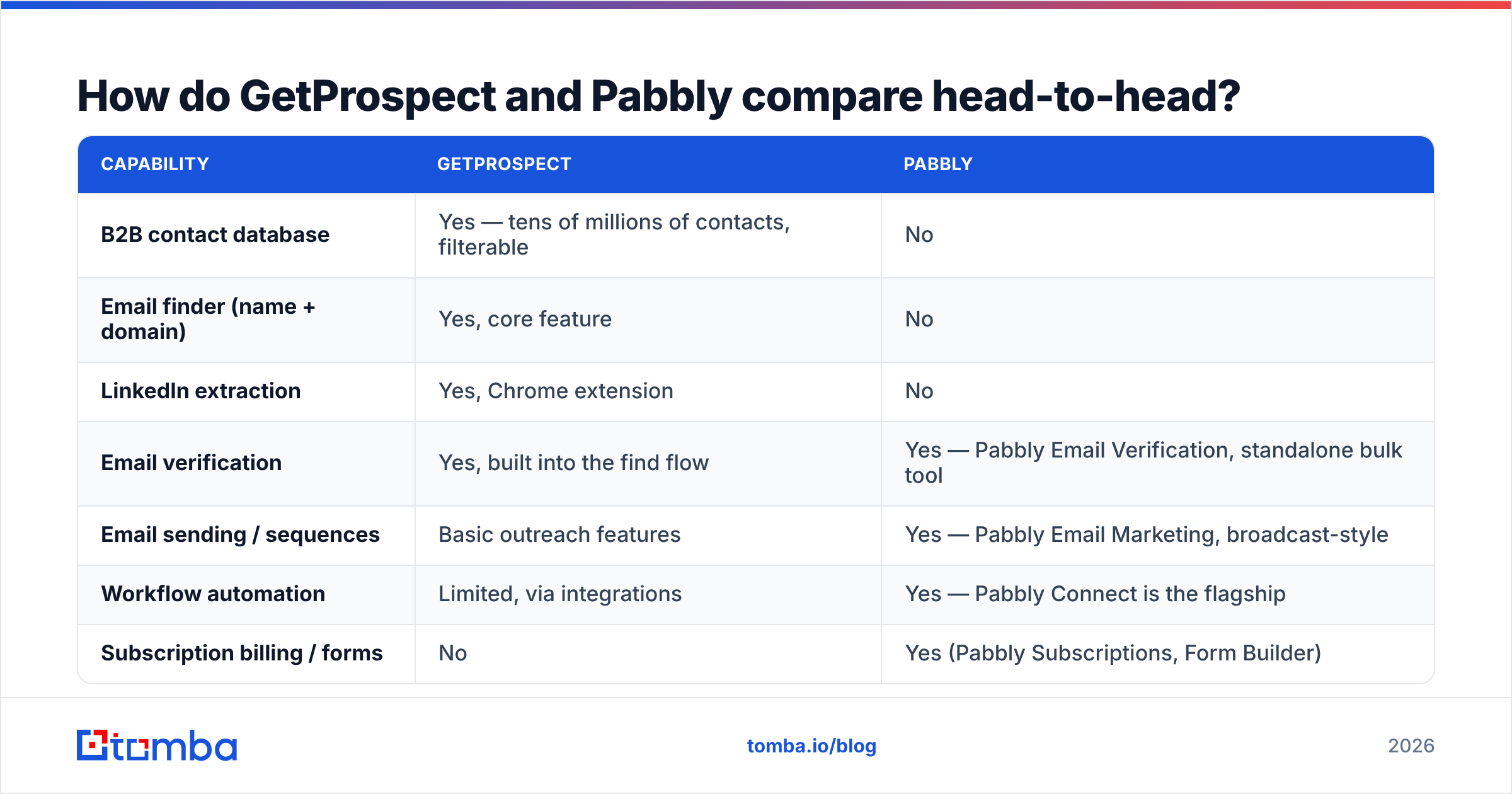
Here is the GetProspect vs Pabbly split, feature by feature.
| Capability | GetProspect | Pabbly |
|---|---|---|
| B2B contact database | Yes — tens of millions of contacts, filterable | No |
| Email finder (name + domain) | Yes, core feature | No |
| LinkedIn extraction | Yes, Chrome extension | No |
| Email verification | Yes, built into the find flow | Yes — Pabbly Email Verification, standalone bulk tool |
| Email sending / sequences | Basic outreach features | Yes — Pabbly Email Marketing, broadcast-style |
| Workflow automation | Limited, via integrations | Yes — Pabbly Connect is the flagship |
| Subscription billing / forms | No | Yes (Pabbly Subscriptions, Form Builder) |
| Public API | Yes | Yes, per product |
| Free tier | ~50 valid emails/month | Free tier on Connect (limited tasks); verification is credit-based |
| Best for | SDRs and founders building lists from scratch | Ops teams cleaning, routing, and sending existing data |
Read that table as two jobs on the same pipeline. The real question is not "which tool is better." It is "which stage of my pipeline is slow right now?"
What does GetProspect actually do well?#
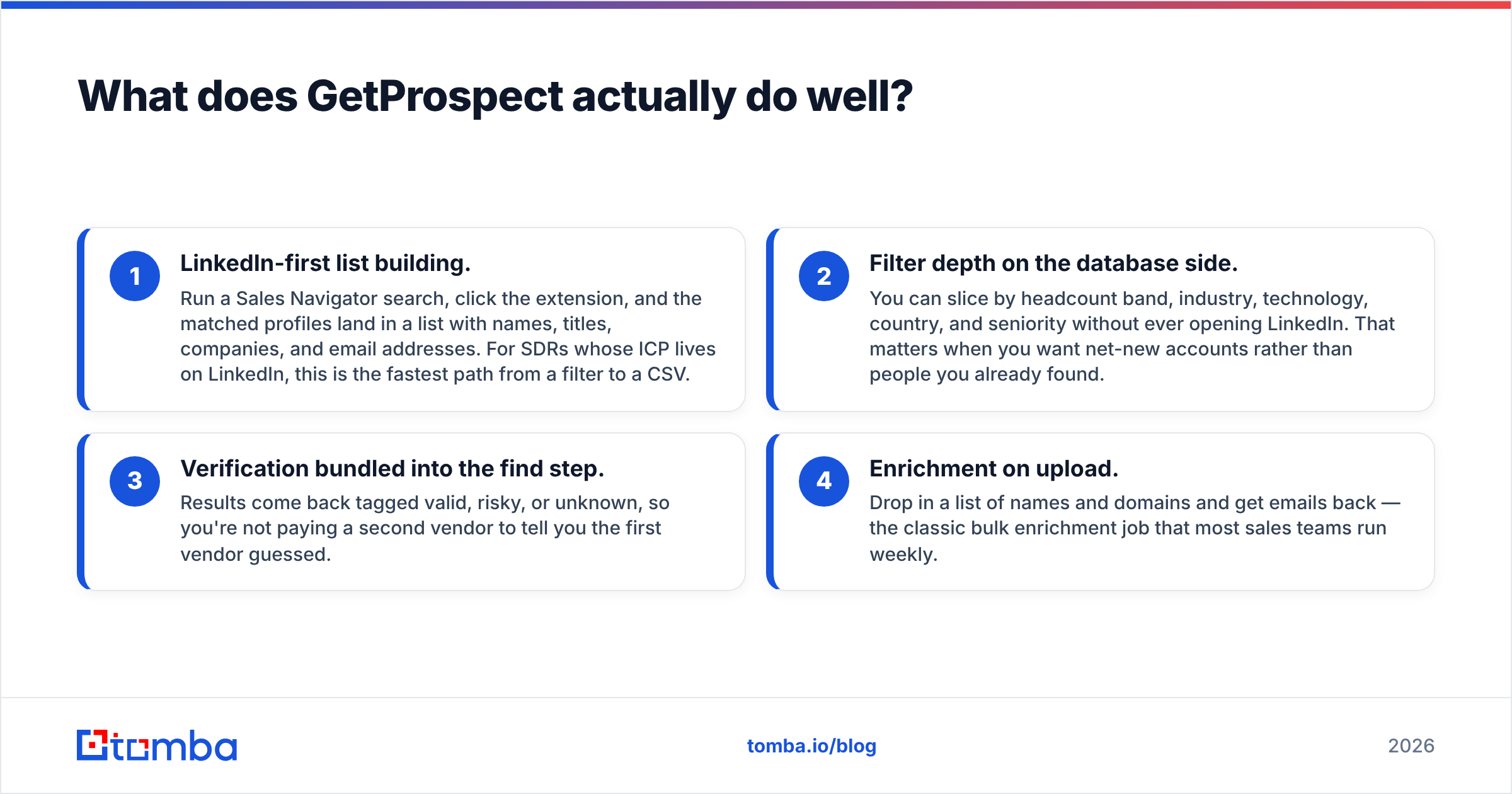
Four things stand out after a month of use:
- LinkedIn-first list building. Run a Sales Navigator search. Click the extension. The matched profiles land in a list with names, titles, companies, and emails. If your buyers live on LinkedIn, this is the fastest path from a filter to a CSV.
- Deep filters on the database side. Slice by headcount, industry, tech stack, country, and seniority. You never have to open LinkedIn. That helps when you want new accounts, not people you already found.
- Verification inside the find step. Results come back tagged valid, risky, or unknown. You do not pay a second vendor to check the first one's guess.
- Enrichment on upload. Drop in a list of names and domains. Get emails back. Most sales teams run this job every week.
Where it gets thin: credits burn fast on wide searches. Catch-all domains often come back as "risky" and stay there. The sending features do not replace a real sequencer. Treat GetProspect as a data source, not an outreach platform.
What does Pabbly actually give you?#
Pabbly sells breadth per dollar. You are not buying the best tool in any one category. You are buying five decent tools for less than one premium tool usually costs.
- Pabbly Connect is the real product. It is a workflow automation tool with triggers, actions, multi-step flows, and routers. It competes with Zapier and Make on price. If your CRM, forms, Slack, and spreadsheets need to talk, Connect is good value.
- Pabbly Email Verification takes a CSV or an API call. It runs syntax, MX, and mailbox checks. It returns deliverable, undeliverable, and accept-all buckets. Credits are cheap.
- Pabbly Email Marketing is a broadcast tool with SMTP routing. It suits newsletters and lists you already own. It is not built for cold outbound with per-mailbox rotation.
- Pabbly Subscriptions and Form Builder have nothing to do with prospecting. They come in the bundle anyway, which is part of why the price per product looks so low.
Where Pabbly falls short for sales teams: no contact data, no LinkedIn layer, and no ICP filters. It cannot answer "who works at this company?" The email marketing product is also wrong for cold outbound. Send unsolicited campaigns through a shared-reputation broadcast tool and you will burn your domain.
How much do GetProspect and Pabbly cost in 2026?#
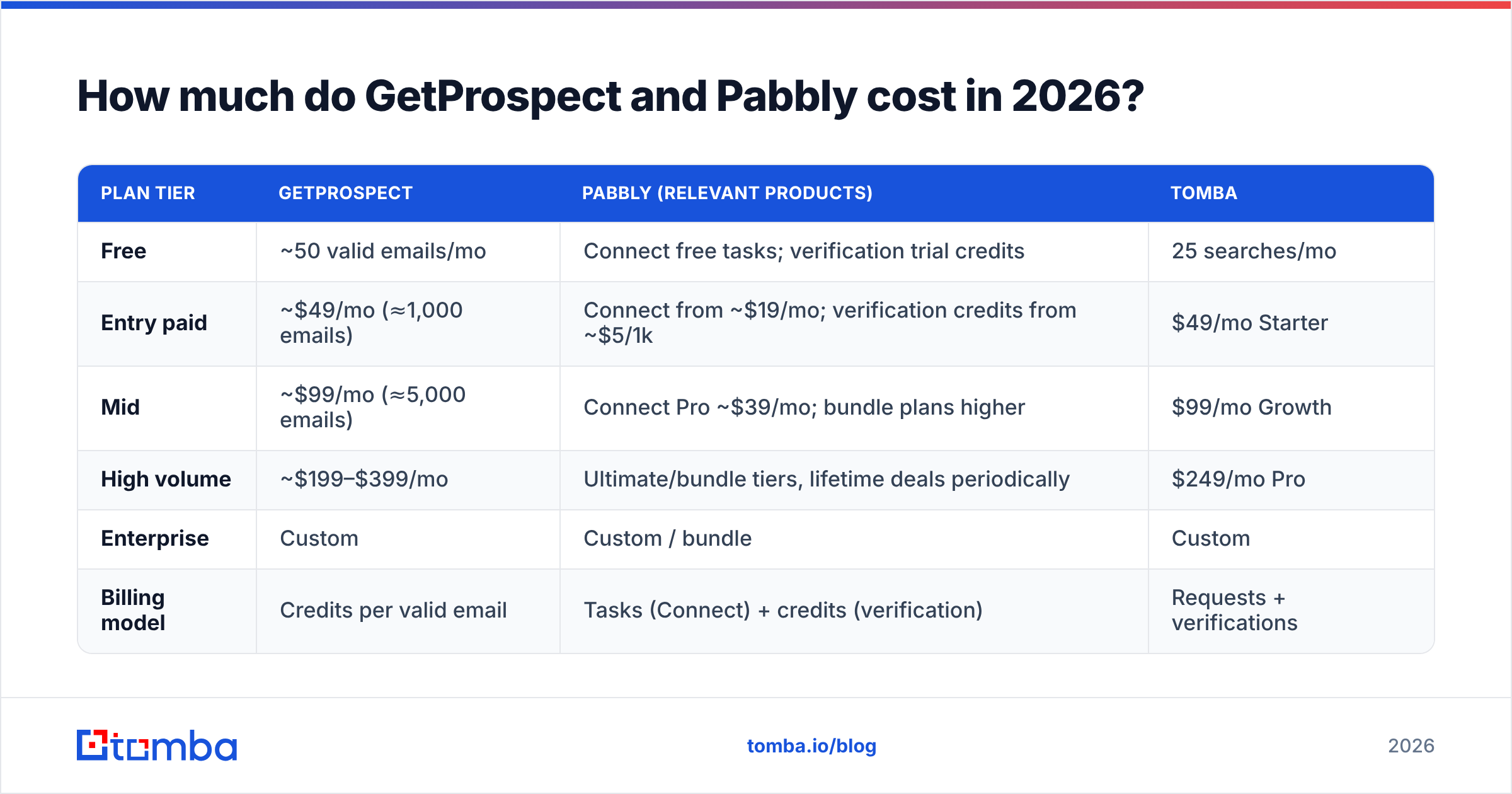
Both vendors change plans often. Check their own pricing pages before you buy. Here is the shape of it as listed in early 2026:
| Plan tier | GetProspect | Pabbly (relevant products) | Tomba |
|---|---|---|---|
| Free | ~50 valid emails/mo | Connect free tasks; verification trial credits | 25 searches/mo |
| Entry paid | ~$49/mo (≈1,000 emails) | Connect from ~$19/mo; verification credits from ~$5/1k | $49/mo Starter |
| Mid | ~$99/mo (≈5,000 emails) | Connect Pro ~$39/mo; bundle plans higher | $99/mo Growth |
| High volume | ~$199–$399/mo | Ultimate/bundle tiers, lifetime deals periodically | $249/mo Pro |
| Enterprise | Custom | Custom / bundle | Custom |
| Billing model | Credits per valid email | Tasks (Connect) + credits (verification) | Requests + verifications |
One thing trips people up in every GetProspect vs Pabbly pricing debate. Pabbly's verification credits look far cheaper than GetProspect's per-email rate. They are not the same unit. Verifying an address you already have is a cheap DNS and SMTP check. Finding an address that is not in your CRM is much harder. It needs a crawled dataset, waterfall lookups, and pattern matching. You are paying for two different cost structures.
For a straight cost-per-verified-contact view, see how Tomba pricing tiers map to volume. The metric that matters is dollars per usable contact after bounces, not dollars per credit.
Which one is more accurate?#
Accuracy comes up in every GetProspect vs Pabbly review. It is mostly the wrong question, but there is a real answer inside it.
GetProspect's accuracy is finder accuracy. Of the emails it returns, how many actually land? Across tools in this category, verified hit rates usually run 80–95% on clean, well-known domains. They drop hard on small companies, non-English domains, and catch-all servers. GetProspect sits in the normal band for a database-plus-pattern finder. It is not the leader on catch-all resolution.
Pabbly's accuracy is verifier accuracy. Of the addresses you feed it, how many does it label correctly? Bulk verifiers are much the same these days. The honest difference is how each one treats accept-all domains. Cheap verifiers dump them into an "accept-all" bucket and stop. You are left to guess. If a big share of your list sits on catch-all servers, the tool choice starts to matter. That is why a dedicated catch-all verifier exists as its own product category.
A practical rule: never trust a vendor's own accuracy number. Run 200 known-good addresses from your CRM through any tool you test. Count the false positives yourself. Vendor benchmarks are marketing. Your list is the benchmark. Reviews on G2 help with support and billing gripes. They help less with data quality claims.

Do you actually have to choose between them?#
No. Most GetProspect vs Pabbly posts skip this part.
The two tools overlap in almost nothing. A sane stack looks like this:
- GetProspect (or another finder) to build the list
- Pabbly Connect to route new contacts into your CRM, tag them, and trigger follow-ups
- A real sequencer (Instantly, Smartlead, Reply) to send the cold outbound
- A verifier between finder and sequencer to strip bounces
That is four line items. It works. For teams already on Pabbly Connect, it can beat the price of one consolidated platform.
The counter-argument is operational, not financial. Every handoff between tools is a place where records get duplicated and fields get mismatched. Someone exports a CSV at 6pm and forgets to re-verify it. If you are a two-person team, four vendors is three too many. Merging the find-and-verify half into one API removes the worst handoff. That is the whole case for a single bulk email finder that verifies inline instead of chaining a finder to a separate vendor.
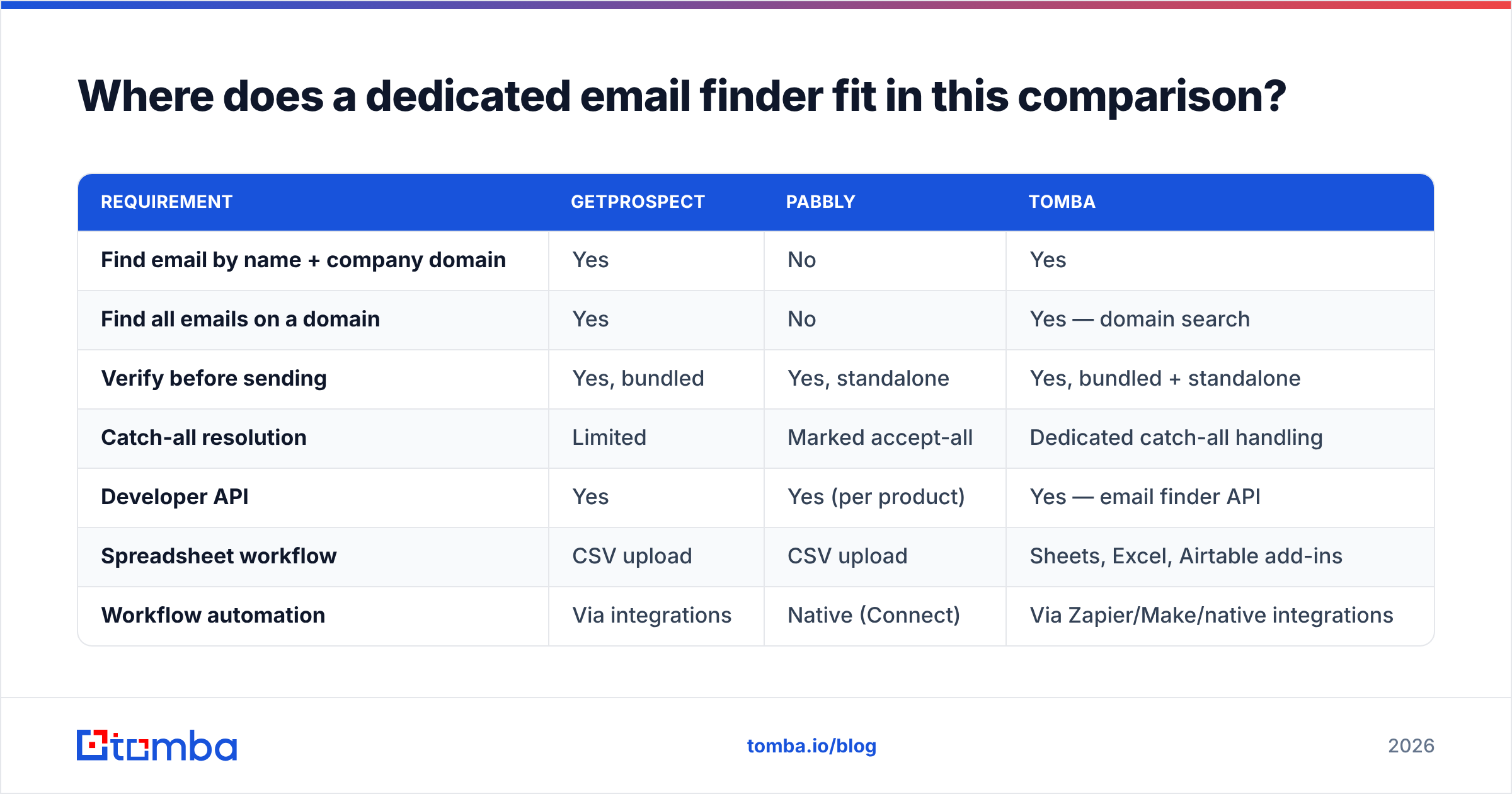
Where does a dedicated email finder fit in this comparison?#
Strip the question down to "I need business email addresses that do not bounce." Neither of these tools is the obvious default.
| Requirement | GetProspect | Pabbly | Tomba |
|---|---|---|---|
| Find email by name + company domain | Yes | No | Yes |
| Find all emails on a domain | Yes | No | Yes — domain search |
| Verify before sending | Yes, bundled | Yes, standalone | Yes, bundled + standalone |
| Catch-all resolution | Limited | Marked accept-all | Dedicated catch-all handling |
| Developer API | Yes | Yes (per product) | Yes — email finder API |
| Spreadsheet workflow | CSV upload | CSV upload | Sheets, Excel, Airtable add-ins |
| Workflow automation | Via integrations | Native (Connect) | Via Zapier/Make/native integrations |
| Starter price | ~$49/mo | ~$19/mo (Connect) | $49/mo |
Tomba covers the find-and-verify half of the pipeline in one place. It handles the catch-all problem instead of passing it back to you. It does not try to be an automation platform. If you want Zapier-class workflow branching, Pabbly Connect is the better buy. The two coexist fine.
Which should you pick?#
The GetProspect vs Pabbly answer depends on your bottleneck, not on feature count.
Choose GetProspect if: your buyers are easy to find on LinkedIn. You build lists from scratch every week. Your main problem is "I do not know who to contact." The extension is the fastest part of the product, and the reason people stay.
Choose Pabbly if: contact data already flows in from forms, imports, or a CRM. Your problem is routing, cleaning, and sending. Pabbly Connect is hard to beat at its price if the other option is Zapier's per-task rates. Watch for lifetime deal windows. They are periodically real, and they change the math.
Choose a dedicated finder plus verifier if: you care most about bounce rate and cost per usable contact. You also want an API you can call from your own systems. This is the right answer for outbound at scale, or for lead-gen built into a product.
Choose both if: you run a small ops team. GetProspect (or Tomba) for data in. Pabbly Connect for the plumbing. They do not clash.
What should you check before you commit?#
Run this five-point test on any trial before you put a card down:
- Bounce test. Send to 200 contacts from your real ICP through your real sending setup. Count hard bounces. Under 3% is fine. Over 5% means the data is not ready.
- Coverage test. Take 50 accounts you actually want. How many return a usable contact at the right seniority? Coverage beats database size claims.
- Catch-all share. What share of your target domains come back as accept-all or risky? If it is high, tools that resolve catch-alls are worth real money to you.
- Credit burn rate. Simulate a normal week. Most teams blow through entry plans in ten days. They end up one tier above the one they priced.
- Export and API friction. Can you get data out cleanly, on a schedule, with no one clicking export? If not, the tool quietly becomes a bottleneck.
Any vendor that resists a hands-on trial on your own list is telling you something.
The bottom line#
GetProspect vs Pabbly is a contest between a data source and a data pipeline. GetProspect gives you contacts you did not have. Pabbly gives you cheap automation, verification, and broadcast sending for contacts you already have. Buying one to do the other's job is the only real mistake on the table.
If the job is getting accurate, verified B2B email addresses into your outbound motion, skip the four-vendor stitch. Start with the Tomba Email Finder. The free tier gives you 25 searches a month. Run the bounce test above on your own list before you spend a cent. Starter is $49/mo when you are ready to scale, with verification and catch-all handling included rather than billed as a second vendor.
Related guides#
Ready to find emails that actually work?
Join 150,000+ professionals who stopped guessing and started sending. Free credits on signup — no credit card required.
Get the Tomba newsletter
Practical outbound tactics and product updates — once every two weeks.
About the author