GetProspect vs Pitchbox: Which Tool Fits Your Outreach?
GetProspect finds B2B emails. Pitchbox runs outreach campaigns at scale. Comparing them head-to-head only makes sense once you know which half of the pipeline is actually broken — here's the honest breakdown.
GetProspect vs Pitchbox is an odd match-up. One tool finds email addresses. The other one sends them. This guide covers what each tool does, what it costs, and which one fixes your real problem.
TL;DR#
- These two tools are not real competitors. GetProspect finds and verifies B2B emails. Pitchbox runs outreach campaigns for SEO link building and PR. One digs the well. The other lays the pipe.
- The short answer to GetProspect vs Pitchbox: pick GetProspect if you lack good email addresses. Pick Pitchbox if your follow-up, personalization, and reporting are a mess.
- Pricing sits in two different worlds. GetProspect starts free and runs from $49 to $399 a month. Pitchbox is quote-based. Expect several hundred dollars a month, and four figures at agency scale.
- Bad data kills most link campaigns, not bad sequencing. If 20% of your list bounces, no amount of workflow polish will save it.
- The stack most teams land on: one tool to find and verify emails (Tomba, GetProspect), plus one tool to send them. One vendor rarely does both jobs well.
GetProspect vs Pitchbox: what each tool does#
GetProspect is a B2B email finder and lead database. You search by domain, job title, industry, headcount, or location. It returns contact records with work emails. It also verifies those emails before you export them. You get a LinkedIn extension, a bulk finder, a simple list manager, and an API. Its job is finding data.
Pitchbox is an outreach platform for SEO, link building, digital PR, and influencer work. You feed it prospect lists, often pulled from Ahrefs, Semrush, Moz, or Majestic. It enriches those contacts, then sends multi-step email sequences. It also tracks replies, stores relationship history, and reports on links won. Its job is running campaigns.
So the honest framing of GetProspect vs Pitchbox is not "which tool is better." It is "which half of my outreach machine is broken."
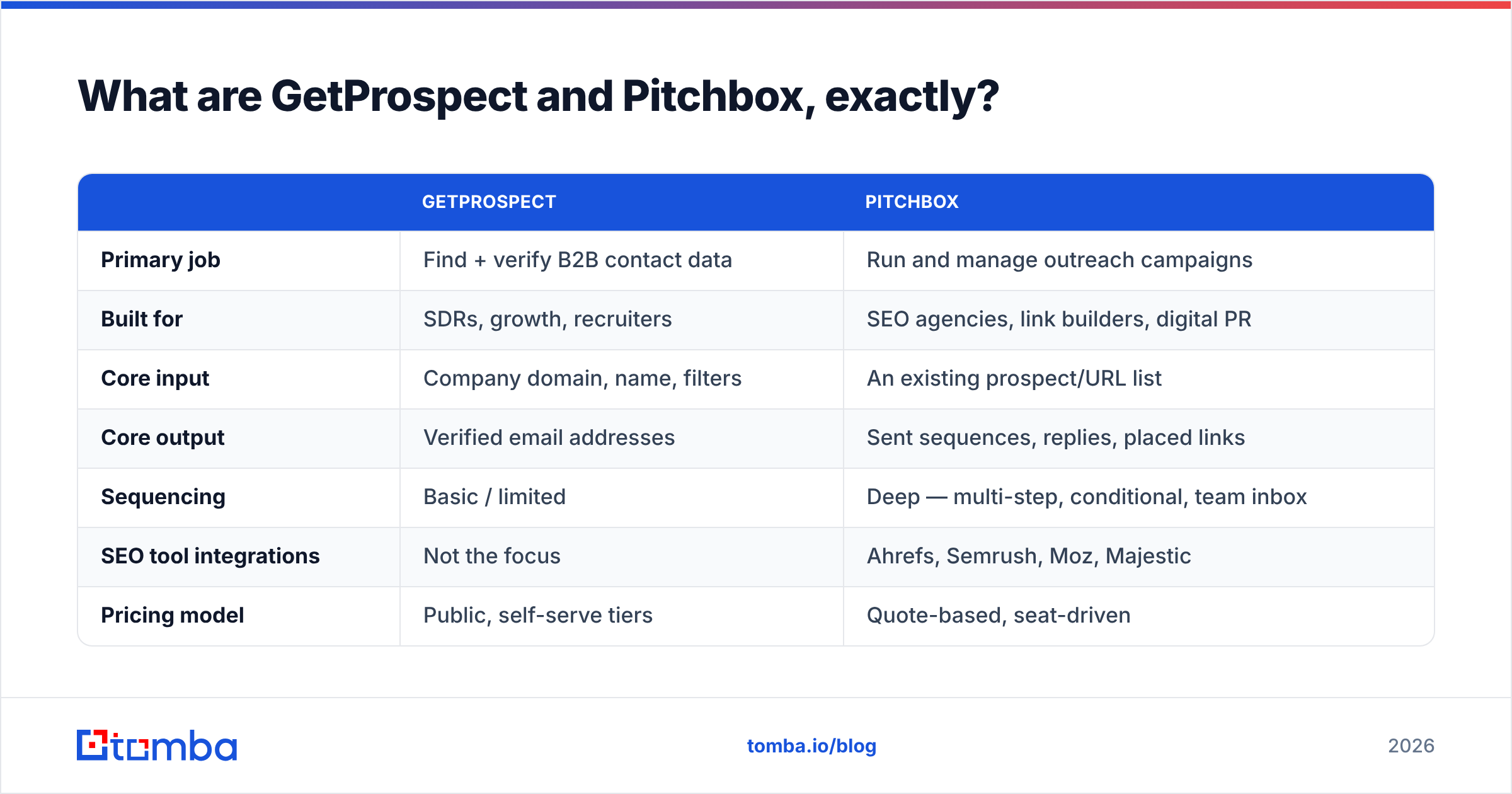
| GetProspect | Pitchbox | |
|---|---|---|
| Primary job | Find + verify B2B contact data | Run and manage outreach campaigns |
| Built for | SDRs, growth, recruiters | SEO agencies, link builders, digital PR |
| Core input | Company domain, name, filters | An existing prospect/URL list |
| Core output | Verified email addresses | Sent sequences, replies, placed links |
| Sequencing | Basic / limited | Deep — multi-step, conditional, team inbox |
| SEO tool integrations | Not the focus | Ahrefs, Semrush, Moz, Majestic |
| Pricing model | Public, self-serve tiers | Quote-based, seat-driven |
| Free entry point | Yes (limited monthly credits) | No — demo required |
Which problem are you actually trying to solve?#
Diagnose your bottleneck before you compare feature grids. Four quick tests:
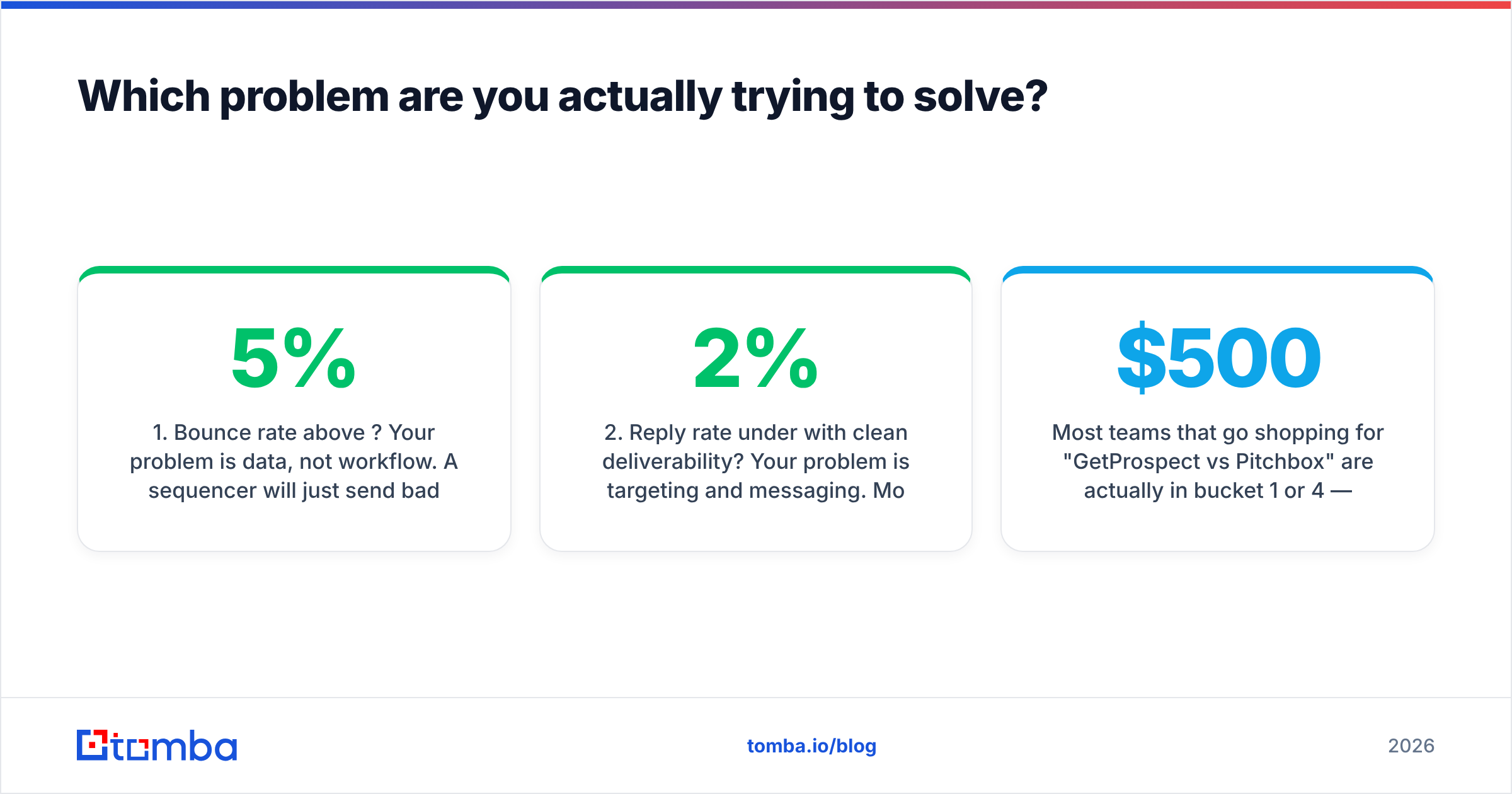
- Bounce rate above 5%? Your problem is data, not workflow. A sequencer will only send bad emails faster. Fix the list first.
- Reply rate under 2% with clean deliverability? Your problem is targeting and copy. More contacts will not help. Better segments and personalization will.
- Losing track of who you already pitched? That is a relationship problem. Pitchbox was built around it. A finder tool does not touch it.
- Copying contacts into spreadsheets for hours? That is an automation problem. A finder with a good bulk email finder and an API is the cheaper fix.
Most teams who search GetProspect vs Pitchbox sit in bucket 1 or 4. Buying a $500-a-month outreach platform to fix a data problem is the priciest mistake in outbound.

GetProspect vs Pitchbox: feature comparison#
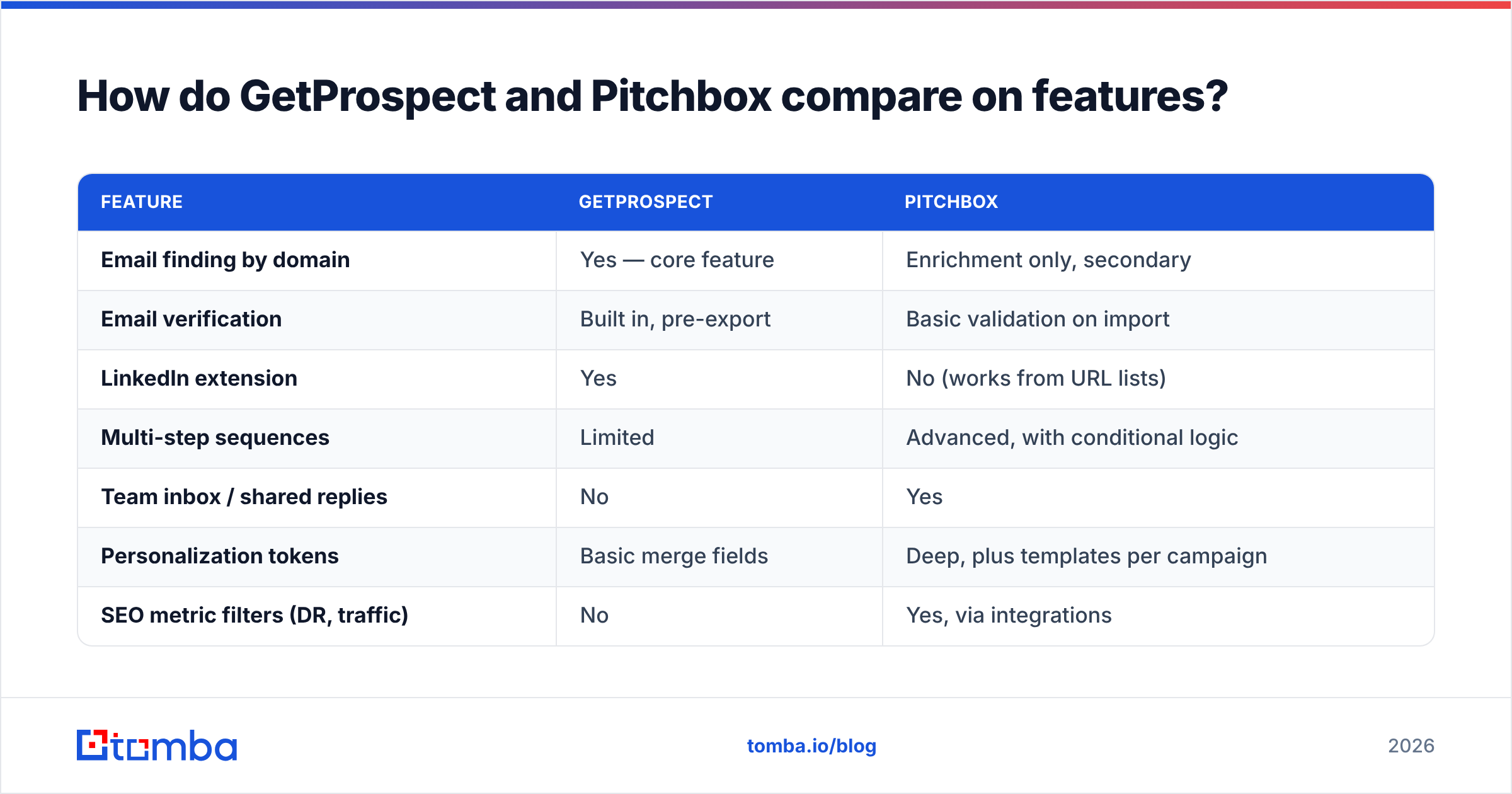
| Feature | GetProspect | Pitchbox |
|---|---|---|
| Email finding by domain | Yes — core feature | Enrichment only, secondary |
| Email verification | Built in, pre-export | Basic validation on import |
| LinkedIn extension | Yes | No (works from URL lists) |
| Multi-step sequences | Limited | Advanced, with conditional logic |
| Team inbox / shared replies | No | Yes |
| Personalization tokens | Basic merge fields | Deep, plus templates per campaign |
| SEO metric filters (DR, traffic) | No | Yes, via integrations |
| Link tracking / placement reports | No | Yes — core feature |
| API access | Yes | Yes (higher tiers) |
| Learning curve | An afternoon | A week, plus onboarding |
Read that table honestly and the overlap is thin. GetProspect fills the top of the funnel. Pitchbox owns the middle. The only real collision is enrichment. Pitchbox will try to find an email for a URL you feed it. GetProspect will let you send a light sequence. Neither one is best in class at the other's job.
For link building, Pitchbox's real moat is memory. It remembers that you pitched editor@example.com fourteen months ago. It remembers that she replied, and what she asked for. Spreadsheets lose that history. For an agency running 40 campaigns at once, that memory is worth real money.
For sales prospecting, Pitchbox is the wrong shape. It has no accounts, no opportunities, and shallow CRM sync. Its pricing also assumes agency budgets.
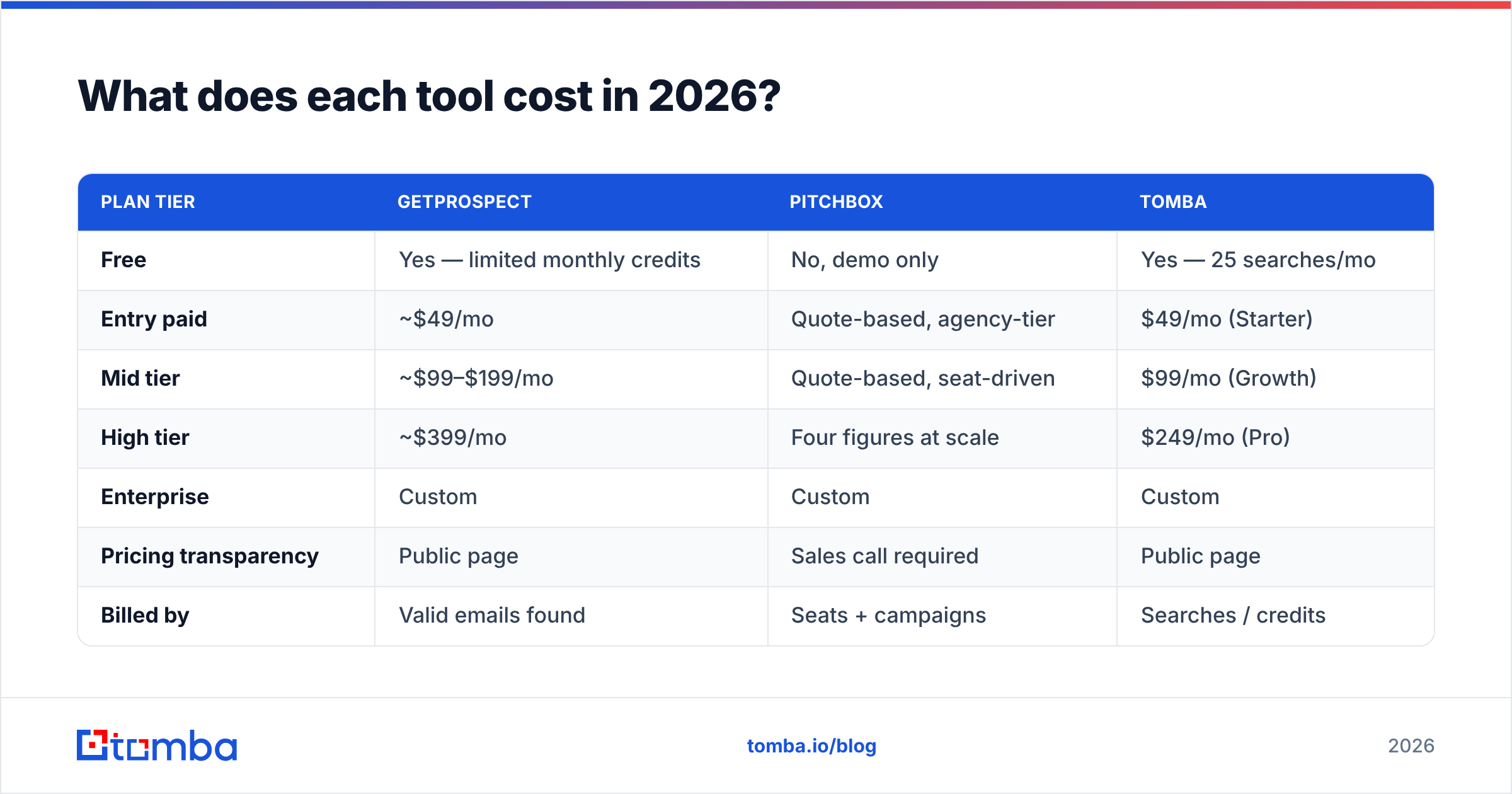
GetProspect vs Pitchbox pricing in 2026#
Prices change often. Treat these as directional and check the vendor page before you buy.
| Plan tier | GetProspect | Pitchbox | Tomba |
|---|---|---|---|
| Free | Yes — limited monthly credits | No, demo only | Yes — 25 searches/mo |
| Entry paid | ~$49/mo | Quote-based, agency-tier | $49/mo (Starter) |
| Mid tier | ~$99–$199/mo | Quote-based, seat-driven | $99/mo (Growth) |
| High tier | ~$399/mo | Four figures at scale | $249/mo (Pro) |
| Enterprise | Custom | Custom | Custom |
| Pricing transparency | Public page | Sales call required | Public page |
| Billed by | Valid emails found | Seats + campaigns | Searches / credits |
Two structural things matter more than the headline numbers.
First, the billing unit. GetProspect and Tomba bill by data volume. Your cost scales with how much prospecting you do. Pitchbox bills by seats and campaign capacity. Your cost scales with team size. A three-person agency sending 5,000 pitches a month may pay less than a ten-person team sending 2,000. The price is simply not tied to output.
Second, transparency. A demo-gated price is normal in agency software. It is not a scandal. But you cannot run fast build-versus-buy math, and it usually means an annual contract. Compare that with Tomba pricing. The tiers are on the page, and the free plan needs no call.

Which one gives you better data?#
Here the comparison gets interesting. Pitchbox is not really a data vendor. It enriches contacts from the pages you feed it. That works well for blogs with a named author and a contact page. It works poorly for everything else. Its strength is finding the right person on a site you already know. It will not build a fresh list from filters.
GetProspect is a true data play: a database plus verification. Accuracy holds up well on common SaaS and tech domains. It thins out on small businesses, non-English markets, and heavily gated companies. Almost every provider in this category shows the same pattern.
Three rules apply no matter which vendor you pick:
- Verify at send time, not at list-build time. A contact verified in March is not verified in August. People change jobs. Run a fresh pass through an email verifier before every campaign.
- Put catch-all domains in their own bucket. Many agency and media domains accept every address at the server level. A "valid" result there means little. Send lower volume and watch replies, not bounces.
- For link building, target the author, not the inbox.
info@addresses get terrible reply rates. The byline author's direct address is the biggest lever you have. An author finder does exactly that: give it an article URL, get the writer back.
That last rule is where these two worlds meet. Pitchbox only pays off if you can reach a real human at a publication. If your enrichment step keeps handing you generic role addresses, you are filling a Ferrari with the wrong fuel.
Is Pitchbox worth it for link building?#
If you run high-volume link acquisition at an agency, probably yes. With caveats.
Where it earns its price:
- Prospect history across campaigns, so you never pitch the same editor twice in a quarter
- Native pulls from Ahrefs, Semrush, Moz, and Majestic, so DR filtering happens where you work
- Reports that tie outreach effort to placed links, which is what clients pay for
- Team workflows: assignment, shared inboxes, approval steps
Where it disappoints:
- Setup is slow. Expect onboarding, not self-serve
- Overkill for anyone sending fewer than a few hundred pitches a month
- Sales-led pricing fits solo consultants and small in-house teams badly
- It will not build a fresh prospect list. You still need a data source
Check current reviews on G2 before you commit. Agency tools of this shape draw split verdicts, and the split follows team size.
Is GetProspect enough on its own for cold outreach?#
For finding contacts, yes. It does the job it advertises. For running the campaign, no. That is not a knock on the tool. Finder tools that bolt on a sequencer usually ship a weak one: no warmup, thin deliverability controls, little inbox rotation, basic reports.
Here is the stack most effective outbound teams end up with:
- Data layer — a finder and verifier with an API, so lists build themselves. Tomba's email finder, GetProspect, and similar tools live here.
- Enrichment layer — job titles, company size, tech stack, phone numbers. This is what makes segmentation possible.
- Sending layer — a dedicated sequencer with warmup and deliverability tools. Pitchbox for SEO and PR, an SDR sequencer for sales.
- CRM layer — where replies turn into pipeline and dedupe rules live.
Teams overpay when they squeeze layers 1 and 3 into one vendor. The cost curves differ. Data scales with volume. Sending scales with domains and seats.
Which should you choose?#
- Choose GetProspect if you need fresh B2B contacts with filters and verification, want self-serve pricing, and already like your sender.
- Choose Pitchbox if you run link building at volume, need memory across campaigns, and can justify agency pricing.
- Choose both if you pitch partnerships as a content agency. Use a finder for the list and Pitchbox for the campaign.
- Choose neither if you send under a few hundred emails a month. A light finder plus a basic sequencer costs a fraction and does 90% of the work.
- Add a verification step either way. A pre-send check is the cheapest deliverability insurance you can buy.
That is the real GetProspect vs Pitchbox decision. It is a diagnosis, not a feature war.
What about accuracy, bounces, and sender reputation?#
Remember one number. Mailbox providers judge you on the aggregate. A 5% bounce rate is the informal ceiling before filtering gets aggressive. Sustained double-digit bounces will burn a sending domain in weeks. Neither tool will save you from a bad list. They will just deliver it faster.
Practical guardrails:
- Cap volume on a new domain for the first 3–4 weeks, then ramp up slowly
- Split catch-all contacts into their own low-volume sequence
- Suppress role addresses (
info@,contact@,admin@) unless you mean to hit a shared inbox - Re-verify any contact older than 60 days before it enters a sequence
- Track reply rate as your main health metric. Bounces judge the list; replies judge the targeting
Want this on autopilot instead of manual? Wire verification into your list-build step with the Tomba API. Contacts then get checked the moment they are created.
What's the fastest way to test both?#
Skip the feature-grid debate. Run a two-week pilot instead:
- Pick one campaign with a clear success metric. Placed links or booked meetings, not opens.
- Build the same 300-prospect list twice. Once from the new tool, once from your current process.
- Verify both lists with the same verifier. That isolates the data quality variable.
- Send both through the same sequencer with the same copy.
- Compare bounce rate, reply rate, and cost per reply. Not cost per contact.
Cost per contact is the vanity metric of this category. A $0.02 email that bounces costs more than a $0.10 email that replies. The bounce also damages the domain you will send from next quarter.
Ready to fix the data half first?#
The GetProspect vs Pitchbox debate usually hides the real bottleneck: the list. Start where leverage is highest and cost is lowest.
Tomba's Email Finder returns verified work emails by domain, name, or company. The free tier gives you 25 searches a month. Test the accuracy on your own target accounts before you spend a cent.
Paid plans start at $49 a month. Verification, domain search, catch-all checks, and enrichment all sit in the same account. That means one vendor for the data layer instead of four. Build the list properly. Then let Pitchbox, or whatever sequencer fits your motion, do the part it is good at.
Related guides#
Ready to find emails that actually work?
Join 150,000+ professionals who stopped guessing and started sending. Free credits on signup — no credit card required.
Get the Tomba newsletter
Practical outbound tactics and product updates — once every two weeks.
About the author