GetProspect vs SourceScrub: Full 2026 Comparison Guide
GetProspect vs SourceScrub is not a real head-to-head. One finds verified work emails. The other sources private companies for deal teams. Here is the honest breakdown of pricing, data depth, and fit.
GetProspect vs SourceScrub is an odd matchup. One tool finds work emails. The other finds private companies to buy. Most people comparing GetProspect vs SourceScrub are about to buy the wrong one, so here is the plain version.
TL;DR
- They are not substitutes. GetProspect is a contact-level email finder. SourceScrub is a private-company platform for PE, M&A, and corp-dev teams.
- The price gap is roughly 10x. GetProspect starts free. SourceScrub is quote-only, annual, and usually five figures.
- GetProspect wins for outbound. If you need to email 2,000 marketing directors this quarter, SourceScrub will not help.
- SourceScrub wins for finding hidden companies. Its conference lists surface bootstrapped firms that normal B2B databases miss.
- Most teams want both layers. Find companies in one tool. Find and verify emails in another, such as a $49/mo email finder.
What are GetProspect and SourceScrub?#
They solve different halves of the same funnel. That is the whole story.
GetProspect is a B2B email finder. You give it a name and a domain, a LinkedIn profile, a Sales Navigator search, or a company URL. It returns work email addresses plus a few company fields.
It ships a Chrome extension, bulk CSV enrichment, a light contact list, and an API. The users are SDRs, lead-gen agencies, recruiters, and founders running their own outbound.
SourceScrub is a deal-sourcing platform. It indexes millions of private companies, and most of them never raised outside money. It adds growth signals, headcount trends, and ownership status.
Its flagship feature is source lists. Those are conference exhibitor rosters, trade association directories, buyer's guides, and award lists. The users are private equity associates, bankers, search funds, and corp-dev teams.
So people who search "getprospect vs sourcescrub" are usually one of two buyers. Either a deal professional asking if a $49/mo tool can replace a five-figure platform. Or an outbound seller asking if the fancy PE tool is worth it. The answers are no and probably not.

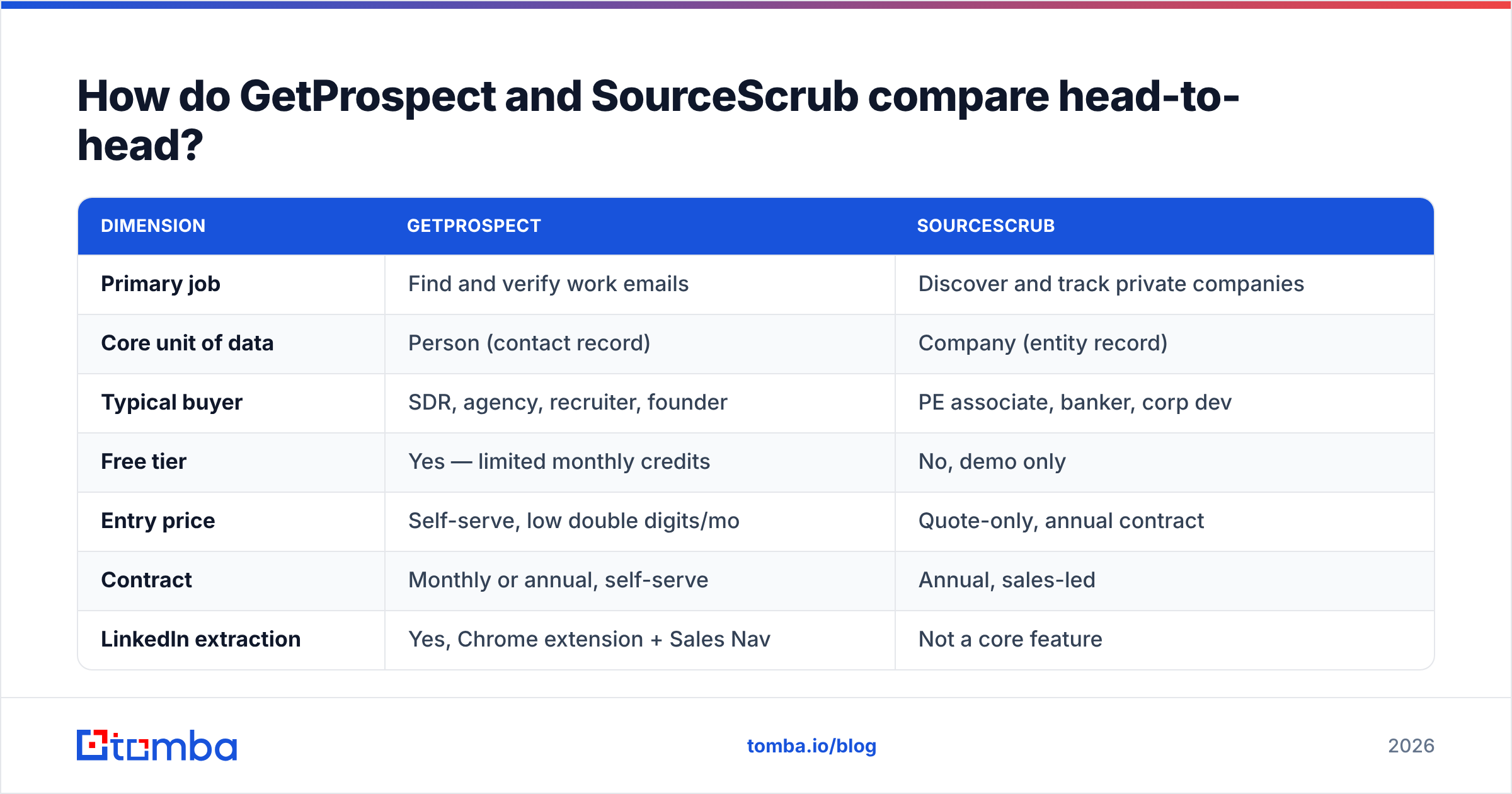
GetProspect vs SourceScrub: the head-to-head table#
| Dimension | GetProspect | SourceScrub |
|---|---|---|
| Primary job | Find and verify work emails | Discover and track private companies |
| Core unit of data | Person (contact record) | Company (entity record) |
| Typical buyer | SDR, agency, recruiter, founder | PE associate, banker, corp dev |
| Free tier | Yes — limited monthly credits | No, demo only |
| Entry price | Self-serve, low double digits/mo | Quote-only, annual contract |
| Contract | Monthly or annual, self-serve | Annual, sales-led |
| LinkedIn extraction | Yes, Chrome extension + Sales Nav | Not a core feature |
| Conference / source lists | No | Yes — the flagship differentiator |
| Growth signals (headcount, web traffic) | Minimal | Extensive, time-series |
| Email verification | Built in | Not the focus |
| API access | Yes, on paid tiers | Yes, enterprise |
| CRM integrations | HubSpot, Pipedrive, Zapier, Salesforce | Salesforce, Affinity, DealCloud |
| Best-fit motion | High-volume outbound email | Proprietary deal flow sourcing |
| Worst-fit motion | Sourcing off-market acquisition targets | Emailing 5,000 contacts next month |
Read that table as two columns that barely compete. The only real overlap is company records with some contact data attached. That overlap is shallow on both sides.
What does GetProspect actually do well?#
Four things, concretely.
- LinkedIn to email, fast. The Chrome extension pulls a Sales Navigator list into a table with emails attached. For a rep with a defined list, nothing is quicker.
- Self-serve pricing. You can start free, prove value in an afternoon, and grow without a procurement cycle.
- Bulk enrichment from a CSV. Upload names and domains. Get emails back. Plain, and heavily used.
- Contact-level filters. Job title, seniority, department, company size, industry, and location.
Where it gets thin: catch-all domains, non-English markets, and company data beyond the basics.
Say your list is 300 European manufacturers with generic info@ inboxes. Expect a chunk of "accept-all" results you cannot act on. You will need a second email verifier in the loop.
What does SourceScrub actually do well?#
The moat is not database size. Plenty of vendors claim tens of millions of records. The moat is where those records come from.
- Source lists. SourceScrub ingests conference lists, association directories, buyer's guides, and award lists. A PE associate would otherwise scrape these by hand at 11pm.
- Bootstrapped coverage. Crunchbase-style databases lean toward funded companies, because a funding round creates the record. SourceScrub leans toward firms that simply exist and sell things.
- Signals over time. Headcount, job postings, website changes, and ownership shifts, tracked month by month.
- Deal-team workflow. It plugs into Affinity and DealCloud, not just Salesforce. That tells you who it was built for.
What it does not do: hand an SDR team fifty verified emails per company. That is a scope boundary, not a flaw.
GetProspect vs SourceScrub: how the data models differ#
This is the part that decides your purchase, so it is worth being precise.
- Unit of record. GetProspect starts with a person, and company data hangs off the contact. SourceScrub starts with a company, and people hang off it sparsely.
- Refresh trigger. GetProspect refreshes on lookup and on crawl cycles. SourceScrub refreshes on events, like a new conference list or a headcount jump.
- Coverage bias. GetProspect skews to roles with public profiles: SaaS, tech, marketing, recruiting. SourceScrub skews to trade businesses: manufacturing, industrials, healthcare services.
The next three differences only show up after you export the data.
- Verification. GetProspect scores email validity and shows confidence. SourceScrub does not sell verification, so treat its emails as leads to check.
- Output shape. GetProspect exports a list ready for a sequencer. SourceScrub exports a target universe ready for a strategy, usually a personal note from a banker.
- Compliance. Both publish GDPR and CCPA docs. Person-level data at volume still carries a heavier duty. Read your own DPA either way.
GetProspect vs SourceScrub pricing in 2026#
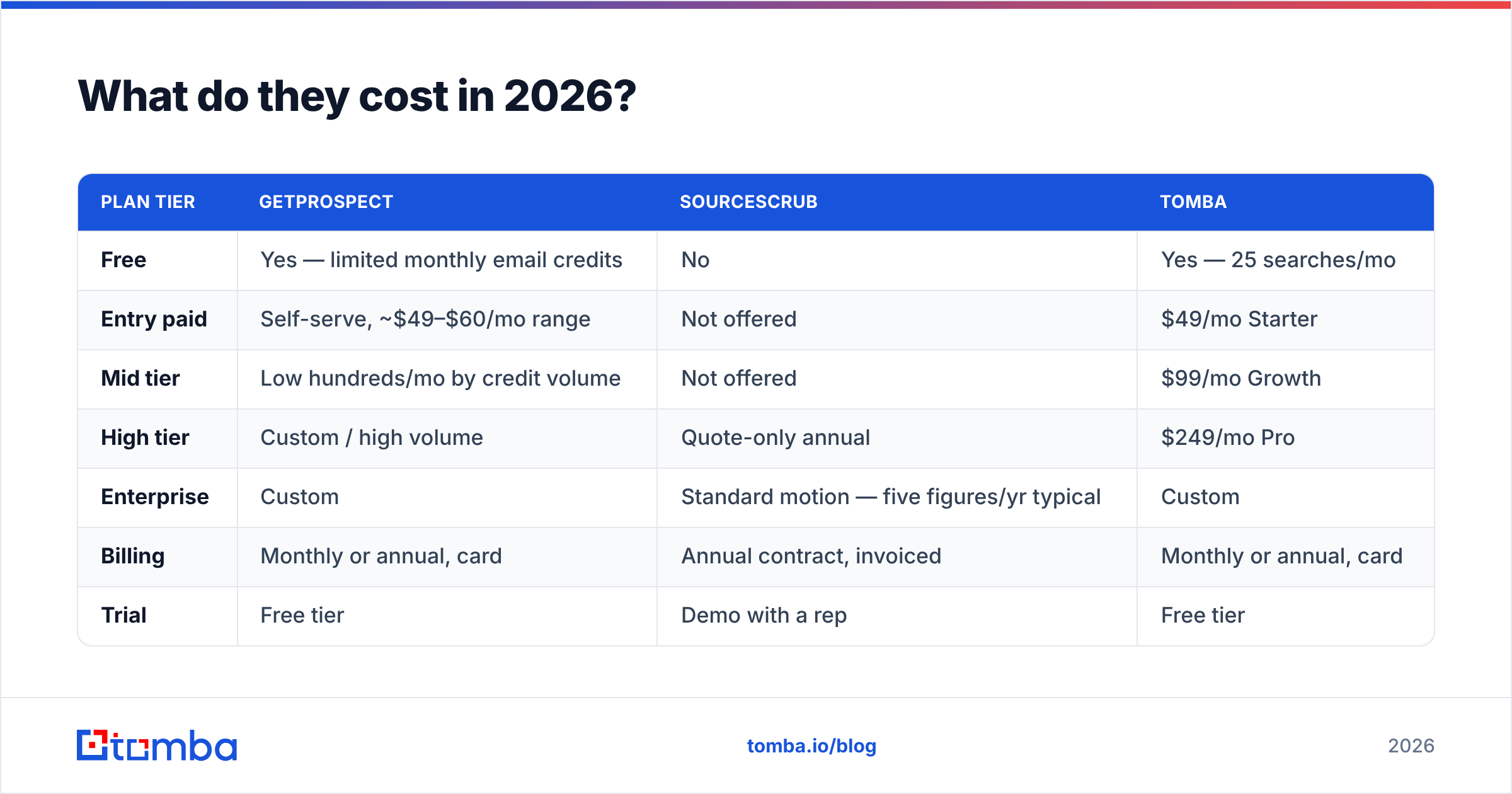
Pricing moves. Check the vendor pages before you sign anything. As of today, the shape looks like this.
| Plan tier | GetProspect | SourceScrub | Tomba |
|---|---|---|---|
| Free | Yes — limited monthly email credits | No | Yes — 25 searches/mo |
| Entry paid | Self-serve, ~$49–$60/mo range | Not offered | $49/mo Starter |
| Mid tier | Low hundreds/mo by credit volume | Not offered | $99/mo Growth |
| High tier | Custom / high volume | Quote-only annual | $249/mo Pro |
| Enterprise | Custom | Standard motion — five figures/yr typical | Custom |
| Billing | Monthly or annual, card | Annual contract, invoiced | Monthly or annual, card |
| Trial | Free tier | Demo with a rep | Free tier |
| Credit rollover | Plan-dependent | N/A (seat-based) | Plan-dependent |
The practical read: GetProspect and Tomba are expense-report buys. SourceScrub is a budget line that needs a partner's signature.
A two-person search fund can still justify it, because one proprietary deal pays for years of the subscription. A Series A startup with four SDRs cannot.
Cross-check the numbers against G2's category listings and the vendor pages. Self-serve tiers move every quarter. Enterprise quotes swing on seat count and export rights more than on features.

Is one better than the other for cold outreach?#
GetProspect, and it is not close.
Cold outreach needs three things SourceScrub does not supply. You need volume of deliverable addresses, verification confidence, and a low cost per contact. SourceScrub gives you the company and a rough sense of who runs it. You still have to find the CRO's email.
So the GetProspect vs SourceScrub question is often a stacking question. Source the universe in SourceScrub. Then run the contact layer through a dedicated finder.
A domain search across 400 sourced domains returns the real people and email patterns behind each one. The per-lookup cost does not need a budget conversation. Feed the result into a bulk email finder and you have a list by the end of the day.
HubSpot's own sales benchmarks keep landing on one point. Bounce rate is the input you control most. Great targeting plus unverified addresses is just a slower way to burn your domain.
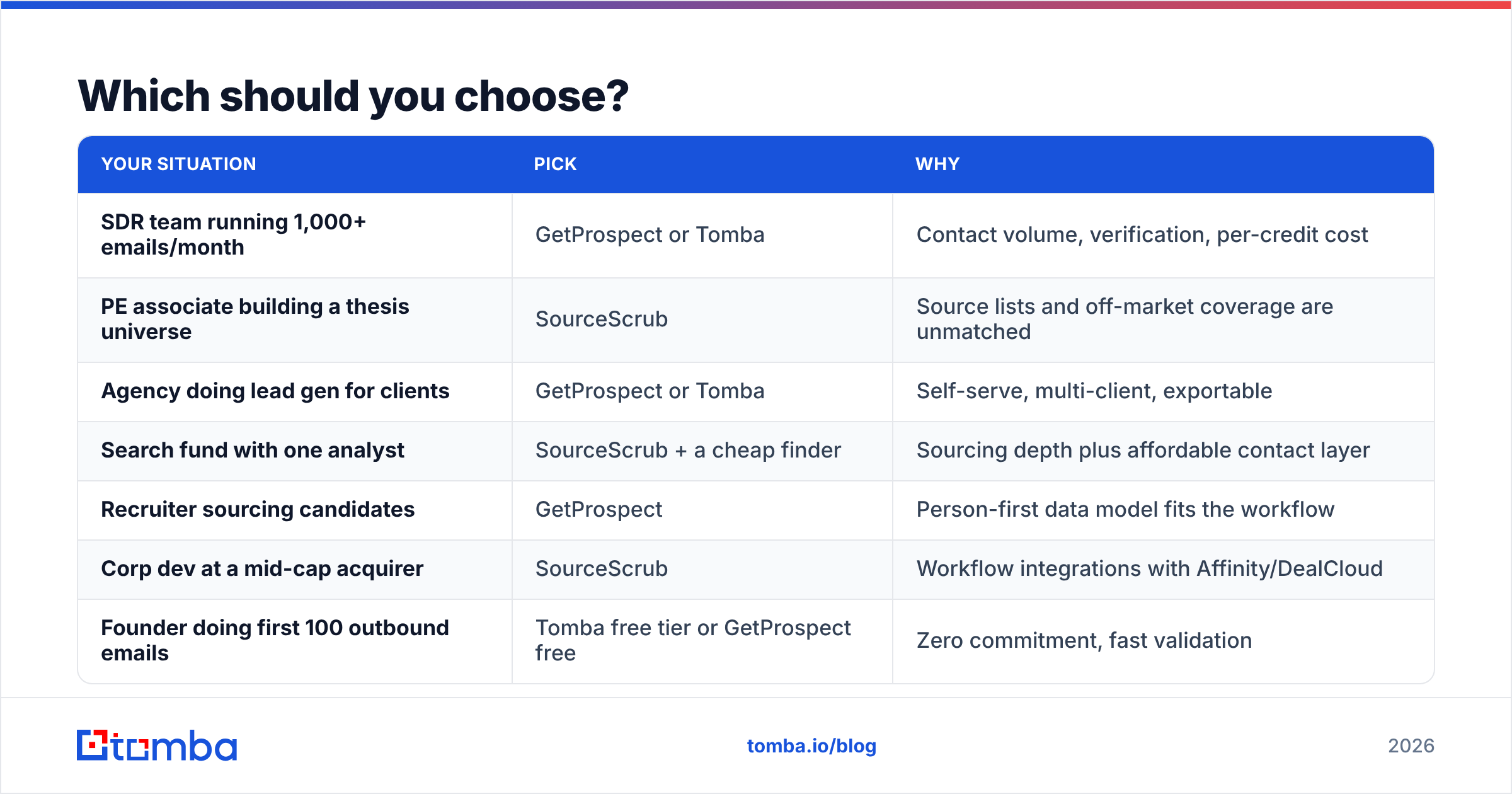
Which should you choose?#
Match the tool to the job, not to the feature list.
| Your situation | Pick | Why |
|---|---|---|
| SDR team running 1,000+ emails/month | GetProspect or Tomba | Contact volume, verification, per-credit cost |
| PE associate building a thesis universe | SourceScrub | Source lists and off-market coverage are unmatched |
| Agency doing lead gen for clients | GetProspect or Tomba | Self-serve, multi-client, exportable |
| Search fund with one analyst | SourceScrub + a cheap finder | Sourcing depth plus affordable contact layer |
| Recruiter sourcing candidates | GetProspect | Person-first data model fits the workflow |
| Corp dev at a mid-cap acquirer | SourceScrub | Workflow integrations with Affinity/DealCloud |
| Founder doing first 100 outbound emails | Tomba free tier or GetProspect free | Zero commitment, fast validation |
| RevOps enriching an existing CRM | Tomba or GetProspect API | Per-record enrichment, no seat minimums |
Still torn on GetProspect vs SourceScrub? Ask one question. Do I already know which companies I want to reach? If yes, you need a contact tool. If no, you need a discovery tool. SourceScrub answers "who exists". GetProspect answers "how do I reach them".
Where does Tomba fit in this comparison?#
Tomba competes with GetProspect, not with SourceScrub. Same job: find and verify work email addresses. A few differences are worth knowing.
- Verification comes first. Catch-all domains break every email finder. Tomba ships a catch-all verifier instead of a shrug labeled "accept-all".
- Developer surface. There is a documented email finder API, a CLI, a Google Sheets add-on, and an MCP server. That matters when you enrich inside a pipeline.
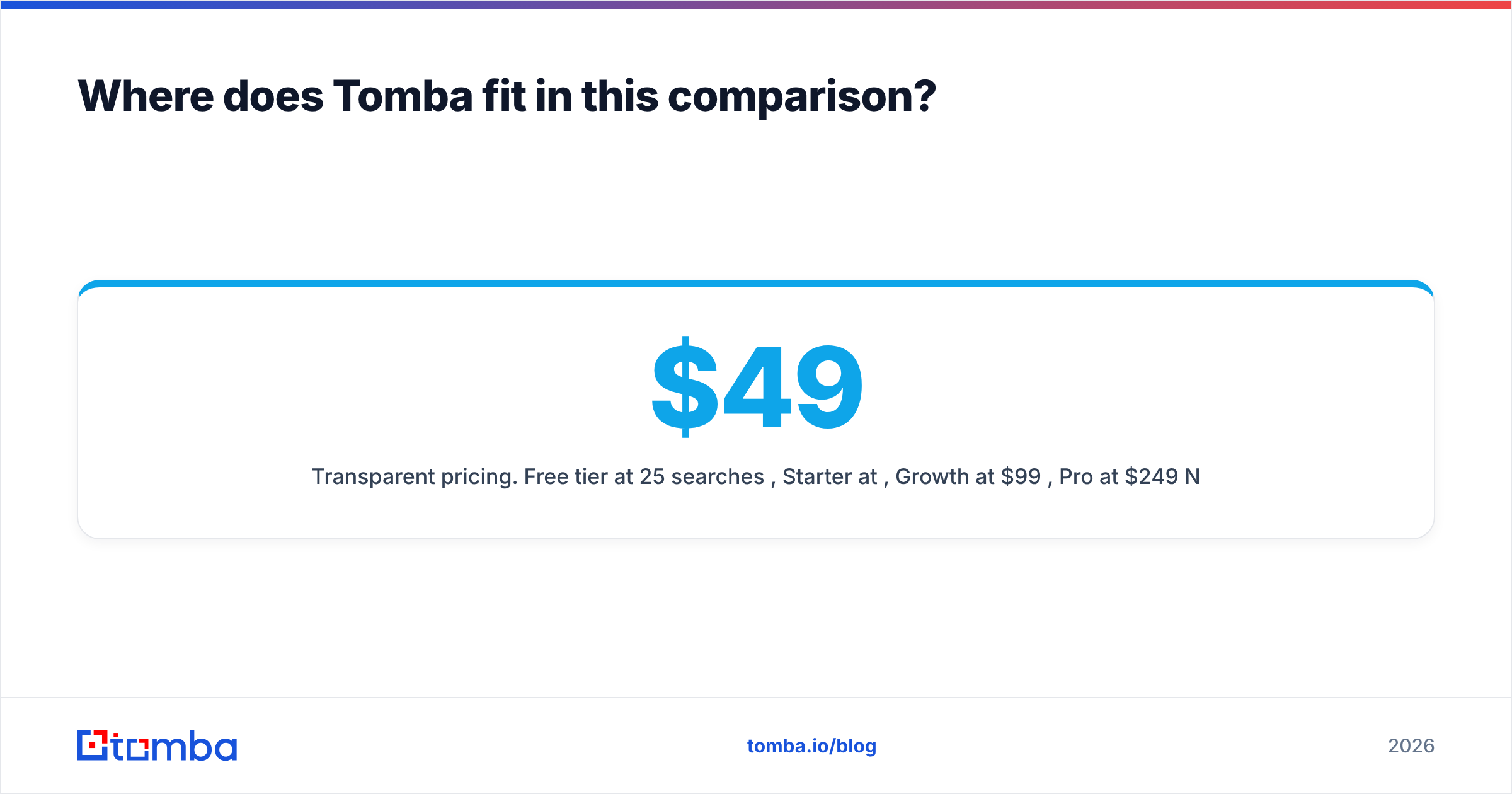
- Public pricing. Free at 25 searches a month, then $49, $99, and $249 tiers. No quote call. Full Tomba pricing is on the site.
- Adjacent data. Phone finder, reverse email lookup, and contact enrichment sit next to the finder, so a sourced list fills out in one pass.
Honest limit: Tomba does not do private-company discovery, conference lists, or ownership tracking. If that is the job, SourceScrub is the right category.
Getting the contact layer right#
Whichever discovery layer you pick, the emails still have to be real. A perfect list of 300 off-market industrial firms means nothing if you send to guessed addresses. That is how good targeting ends in a blocked domain.
Start with the Tomba Email Finder on the free tier. You get 25 searches and no card is needed. Run it against the twenty companies you care about most.
Compare hit rate and bounce rate with your current tool. If it holds up, the $49/mo Starter plan covers most single-rep workloads. The API takes over when you are ready to automate.
Related guides#
Ready to find emails that actually work?
Join 150,000+ professionals who stopped guessing and started sending. Free credits on signup — no credit card required.
Get the Tomba newsletter
Practical outbound tactics and product updates — once every two weeks.
About the author