GetProspect vs TrueList: Which B2B Email Tool Wins in 2026
GetProspect finds emails. TrueList verifies them. They are not really competitors — but most teams only budget for one. Here is the honest breakdown of accuracy, pricing, and which one your outbound stack actually needs.
TL;DR
- GetProspect is a prospecting database + email finder. TrueList is a bulk email verifier. Comparing them head-to-head is like comparing a well to a water filter — you probably need both functions, not one product.
- If your problem is "I don't have enough contacts," GetProspect is the relevant tool. If your problem is "my bounce rate is 9% and Google is throttling me," TrueList is the relevant tool.
- GetProspect includes basic verification; TrueList includes zero discovery. Neither covers the full find → verify → enrich loop on its own.
- Running both means two subscriptions, two credit systems, and a CSV shuttle between them. Consolidated platforms like Tomba do finding and verification on one credit pool starting at $49/mo.
- Read the pricing math below before you buy either — the "cheap" pay-as-you-go option is often more expensive at volume than a single seat that does both.
What are GetProspect and TrueList?#
GetProspect is a B2B contact database with a LinkedIn-first workflow. You filter a database of company and people records by job title, industry, headcount, location, and tech stack, then export contacts with work emails attached. It ships a Chrome extension that pulls emails while you browse LinkedIn profiles and search results, plus a lightweight CRM-ish list manager so you can tag and segment what you pulled. The product's centre of gravity is discovery — turning "VP of Engineering at 50–200 person fintechs in Germany" into a list of named humans with addresses.
TrueList does one job: it takes a list of email addresses you already have and tells you which ones will bounce. Upload a CSV, and it runs syntax checks, MX record lookups, disposable-domain detection, role-account flagging (info@, sales@, support@), and SMTP-level mailbox probing. You get back a categorised file — deliverable, risky, undeliverable, unknown — and you suppress the bad rows before they ever reach your sending tool. It's positioned as a fast, no-nonsense validator rather than a data platform.
So the honest framing of GetProspect vs TrueList is not "which is better." It's "which stage of the pipeline is currently costing me money."
How do these two tools actually differ?#
Four structural differences matter more than any feature checkbox:
- Input vs output. GetProspect starts from criteria (title, industry, domain) and produces contacts. TrueList starts from contacts and produces a verdict. One creates data, the other grades it.
- Credit economics. Finder credits are expensive because sourcing and matching a person is hard. Verification credits are cheap because it's mostly DNS and SMTP handshakes at scale. Never compare their per-credit prices directly — you'll conclude the wrong thing.
- Failure mode. GetProspect's failure mode is a missing email (no result for a person you wanted). TrueList's failure mode is an ambiguous email (a catch-all domain it can't resolve). These break your workflow in completely different ways.
- Where they sit in the stack. GetProspect sits at the top of funnel, next to LinkedIn Sales Navigator and your ICP spreadsheet. TrueList sits at the bottom of list-building, immediately before your sending tool — Instantly, Smartlead, HubSpot, whatever.

If you've ever exported from a finder, uploaded to a verifier, downloaded the clean file, re-uploaded to a sequencer, and then discovered the column headers changed — you already understand why the separation is annoying at volume.
How do GetProspect and TrueList compare feature by feature?#
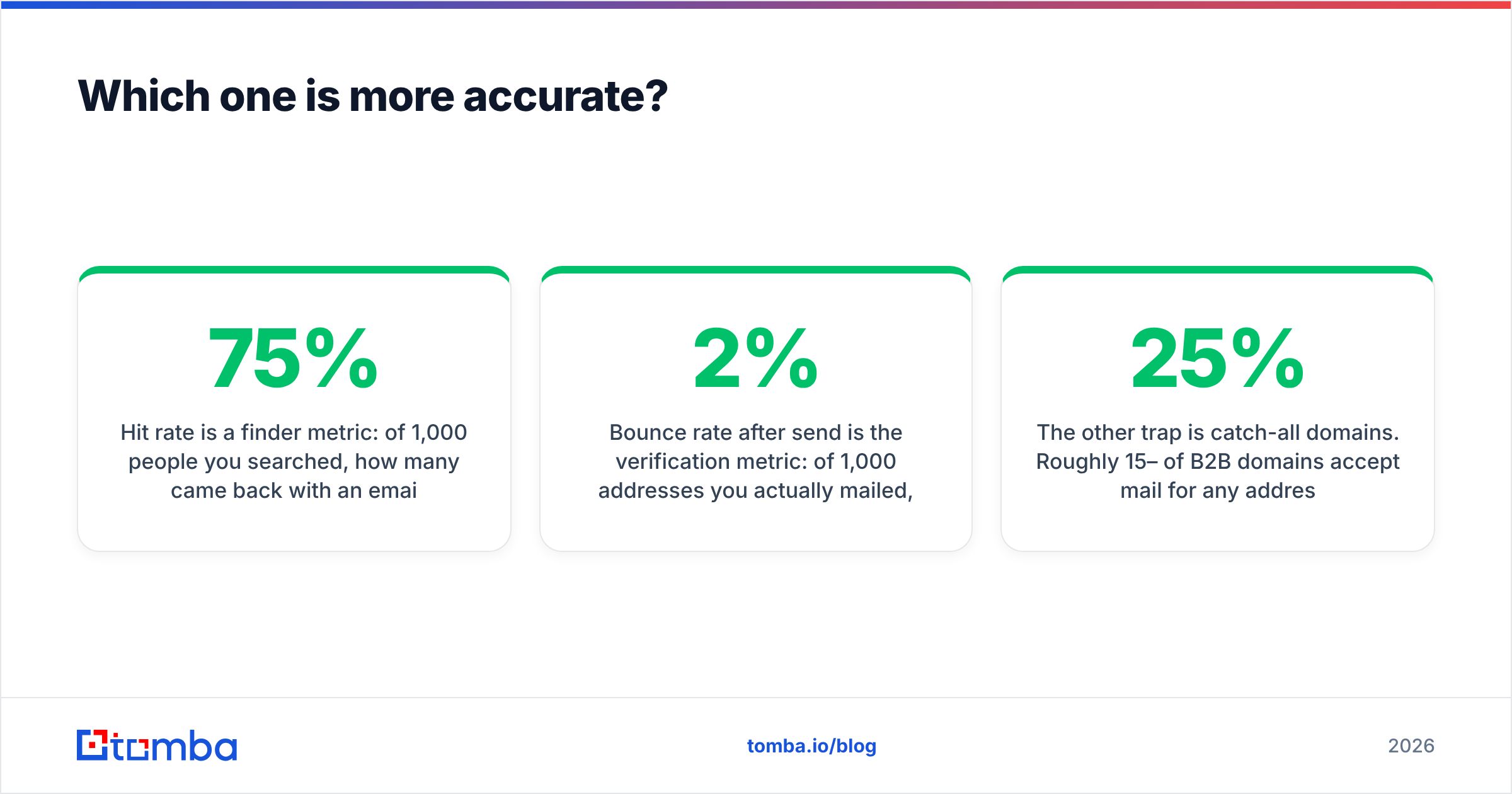
| Capability | GetProspect | TrueList | Tomba |
|---|---|---|---|
| Primary job | Find B2B emails | Verify email lists | Find + verify |
| Contact database | Yes, filterable | No | Yes |
| LinkedIn extension | Yes | No | Yes |
| Domain / company search | Yes | No | Yes |
| Bulk list verification | Basic, included | Yes, core product | Yes |
| Catch-all handling | Marked as risky | Flagged separately | Dedicated catch-all verifier |
| Phone numbers | Limited | No | Yes |
| Public API | Yes | Yes | Yes |
| Free tier | ~50 emails/mo | Free trial credits | 25 searches/mo |
| Entry paid plan | ~$49/mo | Pay-as-you-go packs | $49/mo |
| Best for | List building | Pre-send hygiene | Both in one workflow |
Two notes on reading that table honestly. First, GetProspect's "included verification" is real but shallow — it's a validity flag on the records it returns, not a general-purpose validator you'd point at a 200k-row list from a trade show. Second, TrueList's lack of discovery isn't a weakness; it's a deliberate scope choice, and narrow tools are often better at their one job than suites are.

Which one is more accurate?#
They measure different things, so "accuracy" splits into two numbers you should track separately.
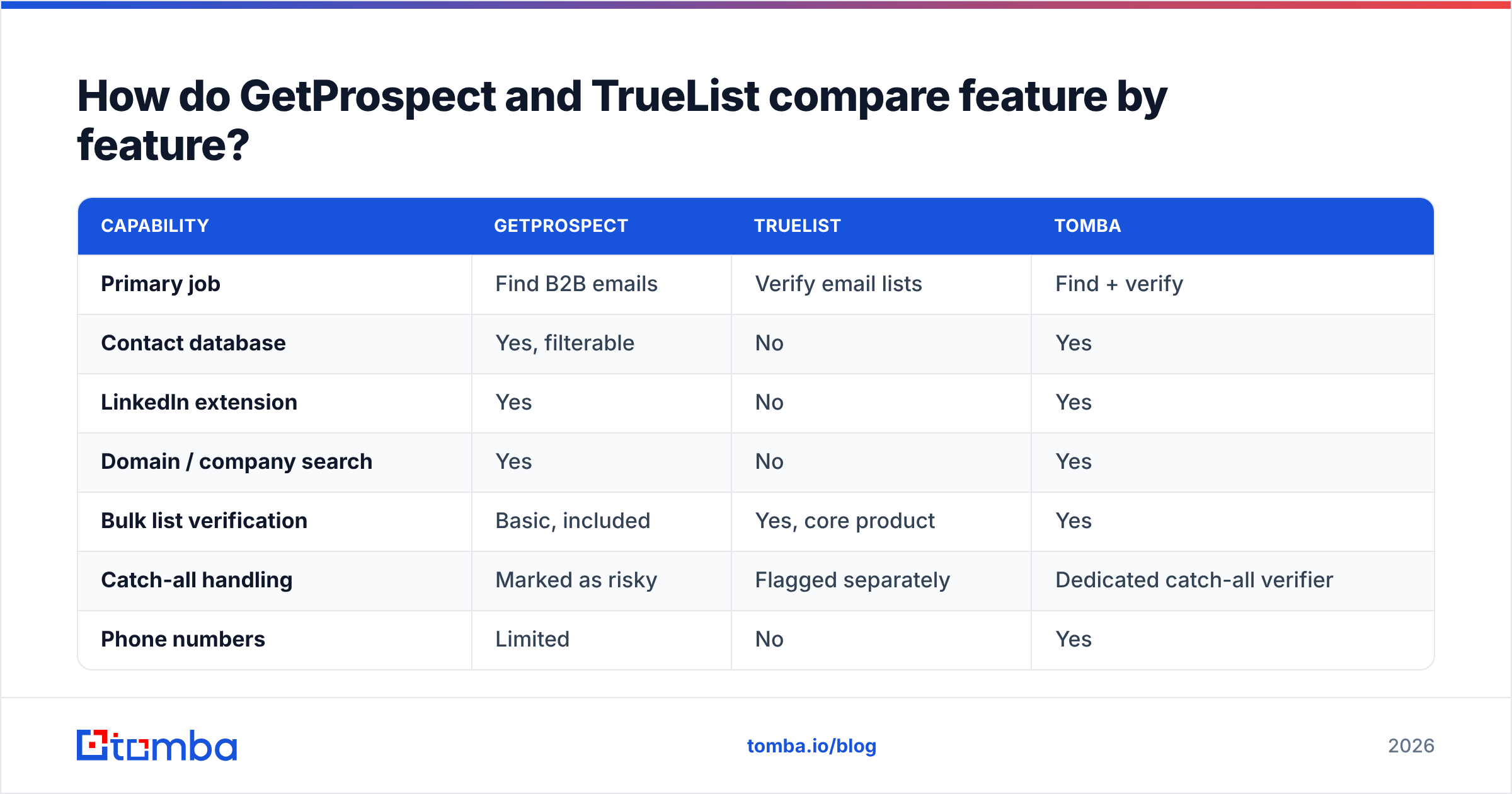
Hit rate is a finder metric: of 1,000 people you searched, how many came back with an email at all? For most database-driven finders including GetProspect, expect somewhere in the 55–75% range on standard B2B targets, dropping hard on small companies, non-English markets, and privacy-heavy regions. Nobody hits 95%, and any vendor claiming it is counting differently than you are.
Bounce rate after send is the verification metric: of 1,000 addresses you actually mailed, how many hard-bounced? A good verifier should get you under 2%, and under 1% on lists that aren't full of catch-all domains. This is what TrueList is optimising for, and dedicated verifiers generally do it well.
The trap: a finder with a high hit rate and loose validation will hand you plausible-looking guesses. firstname.lastname@company.com is a pattern, not a fact. If a tool returns a pattern-generated address with no SMTP confirmation and labels it "found," your hit rate looks great and your bounce rate quietly destroys your sender reputation three weeks later.
The other trap is catch-all domains. Roughly 15–25% of B2B domains accept mail for any address, so SMTP probing returns "yes" for asdkjh@company.com too. Both GetProspect and TrueList will flag these as risky or unknown — they're being honest, but you're left with a bucket of contacts and no decision. This is where a dedicated catch-all verifier earns its keep, because it uses pattern confidence and secondary signals rather than shrugging.
Practical benchmark you can run this week: take 200 contacts you already know are real (customers, past demos, colleagues at other companies). Push them through both tools. Count how many GetProspect finds correctly, and count how many TrueList marks deliverable that you know are live. Vendor-published accuracy stats mean far less than a 200-row test on your own ICP. G2's email verification category is a decent sanity check on reviewer sentiment, but it's no substitute for your own list.
How much do they cost in practice?#
Here is where the "which do I buy" question usually gets settled.
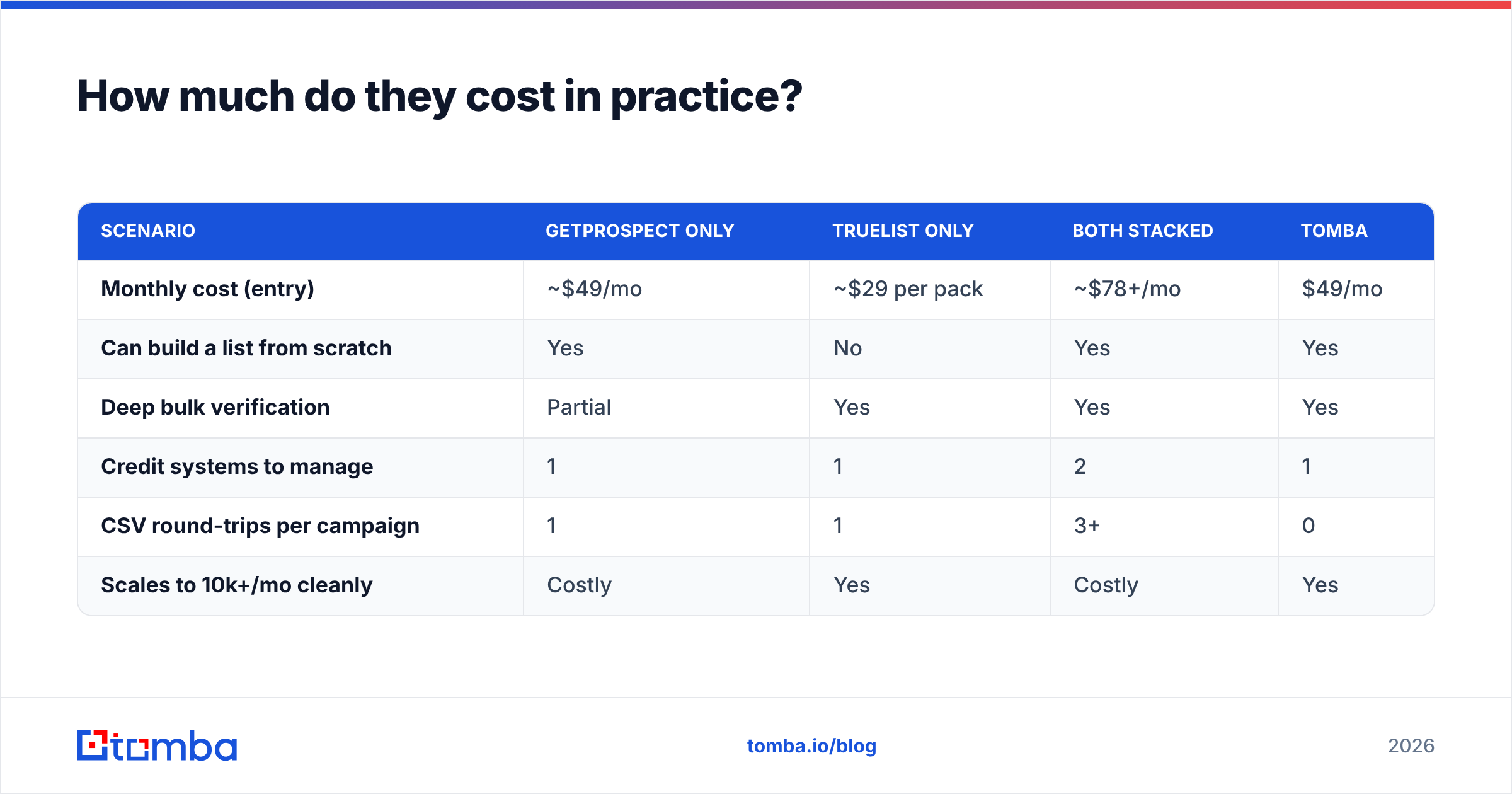
| Scenario | GetProspect only | TrueList only | Both stacked | Tomba |
|---|---|---|---|---|
| Monthly cost (entry) | ~$49/mo | ~$29 per pack | ~$78+/mo | $49/mo |
| Can build a list from scratch | Yes | No | Yes | Yes |
| Deep bulk verification | Partial | Yes | Yes | Yes |
| Credit systems to manage | 1 | 1 | 2 | 1 |
| CSV round-trips per campaign | 1 | 1 | 3+ | 0 |
| Scales to 10k+/mo cleanly | Costly | Yes | Costly | Yes |
Pricing on both products moves, so treat those figures as a starting shape rather than a quote — check each vendor's live pricing page before you commit. The durable point is structural: verification is cheap, discovery is not, and paying two vendors means paying two platform fees for one workflow.
At small volume (a founder doing 200 outbound touches a month), the stacked approach is defensible. At 5,000+ contacts a month, the CSV shuttle stops being a minor annoyance and starts being someone's part-time job. That's the moment teams consolidate.

Which should you choose for your workflow?#
Match the tool to the bottleneck, not to the marketing.
- You have a defined ICP but no contact list. GetProspect. Discovery is your gap; buy discovery. Add cheap verification later when volume justifies it.
- You inherited a 40k-row list of unknown quality. TrueList. You don't need more contacts, you need to know which of these will bounce before your domain gets flagged.
- You're rebuilding outbound from zero. You need both functions. Decide whether you want them from two vendors or one.
- You're an agency running lists for multiple clients. Consolidate. Two vendors × ten clients is a reconciliation nightmare at renewal time.
- You're a developer wiring enrichment into a product. Pick on API quality, rate limits, and response schema — not on the dashboard. Both offer APIs; test the docs and error handling before you commit a sprint.
- Your bounce rate is already above 5%. Stop sending today, verify everything, and fix your list before you touch anything else. No finder upgrade fixes a poisoned domain.
One more thing worth saying plainly: neither tool solves email deliverability. Verification prevents hard bounces. It does not fix SPF/DKIM misconfiguration, a cold domain with no warmup history, or copy that gets you marked as spam. Teams routinely blame their data vendor for what is actually an infrastructure or content problem.

Where does Tomba fit in this comparison?#
Fairly: Tomba is a third option, not an automatic winner. If you only ever need bulk verification and nothing else, a dedicated verifier is a clean, cheap, focused choice, and you should buy it.
Tomba becomes the better answer when you need both halves of the loop on one credit pool. The email finder handles discovery by name, domain, or company. The email verifier runs the same SMTP, MX, syntax, disposable, and role-account checks a standalone validator does — and every address the finder returns is verified before it reaches you, so there's no separate cleanup pass. Domain search pulls every published address on a company domain when you want breadth rather than a single named target, and bulk processing covers list-scale work.
Where it materially differs from a two-vendor stack:
- One credit pool. Finding and verifying draw from the same balance. No stranded credits in the tool you used less this month.
- No CSV shuttle. Results come out verified. The three-step export/upload/download loop disappears.
- Catch-all as a first-class case. Instead of a generic "unknown," catch-all domains get their own resolution path.
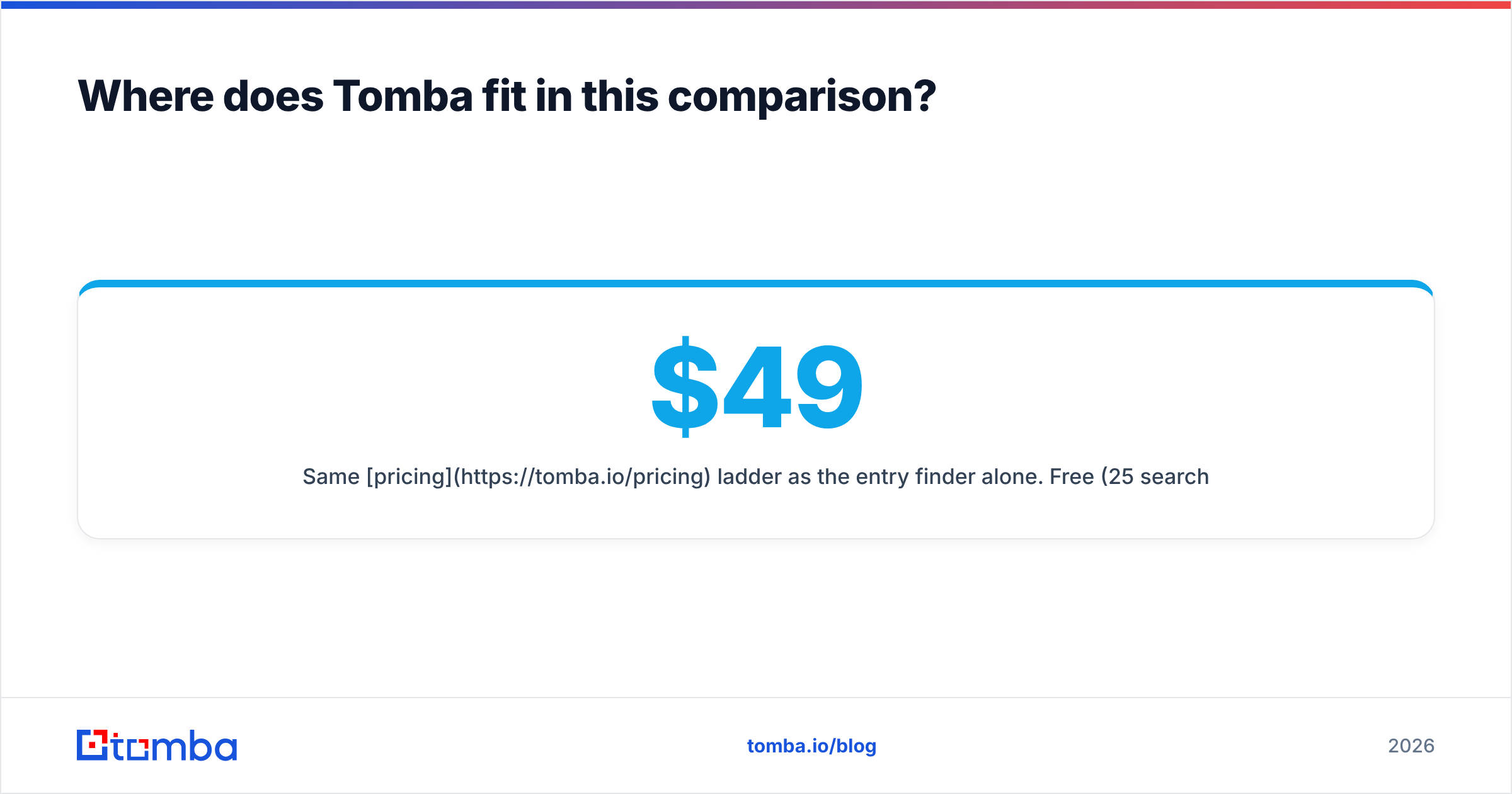
- Same pricing ladder as the entry finder alone. Free (25 searches/mo), Starter $49/mo, Growth $99/mo, Pro $249/mo, Enterprise custom.
- A real API, CLI, and MCP server if the workflow lives in code rather than a dashboard.
The honest caveat: if GetProspect's LinkedIn-native filtering is the specific thing your SDRs live in every day, that habit has real value, and switching costs are not zero. Run both against the same 200-row test list and let the hit rate decide.
What should you do next?#
Run the test before you run the credit card. Pick 200 contacts you can independently confirm, push them through GetProspect, TrueList, and one consolidated option, and compare found-rate and bounce-rate on identical inputs. That single afternoon tells you more than every comparison post on the internet — including this one.
If the outcome you want is a verified list without a two-vendor reconciliation problem, start with the Tomba Email Finder. The free tier gives you 25 searches a month with verification included, which is enough to run the 200-row benchmark on a sample and see the found-rate and confidence scores against contacts you already know. If it wins on your ICP, Starter is $49/mo and covers both halves of the workflow. If it doesn't, you've lost an afternoon and learned exactly which vendor to pay.
Related guides#
Ready to find emails that actually work?
Join 150,000+ professionals who stopped guessing and started sending. Free credits on signup — no credit card required.
Get the Tomba newsletter
Practical outbound tactics and product updates — once every two weeks.
About the author