GetProspect vs Woodpecker (2026): Which Tool Wins Your Outbound?
GetProspect finds the contacts. Woodpecker sends the sequences. They are not really competitors — and picking the wrong one costs you a whole quarter of pipeline. Here is the honest breakdown.
TL;DR
- GetProspect is a B2B contact database and email finder. Woodpecker is a cold email sending and deliverability platform. They solve different halves of the same problem, and most teams eventually run both.
- If your lists are thin, you have a data problem — start with a finder. If your emails land in spam or you send manually, you have a delivery problem — start with Woodpecker.
- GetProspect starts around $49/mo for meaningful volume; Woodpecker starts around $29–$34/mo per sending slot and scales by mailbox, not by contact.
- Woodpecker's built-in verification is basic. GetProspect's LinkedIn-sourced data is decent but skews toward large, well-indexed companies.
- The cheapest real-world stack in 2026 is usually a dedicated finder/verifier (Tomba, $49/mo Starter) feeding a sequencer — not one tool trying to do both badly.
What is GetProspect and what is Woodpecker?#
Think of outbound like a restaurant. GetProspect is the supplier who brings you ingredients — names, emails, job titles, company data. Woodpecker is the kitchen and the waiter — it cooks the sequence, times the follow-ups, and gets the plate to the table without dropping it. Comparing them head-to-head is like arguing whether a fishmonger beats a sous-chef.
GetProspect (getprospect.com) is a contact database with a LinkedIn Chrome extension. You search by title, industry, headcount, or geography, and it returns work emails plus company attributes. It also ships a light CRM-ish list manager and, in recent versions, a basic email-sending add-on.
Woodpecker (woodpecker.co) is a cold email tool built by a Polish team with an unusually deliverability-first culture. It connects your mailboxes, throttles sends, rotates inboxes, detects replies, pauses sequences on human responses, and — critically — runs its own warmup and bounce-shield logic before a campaign goes out.
So the honest framing for getprospect vs woodpecker is: which gap in your outbound machine is bleeding the most money right now?
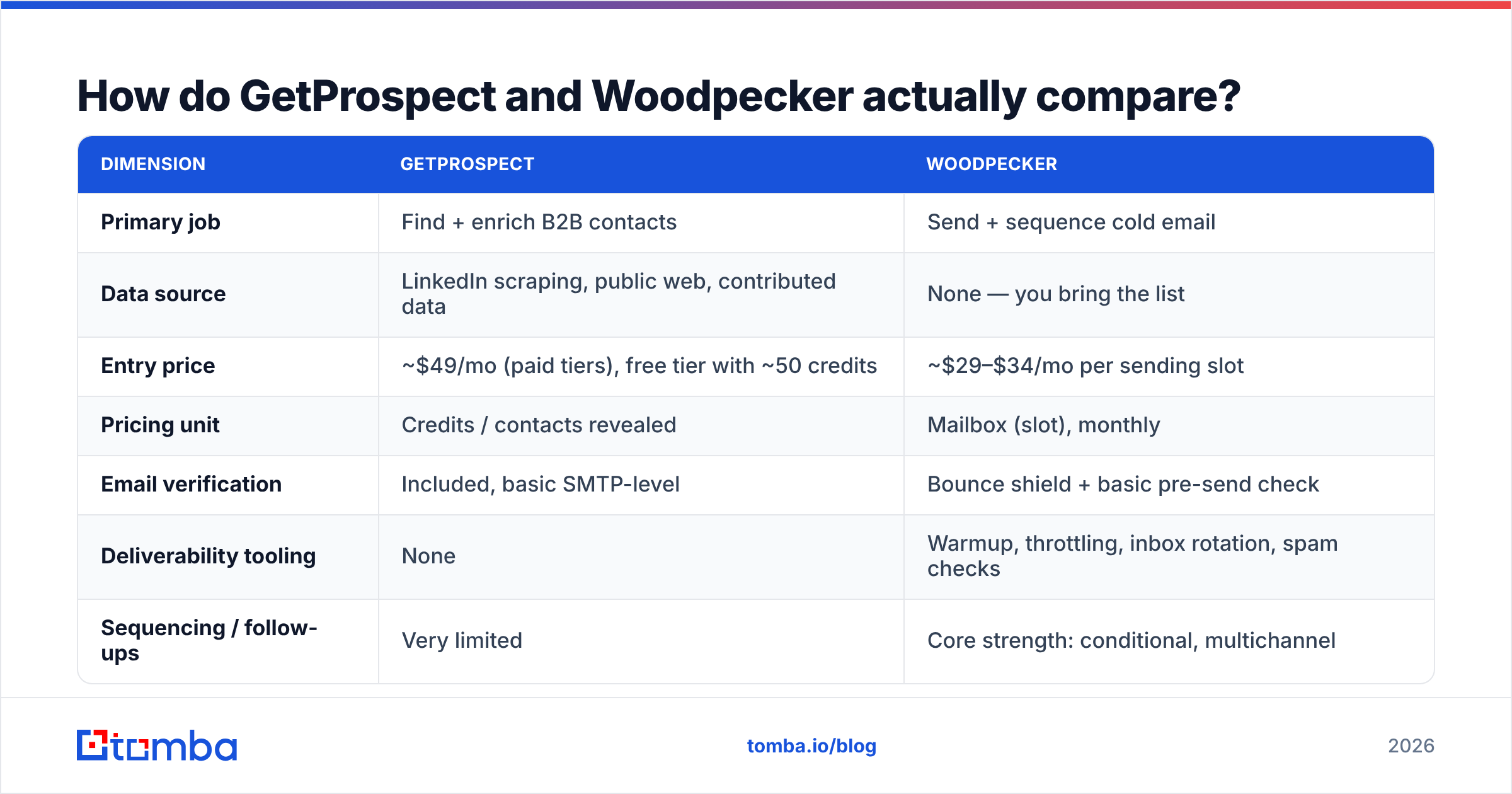
How do GetProspect and Woodpecker actually compare?#
| Dimension | GetProspect | Woodpecker |
|---|---|---|
| Primary job | Find + enrich B2B contacts | Send + sequence cold email |
| Data source | LinkedIn scraping, public web, contributed data | None — you bring the list |
| Entry price | ~$49/mo (paid tiers), free tier with ~50 credits | ~$29–$34/mo per sending slot |
| Pricing unit | Credits / contacts revealed | Mailbox (slot), monthly |
| Email verification | Included, basic SMTP-level | Bounce shield + basic pre-send check |
| Deliverability tooling | None | Warmup, throttling, inbox rotation, spam checks |
| Sequencing / follow-ups | Very limited | Core strength: conditional, multichannel |
| CRM sync | HubSpot, Pipedrive, Zapier | HubSpot, Pipedrive, Salesforce, Zapier |
| API access | Yes, on higher tiers | Yes |
| Best for | Building the list | Working the list |
The table makes the verdict obvious for most readers: you are probably not choosing between them. You are choosing which one to buy first, and then which finder or sequencer completes the pair.
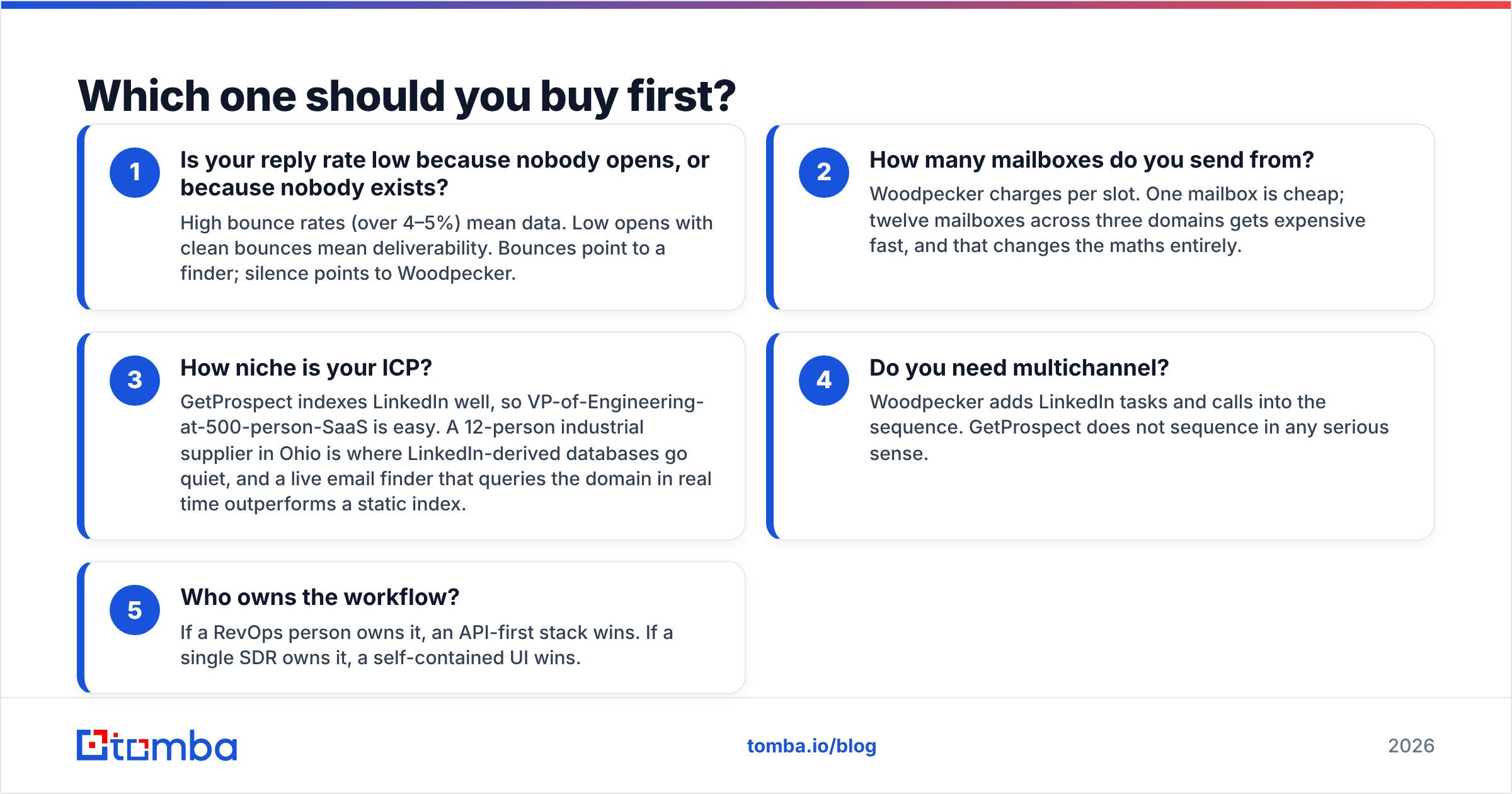
Which one should you buy first?#
Use these five questions as a triage. Answer honestly — most teams misdiagnose this.
- Is your reply rate low because nobody opens, or because nobody exists? High bounce rates (over 4–5%) mean data. Low opens with clean bounces mean deliverability. Bounces point to a finder; silence points to Woodpecker.
- How many mailboxes do you send from? Woodpecker charges per slot. One mailbox is cheap; twelve mailboxes across three domains gets expensive fast, and that changes the maths entirely.
- How niche is your ICP? GetProspect indexes LinkedIn well, so VP-of-Engineering-at-500-person-SaaS is easy. A 12-person industrial supplier in Ohio is where LinkedIn-derived databases go quiet, and a live email finder that queries the domain in real time outperforms a static index.
- Do you need multichannel? Woodpecker adds LinkedIn tasks and calls into the sequence. GetProspect does not sequence in any serious sense.
- Who owns the workflow? If a RevOps person owns it, an API-first stack wins. If a single SDR owns it, a self-contained UI wins.
How accurate is GetProspect's data compared to a dedicated finder?#
Here is where the comparison gets uncomfortable for both tools.
GetProspect's coverage is genuinely strong on the LinkedIn-shaped middle of the market — funded startups, mid-market SaaS, agencies, anyone whose team keeps profiles current. Reported accuracy in that band typically lands in the 85–92% range depending on seniority. Accuracy drops when you leave that band: non-English-speaking markets, sub-20-employee companies, and roles that rarely touch LinkedIn (plant managers, clinic directors, franchise owners).
Woodpecker's verification is a different animal entirely. Its bounce shield is designed to stop obviously dead addresses from torching your sender reputation mid-campaign. It is a seatbelt, not a list-cleaning service. If you upload a 3,000-row list of guessed permutations, Woodpecker will catch some of the garbage and still let plenty through, because SMTP-level checks cannot resolve catch-all domains on their own.
That catch-all problem is the single biggest hidden cost in cold email. Roughly a third of B2B domains accept every address at the gateway and bounce silently later, which means a "valid" flag from a basic checker is often a coin flip. Handling those properly needs a dedicated catch-all verifier that uses pattern confidence and secondary signals rather than a single SMTP handshake.
A practical rule: whatever you use to find emails, run the export through a separate email verifier before it ever touches a sequencer. Treat the finder's confidence score as a hypothesis, not a fact.
What does each one really cost in 2026?#
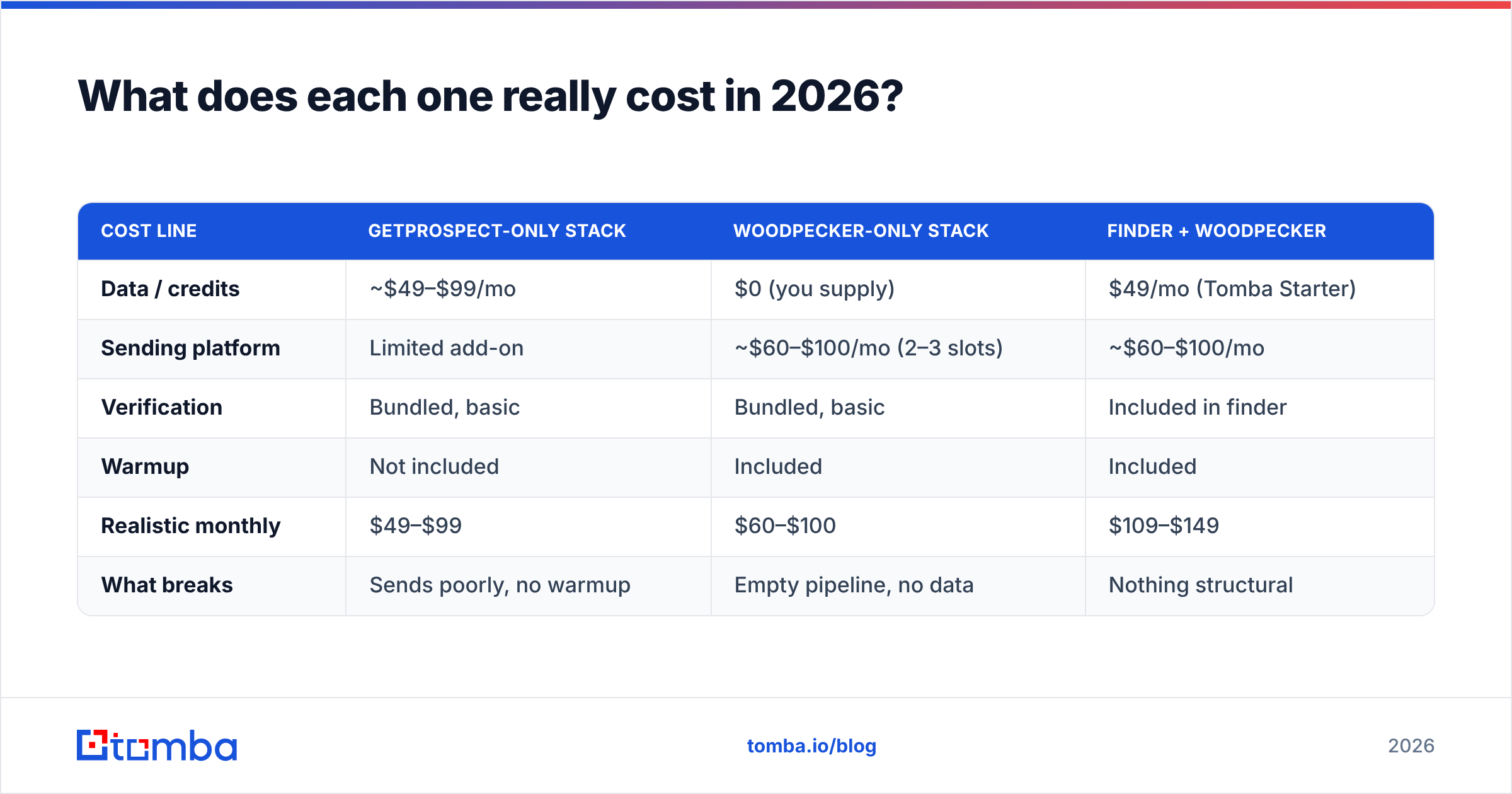
Published pricing is only half the story. Here is the realistic total for a two-SDR team sending 2,000 cold emails a month.
| Cost line | GetProspect-only stack | Woodpecker-only stack | Finder + Woodpecker |
|---|---|---|---|
| Data / credits | ~$49–$99/mo | $0 (you supply) | $49/mo (Tomba Starter) |
| Sending platform | Limited add-on | ~$60–$100/mo (2–3 slots) | ~$60–$100/mo |
| Verification | Bundled, basic | Bundled, basic | Included in finder |
| Warmup | Not included | Included | Included |
| Realistic monthly | $49–$99 | $60–$100 | $109–$149 |
| What breaks | Sends poorly, no warmup | Empty pipeline, no data | Nothing structural |
The third column costs more on paper and is cheaper in practice, because bounced sends and burned domains are the most expensive line item nobody puts in the spreadsheet. Replacing a scorched sending domain costs weeks of warmup, not dollars.
For reference, Tomba pricing runs Free (25 searches/mo), Starter $49/mo, Growth $99/mo, Pro $249/mo, and Enterprise custom — with finder, verifier, domain search, and enrichment on the same credit pool rather than as separate SKUs. That bundling matters when you are already paying per sending slot elsewhere.

Is Woodpecker better than GetProspect for deliverability?#
Yes, and it is not close — because GetProspect barely competes here.
Woodpecker's deliverability stack includes:
- Adaptive sending that spreads volume across the day instead of firing 200 emails at 9:01 a.m.
- Inbox rotation so a single mailbox never carries the whole campaign.
- Reply detection that pulls a prospect out of the sequence the moment a human responds, which protects both your reputation and your dignity.
- Warmup that builds positive engagement signals on new domains before real campaigns start.
- Human-graded spam checks against common filter triggers.
If you want to understand why this matters more than list size, Google's own sender guidelines spell out the authentication and complaint-rate thresholds that now gate bulk delivery to Gmail. Miss them and no amount of contact data helps. Pair that with a clean SPF record and DMARC alignment and you have removed the majority of self-inflicted deliverability wounds.
What Woodpecker cannot do is manufacture prospects. Its own docs assume you arrive with a list. That is the assumption a lot of first-time buyers miss, then blame the tool when campaigns go nowhere.
Where does GetProspect win outright?#
Three scenarios, and they are real:
- You already have a sequencer. If you run Instantly, Smartlead, Lemlist, or a native HubSpot sequence, you do not need Woodpecker — you need contacts. GetProspect slots straight in.
- You prospect visually on LinkedIn. The Chrome extension is competent for reps who work Sales Navigator lists manually and want emails appended as they browse.
- You want list-building and light storage in one place. GetProspect's list manager is more than a CSV dump, which suits solo founders who do not want a CRM yet.
Where it stalls: bulk enrichment at scale, API-first workflows, and any account whose people are not well-represented on LinkedIn. For high-volume enrichment, purpose-built bulk email finder tooling or a direct API integration will move faster and cost less per verified record.
What do real reviewers say about each?#
Both tools sit comfortably in the "good, not magic" band on public review sites. On G2, Woodpecker consistently earns praise for support responsiveness and deliverability results, with the most common complaint being per-slot pricing at scale and a UI that feels dated next to newer entrants. GetProspect reviews cluster around ease of use and value, with recurring notes about credit burn on unverified results and coverage gaps outside major markets.
Cross-check on Capterra and the pattern holds. Neither tool has a reputation problem; both have a scope problem if you expect one product to run your entire outbound motion.
Worth noting for buyers comparing data vendors specifically: providers like BookYourData take a different approach — pre-verified, purchasable lists with accuracy guarantees rather than credit-metered lookups. That model suits teams who want a defined dataset up front instead of searching contact by contact, and it is a legitimate third path alongside the finder-plus-sequencer stack described here.
What is the best stack in 2026?#
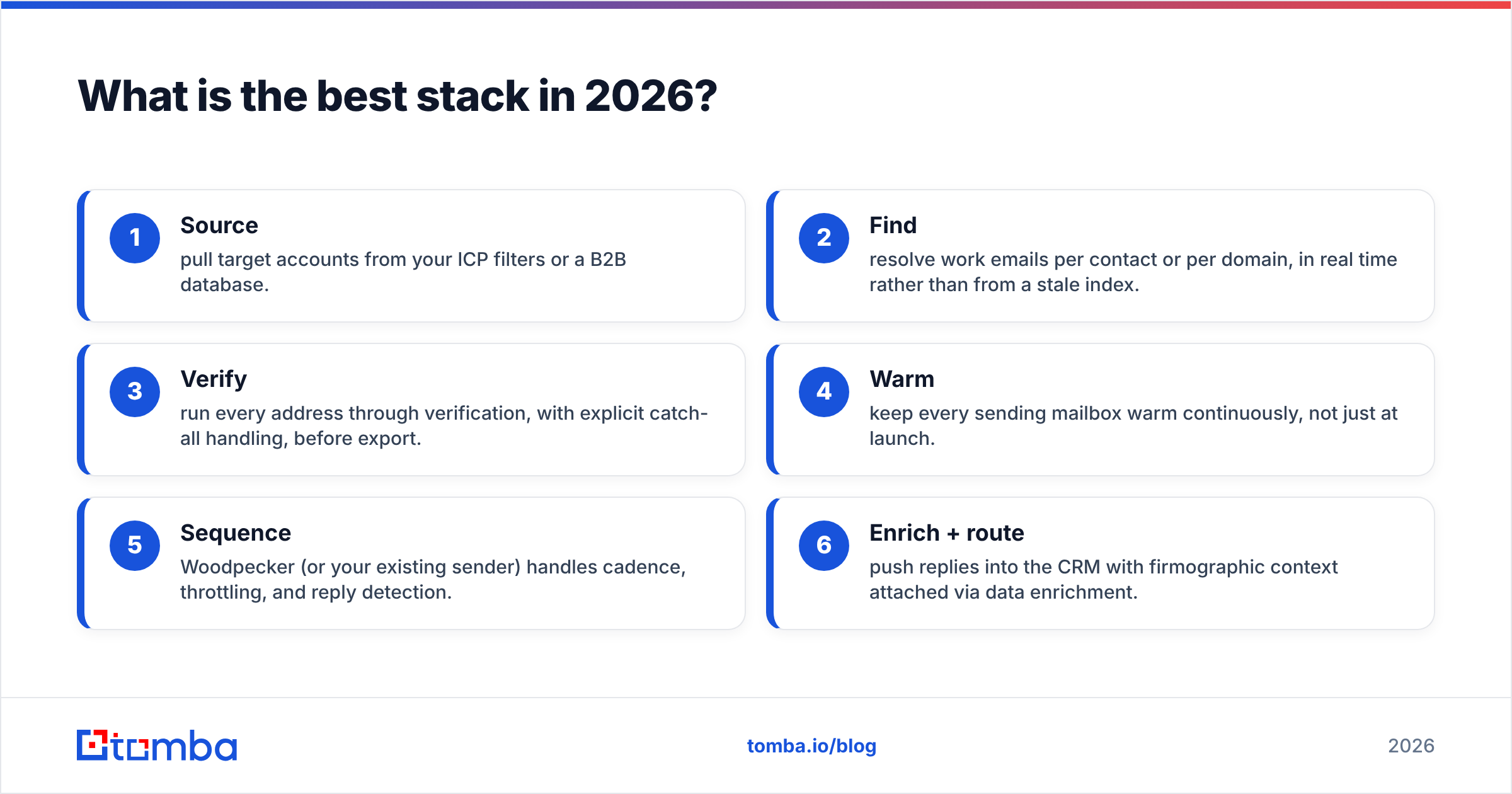
The pattern that consistently works looks like this:
- Source — pull target accounts from your ICP filters or a B2B database.
- Find — resolve work emails per contact or per domain, in real time rather than from a stale index.
- Verify — run every address through verification, with explicit catch-all handling, before export.
- Warm — keep every sending mailbox warm continuously, not just at launch.
- Sequence — Woodpecker (or your existing sender) handles cadence, throttling, and reply detection.
- Enrich + route — push replies into the CRM with firmographic context attached via data enrichment.
Steps 2–3 are where GetProspect competes. Steps 4–5 are where Woodpecker wins. There is no honest version of this article where one tool covers all six well.
Final verdict: which should you pick?#
Pick Woodpecker if you already have contacts and your problem is sending — spam placement, manual follow-ups, no warmup, no reply detection. It is one of the most deliverability-serious senders on the market and worth the per-slot cost when mailbox count is modest.
Pick GetProspect if you already have a sequencer and your problem is an empty list, your ICP lives on LinkedIn, and you want a low-friction browser workflow.
Pick neither as a monolith. The most common mistake in the getprospect vs woodpecker debate is treating it as either/or, then spending six months discovering you bought half a system.
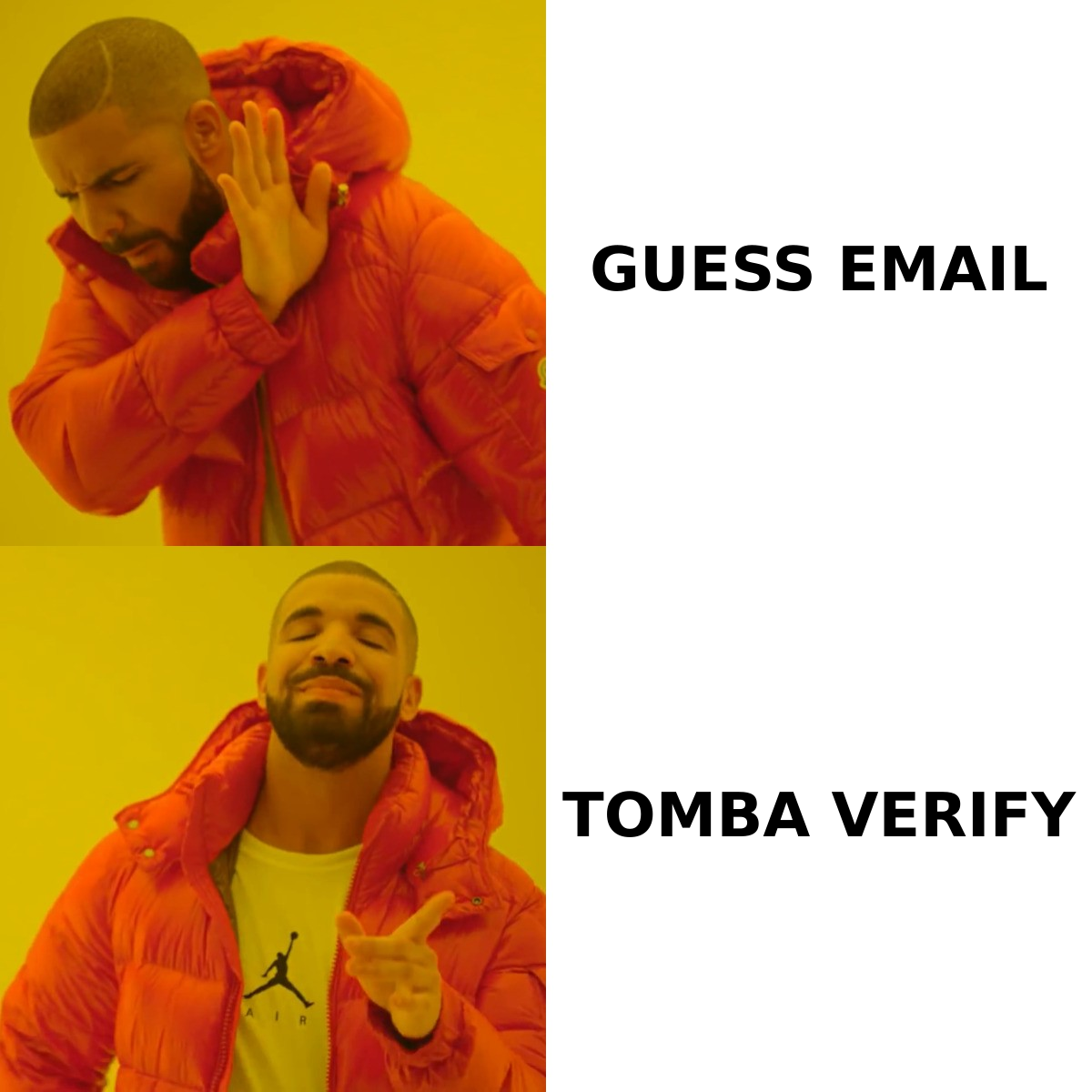
If the missing half is data, start with the Tomba Email Finder. It resolves work emails by name, domain, or company in real time, verifies them on the same credit pool, handles catch-all domains explicitly instead of shrugging at them, and exports clean into Woodpecker or any sequencer you already run. Start on the free tier with 25 searches, then move to Starter at $49/mo once you know your bounce rate is where it should be — under 2%, every campaign, no exceptions.
Related guides#
Ready to find emails that actually work?
Join 150,000+ professionals who stopped guessing and started sending. Free credits on signup — no credit card required.
Get the Tomba newsletter
Practical outbound tactics and product updates — once every two weeks.
About the author